
One DeepSeek Harness web server per project, inside WSL2 — started, stopped and opened from a panel in the Windows app.



The problem
dsh web serves one workspace — the one its dsh home opened last. Point it at a
second project and the two fight over one home, one port and one token: links
open the wrong project, sessions mix, restarts kill your logins. Running several
projects at once means juggling terminals and ports by hand.
This plugin gives every project a place of its own — and one panel to drive them all.
What you get
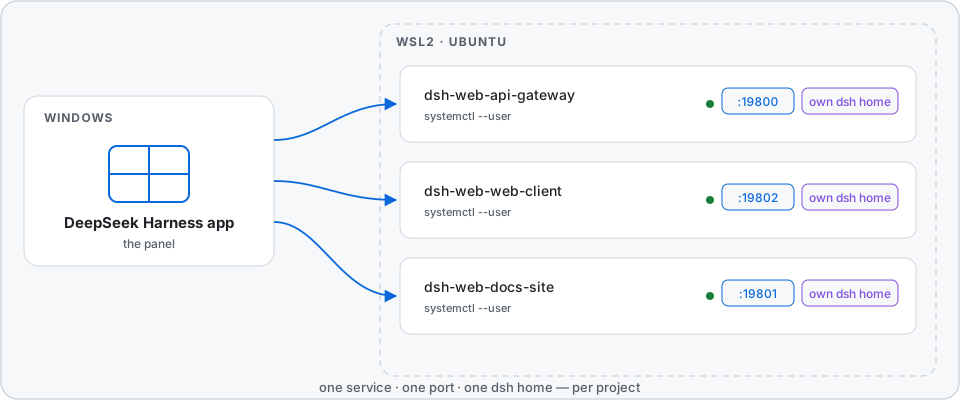
- One systemd user service per project. Start and stop from the panel; a service survives a closed terminal.
- One port per project. A port is never handed to a second project, so a link always opens the project it belongs to.
- One dsh home per project. Conversations and sessions stay inside their project. The account is copied once, so nothing asks for a login again.
- Links that answer. The panel shows a link only after the server answers it — no dead tokens.
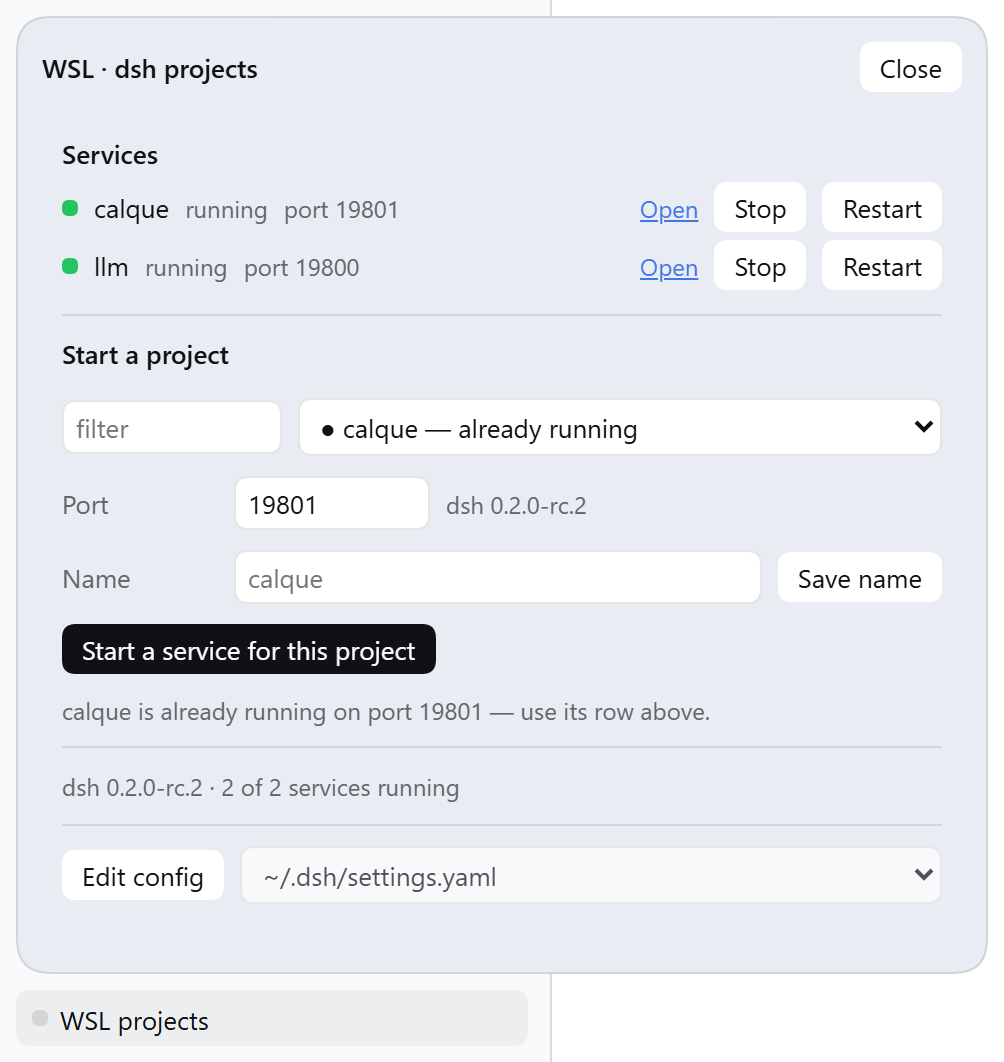
- A panel in the app. Every service with its state, its port and its controls: Open, Stop, Start, Restart, Remove. Start a project by picking it, naming it and choosing a port. The state refreshes every five seconds, so the panel shows what is true now.
- Two surfaces for programs. A REST API under
/wsl-projects/api/, and thewsl_dshagent tool that gives the model the same operations.
Requirements
- Windows with the DeepSeek Harness app.
- WSL2 with a Linux distribution. The plugin is tested on Ubuntu; other distributions are not tested.
dshin that distribution, reachable inPATH.- systemd in the distribution — the plugin uses
systemctl --user. bashin that distribution.- A folder with your projects:
~/projectsby default, configurable.
Install
Run this command in a terminal on Windows:
dsh plugin --profile desktop add <path-or-github-spec>Use
--profile webfor a plaindsh webprofile. A path to a local clone works too.Quit the DeepSeek Harness app and start it again.
A page reload is not sufficient. The app loads the two halves of the plugin at different times: the panel arrives with the client half, and the host half is part of the start sequence.
Use
- Open the panel — it lives at the foot of the sidebar.
- Select a project under Start a project.
- Push Start a service for this project.
- Push Open in the new row.
Configuration
Add the settings to a profile patch:
- id: wsl-projects
  name: dsh-wsl-projects
  config:
    distro: Ubuntu
    projectsRoot: ~/projects
    unit: dsh-web.service
    defaultPort: 19800
    configFiles:
      - ~/.dsh/settings.yaml
      - ~/.dsh/profiles/web/cordis.patch.yml
| Key | Meaning | Default |
|---|---|---|
distro |
The distribution to use. | the WSL default |
projectsRoot |
The folder with your projects. | ~/projects |
unit |
The systemd user unit that owns the WSL dsh. | dsh-web.service |
defaultPort |
The first port for a new service. | 19800 |
configFiles |
The files the panel can edit. | the standard dsh files |
Where the panel lives
The panel sits in the sidebar foot by default. Two other positions are available — set a global before the bundle starts:
window.__DSH_WSL_PROJECTS_SURFACE__ = 'settings'  // a page in Settings
window.__DSH_WSL_PROJECTS_SURFACE__ = 'floating'  // a movable panel
How it works
A project is the unit of control. Each project gets its own dsh home at
~/.dsh/dsh-wsl-projects/homes/<folder>-<tag>/. The tag comes from the path, so
two projects with the same folder name get separate homes. At the first start,
the launcher makes the home, copies the account from ~/.dsh one time, and
writes the project into that home's workspace storage.
The isolation is the point, and three rules follow from how dsh behaves:
dshopens the workspace that$DSH_HOME/storages/workspace.jsonnames — it does not compare it with the folder that started it. One home per project is what keeps every service on its own project.dshidentifies a browser session by host and port. One port per project is what keeps sessions from bleeding across projects.- A token belongs to one process, so a token from an earlier start is dead. A link is offered only after the running server answers it.
Automation
The REST surface is at /wsl-projects/api/ — state, units, projects,
distros, start, stop, restart, stop-unit, restart-unit,
remove-unit, config, alias. The agent tool wsl_dsh offers the same
operations to the model.
Troubleshooting
The panel does nothing, and it says the host half is older.The app runs the host half from the moment it starts. Quit the app and start it again. A page reload is not sufficient.
Open shows the wrong project.Look at the address. One port serves one project, and each project has its own home. Start the project again, then push Open in its own row.
Open shows an error about authentication.The link is old. Push Stop, then Start. The panel checks a link before it shows it.
A project asks for a login again.The home of that project holds a copy of the account, and the copy does not
follow a later change in ~/.dsh. Remove the copy, then start the project:
rm ~/.dsh/dsh-wsl-projects/homes/<folder>-<tag>/.credentials.yaml
Look at its log:
journalctl --user -u dsh-web-<folder>-<tag>.service -n 40
Development
npm run check            # every check, in one sequence
npm run check:offline    # only the checks that need no distribution
The panel images above are screenshots of the real panel:
node scripts/capture-panel.mjs <url> takes them again from a running app.
The banner and the architecture diagram are drawings, each in a light, a dark
and a narrow variant, in docs/.
CI runs the offline checks on Node 20, 22 and 24. What each check covers, and how to run the ones that need a real distribution or a browser, is in CONTRIBUTING.md.
Security
- The plugin runs with your rights: it uses
systemctl --user, and it reads and writes files in the distribution. - The host accepts requests from the panel's own origin only; a request with a different origin gets an error.
- The origin check is not authentication: a local process with the same user rights can still reach the loopback port.
License
MIT — see LICENSE.
No comments yet. Be the first to write one.