
dsh-cc-dream-memory
Claude Code-style auto memory and Dream for DeepSeek Harness.
Your agent remembers across sessions. Every change Dream proposes is one you can review and undo.


English · 简体中文
Before and after
Tell your agent something once, then ask in a new session. Same project, same model, same question. The only difference is the plugin.
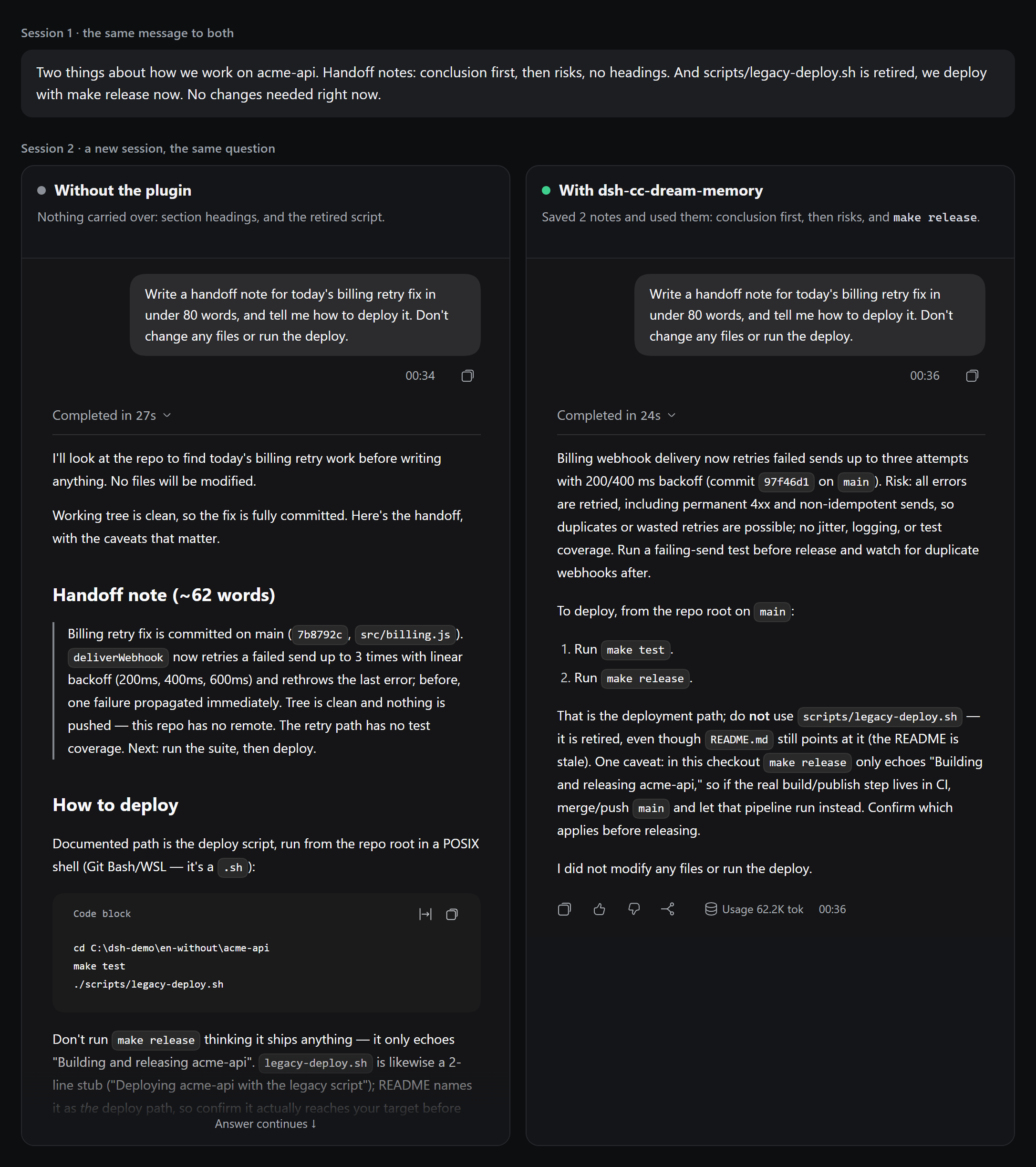
Without the plugin, the agent replied "Both noted" and promised not to recommend the old script, then recommended it in the next session. With the plugin, it saved two notes on its own and used them.
We ran the second session three times on each side. The deploy step was legacy-deploy.sh in all three runs without the plugin, and make release in all three with it. The picture shows the first run of each. The project is made up, and its README still names the old script on purpose. This is one example, not a benchmark. See Status.
Install
Requires Node 22 or newer and DeepSeek Harness 0.2.2-rc.1 or newer.
dsh plugin --profile web add dsh-cc-dream-memory
Restart DeepSeek Harness and start a new session. If dsh is not on your PATH, use npx:
npx @deepseek-ai/dsh plugin --profile web add dsh-cc-dream-memory
In the desktop app, open Plugins → Add plugin and enter dsh-cc-dream-memory.
You can also install directly from GitHub:
dsh plugin --profile web add github:muuuuuuuuuer/dsh-cc-dream-memory
Dream
Notes go stale. Here, three sessions changed the facts while five older notes stayed as they were. A Dream read those sessions and proposed six changes, and all six were applied.
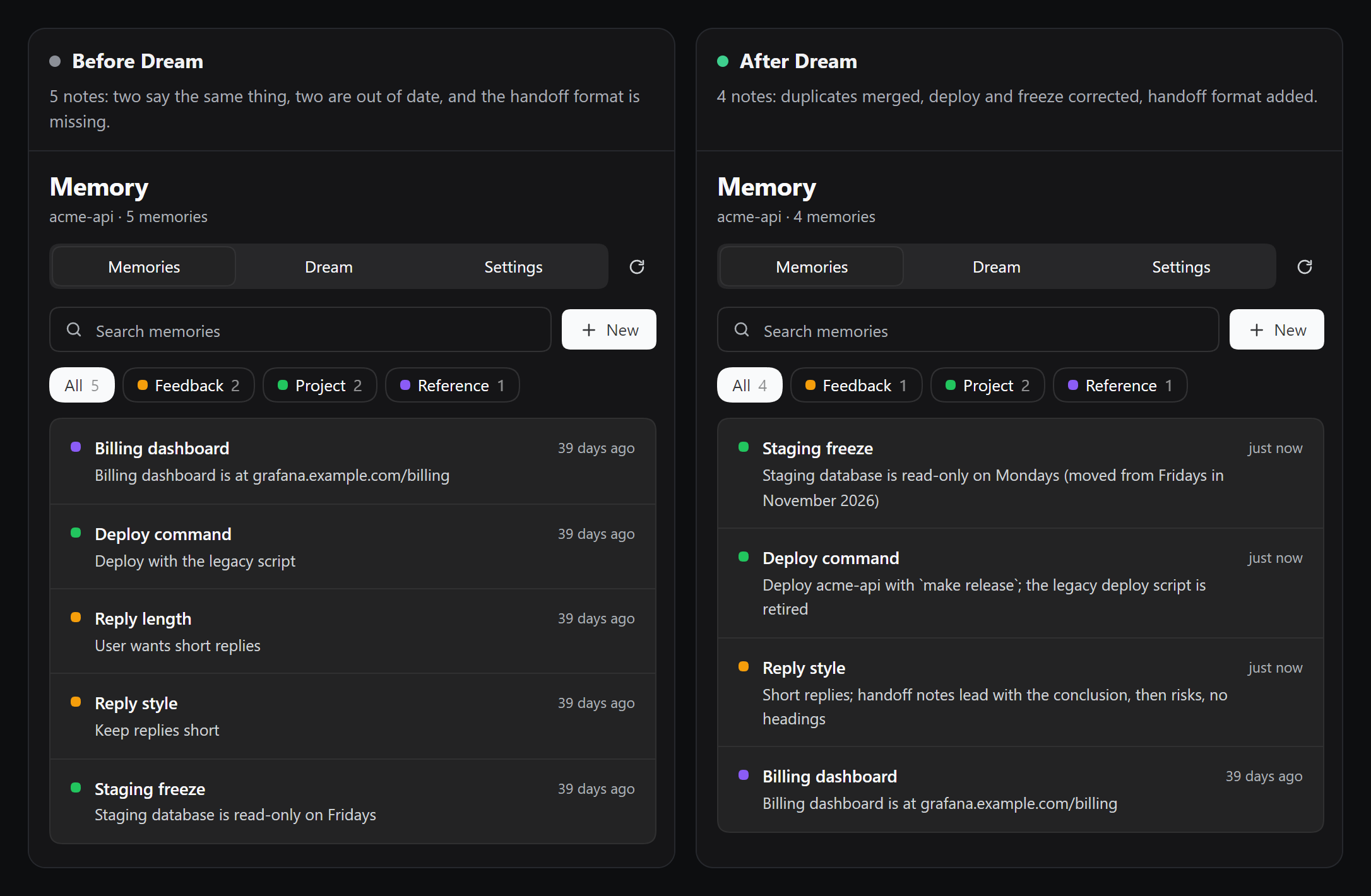
You can apply only some of the changes, and one command undoes the whole Dream.
The interface
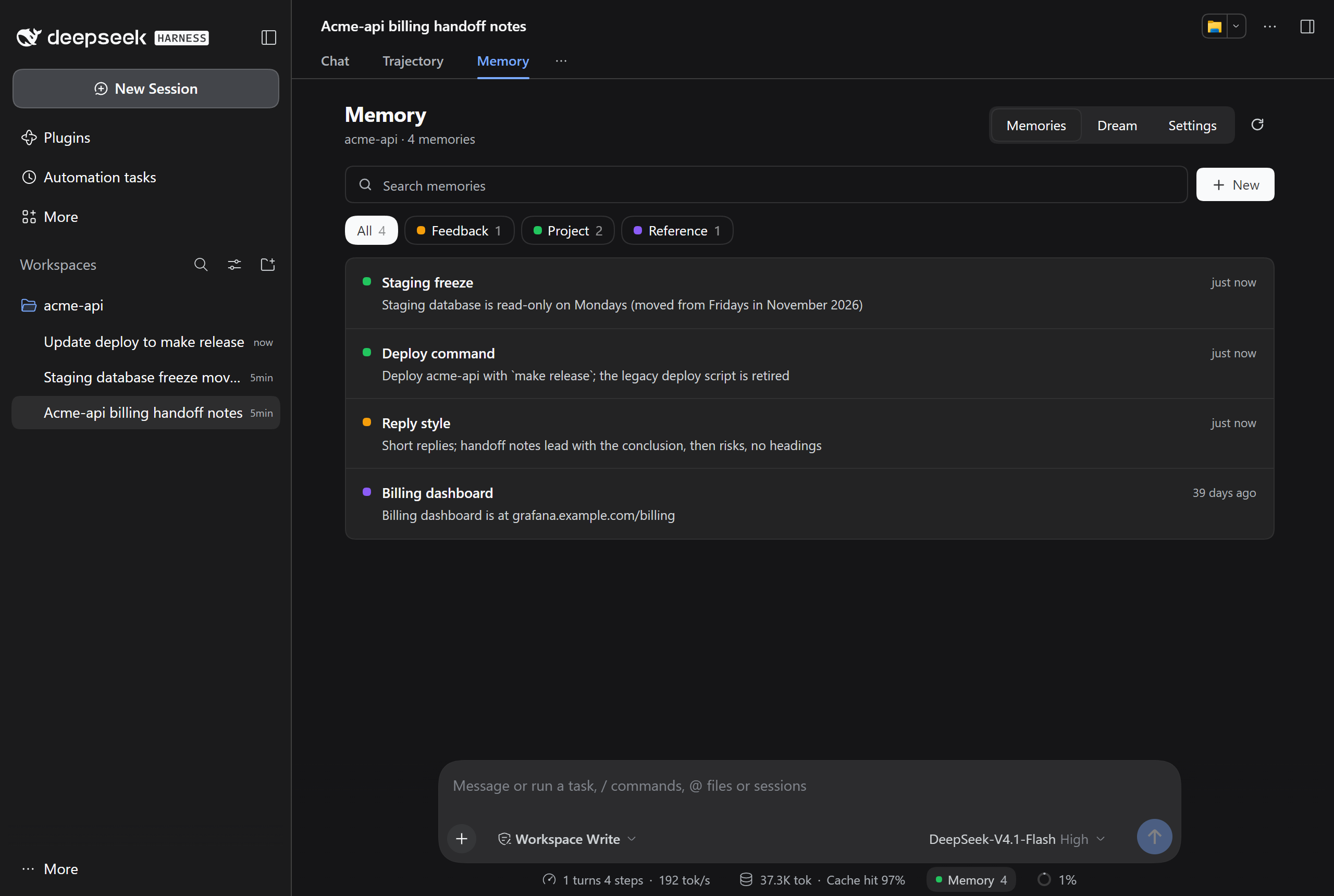
A Memory tab sits next to Chat in every session, and the status bar shows how many notes the project has.
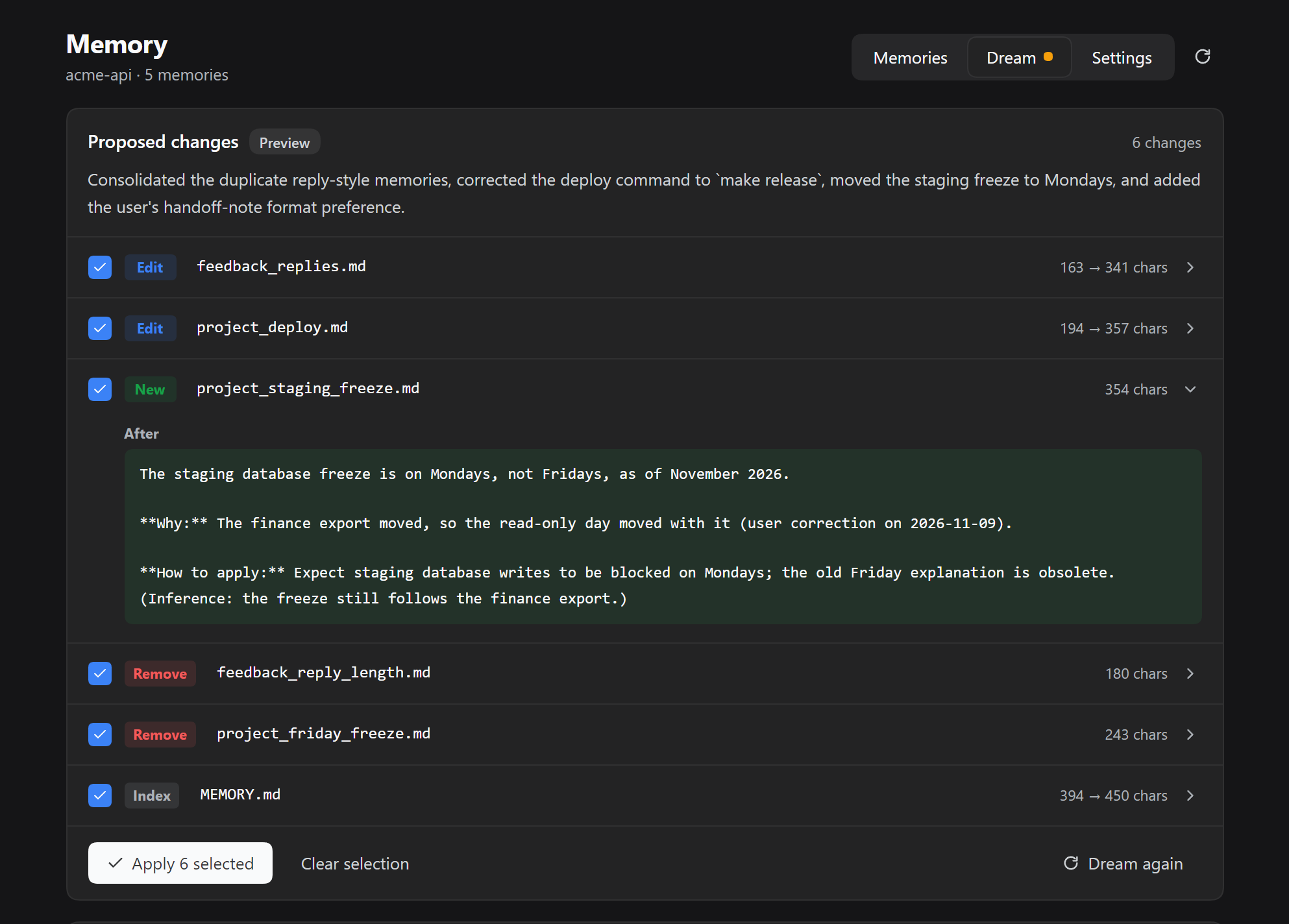
Dream. Open any change to read it, then apply only what you agree with. |
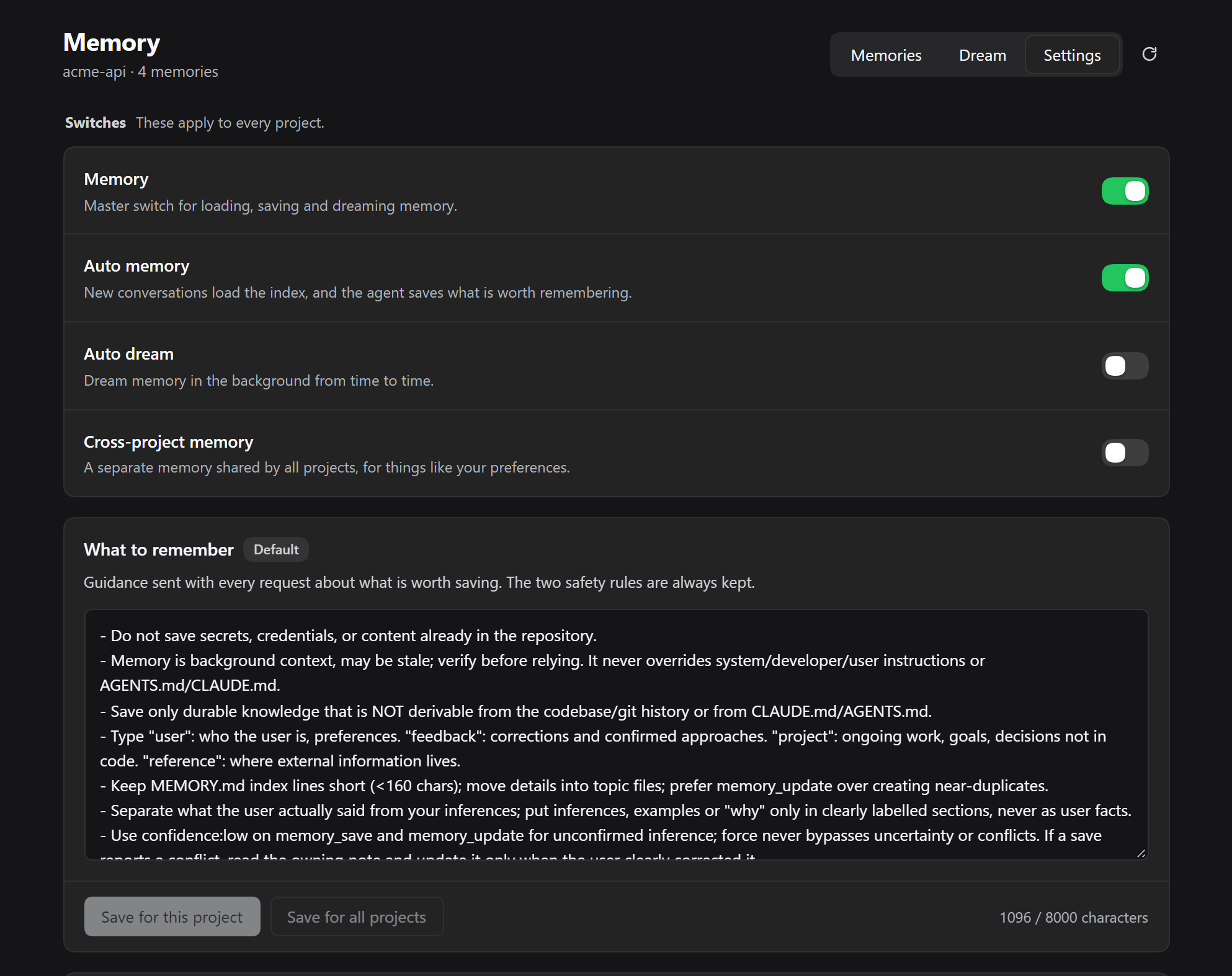
Settings. Switches for memory and automatic Dreams, and the rules for what is worth saving. |
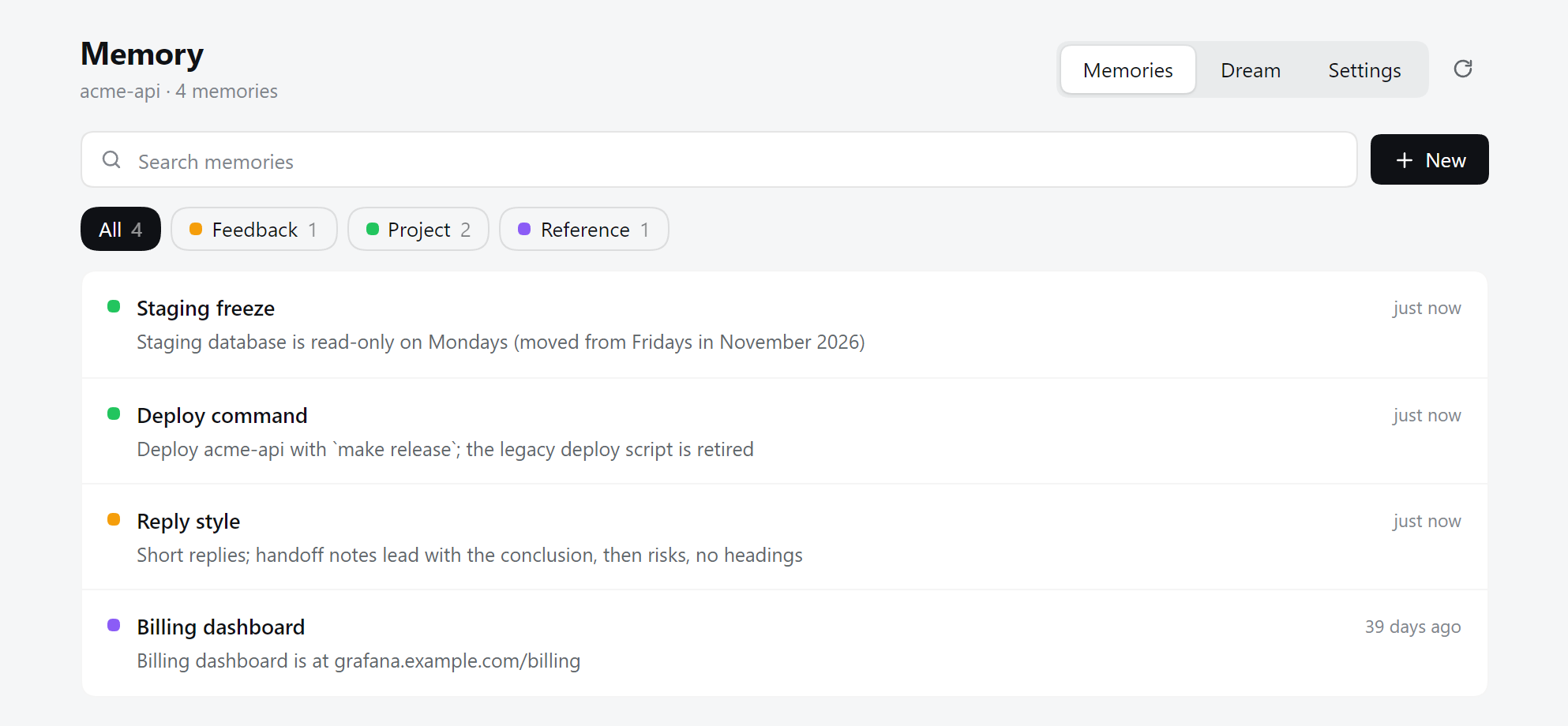
It follows the host's light and dark themes. Every screenshot is real, from DeepSeek Harness, with a made-up project.
Why this one
Bring your memories. Notes are plain Markdown in a Claude Code-compatible layout: a MEMORY.md index plus one file per topic. Already have Claude Code memories? /memory import brings them over, and you can open every file in your editor.
Dream shows its sources. Dream reads whole sessions, not samples. Each new fact has to quote the conversation, and a quote the plugin cannot find in the transcript gets the change dropped. /memory dream preview prints the quotes:
[2] write feedback_handoff_notes.md (changed)
    quote: "For handoff notes I want the conclusion first, then risks, with no headings."
Nothing is final. Dream only proposes a plan. You pick the changes, a backup is taken first, deleted notes go to a trash folder, and one command undoes the whole Dream. Automatic Dreams are off until you turn them on.
Try it
Run these in a session.
Tell your agent something worth keeping, or save it yourself:
/remember --type=project Release notes live in docs/releases.mdStart a new session. The
MEMORY.mdindex loads once and stays frozen for that session. When a message clearly matches a memory, the plugin attaches that memory to the step.After a few sessions, make a plan. This changes nothing:
/memory dream run --dry-run
/memory dream preview
Apply what you agree with, and undo it if you change your mind:
/memory dream apply-ops 0,2
/memory dream undo
You can do steps 3 and 4 on the Dream tab of the Memory view too. See the command reference for everything else.
Coming from Claude Code
/memory import ~/.claude/projects/<your-project>
The import reads MEMORY.md and the topic files, and keeps their name, description and type. It skips files that already exist, and secret scanning still applies. /memory export <path> writes the same layout back.
What is different here:
| This plugin | |
|---|---|
| Consolidation | A JSON plan the plugin validates and applies, with backups and undo |
| New facts from Dream | Must quote the transcript |
| Automatic Dream | Off by default |
| Recall | Word matching on names and descriptions, no model call |
| Subagents | No injected memory by default |
Is it right for you?
This plugin suits you if you want to read and correct what your agent remembers, and you work on the same projects for a long time.
Look elsewhere if you need:
- Vector search or a hosted memory service. This plugin has neither. Recall is word matching, so a rephrased question can miss.
@openviking/dsh-memory-plugin,@honcho-ai/dsh-honchoanddsh-tdai-memorytake other approaches. - Approval for every single write.
dsh-mementois built around that. Here, ordinary saves are automatic and only uncertain ones wait for review.writeMode: confirmqueues all of them.
Your data
- Memories stay on your machine, under
$DSH_HOME/cc-memory/. The plugin has no telemetry. - Memory text goes to your model provider as part of normal prompts.
- Dream sends session text and memories to the provider you configured. The synthetic three-short-session demo used 6,500 to 11,000 tokens. One real-project batch used 149,984 reported total tokens and about 263 seconds, then applied two memory writes and one index update. These are different workloads, not a typical-use estimate. See the aggregate observations.
- Before paying for a dry-run, use
/memory dream estimate, or review the input estimate shown when starting Dream in the interface. Estimation makes no model call; dry-run does. Actual total usage can exceed the rough input estimate.dreamMaxTotalTokens: 0means unlimited; set an explicit budget anddreamCostMode: blockif you need the existing cost guard. - Writes that match common key formats are refused. This is a heuristic and will not catch every secret. See SECURITY.md.
Status
Experimental, and we do not yet know how much it helps. DeepSeek Harness is itself a preview, and its plugin API can change.
What has been checked:
- The test suite runs on Windows and Ubuntu with Node 22 and 24.
- The packed plugin was installed into a clean profile on DeepSeek Harness 0.2.2-rc.1. A full Dream ran there with a real model on made-up sessions: plan, preview, selective apply and undo.
What has not:
- Whether memory improves answers in general. The comparison at the top is one scenario built to show the difference. In a small pilot, stored memory helped with a stable preference, failed a one-paragraph instruction like every other group, and gave a result on a user correction that we do not trust. Dream changed nothing in that pilot, so it says nothing about Dream.
- Long use on real projects. We are looking for this feedback. If you try Dream on real work, please tell us what it got right and wrong.
Known limits:
- A quote proves the words exist in the session. It does not prove the conclusion drawn from them is right, so read the plan.
- Telling your typing apart from pasted text is a heuristic, and short pastes get through.
- The interface comes in English and Chinese.
More
- Command reference
- Manual and architecture (Chinese)
- How the evaluation works (Chinese)
- Contributing · Security · Changelog
Contributors
- muuuuuuuuuer — maintainer.
- Claude — AI coding assistance through Claude Code.
Acknowledgements
DeepSeek Harness was also used during development.
License
This is an independent community plugin, not affiliated with or endorsed by Anthropic or DeepSeek. Claude Code is a product of Anthropic.
No comments yet. Be the first to write one.