dsh-context-cap
对话框里的一枚「上下文上限」控件:把当前模型的 contextWindow 直接调到 32k / 64k / 128k / 256k / 512k / 1M,从而让自动压缩提前触发,长对话不再把单次请求顶到 1M。
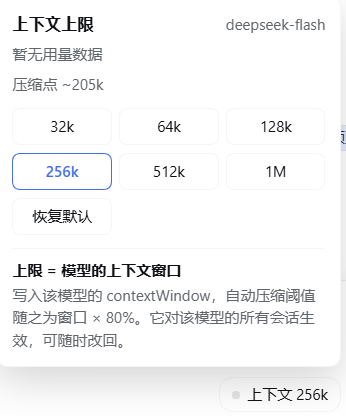
它改的是什么
模型容量是提供方适配器持有的,来自 settings 命名空间里该提供方的配置段(就是「设置 → 模型」里那排 128k / 256k / 512k / 1M 按钮写的同一份数据):
| 提供方配置形状 | 写入路径 |
|---|---|
单目录 models: [...](llm-deepseek) |
整个 models 数组(替换目标行的 contextWindow) |
多提供方 providers.<route>.models(llm-pi-ai) |
整个 providers.<route>.models 数组 |
覆盖表 defaultContextWindow + modelOverrides(llm-deepseek-account) |
已有 override 条目 → modelOverrides.<modelId>.contextWindow;没有条目 → defaultContextWindow(modelOverride 要求 inputModalities,凭空造条目会被 schema 拒) |
dsh-compaction-basic 每个 step 边界用 ctx.llm.resolveModelInfo() 的容量算阈值(floor(window × thresholdRatio),默认 0.8)。窗口降到 128k → 压缩点在 ~102k,代价随之为窗口的一部分;tokenMeter 的占用率也按新窗口算。写入走 settings.mutate,配置消费者(适配器)按 settings/document-updated 重新解析,不需要重启(提供方声明 applies: 'restart' 时面板会提示)。
客户端接线
控件只做三件 Remote 调用,全部按运行中应用的真实契约(见 dsh-api-session-controller / dsh-api-settings-controller 的 typert.remote-client):
| 调用 | 参数 | 返回 |
|---|---|---|
session.modelCatalog() |
无 | { default: { provider, model, reasoningEffort? }, routableProviders, groups, failures }(不含 contextWindow) |
settings.describe() |
无 | { writable, hasDocument, namespaces: [{ ns, value, user, revision, applies, secrets }] } |
settings.mutate(ns, ops, expectedRevision?) |
三个位置参数 | 该命名空间的新 view;error.code === 'settings-conflict' 表示版本冲突 |
传输层按顺序尝试,失败原因全部拼进面板错误文本:
ctx.get('remote.<ns>', false)上的方法(remote.session/remote.settings),位置参数直接 spread——这是装配好的客户端自己带 transport,最稳。- 同源 HTTP 兜底:
POST /api/<namespace>/<method>,body{ type: 'client-request', rpcId, method: '<ns>/<method>', payload: <参数记录> }(参数记录失败时再试{ args }包一层)。
不要再写 ctx.remote.session、connection.api 这类点属性读取:cordis 的追踪代理会抛 cannot get property "<key>" without inject。也不需要把 remote.<ns> 塞进 inject——ctx.get(key, false) 是注册表读取,非 strict 模式在提供方 fiber 未 ACTIVE 时也照常返回,插件自己的 inject 只留 ['slots', 'locale']。读失败会退避重试 3 次(500ms 间隔),不把胶囊钉死在 —。排障时在浏览器控制台跑 __dshContextCap.probe(),它会列出两个命名空间的可用方法链与 HTTP 能力。
显示的窗口取设置项的值:写入后 load() 立刻重读该命名空间,所以胶囊与面板马上同步,不用等下一轮对话。会话投影 contextPressure.contextWindow 只在设置项没有容量(提供方固定)时兜底——它按 step 重新解析,滞后一轮。
用法
- 会话输入框右侧(发送键之前)出现「上下文 1M」胶囊,点击展开面板(见上方截图)。
- 面板显示当前用量与压缩点,选一档即写入。
- 「恢复默认」把该行
contextWindow去掉,回到提供方默认值。
已知边界
- 按模型生效,不是按会话:
contextWindow属于提供方模型目录,同模型的所有会话共享;想按会话隔离需要 Host 侧按会话覆写容量(本插件不做)。 - 只有自动压缩启用时才真的省钱:本插件只改容量;压缩引擎没挂载时,它只影响占用率显示与提供方溢出判定。
- 单次超大粘贴仍会照发:压缩保留的尾部是不可分割单元,一段就超上限的文本压不掉;这类输入请在发送前自行裁剪。
- 容量只降不拦:写入的是「声明容量」,提供方真实窗口没变;真正的保护来自压缩在阈值处提前收口。
No comments yet. Be the first to write one.