@mostkia/dsh-launcher
Power controls for DeepSeek Harness (DSH): one power button in the sidebar, plus a Windows tray launcher that can start it, restart it and show its console output.
🌏 English · 简体中文
What you get
A complete power-and-launch plugin for stock DSH: shut-down and restart buttons (no more Ctrl+C in a terminal to stop the server), a real system launcher (a desktop shortcut plus start-at-logon), and tray management (no ugly console box left sitting on screen).
| Part | Where it lives | What it does |
|---|---|---|
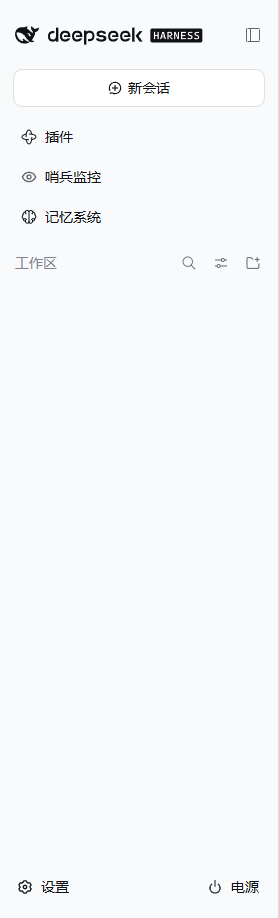
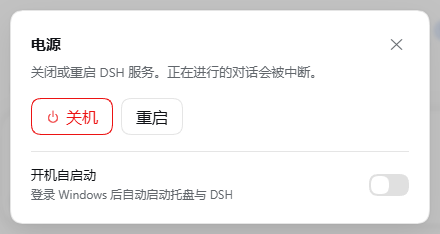
| Power button | DSH's official sidebar foot slot | Opens a dialog with Shut down / Restart, plus a Start at logon switch at its foot |
| Tray launcher | Desktop shortcut and the system tray | Starts DSH, and lets you control and watch its running state |
Screenshots
| Sidebar power button | Power dialog, light | Power dialog, dark |
|---|---|---|
 |
 |
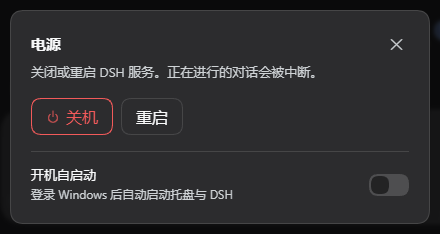 |
The dialog follows the host theme because every colour, radius and shadow comes from theme tokens. The action itself uses the shell's own sidebar foot seat, beside Settings, and takes no row of its own.
Install
# from GitHub; pinning the release tag keeps it reproducible:
dsh plugin --profile web add github:mostkia/dsh-launcher#v0.1.0
Once the install finishes, the power menu is available first - but nothing has taken effect until DSH is restarted, so the feature set is incomplete until then.
Restart DSH once: the tray launcher installs itself automatically during that restart. Antivirus or system prompts may appear (the plugin needs to install the tray and create the shortcut) - allow them, they are normally not a false positive. After the restart the desktop shortcut exists: close DSH once more and start it from that shortcut, and every feature is available. Start-at-logon is off by default; turn it on from the tray menu, or from the power dialog inside DSH, if you want it.
Uninstall
# remove the power plugin from this machine
dsh plugin --profile web remove @mostkia/dsh-launcher
Removing the tray launcher: open the tray, find the DSH launcher (the black whale icon) and right-click the tray icon → Uninstall tray…. That stops the running tray and clears the start-at-logon entry, the desktop shortcut and the launcher itself.
The power plugin and the tray launcher uninstall independently, and that is deliberate: if you only want part of the set, keep that part.
Requirements
- DSH host version: 0.1.7-rc.1 || 0.1.7-rc.2, or newer (it uses
sidebar.footer.action,ctx.appExitand thewebServerregistration API). - Node
^22.19.0 || >=24.0.0(DSH's own requirement). - The tray and start-at-logon are Windows only for now; the plugin itself is platform-neutral and says so clearly where they are not supported.
Using it
- Sidebar power button:
Shut down= graceful exit (code 0);Restart= exits with the restart code, so the tray relaunches it. - Start at logon: the switch at the bottom of the power dialog and the checkable
tray menu item read and write the same registry value
(
HKCU\Software\Microsoft\Windows\CurrentVersion\Run→DSHLauncher). - Tray icon: double-click to read the captured console output; the menu has show/hide, start, restart, open DSH, open the log file, start at logon, and "shut down DSH and exit".
HTTP surface (for scripts and other launchers)
Every endpoint rejects an Origin that is not this machine's loopback address
(always 403), and all of them live under the plugin's own namespace. A request
without an Origin (a script, curl) is allowed by design: a browser always sends
one on a POST, so the absent header is what a CSRF guard should ignore — while a
present Origin must never be trusted just because its host matches the request's
Host. An earlier version did exactly that, and it was a DNS-rebinding hole (found in
review).
| Method | Path | Meaning |
|---|---|---|
GET |
/_dsh-launcher/status |
platform, pid, whether a supervisor is there, autostart state |
POST |
/_dsh-launcher/shutdown |
graceful exit, code 0 |
POST |
/_dsh-launcher/restart |
graceful exit, code 42 (only when supervised) |
POST |
/_dsh-launcher/autostart/enable |
register the logon-start entry |
POST |
/_dsh-launcher/autostart/disable |
remove it |
Testing
Both halves ship with a test that needs no real DSH session:
# host half: endpoints, guards, exit codes, autostart states (34 checks)
node test/host-half.test.mjs

# client half: slot registration and zh/en string completeness, no browser needed
node test/client-half.test.mjs

# tray: the supervision probe and both restart paths, against a fake DSH
powershell -NoProfile -ExecutionPolicy Bypass -File test\tray-supervision.ps1

# tray install/uninstall round trip: install into a scratch directory, assert the
# uninstaller travelled with the tray, then let that copy remove it (33 assertions)
powershell -NoProfile -ExecutionPolicy Bypass -File test\tray-uninstall.ps1
The tray test runs test/fake-dsh.mjs (a tiny HTTP server that speaks the plugin's
endpoints) as the supervised child on a scratch port, so a real DSH is never started,
killed or restarted. It pins the decisions that matter: with a supervised child the
tray asks the plugin and waits for the restart code; with an unsupervised one it
refuses to call the endpoint that would answer ok:false and forces the restart
itself. Inside a confined shell taskkill is denied, so the kill step of the forced
path cannot be observed there; the runner notes the limitation and the fake child
exits on its own instead.
Maintainers: RELEASE.md carries the pre-flight checks, the tagging
steps and the optional market listing. Those suites, plus a package-contents check,
run in CI on every push and pull request (.github/workflows/tests.yml).
Design notes
- No runtime dependencies, on purpose. Everything
@deepseek-ai/*is a peerDependency, never a dependency: if a package manager installs a second physical copy of a shared DSH package into the profile, private Symbols split and the host's scheduler fails outright. - The client half imports nothing. No
@deepseek-ai/dsh-client-ui-*package is required; the UI is hand-built from theme tokens (--dsw-alias-*,--dsw-radius-*,--dsw-shadow-*) so it follows light/dark and the host design language. All visible text goes through the client locale service (zh + en). - No conflict with other plugins. It claims only its own paths and does not
attempt to coexist with, or replace,
dsh-shutdownat the routing level; each works when installed alone.
Credit and licence
The approach taken for some of these features was informed by
dsh-shutdown (MIT); no code from it is
included here. The tray icon is derived from DSH's own front-end favicon
(favicon.svg) and is used to identify the launcher.
MIT © 2026 mostkia
No comments yet. Be the first to write one.