dsh-performance-slider
中文: DeepSeek Harness(dsh web / dsh-desktop)的 Codex 风格 6 档性能滑杆。每一档同时切换模型 + 推理等级,并换上对应的人物背景。
English: A Codex-style 6-level performance slider for DeepSeek Harness. Each level maps a model + reasoning effort and a cutout background.
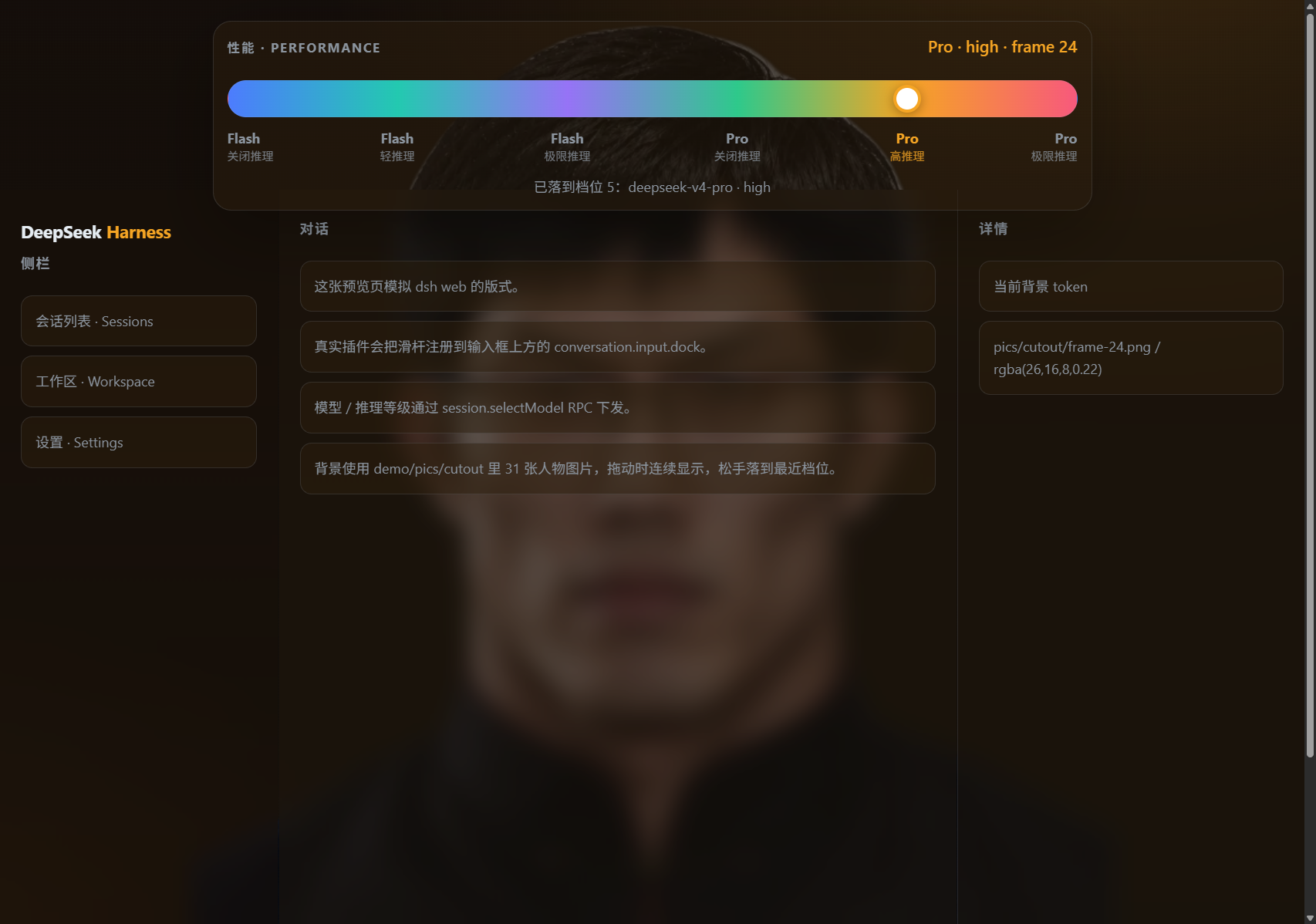
它复刻 Codex 桌面端的性能滑杆交互:一个 6 段式滑杆,每一档同时对应一组
模型 + 推理等级(reasoning effort)。拖动时会在 31 张本地 cutout 人物帧
(demo/pics/cutout/frame-00.png … frame-30.png)之间连续切换背景,松手后
吸附到最近的档位(帧 0 / 6 / 12 / 18 / 24 / 30)。图片由插件 host 侧从
/plugins/dsh-performance-slider/frames/… 提供。
档位    模型                 推理等级      背景
 1     deepseek-v4-flash    off           人物背景 1
 2     deepseek-v4-flash    low           人物背景 2
 3     deepseek-v4-flash    max           人物背景 3
 4     deepseek-v4-pro      off           人物背景 4
 5     deepseek-v4-pro      high          人物背景 5
 6     deepseek-v4-pro      max           人物背景 6
模型切换时,插件会优先选择“实际声明了该推理等级”的 provider/model; 如果某个模型没有声明
off或max,DSH 本身也会拒绝该等级。 默认模型 id 是 DeepSeek 官方路由的deepseek-v4-flash/deepseek-v4-pro。 如果你的自定义 provider 使用了别的模型 id,改lib/client.frames.js里的LEVELS表即可(也支持在demo/index.html里先预览)。
目录结构
dsh-performance-slider/
├── lib/
│   ├── index.js          # DSH host 侧插件入口,并托管 /plugins/…/frames 图片
│   └── client.frames.js  # DSH browser 侧插件:拖拽滑杆 + 31 帧背景 + 模型切换
├── scripts/
│   ├── install.mjs       # 一键安装到 ~/.dsh/profiles/web
│   ├── uninstall.mjs     # 从 profile 移除
│   └── check.mjs         # 静态检查 DSH client-plugin 包契约
├── demo/
│   ├── index.html        # 不依赖 DSH 的独立预览页
│   └── pics/cutout/      # 31 张 frame-00..30 人物背景图
├── assets/
│   └── screenshot.png    # README 预览截图
├── cordis.patch.yml      # dsh.bundle 层:安装后自动 insert 插件行
├── package.json
└── README.md
安装到 dsh web profile
需要 pnpm(dsh plugin 本质是转发 pnpm)。本包声明了 dsh.bundle,dsh plugin add 会自动挂上 cordis.patch.yml,一般不用再手改 profile。
# 推荐:从 GitHub 安装(dsh.so / registry 同款)
dsh plugin --profile web add github:mobius/dsh-performance-slider

# 本地克隆后安装
git clone https://github.com/mobius/dsh-performance-slider.git
cd dsh-performance-slider
node scripts/install.mjs
# 或
dsh plugin --profile web add "file:$(pwd)"
然后重启 dsh web(dsh-desktop:Server → Restart dsh web)。
安装完成后,打开任意普通会话,滑杆会出现在输入框上方
(conversation.input.dock),点击 1–6 档即可切换模型 + 推理等级,
同时整个 Harness 背景会切换到对应的人物图片。选择会同时写入浏览器
localStorage 和一个 host-scoped cookie(端口无关),因此即使
dsh web --port 0 每次使用随机端口,下次打开也能自动恢复背景档位。
卸载
cd ~/.dsh/profiles/web
pnpm remove dsh-performance-slider
并从 ~/.dsh/profiles/web/cordis.patch.yml 中删除
- insert: ... name: dsh-performance-slider ... 整段。
快速预览
不用安装到 DSH,直接用浏览器打开 demo/index.html 即可看到可拖动的
6 档性能滑杆:拖动时连续显示 demo/pics/cutout/frame-00.png 到
frame-30.png 共 31 张人物背景,松手后落到最近的档位。也可以先跑一下包契约检查:
node scripts/check.mjs
如何改档位映射
编辑 lib/client.frames.js 中的 LEVELS 数组。每一项:
{
  id: 'flash-off',
  modelShort: 'Flash',
  models: ['deepseek-v4-flash', 'deepseek-v4-flash-0731', 'deepseek-chat'],
  modelClass: 'flash',
  effort: 'off',
  effortFallbacks: ['off'],
  tokens: { '--dsw-alias-bg-base': { light: '...', dark: '...' }, ... },
  aura: { light: '...fallback-gradient...', dark: '...fallback-gradient...' },
}
models:按顺序精确匹配 provider 目录里的模型 id;另外还会按modelClass(flash/pro)做一次宽松匹配,所以deepseek-v4-flash-0731这类带日期后缀的自定义模型也能命中。effort:首选的推理等级;若当前模型没有这一档,则依次尝试effortFallbacks,最后回落到模型目录的默认等级。tokens:通过ctx.theme.overrideTokens()覆盖 DSH 主题变量; 这里保留低透明度 tint,让背景人物图片能透出来且文字仍可读。aura:人物 cutout 帧底层的兜底渐变。- 31 张帧图片由 host 侧
/plugins/dsh-performance-slider/frames/frame-XX.png提供;FRAME_COUNT、FRAME_URL_PREFIX和LEVEL_STEP在lib/client.frames.js顶部,可自行调整。
提交到 dsh.so
仓库已声明 dsh.bundle + dsh.client,许可证 MIT。在 https://www.dsh.so/submit/ 粘贴:
https://github.com/mobius/dsh-performance-slider
No comments yet. Be the first to write one.