dsh-git-bar
English | 简体中文
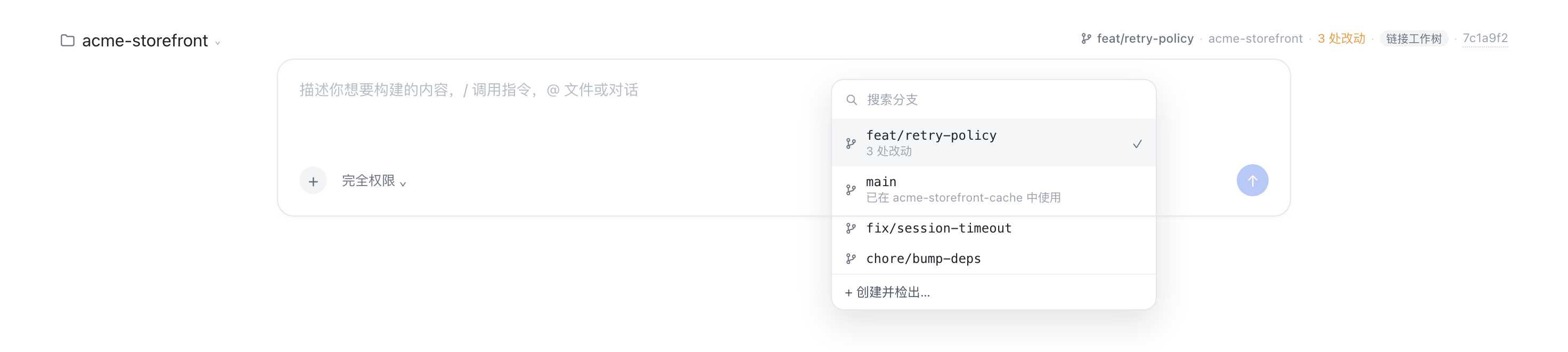
A DeepSeek Harness bundle that adds one ambient row above the composer showing the Session's git context:
⎇ main · dsh-git-bar · 3 处改动 · ↑2 ↓1 · a1b2c3d

- repository name and root
- the branch the Session runs on, or
游离 HEAD/detached HEADwhen the HEAD is not on a branch - working-tree change totals (staged / unstaged / untracked in the tooltip)
- ahead/behind counts against the upstream branch
- short commit id — clickable, opening that commit on the origin remote
(GitHub, GitLab and Bitbucket commit routes are all handled) — and a
链接工作树/linked worktreemarker when the directory is a linkedgit worktree, or aN 个工作树marker when the repository has more than one - every label is plain text: select it and copy it
The row refreshes every 8 seconds, on window focus, and when the Session changes. Reading it never touches the repository; two interactions deliberately do:
- click the branch — a searchable popover lists every local branch with its upstream, ahead/behind and dirty state, marks the current one, and can check one out or create a new branch from the current HEAD;
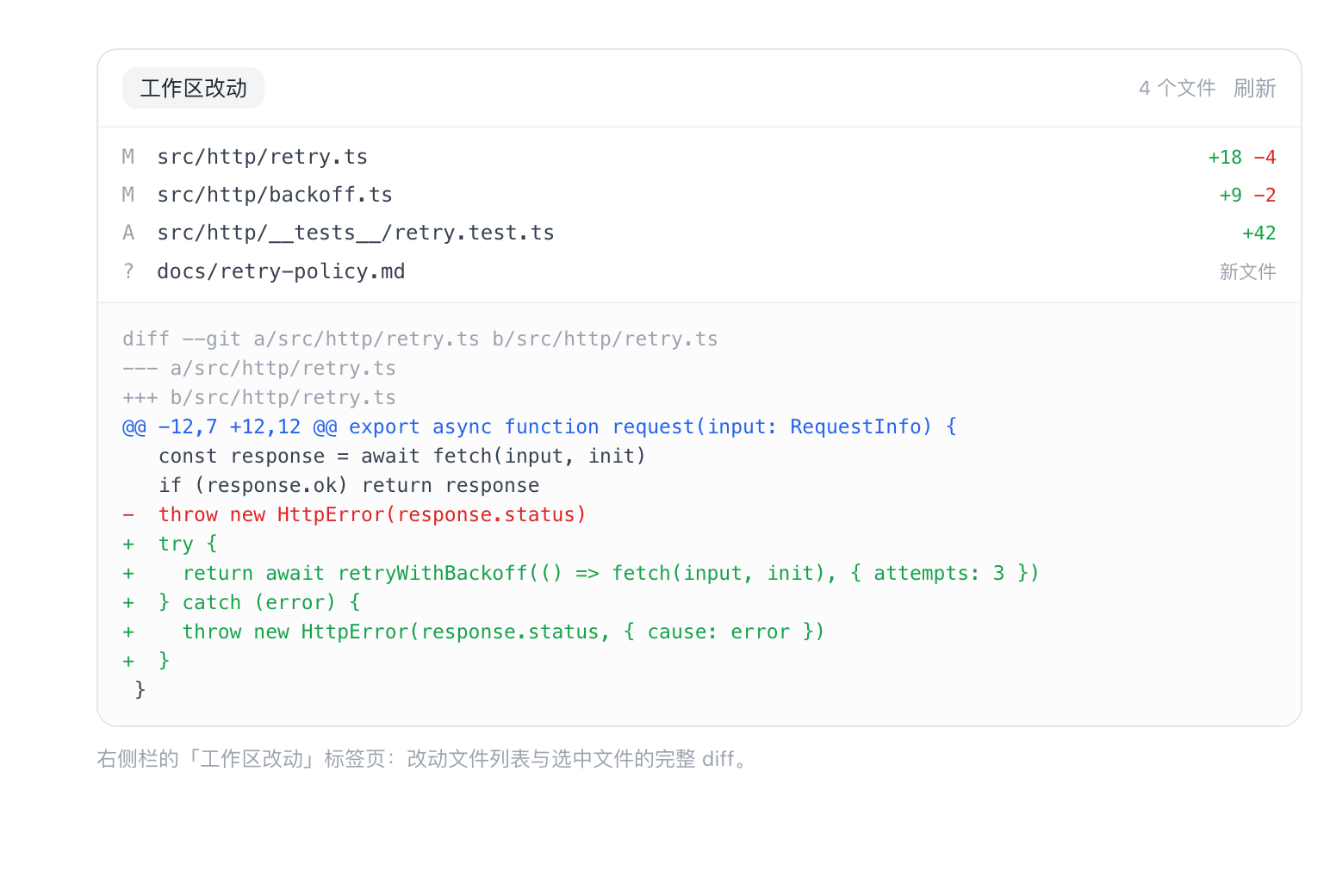
- click the change count — opens the working tree in the right-hand Sidebar
as a
工作区改动tab: the changed files, and the unified diff of the file you pick, untracked files included (diffed against/dev/null); - click the worktree marker — lists every worktree of the repository with its
branch and change count.
在此新建会话opens a new Session in that worktree's directory — registering the directory as a workspace first when it is not one yet — (a worktree is a directory, so a Session is never moved between them), and复制路径copies it. A branch already checked out in another worktree is greyed out in the branch popover with the worktree that holds it, instead of failing with git'salready checked outafter the click.
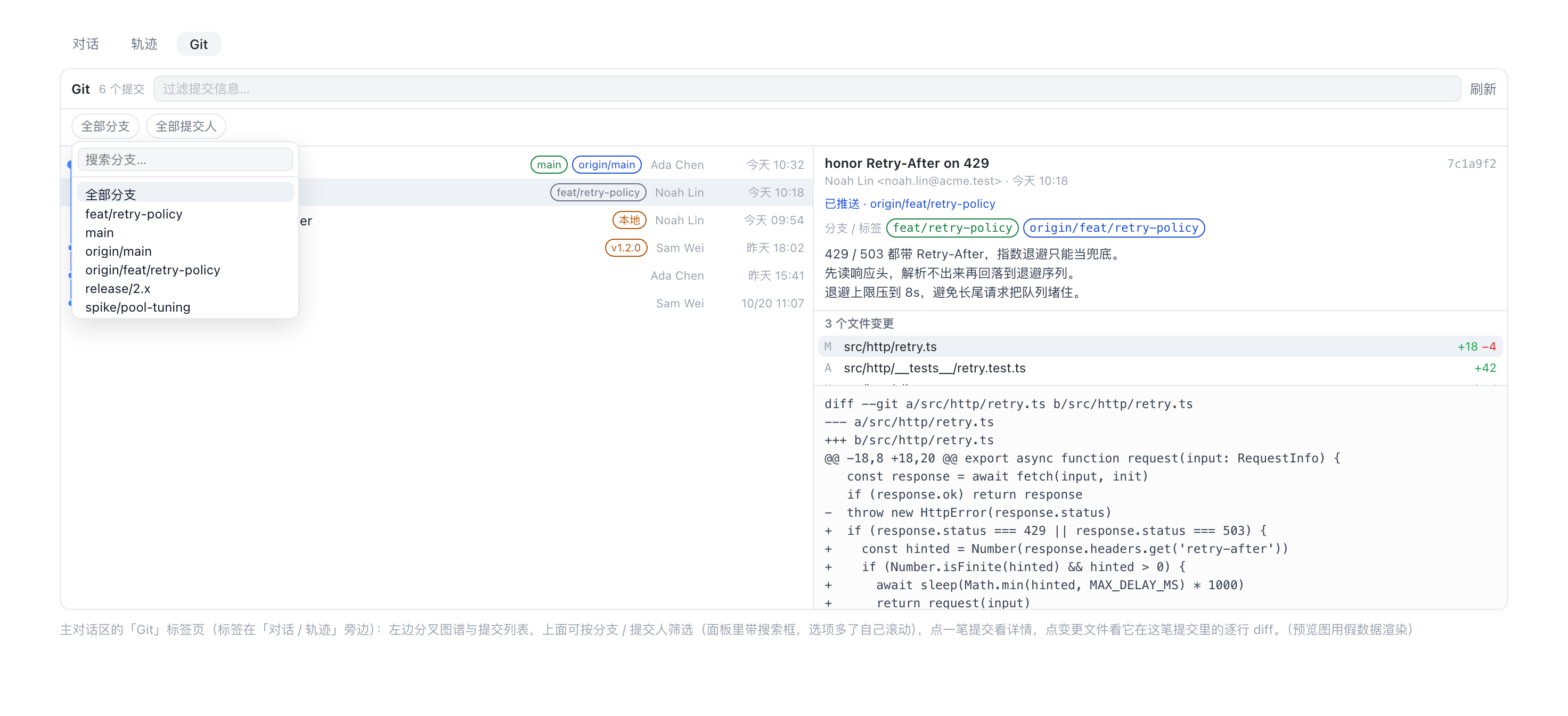
The conversation also gains a Git history view tab. The left half is the
commit graph — one lane per line of history, each lane keeping its own colour,
merge commits drawing the line back into the lane it merged into — followed by
the commit list and a keyword filter, plus two dropdowns that narrow the list by
branch and by author — both run in git, so they apply to the whole history rather
than to the page already loaded. Each dropdown has its own search box and its
options scroll on their own, so a repository with hundreds of branches is still
usable. The branch dropdown lists every local branch and every remote-tracking
one (origin/<branch>), so a branch that only exists on the remote can still be
searched for and filtered by; the author list comes from /authors, i.e. from
every commit in the repository, not just the page already loaded. Picking a commit reads its author, time, full
message and changed files; the same pane lists the branches and tags that point
at the commit (the branch HEAD sits on, local branches, origin/<branch>, tags)
by their full name, which can be drag-selected and copied; picking a file reads its unified diff inside that
commit. A commit that no remote-tracking branch reaches carries a local badge in
the list, and its detail says whether it has been pushed: the remote branches that
contain it, or that it only exists locally. A repository without a remote-tracking
branch says so instead of claiming every commit is local. Deciding this costs one
extra git rev-list per page, not one call per commit, and nothing is fetched —
the answer reflects the last fetch, not the network. Scrolling to the bottom loads older commits by itself; there is no
"load more" button. The tab only reads: no ref, index or worktree is written.
- nothing here silently scrolls away: a drag that selects text does not also open a popover.
Install
Requires DSH >= 0.2.1-rc.2 and git on the Host's PATH. The plugin is
distributed through GitHub; an npm account is not required.
For the desktop app, use its own Plugin Manager's install/add entry and supply:
git+https://github.com/mjnhmd/dsh-git-bar.git#b42953ad4544c23d0baca470b272162d5f93b46e
Alternatively, search for dsh-git-bar in the community dshmarket plugin.
The desktop app does not necessarily use a CLI profile named web or desktop.
For a regular dsh web instance (replace web if you use another profile):
dsh plugin --profile web add "git+https://github.com/mjnhmd/dsh-git-bar.git#b42953ad4544c23d0baca470b272162d5f93b46e"
For local development:
dsh plugin --profile web add link:/absolute/path/to/dsh-git-bar
The Host half loads at startup, so restart the app after the first install; the Client half is served on the next page load.
Publish
Market index (add under 插件 → 发现 → 添加索引源): https://mjnhmd.github.io/dsh-git-bar/market/index.json
DSH ships no index of its own: a plugin market is a JSON file (format 1) you host
yourself and add under 插件 → 发现 → 添加索引源. docs/market-index.example.json
is a ready template, scripts/validate-index.mjs checks it against DSH's own
validator, and docs/PUBLISH.zh.md walks through pushing the
repository, publishing to npm, and publishing the index.
Community listing: https://awesome-dsh-plugin.com/p/mjnhmd/dsh-git-bar/. This is separate from the self-hosted index above.
Marketplace screenshots
The root screenshots.json declares the three preview images in display order, using paths relative to that file. The community directory's next nightly build picks up the manifest after it is pushed; changing a local file or embedding images in the README alone does not update the listing card.
All previews use fictional data rendered from scripts/previews/. Do not replace
them with screenshots containing real workspace, session or private project data.
Host API
GET /dsh-git-bar/info?sessionId=<id>[&dir=<absolute path>]
- admitted through the harness browser session (
ctx.connection.requestRejection), so it is unreachable without the GUI's own credentials; - the directory comes from the Session store first;
diris only a fallback for a Session the store does not know, and must be absolute; - replies with
{ dir, repository: null | { root, name, branch, detached, sha, commitUrl, remote, dirty: { changed, staged, unstaged, untracked }, upstream, ahead, behind, worktree: { linked, mainRoot, count } } }; commitUrlis derived from theoriginremote: the scp,ssh://,git://and http(s) forms all normalize tohttps://host/owner/repo, and the commit route follows the host (GitHub/commit/, GitLab/-/commit/, Bitbucket/commits/). A local-path remote yieldsnulland the id stays plain text.
GET /dsh-git-bar/branches?sessionId=<id> — { branches: [{ name, current, upstream, ahead, behind, subject, checkedOutIn }], remotes: [{ name, remote, branch }], remotesTruncated, dirty }, where checkedOutIn is the worktree path
holding that branch (a branch can only be checked out in one worktree at a time).
remotes is the list behind the history branch filter — <remote>/<branch>
names that /log?branch= accepts as a revision — capped at 500 entries with
remotesTruncated set when more exist; branches is what the switcher offers.
GET /dsh-git-bar/worktrees?sessionId=<id> — { root, worktrees: [{ path, name, branch, detached, sha, bare, locked, prunable, main, current, dirty }] }, each
worktree costing one status call for its own change count.
POST /dsh-git-bar/branches/checkout { sessionId, branch } — { branch, created: false }; 409 when git refuses (local changes, unknown branch).
POST /dsh-git-bar/branches/create { sessionId, name, from? } — { branch, created: true }; the name is validated with git check-ref-format --branch.
GET /dsh-git-bar/changes?sessionId=<id> — { files: [{ path, status, staged, additions, deletions }], dirty, truncated }, capped at 500 files.
GET /dsh-git-bar/diff?sessionId=<id>&path=<repo-relative>&staged=0|1 — { path, staged, diff, truncated }, capped at 200 000 characters.
GET /dsh-git-bar/authors?sessionId=<id> — { dir, authors: [{ name, email, count }], truncated }, aggregated over git log --all, most commits first, tied
names alphabetical, capped at 500 rows. It exists so the author filter can offer
people who only appear deeper in the history than the current page.
GET /dsh-git-bar/log?sessionId=<id>[&limit=1..300][&skip=0..][&branch=<ref>][&author=<text>]
— { dir, commits, hasMore, truncated, hasRemote, filters: { branch, author } }, where each commit is { hash, short, parents, author, email, when, subject, refs: [{ name, kind }], pushed }. kind is head, local, remote or tag,
and name is the short ref name (the same form /branches reports). 60 commits
by default, 300 at most; skip is how many commits the caller already has, which
is how the panel pages through a history longer than one page.
pushed is true when some remote-tracking branch reaches the commit, false
when none does, and null when the repository has no remote-tracking branch at
all (nothing is fetched, so false means "not pushed as far as this clone knows");
hasRemote tells those last two cases apart. A page costs one extra git rev-list
whatever its size, and the whole page reports null if that call fails or returns
more than the buffer cap.
GET /dsh-git-bar/commit?sessionId=<id>&hash=<4..40 hex> — { dir, hash, short, parents, author, email, when, subject, body, refs, pushed, remoteRefs, files, truncated }, refs
being [{ name, kind }] for every branch or tag pointing at the commit (same
shape as in /log, empty when nothing points at it), each file being
{ path, status, additions, deletions, binary }, capped at 500 files.
remoteRefs are the origin/<branch>-style names of the remote-tracking branches
that contain the commit (origin/HEAD and other symbolic refs excluded), and
pushed follows the same three-valued rule as in /log; a failure to read them
yields null and [] rather than failing the whole route.
GET /dsh-git-bar/commit-diff?sessionId=<id>&hash=<4..40 hex>&path=<repo-relative>
— { dir, hash, path, diff, truncated }: one file's unified diff inside that
commit, also capped at 200 000 characters.
Every git call uses an argument array (no shell), a 4 s timeout, and a 256 KiB buffer cap. Nothing is watched and nothing is cached.
Layout
| File | Role |
|---|---|
index.js |
Host half: the read-only JSON routes over the git executable, including the three history routes |
client.js |
Client half: the conversation.input.dock row, the branch popover, the Sidebar tab body, and the conversation.view Git history tab |
cordis.patch.yml |
Bundle patch that inserts the git-bar row |
locale/*.json |
Display metadata for Plugin Manager / Settings |
icon.svg |
Plugin icon |
docs/PUBLISH.zh.md |
How to distribute the plugin (Git / npm / a market index) |
docs/market-index.example.json |
Format-1 market index template |
scripts/validate-index.mjs |
Rejects an index the way DSH's reader would |
No comments yet. Be the first to write one.