DSH Subagent Workspace UI
A Web client plugin that adds a 子代理管理 button to the conversation-header action row. It opens a searchable panel for the subagents currently discovered by the DSH client runtime.
Features
- Compact title-bar trigger shows the active-child count and animated activity dot without opening the panel.
- Defaults to the main session's current workspace and current session, even when the user is viewing a child session.
- Workspace and session selectors support current workspace, all workspaces, named workspaces, current session, and named sessions.
- Sort by recent activity, name, or type; recently running children remain near the top after they finish.
- Group by session, workspace, category, type, or no grouping. Session headers show the workspace and parent session name.
- Browser-local classification tabs support custom regular expressions. Built-ins include all, other, review, test, implementation, and planning.
- One-shot children carry a compact
⚡ 一次性badge; continuable children remain visually uncluttered. - Archive state is local and never deletes a DSH session. Single-row archive actions and a batch mode support shift-selection, select-all, time-based selection (up to 1,000 rows), batch archive, restore, and archive-all.
- Load catalogs in pages of 40 with an independent wheel-scroll container; batch time selection expands loading up to 1,000 children.
- Batch mode changes cards into selection targets and hides individual archive/restore actions. The highlighted 完成 button exits batch mode.
- Open a loaded child at its exact
{ parentSessionId, childSessionId, mode }address. In normal mode the whole card opens the child; archive controls do not. - Show session IDs beside names, compact metadata, token totals, and creation time in the relative-time tooltip.
- Active children are grouped at the top in a collapsible section. When the runtime exposes conversation snapshots, the panel shows the latest two lines of live output, recent tool calls, context injection, command status, and a gray final snapshot after completion.
Screenshot guide
The screenshots demonstrate the compact manager and active-agent floating panel:
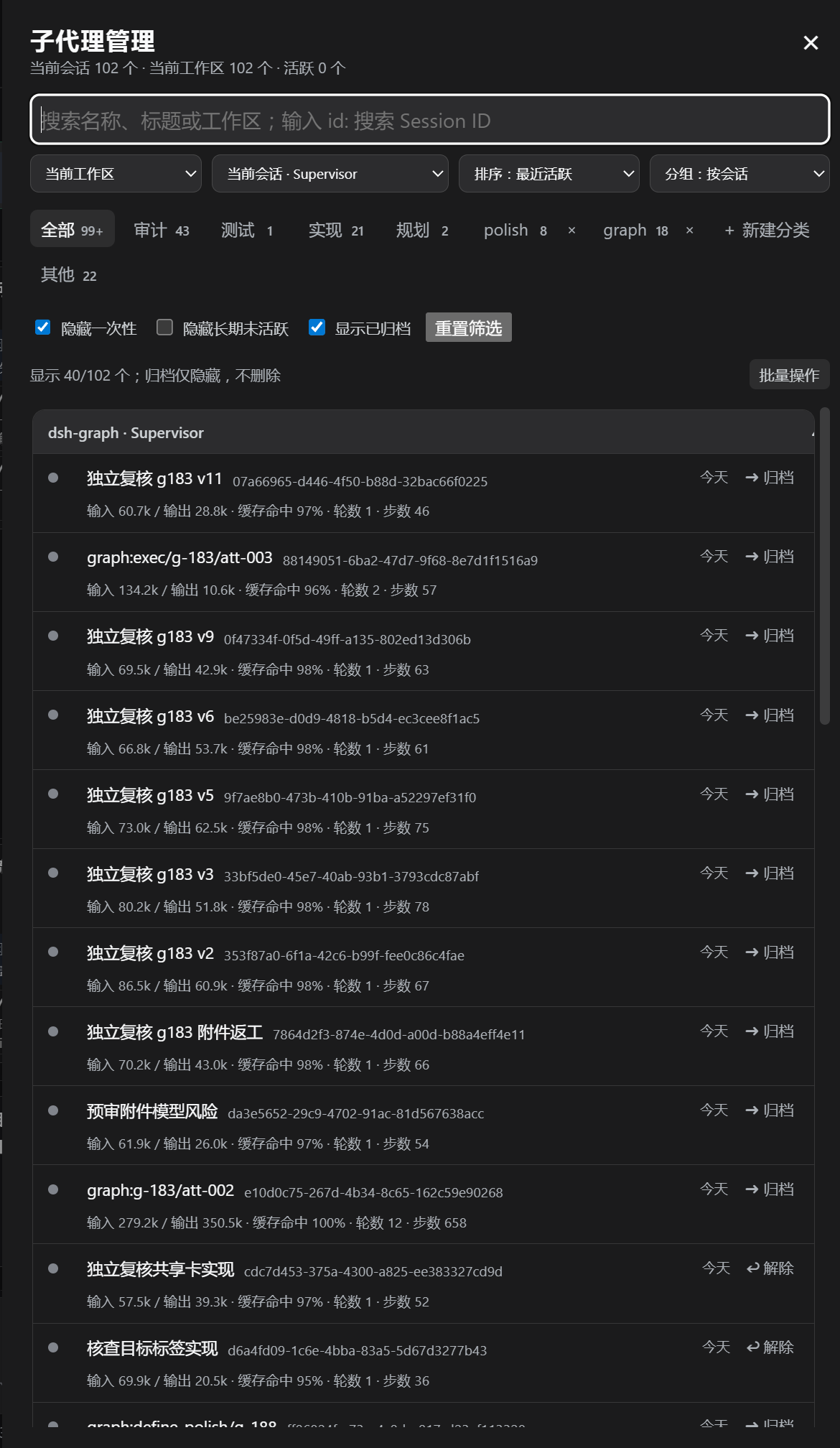
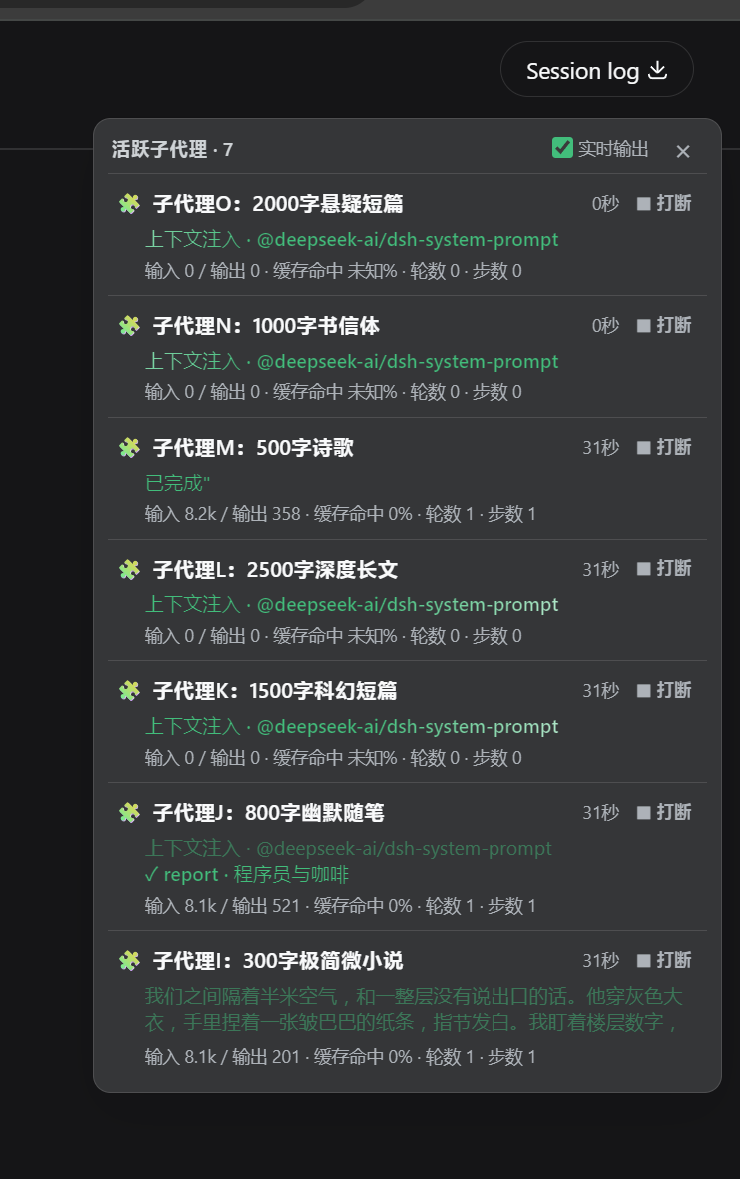
- Header — title, current-session/workspace counts, and close action.
- Search and scope row — ordinary name/title/workspace search, with
id: xxxreserved for Session ID search; workspace, session, sorting, and grouping selectors stay on one compact row. - Classification row — built-in and custom categories, with custom-category deletion inside the same tab frame.
- Filter row — hide one-shot, hide stale children, show archived, and reset filters.
- Results — collapsible active group, workspace/session group headers, Session ID beside each name, relative activity time, and archive status.
- Live activity — when available, the last two output lines or the latest tool/context status appear at the bottom of the card; the final snapshot remains gray after completion.
Install in the Web profile
From this directory:
dsh plugin --profile web add file:.
The bundle includes cordis.patch.yml, which inserts the manager and disables DSH’s stock ui-subagent lineage dropdown while the package is installed. Removing the package removes this bundle layer and restores the underlying ui-subagent setting. Restart the existing dsh web process, then refresh http://127.0.0.1:3080 after the plugin is available.
If you previously disabled ui-subagent manually in $DSH_HOME/profiles/web/cordis.patch.yml, remove that manual stanza when testing automatic restoration; user-owned settings are intentionally preserved.
Runtime data boundary
The public DSH Web session store exposes subagent summaries that have been discovered in the current browser runtime. It deliberately does not expose a global historical subagent index or a mode for every unvisited child. Therefore this first plugin version manages the discovered catalog; rows whose type is not yet loaded remain visible and searchable and fall back to DSH's retained session navigation. Exact catalog navigation is used automatically as soon as DSH supplies the address and mode.
A full persistent workspace-wide archive view requires a host-side catalog RPC (or an upstream DSH API) that enumerates every child address and its mode. The public SessionSummary does not expose the original prompt or provider/model route, so those are intentionally not queried or displayed. Live output and tool/context activity are read from the bound session automatically: on dsh 0.1.2-alpha.2 they are derived from the raw binding.eventSource event stream (showing the tool description or target filename), while older hosts (e.g. 0.1.1-rc.2) fall back to session.getSnapshot().chat.legacy. Capability detection selects the path, so the plugin stays forward compatible. If the host publishes neither, the panel falls back to the durable summary. The UI is isolated in lib/client.js, so it can switch to a richer source without changing the panel interaction model.
Compatibility
v1.3.1 is compatible with dsh 0.1.2-alpha.2 (new binding.eventSource live-output path) and 0.1.1-rc.2 (legacy chat.legacy snapshot path). Live output is selected by capability detection, so older hosts behave as before.
v1.3.4
- Feature: the whole UI is localized through DSH client-locale (zh/en, AI-assisted English strings). Labels, buttons, stats, live output (context injection / thinking / tool details) and confirm dialogs now use translation keys and follow the host language.
v1.3.3
- Fix: batch delete no longer errors on large selections (host request-body limit raised to 8 MiB).
- Feature: with details hidden, hovering a row/name shows the stats (
输入/输出 · 缓存命中 · 轮数 · 步数) via the title tooltip. - Fix: live output now shows context injection (
上下文注入 · <form>) and the thinking state. - Feature: while thinking, a rotating "思考中…" spinner indicates the state instead of the low-priority reasoning text.
v1.3.2
- Performance: the manager now does one base scan (
subagentRows) and derivesallRows/activeRows/tabCountsfrom it (no repeated full scans ormodeMapmerges),tabCountsis computed from a deferred value and is skipped while the panel is closed, anduseSessionssubscribes only the fields the manager reads. Live output is capped to a few simultaneous subagents (liveCap, default 3,0= unlimited) and fully releases its subscriptions when live display is off or the float/panel is closed. - UX: opening a subagent now auto-switches the session to the Chat tab.
- Fix: the batch "select N hours ago" now selects the truly-old subagents in the current view (accurate count) and no longer overwrites or re-selects your manual changes.
Validation
pnpm run check
Smoke-test a specific dsh version:
./test.sh                                      # local dsh, port 8084
DSH_VERSION=0.1.1-rc.2 ./test.sh               # pnpx @deepseek-ai/dsh@0.1.1-rc.2 (via proxychains4 -q)
Acknowledgements
- Subagent permanent deletion and session cleanup design inspired by and referencing @heiheiha798/dsh-plugin-subagent-delete.
No comments yet. Be the first to write one.