
DSH Launcher
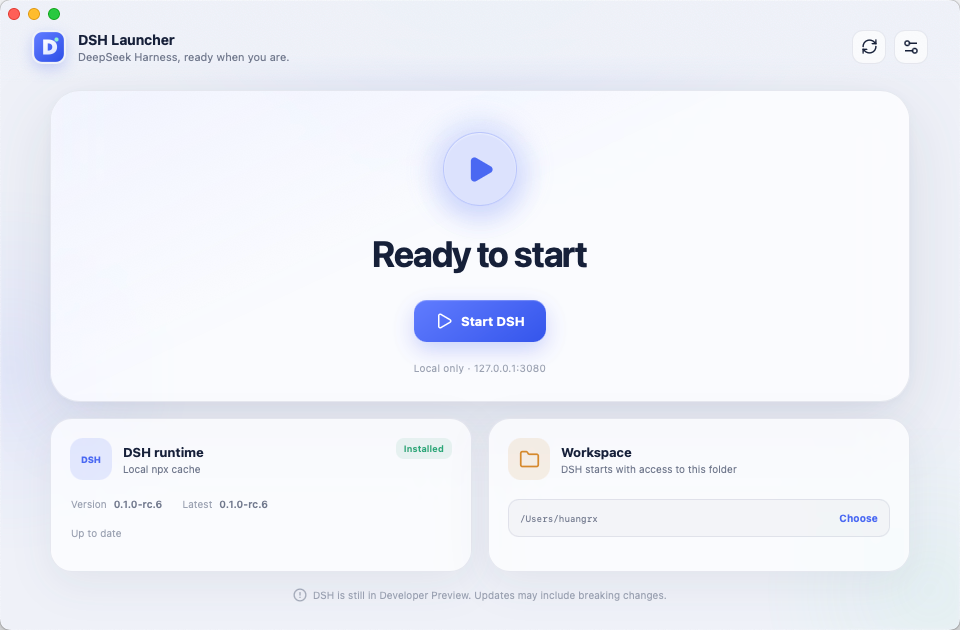
A lightweight desktop app for installing, updating, and controlling DeepSeek Harness Web.
[!IMPORTANT] DSH Launcher is currently a developer preview. It is an unofficial, community-maintained project and is not affiliated with or endorsed by DeepSeek.
Why it exists
DeepSeek Harness Web is normally started with npx @deepseek-ai/dsh web. DSH Launcher brings installation, version checks, and process control into one desktop interface, so routine use does not depend on repeatedly entering a command.
Features
- Detects app-managed, global npm, and npx-cached
@deepseek-ai/dshruntimes - Checks npm for new versions and updates only with user confirmation
- Starts, opens, restarts, and stops the DSH Web service
- Manages verified DSH processes started from either a terminal or the launcher
- Lets you choose the working directory used to start DSH
- Refuses to terminate unrelated processes occupying port
3080 - Supports macOS, Windows, Simplified Chinese, and English
- Supports light, dark, and system appearance
Installation
Prebuilt installers will be published on GitHub Releases. The current version can be run directly from source.
Node.js and npm must be available before DSH Launcher can run Harness. A runtime installed through the app is isolated in the application data directory: it does not alter global npm packages or require administrator privileges.
Run from source
Prerequisites
- Node.js and npm
- The stable Rust toolchain
- Tauri 2 system dependencies
git clone https://github.com/minorsnownight/dsh-launcher.git
cd dsh-launcher
npm install
npm run desktop
Build an installer for the current platform:
npm run dist
How it works
DSH Launcher searches for a usable runtime in this order:
- The launcher-managed runtime in the application data directory
- A global npm installation
- The local npx cache
The service runs at http://127.0.0.1:3080. If that port is occupied, the launcher inspects the listening process and only offers restart or stop controls when it can verify that the command belongs to @deepseek-ai/dsh.
The “working directory” is the current directory used when starting DSH. Harness reads and works with project files there. Stop the service before changing it.
Privacy and safety
- No account system, telemetry, or analytics
- No silent DSH installation or updates
- No user-controlled strings interpolated into shell commands
- Service health checks stay on the local loopback address
- Unverified port owners are never terminated
Development
npm run typecheck
npm test
npm run build
cargo test --manifest-path src-tauri/Cargo.toml
See AGENTS.md and docs/PRODUCT.md for project structure and product boundaries. Read CONTRIBUTING.md before submitting changes. Report security issues privately as described in SECURITY.md.
License
DSH Launcher is available under the MIT License.
“DeepSeek” and related marks belong to their respective owners. This project only manages the user's local installation of @deepseek-ai/dsh; it does not include or redistribute that package.
还没有评论,来写第一条。