dsh-nightshift (Night Shift) 🌙
English | 简体中文
Queue during peak hours. Drain off-peak. Read the savings in the morning.
A third-party plugin for DeepSeek Harness (dsh). During the daytime peak windows your tasks wait in a queue; when the off-peak window opens, nightshift dispatches them one at a time into your sessions, retries failures with backoff, auto-continues max-tokens truncations, and books the real token spend against your peak/off-peak prices. When the queue empties (or peak returns) it writes a per-day savings report.
 daytime (peak)              night (off-peak)
┌────────────────────┐      ┌────────────────────┐
│ 🌙 等低谷  2小时13分 │ ───▶ │ 🚀 夜航中  8小时40分 │
│ queued: 3 tasks     │      │ ▶ task 1/3 done    │
│ (frozen, no spend)  │      │ ▶ task 2/3 running │
└────────────────────┘      └────────────────────┘
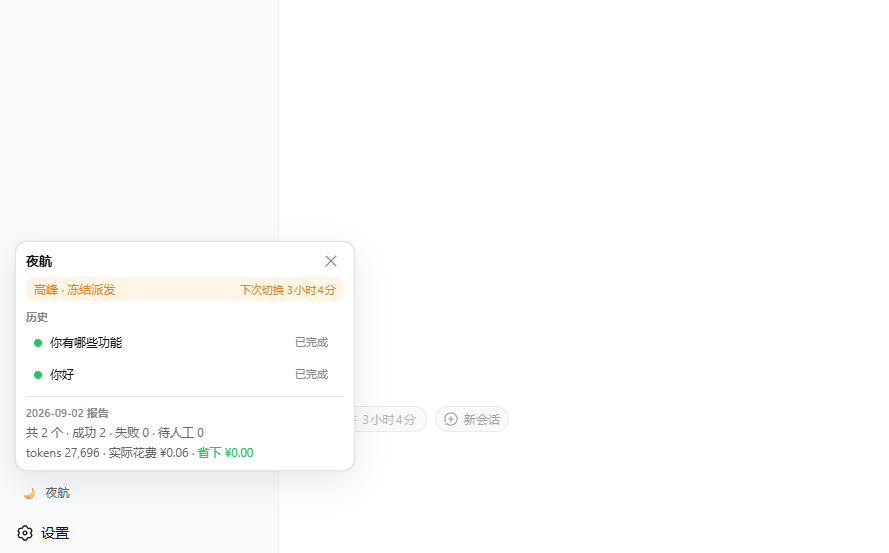
                             2026-09-01 report:
                             12 tasks · 8.4M tokens
                             cost ¥8.40 · saved ¥8.40
Why
DeepSeek's off-peak pricing (roughly UTC+8 night hours — check the current announcement) is a fraction of the peak price. But agents run when you are at the keyboard, which is exactly when compute is most expensive. Nightshift inverts that: write the task now, let the queue hold it until the price drops, wake up to finished work and a report of what the patience bought.
Features
- One-chip enqueue — a 🌙 chip next to the conversation composer hands the current draft to nightshift (default target: continue the current session); the "new session" button runs it in a fresh session instead (directory follows the current workspace and joins its sidebar group, or the dsh default when ungrouped).
- Peak freeze — no dispatch during peak windows; a task already running when peak arrives is left to finish naturally (finished work is never interrupted).
- Off-peak drain — one task at a time,
drainGapMsbetween dispatches, cold sessions auto-resumed by the harness. - Failure policy —
turn/endreasons are classified:error/interrupted→ exponential backoff retry (bounded);max-tokens→ auto-send the continuation prompt (bounded);blocked→ parked for a human;aborted→ treated as your cancellation. - Savings ledger — per-turn token deltas (four buckets) are priced at the window in effect when they happened, so cross-window and retried tasks book faithful money.
- Daily reports — generated when the queue empties or peak returns; same-day re-runs merge without double counting.
- Durable queue — a restart re-queues orphaned running tasks (at-least-once); nothing is lost to a reload or crash.
- Panel — sidebar entry with window banner, live task row, queue with run-now/cancel, history, and the latest report.
Requirements
- dsh with the
webprofile (the host process must stay resident — it does, independent of the browser tab). - Node.js ≥ 20.
Install
Official channel (recommended) — dsh's built-in plugin command does everything in one line (link + auto-added to the profile's bundles; no file edits):
dsh plugin --profile web add github:mikasaxin529/dsh-nightshift
Swap the profile name for another (headless, …); pin a commit with github:mikasaxin529/dsh-nightshift#<sha>; uninstall with dsh plugin --profile web remove dsh-nightshift. Restart dsh to activate. From a local clone, pass the repo path instead of the github: spec.
Script — from this repo's directory (wraps the official channel; falls back to manual mode when dsh is not on PATH):
.\install.ps1                    # installs into the web profile
.\install.ps1 -Profile headless  # another profile
Manual fallback (no dsh CLI) — three steps:
.\install.ps1 -Manual -Target "$env:USERPROFILE\.dsh\profiles\node_modules" -Profile "$env:USERPROFILE\.dsh\profiles\web"
Or fully by hand:
Link or copy this folder into the
node_modulesthe profile resolves plugins from, nameddsh-nightshift(the default dsh layout shares~\.dsh\profiles\node_modules).Append to the target profile's
cordis.patch.yml:- insert: - id: nightshift name: dsh-nightshiftRestart dsh (or let the loader hot-apply the patch).
The plugin shares the host's own @deepseek-ai/* instances (declared as optional peerDependencies on purpose — bundling a second copy would break cordis service identity). Do not npm install its dependencies into the plugin folder on the host side; devDependencies are only for running the test suite.
Configuration
All keys live under the nightshift entry in your loader config (defaults shown):
| key | default | meaning |
|---|---|---|
timeZone |
Asia/Shanghai |
IANA zone the windows are interpreted in |
peakWindows |
09:00–12:00, 14:00–18:00 |
[start, end) wall-clock windows; may cross midnight; [] = never peak |
peakPricePerMTok |
2 |
price per million tokens during peak (fill your real number) |
offPeakPricePerMTok |
1 |
price per million tokens off-peak |
currency |
¥ |
display only |
tickMs |
30000 |
window-check / dispatch tick |
maxRetries |
3 |
retries for error/interrupted turns |
retryBaseMs / retryFactor / retryMaxMs |
60000 / 2 / 1800000 |
exponential backoff base, factor, ceiling |
continuationLimit |
3 |
auto-「继续」sends per task on max-tokens |
continuationPrompt |
继续 |
the continuation prompt text |
drainGapMs |
5000 |
pause between dispatches |
allowRunNow |
true |
whether the panel's run-now button is honored |
reportRetentionDays |
30 |
report pruning |
exposeTool |
false |
reserved for v1.1 (nightshift_enqueue tool) |
How it works
- The host half (
index.js) is a cordis function plugin: one self-reschedulingsetTimeouttick (neversetInterval), asession/eventlistener that reacts toturn/end, two GET exact-fetch routes (/api/nightshift/state,/api/nightshift/report) and three POST webServer routes (enqueue,task/cancel,task/run-now) guarded by the connection's request rejection. Queue and reports persist throughctx.storageDomain(zod row schemas). - The client half (
client.js) is a hand-authoredwindow.__ModuleLoader__.loadfactory — a classic script registering two slots: the composer chip (conversation.input.dock) and the sidebar panel (sidebar.footer.action). It polls the state route (30s when the panel is open, 2min closed) and never holds UI state that a reload cannot rebuild. - Display helpers live in
lib/format.js(shared semantics, re-inlined in the client factory, which cannot reach the host's module graph).
Differences from adjacent plugins
- vs sleep-send / scheduled tasks: those send at a time you name; nightshift follows the price window — you configure windows once, not per task, and re-configuring re-freezes/unfreezes the whole queue.
- vs session-guard / input-traffic: those shape or gate interactive input; nightshift never touches your live sessions. Freeze means "no dispatch", not "session frozen" — manual work keeps flowing at any hour.
Known limitations
- Cache pricing is simplified: all four token buckets bill at the same window price (cache reads are overcharged versus DeepSeek's real cache pricing, so the reported savings are conservative on that axis).
- At-least-once: a crash mid-task re-runs the task on restart. The task is idempotent or re-runnable at your discretion.
- One task at a time — a deliberate v1 invariant.
- Prices are your declared numbers; nightshift has no balance/pricing API to check against.
- Changing config triggers an HMR reload (timers/domain/listeners are disposed cleanly); queued tasks survive in storage.
Develop
npm install   # devDependencies only (test tooling + type-real imports)
npm test      # 117 vitest cases
Layout and the full design contract live in SPEC.md.
No comments yet. Be the first to write one.