dsh-review
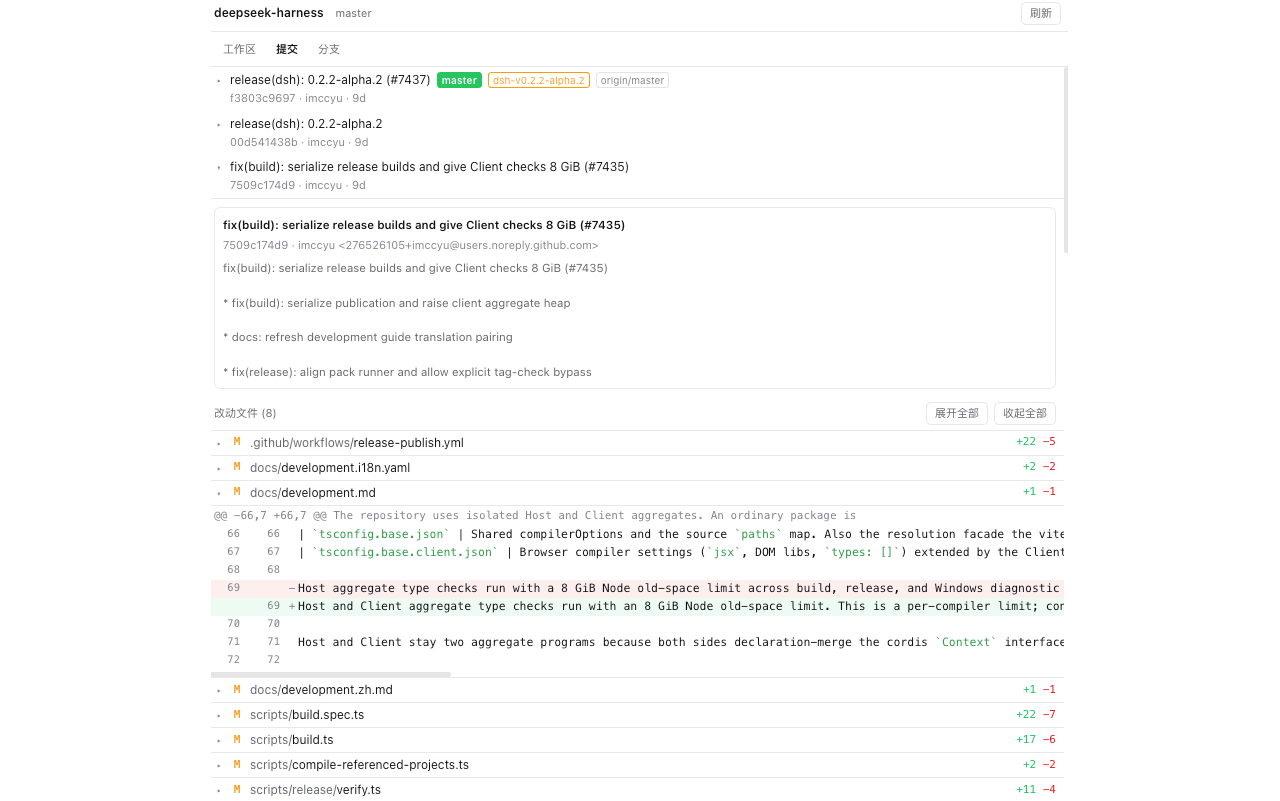
A review-first Git panel for the DSH Web GUI. It adds one tab to the right Sidebar that answers the questions a code review actually asks: what is dirty in my work tree, what does this commit change, how does my branch compare to another one, and which branch am I on — without a terminal and without touching history.
- Working tree: staged, unstaged, and untracked files, each with its
+/-counts - Commits: the current branch's history, page by page, each row tagged with the refs pointing at it (
main,origin/main, tags); a commit opens its message, author, and changed files, and any file opens its diff - Branches: local and remote branches tagged apart, each with its last commit; local branches show how many commits are not pushed yet, one click switches, and
对比diffs a local branch against its upstream (or againstHEADwhen it tracks nothing) - Sub-projects: when the working directory is a container rather than a repository, the panel lists the Git work trees below it and remembers the choice per Session
- Diffs are real
git diffoutput — renames, binary files, and mode changes included — rendered line by line with the Host's own syntax highlighting - Read-only by design: no commit, no push, no stage, no reset. The only write is
git checkout, and it refuses a dirty work tree instead of stashing or forcing

Screenshots
Install
1. Through the Host's installBundle (installs and enables)
Ask the agent in a conversation:
install the plugin
github:miiy/dsh-review
or paste the same spec into the install field on Settings → Plugins.
Both call the Host's installBundle, which installs the package, adds it to
dsh.profile.bundles, and hot-applies it — one step.
2. From the CLI (dsh plugin, installs only)
dsh plugin --profile <profile> add github:miiy/dsh-review
dsh plugin forwards its arguments to pnpm inside the profile directory, so this
step installs the package but does not compose it. The row then shows up on
Settings → Plugins as installed and switched off; turn it on to add it to
dsh.profile.bundles. If the switch does not take effect live, restart dsh web.
A plain-JavaScript bundle has no build script, so a git install needs no
allowBuilds approval. A local checkout works too:
dsh plugin --profile <profile> add /path/to/dsh-review.
3. Start the Host
Then start dsh web as usual. No launch flag is needed: the bundle registers its
route on the Host's webServer when it mounts, and the tab shows up in the right
Sidebar's tab guide.
Use
Open the right Sidebar and pick Git 审查 / Git Review from the tab guide (+).
The panel follows the Session's working directory, so each conversation reviews its
own repository.
| Tab | What it shows |
|---|---|
| Changes | Staged, unstaged, and untracked files; click a file for its diff |
| Commits | History of the checked-out branch; click a commit for its files, then a file for its diff |
| Branches | Local branches with ↑ unpushed commits (and ↓ behind), then remote branches; Switch asks for an inline confirmation, Compare diffs a local branch against its upstream (or against HEAD when it tracks nothing) and lists the changed files, each opening its diff |
Refresh re-reads whatever the panel is showing. Switching away and back also
refreshes, and nothing polls in the background.
Click the repository name in the header to switch between the Git work trees the Session can reach: the one containing the working directory, plus any nested one down to four levels. A Session directory that is not itself a repository picks its only candidate automatically, and asks when there are several.
Safety
- Every git command runs through
spawn('git', [...])with an argument list — never a shell string. - References are fenced by
rev-parse --verify, paths must be repository-relative (no.., no leading dash). - Commands carry
GIT_TERMINAL_PROMPT=0andGIT_OPTIONAL_LOCKS=0; diffs use--no-color --no-ext-diff --no-textconv. checkoutrefuses any staged or unstaged tracked change and returns the affected files. Untracked files alone do not block it.- The route is fenced with the Host connection's
requestRejection, so a non-loopback request without a same-origin or paired origin is rejected. - A repository the client asks for must be the work tree the Session directory sits in, or one inside it; anything else answers
forbidden-root.
Requirements
- DeepSeek Harness
>= 0.2.1-rc.1 < 0.3.0on the Web profile giton the Host, and the Session working directory inside a git working tree
Limitations
- One repository at a time: the one containing the working directory, or a nested one the panel offers.
- No commit, push, stage/unstage, stash, or history rewrite.
- Syntax highlighting is off when the Host does not export
useCodeHighlighter; rows still render as plain text. - A working directory outside a repository, or a Host without
git, answersnot-a-repositoryand the panel says so.
Development
node --test # parsers, route surface, and the client module contract
test/ needs no dependency; the node_modules/@deepseek-ai/schemastery link the
route tests use only mirrors what the profile provides at runtime.
| File | Role |
|---|---|
git.js |
git execution, output parsers, reference and path fencing |
index.js |
Host plugin: the /dsh-review/api/<method> route |
client.js |
Client bundle: the Sidebar tab type and its body |
MAINTENANCE.md |
every upstream name this plugin depends on |
License
MIT — see LICENSE.
No comments yet. Be the first to write one.