dsh-session-mgr(会话管理)
DeepSeek Harness Web 会话语管理外挂
在设置页直接对「会话」与「已归档会话」进行移动、归档、恢复、备份与删除,并可跨工作区操作。
English ·  ·
·

目录
功能
| 功能 | 说明 |
|---|---|
| 移动 | 把任意会话(含已归档会话)移动到任意工作区。 |
| 归档 | 从侧栏隐藏会话;保留原工作区位置与排序。 |
| 恢复 | 取消归档,把会话恢复到原位置。 |
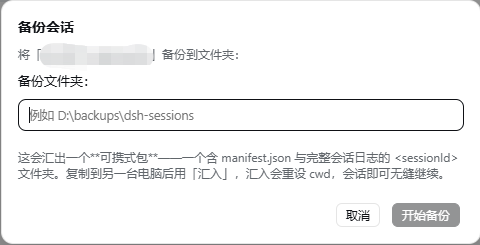
| 备份 / 汇出 | 生成可携式包——一个含 manifest.json 与完整会话日志的 <sessionId> 文件夹。复制到另一台机器后用「汇入」,会话即可无缝继续。 |
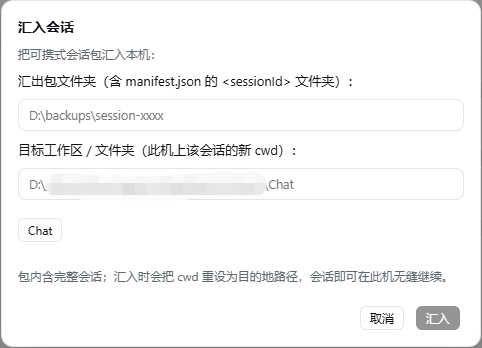
| 汇入 | 在本机安装可携式包,并把会话的 cwd 重设为此处存在的工作区/文件夹——让另一台机器上开始的会话在这里继续。 |
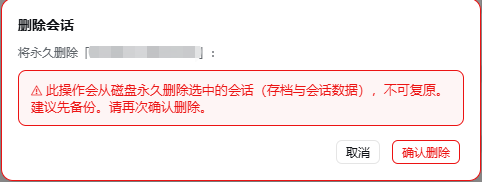
| 删除 | 从磁盘永久删除会话,带红色二次确认弹窗。 |
| 三语界面 | 英文 / 简体中文 / 繁体中文——跟随 Harness 语言设置;简体/繁体切换位于插件页面内。 |
| 标题栏快捷操作 | 当前打开的会话可一键「移动到工作区」。 |
支持单条与批量操作(移动 / 归档 / 恢复 / 备份 / 删除选中)。
跨机器可携
会话通过 header 的 cwd 关联工作区,而 cwd 是每台机器专属的绝对路径——直接复制文件夹到另一台机器会因路径不存在而无法继续。因此:
- 在 A 机:对会话点「备份」,得到可携式包;
- 把该包复制到 B 机;
- 在 B 机:「汇入」该包并选择会话应归属的工作区/文件夹——汇入会把
cwd重设为 B 机的路径(会话内容不变),会话即可在 B 机无缝继续。
工作区 = 文件夹,会通过 header 的
cwd关联,而cwd是每台机器专属的绝对路径。因此 A 机备份的会话要搬到 B 机继续,需要用「汇入」把cwd重设为 B 机上存在的路径。
截图
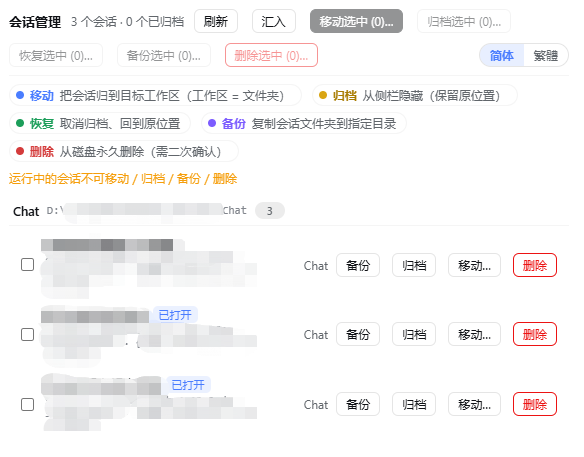
会话管理页
弹窗
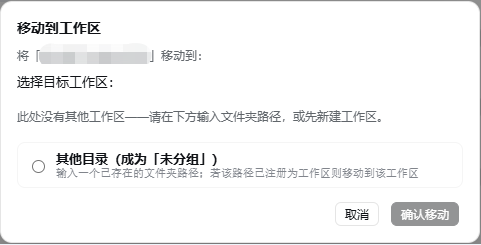
| 移动到工作区 | 备份 / 汇出 | 汇入 | 删除(二次确认) |
|---|---|---|---|
 |
 |
 |
 |
环境需求
- DeepSeek Harness 的 web profile(
dsh web) - Node.js
^22.19.0 || >=24.0.0(Harness 运行时)
安装
方法一:安装到 web profile(推荐)
# 1. 克隆/下载本仓库,然后安装到你的 web profile。
#    把 <path> 换成 dsh-session-mgr 文件夹的绝对路径。
dsh plugin --profile web add "file:<path>\dsh-session-mgr"

# 2. 在 web profile 的 package.json 中,把 "dsh-session-mgr" 加入 dsh.profile.bundles
#    (与其他插件条目并列)。

# 3. 重新启动 web 服务器使外挂生效。
dsh web
方法二:手动安装
把本包放进 profile 的 node_modules(例如 pnpm add file:... 或 symlink),
再把 "dsh-session-mgr" 加入 profile package.json 的 dsh.profile.bundles,然后重启。
使用
打开「设置 → 会话管理」。
所有会话按当前工作区分组;已归档的会话带有徽章标记。
使用每行的按钮,或勾选复选框后使用工具栏批量操作:
- 移动选中… → 选择目标工作区(或输入任意已存在文件夹,使其成为「未分组」)。
- 归档选中… → 从侧栏隐藏(保留原位置)。
- 恢复选中… → 取消归档,回到原位置。
- 备份选中… → 把每个会话汇出为可携式包(一个含
manifest.json与完整日志的<id>文件夹)到指定文件夹。 - 汇入… → 把另一台机器的可携式包安装到所选的会话所在工作区/文件夹(在 B 机执行)。
- 删除选中…(红色)→ 红色警告弹窗要求再次确认后才会真正删除。
打开会话时,标题栏还有「移动到工作区」按钮,可一键移动当前会话。
工具栏的 简体/繁體 切换(只有当 Harness 语言设为中文时才显示)用于切换中文简繁。
HTTP API
宿主端在 /dsh-session-mgr/* 下提供小型 JSON API(均为 POST):
| 端点 | 请求 | 响应 |
|---|---|---|
/dsh-session-mgr/list |
{} |
{ workspaces, sessions, archivedSessionIds, backupDefaultDir } |
/dsh-session-mgr/move |
{ sessionId, targetPath } |
{ ok, sessionId, archived, from, to } |
/dsh-session-mgr/archive |
{ sessionId } |
{ ok, archived, sessionId, archivedSessionIds } |
/dsh-session-mgr/unarchive |
{ sessionId } |
{ ok, archived, sessionId, changed, archivedSessionIds } |
/dsh-session-mgr/backup |
{ sessionId, targetDir, format } |
{ ok, sessionId, cwd, archived, backupPath, sizeBytes, format, manifest } |
/dsh-session-mgr/import |
{ sourcePath, targetPath } |
{ ok, sessionId, importPath, cwd, workspaceId?, workspaceTitle? } |
/dsh-session-mgr/delete |
{ sessionId } |
{ ok, sessionId, deleted, reason?, path, sizeBytes?, cwd? } |
targetPath 接受真实路径或已注册的工作区 ID。backup(format: "zip" 用于 Windows,"targz" 用于 Linux)产生一个可携式压缩档(<sessionId>.zip / <sessionId>.tar.gz);import 在本机读取该档案并安装(把 cwd 重设为 targetPath)。
原理
DSH 的「工作区」本质上是文件夹:会话通过 session header 的 cwd 归属到工作区。
「移动」=
- 把会话存档文件夹从
<sessions>/<旧cwd编码>/<id>移到<sessions>/<新cwd编码>/<id>; - 重写 JSONL 存档第一行(zstd 的第一个 frame)的
cwd; - 同步更新内存中的 workspace registry(header 索引 + 会话归账),侧栏立即重新分组——无需重启。
「归档/恢复」使用 registry 的全域归档集合;归档的会话保留 sessionIds 席位,
因此恢复后会回到原来的位置。
安全机制
- 运行中的会话不可移动/归档/备份/删除(通过
agents服务判断)。 - 已打开(live)但闲置的会话在移动/删除前会先从内存卸载,下次打开读取新 header。
- 目标位置已存在同名文件/文件夹时拒绝并报错(不会静默覆盖)。
- 跨磁盘(EXDEV)移动时自动改为复制+删除来源。
- 删除需要二次确认且不可恢复——建议先备份。
开发
lib/host.js 中的纯函数(路径编码、zstd frame 扫描、header 重写、文件夹搬移)可独立测试:
node scripts/test-move.mjs   # 合成数据测试
node scripts/test-real.mjs   # 用真实存档的「副本」测试
test-real.mjs 需要传入一个真实会话目录作为参数(或设置 DSH_REAL_SAMPLE):
node scripts/test-real.mjs "C:\path\to\<session-id>\"
贡献
发现 bug 或想要新功能?请提交 issue 或 PR。请遵循现有代码风格(纯 ESM、无构建步骤),并针对 lib/host.js 的改动补充/运行测试。
No comments yet. Be the first to write one.