dsh-quick-reply
Adds a quick-send button to the DeepSeek Harness composer. Save the phrases you keep retyping, then send any of them to the current session with one click.
English | 中文
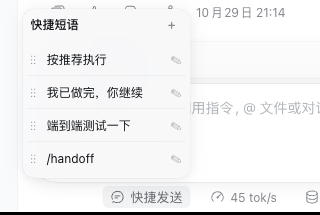
What it does
- One-click send. Clicking any phrase in the panel sends it as a message to the current session and collapses the panel.
- Skill shortcuts. A phrase may contain
/skill-name, which is equivalent to typing that skill by hand. While adding a new phrase, or editing one that already contains a/skill-nametoken, type/or press the/button to list the skills available in the current session. A phrase without such a token stays plain text: no/button, no candidate list. - Custom order. Hold
⋮⋮and drag up or down to reorder. - Edit in place. ✎ edits a phrase,
🗑deletes it,✓saves,✕cancels. - Add any time. The
+in the panel's top-right corner appends an entry (at most 20 phrases, 2000 characters each).
Four phrases ship by default: 按推荐执行, 我已做完,你继续, 端到端测试一下, and
/handoff (the last one is a skill shortcut and only fires when the session has a
handoff skill).
Install
Requires DSH >=0.2.1-0 <0.3.0. Install through dsh plugin, replacing
--profile with the instance you use (web or desktop):
dsh plugin --profile web add dsh-quick-reply
Afterwards restart that instance (dsh web or the desktop app), then hard-refresh
the browser (Cmd/Ctrl+Shift+R).
Update to the latest version:
dsh plugin --profile web add dsh-quick-reply@latest
Uninstall:
dsh plugin --profile web remove dsh-quick-reply
Usage
- Phrases live in the current browser's
localStorage(keydsh-quick-reply:items:v1); they are not synced across browsers or devices. Switching browsers or clearing site data means adding them again. - The skill list comes from the current session, so the available skills change when you switch sessions.
- A mistyped skill name does not raise an error: the text is sent as plain text.
Caveats
- Clicking a phrase sends its content straight as a message, exactly as if you had typed it yourself — there is no extra confirmation step.
- The plugin only sends text; it never runs commands on your behalf.
Development
The rest of this document is for plugin developers.
Layout
| File | Purpose |
|---|---|
client.js |
Browser-side UI bundle: dock button, panel, editing, drag-reorder, skill suggestions |
index.js |
Host-side no-op plugin that only declares its name |
cordis.patch.yml |
Bundle patch, declared by dsh.bundle.patch in package.json |
locale/{en,zh}.json |
Plugin title and description |
client.test.mjs |
node --test cases |
Dependencies
- Skill suggestions come from
remote.skills(skills/list). When that service is unavailable the plugin still works — you just get no suggestion list, and typing/nameby hand still works. - Messages are sent through the session's
conversationservice,send(text).
Local debugging
dsh plugin --profile web add /absolute/path/to/dsh-quick-reply
Editing client.js hot-swaps on save: the host's built-in client HMR polls the
loaded client assets every 500 ms ({mtimeMs, ctimeMs, size}), pushes a rebuilt
frame over /plugins/events, and the browser swaps that plugin's bundle. No
instance restart and no page refresh is needed (the bundle reload resets that
plugin's front-end state). If a change does not show up, retry from
Settings → Plugins.
The host half (index.js) is outside that HMR path, so restart the instance after
changing it.
Tests
npm test
The tests evaluate client.js in Node with a stub loader and only cover the
exported pure functions: storage normalization, reordering, and /name syntax
parsing and filtering.
Before releasing, check the publish manifest with npm pack --dry-run: every
runtime file must be listed (both READMEs included) and test or temporary files
must not be.
Release
A tag triggers CI to publish to npm (Trusted Publishing, with provenance):
# edit package.json's version so it matches the tag
git commit -am "chore: release X.Y.Z"
git push origin master
git tag vX.Y.Z && git push origin vX.Y.Z
CI creates a GitHub Release afterwards.
No comments yet. Be the first to write one.