dsh-mcp-autoload
Auto-discover project-level MCP servers for DeepSeek Harness (DSH).
Place a .agents/mcp.json at your project root (the nearest ancestor with a
.git marker). Every DSH agent session whose working directory is inside that
project automatically mounts the declared servers; connections close when the
session ends. Servers from other projects never leak in.
English | 中文
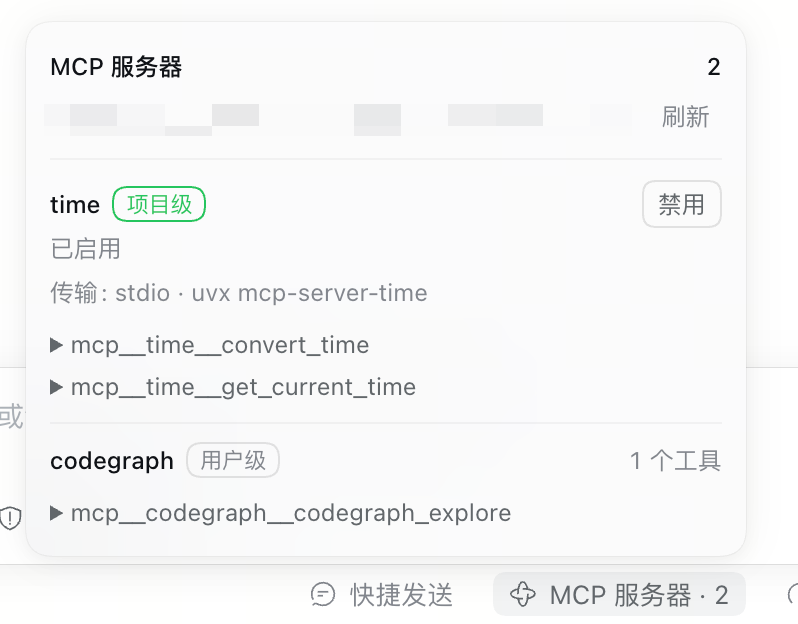
The panel above is the session MCP inventory. time comes from the project's .agents/mcp.json (marked 项目级 / project level); codegraph comes from the profile (用户级 / user level).
Install
Requires DSH >=0.2.1-0 <0.3.0 and Node.js ^22.19.0 || >=24.0.0. dsh plugin
forwards its arguments to pnpm inside the profile directory.
dsh plugin --profile web add dsh-mcp-autoload
The package declares dsh.bundle.patch, so the CLI registers it under the
profile's dsh.profile.bundles for you. Restart dsh web afterwards — the host
half loads at startup — then hard-refresh the browser (Cmd/Ctrl+Shift+R).
Working on the plugin from a local clone instead (the dependency is recorded as
a link:):
dsh plugin --profile web add /absolute/path/to/dsh-mcp-autoload
Update with dsh plugin --profile web add dsh-mcp-autoload@latest; uninstall with
dsh plugin --profile web remove dsh-mcp-autoload.
Minimal example
{
  "mcpServers": {
    "playwright": {
      "command": "npx",
      "args": ["@playwright/mcp@latest"]
    }
  }
}
Full example
Four entries cover every field and both toggle spellings:
{
  "mcpServers": {
    "playwright": {
      "type": "stdio",
      "command": "npx",
      "args": ["@playwright/mcp@latest"],
      "env": { "PLAYWRIGHT_BROWSERS_PATH": "~/.cache/ms-playwright" }
    },
    "postgres_local": {
      "type": "http",
      "url": "http://localhost:3000/mcp",
      "headers": { "Authorization": "Bearer local-dev-token" }
    },
    "experimental_server": {
      "enabled": false,
      "command": "uvx",
      "args": ["some-experimental-mcp@latest"]
    },
    "legacy_server": {
      "disabled": true,
      "url": "http://old-mcp.internal/mcp"
    }
  }
}
Field reference
| Field | Transport | Notes |
|---|---|---|
command |
stdio | Executable: a bare name resolved from PATH (npx, uvx) or an absolute path. Required for stdio |
args |
stdio | Optional string array, passed through without shell interpolation |
env |
stdio | Optional string map merged over the scrubbed child environment; explicit entries survive the scrub |
url |
Streamable HTTP | Absolute http(s):// URL. Required for HTTP |
headers |
Streamable HTTP | Optional string map of extra request headers |
type |
— | Optional; accepted values are stdio and http. sse is rejected with a log line |
disabled / enabled |
— | Optional; disabled: true or enabled: false skips the entry silently (both Claude Code and Codex spellings). The popover removes both fields to enable, or writes disabled: true to disable |
Transport selection: an entry with url mounts over Streamable HTTP;
otherwise command mounts a stdio child process whose working directory is
the session's cwd. An entry with neither is skipped with an error log.
Server names. A name matching [A-Za-z0-9_-]{1,32} passes through
unchanged (postgres_local, experimental_server stay as-is). Any other name — Chinese
characters, spaces, over-long — is normalized to a deterministic slug (the
same algorithm the DSH ACP bridge uses), e.g. 我的服务器 → server_<hash>.
Tool names. Each server's tools register for that session as
mcp__<serverName>__<rawToolName>, e.g. mcp__playwright__browser_navigate.
Behavior
- Per-session scope. Each server mounts inside the agent's Cordis scope: tools apply to that session only, and connections close when the agent is disposed. Two sessions in different projects can use the same server name independently.
- Startup. Mounting runs in the background after the session is
created: a new session returns immediately instead of waiting for the MCP
handshake and tool discovery (a single connection may take up to its own
request timeout). Opening the popover lists every server declared in the
manifest right away (disabled entries included), and each server connects
and updates its own row independently: once connected, that row shows the
tools it registered and their count, while a failing server shows its error on
that row only. The dock trigger reports progress as "connected n/N" (n =
enabled servers mounted, N = enabled servers). While discovery is in flight,
opening the popover keeps re-querying until the host reports it settled
(bounded retries — a failed or hanging mount never polls forever), and
Refresh re-checks on demand. Project tools can therefore be missing from the
first turns until the mount completes. Servers connect in parallel; one slow
or broken server never blocks the others (
failOnStartupErrorstays false). A server that fails to connect is skipped with an error log and the rest keep working. - In-session management. The popover can enable/disable project MCP servers; a click applies immediately — no browser confirmation dialog in either direction (the row's own state and the notice below are the feedback). The manifest is locked, backed up (only the five newest backups are kept) and replaced atomically; a symlinked manifest is followed so the link itself survives. Disabling unloads its tools at once. If re-enabling cannot mount, the manifest is rolled back to its previous state and the failure is reported — the file never claims a state the session could not actually mount.
- User-level MCPs. Profile-configured entries are listed but cannot be toggled here; only project manifest entries are writable.
- No external hot reload. The manifest is read once per session start (including resume). Manual edits require a new session to apply.
- Plugin config (in the patch row):
- id: mcp-autoload
  name: dsh-mcp-autoload
  config:
    configPath: .agents/mcp.json   # absolute, or relative to the project root
    projectRootMarkers: ['.git']   # directory entries that mark the root
Security
.agents/mcp.json entries are executed on session start. A cloned
repository containing this file gets to run arbitrary command lines on your
machine — the same trust level as an npm postinstall script. Only add this
file to projects you trust, and review it when cloning others'.
Compatibility
Peer packages (@deepseek-ai/cordis, @deepseek-ai/schemastery,
@deepseek-ai/dsh-mcp-client) are provided by the DSH installation; the
bundle declares them only for version checks. Requires DSH >= 0.2.1-0 < 0.3.0.
Development
All ESM, no build step: the source is the published artifact. npm test runs
node --test; npm pack --dry-run must list every runtime file. Conventions
live in AGENTS.md;
release and awesome-list submission are documented in
PUBLISHING.md.
No comments yet. Be the first to write one.