dsh-plugin-rag
Semantic memory (RAG) over all your DeepSeek Harness chat sessions — automatic, self-contained, and non-destructive.
Install ·
How it works ·
Settings ·
The rag_search tool ·
Uninstall
What it does
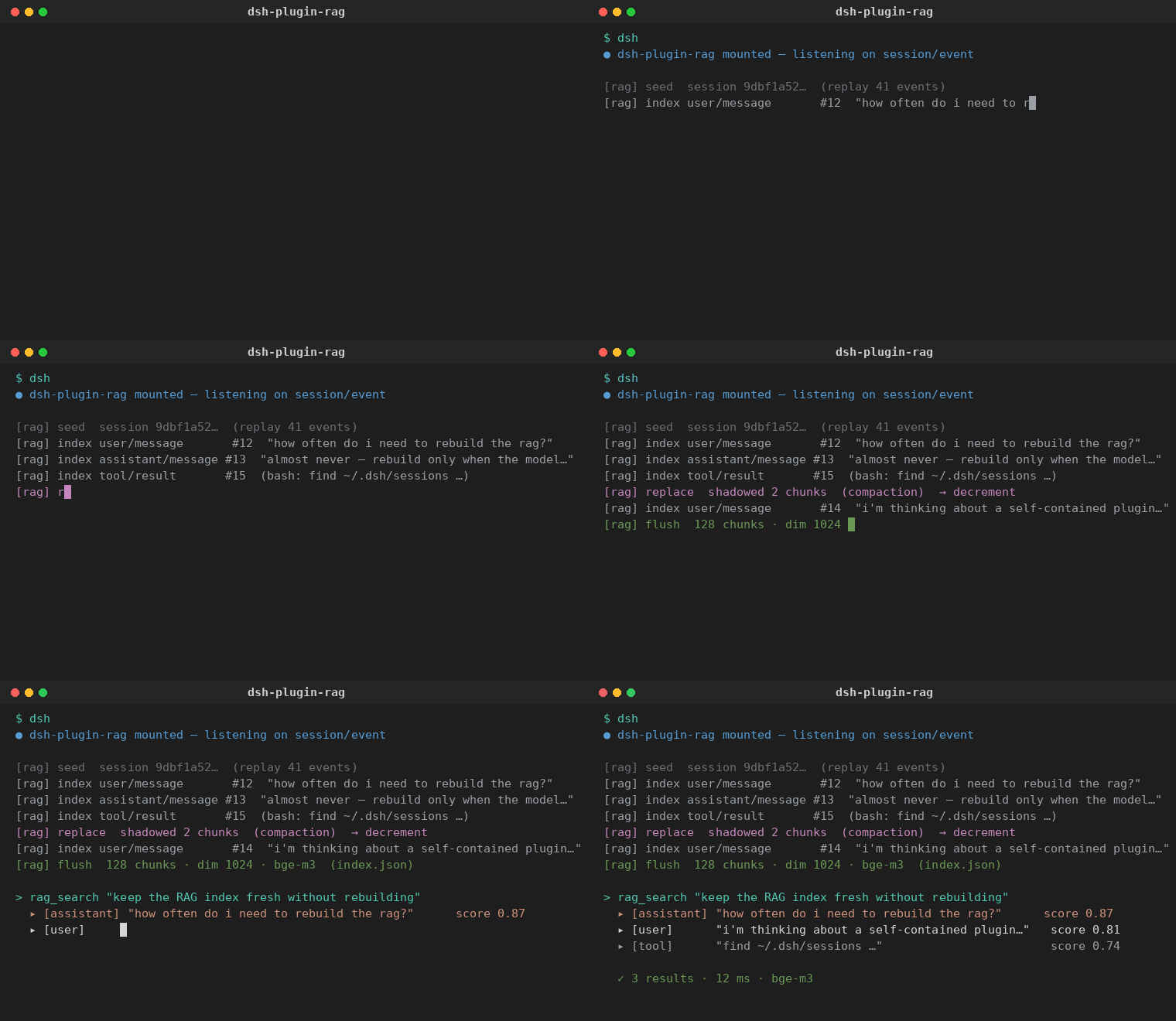
dsh-plugin-rag turns every conversation you have with the harness into a
searchable memory. As you chat, the plugin increments the index with each
new message and decrements it when compaction/pruning shadows old content,
so retrieval always reflects the current surface of your sessions — never a
stale dump.
- ✅ Automatic — no rebuild schedule, no manual export. It listens to the session store and stays in sync as you work.
- ✅ Self-contained — embeddings come from any OpenAI-compatible
/embeddingsendpoint; vectors live in one local JSON file. No native modules, no database, no extra service. - ✅ Non-destructive — it listens to published session events. It never patches the agent loop, and uninstalling restores the harness to its exact original state.
- ✅ Model-agnostic — choose a built-in preset or plug in your own endpoint, model, and API key.
Install
A DSH plugin is a plain npm/Cordis package. Install it exactly like the
terminal or
qr-connect plugins: add
it to your profile's dependencies, bundle list, and one cordis.patch.yml
insert row.
Add the package to your profile's
package.json(e.g.~/.dsh/profiles/web/package.json):{ "dependencies": { "dsh-plugin-rag": "github:mervyn-teo/dsh-plugin-rag" }, "dsh": { "profile": { "bundles": [ "@deepseek-ai/dsh-base", "@deepseek-ai/dsh-web-app", "dsh-plugin-rag" ] } } }Or install from a local clone:
"dsh-plugin-rag": "file:/path/to/dsh-plugin-rag".Add the insert row to your profile's
cordis.patch.yml(create it if it doesn't exist):- insert: - id: rag name: dsh-plugin-rag config: enabled: true provider: soclaas-bge-m3 model: bge-m3 endpoint: https://soclaas-api.comp.nus.edu.sg/v1 topK: 5 dataDir: "" includeToolResults: true includeReasoning: false maxChunkChars: 4000Reinstall and restart the harness so the profile re-resolves its dependencies and mounts the new bundle.
Settings
Open Settings → Plugins → RAG Memory. The card exposes exactly the fields you need to point the indexer at any embeddings provider:
| Field | Purpose |
|---|---|
| Enable indexing | Toggle the indexer and the rag_search tool. |
| Embedding model | Pick an existing preset — BGE-M3 (SoCLaaS), OpenAI text-embedding-3-small/large, or Ollama nomic-embed-text — or Custom… to supply your own. |
| Endpoint URL | Base URL of any OpenAI-compatible embeddings endpoint. |
| Model name | The model string sent to the endpoint. |
| API key | Paste a key directly. Saving it persists it to the harness settings (settings.yaml) and mirrors it into the .env file under Key env var, so it survives a restart. Leave empty to read from settings, then .env, then the process environment. |
| Key env var | The environment variable name the key is read from / written to in the .env file when the API key field is empty. |
| Results | Default number of hits returned by rag_search. |
| Index tool results | Also index tool output (on by default). |
| Index reasoning | Also index model reasoning blocks (off: noise + privacy). |
| Max chars per chunk | Chunk size for long messages. |
The card also shows a live index status (chunk count, session count, vector dimension, model, data dir) and a Reindex button.
⚠️ Changing the model or endpoint triggers a full rebuild, because embedding vectors are not comparable across models or providers.
The rag_search tool
Once installed, the model gains a first-class rag_search tool. It embeds the
query with your configured endpoint and returns the most relevant past
messages — each with role, session title, and snippet — so the agent can recall
prior work, decisions, code, and context across sessions.
rag_search("how did we set up the terminal plugin's WebSocket handshake?")
How it works
The plugin plugs into the harness the non-destructive way — by subscribing to events the session store already publishes:
| Event | Effect |
|---|---|
session/created |
Replays the (new or resumed) session's log from the stored cursor forward. |
session/event |
Increment/decrement — indexes new user/message, assistant/message, and tool/result surface events; un-indexes entries shadowed by a replace (compaction / tool-result pruning). |
session/flush |
Awaited durability checkpoint; drains the pending embed batch. |
Message extraction is deliberate about noise:
- only human
user/messageevents (real prompts, not system-prompt or runtime-context injections) are indexed; assistant/messagecontributes its final text blocks (not reasoning or tool-call blocks — those are skipped unless you enable Index reasoning);tool/resultcontributes tool output (optional, and truncated by the chunker).
Embeddings are written to ~/.dsh/rag/index.json (configurable via dataDir)
using an atomic tmp+rename write. A per-session cursor tracks the last
processed seq, so restarts are idempotent and only new content is embedded.
Uninstall
Uninstall is just as clean as install — nothing in the harness was modified:
- Remove the
dsh-plugin-ragentry fromcordis.patch.ymland fromdsh.profile.bundles. - Remove it from
package.jsondependencies. - Reinstall and restart.
Cordis disposes the plugin's scope (listeners, the rag_search tool, and the
config route) automatically, leaving the harness byte-identical to before. The
only residue is the index file itself; delete ~/.dsh/rag/ (or your dataDir)
to purge the stored vectors.
Configuration reference
| Key | Default | Contract |
|---|---|---|
enabled |
true |
Whether indexing and the rag_search tool are active. |
provider |
soclaas-bge-m3 |
soclaas-bge-m3 · openai-3-small · openai-3-large · ollama-nomic · custom |
model |
bge-m3 |
Model string sent to the endpoint (overrides the preset's model). |
endpoint |
https://soclaas-api.comp.nus.edu.sg/v1 |
OpenAI-compatible embeddings base URL. |
topK |
5 |
Default result count (1–50). |
dataDir |
"" |
Index directory; empty means ~/.dsh/rag. |
includeToolResults |
true |
Index tool results. |
includeReasoning |
false |
Index reasoning blocks. |
maxChunkChars |
4000 |
Max characters per chunk (256–16000). |
Privacy
Everything stays on your machine by default: the index is a local file, and the
only outbound traffic is the embedding request to the endpoint you configure.
API keys are never written into the index, and the key is not plugin
configuration — there is no setting for it and the card offers nowhere to type
one. Each provider preset pins a credential reference (soclaas-bge-m3 →
SOCLAAS_API_KEY, the OpenAI presets → OPENAI_API_KEY, custom →
RAG_API_KEY), which is resolved through the harness credential store: the
process environment, then ~/.dsh/.credentials.yaml (the same file the Models
page writes), then a .env fallback. The Settings card reports only whether
that reference currently resolves.
还没有评论,来写第一条。