dsh-panel-fold
Fold the DSH sidebar's global panel icons into the More menu — give your workspace and session list its vertical space back.
中文说明 · MIT · a DeepSeek Harness web client plugin
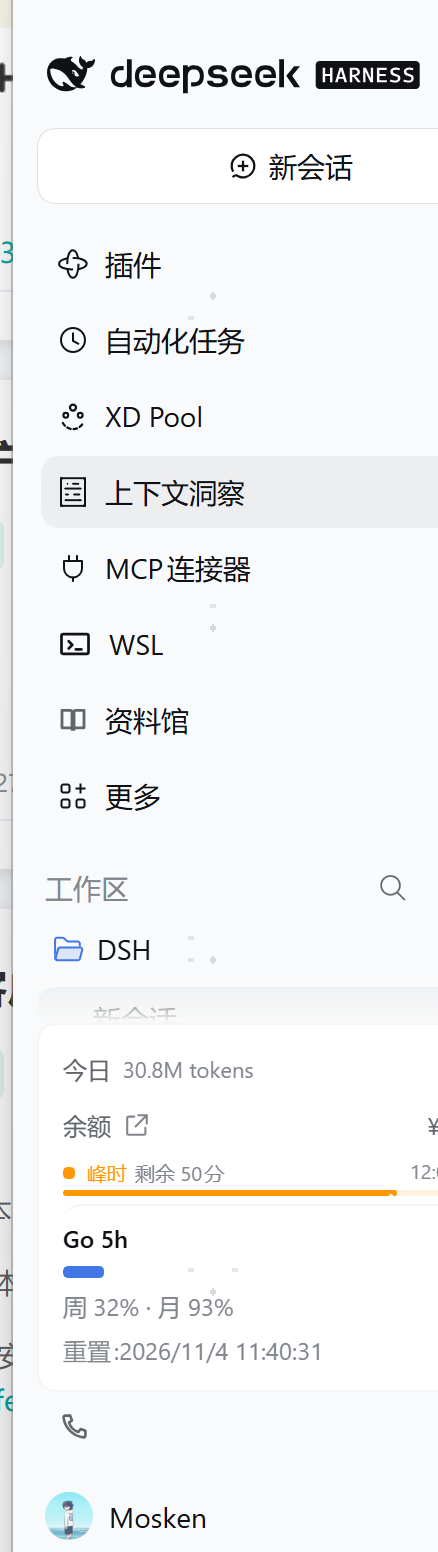
DSH's left sidebar devotes a fixed block near the top to the global panel launchers — Plugins, Automated tasks, XD Pool, Context insights, MCP connectors, WSL, Library, and so on. Every plugin that registers a panel adds one more 36px row there. With a handful of plugins installed, that block alone eats seven or eight rows, and the workspace / session list underneath gets squeezed into a narrow strip.
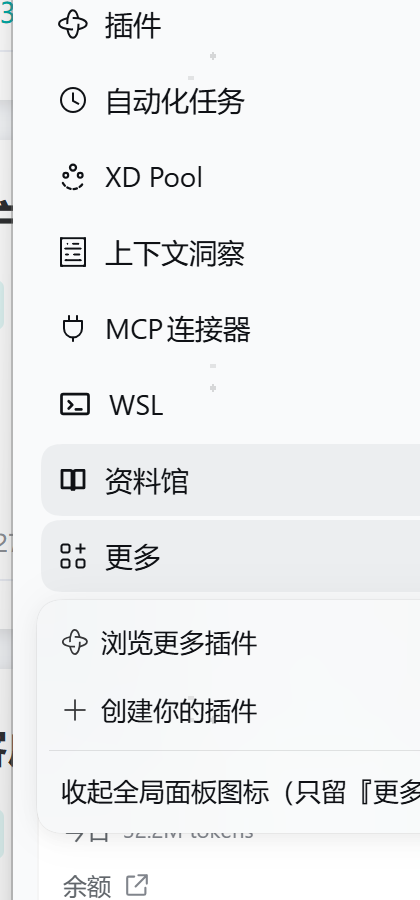
This plugin folds those rows into the single More button that already sits at the bottom of that block. Panels stay one click away; the list above your sessions does not.
| Before | After |
|---|---|
 |
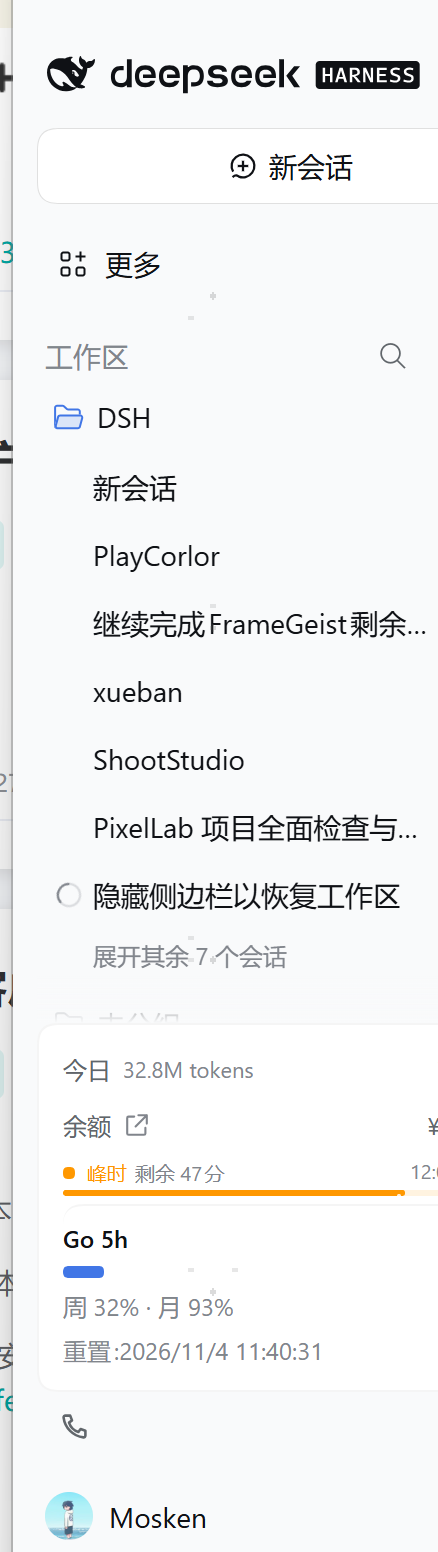 |
Both screenshots are of the same window with the same plugins enabled — the only difference is the fold.
Verified on DSH
0.2.1-rc.2(desktop profile, Windows). The fold survivesCtrl+R, and folded-vs-expanded round-trips in place without a reload.
What you get
- One row instead of eight. The panel block collapses to
⋯ More. The workspace list directly below gains roughly7 × 36pxof height. - Nothing becomes unreachable. Every panel is still in the More menu, and opening one behaves exactly as before (
selectPanel, current selection preserved).pluginsis untouched by design — it is the row ui-sidebar itself refuses to unpin. - A one-line toggle. The last row of the More menu is
Show global panel icons/Fold global panel icons into More. Click it and the rows come straight back, no reload, no restart. - The choice sticks. Stored in
localStorageunderdsh-panel-fold:mode(collapsed|expanded), so it survives refresh, restart, and plugin reload. - Folded by default. Installing the plugin is the opt-in.
Install
Not on npm yet — install straight from GitHub:
dsh plugin --profile <your-profile> add github:meihuaanying/dsh-panel-fold
Or from a local checkout:
dsh plugin --profile <your-profile> add /path/to/dsh-panel-fold
Then reload the web client. The fold applies immediately; the toggle appears under the sidebar's More menu.
Already installed an older copy under a different name? Remove it first (
dsh plugin --profile <p> remove <old-name>) so the profile does not keep a dangling link to a renamed folder.
How it works
No patching of ui-sidebar, and no dependency on its hashed CSS class names (those change between releases):
The web client half watches the DOM with a
MutationObserverand marks the panel-list<nav>— matched first by itsaria-label(全局面板/Global panels, i.e. ui-sidebar'st("panels.label")), falling back to the structural signal "a<nav>that contains abutton[aria-haspopup="menu"]and at least two direct child buttons".One CSS rule hangs off a class on
<html>:html.dsh-panel-fold-collapsed nav[data-dsh-panel-fold-nav] > *:not(:last-child) { display: none !important; }The last child of that
<nav>is the More button, so only it remains.The toggle row registers into the
sidebar.panellist.actionsslot, which ui-sidebar renders inside the More menu.
Why not the built-in unpin mechanism?
ui-sidebar does have a "pin / unpin panel" mechanism (setPinned), and unpinning a panel removes its row while keeping it in the More menu. But setPinned is only reachable through the sidebar.panellist.actions owner props, and that slot only mounts while the More menu is open — there is no way to apply a pin state at startup. The CSS route needs no such hook, and it is what lets the plugin honour a persisted preference on first paint.
Reversibility
Temporary: sidebar
More→Show global panel icons. Instant.Permanent: disable or uninstall
dsh-panel-fold. The<style>tag and the<html>class go with it, leaving the sidebar exactly as shipped.Disable without uninstalling: append to your user patch layer:
- id: dsh-panel-fold
  disabled: true
Files
| File | Purpose |
|---|---|
lib/client.js |
The whole feature: style injection, <nav> marking, More-menu toggle row |
lib/index.js |
Host-side stub, exists only to carry the bundle patch row |
cordis.patch.yml |
Bundle patch inserting the dsh-panel-fold row |
test/manifest.test.mjs |
Checks the manifest, patch, and client entry agree |
Related work
Two other plugins touch the same block. Both are stable, MIT, and worth a look if you want more than a fold:
ACGsu/dsh-sidebar-panel-fold— the closest neighbour. It adds its own "collapse panels" row above the list; collapsing turns the whole block into a single summary row (active panel icon + name) that opens a popover listing every panel, and the state persists through DSH's host settings channel rather thanlocalStorage. If you would rather have a dedicated summary row with the active panel's name on it, use that one.LoktLin/dsh-sidebar-tidy— a much broader take: it hides the brand row, the new-session button, the panel block and the footer settings behind one "exit minimal mode" button, and adds workspace colour blocks. If you want the whole sidebar stripped down, use that.
dsh-panel-fold deliberately takes the smallest possible slice: it adds no new row — it reuses the More button ui-sidebar already renders at the bottom of the block — it changes nothing else in the sidebar, and it keeps the client half under 7 KB with no host-side code at all.
License
MIT
中文
把左侧栏那排「全局面板」图标收进『更多』,把纵向空间还给工作区和会话列表。
DSH 左侧栏顶部有一块固定的「全局面板」入口区 —— 插件、自动化任务、XD Pool、上下文洞察、MCP 连接器、WSL、资料馆……每装一个会注册面板的插件,这里就多一行 36px。装上几个插件后,这块自己能占七八行,下面的工作区 / 会话列表被挤成窄窄一条。
这个插件把那一排收进块底本来就有的 『更多』 按钮里。面板仍然一键可达,你的会话列表回来了。
你会得到
- 一行代替八行。 面板块收成一个
⋯ 更多,下面的工作区列表多出约7 × 36px。 - 没有任何东西变得不可达。 所有面板都在『更多』菜单里,点开行为完全不变(
selectPanel,当前选中项保留)。plugins一行按设计不动 —— ui-sidebar 自己就不允许取消固定它。 - 一行开关。 『更多』菜单最后一行是「显示全局面板图标 / 收起全局面板图标(只留『更多』)」,点一下立刻来回切,不用刷新、不用重启。
- 选择会被记住。 存在
localStorage的dsh-panel-fold:mode(collapsed|expanded),刷新、重启、插件重载都保持。 - 默认折叠。 装上它本身就是你的选择。
安装
还没上 npm,直接从 GitHub 装:
dsh plugin --profile <你的 profile> add github:meihuaanying/dsh-panel-fold
本地目录安装:
dsh plugin --profile <你的 profile> add /path/to/dsh-panel-fold
然后刷新 web 客户端。折叠立即生效,开关在侧栏『更多』菜单里。
之前装过改名前的老版本?先
dsh plugin --profile <p> remove <旧包名>,否则 profile 会留下指向已改名目录的断链。
实现方式
不改 ui-sidebar 一行代码,也不依赖它的哈希类名(那些版本间会变):
web 端用
MutationObserver找到面板列表<nav>并打标记 —— 优先按aria-label精确匹配(全局面板/Global panels,即 ui-sidebar 的t("panels.label")),文案若变化则退回结构判据「<nav>里含button[aria-haspopup="menu"]且至少有两个直接子按钮」。一条 CSS 规则挂在
<html>的类上:html.dsh-panel-fold-collapsed nav[data-dsh-panel-fold-nav] > *:not(:last-child) { display: none !important; }那个
<nav>的最后一个子元素就是『更多』按钮,所以只剩它。开关行注册进
sidebar.panellist.actions槽,ui-sidebar 会把它渲染在『更多』菜单里。
为什么不用内置的「取消固定」?
ui-sidebar 确实有「固定 / 取消固定面板」机制(setPinned),取消固定后面板行会从边栏消失、但仍留在『更多』菜单里。但 setPinned 只能通过 sidebar.panellist.actions 的 owner props 拿到,而那个槽只在『更多』菜单展开时挂载 —— 启动时没有任何钩子能应用一个固定状态。CSS 路线不需要这个钩子,这也是它能首帧就兑现已保存偏好的原因。
恢复
临时:侧栏『更多』→「显示全局面板图标」。立刻生效。
彻底:停用或卸载
dsh-panel-fold。<style>标签和<html>上的类一起消失,侧边栏回到出厂样子。只停用不卸载:在自己补丁层追加
- id: dsh-panel-fold
  disabled: true
与类似项目的关系
还有两个插件动的是同一块,都是 MIT、都在维护,想多要一点就看它们:
ACGsu/dsh-sidebar-panel-fold—— 最接近的一个。 它在面板列表上方自己加一行「收起面板」;收起后整块变成一行摘要(当前面板图标 + 名字),点这一行弹浮层列出全部面板;状态存在 DSH 的 Host 设置通道里而不是localStorage。你想要「一行摘要 + 当前面板名」那种形态,用那个。LoktLin/dsh-sidebar-tidy—— 更激进:把品牌行、新会话按钮、面板块、底部设置全部收进一个「退出极简」按钮,还给工作区加彩色缩写块。你要的是「整个侧栏极简」,用那个。
dsh-panel-fold 刻意只切最小的那一块:不新增任何一行(复用 ui-sidebar 本来就在块底渲染的『更多』按钮),侧栏其它地方一律不动,客户端半边不到 7 KB、完全没有 Host 侧代码。
许可
MIT
No comments yet. Be the first to write one.