READMESource: main@3ecbeaee
dsh-spotlight
English | Português (Brasil) | 中文
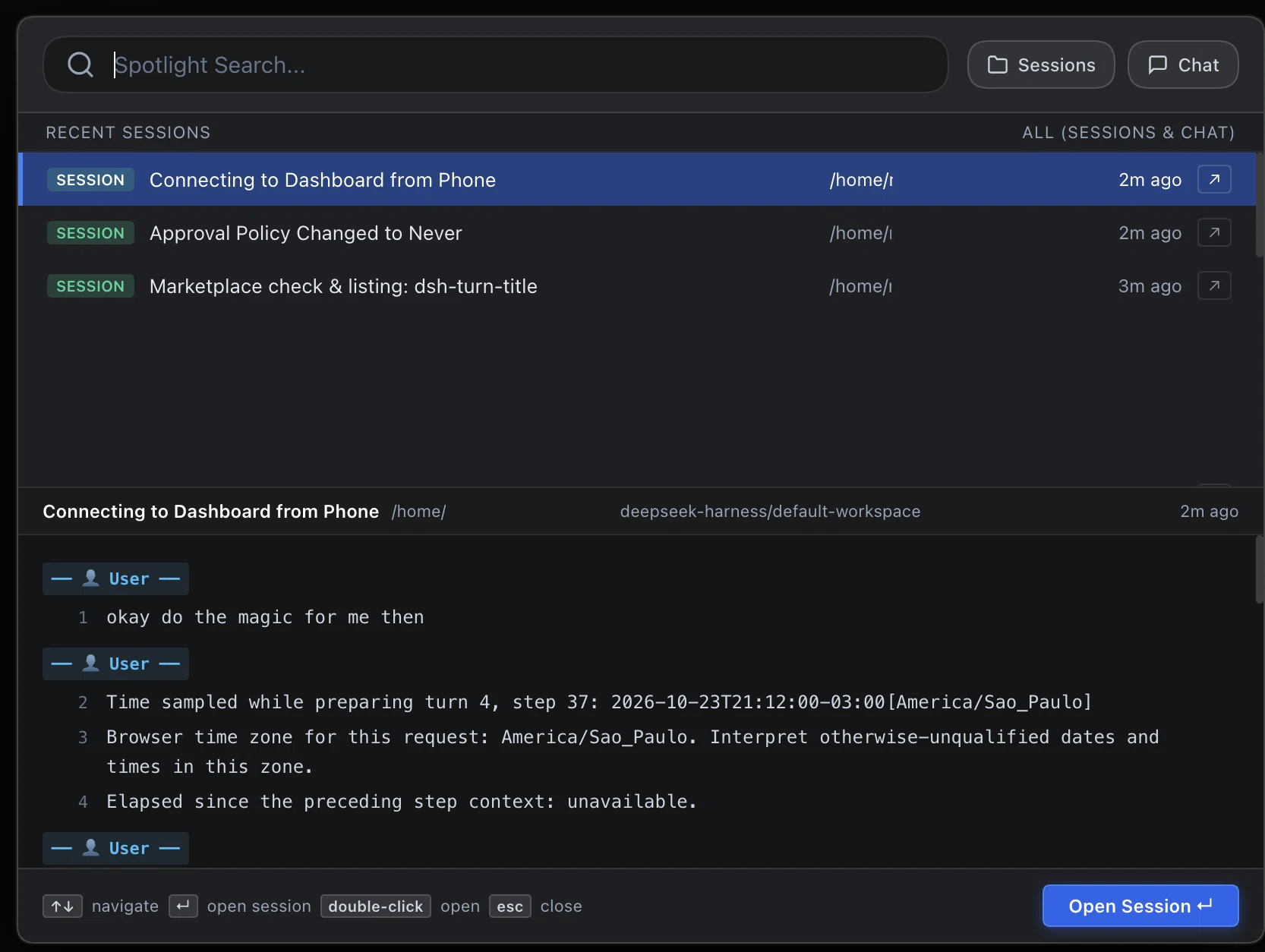
A DeepSeek Harness (DSH) plugin that replaces the sidebar search with an Apple Spotlight and IntelliJ/PyCharm-style centered search dialog for sessions and chat messages.
Features
- Apple Spotlight Centered Modal: Triggered by clicking the search magnifying glass in the sidebar or via
Cmd+K/Ctrl+K. Opens an elegant, centered search dialog over the application. - Filter Selector: Seamlessly switch between searching Sessions, Chat messages, or both at the same time (default).
- IntelliJ / PyCharm "Find in Path" Layout:
- Top Pane (Search Results): Displays matching sessions and chat message excerpts with query term highlights, relative timestamps, and directory tags.
- Bottom Pane (Live Context Preview): Shows live, line-numbered dialogue context (user & assistant turns) with highlighted search hits.
- Keyboard Navigation & Quick Actions:
↑/↓to navigate search results.Enteror double-click to immediately open the selected session.- Quick open button (
↗) on each result item. Escto close.
- Immediate Live Search & SQLite FTS: Searches active live session inboxes in real-time, backed by SQLite FTS for persistent conversation history.
- Theme-Native: Uses DSH
--dsw-alias-*theme tokens to match light and dark modes seamlessly.
Installation
Via DSH Plugin Market (dshmarket)
Search for dsh-spotlight in the DSH Plugin Marketplace and click Install.
Via DSH CLI
dsh plugin --profile web add dsh-spotlight
From Local Source
git clone https://github.com/mdalboni/dsh-spotlight.git
dsh plugin --profile web add link:./dsh-spotlight
Testing
Run the unit test suite using Node.js built-in test runner:
node --test test/index.test.js
License
MIT © Maxwell Dalboni
No comments yet. Be the first to write one.