dsh-codex-hooks
Codex's hook management, ported to DeepSeek Harness (dsh).
Codex gives every hook a review step, a fingerprint you approve once, a settings page, a /hooks browser and a stats panel. dsh ships none of that: it exposes interception seams and nothing around them. This plugin ports that management layer over, so hooks on dsh are reviewed, trusted, switched off and inspected the same way they are in Codex.
The config file is dsh's own (hooks.json with dsh event names) — what is ported is the behaviour around it, not Codex's file format.
中文文档:README.zh.md
Screenshots
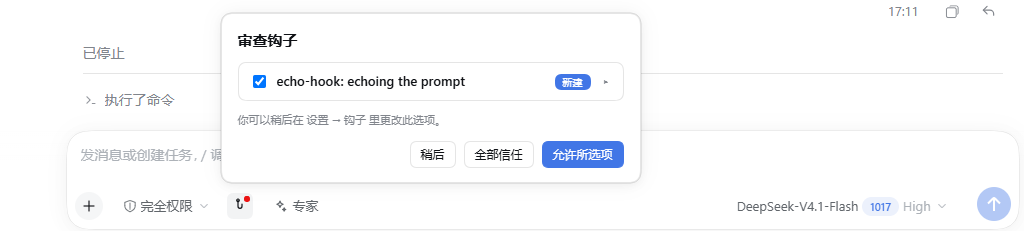
Review happens where the work happens — a hook button in the composer, a red dot while something is unapproved:

Clicking it opens the review dialog: one row per hook, a New badge, a chevron for the details, and Not now / Allow all / Allow selected:
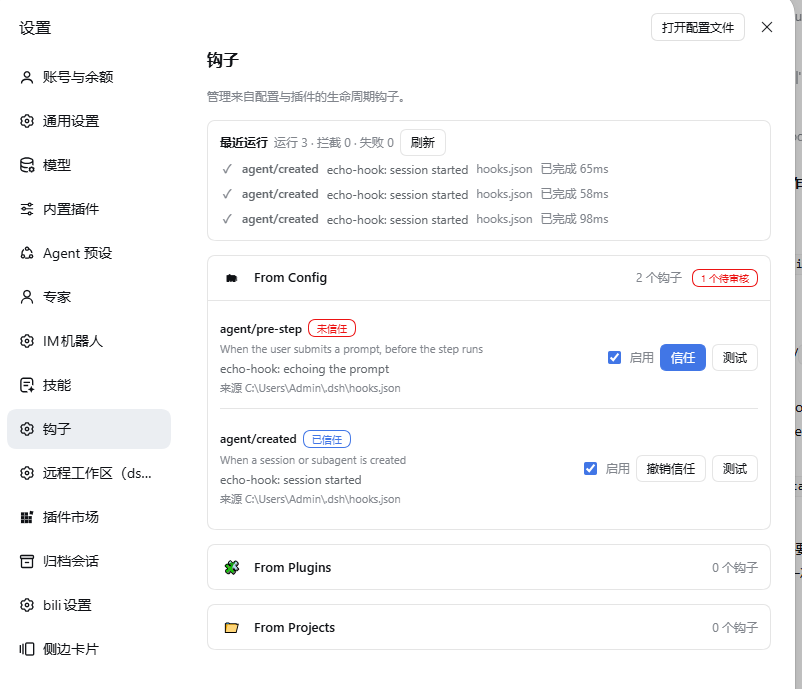
Everything else is managed in Settings → Hooks: hooks grouped by where they came from, each with its trust state, an on/off switch, Trust / Revoke and a dry-run Test:
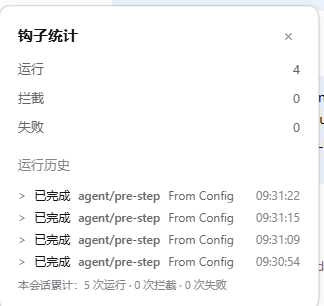
Per-run detail lives behind the message action row. The Hook stats dialog reads one turn, names it, and lists that turn's runs with the session totals underneath — no turn picker, it answers for the message you opened it from. Turns are numbered from the agent's counter, which starts over when the host restarts, so a turn that cannot be found by number is matched by how far back from the newest turn it sits; a turn further back than the log goes answers with 0 rather than borrowing another turn's numbers:
The screenshots come from a local dsh install running the two echo-hook entries in ~/.dsh/hooks.json — the same config the examples in this repo use.
Compatibility
| Plugin | Verified against |
|---|---|
| 0.5.x | dsh 0.1.0-rc.6 (development and self-test host, web + desktop) |
Newer dsh releases are untested: the plugin reads dsh's slot, command and remote-method contracts, and a host that renames one of those breaks it until it is updated.
The client half binds to four dsh client packages — @deepseek-ai/dsh-client-locale, @deepseek-ai/dsh-client-ui-settings, @deepseek-ai/dsh-client-ui-commands and @deepseek-ai/dsh-client-ui-chat. The first three ship with the profile; dsh-client-ui-chat is what provides the conversation.chat.turnTail slot the "open the stats of the message you clicked" feature needs, and on some installs it only exists inside the app's own node_modules. If the message-level hook button shows no turn, that package was the missing piece.
What it actually does
- Discovers
hooks.jsonfrom three places, grouped in the UI:- From Config —
$DSH_HOME/hooks.json(default~/.dsh/hooks.json). - From Plugins — every package inside the active profile that ships a
hooks.json. - From Projects —
<workspace>/.dsh/hooks.jsonfor the workspaces this session has touched (up to 32 remembered).
- From Config —
- Fingerprints each hook: normalized JSON of the hook definition,
sha256:over its UTF-8 bytes. The fingerprint is what the trust decision is pinned to, so editing a hook's command invalidates its trust instead of silently running new code. - Reviews trust per hook in the settings page: new hooks start in needs review; you approve the current fingerprint, and the state lives in
$DSH_HOME/hooks.state.jsontogether with an independent enabled/disabled switch per hook. - Runs
commandhandlers only when they are enabled and trusted, with the hook's own timeout,cwd, environment andcommand/commandWindowssplit. Anapproval/requesthook may answer{"decision":"allow"}to auto-approve the pending tool call, ordeny; a deny from any hook wins over an allow. - Injects context: a handler's
additionalContextis appended to the model input onagent/pre-step,tools/pre-execute,tools/post-executeandagent/created(2500 characters by default). - Matches the tool seams (
tools/pre-execute,tools/post-execute,approval/request) with*, exact names,Name|Otheror a regular expression.
Events
| Event | Fires | Can block |
|---|---|---|
agent/pre-step |
a prompt was submitted, before the step runs | yes |
agent/request |
before the model request is sent | no |
tools/pre-execute |
before a tool call runs | yes |
tools/post-execute |
after a tool call finished | yes |
approval/request |
before a tool call asks for permission | yes |
agent/created |
a session starts | no |
agent/turn-stopping |
right before the turn ends | no |
session/disposed |
the session is disposed | no |
Default timeout is 600s, except session/disposed (1s default, 3s maximum) so shutdown cannot hang.
Review, run history and /hooks
- Hook button in the composer — a hook icon sits in the composer's tool row (next to the permission and agent controls), with a small red dot while hooks still need review (no number — a count goes stale as soon as a hook is trusted elsewhere); clicking it opens the Review hooks dialog: one row per hook with a checkbox, the hook name, a New badge and a chevron that expands Source / Hook type / Command / Timeout, then the hint "You can change this later in Settings, under Hooks" (plain text: dsh exposes no API for a plugin to open a settings section, so it does not pretend to jump) and the three choices Not now / Allow all / Allow selected. Approving pins the current fingerprints in
$DSH_HOME/hooks.state.json; everything else is handled later in Settings → Hooks, one hook at a time. /hooksopens the hooks browser — the first page lists the events withactive/installedand a!marker on the events that need review, the second page lists the handlers of one event with their trust state, an on/off switch and a Trust / Revoke button. It is a normal dsh slash command (registered when the host composes thecommandsservice), so it never reaches the model.- Hook stats in the message action row — the assistant message action row carries a hook icon; clicking it opens a Hook stats dialog. Like Codex, every run belongs to the turn that triggered it, so the dialog reads one turn at a time (
Runs / Blocked / Failed, plusRunningwhile a slow hook works) and names that turn, with the session totals underneath. There is no turn picker: the dialog answers for the message you opened it from. The Run history list shows that turn's executions (Completed agent/pre-step User); the dialog refreshes every 1.5s while it is open. Hook output is not printed into the conversation; the model only ever sees a handler'sadditionalContext. The run log lives in memory for the session and is not written to disk — a reload starts empty, exactly like Codex, whoseHookStarted/HookCompletednotifications are transient too./hookskeeps the session-wide view. Clicking a message opens that message's turn, not whatever turn is current: a companion renderer onconversation.chat.turnTail— which does receive the wholeTurnLocation, and renders before the action row of the same turn — records which turn each message ends, and the dialog opens on it, falling back to the current turn for a message it has never seen. One deliberate difference from Codex:agent/pre-stepfires before every step of the agent loop ({ turn, step }), not once per submitted prompt, so anagent/pre-stephook runs once per model call inside a turn — that is why a single turn can show several runs. - Dry run — Test in the settings page runs one hook once with sample input and reports ok / blocked / failed plus the duration. It refuses to run a hook that has not been approved.
- Floating panels — every panel is rendered through a portal on
document.bodywith a fixed position, so it is never clipped by the composer or the message column.
Auto-approving a tool call
An approval/request hook can decide the pending approval itself:
{
  "hooks": {
    "approval/request": [{ "command": "node examples/approval-allow.mjs", "timeout": 10 }]
  }
}
The hook prints {"decision":"allow"} to approve that one call, {"decision":"deny","reason":"…"}
to refuse it, or nothing at all to let the normal prompt ask. A deny from any hook wins over an
allow from another. examples/approval-allow.mjs only allows the tool named in
APPROVAL_ALLOW_TOOL, because a hook that approves everything silently removes the prompt.
Install
Requires dsh 0.1.0-rc.6 or newer and Node 20+.
# from GitHub
dsh plugin --profile desktop add github:matata2017/dsh-codex-hooks

# or from a local checkout, which is how this project is developed
dsh plugin --profile desktop add /path/to/dsh-codex-hooks
Restart the dsh web/desktop host afterwards, then open Settings → Hooks.
Configure
~/.dsh/hooks.json:
{
  "version": 1,
  "description": "my hooks",
  "hooks": {
    "agent/created": [
      {
        "command": "node ./examples/echo-hook.mjs agent/created",
        "commandWindows": "node.exe ./examples/echo-hook.mjs agent/created",
        "timeout": 15,
        "statusMessage": "echo-hook: session started"
      }
    ],
    "tools/pre-execute": [
      {
        "matcher": "Bash",
        "command": "node ./examples/echo-hook.mjs"
      }
    ]
  }
}
One object per hook: command (or type: "mcp_tool" with server + tool), optional matcher, timeout, statusMessage, additionalContextLimit, async.
Handler types: command is the only one executed. mcp_tool, prompt and agent are parsed and reviewable but not dispatched — they show up as installed, never as active, because a hook that silently does nothing is worse than one that says so.
Verification status
node test/run-tests.mjs→ 97 passed, 0 failed, 0 skipped.node selftest/host-e2e.mjs→ 18 passed, 0 failed against a real profile.agent/pre-stepruns in a live dsh session once the hook is trusted: the example hook prints oneecho-hook received event=…line per agent step (it fires before every step, so one prompt can produce several lines). A hook stays untrusted until you approve it in the review dialog or in Settings → Hooks; an untrusted hook never runs.
What a hook cannot do here
These are dsh boundaries, not missing code: they need a seam the harness does not expose. Codex has these; dsh does not, so the port stops here.
- Context is user-role only.
agent/pre-steptakesUserMessage[], and no public API appends a developer message, soadditionalContextcannot arrive with the extra weight a developer message would carry. - Tool arguments cannot be rewritten.
tools/pre-executereturns allow / deny / ask / cancel; dsh deliberately excludes input rewriting because arguments are already logged and presented. - No seam for compaction, interrupt, or model-request events.
agent/createdwithsource: "compact"is the closest thing to a post-compaction hook. mcp_tool,prompt,agenthandlers are reviewable but not executed, so they never show as active.
Security
Hooks execute real commands with the permissions of the dsh process. That is why trust is pinned to the sha256 fingerprint of each hook: approving a hook approves exactly that command line, and any edit requires a new approval. Only enable hooks you have read.
License
MIT
No comments yet. Be the first to write one.