dsh-session-batch-manager — batch session manager and session dashboard for DeepSeek Harness
English | 中文


0 Overview
Batch session management for DeepSeek Harness (DSH): multi-select sessions in the sidebar and batch archive / unarchive / delete, plus a full-screen Session management dashboard that visualizes model, token usage, cache read/write, and context pressure for every local session.
The DSH GUI natively offers per-session archiving only — there is no delete entry at all. This plugin fills the gap:
- a per-row checkbox revealed by the Batch toggle at the bottom of the sidebar (selection survives leaving the mode and is cleared automatically when a batch operation completes);
- a floating toolbar with select-all / clear / archive / delete, stop-and-archive retry for sessions with running work, and a physical delete pipeline (host route + confirmation dialog + immediate row removal in every connected GUI);
- a Session management panel: a 6-column table (model, 4-bucket token usage, cache read/write, context-pressure progress bar), 4 filter views, in-panel batch operations, progressive loading and 5-second polling.
Verified with DSH 0.2.2-alpha.2 (Web UI, dev sandbox); see 6 Compatibility.
1 Demo
| # | Screenshot | Description |
|---|---|---|
| 1 | 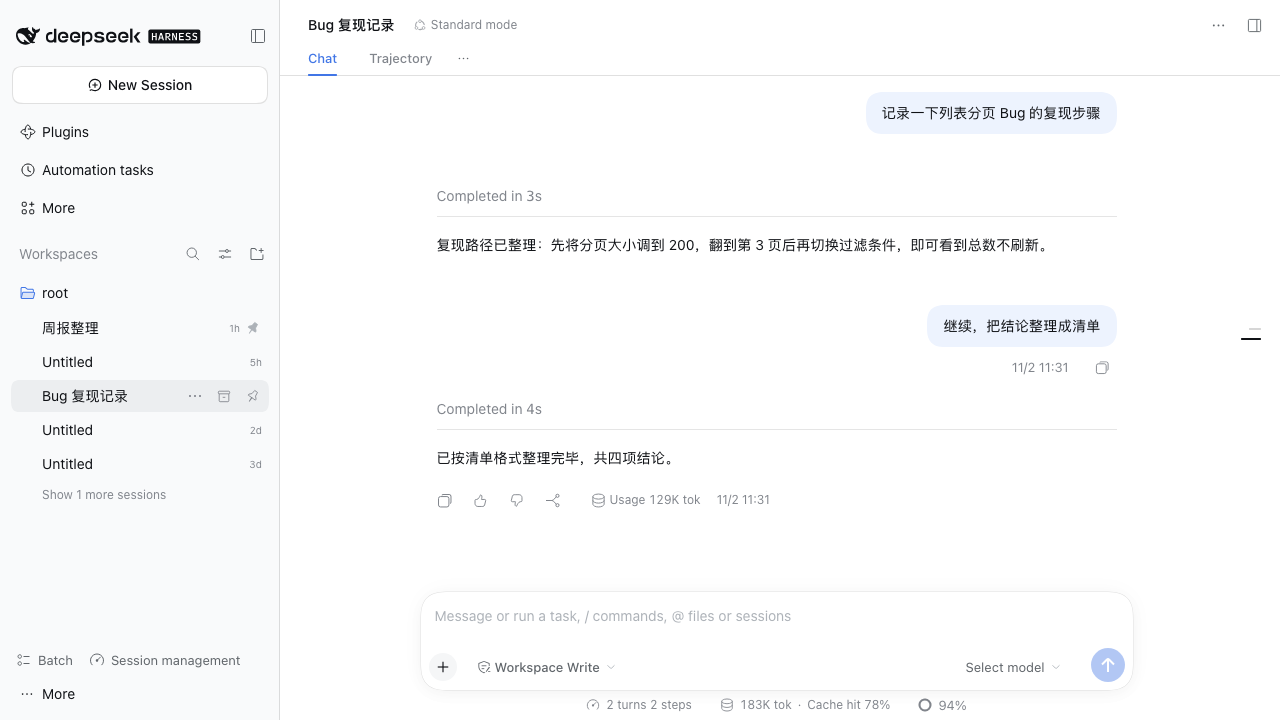 |
Sidebar Batch mode: checkboxes appear, rows can be multi-selected, floating toolbar at the bottom. |
| 2 | 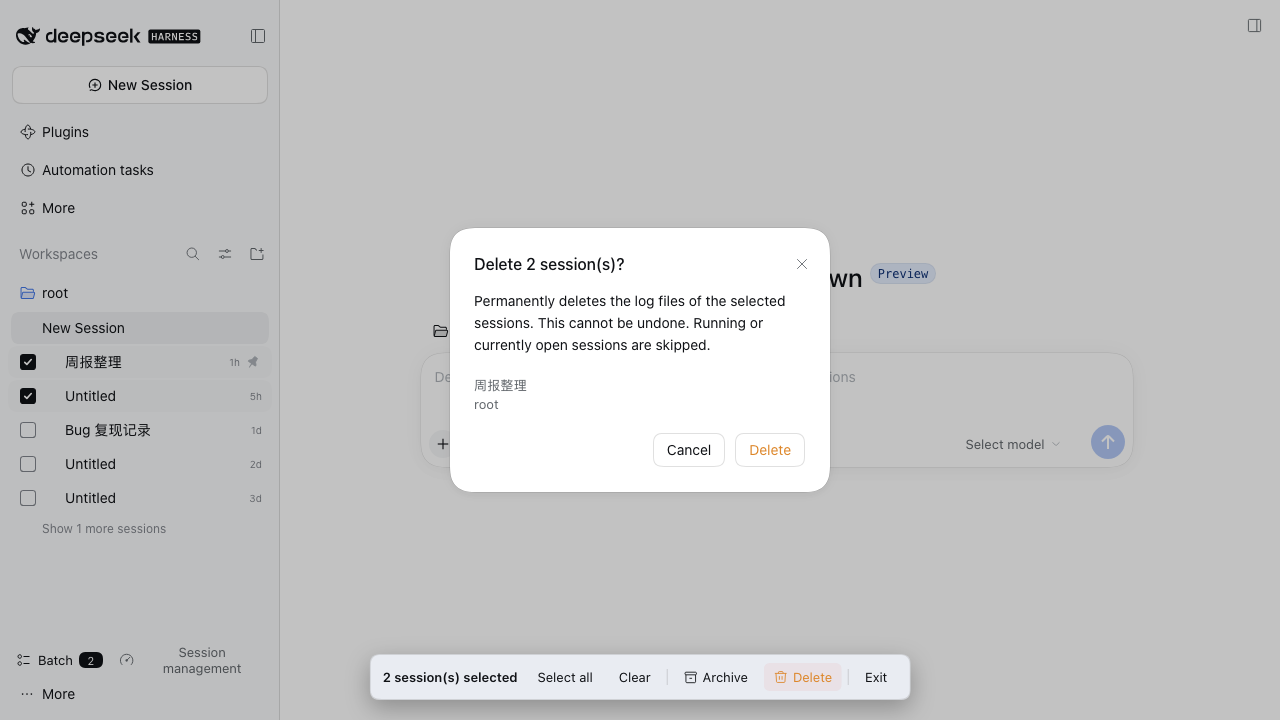 |
Delete confirmation dialog lists the selected sessions before physical deletion. |
| 3 | 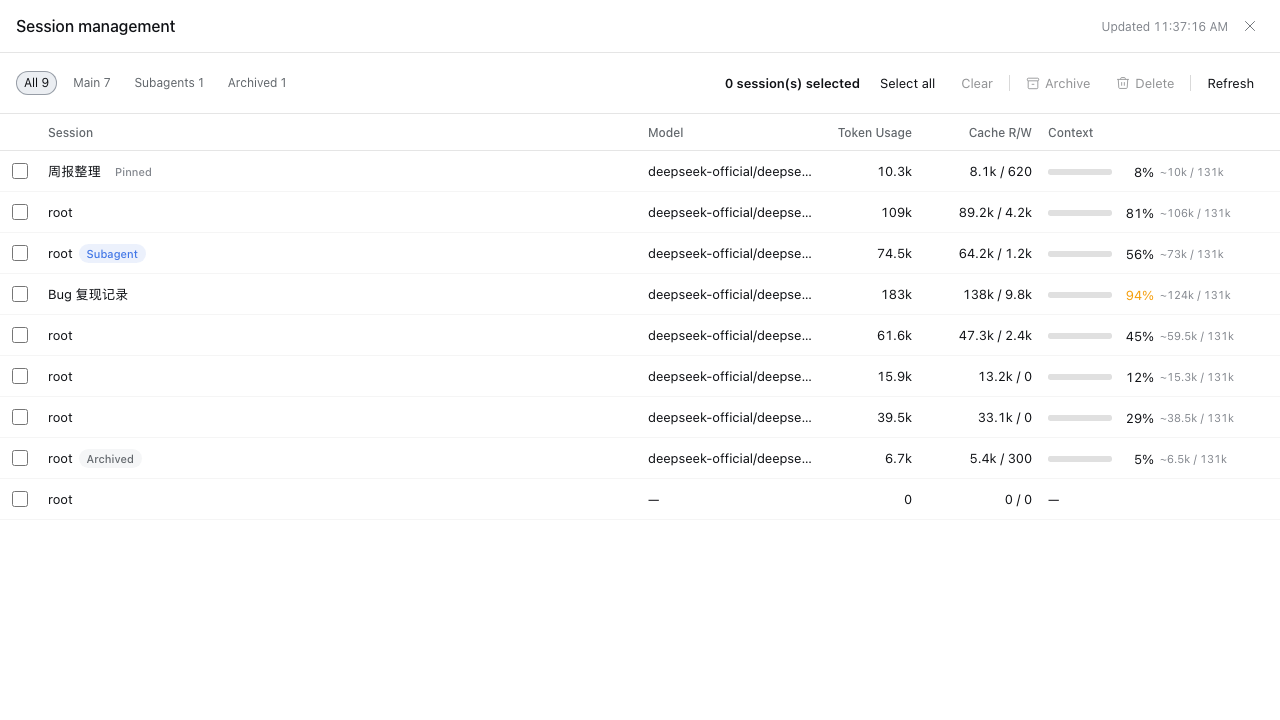 |
Full-screen Session management panel: 6-column table (model, token usage, cache, context pressure), progressive loading, in-panel batch operations. |
| 4 | 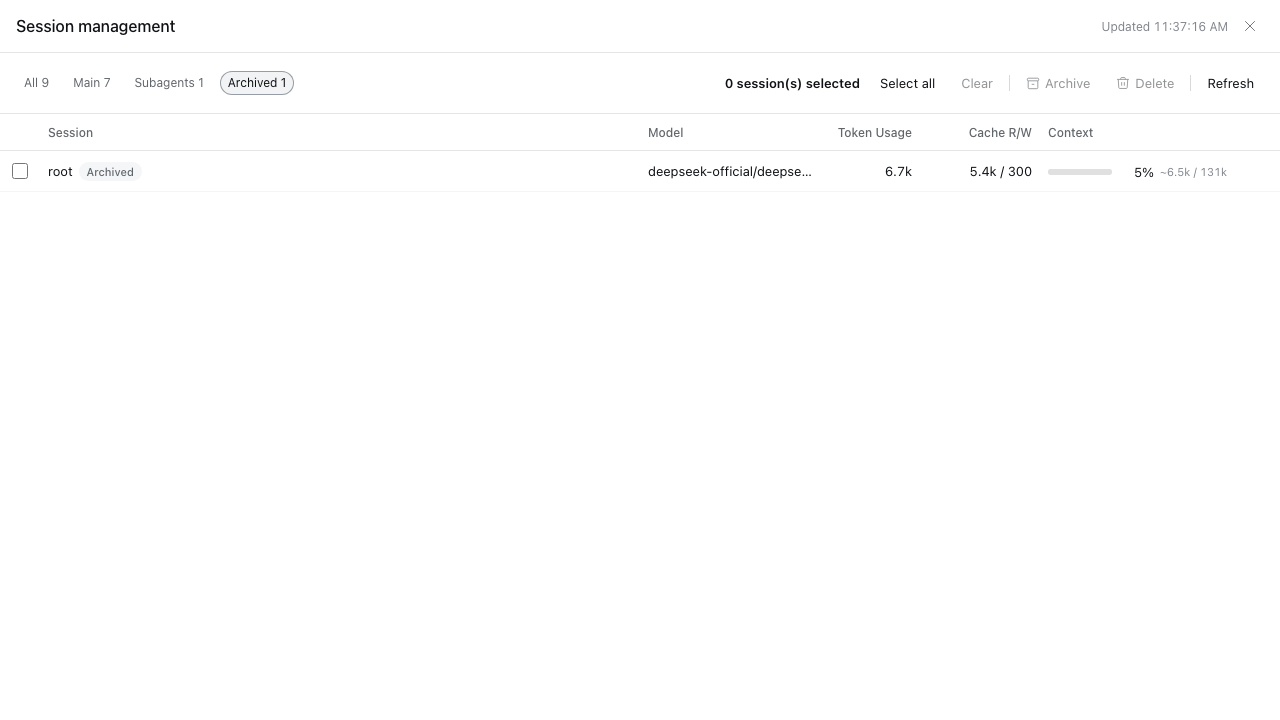 |
Four filter chips (All / Main / Subagents / Archived) with live counts — click to filter the table. |
| 5 | 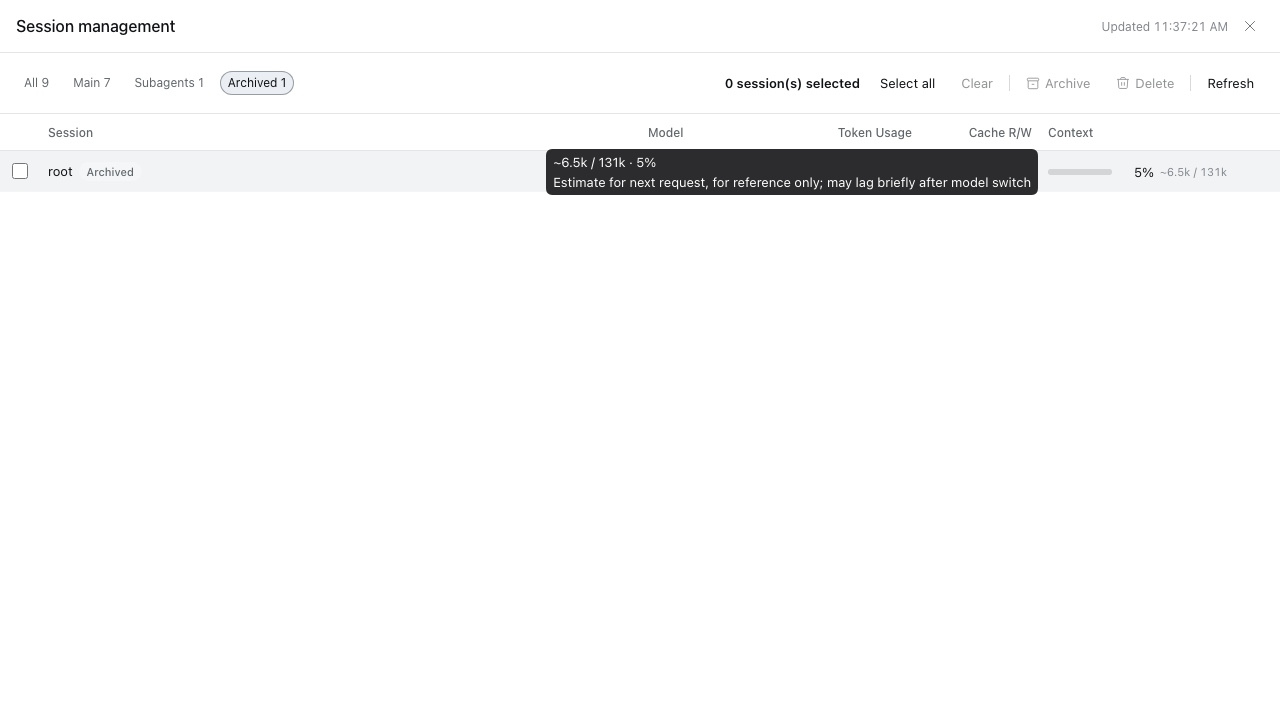 |
Per-bucket tooltip on token usage cells showing uncached input, cache read/write, and output breakdown. |
2 Features
2.1 Sidebar batch management
- Selection mode: the Batch toggle at the bottom of the sidebar. Checkboxes are hidden by default and appear only in selection mode. While it is on, clicking anywhere on a row toggles its selection (opening, double-click rename, drag-sorting and Enter/Space are taken over). The selection survives leaving the mode — highlighted rows and the toolbar count stay; any batch operation (archive / unarchive / delete) clears it when it completes, and Clear clears it manually.
- Floating toolbar (bottom of the sidebar): appears whenever at least one session is selected, not only in selection mode. Shows the selected count, Select all, Clear, Archive (switches to Unarchive when every selected session is already archived), Delete (confirmation first) and Exit (selection mode only).
- Stop-and-archive retry: when batch archiving meets sessions with running work, they are reported separately and the result notice offers a one-click Stop and archive N running sessions retry — the same upgrade path as the native DSH archive dialog.
- Batch delete: the confirmation dialog lists the target sessions → the host route physically deletes their JSONL log directories →
api-session/removedis broadcast, so every connected GUI drops the rows immediately. Deleted rows are additionally hidden by client-side tombstones (see 5 Safety and behavior). - Context-menu entry (optional contribution): Batch select sessions appears automatically on DSH builds that ship a context-menu service; on 0.2.2-alpha.2 (which lacks it) the entry is silently absent and nothing else is affected.
2.2 Session management dashboard
A gauge-icon button at the bottom of the sidebar opens a full-screen, read-only Session management panel that scans every local session:
- 6-column table: checkbox / session (title + running / subagent / archived / pinned badges) / model (
provider/model) / token usage (4-bucket total, per-bucket tooltip) / cache read · write / context pressure percentage (progress bar, warning color at ≥ 90%). - 4 filter chips: All / Main / Subagents / Archived with live counts. Switching a filter clears the panel's selection set (independent from the sidebar's).
- In-panel batch operations: archive / unarchive / delete reuse the same core pipeline as the sidebar, with their own selection.
- Progressive loading: the first sweep is O(all logs) — skeleton rows first, then rows appended newest → oldest while the pending count decreases and a thin progress bar advances. Afterwards only sessions whose revision changed are replayed. The stats route responds immediately (fire-and-forget sweep) instead of blocking.
- 5-second polling while the panel is open, paused when the tab is hidden (configurable via
statsPollIntervalMs); zero host overhead while the panel is closed. - Per-session error isolation: a corrupt session log shows a warning-icon row (its numeric columns show “—”) instead of breaking the table. When the host's
sessionQueryservice is unavailable, the panel degrades gracefully to list + batch operations.
3 UI entry points
Both entries are buttons at the bottom of the DSH sidebar:
- Batch (checklist icon): toggles selection mode on the sidebar session list.
- Session management (gauge icon): opens / closes the full-screen dashboard panel.
While selection mode is on, the floating toolbar appears at the bottom of the sidebar as soon as at least one row is selected.
4 Installation
The repository ships prebuilt bundles under lib/ (committed), so no build step is required to install.
4.1 Install from GitHub via CLI
dsh plugin --profile web add github:mars401/dsh-session-batch-manager
Restart DSH Web after installation. If the browser still loads an older client bundle, use Ctrl+Shift+R to force-refresh the page.
Verify the installation:
curl -s http://127.0.0.1:<your-dsh-web-port>/dsh-session-batch-manager/v1/status
# {"ok":true,"service":"dsh-session-batch-manager","version":"0.1.0"}
The
desktopprofile is managed by the official Desktop app and is not intended to be modified with the regulardshCLI. Desktop users should install the plugin through Plugins in the app.
4.2 Local development / testing
pnpm install
pnpm typecheck          # tsc --noEmit
pnpm build              # esbuild → lib/host/index.js + lib/client.js
node --test tests/stats.test.mjs
Then install the local checkout the same way, using the repository path instead of the GitHub spec:
dsh plugin --profile web add <path-to-this-repository>
For client-side code, changes reload automatically after saving while HMR is working; otherwise reload the page or restart the client. After changing plugin dependencies, package.json, or bundle configuration, reinstall the plugin or restart the corresponding client.
4.3 Configuration
Optional overrides in the bundle layer (cordis.patch.yml):
| Key | Default | Description |
|---|---|---|
routeBase |
/dsh-session-batch-manager/v1 |
Host route prefix, injected into the page as window.__DSH_SESSION_BATCH_MANAGER__ |
maxBatchSize |
200 |
Max session IDs per delete request |
trustedHosts |
[] |
Additional trusted authorities for the host fence (only needed for non-loopback deployments) |
statsPollIntervalMs |
5000 |
Dashboard polling interval while the panel is open |
statsSweepConcurrency |
4 |
Cold-session observation concurrency |
5 Safety and behavior
Delete is evaluated per session, independently — one failure never affects the others. In order:
- Sessions with running work are refused (
active): in-progress turns, subagents, background tasks, timers — archive them first (archiving may stop tasks). Sessions that are merely mounted in memory but idle are allowed, matching native archive semantics (otherwise GUI-opened sessions could never be deleted before a restart). - Physical deletion: the JSONL log directory is located through the persistence layer (lazily materialized sessions are flushed first); the directory name must equal the encoded session ID and be truly contained in the persistence root (double validation against wrong deletions), then removed recursively.
- Registry accounting (best-effort): live sessions go through an archive-set tombstone — hidden from the active view immediately, while still-open tabs are blocked by the native archived-session gate. Cold sessions are removed from the archive/pinned sets and detached from workspace records.
- Client-side tombstones: successfully deleted IDs are persisted to the browser's
localStorageand filtered from all views (including archived) across refreshes, so ghost rows of deleted live sessions cannot reappear before the host restarts. - Broadcast and idempotence:
api-session/removedis broadcast so GUIs drop rows instantly; already-deleted or ghost targets are reported as success — the desired end state has been reached.
Browser trust fence (mirrors DSH's /api trust model): the delete route only accepts POST requests carrying the plugin-specific x-dsh-session-batch-manager header; the Host must be a loopback spelling, the bound address, or listed in trustedHosts; Sec-Fetch-Site: cross-site is a hard veto; the Origin must match; OPTIONS always answers 403 and no CORS headers are ever sent — a malicious web page cannot trigger a cross-site delete (the custom header forces a preflight, which is rejected). The stats route is read-only, sends cache-control: no-store and no CORS headers, and its payload carries no titles or secrets — only IDs, model names and token counts.
Known boundaries:
- Delete cleans the session log directory and registry accounting only; auxiliary state (KV entries, scheduled tasks, attachment caches) is out of scope for v0.1 — target sessions are already excluded from running state, so leftovers are lazy and harmless.
- Subagent sessions are excluded from the sidebar's Select all (matching the native list) but can be selected and deleted individually.
- Rows in search-result views don't render checkboxes (the host opens no row-action slot there); batch operations target the main list.
- The dashboard's context-percentage is an estimate (
contextPressureis not an atomic observation) and may lag briefly after a model switch; the tooltip states this. - Dashboard tooltips are plain text (the dsh Tooltip primitive supports string labels only); bucket breakdowns are newline-separated key-value pairs.
6 Compatibility
| DeepSeek Harness (DSH) | dsh-session-batch-manager | Verified environment |
|---|---|---|
| v0.2.2-alpha.2 | 0.1.0 |
Web UI (dev sandbox) |
The combination above has been tested with the official Web UI. The plugin declares dsh: ">=0.2.2-alpha.2" in engines. The Desktop App (0.2.1-rc.3) has not been verified; other version combinations may work but have not been individually verified.
On DSH builds without a context-menu service (0.2.2-alpha.2 included), the context-menu entry is silently absent — see 2.1.
This is a Cordis plugin with zero runtime dependencies: the host half is a plain ESM bundle, the client half is loaded through the DSH module loader.
7 Development
lib/host/index.jsis the host-side ESM plugin (delete route, stats route, index-inject config publication);lib/client.jsis the client UI bundle. Both are committed so the repository installs without a build step; rebuild withpnpm buildafter source changes.- Quality gates before submitting changes:
pnpm typecheck,pnpm build,node --test tests/stats.test.mjs. - Source layout:
src/host/(host half: routes, stats aggregator, trust fence, structured types),src/client/(browser half: batch ops, stores, dashboard panel and components),tests/(host unit tests),docs/(design / UI spec / review / test documents). - Host coupling points — re-check when upgrading DSH: row DOM
div[data-row-key^="session:"]; slotssidebar.workspaces.session.row.action,sidebar.footer.action,shell.overlay; client servicessessions/workspaces/localeplus optionalcontextMenus; host servicessessions/sessionPersistence/workspaceRegistry/webServer; eventswebserver/index-inject,workspace/session-activity,api-session/removed; archive-refusal detection viaerror.name === 'WorkspaceArchiveError'andrpcError.code === 'workspace/session-active'. The full reasoning lives indocs/. - Release history is in CHANGELOG.md.
8 Acknowledgments
- Thanks to the DeepSeek Harness team for the platform and its plugin APIs.
- README structure inspired by dsh-session-manager.
- Thanks to everyone who installs and uses dsh-session-batch-manager, and to the people who file issues and open pull requests to help improve it.
No comments yet. Be the first to write one.