dsh-malko-prefs
Vibe coded. This plugin was written almost entirely by an AI assistant (OpenCode,
deepseek-v4.1-flash) from natural-language prompts, with light human review and testing. It is not a carefully hand-engineered product: read the code before trusting it, expect rough edges, and check what it changes in your dsh profile — in particular it restates your agent presets (see Install). Use at your own risk.
Personal preferences for DeepSeek Harness (dsh): a tunable companion to the official compaction engine, a llama.cpp model enrichment for the Models page, and tab notifications, packaged as a single dsh bundle.
- Compaction — the official
@deepseek-ai/dsh-compaction-basicengine is the reference behaviour; this plugin wraps it with a settings page so the threshold, the retention, the summarization model/reasoning and an optional end-of-turn compaction become user-configurable. It also adds a/force-compactcommand. - Model enrichment — reads the richer model metadata a llama.cpp server
exposes (
meta.n_ctx,architecture.input_modalities,aliases) and fills the correspondingllm-pi-aimodel entries (context window, text/image input). - Notifications — the browser tab icon turns amber while a question/approval
waits for you, blue while a session works, and green when a session finishes
unattended; the browser raises a notification on either event with an optional
sound. Ported from
dsh-notice-center(MIT).
Requirements
- dsh ≥
0.1.7-rc.1— built on the current settings domain (Configfields marked.volatile()on the Host,ctx.configFormson the Client) and onBasicCompactionEngine. - A working
llm-pi-aiprovider (e.g. your llama.cpp server) for the model enrichment.
Install
From the registry (once published):
dsh plugin --profile web add dsh-malko-prefs
# then restart dsh web
Or from a local checkout / tarball:
dsh plugin --profile web add /path/to/dsh-malko-prefs
dsh plugin --profile web add ./dsh-malko-prefs-0.1.0.tgz
The bundle layer does two things (see cordis.patch.yml):
- inserts the Host half: the settings service
malkoPrefsand themalkoModelsprobe Service, whose strict Typert wire definition is contributed through the package./typertexport that@deepseek-ai/dsh-typert-loaderregisters automatically on mount; - restates every shipped agent preset (
preset-cordis,preset-ptc,preset-standard) with the officialcompaction-basicrow retargeted atdsh-malko-prefs/compaction.
This second point is why the file is generated, not hand-written: a patch replaces a row's
configwholesale and the compaction backend lives nested inside the preset, so swapping it means copying the whole preset. Regenerate it after a dsh upgrade that touches the presets:node scripts/gen-preset-override.mjs # auto-detects dsh on PATH node scripts/gen-preset-override.mjs <presets-dir> # or pass it explicitly DSH_PRESETS_DIR=<presets-dir> node scripts/gen-preset-override.mjsThe generated
cordis.patch.ymlis tied to the preset composition of the dsh version it was generated against — the plugin targets whichever dsh ships those presets (declared through its optionalpeerDependencies).
Rollback: dsh plugin --profile web remove dsh-malko-prefs (then restart).
Settings — “Malko's prefs”
Adds a section to Settings, split into three sub-tabs: Context compaction, llama.cpp models, and Notifications. All fields are applied live (no restart).
Context compaction
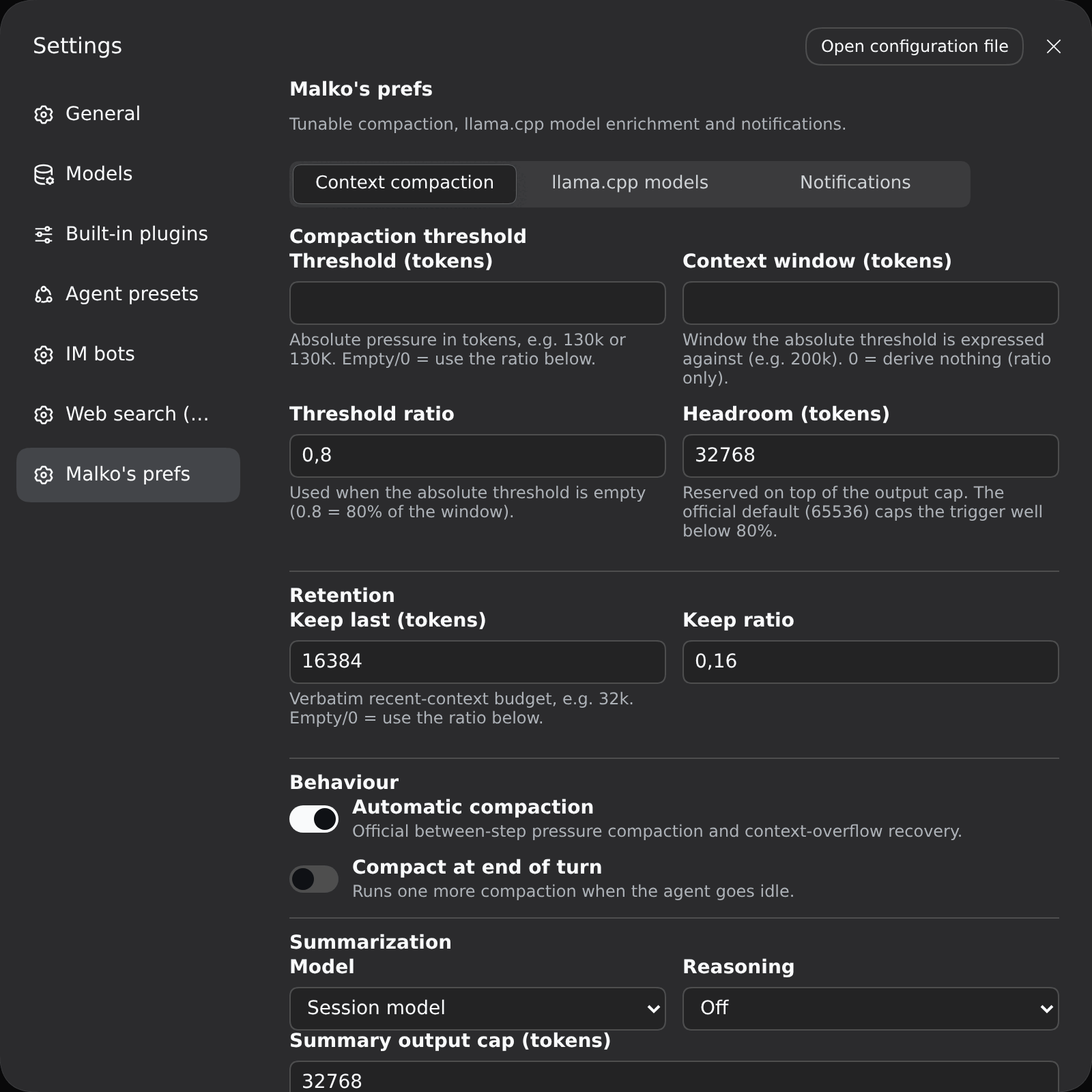
Compaction threshold
| Field | Meaning |
|---|---|
| Threshold (tokens) | Absolute pressure in tokens, e.g. 130k / 130K / 1.5m. Empty/0 = use the ratio below. |
| Context window (tokens) | Window the absolute threshold is expressed against (e.g. 200k). 0 = ratio only. |
| Threshold ratio | Used when the absolute threshold is empty (0.8 = 80% of the window). |
| Headroom (tokens) | Reserved on top of the output cap. The official default (65536) caps the trigger well below 80%. |
Effective trigger: min(window × ratio, window − output − headroom); when an
absolute threshold and a context window are set, it becomes exactly that
threshold. Default: ratio 0.8 + headroom 32768 → compacts around 160k on a
200k window.
Retention
Keep last (tokens) (absolute, e.g. 32k) or Keep ratio — the verbatim
recent-context budget.
Behaviour
- Automatic compaction — the official between-step pressure compaction and context-overflow recovery.
- Compact at end of turn — runs one more compaction when the agent goes idle.
Summarization
- Model —
Session model(default) orCustom model. - Provider / Model — shown when
Custom model; populated from thellm-pi-aicatalog. - Reasoning —
Default,Off, or any level the selected model declares (session mode exposes onlyDefault/Off). The instruction is appended after the replayed prefix, so the provider's prompt cache stays warm.
Advanced
Summary output cap, Extra compaction attempts, Overflow recovery attempts.
llama.cpp models
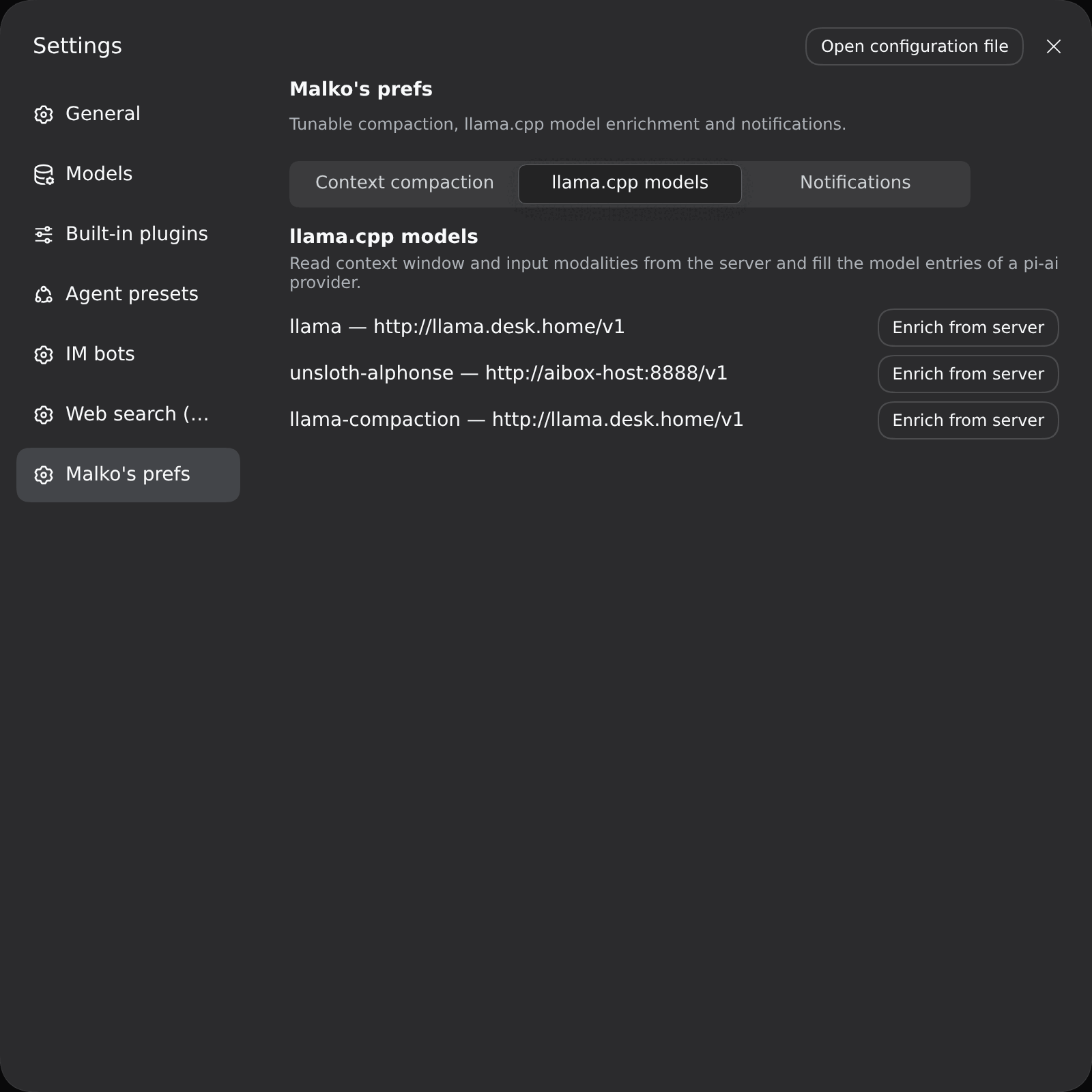
For every llm-pi-ai provider that declares a baseURL, an Enrich from
server button reads GET {baseURL}/models and completes the model entries
(context window from meta.n_ctx/n_ctx_train, input modalities from
architecture.input_modalities). Existing user values are never overwritten;
new providers adopt the whole list.
Notifications
Two independent features, both driven by the official client signals
(sessions, uiSession.sessionStatus); nothing is persisted beyond the config.
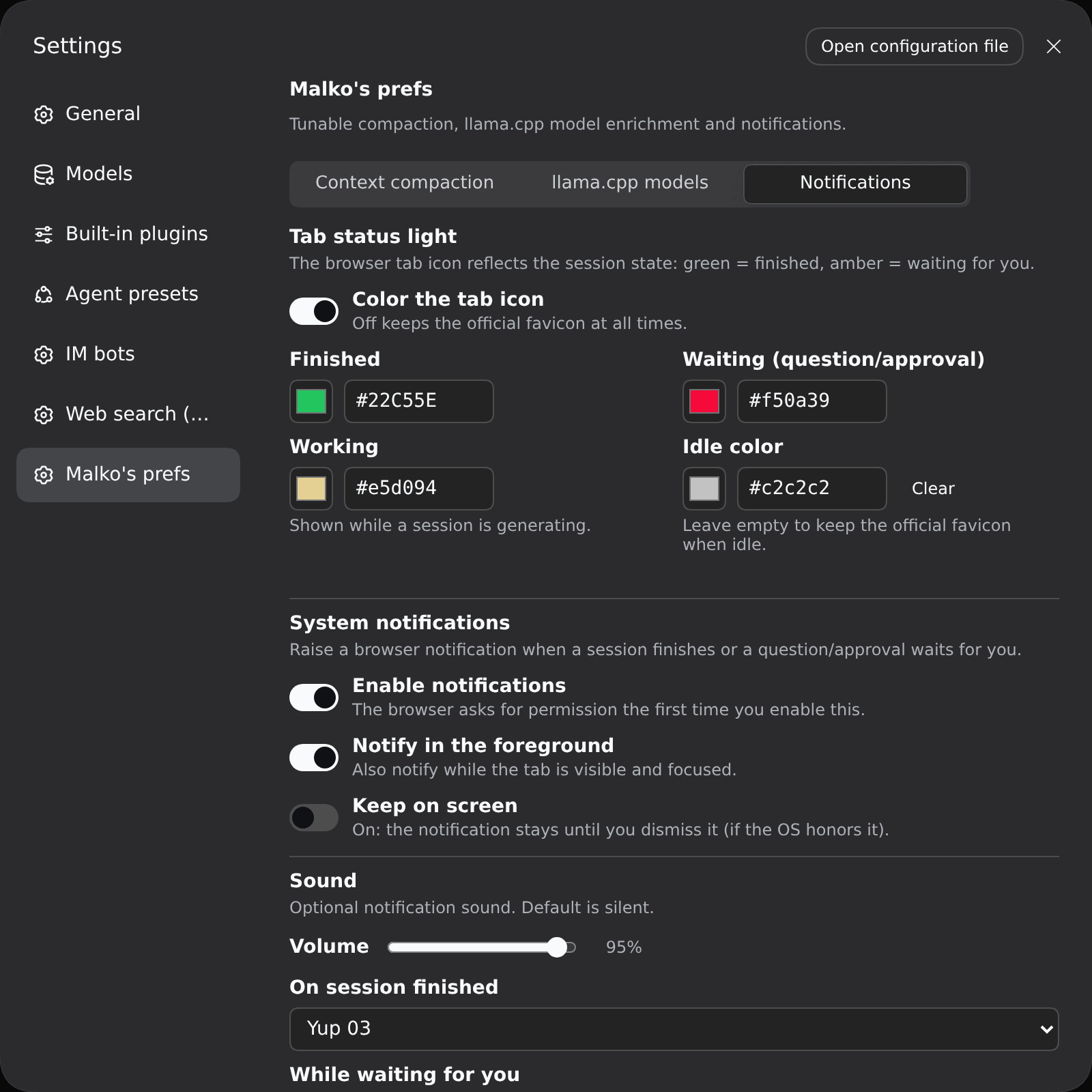
Tab status light — recolours the browser tab icon:
| Colour | Meaning | Clears when |
|---|---|---|
| amber | a session waits for you (question / approval / plan review) | you handle it |
| working | a session is generating | it stops running |
| green | a main session finished while you were away | you open that session / return to the tab |
| idle | nothing to report (official favicon unless you set a colour) | — |
Priority is amber > working > green > idle, and sub-agent sessions are ignored.
All icon links are repainted together (DSH ships a dark and a light favicon
selected by prefers-color-scheme).
System notifications — a browser notification on session completion or on a new pending interaction, with the session name as the title. Defaults to only firing when the tab is not in the foreground (visible and focused); enable Notify in the foreground to also fire while you watch, and Keep on screen to stop the notification from auto-hiding. Enabling notifications asks the browser for permission once.
Sound — two selectors (finished / waiting), each defaulting to No sound.
The list is: No sound, two built-in synthesized chimes (Chime Up / Chime Down, no asset needed) and 45 bundled opencode sounds (see
assets/audio/README.md); picking one previews it and
the Host serves the mp3s at /malko-prefs-sounds/<id>.mp3. If that route is
unavailable the player falls back to a chime — but browsers may block audio
until you have interacted with the page at least once.
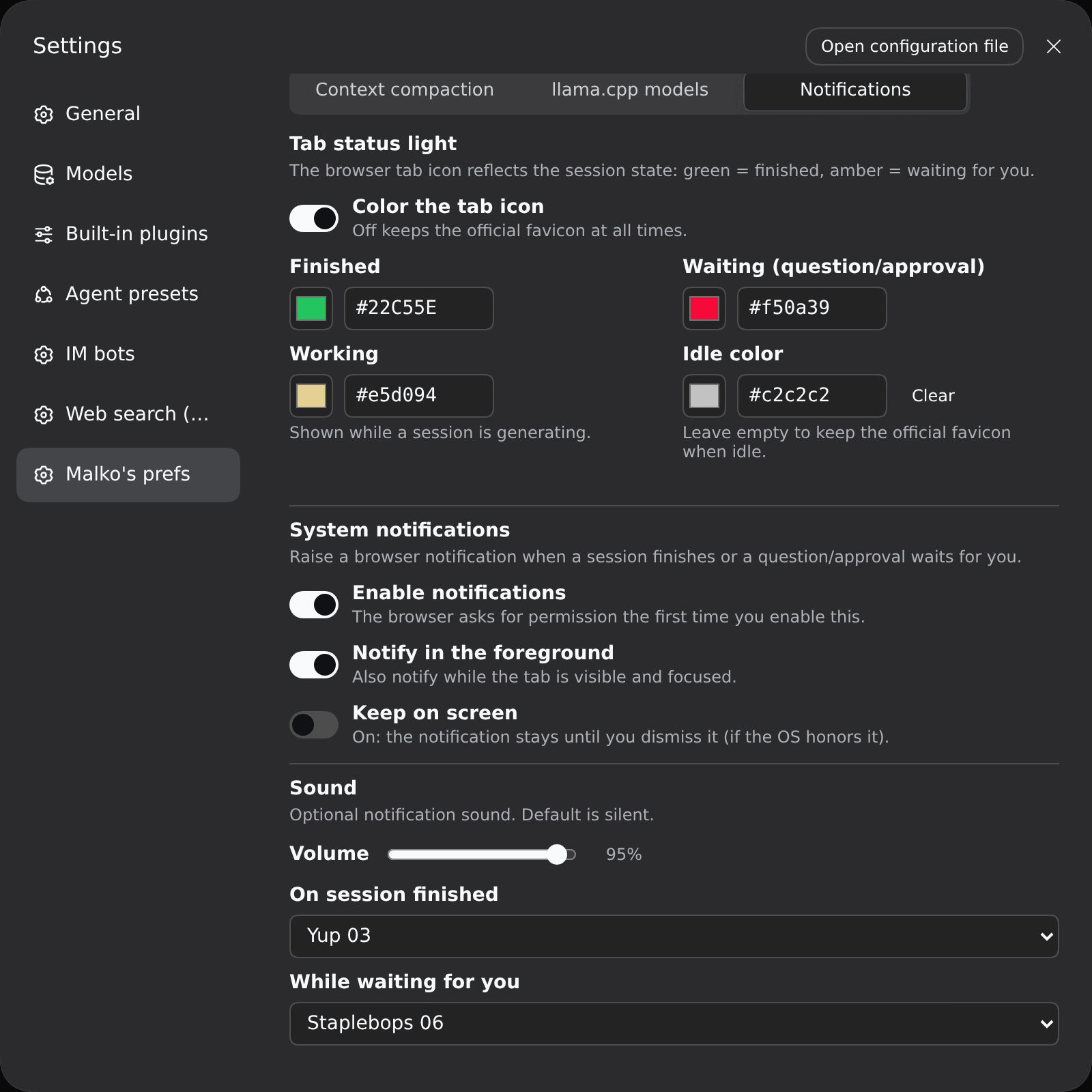
| Field | Key | Default |
|---|---|---|
| Color the tab icon | colorsEnabled |
on |
| Finished / Waiting / Working / Idle color | green / amber / working / black |
official sidebar colors for green/amber, blue for working; black empty = official favicon |
| Enable notifications | notifyEnabled |
off |
| Notify in the foreground | notifyForeground |
off |
| Keep on screen | notifyPersistent |
off (auto-hide) |
| Volume | notifyVolume |
0.6 |
| Sound on finished / waiting | notifyDoneSound / notifyPendingSound |
none (silent) |
System notifications need a secure context —
http://127.0.0.1:PORTorlocalhost. Opened over a LAN IP the Notification API is unavailable (a browser rule, not a plugin one); the tab status light still works.
Commands
/compact— the official dsh command (idle manual compaction)./force-compact— compact now: immediately when the agent is idle, otherwise queued and consumed at the next model step (bypasses the threshold).
How it works
host plugin  (lib/index.mjs)
  ├─ Config (volatile)  ──▶ settings page "malko-prefs"
  ├─ service malkoPrefs ──▶ live prefs + force queue
  ├─ service malkoModels ──▶ llama.cpp probe (wire def in lib/typert.host.mjs)
  ├─ /malko-prefs-sounds/<id>.mp3 ──▶ bundled sound library
  └─ /force-compact command

client plugin (lib/client.js)
  ├─ mounts its own malkoModels Remote via ctx.remote.$mount()
  ├─ tab status light + notifications (src/notify.ts, optional uiSession)
  └─ settings page: 3 sub-tabs (compaction / models / notifications)

preset plugin (lib/compaction.mjs)
  └─ MalkoCompactionEngine extends BasicCompactionEngine
       ├─ rebuilds its policy from malkoPrefs before each operation
       ├─ summarize() → model + reasoning control (cache-safe order)
       └─ agent/status idle → optional turn-end compaction
The engine reuses the official engine for everything else (durable
transactions, pruning, overflow recovery), so behaviour matches
compaction-basic unless a preference changes it.
Note: service classes avoid JS private members (#x) — cordis binds service
methods to a proxy, and private members would throw
Receiver must be an instance of class ....
Development
node build.mjs            # esbuild → lib/{index,compaction,typert.host}.mjs + lib/client.js
node scripts/check.mjs    # static conformance checks
| File | Role |
|---|---|
src/prefs.ts |
preference fields, defaults, parseTokenText |
src/index.ts |
host plugin: volatile Config, malkoPrefs, /force-compact |
src/compaction.ts |
MalkoCompactionEngine (extends the official engine) |
src/remote.ts |
shared wire identity + probeInvocation() builder |
src/typert.ts |
Host Typert manifest (zod strict codecs) |
src/typert.host.ts |
the ./typert export entry dsh-typert-loader imports |
src/probe.ts |
malkoModels Service (llama.cpp /models probe) |
src/client.ts |
settings page (three sub-tabs) |
src/notify.ts |
tab status light + notifications + sound player (ported from dsh-notice-center) |
assets/audio/ |
45 bundled notification sounds (opencode, MIT) |
src/whale.ts |
the recolored official whale SVG used as the tab icon |
scripts/gen-preset-override.mjs |
regenerates cordis.patch.yml from the installed presets |
scripts/check.mjs |
manifest / bundle / cache-safety checks |
Publishing
The package is publication-ready:
privateis removed;LICENSE(MIT) andauthorare set;filesshipslib/,cordis.patch.yml,scripts/,assets/andLICENSE.prepublishOnlyruns the build andscripts/check.mjs.- Conformant bundle:
dsh.bundle.patch,exports["./client"]andexports["./package.json"], the client bundle id equals the package name, and the client requires only baseline platform modules (react,@deepseek-ai/dsh-client-ui-primitives). - The name is free on npmjs.com; release with
npm publish(unscoped/public).
Caveat: cordis.patch.yml is generated from the shipped presets, so regenerate
it against the dsh version you target and keep the peerDependencies ranges in
sync before publishing.
Limits
- The generated
cordis.patch.ymlcopies the shipped presets; re-rungen-preset-override.mjsafter a dsh upgrade. - The
/force-compactbusy path uses the engine's context-overflow entry, which compacts the maximal safe head (retention 0). - The model enrichment is host-side (the browser cannot reach a local llama.cpp server cross-origin).
- Browser notifications require a secure context (
127.0.0.1/localhost); the tab status light's green/amber state is in-memory and resets on reload. - Notification sound is best-effort: browsers may block audio until the page has
had a user gesture, and if the
/malko-prefs-soundsroute is unavailable the player falls back to a synthesized chime.
No comments yet. Be the first to write one.