dsh-client-ui-frosted-glass
A global frosted-glass (backdrop blur) theme plugin for the dsh Web UI. It keeps the existing light/dark preference untouched and layers a translucent surface-token override plus a global backdrop-filter on top, giving the whole UI an iOS/macOS-style frosted-glass look.
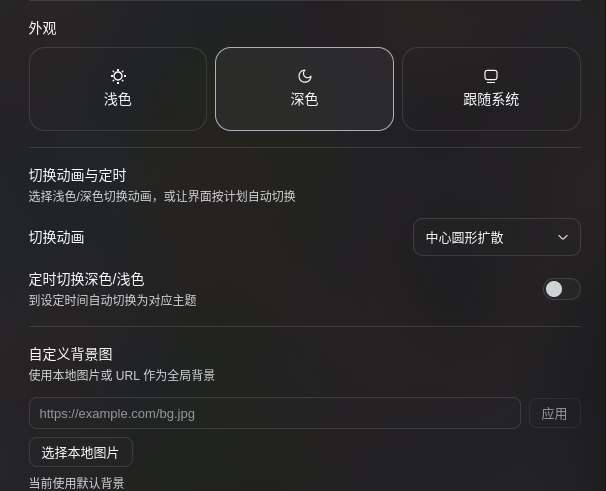
The plugin also adds a Transition & schedule row right below Appearance in Settings → General:
- Switch animation: None / Fade / Circle reveal / Wipe from top — full-screen transitions when light/dark is switched.
- Scheduled switching: set a daily dark-theme time and light-theme time; the UI switches automatically at those boundaries, and manual switches last until the next boundary.
- Custom background: static images (URL / local) and dynamic wallpaper videos (video URL / local file), with one-click reset to the built-in background.
Screenshot
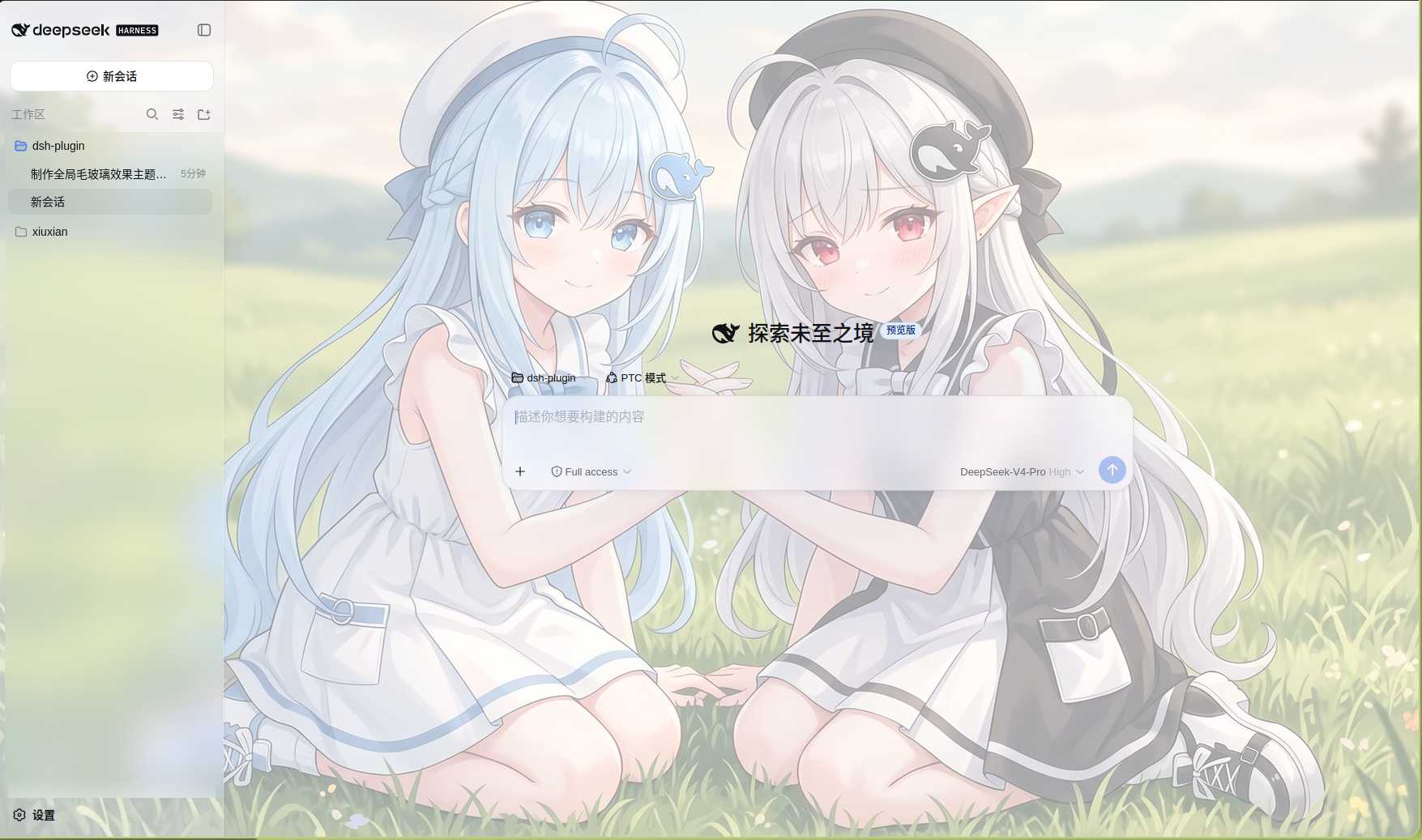
What it does
Two browser-side halves:
Global stylesheet (inlined by
lib/client.js)- Paints
bg.jpegas a centered, cover background onbody(inlined as base64; source kept atassets/bg.jpeg), shown as-is in light mode and dimmed behind a translucent dark veil in dark mode — the content the blur reveals. - Applies
backdrop-filter: blur(...) saturate(...)to the three-column shell frame and to floating surfaces ([role="menu"],[role="dialog"],[role="listbox"],[role="tooltip"], ...). - A MutationObserver auto-marks fixed/absolute panels that other plugins portal under
<body>, giving them the same frosted glass without any per-plugin adaptation. - Strengthens the stock
--dsw-mask-blurtoken so dialogs / image masks blur harder.
- Paints
Translucent surface-token override (via
ctx.theme.overrideTokens)- Rewrites
--dsw-alias-bg-base,--dsw-alias-bg-layer-1/2/3,--dsw-alias-bg-overlay,--dsw-specific-sidebar-fill,--dsw-specific-menu, ... to translucentrgba(...), each with a{ light, dark }pair. - Because every component reads
var(--dsw-*), this layer is class-name agnostic and survives shell re-hashing.
- Rewrites
Theme-switch animations
- Wraps
ctx.theme.setThemewith the browser-native View Transition API: the browser snapshots the REAL before/after frames and uses the new frame as the mask — fade, circle reveal centered on the click, or wipe from top — with no solid-color veil. - Respects
prefers-reduced-motion; switches without an animation when the resolved scheme stays the same (e.g. “System” resolving to the current scheme), and falls back to an instant switch where View Transitions are unavailable.
- Wraps
Scheduled light/dark switching
- When enabled, a timer is scheduled for the next “dark theme at” / “light theme at” boundary and uses the same animated switch path.
- Preferences persist under the
ui-themesection of the user-settings document withfrosted*-prefixed fields.
Custom background
- Static images: URLs persist as
ui-theme.frostedBackgroundUrl; local images are compressed and stored inlocalStorage. - Dynamic wallpaper: video URLs persist as
ui-theme.frostedBackgroundVideoUrl; local videos are stored as Blobs in IndexedDB. - Videos render through a full-screen
<video>layer (object-fit: cover, muted loop) while static backgrounds override the--frosted-bg-imagevariable on<body>. - Reset clears every custom source and returns to the built-in
bg.jpeg.
- Static images: URLs persist as
Layout
dsh-client-ui-frosted-glass/
├── package.json          # dsh.bundle (self-inserting row) + dsh.client (browser half)
├── cordis.patch.yml      # bundle patch: inserts the ui-frosted-glass row
├── lib/
│   ├── index.js          # host half (empty apply, only to appear in the Loader)
│   └── client.js         # browser half (window.__ModuleLoader__.load bundle format)
├── README.md
└── README.zh.md
lib/client.js is a hand-authored browser bundle in the same window.__ModuleLoader__.load({ id, factory }) format tsdown emits — no local build step required.
Install
Clone the repo, then install into the web profile via the profile plugin manager:
git clone https://github.com/makuralymi/dsh-webUI-Glass-Theme.git
dsh plugin --profile web add ./dsh-webUI-Glass-Theme
This runs pnpm in the profile directory and, because the package declares dsh.bundle.patch, auto-adds it to dsh.profile.bundles; its bundle patch then inserts the ui-frosted-glass row automatically — no manual cordis.patch.yml edit is needed. Then:
dsh --profile web
# or
dsh web
Note: the host composition is assembled at boot, so adding/removing a plugin requires restarting the web process before a refresh shows it.
Manual install (without dsh plugin)
Use this OR the dsh plugin path above, not both (they insert the same row). For cases where dsh plugin is unavailable:
Add the directory as a profile dependency:
cd "$DSH_HOME/profiles/web" pnpm add <path-to-the-cloned-repo, e.g. ./dsh-webUI-Glass-Theme>
Append a row to
$DSH_HOME/profiles/web/cordis.patch.yml:- insert:
- id: ui-frosted-glass name: 'dsh-client-ui-frosted-glass'
- insert:
Verify
- The shell frame and its floating surfaces render translucent + blurred in both light and dark.
- DevTools shows a
<style data-plugin="dsh-client-ui-frosted-glass">in<head>and inline translucent tokens (--dsw-alias-bg-base, ...) onbody. body[data-ds-dark-theme]switches the dark gradient and dark translucent tokens.- Settings → General → below Appearance shows Transition & schedule; picking an animation and clicking light/dark plays the full-screen transition.
- With the schedule enabled, the theme switches automatically at the configured times; settings persist under
ui-theme.frosted*in$DSH_HOME/settings.yaml. - Custom background: choose a static image or a dynamic video; local videos mount a full-screen
<video>layer immediately, and “Reset to default background” restores the built-in background.
Customize
- Blur:
--frosted-blur(default 20px) and--frosted-saturate(default 180%) inlib/client.js. - Background: replace
assets/bg.jpegthen re-inline (or edit the--frosted-bg-imagedata URI inlib/client.js); dark-mode dim strength is thelinear-gradientalpha underbody[data-ds-dark-theme]. - Translucency: the
rgbaalpha values inFROSTED_TOKENS. - For broader coverage, add more
--dsw-alias-bg-*/--dsw-specific-*tokens toFROSTED_TOKENS. - Animation speed:
--frost-vt-durationinlib/client.js(default 340ms). - Animation easing:
--frost-vt-easing. - Default times:
frostedDarkTime/frostedLightTimeinSETTINGS_DEFAULTS. - Local-image compression:
compressImagemaxDimension(default 2560) andquality(default 0.86).
Known limitations
- The frame and composer-card
backdrop-filterride stabledata-*attributes (:has(> [data-shell-overlay])and[data-composer-card]) rather than hashed module classes; floating surfaces use[role=...], and the translucent-token override is class-name agnostic. - Third-party theme token overrides are a runtime layer with no completeness validation; this plugin intentionally overrides only surface-background tokens and leaves text/state tokens readable.
No comments yet. Be the first to write one.