⑂ BubbleChat
分支对话 · Branch Chat for DeepSeek Harness
在对话里选中一段文字,就地开一个气泡分支追问;分支共享主对话的全部上下文,但问答只出现在气泡里,主对话保持原样。
Select any passage in a conversation and open a bubble branch to ask follow-ups about it. The branch shares the full context of the main conversation, while its Q&A stays inside the bubble — the main transcript is left untouched.




截图 / Screenshots
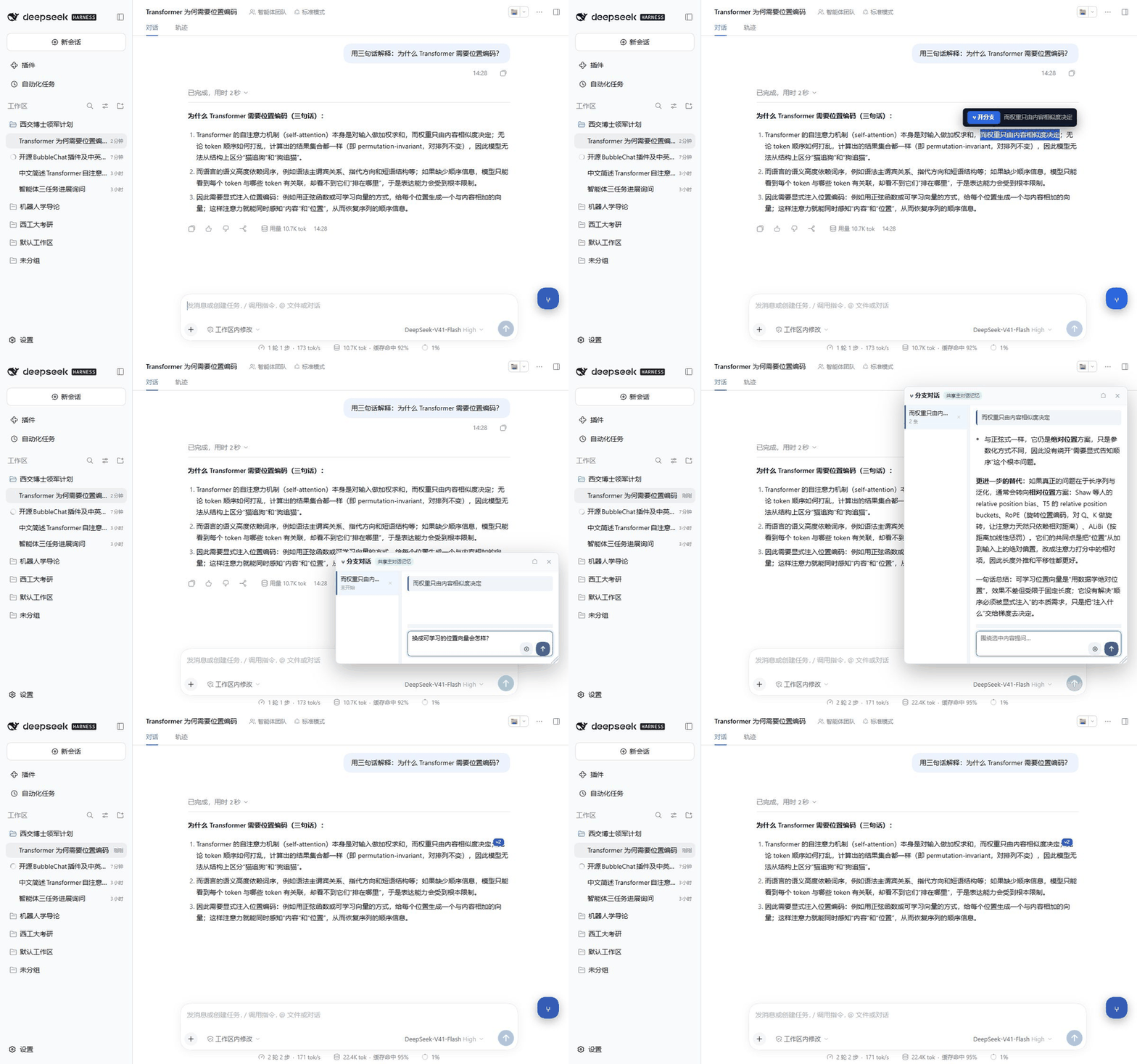
完整交互(约 11 秒):选中一段文字 → 开分支 → 在气泡里提问 → 回答生成 → 收起后留下 ⑂N 锚点。
Full interaction (~11s): select text → open a branch → ask in the bubble → the answer arrives → collapsing leaves an ⑂N anchor.

① 选中文字:选中对话中任意一段文字,浮出「⑂ 开分支」。 Select text — a floating “⑂ 开分支” button appears. |

② 分支气泡:引用原文 + 独立问答区;可拖动、八向缩放、左右/上下分栏。 Bubble panel — quoted anchor plus its own thread; draggable and resizable. |

③ 就地追问:回答保留完整 Markdown / 公式 / 代码块渲染,主对话中这两轮被隐藏。 Ask in place — the answer keeps full Markdown, math and code rendering; its turns are hidden from the main transcript. |

④ 锚点标签:收起气泡后,原文旁留下 ⑂N 标签,点击即可回到分支。Anchor badge — an inline ⑂N tag marks the quoted passage; click it to reopen the branch. |

⑤ 精确定位:一键跳回原文并高亮;由文本指纹严格校验,校验不过就拒绝跳转。 Locate — jump back to the exact passage with a highlight, verified by text fingerprints. |

⑥ 多个分支:同一段回答可以从多个角度分别开分支,锚点互不干扰。 Multiple branches — several anchors can coexist on the same conversation. |
中文
这是什么
BubbleChat(分支对话)是 DeepSeek Harness 的客户端插件。它把「追问」变成一次就地操作:
- 在对话里选中任意一段文字(AI 回答或你的提问都可以);
- 点浮出的「⑂ 开分支」;
- 右侧弹出气泡面板,围绕这段文字提问;
- 回答出现在气泡里,主对话的阅读线不被打断。
分支不是新建会话:问题会以「引用 + 你的问题」的形式回到同一个会话,所以模型拥有完整的上下文,回答能准确接上文;生成完成后,插件把回答的渲染结果复制进气泡,并把主转录里这次分支的轮次隐藏起来。
它解决什么问题
- 不想开新会话重讲一遍上下文:分支复用主对话的全部记忆,不需要把前文复制过去。
- 不想打断阅读线:直接在主对话里追问,回答会插在正文中间,之后回看原文很痛苦。分支把问答收到气泡里。
- 一段内容想从多个角度讨论:「为什么这样设计」「有没有反例」「换成 PyTorch 怎么写」可以分别挂在同一段文字上,互不干扰。
- 想随时回到原文:锚点标签留在原文旁边,一键定位,不靠翻聊天记录找。
功能一览
| 功能 | 说明 |
|---|---|
| 选区开分支 | 选中文本后浮出工具条,一键创建锚点(记录轮次、字符偏移、出现序号、前后各 20 字指纹) |
| 锚点标签 | 关闭气泡后,原文旁保留 ⑂N 标签(N 为分支消息数),点击即打开对应分支 |
| 独立气泡面板 | 可拖动、八向缩放、左侧锚点列表宽度可拖、输入区高度可拖(双击各自恢复默认),位置尺寸自动记忆 |
| 共享主对话记忆 | 分支提问以隐藏标记回到同一会话,模型看到完整上下文,回答自然承接前文 |
| 主对话零污染 | 插件只维护自己独占的 <style> 来隐藏分支轮次,不修改主转录任何节点属性;清空即立刻恢复 |
| 完整渲染还原 | 不是把回答当纯文本塞进气泡,而是克隆主会话里那份渲染结果,Markdown、公式、代码高亮、表格都保留 |
| 精确定位回原文 | 轮次 + 偏移 + 上下文指纹 + 第 N 次出现多路尝试,最终用 Range.toString() 严格比对,对不上就拒绝跳转而不是「大致跳过去」 |
| 多分支管理 | 左侧列表显示每条分支的引用摘要与消息数,可切换、可删除(删除会连带该分支对话) |
| 本地持久化 | 锚点、对话、窗口位置与尺寸、隐藏状态都写在 localStorage(dsh-branch-chat/v5),刷新或重启后仍在 |
| 零依赖、无构建 | 只有一个客户端文件,React 由宿主提供;没有构建步骤,不需要打包工具 |
快速开始
环境要求
- DeepSeek Harness 0.2 预览版(桌面端或 Web 客户端)
- 能安装第三方插件(「插件」面板可管理 profile 时即可)
安装方式 A:图形界面(推荐)
- 打开 DeepSeek Harness,左侧进入「插件」;
- 点「添加插件」;
- 输入本仓库地址
https://github.com/makima-coder/BubbleChat,或本地目录的绝对路径; - 安装完成后启用
dsh-client-ui-branch-chat,按提示重启应用; - 对话输入框右下角出现蓝色
⑂悬浮按钮即安装成功。
安装方式 B:命令行
# 从 Git 仓库安装
dsh plugin add https://github.com/makima-coder/BubbleChat

# 或从本地目录安装
dsh plugin add C:\path\to\BubbleChat
安装后重启 DeepSeek Harness。当前 DSH 版本不支持插件自动更新,升级时需要先卸载再安装新版本。
安装方式 C:手动写入 profile(排查问题时可参考)
编辑 ~/.dsh/profiles/desktop/package.json:
{
  "dependencies": {
    "dsh-client-ui-branch-chat": "link:C:/path/to/BubbleChat"
  },
  "dsh": {
    "profile": {
      "bundles": [
        "dsh-client-ui-branch-chat"
      ]
    }
  }
}
lib/index.js 只是宿主侧的空插件,真正的界面在 lib/client.js,由 package.json 里的 dsh.client 声明自动注入浏览器侧。
使用
- 在任意对话里选中一段文字,点「⑂ 开分支」;
- 在气泡输入框里提问,
Enter发送,Shift + Enter换行; - 回答出现在气泡中,主对话里对应的提问与回答轮次会被隐藏;
- 点气泡右上角
×收起;原文旁的⑂N标签可随时重新打开; - 气泡里点
⌂重置窗口位置与尺寸;点圆形「定位」按钮跳回原文并高亮; - 左侧列表可切换不同分支,
×删除某条分支(含其对话内容)。
工作原理
1)锚点 = 文本 + 位置指纹
创建锚点时不只记录文字本身,还记录:所在轮次(data-chat-turn)、该轮文本总长、选区起始字符偏移、这段文字在该轮中第几次出现、以及前后各 20 字的上下文指纹。恢复位置时按「前后指纹 → 前指纹 → 后指纹 → 偏移 → 第 N 次出现 → 首次出现」依次尝试,最后用 Range.toString() 严格校验还原出来的文本是否就是原文;不一致就返回失败,宁可不跳也不跳错。
2)分支消息
发送时把问题包装成带隐藏标记的消息回到同一会话:
⟦分支·<anchorId>⟧关于「<选中原文>」

<你的问题>
anchorId 让插件之后能认出「哪一轮是我这条分支」。注意:这一步是真实写入会话上下文的,所以分支回答拥有完整记忆;「主对话里看不到」只是显示层的隐藏。
3)回答捕获
插件轮询会话运行状态,等本轮生成结束后,在主转录里按标记找到该分支对应的回答容器,克隆其 DOM,移除过程性噪声(data-step-process、代码块按钮等),再注入气泡。因此气泡里的回答与主对话中渲染完全一致。
4)隐藏主对话里的分支轮次
插件只创建并维护一个自己独占的 <style id="branch-chat-hide">,内容是:
[data-chat-turn="N"]:not(:has([data-chat-turn])) { display: none !important; }
只隐藏「叶子轮次」,避免误伤包含多轮的祖先容器;用户提问轮次还要确认确实包含本条分支的标记才会被隐藏。清空这条样式即可立刻恢复,主转录的 DOM 从未被改写。
5)窗口与状态
面板位置/尺寸、输入区高度、左栏宽度、悬浮按钮位置、锚点与全部对话都持久化在 localStorage;刷新页面或重启应用后原样恢复。
项目结构
BubbleChat/
├── lib/
│   ├── index.js          # 宿主侧入口(空实现,仅为加载占位)
│   └── client.js         # 全部 UI 与逻辑(浏览器侧,单文件)
├── cordis.patch.yml      # bundle patch:单独安装时插入本插件
├── package.json          # DSH 插件清单(dsh.bundle / dsh.client)
├── docs/images/          # README 截图
├── LICENSE
└── README.md
已知限制
- 依赖 DSH 客户端的 DOM 约定(
data-chat-turn、data-turn-process-answer、data-chat-group-part等)。DeepSeek Harness 大版本升级可能改动这些标记,届时需要适配。 - 只测过 Web 客户端(
dsh.client.platform = "web",桌面端渲染的也是 Web 客户端)。 - 分支问答真实占用会话上下文:隐藏是显示层的,长对话里开很多分支仍会累积 token。
- 回答捕获依赖主会话空闲:插件会等主会话本轮结束再抓取;若抓取失败会提示「回答已生成,但未能捕获(可点『定位』)」,此时该轮分支内容会留在主对话中可见。
- 状态存在浏览器本地:
localStorage按浏览器/设备存储,不跨设备同步;清空站点数据会丢失锚点与分支对话。 - 暂不支持分支导出、分享或重命名。
开发与调试
- 没有构建步骤:
lib/client.js是被宿主直接加载的浏览器端模块,改完重启应用即可生效。 - 启动日志:浏览器控制台会打印
[branch-chat] 已加载。 - 本地状态:
localStorage的dsh-branch-chat/v5,调试时可手动清空以重置全部锚点。 - 改动建议集中在一个文件里,保持「不修改主转录 DOM」的约束;隐藏一律通过插件独占的
<style>。 - 提交前的手动测试清单:选区开分支 → 提问 → 回答渲染 → 收起后锚点标签 → 点击定位 → 刷新页面后状态恢复 → 删除分支。
兼容性
| 项目 | 版本 |
|---|---|
| DeepSeek Harness | 0.2 预览版 |
@deepseek-ai/cordis(peer) |
~4.0.4 |
| 平台 | Web 客户端(桌面端 / 浏览器) |
| 运行时依赖 | 无(React 由宿主提供) |
贡献
欢迎 Issue 与 PR。由于插件依赖 DSH 的客户端 DOM 约定,提交前请说明你测试所用的 DSH 版本与场景;改动尽量小而聚焦,方便 review。
License
MIT © 2026 makima-coder
English
What it is
BubbleChat is a client plugin for DeepSeek Harness that turns follow-up questions into an in-place gesture:
- Select any passage in a conversation — the assistant's answer or your own message;
- Click the floating “⑂ 开分支” button;
- A bubble panel opens on the right, anchored to that passage;
- Your follow-up Q&A lives inside the bubble, and the main transcript stays untouched.
A branch is not a new session. The question is sent back to the same conversation as a quoted, marker-tagged message, so the model keeps the complete context. Once the answer finishes, the plugin clones its rendered output into the bubble and hides the branch turns in the main transcript.
Why
- No context re-explaining — branches reuse the main conversation's memory; nothing needs to be pasted again.
- No broken reading flow — asking directly in the main thread inserts the answer in the middle of the transcript. Branches keep Q&A out of the reading line.
- Multiple angles on the same passage — “why this design?”, “any counterexample?”, “how would this look in PyTorch?” can each hang off the same quote independently.
- Always find the source again — an anchor badge stays next to the quoted text; one click locates it.
Features
| Feature | Description |
|---|---|
| Branch from selection | Select text, click the floating button; the anchor stores turn, character offset, occurrence index and 20-character context fingerprints |
| Anchor badge | After closing the bubble, an inline ⑂N badge (N = messages in that branch) marks the passage; click to reopen |
| Floating bubble | Draggable, eight-direction resizable, resizable anchor-list width and input height (double-click each to reset), geometry persisted |
| Shared main-conversation memory | Prompts return to the same session behind a marker, so the model keeps full context and answers coherently |
| Zero pollution of the main transcript | The plugin only maintains its own <style> element to hide branch turns; no node attributes of the transcript are modified and everything restores instantly |
| Faithful rendering | The answer is cloned from the main transcript's rendered DOM, so Markdown, math, syntax highlighting and tables are preserved |
| Exact locate | Turn + offset + context fingerprints + Nth occurrence, then a strict Range.toString() check — if it does not match, the plugin refuses to jump instead of guessing |
| Multi-branch management | Left-hand list with quote summary and message count; switch between branches or delete one together with its thread |
| Local persistence | Anchors, threads, window geometry and hidden state live in localStorage (dsh-branch-chat/v5) and survive reloads |
| Zero dependencies, no build | A single client file; React is provided by the host. No bundler, no build step |
Quick start
Requirements
- DeepSeek Harness 0.2 preview (desktop app or web client)
- Ability to install third-party plugins (an installable/managed profile)
Install, option A — in the app (recommended)
- Open DeepSeek Harness → Plugins in the sidebar;
- Click Add plugin;
- Enter this repository's URL
https://github.com/makima-coder/BubbleChat, or the absolute path to a local clone; - After installation, enable
dsh-client-ui-branch-chatand restart the app; - A blue
⑂floating button appears at the bottom-right of the composer when it is active.
Install, option B — CLI
dsh plugin add https://github.com/makima-coder/BubbleChat   # from Git
dsh plugin add C:\path\to\BubbleChat                        # from a local folder
Restart DeepSeek Harness afterwards. The current DSH release does not auto-update plugins — uninstall and reinstall to upgrade.
Install, option C — profile manifest (useful when debugging)
Edit ~/.dsh/profiles/desktop/package.json:
{
  "dependencies": {
    "dsh-client-ui-branch-chat": "link:C:/path/to/BubbleChat"
  },
  "dsh": {
    "profile": {
      "bundles": [
        "dsh-client-ui-branch-chat"
      ]
    }
  }
}
lib/index.js is an empty host-side half; the real UI is lib/client.js, injected into the browser half by the dsh.client field in package.json.
Usage
- Select text in any conversation and click “⑂ 开分支”;
- Ask in the bubble input:
Entersends,Shift + Enterinserts a newline; - The answer appears in the bubble, and the corresponding question/answer turns are hidden from the main transcript;
- Click
×to collapse the bubble; the inline⑂Nbadge reopens it later; - In the bubble,
⌂resets the window position/size, and the round locate button jumps back to the original passage with a highlight; - The left list switches between branches;
×deletes a branch and its thread.
How it works
1) An anchor is text plus a positional fingerprint. Besides the quote, an anchor stores its data-chat-turn, the turn's text length, the selection's character offset, the occurrence index of the quote inside the turn, and 20 characters of context before and after. Resolution tries full context → leading context → trailing context → recorded offset → Nth occurrence → first occurrence, then validates the reconstructed range with Range.toString(). A mismatch fails closed — no “close enough” jumps.
2) Branch messages. The prompt is sent back to the same session behind an internal marker:
⟦分支·<anchorId>⟧关于「<quoted text>」

<your question>
This is a real write into the session context, so the branch answer has full memory; hiding it in the main transcript is purely presentational.
3) Capturing the answer. The plugin polls the session's running state, then finds the answer container for that turn by marker, clones its DOM, strips process noise (data-step-process, code-block buttons) and injects it into the bubble — so the bubble renders exactly like the main transcript.
4) Hiding branch turns. The plugin owns a single <style id="branch-chat-hide"> with [data-chat-turn="N"]:not(:has([data-chat-turn])) { display: none !important; }, hiding only leaf turns (never ancestor containers); a user turn is hidden only after it is confirmed to contain this plugin's marker. Clearing the style restores everything; transcript DOM is never rewritten.
5) Window and state. Panel geometry, input height, list width, floating-button position, anchors and threads are persisted in localStorage and restored across reloads.
Project layout
BubbleChat/
├── lib/
│   ├── index.js          # host-side entry (empty placeholder)
│   └── client.js         # all UI and logic (browser half, single file)
├── cordis.patch.yml      # bundle patch so the plugin loads standalone
├── package.json          # DSH plugin manifest (dsh.bundle / dsh.client)
├── docs/images/          # README screenshots
├── LICENSE
└── README.md
Known limitations
- Depends on DSH client DOM contracts (
data-chat-turn,data-turn-process-answer,data-chat-group-part, …). Major DSH upgrades may change them and require adaptation. - Only the web client is tested (
dsh.client.platform = "web"; the desktop app renders the web client). - Branch Q&A really consumes context. Hiding is presentational; many long branches still add tokens.
- Capture depends on the main session going idle. If capture fails you will see “answer generated but not captured (use Locate)”, and that branch's turns remain visible in the main transcript.
- State is per browser.
localStorageis not synced across devices; clearing site data loses anchors and threads. - No branch export/share/rename yet.
Development
- No build step:
lib/client.jsis loaded directly by the host; restart the app after edits. - The browser console prints
[branch-chat]load status. - Local state key:
dsh-branch-chat/v5(clear it to reset all anchors). - Keep the constraint of never modifying the main transcript DOM; hide only through the plugin-owned
<style>. - Manual test checklist before submitting: select → create branch → ask → render → collapse (badge) → locate → reload and restore → delete branch.
Compatibility
| Item | Version |
|---|---|
| DeepSeek Harness | 0.2 preview |
@deepseek-ai/cordis (peer) |
~4.0.4 |
| Platform | Web client (desktop app / browser) |
| Runtime dependencies | none (React from the host) |
Contributing
Issues and PRs are welcome. Since the plugin relies on DSH's client DOM contracts, please mention the DSH version and scenario you tested; keep changes small and focused for review.
License
MIT © 2026 makima-coder
No comments yet. Be the first to write one.