dsh-choice
A single-choice board inside the DeepSeek Harness chat, next to the built-in ask_user_question.
ask_user_choice({ title, subtitle?, options, noneLabel? })
Every option is text, an image or a sound. The card is posted as a normal chat row, the user presses the check icon on one row, and the choice comes back as an ordinary chat message that starts the next turn.
Behaviour
- one pick per board — the check button on the chosen row; other rows become inert;
- «none of these» — a trailing row with its label from
noneLabel; - sounds and image previews stay usable after the pick;
- non-blocking — the tool returns immediately, unlike
ask_user_question, which waits for the answer inside the turn; - subagents are refused — only the main agent can show a board:
human interaction is unavailable while the calling agent is owned by another live agent….
All visible text (title, subtitle, option titles and descriptions, noneLabel) comes from
the agent, in the language of the conversation.
Card
Rows: a 52 px preview (image thumbnail or ▶ button), the title and description, and the
round check button on the right. Clicking an image opens a lightbox; pressing ▶ plays the
sound with a plain Audio object, so there is no extra UI. A pick replaces the drafts
carefully: the composer keeps its text, the choice is sent as its own message.
Options
{
  "kind": "text",              // required: text | image | audio
  "title": "Keep as is",       // row label
  "description": "…",          // optional second line
  "value": "…",                // text sent to the chat (defaults to title)
  "src": "C:\\sounds\\a.wav"   // image/audio: http(s) URL or absolute local path
}
Local files are copied into %LOCALAPPDATA%\dsh-choice\media and served over loopback.
Bridge
127.0.0.1:49236:
| Method | Path | Purpose |
|---|---|---|
GET |
/status |
port and media counter |
GET |
/media/<file> |
served image or audio |
POST |
/attach |
copy a local file and return its URL |
GET |
/settings |
stored settings (language) |
POST |
/settings |
save language: ru, en, zh or auto |
Settings
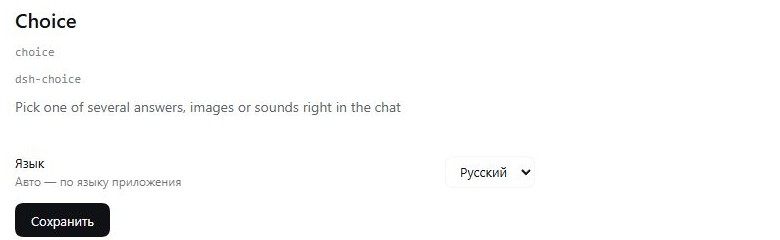
The plugin row config (plugins.row.config) holds one control: the interface language —
Русский, English, 中文 or Авто. It is stored in %LOCALAPPDATA%\dsh-choice\settings.json
and applies to the card and the form without a restart.
The language is resolved in this order:
- the saved
language, when it isru,enorzh; auto— the application language:document.documentElement.lang, thennavigator.language;ru*→ ru,zh*→ zh, anything else → en;- nothing stored —
ru.
All card text (title, subtitle, option titles and descriptions, noneLabel) comes from the
agent, in the language of the conversation; only the plugin's own labels — the pick, play
and open buttons and the settings row — follow the language above.
Languages
The interface speaks Russian, English and Chinese. The language comes from the
extension setting when it is ru, en or zh; auto follows the application
language (document.documentElement.lang, then navigator.language; ru* → ru,
zh* → zh, anything else → en); with nothing stored it is ru. Change it in
Plugins → Choice; the value lives in %LOCALAPPDATA%\dsh-choice\settings.json
and applies without a restart.
Screenshots
Install
"@machine202502/dsh-choice": "^0.1.1"
and add dsh-choice to dsh.profile.bundles. A restart is required for the host half to
load; the client half reloads with the page.
License
MIT.
No comments yet. Be the first to write one.