READMESource: main@a5aea1a4
dsh-anchor-rail
DSH Web 会话锚点导轨插件:长会话快速定位历史问题。
功能
会话锚点导轨
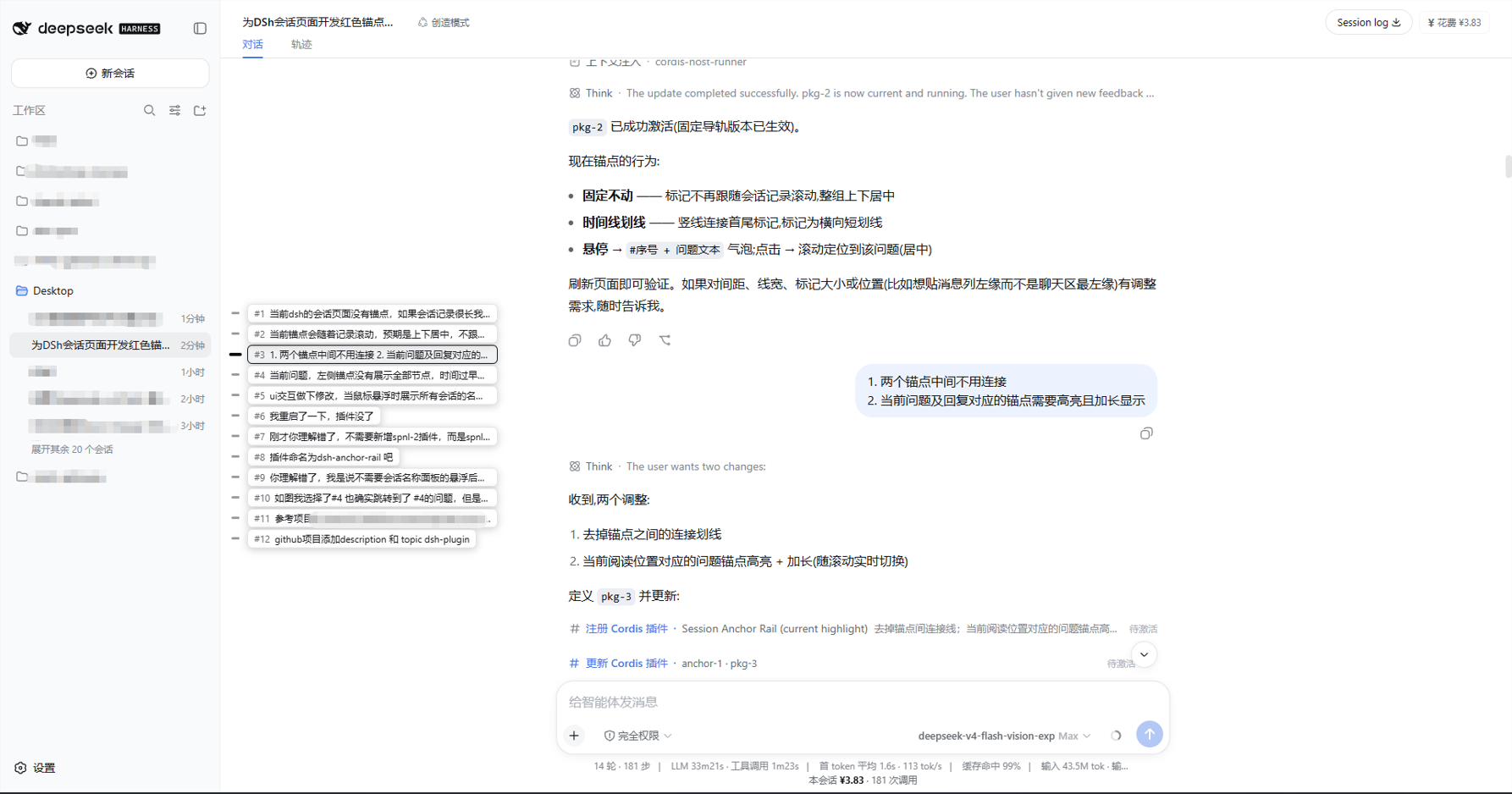
- 会话聊天区左缘一条固定导轨,展示会话全部用户问题锚点(不随滚动移动,整组上下居中)
- 压缩段聚合为一个锚点:连续已压缩的问题折叠成一个虚线分组标记(
▸ 已压缩 · N 个问题),长会话压缩再多轮导轨也不会挤爆 - 悬浮导轨(或任意锚点)→ 展示聚合后的全部锚点名称,每个名称与对应锚点垂直对齐(
#序号 + 问题文本);移出后自动收起(150ms 宽限) - 悬浮虚线分组锚点 → 切换为该段已压缩问题的子列表(可滚动、逐条可跳转);悬浮普通锚点则只显示未压缩列表,两者互不干扰
- 密集兜底:当未压缩锚点仍多到名称无法与锚点对齐(间距 < 24px)时,名称面板自动变为紧凑滚动列表,不再互相压叠
- 当前正在阅读的问题对应锚点/名称高亮加长(品牌色),随滚动实时切换;阅读进压缩段时对应分组锚点高亮
- 点击锚点或名称跳转到该问题:已渲染的直接滚动定位(与当前判定同参考线,点击谁高亮谁);窗口外的问题自动逐页加载历史后再定位,加载中锚点有脉冲动画;分组锚点的点击为展开/收起子列表
- 上下文压缩后锚点保留:历史问题锚点不因 compact 而清除(聚合进虚线分组),单独一个已压缩问题保留为虚线锚点(名称带灰标签)
- 锚点过多时导轨内部滚动并跟随当前锚点,名称列表同步滚动
- 问题少于 2 个或内容无需滚动时导轨自动隐藏
效果展示
悬浮导轨后,全部锚点名称在导轨右侧按标记位置对齐展开(#序号 + 问题文本),当前阅读的问题高亮:
安装
方式一:dsh plugin 安装(推荐)
dsh plugin --profile web add dsh-anchor-rail
方式二:profile 本地包
- 将本仓库放到
~/.dsh/profiles/web/plugins/dsh-anchor-rail/ - 在
~/.dsh/profiles/web/package.json增加:
"dependencies": {
  "dsh-anchor-rail": "link:plugins\\dsh-anchor-rail"
},
"dsh": {
  "profile": {
    "bundles": [ "...", "dsh-anchor-rail" ]
  }
}
- 在 profile 目录执行
pnpm install - 重启 DSH Web 服务
工作原理
- Host 半:
sessionQuery.readSession一次性读取会话的完整原始日志(含被折叠替换的历史事件),只取与页面渲染规则一致的提问事件(user/message+surfaceOp: append+source.kind: 'user',即页面上渲染为 user/steering 气泡的行;压缩检查点与注入上下文均排除),提取{seq, text}并按sessionId + 日志尾部 seq缓存——只有新消息才重读,其余请求均为缓存命中。原始日志只增不减,因此压缩后锚点不会丢失;压缩检查点(surfaceOp: replace+source: {kind:'plugin', plugin:'compact'})的替换区间用于把历史锚点标记为「已压缩」。通过/dsh-anchor-rail/anchors路由提供给客户端。 - Client 半:连续已压缩问题折叠为一个虚线分组展示项(悬浮/点击展开该段的可滚动子列表;普通悬浮只显示未压缩列表);锚点间距 < 24px 时名称面板切换为紧凑滚动列表防重叠。其余锚点按全局序号映射(#N 不因折叠而错位;页面窗口始终是原始日志的连续切片,
loadOlder向前翻页),标记等距分布、上下居中;滚动只扫描已渲染行计算"当前"索引并映射到所属分组;跳转窗口外问题时循环调用会话loadOlder()(50 条/页)逐页加载直到目标渲染后定位。
结构
lib/index.js— Host 半:锚点数据路由 + 缓存lib/client.js— Client 半(window.__ModuleLoader__打包格式):导轨 + 悬浮名称列表cordis.patch.yml— bundle 组合层,插入anchor-rail行
License
MIT
No comments yet. Be the first to write one.