dsh-chat-shell
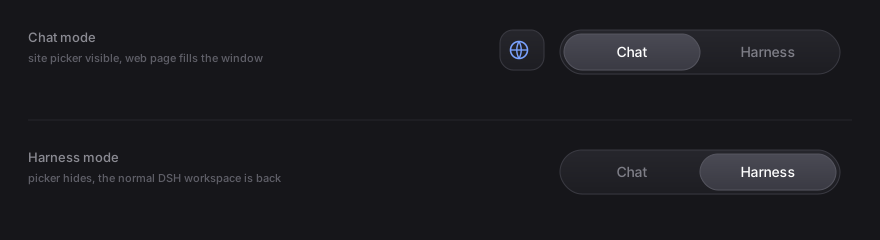
A Chat / Harness switch for DeepSeek Harness: embed DeepSeek, Doubao or ChatGPT in the whole window, and get back to Harness with one click — without losing your conversation, your scroll position or a reply that is still streaming.


-22c55e)

What it does
DeepSeek Harness is one window with one interface. This plugin adds a second one: a glass segmented switch in the title bar, with the sites you use beside it.
Harness                            Chat
┌────────────────────────────┐    ┌────────────────────────────┐
│  应用  编辑   Chat│Harness  │    │  应用  编辑  ⬤▾  Chat│Harness│
├────────────────────────────┤    ├────────────────────────────┤
│                            │    │                            │
│   the untouched DSH UI     │ ⇄  │   a real browser showing   │
│   (sessions, tools, tasks) │    │   chat.deepseek.com        │
│                            │    │   (or Doubao / ChatGPT)    │
└────────────────────────────┘    └────────────────────────────┘
Both sides stay alive. Switching is a fade, not a page load:
- the DSH session, its scroll position and any running tool call are untouched;
- every AI website stays mounted, so an answer that is still being generated keeps generating while you are looking at Harness;
- each site has its own session partition, so three logins do not overwrite each other.
Features
| Segmented switch | Chat | Harness, centred in the title bar. Click either label, or drag the glass thumb and drop it where you want it. |
| Site button | Real brand mark + a caret, left of the switch. Open it to pick a site, or to add one of your own. |
| Three presets | DeepSeek, Doubao (豆包), ChatGPT — each in its own browser session. |
| Add any website | Paste a URL; the label is derived from the hostname. Custom sites are stored next to the presets. |
| Instant switching | Sites are mounted once and toggled with CSS, never torn down on a switch. |
| Remembers everything | Last mode, last site and your site list survive a reload. |
| Follows the theme | Light and dark are detected from the live page and re-applied whenever the app theme changes. |
| Fails soft | On a browser-hosted DSH (no desktop bridge) the switch simply hides itself instead of breaking the page. |
Requirements
- DeepSeek Harness desktop 0.2.x — the embedded browser is provided by the
Electron shell and does not exist in
dsh web. - Windows (the desktop build this was developed and tested against).
Install
With the plugin market / CLI
dsh plugin add dsh-chat-shell
Manually (local folder)
Copy this folder into the profile's
node_modules:%USERPROFILE%\.dsh\profiles\desktop\node_modules\dsh-chat-shellAdd the plugin to the profile patch,
…\profiles\desktop\cordis.patch.yml:- insert: - id: chat-shell name: dsh-chat-shellSave. The desktop app hot-reloads the plugin graph, so the switch appears without restarting; if it does not, restart the app once.
Use
- Switch — click
ChatorHarness, or drag the thumb. - Pick a site — click the round button left of the switch.
- Add a site — open the picker, choose
+ 添加 AI 网页, paste a URL,Enter. - Go back to Harness — one click; nothing else changes.
The plugin keeps exactly one preference key in localStorage:
// dsh-chat-shell:state
{
  "mode": "chat",                                  // "chat" | "harness"
  "active": "deepseek",                            // id of the selected site
  "sites": [{ "id": "deepseek", "label": "DeepSeek", "url": "https://chat.deepseek.com/" }]
}
To reset everything, run localStorage.removeItem("dsh-chat-shell:state") in the
app's devtools and reload.
Staying logged in (optional)
Out of the box the embedded browsers use an in-memory session partition, so every restart of the app logs you out again. That is a property of the shell, not of this plugin.
scripts/patch-persistent-login.mjs fixes it with a one-line change to the
shell, made on a copy, with the original archive kept for rollback:
- partition = `dsh-sidebar-browser-${randomUUID()}`;
+ partition = `persist:dsh-sidebar-browser-${createHash("sha1").update(workspace)…}`;
node scripts/patch-persistent-login.mjs status     # is the shell patched?
node scripts/patch-persistent-login.mjs build      # extract + patch (no swap)
node scripts/patch-persistent-login.mjs apply      # prepare the swap…
# …then double-click apply-patch.cmd and quit DSH (应用 → 退出)
Read docs/persistent-login.md before running it:
it edits the installed application, it is Windows-only, and a DSH update
overwrites it (re-run build + apply afterwards). The plugin works without it.
Limits worth knowing
- Desktop only. The switch needs the desktop bridge
dshDesktop.browser, which the browser-hosted DSH does not expose. The plugin detects this and stays out of the way. - The bridge is not a documented API. It is a stable-looking internal contract of the 0.2.x shell; a future DSH release may rename it. If that happens the switch hides itself rather than throwing.
- The embedded browser is locked down by the shell — no downloads, no permission prompts, no nested webviews, no HTTP authentication dialogs. That is deliberate and this plugin does not try to relax it.
- Some sites may notice the embedded browser. DeepSeek, Doubao and ChatGPT all render and accept input today; a site that blocks automation will show its own notice, which no plugin-side workaround should try to defeat.
- One window per site is not on the roadmap — each site is a single tab.
Uninstall
- Remove the
chat-shellentry fromcordis.patch.yml(or rundsh plugin remove dsh-chat-shell). - Delete
…\profiles\desktop\node_modules\dsh-chat-shell. - If you applied the optional shell patch, run
node scripts/patch-persistent-login.mjs restorefirst — otherwise the patched shell keeps loading, which is harmless but no longer updated by the plugin's uninstall.
How it works
The 60-second versionThe package is a client plugin:
lib/client.jsis a plain ES module wrapped inwindow.__ModuleLoader__.load({ id, factory }), andlib/index.jsexists only because the loader mounts every package on both sides.On mount it registers nothing into the slot tree. Instead it paints three elements into
document.body— a full-screen panel, the site button and the switch — and positions them over the app shell (z-indexabove the layout,-webkit-app-region: no-dragso the title bar stays clickable).Each site becomes a
<webview>created exactly the way the built-in sidebar browser creates it:const { lease, partition } = await window.dshDesktop.browser.acquire("chat-shell:" + site.id); const view = document.createElement("webview"); view.setAttribute("name", lease); view.setAttribute("partition", partition); view.setAttribute("allowpopups", ""); view.setAttribute("src", "about:blank#" + lease); view.addEventListener("dom-ready", () => view.loadURL(site.url));The shell only attaches a webview whose
srcisabout:blank#<lease>and overwrites the web preferences itself, so a wrong element is rejected rather than silently running with different privileges.Colours are read from the live page (
getComputedStyle), turned into a small palette of CSS custom properties, and recomputed when the app theme changes (MutationObserveron<html>/<body>+prefers-color-scheme).No build step, no dependencies, no network requests of its own.
Development
The package is plain JavaScript, aimed at the browser. There is nothing to compile:
node --check lib/client.js                    # syntax only
node scripts/patch-persistent-login.mjs status
To iterate: edit lib/client.js in your profile's node_modules, save, and the
desktop app reloads the plugin graph. The file is UTF-8 and contains Chinese
labels inline — edit it with a UTF-8 aware editor (PowerShell Set-Content
will corrupt it).
No comments yet. Be the first to write one.