READMESource: main@3c20c4f4
dsh-tencent-docs

腾讯文档 in the DSH left sidebar. Click the icon, get your real recent files, folder tree and title search — read live from Tencent Docs' official MCP endpoint with a token you paste once.
由 liuxc 制作 · MIT · v0.3.5
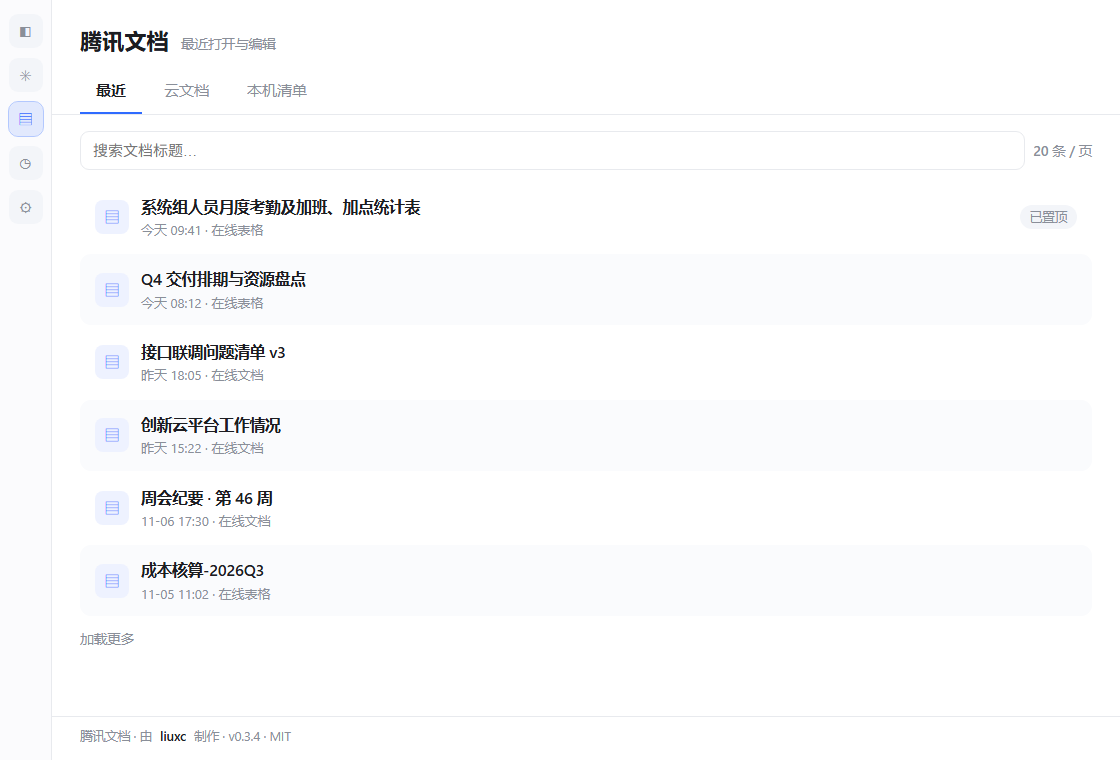
它长什么样
| 最近 | 云文档 | 本机清单 |
|---|---|---|
|
 |
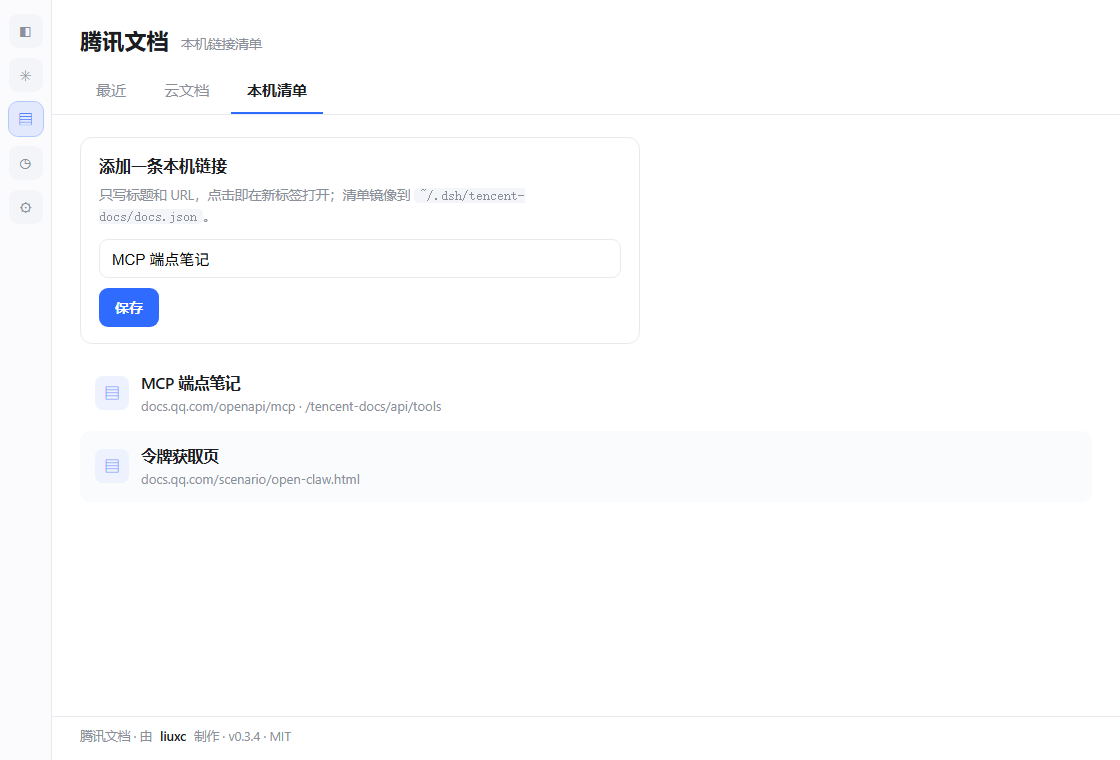 |
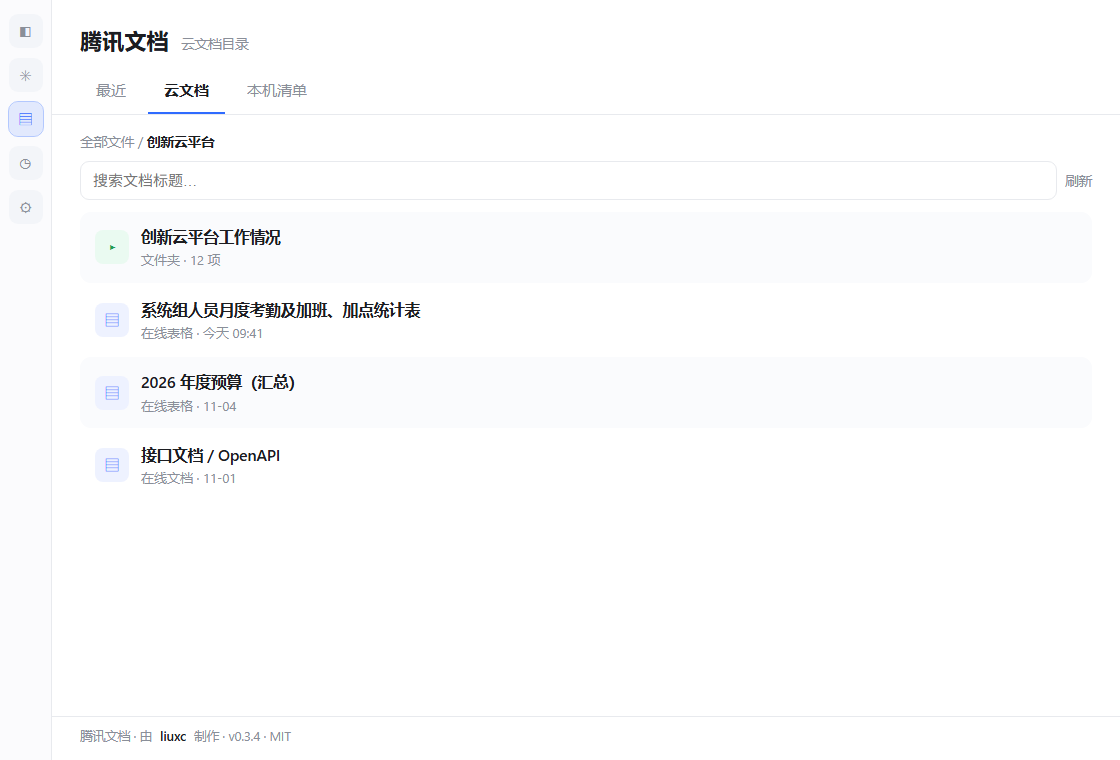
以上为面板截图(示意数据,真实条目来自你自己的腾讯文档账号)。
三个标签
- 最近 —
manage.recent_online_file,每页 20 条,翻页加载;默认首页。 - 云文档 —
manage.folder_list逐层下钻真实目录,面包屑导航,manage.search_file按标题搜索,文件点开即在新标签打开。 - 本机清单 — 自己维护的链接清单,镜像到
~/.dsh/tencent-docs/docs.json,换浏览器不丢。
安装
dsh plugin --profile desktop add dsh-tencent-docs
本地目录 / tarball:
dsh plugin --profile desktop add "C:\path\to\dsh-tencent-docs"
dsh plugin --profile desktop add "C:\path\to\dsh-tencent-docs-0.3.4.tgz"
装完刷新 Web GUI,左侧栏出现文档图标(排在 dsh-context 与 dsh-purge 之间)。
授权
- 点图标,面板会要令牌。
- 打开 https://docs.qq.com/scenario/open-claw.html,QQ/微信登录后复制访问令牌。
- 粘贴、保存。令牌只由 Host 半写入
%USERPROFILE%\.dsh\tencent-docs\auth.json(0600),浏览器脚本拿不到;「断开」即清除。
权限与数据
| 能力 | 用途 | 边界 |
|---|---|---|
| 网络 | 访问 https://docs.qq.com/openapi/mcp |
只此一个域名,无遥测、无作者服务器 |
| 读写文件 | ~/.dsh/tencent-docs/ 下 auth.json、docs.json |
不碰其他路径 |
| 凭证 | 你粘贴的访问令牌 | 只落本机、只发给腾讯文档;接口只回 len32:… 摘要 |
沙箱静态扫描会看到 fs-read / fs-write / network;没有 shell、没有 env、没有 credentials 读取。
HTTP 路由(Host 半,同源)
| 路由 | 方法 | 用途 |
|---|---|---|
/tencent-docs/api/recent?page=&count= |
GET | 最近文件(count 上限 20) |
/tencent-docs/api/tree?folder=&start= |
GET | 目录列举 / 下钻 |
/tencent-docs/api/search?q= |
GET | 标题搜索 |
/tencent-docs/api/auth |
GET/POST | 令牌状态 / 保存 |
/tencent-docs/api/auth/clear |
POST | 清除令牌 |
/tencent-docs/api/tools |
GET | MCP 工具清单(缓存 60s) |
/tencent-docs/api/load · /save |
GET/POST | 本机清单读写 |
错误统一 { ok: false, error, authRequired };缺令牌 → 401。
已知限制
- 腾讯文档禁止第三方 iframe 嵌入(
frame-ancestors),所以文件一律新标签打开,面板内不做预览。 - 工具名在运行时按正则解析(端点约 227 个工具,改过名),不硬编码。
manage.recent_online_file的count上限 20,传更大值会被拒;Host 侧已截断。- 免费账号 2000 次 MCP 调用/天。
Author
liuxc — host bridge, client panel, packaging. Fork 或再分发时保留 package.json 的 author 与面板页脚的「由 liuxc 制作」(MIT 本来就要求保留版权声明)。
License
MIT © 2026 liuxc
No comments yet. Be the first to write one.