
DSH Web Guard
A password gate for the DeepSeek Harness Web UI — one plugin that fixes four deployment problems at once and adds a native settings page.





| Problem | Vanilla behaviour | dsh-web-guard |
|---|---|---|
| No human login | A per-process ?token= printed to the terminal, new on every restart |
One password + revocable sessions |
/api returns 403 behind a proxy |
The browser-trust fence requires Host to arrive unrewritten; NPM/Caddy rewrite it |
The proxy rewrites Host/Origin to the loopback authority and drops Referer, so the fence and loopback-checking plugins both accept it |
| Token lives in the journal | journalctl | grep token before you can get in |
Exchanged in-process; the browser never sees a token |
| UI breaks on plain HTTP | crypto.randomUUID is not a function outside a secure context |
Injects a getRandomValues polyfill |
Zero runtime dependencies (Node standard library only). The npm package ships prebuilt JavaScript, so dsh plugin add needs no toolchain; building from a checkout is a maintainer command (npm run build).
Requires DeepSeek Harness 0.2.2-rc.1 or newer (engines.dsh: >=0.2.2-rc.1 <0.3.0). On an incompatible host the whole bundle is skipped — for a front door that means the gate does not start, so upgrade DSH rather than removing the plugin.
Screenshots
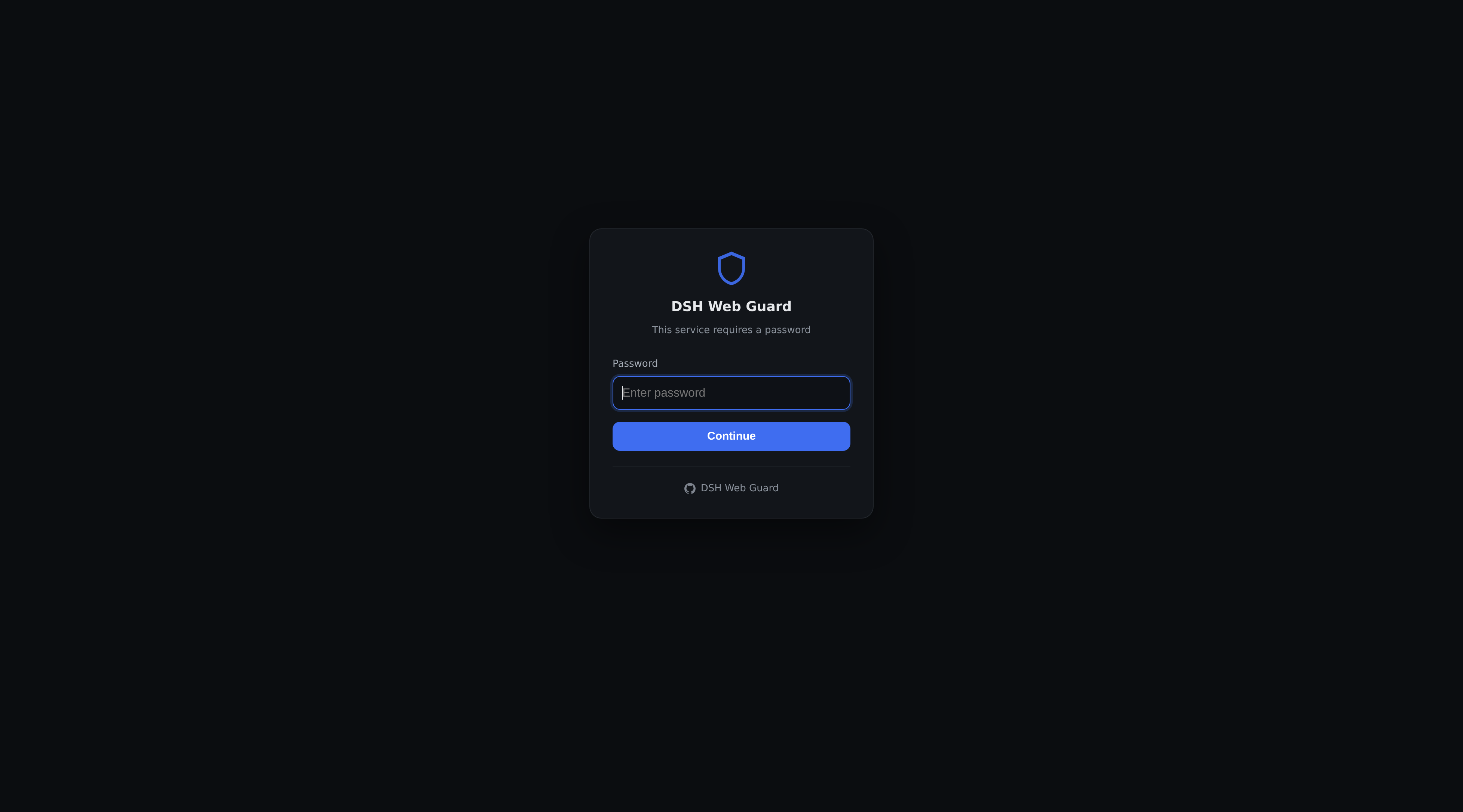
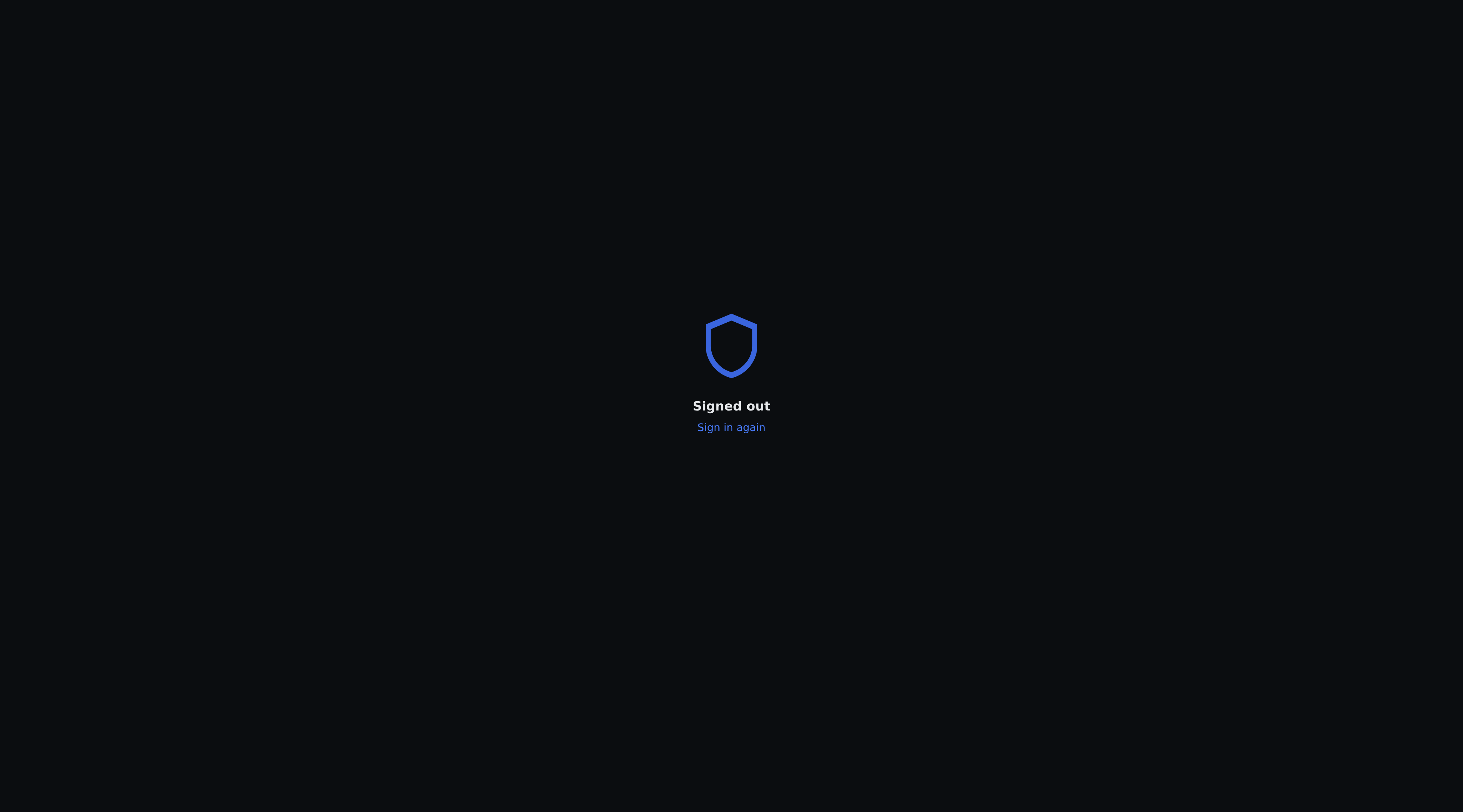
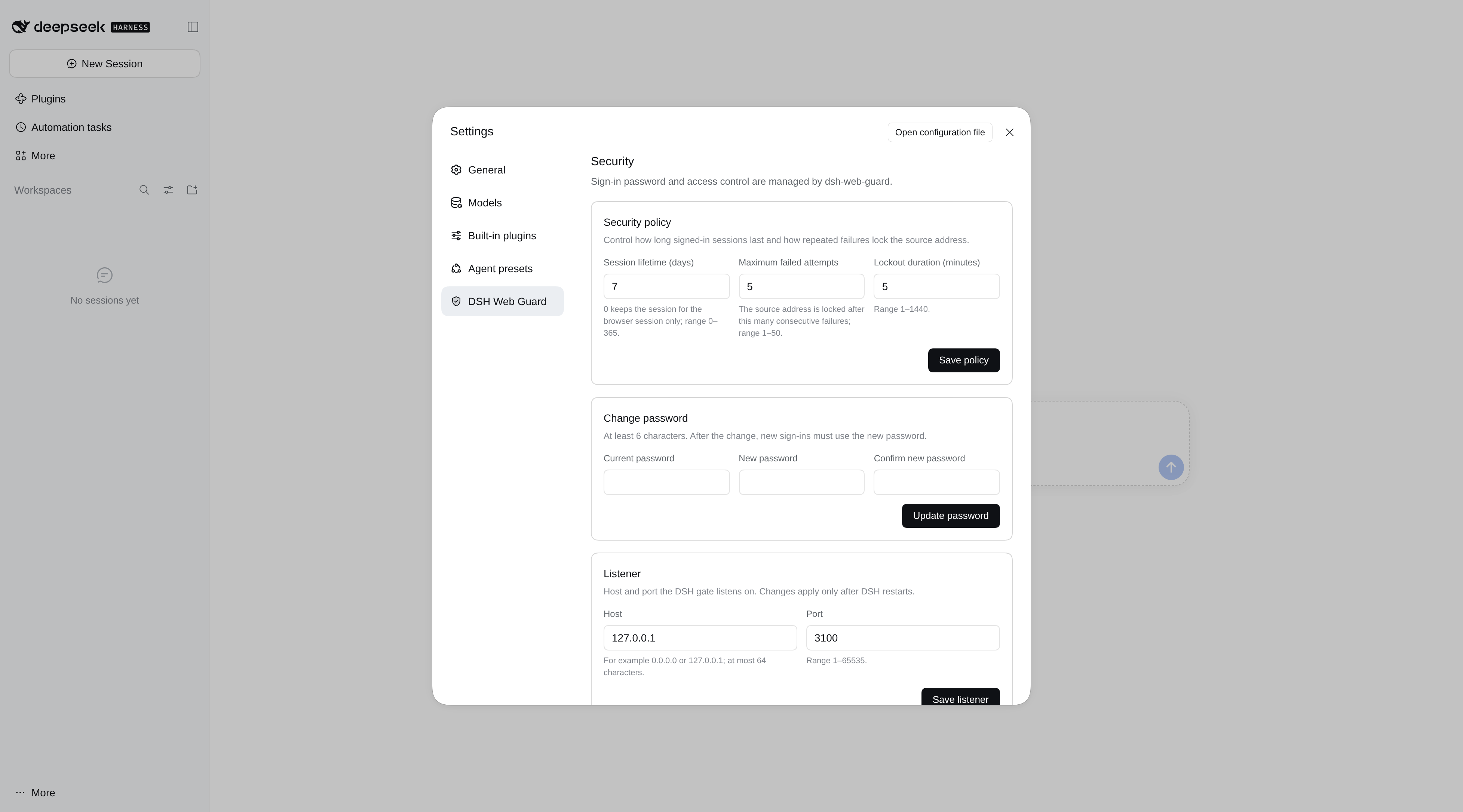
Login page · sign-out confirmation · native DSH Web Guard page in the harness settings (follows the harness light/dark theme)
How it works
browser ──HTTP(S)──> dsh-web-guard :3081 ──> DSH listener (loopback)
                          │
                          ├─ not signed in → /login
                          ├─ signed in → forward, Host/Origin rewritten to loopback, Referer dropped
                          └─ injects the harness cookie (never exposed to the browser)
The harness fence accepts a loopback authority, so making every upstream request look like one removes the 403 entirely. Authentication happens in the proxy, not as a front-end overlay — a request without a session cookie never reaches the harness.
A small browser half (dsh.client) adds the management page to the harness Settings panel; the gate itself is entirely server-side and keeps working if the browser half cannot load.
Install
# npm
dsh plugin --profile web add @lvxianchao/dsh-web-guard

# from GitHub
dsh plugin --profile web add "github:lvxianchao/dsh-web-guard"

# from a local checkout
dsh plugin --profile web add /path/to/dsh-web-guard
main only ever carries released code (development happens on dev), so this
installs the latest stable release. Installing is enough — the package declares dsh.bundle, so the guard row is
mounted automatically. Restart dsh.
On first start a password is generated, printed to the terminal and stored
(hashed) in <profile>/data/dsh-web-guard.json with mode 0600. To pin your own,
add a row to ~/.dsh/profiles/web/cordis.patch.yml (it overrides the bundle
defaults):
- id: guard
  config:
    listenHost: '0.0.0.0'
    listenPort: 3081
Note that a profile patch replaces the whole config object, so restate every
key you care about.
Upgrading from v2: the bottom-right shield button and /__guard/admin are gone; management lives in Settings → DSH Web Guard. Reinstall the package (or update to 3.0.0) and restart DSH. The password hash, session cache and settings file keep their format, so nobody is signed out and your configuration carries over.
The harness itself must listen on loopback (its default). If it is bound to a LAN address, clients can bypass the gate by connecting there directly — the plugin detects this at startup and warns.
⚠️ This is the front door, not an optional plugin
Once installed, dsh-web-guard is the only way in: it listens on 3081 and forwards to a DSH that is bound to loopback only (3080). If the plugin stops loading, 3081 stops listening and both your LAN and the internet lose access at once — while DSH itself keeps running, with your sessions and data intact. That is the dangerous shape: the door is welded shut and you are standing outside it.
If you exposed this address to the internet, take this seriously.
Three rules:
- Do not uninstall it and do not disable it. Concretely: don't run
dsh plugin --profile web remove @lvxianchao/dsh-web-guard, don't drop the entry fromdsh.profile.bundlesin the profile'spackage.json, and don't adddisabled: trueto it incordis.patch.yml. - DSH's Settings → Plugins page is a read-only inventory — status tags only (enabled / disabled / failed), no toggles. Don't go looking for an off switch there; accidents happen on the command line instead.
- Upgrading, editing config and
systemctl restart dsh-webare all safe. Only "making it not load" is not.
If you closed it by accident
Relax: DSH is still running on 127.0.0.1:3080; sessions, workspace and password are all intact. Only the gate is gone. Recovery takes two commands and does not depend on the plugin being loaded:
# 1) install it again (use file: if you installed from a checkout)
dsh plugin --profile web add file:/path/to/dsh-web-guard
# or: dsh plugin --profile web add github:lvxianchao/dsh-web-guard

# 2) restart, and 3081 starts listening again
sudo systemctl restart dsh-web
If you removed it by adding disabled: true, delete that line and restart. Your password is not lost — the hash lives in <profile>/data/dsh-web-guard.json; leave that file alone.
The real trap is not these two commands — it is that you can no longer reach the machine.
The gate only proxies DSH's HTTP entry point; it does not touch SSH. But if all your remote access funnels through this one hostname, losing the plugin leaves you exactly one option: a path that does not go through it. Have one ready, and verify it now, not after the incident:
- a hypervisor console (PVE / ESXi / cloud VNC) into the container or VM, then run the two commands;
- or an independent SSH path (direct LAN, bastion, or VPN).
One last thing: do not keep these recovery commands only on the machine that hosts the gate. Copy them somewhere you can open from outside.
Deployment topologies
1. Direct, no reverse proxy — let the plugin terminate TLS:
config:
  listenHost: '0.0.0.0'
  listenPort: 8443
  tls:
    certFile: /path/fullchain.pem
    keyFile: /path/privkey.pem
The session cookie is issued with Secure. Point DNS at the host and open one port.
2. Behind a reverse proxy (NPM / Caddy / Traefik) — the proxy does TLS, the plugin does auth:
Set the upstream to http://<dsh-host>:3081 and enable WebSocket support. No Host-rewrite configuration is needed — that is the part this plugin removes.
3. Plain LAN — HTTP plus password. Simplest, least safe: the session cookie can be sniffed on a shared network.
Language
The login page and the settings surfaces follow the harness language setting: the plugin reads
preference from the locale row in the profile patch file (~/.dsh/profiles/web/cordis.patch.yml),
which is exactly where the harness settings UI writes it. Chinese and English are
supported. With no explicit preference the pages fall back to the browser's
Accept-Language.
Theme
The native settings page is part of the harness, so it simply follows the harness light/dark choice.
The login and sign-out pages are standalone documents rendered before the harness page exists, so the server reads the harness choice from the profile patch (- id: ui-theme → config.preference, the row the Appearance control writes) and forces that palette before first paint. Precedence: ?theme=light|dark → the harness preference → the operating system (prefers-color-scheme) when the preference is system or unset.
Configuration
| Key | Default | Meaning |
|---|---|---|
listenHost |
0.0.0.0 |
Interface the gate listens on |
listenPort |
3081 |
Gate port; must differ from the harness port |
password |
— | Plaintext password, hashed at startup |
passwordHash |
— | scrypt$N$r$p$salt$key; takes precedence over password |
sessionDays |
7 |
Session lifetime; 0 = expires when the browser closes |
maxAttempts |
5 |
Consecutive failures before a temporary lock |
lockMinutes |
5 |
Lock duration |
polyfill |
true |
Inject the crypto.randomUUID shim |
title |
DSH Web Guard |
Heading on the login page |
repo |
the project repository | Link shown under the login form |
tls |
null |
{certFile, keyFile} to serve HTTPS |
Generate a hash for the config:
node -e "import('./lib/auth.js').then(m=>console.log(m.hashPassword(process.argv[1])))" 'your-password'
Security model
- Passwords are hashed with scrypt (random salt). The plaintext appears exactly once, in the generated-password log line.
- Session tokens are stored server-side as SHA-256 digests; cookies are
HttpOnly,SameSite=Lax, andSecurewhen TLS is on. - Login POSTs are checked for a same-hostname
Origin. The session cookie'sSameSiteattribute is the primary CSRF defence. - Repeated failures from one IP trigger a temporary lock (in-memory, cleared on restart).
- The session table is cached on disk (
<profile>/data/dsh-web-guard-sessions-<port>.json, mode0600, atomic tmp+rename), so restarting DSH no longer signs signed-in browsers out. The file holds SHA-256 digests, never tokens — neither the cache nor a heap dump can mint a working cookie. The filename carries the listener port, so a shadow instance cannot overwrite the live one. /logoutends the current browser session. To revoke everything (a suspected leak, say), use the settings page's sign out all devices — a restart is not a revocation any more.
This is not multi-user. One password, one privilege level. The harness agent can execute code, so anyone who gets in has code execution on that host — which is the product's design, not a bug in the gate.
When the session is gone
If the session disappears (password changed, sign-out-all, or no activity within sessionDays), an open tab does not sit on "reconnecting" forever:
- it probes
/__guard/sessionwhen the tab becomes visible, when the network comes back, after a WebSocket close, and every 30 seconds - only an explicit 401 triggers a redirect — a failed fetch (offline, server restarting) never does
- the redirect carries
?next=, so you land back where you were after signing in
Restarts (upgrades, config changes) are invisible: the session table is restored from disk and the page reconnects on its own.
Settings page
The management surface is part of the harness itself: Settings → DSH Web Guard (the same panel that holds General, Models and Agent presets; the entry is labelled with the plugin name and carries a shield icon).
- change the sign-in password (the current one is required)
- session lifetime, lockout threshold/duration — applied on save
- listen host/port — marked "takes effect after restart"
- live session list (source IP, browser, last activity): sign out just this device, kick another device, or sign out everywhere
The page renders inside the harness React tree, so it inherits the harness light/dark theme, scrolling, focus handling and mobile layout. On a narrow screen it collapses to a single column. There is no floating button and no separate admin URL any more — the settings page is the only management surface.
Why v3 makes the settings page native. The server half still does all the gating, but the page is now a dsh.client bundle: a hand-written React module (no bundler for users, React comes from the host module table) registered into the settings.section slot. The harness exposes no HTML-injection route into its React tree, so a first-class entry requires exactly this. The trade-off is a declared engines.dsh range and a browser half that a future host may skip; the server half (authentication, forwarding, the gate itself) never depends on the browser half.
Troubleshooting
| Symptom | Cause |
|---|---|
502 upstream unreachable |
The harness is down, or listenPort collides with it |
Keeps bouncing to /login |
No session cookie; make sure you use one address (an HTTP cookie is not shared with HTTPS) |
| Login succeeds then bounces back | Clock skew between the client and the host |
randomUUID is not a function |
polyfill is disabled |
| LAN can still reach the harness port | The harness is not bound to loopback — see the startup warning |
A plugin's own /api/... route answers 403 "loopback only" while the guard log shows the same 403 |
Before 3.0.2 the proxy forwarded Referer verbatim, so a plugin that re-checks Origin || Referer saw the public authority instead of the loopback one |
| No Settings → DSH Web Guard entry | The host skipped the bundle: it is older than 0.2.2-rc.1, or the page failed to load. Check `journalctl -u dsh-web |
All log lines are prefixed [dsh-web-guard] and share the harness's journal stream. Successful requests are not logged (the Web UI polls constantly); only failures and slow requests are.
Development
npm ci --ignore-scripts        # TypeScript + esbuild, build-time only
npm run typecheck              # server and client halves
npm run build                  # src/ → lib/ (tsc + one esbuild bundle); lib/ is committed

# Shadow instance: serves this checkout through the real profile without editing it.
# An isolated DSH_HOME keeps the shadow gate away from the live profile's guard state.
cp -a ~/.dsh/profiles/web /tmp/dsh-shadow-home/profiles/web
cp dev.yml dev.local.yml       # then point `name:` at this checkout's lib/index.js
DSH_HOME=/tmp/dsh-shadow-home dsh --profile web --patch ./dev.local.yml --host 127.0.0.1 --port 3099 --no-open

# e2e against the running gate (dev.yml listens on 3100)
GUARD_URL=http://127.0.0.1:3100 GUARD_PASSWORD=dev-only-password node test/e2e.mjs
The plugin uses only public harness APIs: webServer.tapIndex, webServer.getOrigin and connection.authenticatedUrl on the server, and the documented ctx.slots / ctx.locale services in the client bundle. No monkey-patching, no source modification.
lib/client.js is one classic script that registers a lazy factory through window.__ModuleLoader__.load(); React is resolved from the host's shared module table, so it is never bundled twice. CI fails when lib/ is stale.
Companion plugin
DSH's built-in document preview cannot play video — opening an .mp4 in the sidebar says the format is unsupported. dsh-video-preview adds a streaming video renderer for the same sidebar: mp4 / webm / mov, byte-range seeking, no size cap.
dsh plugin --profile web add @lvxianchao/dsh-video-preview
The two plugins are independent — install either or both.
Sponsor
If dsh-web-guard saved you some setup time, a coffee is welcome:
WeChat tip QR
License
MIT
No comments yet. Be the first to write one.