Workboard
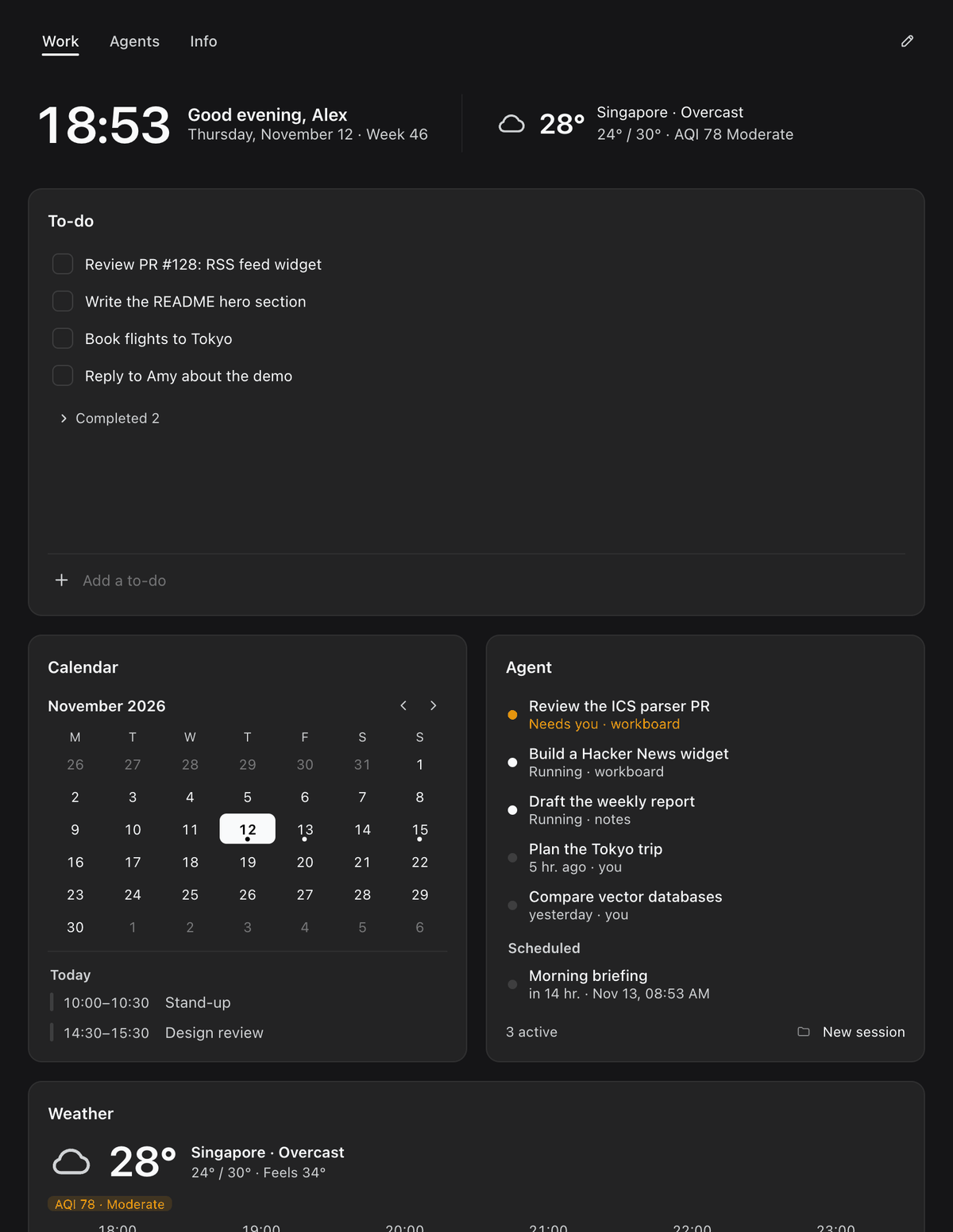
A modular dashboard for DeepSeek Harness. 36 widgets out of the box — and your agent builds the rest.
简体中文 · 

Highlights
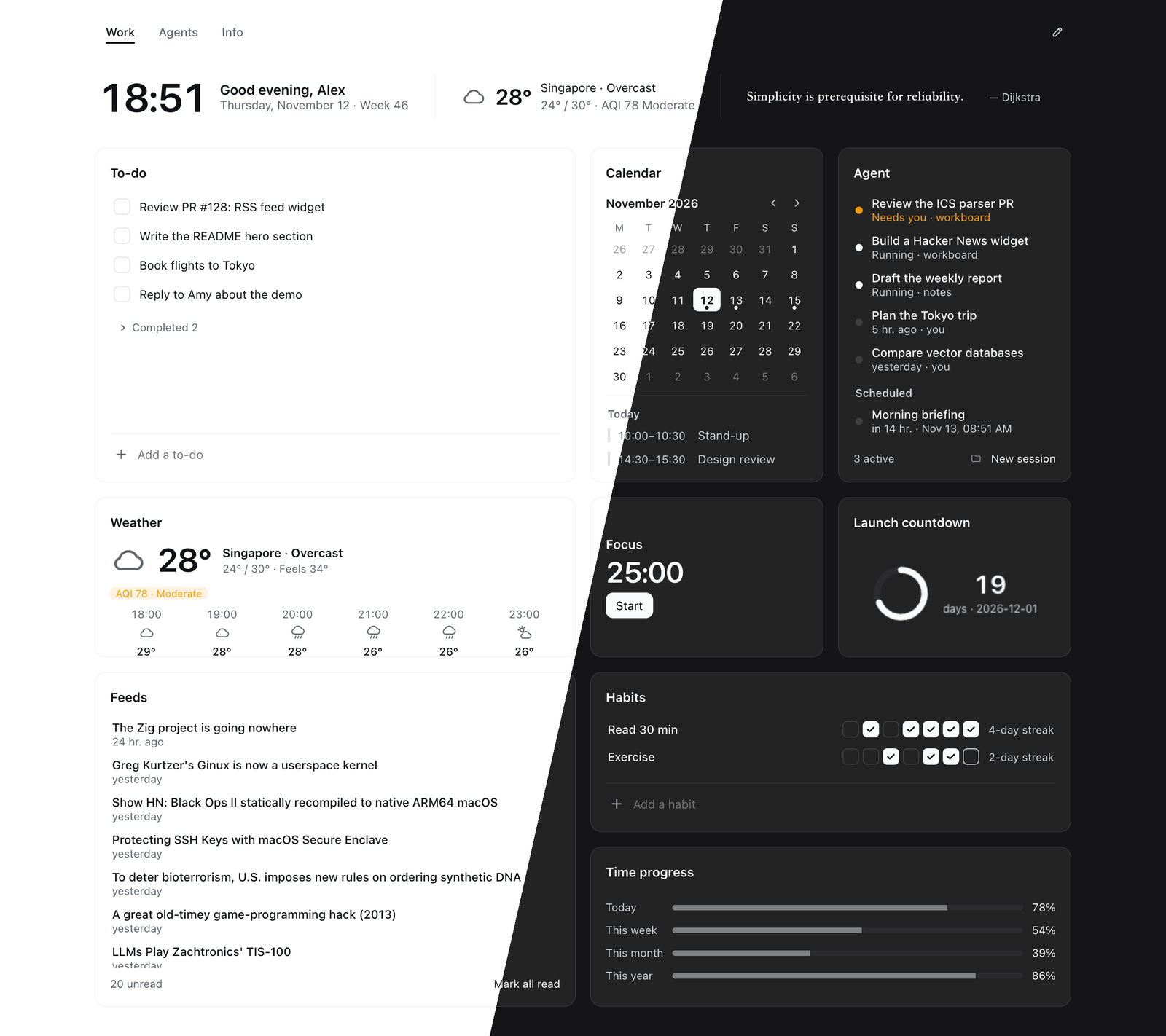
36 widgets, ready to use
Open the widget gallery, search, and drop cards straight onto your board across four categories:
- Agent workflows: active and waiting sessions, running goals and background jobs, quick prompts, inbox, token usage and cost estimates, deliverables, scheduled tasks, and pinned sessions
- Productivity & dev tools: to-dos, scratch notes, ICS calendar, Pomodoro focus timer, ambient sound, quick links, Git repos, GitHub PRs and issues, system monitor, network speed and latency, clipboard history, and recent files
- Daily essentials: Today banner, clock, world clock, weather, countdowns, time progress, habit tracker, photo frame, and now playing
- News & markets: multi-source trending lists, RSS / Atom feeds, video subscriptions, stocks / forex / crypto markets, and daily quotes
Most widgets work with zero configuration; a few only ask for essentials like your city, an ICS calendar URL, or ticker symbols.
Your agent builds the rest
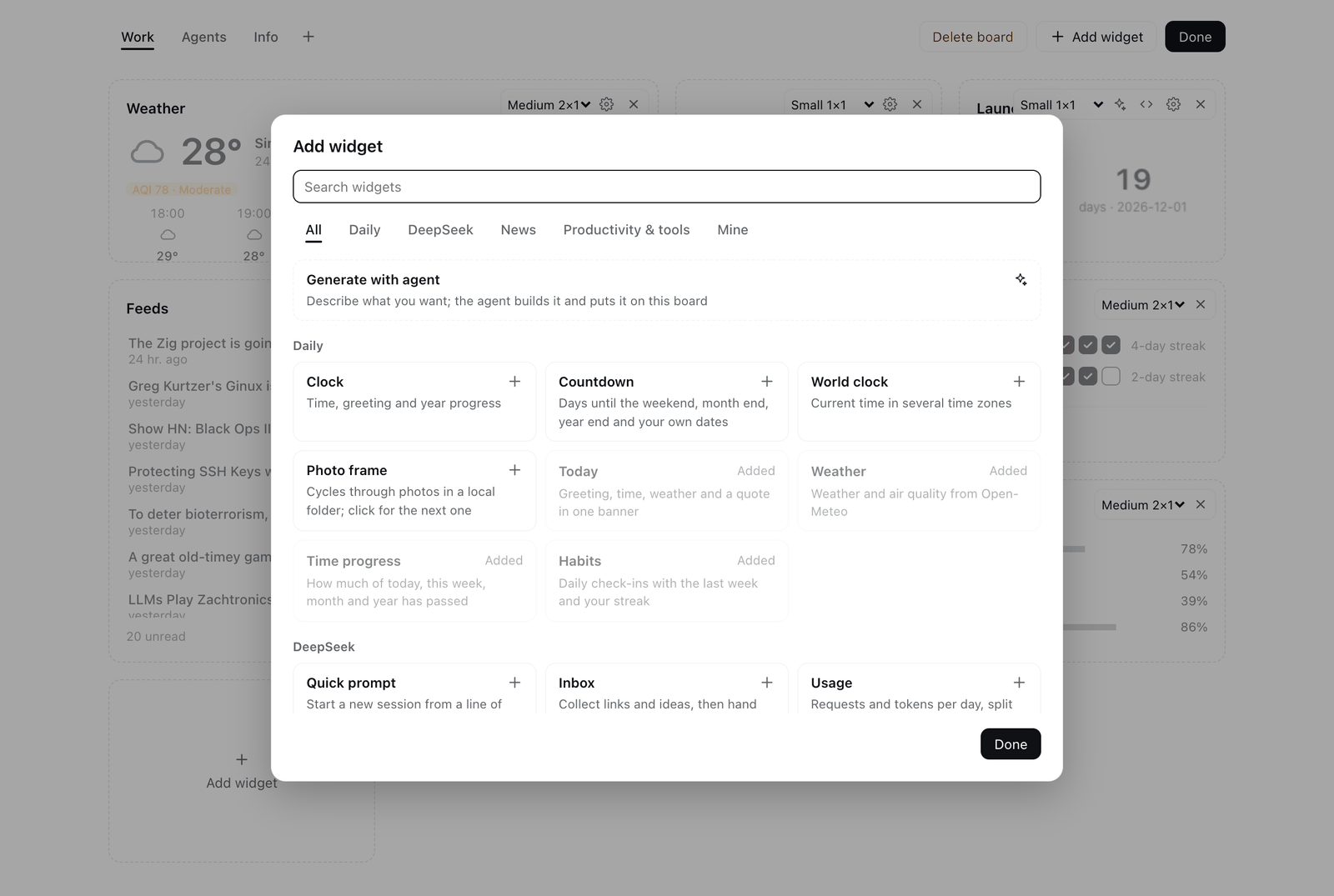
Describe the card you want in a sentence and click Hand to agent. The agent writes the widget and places it directly onto your open board. Click the sparkle button on any custom card to ask for changes, or Ask agent to fix to hand runtime errors back to the agent.
Custom widgets run inside an isolated sandbox with no access to the host page, cookies, or undeclared network endpoints — they can only fetch URL prefixes explicitly declared by the widget.
Built for agent workflows
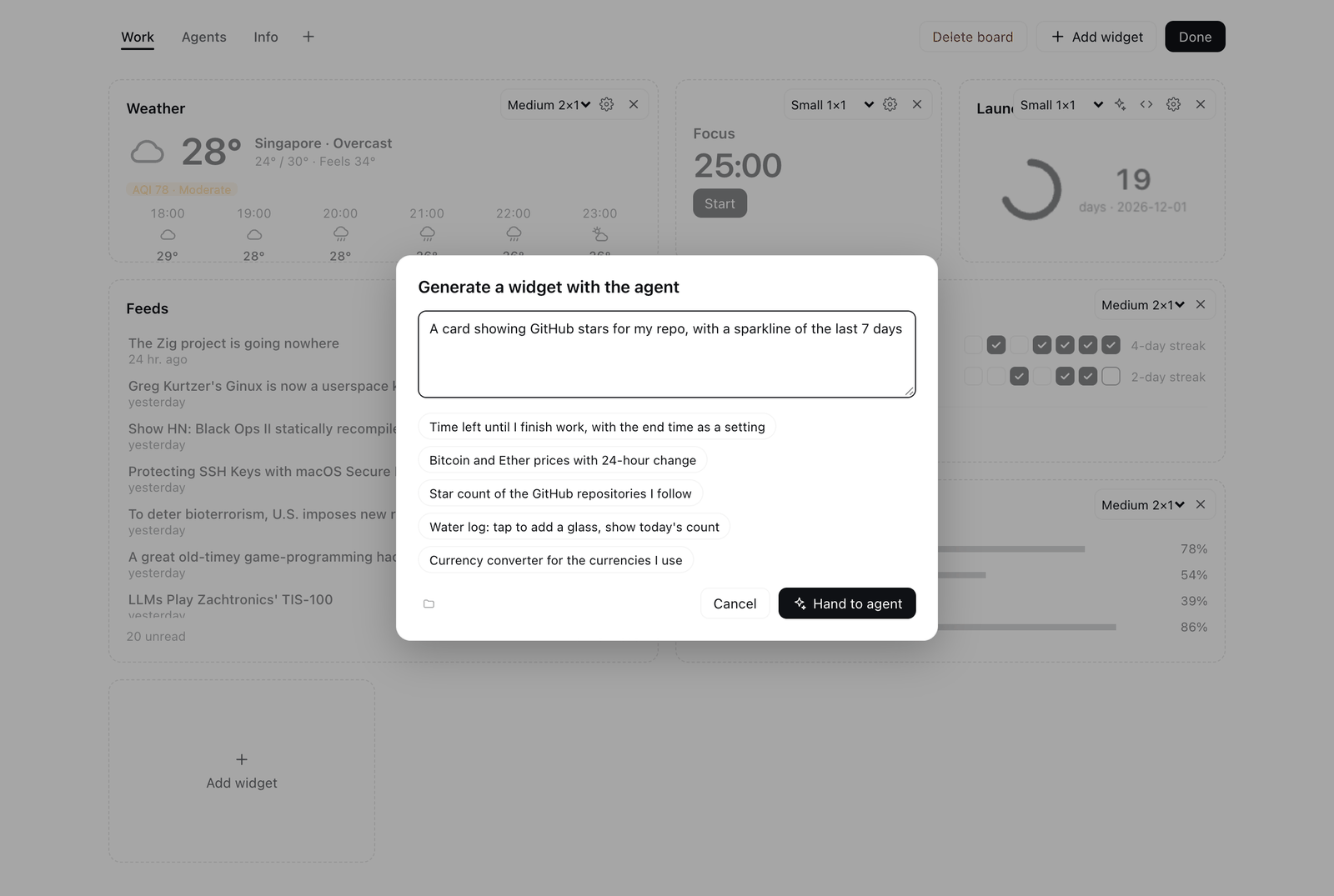
Monitor sessions waiting for your approval, active goals and background jobs, token usage, deliverables, and scheduled tasks on a single board. Going the other way, your agent can read and update your to-dos, notes, inbox, and custom widgets from any conversation using built-in tools.
Modular, adaptive, minimal
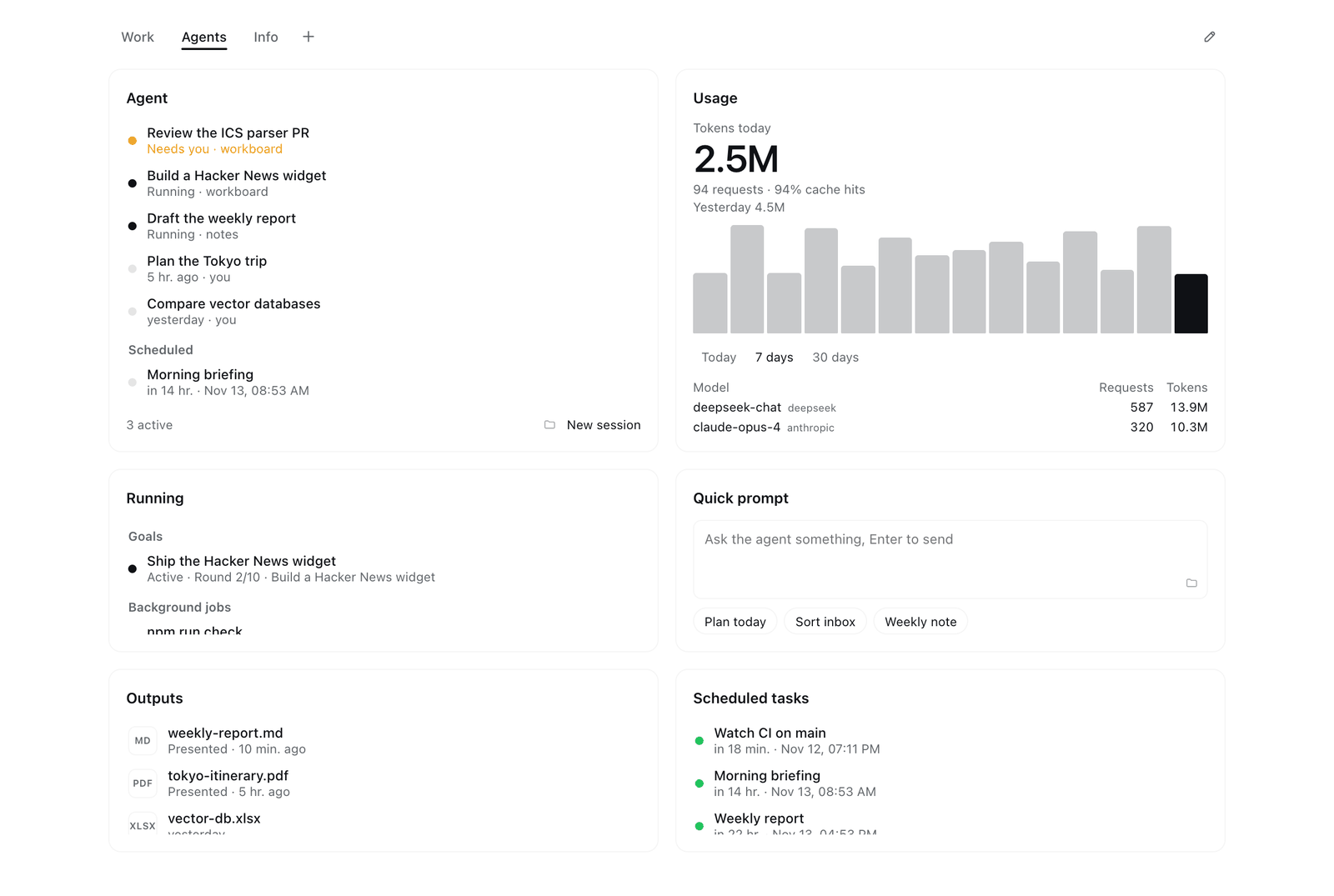
Cards snap to a four-column grid across six sizes. Drag to rearrange, resize on the fly, and organize widgets across tabbed boards. The layout reflows smoothly to narrow windows and follows the Harness light and dark themes. Each card does one job with zero visual clutter.
Local and private
All boards and personal data stay in your local Harness profile. Every external network request is proxied and cached by the Host — the browser page never connects to third-party services directly.
Quick start
In Harness, open Plugins → Add plugin, enter the package name, and install:
dsh-workboard
Or just tell your agent "install the plugin dsh-workboard". From the command line: dsh plugin --profile web add dsh-workboard.
Then open Workboard from the sidebar. The default board comes preset with common widgets such as Today, To-do, Trending, Outputs, Clipboard, Calendar, and System. Click Edit → Add widget to browse the gallery or ask the agent to build a custom card.
For AI agents
If you are an agent interacting with Workboard:
- Install: call
plugin_manager install_bundlewithtargetset todsh-workboard, or to this repository's absolute path when installing from source (local directories are linked rather than copied). - Built-in tools:
workboard_todos:list·add·complete·reopen·removeworkboard_note:read·append·replaceworkboard_inbox:list·add·remove·clearworkboard_widget:list·get·create·update·set_data·removeworkboard_context: read-only; one call returns what needs the user, calendar, weather, to-dos, habits, inbox, note, sessions, running work, scheduled tasks, outputs, usage, Git, and GitHub; passsectionsto read only someworkboard_brief:read·write(the daily brief, in Markdown)
- Build a custom widget: load the
workboard-widgetskill (skills/workboard-widget.md) before callingworkboard_widget. It documents card sizes, thewindow.workboardbridge API, sandbox rules, and theme tokens. - Limits & live sync: up to 50 custom widgets, each with up to 200 KB of HTML and 200 KB of JSON data. The UI polls every 5 seconds, so your changes appear without reloading the page.
- Storage:
~/.dsh/storages/dsh_workboard.json.
Reference
All 36 built-in widgets| Widget | Sizes | What it shows |
|---|---|---|
| DeepSeek (Agent workflows) | ||
| Attention | l t m w |
One queue, by urgency, of sessions waiting for you, blocked goals, failed background jobs, PRs to review, carried-over to-dos, and the inbox; jump to the session, complete the to-do, or hand off to the agent |
| Agent | t l m w |
Sessions waiting for your input first, followed by running and recent sessions, upcoming scheduled tasks, and a new-session button |
| Running | t l m w |
Active goals and background jobs across sessions; jump to the session or stop a job |
| Daily brief | l t w m |
A brief of your day that the agent writes from the dashboard; generate it any time or every day on a schedule |
| Quick prompt | m w l t s |
Type a prompt or pick a preset to launch a new session right away in the chosen workspace |
| Inbox | t l m w |
Quick capture for links and thoughts; hand everything to the agent to triage with one click |
| Usage | l t m w s |
Token counts, request totals, cache hit rate, and per-model breakdown from local session logs, plus cost estimates when prices are set |
| Outputs | t l m w |
Deliverables presented by the agent, newest first; open, reveal in Finder, or jump to the source session |
| Scheduled tasks | t l m w |
All scheduled tasks with recurrence and next run time; run now, pause, resume, or delete |
| Pinned sessions | t l m w |
Your pinned sessions with a preview of each session's latest message |
| Productivity & tools | ||
| To-do | l m t |
Open items on top, completed items collapsed; unfinished items from earlier days are badged as carried over |
| Notes | l t m s |
Autosaving scratchpad; turn the current line into a to-do with one click |
| Calendar | t l s m |
Month grid and selected day's schedule from one or more ICS subscriptions, including recurring events |
| Focus | m s |
Pomodoro timer that keeps running across boards and panels, sends a system notification when done, and tracks today's completed sessions |
| Ambient sound | m s w t |
Rain, waves, wind, fire, and pink / brown noise synthesized in the page; mix several, keeps playing across boards and panels, and can start with Focus |
| Links | m s w t l |
One name URL per line (http, https, and mailto only) |
| Git repos | t l m w |
Current branch, uncommitted changes, ahead / behind counts, and branches whose upstream is gone; defaults to your Harness workspaces |
| GitHub | t l m w |
PRs awaiting your review, your open PRs, and issues assigned to you via your signed-in gh CLI |
| System | m s t l w |
CPU, memory, disk, battery, and a 5-minute CPU load sparkline |
| Recent files | t l m w |
Newest files in ~/Downloads, ~/Desktop, or custom folders; open, reveal, or hand a file to the agent |
| Clipboard | t l m w |
Text copied while the panel is open; copy again or send to the agent with a preset like Translate |
| Network | m s t l w |
Live download / upload throughput, local and public IP, system proxy status, and latency to configured hosts |
| Daily | ||
| Today | bar |
Time, greeting, date, ISO week, current weather, and a daily quote (built-in, Hitokoto, or custom; click for another) |
| Clock | m s |
Current time, greeting, date, and year progress |
| World clock | m s w t |
Current time across multiple IANA time zones with local offset and day difference |
| Weather | m s |
Current conditions, today's high and low, air quality, and hourly forecast |
| Countdown | m s t |
Days until the weekend, month end, year end, and custom dates (MM-DD without a year repeats annually) |
| Time progress | m s w |
Percentage of today, this week, this month, and this year elapsed |
| Habits | m l t w |
Check in for any day of the past week and track your current streak |
| Photo frame | m s t l w |
Cycles through photos from a local folder (~/Pictures by default) |
| Now playing | m s w t |
Track, artwork, and progress of whatever macOS reports as now playing (Music, Spotify, QQ Music, browsers…), with play / pause and skip |
| News & markets | ||
| Trending | l t m w |
Tabbed hot lists from Weibo, Zhihu, 36Kr, sspai, Hacker News, GitHub Trending, Product Hunt, and Reddit (Bilibili and V2EX optional) |
| Feeds | t l m w |
Multiple RSS / Atom feeds merged chronologically; visited items dim automatically |
| Videos | l t m w |
Latest uploads from YouTube channels (link, UC… ID, or @handle), Bilibili creators (space link or UID), and RSS feeds with images, with thumbnails |
| Markets | t m s l w |
Forex (USD/CNY), China / HK / US equities (sh600519, hk00700, usAAPL), and crypto (BTC, cg:<id>) |
| Quote | m w s |
A daily quote (click for another), sharing its source setting with the Today banner |
Note: Agent, Quick prompt, Inbox, Attention, and Daily brief share the same default workspace selection; PRs in Attention reuse the GitHub widget's query and cache. Shared preferences (your name, week start day, city, temperature unit, and quote source) can also be configured under Settings → Workboard. New built-in widgets added in future updates appear in the gallery without altering existing boards.
Network requests and local readsAll external network requests are made and cached by the Host:
- Weather & city search: Open-Meteo, requested only after you set a city
- Quotes: Hitokoto, requested only when selected as the quote source
- Calendars & feeds: the ICS and RSS / Atom URLs you configure; the Feeds widget starts with hnrss.org front page (ifanr and Ruan Yifeng's blog in Chinese), editable in its settings
- Markets: Tencent Finance (
qt.gtimg.cn) for equities, open.er-api.com for exchange rates, and CoinGecko for crypto - GitHub: uses your local
ghCLI and its existing sign-in - Trending: public web endpoints for Weibo, Zhihu, 36Kr, sspai, Bilibili, and V2EX (unofficial and may break if a site changes), the HN Algolia API, the GitHub Trending page, and official Product Hunt and Reddit feeds; cached for 10 minutes
- Videos: YouTube channel RSS feeds (channel pages only to resolve an
@handle), Bilibili's public creator archive endpoint (unofficial, rate-limited at times), and thumbnails proxied as data URLs; cached for 15 minutes - Network: public IP from ipinfo.io (falling back to ip.sb) and host latency via
curl, respecting the system proxy when set; tests Google, GitHub, and Cloudflare by default (Baidu, GitHub, and Google in Chinese) - Custom widgets: limited to the
http(s)URL prefixes declared in each widget'sfetchallowlist; cached for 30 seconds
Widgets that only read local state:
- Usage & Outputs: read local session logs under
~/.dsh/sessions - Attention: combines Harness session, goal, and background job state with your local to-dos and inbox; with GitHub on, it calls the local
ghCLI (sharing the GitHub widget's 5-minute cache) - Daily brief: written by the agent in a new session after it reads the local data above through
workboard_context; turning on Every day creates one daily Harness scheduled task, and turning it off deletes it - Git repos: runs
git statuslocally, and only runsgit fetchwhen you click Fetch - System: uses
vm_statandpmseton macOS - Photo frame: uses
sipson macOS to generate thumbnails cached in the system temp directory - Now playing: reads the system now-playing session through the bundled mediaremote-adapter (
vendor/, BSD-3-Clause), which runs under/usr/bin/perland needs no permission; if that fails it falls back to asking Music or Spotify viaosascriptwhen already running, for which macOS asks once for Automation permission - Ambient sound: synthesized with Web Audio in the page, with no files or network
- Recent files: lists only the top level of each configured folder
- Clipboard: polls
pbpaste(macOS) orwl-paste/xclip(Linux) every 2 seconds while the card is visible; history stays in memory only
Data from earlier package names (@lukeinx/dsh-desk or dsh-bento) is migrated automatically on first launch while leaving the original files untouched.
Another bundle can register a React component into the workboard.widget slot from its client.js. Attach the widget manifest to the component's static workboard property; the slot registration itself only needs id, order, and label:
function Hello({size, config}) {
  return h('b', null, `Hello (${size})`);
}
Hello.workboard = {apiVersion: 1, sizes: ['m', 's']};

ctx.effect(() => ctx.slots.inject('workboard.widget', () => ctx.slots.register({
  name: 'workboard.widget', id: 'hello.widget', order: 100, label: 'Hello',
}, Hello)), 'hello widget');
See examples/hello-widget for a complete bundle. A newly installed external widget is automatically placed once on the currently open board; other boards can add it from the gallery.
| Size | Columns × rows | Description |
|---|---|---|
bar |
4 × ½ | Frameless banner |
s |
1 × 1 | Small |
m |
2 × 1 | Medium |
t |
1 × 2 | Tall |
l |
2 × 2 | Large |
w |
4 × 1 | Wide |
Manifest fields:
sizes: allowed size keys;defaultSizemust be one of them and defaults to the first entry.title: false: hides the card header;banner: true: renders without a card frame.description: summary shown in the widget gallery.category: gallery section —daily(Daily),agent(DeepSeek),news(News), ortools(Productivity & tools). Any other value appears under Plugins.settings: fields for the card settings dialog:{key, type, label, default?, options?, placeholder?}, wheretypeistext,textarea,select(withoptions: [{value, label}]), ortoggle. Labels may be strings or functions returning a string.
The component receives {size, config, editing, openSettings} as props.
Development
To run from source, clone the repository and enter its absolute path in Add plugin (local directories are linked rather than copied).
git clone https://github.com/lukeinx/dsh-workboard.git ~/dsh-workboard
npm run check   # syntax check, Host smoke test, and ICS parser tests
index.js: Host routes (/api/dsh-workboard/*), storage tables, and agent toolsclient.js: sidebar entry, board container, and the 36 built-in widgetslib/: data fetchers, parsers, and system probesskills/workboard-widget.md: agent skill for building custom widgets
Acknowledgments
Workboard builds on the following projects and services. Feed and trending content belongs to its respective publishers.
| Project or service | Used for | License or terms |
|---|---|---|
| DeepSeek Harness | Plugin host, theme tokens, and React runtime | MIT |
| React | Widget rendering, provided by Harness | MIT |
| Feather Icons | Selected icon paths adapted from Feather | MIT |
| Open-Meteo | Weather, air quality, and city search | Data under CC BY 4.0 |
| Hitokoto | Optional Chinese quotes | Public API |
ExchangeRate-API (open.er-api.com) |
Foreign exchange rates | Free open access (attribution required) |
| CoinGecko | Cryptocurrency prices | Public API (attribution required) |
Tencent Finance (qt.gtimg.cn) |
China, Hong Kong, and US stock quotes | Unofficial endpoint |
| HN Algolia API, hnrss.org | Hacker News hot list and default English feed | Public API and feeds |
| Weibo, Zhihu, 36Kr, sspai, Bilibili, V2EX, GitHub Trending, Product Hunt, Reddit | Trending lists | Public pages, feeds, and unofficial endpoints |
| YouTube, Bilibili | Video subscriptions and thumbnails | Public channel feeds and unofficial endpoints |
| ifanr, Ruan Yifeng's blog | Default Chinese RSS feeds | Publishers' RSS feeds |
| GitHub CLI | GitHub widget data | MIT |
| mediaremote-adapter | System now-playing info, bundled in vendor/ |
BSD-3-Clause |
| ipinfo.io, ip.sb | Public IP lookup in the Network widget | Public API |
| Classical texts (Laozi, Confucius, Xunzi, and others) | Built-in quotes | Public domain |
No comments yet. Be the first to write one.