cursor-to-dsh


Use Cursor models as the
cursorLLM provider in DeepSeek Harness (DSH) and DeepSeek Desktop, through the official@cursor/sdkand your own Cursor API key. DSH keeps the agent loop, tools and permissions; Cursor is only the model. The docs are in Chinese.
把 Cursor 注册为 DeepSeek Harness(DSH,含 DeepSeek Desktop)的模型提供方 cursor。DSH 负责 agent 循环、工具和权限,Cursor 只当模型。
特点
- 官方接口:通过
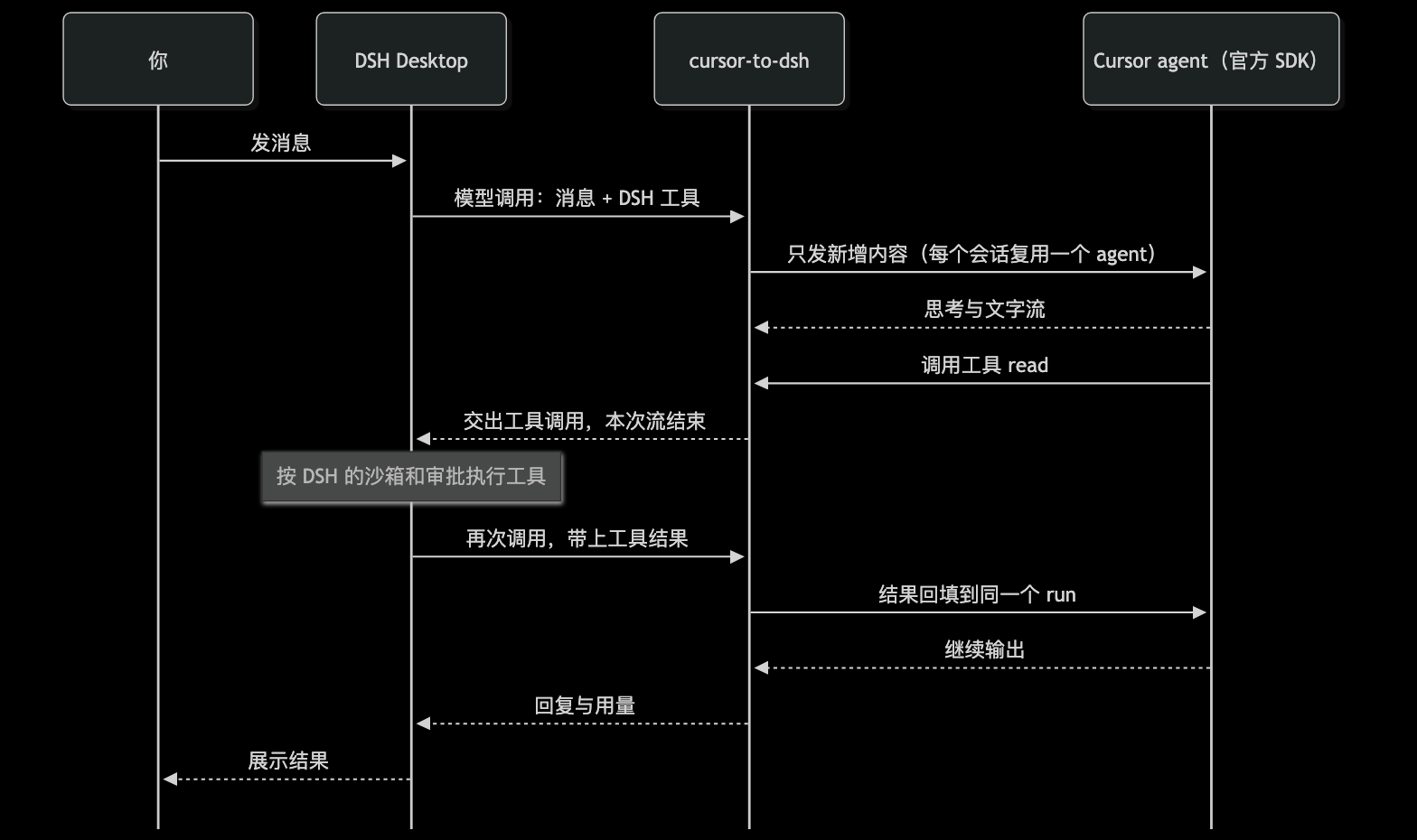
ctx.llm.registerAdapter注册适配器,不改 DSH 内部实现。 - 缓存复用:每个 DSH 会话对应一个 Cursor agent,只发新增内容;工具结果回填到同一个 run 里继续。
- 工具归 DSH:Cursor 内置工具关闭,工具全部由 DSH 执行,受 DSH 的沙箱和审批管控。
- 模型参数:模型目录和推理强度来自 Cursor 的实时目录;始终
fast=false;上下文档位默认最小档,被拒时自动降档。 - 用量口径:按 DSH 的互不重叠用量桶上报,多次调用的 run 按估算上下文上报,不误报超限。
- 图片:用户消息和工具结果里的图片附件从 DSH 附件服务读出后转给 Cursor,同一附件只读一次。
安全合规
- 官方 SDK + 自己的 key:只通过 Cursor 官方
@cursor/sdk调用,用你在 Cursor 后台创建的 API Key,用量计入你自己的 Cursor 账号;不逆向私有协议,不读取 Cursor IDE 的登录态或本地凭据。 - DSH 官方接口:通过
ctx.llm.registerAdapter注册,不改宿主代码。 - 工具与权限归 DSH:Cursor 内置工具全部关闭,读写文件、执行命令都由 DSH 执行,沿用 DSH 的沙箱和审批。
- key 不外泄:key 存在 DSH 凭据服务(
~/.dsh/.credentials.yaml,0600)或环境变量里,不写进日志、不进仓库。
原理
- 适配器把 DSH 的请求消息转成核心逻辑的形状,按消息指纹判断 Cursor 已经看过哪些内容。
- DSH 的工具挂给 Cursor 作为自定义工具。Cursor 调工具时,适配器交出工具调用并结束本次流;DSH 执行完工具再调一次适配器,结果回填后同一个 run 继续。
- 会话中途新增的工具会在下一次发送里告知模型(Cursor 只在会话开始时列出工具)。
- 压缩、改写历史、换模型、系统提示词被改写时,新开 Cursor agent 并重放完整历史。标题、压缩等辅助调用用一次性 agent。
安装
前置:DSH 0.2.0-rc.2 及以上(DeepSeek Desktop 内置 0.2.1-rc.2)。
Desktop 用 desktop profile,它只归 Desktop 管:dsh plugin --profile desktop add 和 --dump-config 都会报 managed exclusively by the Electron application。所以要先退出 Desktop,手动改 profile 的 package.json,再用 Desktop 自带的 pnpm 安装。
完全退出 DeepSeek Harness Desktop。
编辑
~/.dsh/profiles/desktop/package.json,保留已有条目,只加两处:{ "dependencies": { "cursor-to-dsh": "^0.1.1" }, "dsh": { "profile": { "bundles": ["…已有条目…", "cursor-to-dsh"] } } }按下文「获取 key」写好
CURSOR_API_KEY,然后安装并启动 Desktop:cd ~/.dsh/profiles/desktop node "/Applications/DeepSeek Harness.app/Contents/Resources/runtime/primary-runtime/dependencies/pnpm/bin/pnpm.mjs" install open -a "DeepSeek Harness"Desktop「设置 → 模型」里出现 Cursor、模型选择里有
cursor下的模型,即安装成功。
其他 profile(如 CLI 的默认 profile)不受限制,可以直接 dsh plugin --profile <名称> add cursor-to-dsh。升级:改版本号后重复第 3 步。
从源码安装(开发用):git clone https://github.com/lukeinx/cursor-to-dsh.git && cd cursor-to-dsh && npm install && npm run build,第 2 步的依赖写成 "cursor-to-dsh": "link:<仓库绝对路径>"。源码改动后要重新 npm run build 并重启 DSH。
也可以把下面这段发给 Agent(Claude Code、Cursor、pi 等)代装:
按 https://github.com/lukeinx/cursor-to-dsh 的 README 给我的 DeepSeek Harness Desktop 安装 cursor-to-dsh,
遵守 README 里给 Agent 的规则;装好后告诉我把 Cursor API Key 填到哪里,key 由我自己填。
让 coding agent 代装时,请它遵守:改 profile 前先退出 Desktop,只追加条目、不动已有的 dependencies 和 bundles;key 由用户自己填入凭据文件,Agent 不读取、不打印;在本仓库改代码前先读 AGENTS.md。
获取 key:打开 cursor.com/dashboard → API Keys → New API Key。用个人 key 或 service account key,Team Admin key 不支持。
Key 的查找顺序:DSH 凭据服务里的 CURSOR_API_KEY → 启动 DSH 时的环境变量 CURSOR_API_KEY → 插件配置 apiKey。
Desktop「模型」设置页目前只给内置 provider 显示 key 输入框,第三方插件填不了。推荐写进 DSH 的本地凭据文件 ~/.dsh/.credentials.yaml,权限必须是 0600,改动会热加载,优先级高于环境变量:
version: 1
refs:
  CURSOR_API_KEY: <你的 key>
文件已存在时只在 refs: 下加一行,不要覆盖已有条目。也可以在 profile 的 cordis.patch.yml 里覆盖插件这一行,直接写 apiKey(明文在配置里,不推荐):
- id: llm-cursor
  name: cursor-to-dsh
  config:
    apiKeyEnv: CURSOR_API_KEY
    apiKey: <你的 key>
    context: min
patch 会替换整个 config,覆盖时要写全所有键。然后在模型选择里选 cursor 下的模型,或者把 agent-default-model 改成 provider: cursor。
配置
| 配置项 | 默认值 | 含义 |
|---|---|---|
apiKeyEnv |
CURSOR_API_KEY |
存 key 的凭据名 / 环境变量名 |
apiKey |
无 | 凭据和环境变量都没有时使用 |
context |
min |
上下文档位:min、max 或具体档位如 300k |
cwd |
会话工作目录 | Cursor agent 的工作目录 |
环境变量:DSH_CURSOR_CONTEXT 覆盖 context,DSH_CURSOR_CWD 覆盖 cwd,DSH_CURSOR_DEBUG=1 输出调试日志(含建 agent、发送、首个事件的耗时)到 stderr,DSH_CURSOR_PREWARM=0 关闭预热。
预热:Cursor SDK 每个进程第一次建 agent 要约 8 秒初始化。插件加载后拿到 key 就拉模型目录,成功后在后台建一个一次性 agent 把这段时间提前付掉(在空临时目录里,发送后立即取消)。之后每个新会话的首字时间主要是模型本身:Haiku 5.5 开思考约 3 秒、关思考约 1.3 秒;Sonnet 5.5 约 1.2 秒;DSH 的工具和系统提示词较长时还会再慢一些。
已知限制
- 文件附件、已被卸载(offloaded)的图片和读不出的图片不转给 Cursor,只留一句占位说明。重放历史时只带最后一条用户消息的图片,更早的图片 Cursor 看不到。
- 工具交接时不报用量(Cursor 只在 run 结束时给累计值),上下文用量在 run 结束时更新。
stop停止序列不支持,请求带了会报UNSUPPORTED_OPTION;temperature、maxTokens被忽略。- 「模型」设置页会列出 Cursor 并显示 key 是否已配置,但宿主只给内置 provider 渲染编辑表单,Cursor 这一行不能在页面上填 key 或改配置。
开发
npm test         # 假 Cursor agent 的单测
npm run check    # 类型检查
npm run build    # 生成 lib/,DSH 加载的是它
npm run check:public   # 发布前检查:不含内网链接、本机路径,package.json 指向公开仓库
CURSOR_API_KEY=... node --experimental-strip-types scripts/live.ts [模型 id]   # 真实 Cursor 实测
不安装、不动任何 profile,在真实 DSH 里试跑:写一个 overlay(路径必须是绝对路径),用 headless 模式执行一个任务。
# /tmp/cursor-overlay.yml
- insert:
    - id: llm-cursor
      name: <仓库绝对路径>/lib/index.js
- id: agent-default-model
  name: '@deepseek-ai/dsh-agent-default-model'
  config:
    provider: cursor
    model: claude-haiku-5-5
DSH="/Applications/DeepSeek Harness.app/Contents/Resources/runtime/cli/bin/dsh"
CURSOR_API_KEY=... DSH_CURSOR_DEBUG=1 "$DSH" --profile headless --patch /tmp/cursor-overlay.yml --json "Read README.md and summarize it in one line"
--json 输出运行事件;调试日志里工具结果回填那次调用应显示 plan=results(同一个 Cursor run 继续)。
--patch 按绝对路径挂载时,插件用的是自己 node_modules 里的 @deepseek-ai/dsh-llm 副本,和宿主不是同一份,LlmError 的错误码在 agent 循环里会变成 UNKNOWN。只用于试跑;正式使用请 dsh plugin add,那样共享宿主的副本。
同一进程多轮对话可以用 npm 上的 @deepseek-ai/dsh-sdk-client 驱动 dsh --profile sdk,patches 传同一个 overlay;第二轮调试日志应显示 plan=send(只发新增内容)。
约束见 AGENTS.md。
版权
MIT,见 LICENSE。Copyright (c) 2026 Luke。
No comments yet. Be the first to write one.