dsh-workspace-rail

A workspace-first sidebar for DSH: pinned chats, projects as folders, live Recents and unread markers.
dsh plugin --profile web add @lucagiftzek/dsh-workspace-rail
# or from GitHub: dsh plugin --profile web add github:lucagiftzek/dsh-workspace-rail
# then restart dsh web
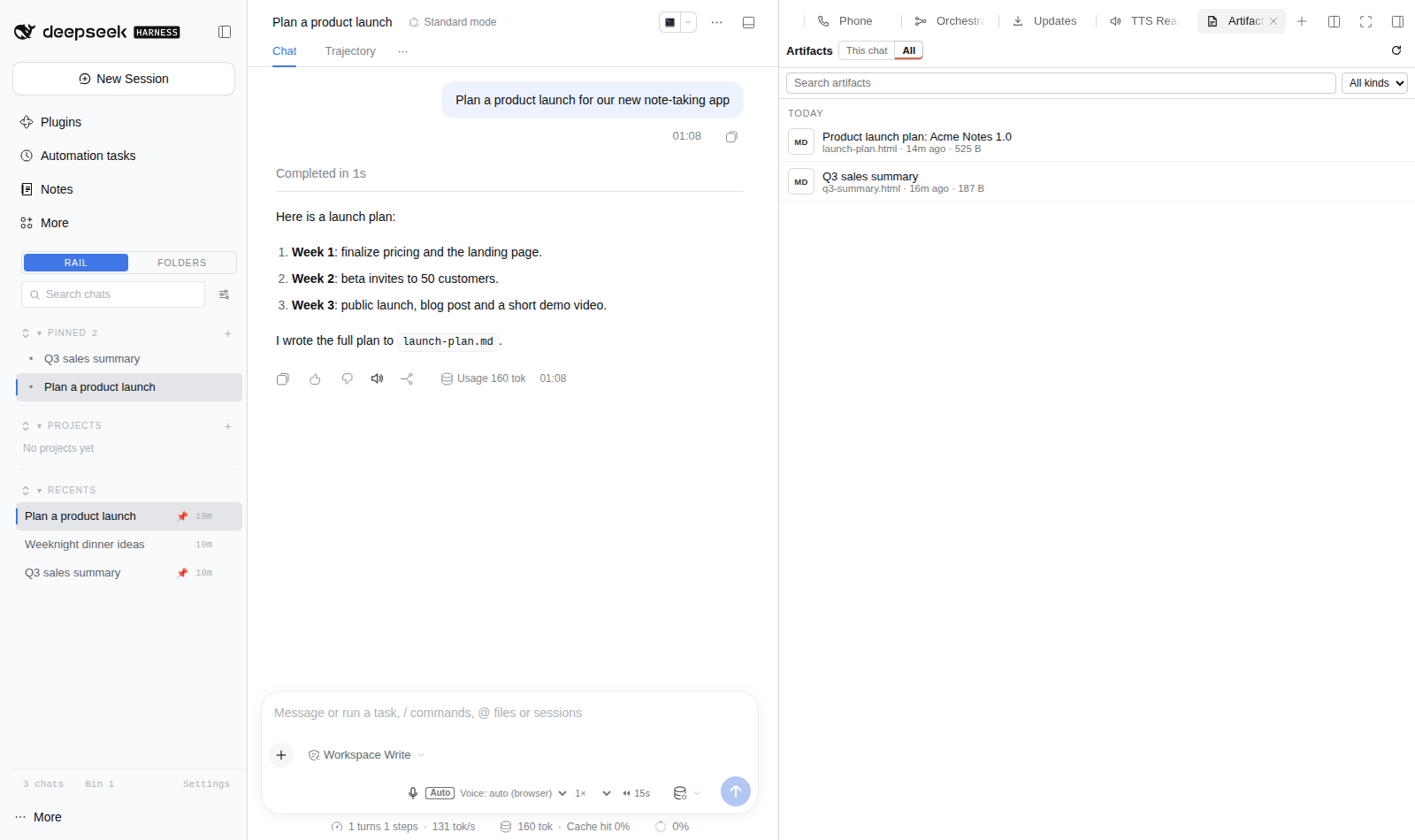
Screenshot from a demo DSH instance with sample data.
A workspace-first sidebar rail for the DeepSeek Harness (DSH) web GUI: Pinned chats (folders included), Projects (isolated workspace folders with their own instructions and files), a virtualized Recents list ordered by the last finished turn, graded transcript search, unread markers and a live browser tab title.
Runs on DSH 0.2.x (tested on 0.2.1) and on DSH 0.1.5 with the same build.
Install
Install from npm: dsh plugin --profile web add @lucagiftzek/dsh-workspace-rail, or from GitHub: dsh plugin --profile web add github:lucagiftzek/dsh-workspace-rail.
dsh plugin --profile web add @lucagiftzek/dsh-workspace-rail
# or from GitHub: dsh plugin --profile web add github:lucagiftzek/dsh-workspace-rail
The package declares dsh.bundle, so dsh plugin add lists it in the
profile bundles; restart dsh web to load the host half. To work on a
checkout instead:
git clone https://github.com/lucagiftzek/dsh-workspace-rail
cd dsh-workspace-rail && npm install && npm run build
dsh plugin --profile web add link:$PWD
lib/ is committed, so a plain install needs no build step.
Options
Row options go in the - id: workspace-rail row of your profile
cordis.patch.yml, under config:.
| Option | Default | Meaning |
|---|---|---|
enableRail |
true |
Mount the rail in the web GUI. |
stripeEdge |
right |
Edge of the colour stripe on chat, folder and project rows. |
recentsMaxRows |
5000 |
Cap on rows kept in Recents. |
projectsRoot |
~/dsh-projects |
Where per-project folders are created. |
trustedHosts |
[] |
Host names (besides loopback) the rail API accepts. Empty means the authorities DSH itself trusts: every --trusted-host value of the dsh web command line, plus the comma-separated DSH_WORKSPACE_RAIL_TRUSTED_HOSTS environment variable. |
enablePointerHealth |
true |
Check that linked project files still exist. |
enableWindowsIndex |
false |
DSH 0.1.5 only: transcript-window bridge for search. |
If you serve DSH under a public host name behind a reverse proxy, you already
start it with dsh web --trusted-host app.example.com (the core's own API
fence needs it), and the rail picks that up with no extra setting.
How it is built
Dual-face plugin (host and browser), the same harness contract as
dsh-session-pin:
src/index.ts: host face. Serves the rail's own API and file store; on DSH 0.1.5 it also registers theworkspace-railsettings namespace (see "DSH versions").src/client.ts: browser face. Catalog sync (sessions and workspaces snapshots), the rail panel (vanilla DOM, outside React's tree), virtualized Recents.src/scoring.ts: pure 4-tier graded search scoring (title x40, doc names and tags x15, first 3 messages x8, last 3 messages x4, 14-day recency decay, pinned x1.2 boost).
Placement
The rail is the sidebar list: the browser face registers the
sidebar.workspaces seat at priority -2, one below dsh-metafolder-plugin
(-1), which is one below the shipped browser (0). The header's
Rail | Folders switch unregisters the seat to reveal the folder view
underneath (nothing is hidden with CSS); a Rail button in
sidebar.footer.action brings it back. The choice is per browser
(localStorage['dsh.workspace-rail.view']). Hosts without a slot registry
fall back to a floating panel.
The rail hides the "Pinned sessions" footer button of dsh-session-pin, since
the rail's PINNED section lists the same pins; pinning itself is untouched.
One CSS rule in src/rail-style.ts (PIN_FOOTER); delete it to bring the
button back.
Colours come from the host's --dsw-alias-* tokens, so the rail follows
light and dark mode and any theme on top; a theme plugin can also set
--tz-* variables (accents, display font, radius, shadows). Subagent
transcripts are excluded from Recents; rows show a compact age and open the
chat on click.
Rename: triple-click a chat title, or the row menu, Rename. Enter saves,
Esc cancels, clicking away saves. It goes through the host
(ctx.sessions.binding(id).session.rename), which also pins the title
against automatic regeneration.
Projects
Clicking a project opens its view inside the rail: Chats first (same rows
as Recents: open, rename, age; row menu, Remove from project), with
+ New chat (created and filed in the project, then opened) and
Add chats... (a searchable picker). Files below: paste a path or URL
and press Enter, or drop text paths; name and kind are inferred
(src/files.ts). Clicking a file opens it in dsh-better-sidebar's editor when
that plugin is installed (optional ctx.inject(['betterSidebar'])); links
open in a new tab. Files the server cannot find are marked and can be removed
in one click. Files are links only: nothing is copied.
Moves, removals and deletes apply immediately with an Undo toast.
Projects are folders
Each project gets ~/dsh-projects/<name>-<id>/ (option projectsRoot).
+ New chat registers that folder as a DSH workspace (titled like the
project) and opens its chat, the same path as DSH's New Session. DSH's own
instructions loader then applies the folder's AGENTS.md, which the rail
writes from the project's Instructions, Project memory (the assistant
keeps PROJECT-MEMORY.md) and Answer from project files only settings.
Uploads land in the folder, so the assistant can read them. Chats started in
the folder belong to the project automatically.
Search, models, archive
- project_search (agent tool,
src/host/search.ts): BM25 over ~30-line passages of the project folder and linked files (text and code, PDF viapdftotext, .docx viaunzip); hits carryfile:line. Scoped to the calling chat's project. - Default model per project: picked from DSH's model catalog and applied to + New chat before the first message.
- Archive hides a project behind "Archived (n)" with everything kept.
Delete asks first and keeps the folder unless ticked; the host only
removes the folder the saved state records, and only inside
projectsRoot.
Layout
Pinned and Projects have a fixed header and their own scrolling list, N rows tall (drag the line under a section, or use the steppers in settings); clicking a header folds the section; Recents fills the rest. The small button before each header label expands that section to the full sidebar height; pressing it again restores the previous layout.
Recents is ordered by the last COMPLETED turn, newest first, and updates live:
the rail stamps the running to idle edge the host pushes for every chat (no
polling) and keeps the stamps per browser in localStorage
(dsh.workspace-rail.completedAt).
Browser tab (icon and title)
- Icon: a small pixel rail icon (
assets/). The build inlines it intolib/client.jsas data: URLs, so the browser makes no request for it. Replace the four files inassets/and rebuild to show your own logo. The shell's own icon links come back when the feature is off. - Title, first rule that applies (
src/tab-title.ts):- unread replies:
(N) <first words of the newest unread reply>, or(N) <kitty frame>while the open chat is working; - no chat on screen:
DeepSeek Harness; - the open chat is working: a one-line kitty animation;
- the open chat is idle: the first words of its last message.
- unread replies:
- Unread: a chat is unread when this browser saw it finish a turn after it was last on screen. Subagents, binned and archived chats do not count. Tabs share the stamps through localStorage.
- Row markers: a small blue dot on every unread chat in Pinned, Recents and project lists, on a project row or folded folder holding one, and on the Rail icon of the collapsed sidebar.
- Off switch: rail Settings, "Browser tab" Live or Off.
Persistence and security
State lives in ~/.dsh/workspace-rail/state.json, served by the rail's own
API (/workspace-rail/api, src/host/api.ts), not by DSH settings: DSH gives
every non-loopback browser a memory-mode settings scope, so writes there would
never reach the host. The browser loads the host copy first, merges in
anything only it holds, then saves debounced with a revision check (409 means
another tab won; it adopts that state).
DSH does not authenticate plugin routes, so the API checks every request:
loopback peer (DSH behind a reverse proxy on the same machine) and a trusted
Host; writes also need a matching Origin, the
X-Requested-With: dsh-workspace-rail marker and the harness session cookie.
DSH versions
The same build runs on DSH 0.1.5 and on DSH 0.2.x (peers >=0.1.2-rc.1 <0.3.0).
The host picks its path by capability, not by version string:
- 0.1.5 (
ctx.settings.registerexists): theworkspace-railnamespace is registered, seedsstate.jsonon a first boot, and carries the transcript-window bridge (off by default). - 0.2.x (
ctx.settingsis the forms service):state.jsonis the only store and the window bridge is not available.
Development
npm install
npm run typecheck && npm test && npm run build
The tests use vitest and jsdom and need no running DSH.
License
Apache-2.0, see LICENSE.
More plugins by the same author
All of them are open source and run on DeepSeek Harness 0.2.x (several on 0.1.5 too).
| Plugin | What it does |
|---|---|
| dsh-artifacts | An Artifacts tab that lists the files an agent produced and previews them in place, plus a template library agents can use and extend |
| dsh-mail | Mail client and agent mail tools: IMAP, POP3, SMTP and OAuth2 accounts, scheduled and bulk sends with unsubscribe handling |
| dsh-note-keeper | Obsidian-compatible Markdown notes in the sidebar with search, graph, audio notes and transcription, OCR and client-side encryption |
| dsh-phone | SMS and calls (Twilio, SIP via Asterisk) with call audio through your own server, live voicemail and Telegram |
| dsh-voice | Read-aloud, dictation and language-aware speech with 23 TTS and STT providers, per-language routing and word highlighting |
| dsh-orchestrator | Agent swarm and task orchestration: an Orchestrate tab, orch_* tools, runners, provider cards and a machine API |
| dsh-workspace-rail (this one) | A workspace-first sidebar rail: pinned chats, projects as folders, live Recents, search and unread markers |
| DSH-Idle-Watchdog | Idle-chat nudges and an authenticated HTTP API that posts a prompt into any chat |
| dsh-plugin-updates | Update checker that only offers releases your running DSH core can load |
| dsh-subagent-tiering | Subagents default to a cheaper sibling of the parent model unless the agent names a route |
| dsh-fs-reobserve | Ends self-inflicted stale-file errors after an agent's own shell commands |
| dsh-request-image-cap | Clamps every image sent to the model to a pixel cap, fixing many-image request errors |
| dsh-seal | An encrypted channel in front of DSH: a Go reverse proxy plus a service worker that seal all DSH browser traffic |
Built by Luca Tzekos, who also makes Job Opportunities API: employer-direct job data with per-field provenance you can verify yourself, free to read and available as an API. If this plugin is useful to you, a star on this repo or a look at jobopportunitiesapi.org is the best thanks.
No comments yet. Be the first to write one.