dsh-orchestrator

Spawn, prompt and track agent chats and tasks from one Orchestrate tab, with orch_* tools and runners.
dsh plugin --profile web add dsh-better-sidebar   # the tab host, skip if installed
dsh plugin --profile web add @lucagiftzek/dsh-orchestrator
# or from GitHub: dsh plugin --profile web add github:lucagiftzek/dsh-orchestrator
# restart dsh web, then open the Orchestrate tab
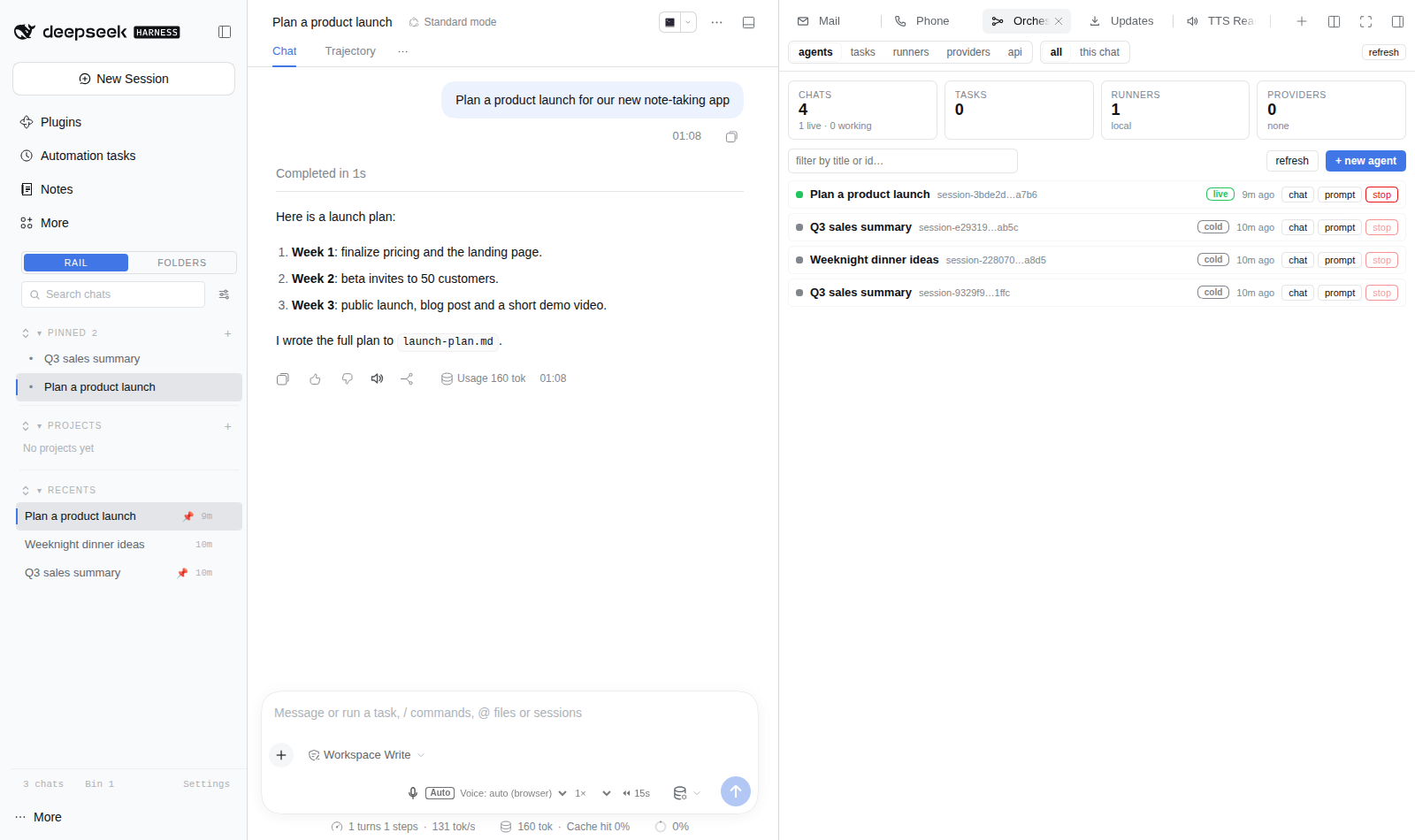
Screenshot from a demo DSH instance with sample data.
Agent swarm + task orchestration for DeepSeek Harness (DSH).
A plugin that adds an Orchestrate tab to dsh-better-sidebar, like the built-in Background Tasks view, but broader:
- Agents: create, list, prompt, fork (split a conversation), fan-out and cancel agent chats, with a chat-style transcript drawer. Sessions address all of it through 14
orch_*tools. - Tasks: tracked, status-updated work of four kinds:
command(shell on any runner),scrape(deterministic multi-URL extraction, no model in the loop),http(endpoint calls),agent(a spawned chat whose answer is the task output). - Runners: where commands execute: this host, ssh targets, or remote tool servers (any other host running this plugin). Explicit selection or the configured default.
- Providers: external integrations rendered as status cards, including an optional HPC allocation card and any JSON status endpoint.
- Remote API: a secret-protected machine API: prompt chats, spawn agents, create tasks, and serve the tool-server contract so OTHER hosts can run work here.
Everything is settings-driven: runners, providers, presets, limits and the API secret live in Settings → Orchestrator (or the cordis config row). Nothing is hardcoded, no hosts, no commands, no credentials in the code.
Contents
- Install
- The tab
- The agent tools
- Task types
- Runners: where work executes
- Providers: integrations
- The machine API
- Settings reference
- Security model
- Kill switches
- Development
Install
Requires DSH >= 0.1.1-rc.1, Node >= 22.5, the web profile, and dsh-better-sidebar (the tab host).
Install from npm: dsh plugin --profile web add @lucagiftzek/dsh-orchestrator, or from GitHub: dsh plugin --profile web add github:lucagiftzek/dsh-orchestrator.
dsh plugin --profile web add @lucagiftzek/dsh-orchestrator
# or from GitHub: dsh plugin --profile web add github:lucagiftzek/dsh-orchestrator
The package declares dsh.bundle, so dsh plugin add lists it in dsh.profile.bundles. From a checkout instead:
git clone https://github.com/lucagiftzek/dsh-orchestrator
dsh plugin --profile web add link:$PWD/dsh-orchestrator
lib/ is committed, so no build step is needed. Then restart dsh-web (the client half mounts live after a browser refresh; the host half, tools, settings namespace, API route, needs the restart). Full steps are in cordis.patch.yml.
The tab
Open the sidebar + menu → Orchestrate. Five sections:
| Section | What it shows / does |
|---|---|
| agents | every chat (live + cold) with title, running state, recency; quick prompt, stop, chat drawer (transcript + send box + fork + cancel); + new agent spawn form with fan-out |
| tasks | every task with status, runner, live output (auto-polling while running), cancel; + new task form for all four types |
| runners | execution targets with health probes |
| providers | integration cards, an hpc provider shows the allocation headline, queue, collector health and staged proposals |
| api | machine-API secret management + ready-made curl examples + the tool-server contract |
A badge on the tab counts active work (running agents + running tasks).
The agent tools
Sessions get these tools (registered through the standard ctx.tools seam, they behave like any core tool):
| tool | what it does |
|---|---|
orch_status |
one-screen overview: agents, tasks by status, runners, providers |
orch_agents_list |
list chats (live/cold, titles, running flags), with search |
orch_agent_status |
one chat: running state + last user/assistant text |
orch_agent_prompt |
deliver a message into a chat (id, unique prefix, or exact title); cold chats resume |
orch_agent_spawn |
create chat(s), optionally with a first prompt; count fans out with {i} interpolation, how you split work across agents |
orch_agent_fork |
split a conversation: fork a chat's completed-turn history into a new session, then prompt the fork |
orch_agent_cancel |
cancel a chat's active turn (queued work is kept) |
orch_task_create |
create + run a task (see below) |
orch_task_list / orch_task_status / orch_task_output |
list / inspect / read tasks |
orch_task_cancel |
cancel a task (kills the runner process or cancels the agent turn) |
orch_runners |
runner inventory + health probes |
orch_providers |
provider status cards (for example an HPC allocation) |
Task types
| type | spec fields | output |
|---|---|---|
command |
command, cwd, runner, timeoutMs |
stdout + stderr, capped |
scrape |
urls[], extract (text/html/json), selector (tag/.class/#id/[attr]), attribute, pattern (regex) |
JSON rows: per-URL status + extracted data |
http |
url, method, body, headers, expectStatus, timeoutMs |
response body, capped |
agent |
prompt, count (fan-out), forkOf (split an existing chat), promptExisting (drive an existing chat), preset, cwd |
the chat itself, live status while it works, the assistant answer when it settles |
All tasks: global concurrency cap with queueing, cancellation, durable history with pruning, and an audit event log. Tasks also mirror (best-effort) into ctx.jobs so they appear in the built-in Background Tasks surface.
Live output: command tasks stream stdout/stderr into the task record as it arrives (the tab's output panel and orch_task_output show progress while the command runs, not just the final result); scrape tasks log per-URL progress lines ([2/5] https://… -> 200) before the structured JSON replaces them at settlement.
After mounting (restart), verify the host with bash scripts/verify-host.sh [port] [secret]: health, dashboard shape, the trust fence, the CSRF gate, and (with the secret) a machine probe round trip.
Runners: where work executes
Declared in Settings, never in code:
- local: spawn on this host (
bash -lc <command>, argv only, scrubbed env: no SSH_AUTH_SOCK, no inherited secrets) - ssh:
ssh <target> -- <command>; target, binary, connect timeout and extra args are operator config; the command is one argv element on this side - http: a remote tool server speaking this plugin's contract:
POST {url} {kind, spec, timeoutMs}→{ok, status, output, detail}. Any host running dsh-orchestrator serves it at/dsh-orchestrator/api/remote/run: so your boxes can run work for each other. The auth token is read from an env var at call time (secretEnv), never stored.
Selection: explicit runner id, else the configured default, else round-robin across enabled runners.
Providers: integrations
- hpc (optional): an adapter for an HPC allocation status service you run yourself (a GPU-hour grant, a cluster quota). It reads
{url}/healthand{url}/state; the contract is below. Leave it out if you have no such service. - http: any JSON status endpoint;
ok/health/status/headlinekeys are highlighted when present, everything else renders as fields. OptionalsecretEnvfor a bearer token read at call time.
The hpc contract (only the fields you have are needed; missing ones render as empty):
GET {url}/health  -> {"ok": true}
GET {url}/state?logbook=0 -> {
  "headline": "1,234 GPU-hours left, 24 days to the deadline",
  "balance":  {"gpu_hours_left": 1234, "billing_hours_left": 56789, "deadline": "2027-01-31"},
  "collector": {"status": "ok", "checked_at": "2027-01-07T10:00:00Z"},
  "queue":    {"running": [ ... ], "pending": [ ... ]},
  "staged":   [{"arm": {"armed": true}}, ...]
}
CamelCase keys (gpuHoursLeft, billingHoursLeft) are accepted too. secretEnv names an environment variable holding a bearer token, read at call time.
Add your own control planes (pods, orchestrators, dashboards) as http providers; add your remote boxes as ssh or http runners. The plugin has zero knowledge of any specific host.
The machine API
Protected by a secret (DSH_ORCHESTRATOR_SECRET env or Settings), constant-time compared, rate-limited per IP, failing closed when no secret is configured. Present it as x-orchestrator-secret: <secret> or Authorization: Bearer <secret>.
# prompt any chat (id, unique prefix, or exact title), cold chats resume
curl -sS -X POST http://127.0.0.1:3080/dsh-orchestrator/api/remote/prompt \\
  -H "content-type: application/json" \\
  -H "x-orchestrator-secret: $DSH_ORCHESTRATOR_SECRET" \\
  -d '{"chat":"Research","message":"status report?"}'

# spawn an agent
curl -sS -X POST http://127.0.0.1:3080/dsh-orchestrator/api/remote/agents/create \\
  -H "content-type: application/json" \\
  -H "x-orchestrator-secret: $DSH_ORCHESTRATOR_SECRET" \\
  -d '{"title":"nightly-research","prompt":"summarize todays papers","count":3}'

# run work on this host from anywhere (the tool-server contract)
curl -sS -X POST http://127.0.0.1:3080/dsh-orchestrator/api/remote/run \\
  -H "content-type: application/json" \\
  -H "x-orchestrator-secret: $DSH_ORCHESTRATOR_SECRET" \\
  -d '{"kind":"command","spec":{"command":"uptime"},"timeoutMs":30000}'
# -> {"ok":true,"status":"completed","output":"..."}
Reads (/status, /agents, /tasks, /providers, /runners, /settings) also answer to the secret. Browser reads are trust-fenced (loopback + Host authority); browser mutations additionally require the same-origin CSRF header set and the harness session cookie (see Security).
Settings reference
Where the values live depends on the DSH line (lib/dual-settings.js picks it by capability): on DSH 0.1.5 they are the registered namespace dsh-orchestrator in settings.yaml; on DSH 0.2.x they are the dsh-orchestrator row of the profile's cordis.patch.yml (every field live except stateDir), imported once from settings.yaml.imported while the row is still empty. api.secret is a secret field and is redacted on every read.
Everything lives under the dsh-orchestrator settings namespace (Settings → Orchestrator) or the cordis config row. Highlights:
| key | default | meaning |
|---|---|---|
enabled |
true | master switch |
api.secret / env DSH_ORCHESTRATOR_SECRET |
, | machine API secret (env wins; never echoed back) |
api.rateLimitPerMinute |
60 | per-IP machine call budget |
agents.spawnMax |
8 | fan-out cap per spawn |
agents.defaultPreset / agents.defaultCwd |
, | defaults for new chats |
tasks.maxConcurrent |
4 | engine-wide live task cap |
tasks.defaultRunner |
local | runner for unqualified tasks |
tasks.allowCommandTasks |
true | can command tasks run at all |
tasks.allowRemoteRunners |
true | may tasks leave this host |
tasks.historyKeep |
400 | finished tasks kept |
mirrorJobs |
true | mirror tasks into ctx.jobs (Background Tasks tab) |
runners[] |
local only | execution targets, see above |
providers[] |
, | integrations, see above |
trustedHosts[] |
, | extra Host authorities for the public edge |
Security model
Two caller classes, two gates (full detail in docs/DESIGN.md):
- Browser (tab + settings UI): loopback peer + trust fence (Host authority, no cross-site) on reads; adds same-origin
sec-fetch-site/Origin, JSON content-type, the plugin'sX-Requested-Withheader, and the harness session cookie presence on mutations. No GET ever mutates. - Machine (curl / cron / other boxes): the operator secret, constant-time compared, per-IP rate-limited, with a tighter wrong-secret budget. Fails closed with no secret.
- Commands run with a scrubbed environment (PATH/HOME/LANG only) and argv-only spawning. SSH credentials are the operator's ssh config; http tokens are env vars read at call time. Secrets never appear in settings reads, logs, or the task store.
Kill switches
# disable without uninstalling (needs a dsh-web restart):
# ~/.dsh/profiles/web/cordis.patch.yml
- id: dsh-orchestrator
  disabled: true

# runtime, no restart:
DSH_ORCHESTRATOR_DISABLE=1   # in the dsh-web environment
Development
npm run check   # node --check every file
npm install     # devDependencies: esbuild, jsdom, react, react-dom
npm run build   # bundle src/client.jsx -> lib/client.js (esbuild, or ESBUILD_MAIN)
npm test        # host-half tests, lossless JSON checks, client render test, dual-settings tests
The client test needs jsdom and react from the devDependencies (or a package directory named by DSH_TEST_REQUIRE_SEED); without them it skips.
Status
0.1.1: used daily on a real deployment. MIT license, see LICENSE. Issues and PRs welcome.
More plugins by the same author
All of them are open source and run on DeepSeek Harness 0.2.x (several on 0.1.5 too).
| Plugin | What it does |
|---|---|
| dsh-artifacts | An Artifacts tab that lists the files an agent produced and previews them in place, plus a template library agents can use and extend |
| dsh-mail | Mail client and agent mail tools: IMAP, POP3, SMTP and OAuth2 accounts, scheduled and bulk sends with unsubscribe handling |
| dsh-note-keeper | Obsidian-compatible Markdown notes in the sidebar with search, graph, audio notes and transcription, OCR and client-side encryption |
| dsh-phone | SMS and calls (Twilio, SIP via Asterisk) with call audio through your own server, live voicemail and Telegram |
| dsh-voice | Read-aloud, dictation and language-aware speech with 23 TTS and STT providers, per-language routing and word highlighting |
| dsh-orchestrator (this one) | Agent swarm and task orchestration: an Orchestrate tab, orch_* tools, runners, provider cards and a machine API |
| dsh-workspace-rail | A workspace-first sidebar rail: pinned chats, projects as folders, live Recents, search and unread markers |
| DSH-Idle-Watchdog | Idle-chat nudges and an authenticated HTTP API that posts a prompt into any chat |
| dsh-plugin-updates | Update checker that only offers releases your running DSH core can load |
| dsh-subagent-tiering | Subagents default to a cheaper sibling of the parent model unless the agent names a route |
| dsh-fs-reobserve | Ends self-inflicted stale-file errors after an agent's own shell commands |
| dsh-request-image-cap | Clamps every image sent to the model to a pixel cap, fixing many-image request errors |
| dsh-seal | An encrypted channel in front of DSH: a Go reverse proxy plus a service worker that seal all DSH browser traffic |
Built by Luca Tzekos, who also makes Job Opportunities API: employer-direct job data with per-field provenance you can verify yourself, free to read and available as an API. If this plugin is useful to you, a star on this repo or a look at jobopportunitiesapi.org is the best thanks.
No comments yet. Be the first to write one.