Note Keeper (dsh-note-keeper)
Note Keeper is a plugin for the DeepSeek Harness (DSH) web GUI: an
Obsidian-compatible, local-first notes app that lives in the left sidebar and
opens as a full-page panel. It stores notes as plain Markdown files in a
regular directory on disk, so any Obsidian-compatible sync method keeps it in
step with a phone or another desktop. It also exposes a set of notes_*
tools so an AI in the same DSH chat can read, search and write the user's
notes under a clear set of guardrails.
Author: Loukas "Luca" Tzekos. License: MIT.
Feature overview
- Left-sidebar "Notes" entry: a row in the sidebar panel list
(
sidebar.panellistslot) that opens Note Keeper as a full-page panel registered in the main-column keyed slot. - Obsidian-compatible vault: plain Markdown files under a normal
directory (default
~/NoteKeeper, configurable viavault). Wikilinks ([[Note]]), embeds (![[Note]]),#tags(including nestedproject/alpha), YAML frontmatter, callouts (> [!warning]), and a.trashfolder for recoverable deletes, exactly the way Obsidian lays them out. - Rename-safe wikilinks: moving or renaming a note rewrites every
[[wikilink]]/![[embed]]that pointed at it, in every other note, the same way Obsidian does. - Live sync from any writer: an fsnotify-backed watcher reindexes any change (this app's own writes, Obsidian on the same machine, a sync client landing a phone edit) and pushes a Server-Sent Events refresh to every open browser tab; a 5-minute full rescan repairs anything a dropped kernel event missed.
- Full-text search: accent-insensitive for both Greek and Latin script
(Καλημέρα ≈ καλημερα ≈ ΚΑΛΗΜΕΡΑ), last-word prefix matching while typing,
and
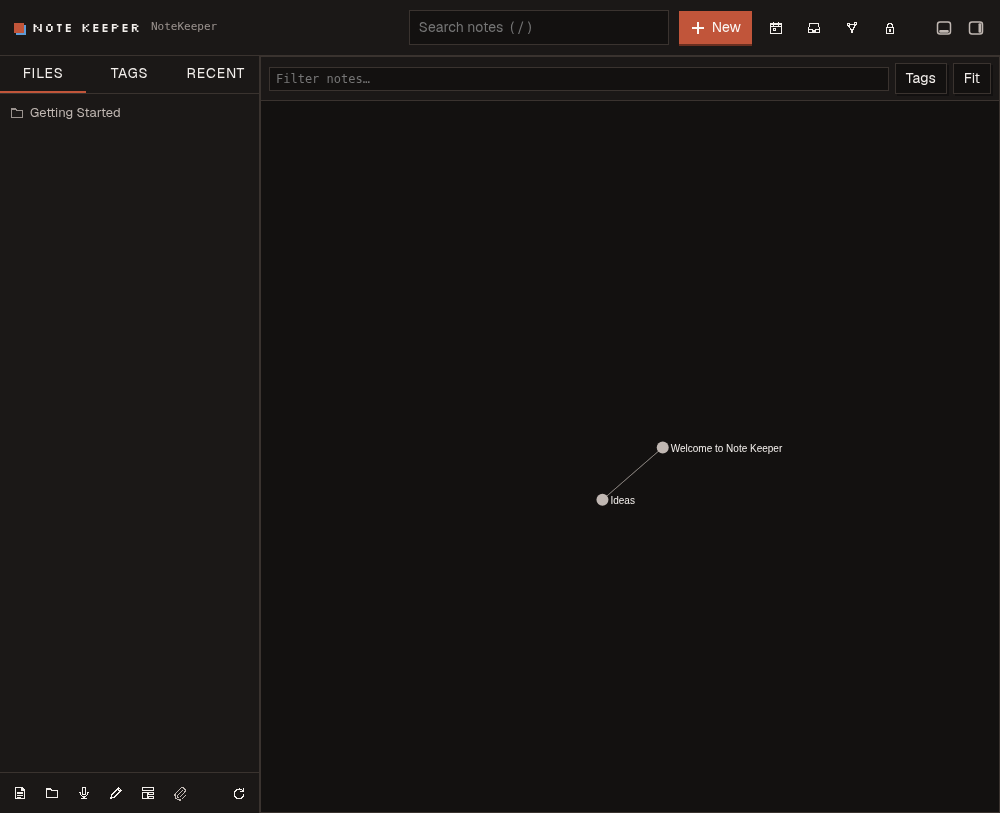
"quoted phrase"matching. Filterable by tag (nested tags included) or folder. - Tags, backlinks, outline, graph: a tag browser with counts, a backlinks panel per note, a heading outline, and an interactive local graph view (note/attachment/tag nodes, plus "ghost" nodes for unresolved links, just like Obsidian's graph).
- Quick capture & daily notes: one shortcut appends a timestamped
bullet (or a
- [ ]task) toInbox.md; another opens or creates today's daily note atDaily/YYYY-MM-DD.md, expandingTemplates/Daily.mdwhen present. - Templates: any note under the
Templates/folder can be used to start a new note, with{{title}},{{date}}and{{time}}expanded. - Audio notes: record with
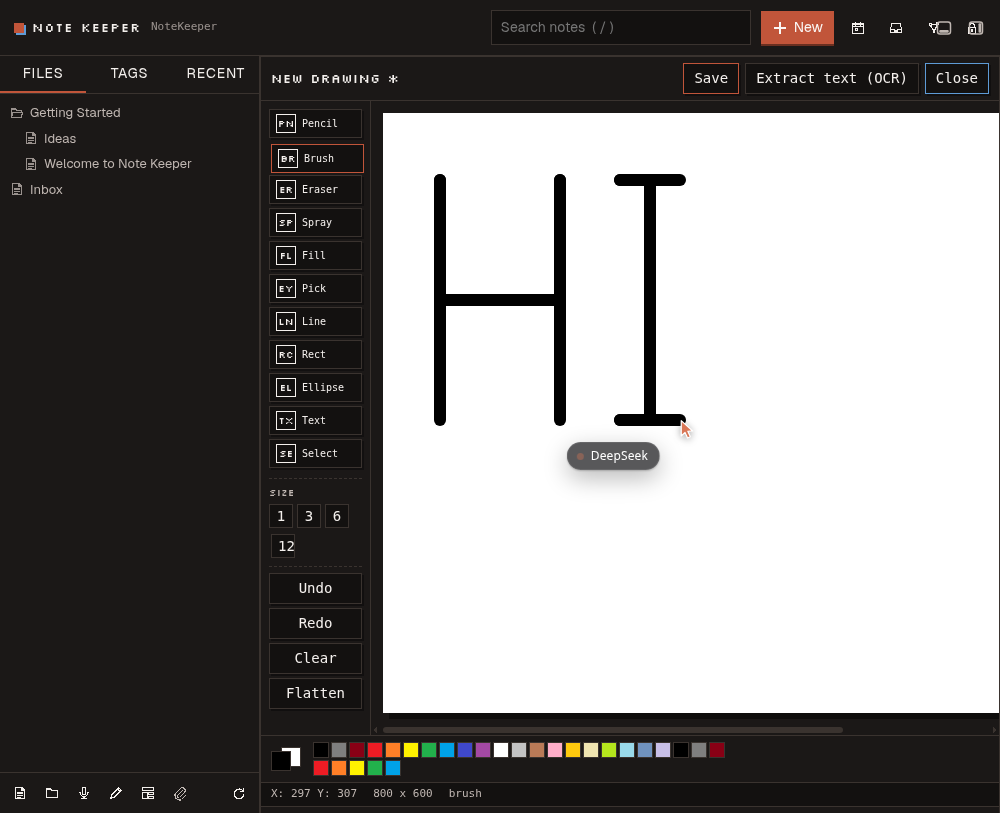
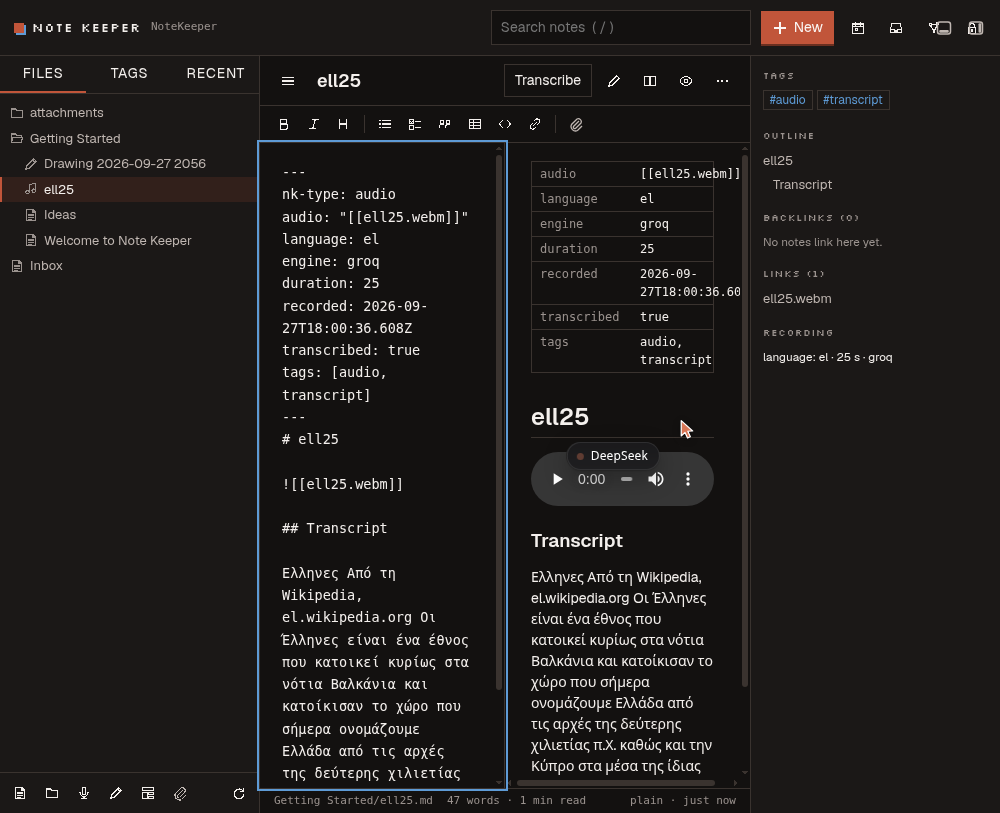
MediaRecorder, send the clip to thedsh-voiceplugin's/api/voice/sttendpoint with the language pinned (Greek and English are first-class; several others are offered; "auto" lets the engine detect), optionally run a text-polish pass, and save the result as a Markdown note withnk-type: audiofrontmatter (language,engine,duration) embedding the audio clip. - Retro paint canvas: an MS-Paint-style drawing editor: pencil, brush, eraser, spray and more, over a raster canvas plus an editable vector shape layer. Saving writes a PNG, the vector JSON, and (optionally) OCR'd text from the drawing into a single "drawing" note.
- OCR: Tesseract (
eng+ellby default) runs over pasted/attached images and over paint-canvas drawings to extract text (handwriting included, on a best-effort basis). - Attachments: upload, paste, or drag-and-drop images, audio, video and
PDF, with inline previews; risky file types (HTML, SVG, JS, …) are always
forced to download so an uploaded file can never script the DSH origin.
Large files: uploads above 64 MiB are sent as 64 MiB slices
(
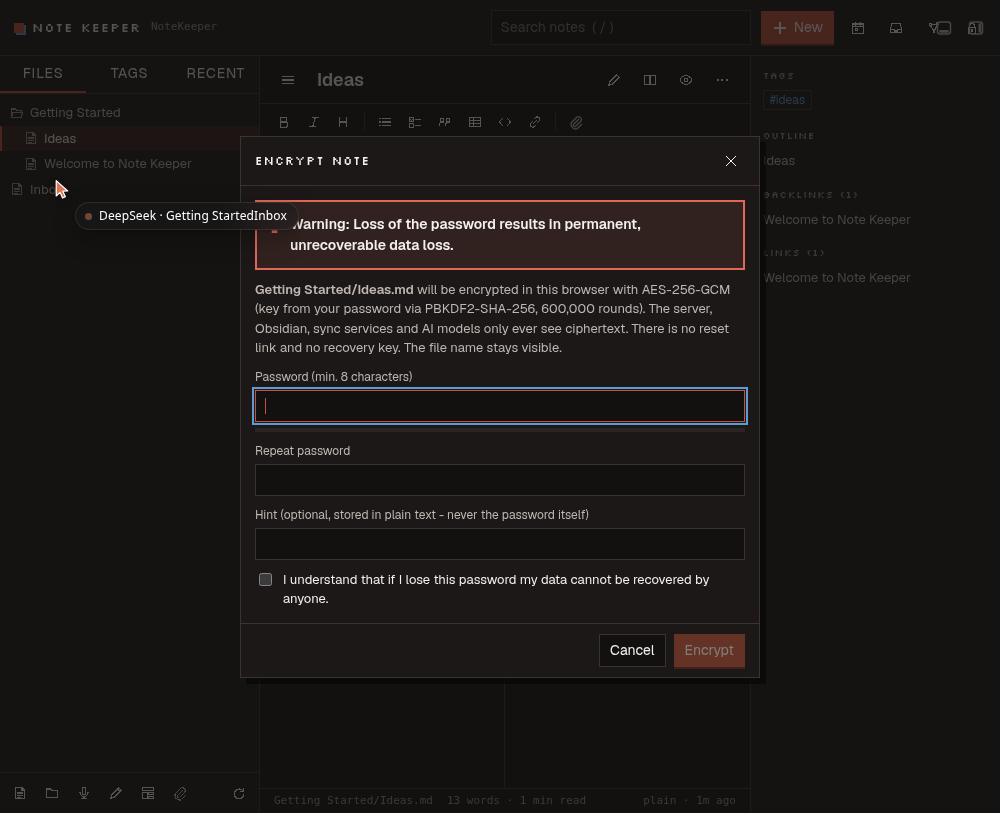
begin/chunk… /finish), because an edge such as Cloudflare refuses any single request body over 100 MB. The server stages the slices in a hidden.nk-up-*file, renames it into place atfinish, and removes it on any failure or abort. The assembled-file cap is 1 GiB (maxAttachBytes). - Client-side zero-knowledge encryption: see the Security model section below. Encrypted notes/attachments/folders are opaque to the server, to sync tools and to AI tools; only the browser that knows the password can read them.
- Conflict detection: every save carries the mtime it was read at; a concurrent edit from another device, Obsidian, or an AI tool produces a conflict banner offering "load disk version", "keep both" or "overwrite with mine", instead of silently clobbering data.
- Autosave: edits are saved 1.2 s after the last keystroke, and flushed immediately when the tab is hidden or closed.
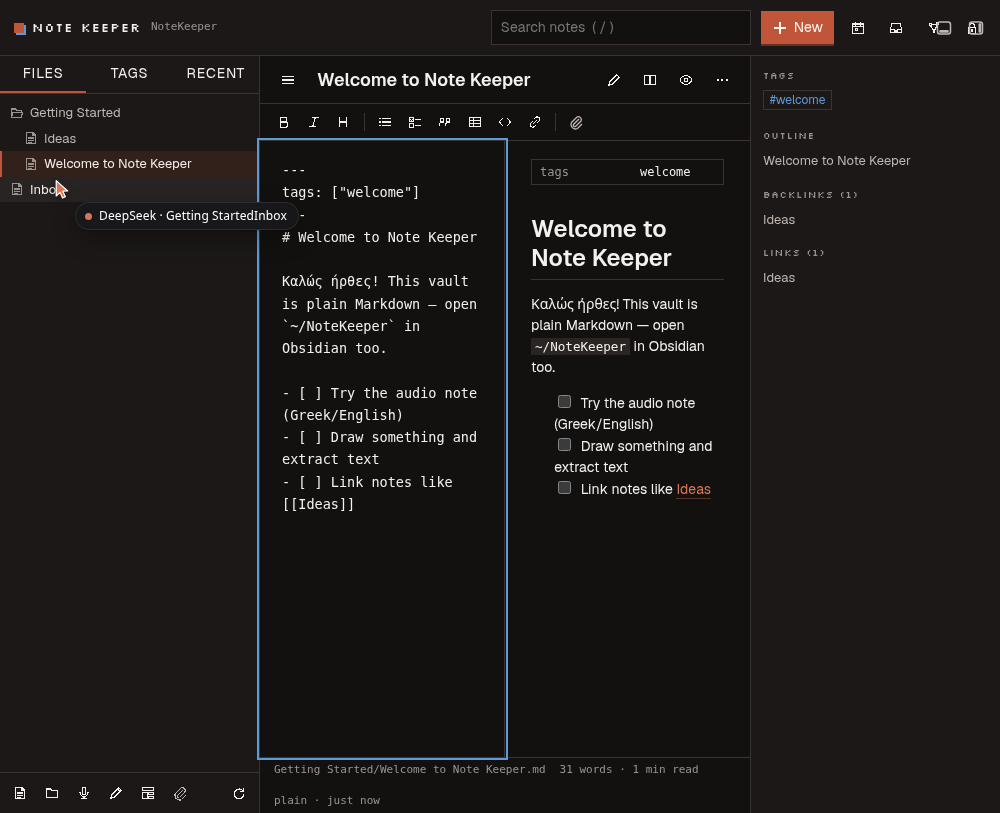
- Live preview editor: CodeMirror 6 with Obsidian-style live preview: links, wikilinks and tags are clickable while you type; source, split and reading modes too.
- Connect: the Note Keeper Sync plugin for Obsidian (desktop and mobile, two-way, paired with a one-time code, signed requests), WebDAV for other apps, and a two-way cloud mirror (Google Drive, OneDrive, Dropbox, iCloud Drive, S3) via rclone. See docs/SYNC-PROTOCOL.md.
- Import: Obsidian/Bear/Logseq/Joplin Markdown, HTML, Evernote .enex, Google Keep Takeout, Notion export zips.
- AI Enhance: proofread, format and interlink a note with the DSH default model (or any model chosen in its settings), previewed as a diff before anything changes.
- 12 AI tools (
notes_*), see the AI tools table.
Screenshots
v0.2: live preview (links and tags clickable), AI Enhance diff review, Connect (Obsidian pairing):
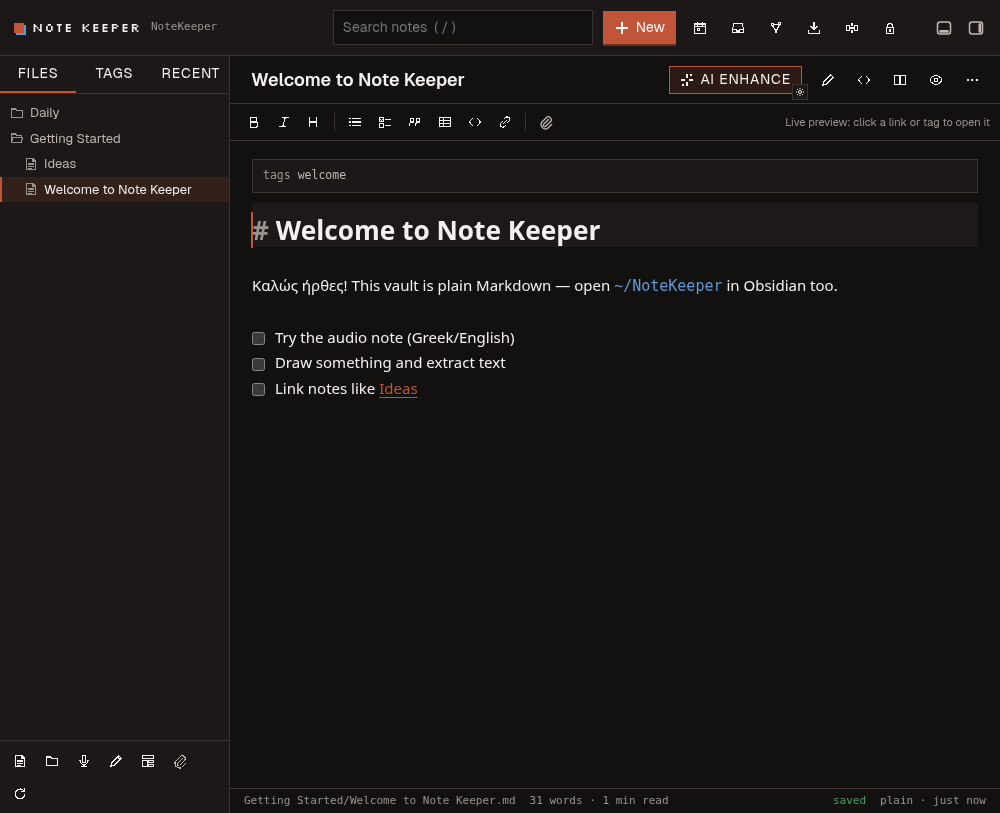
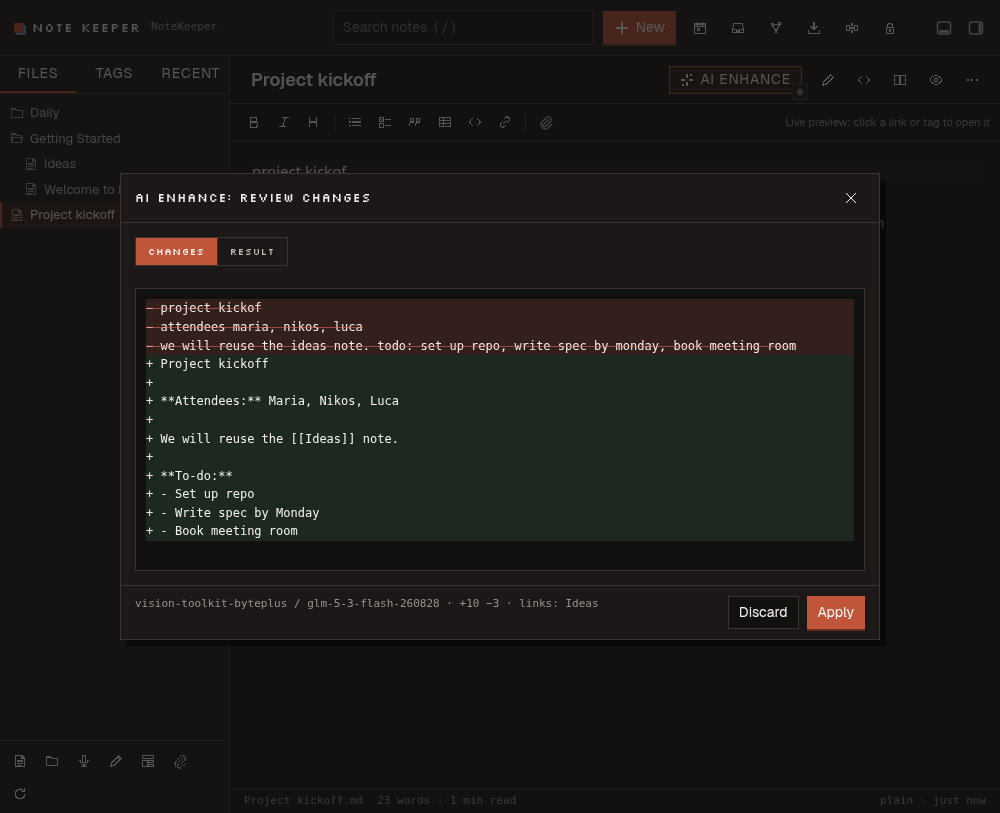
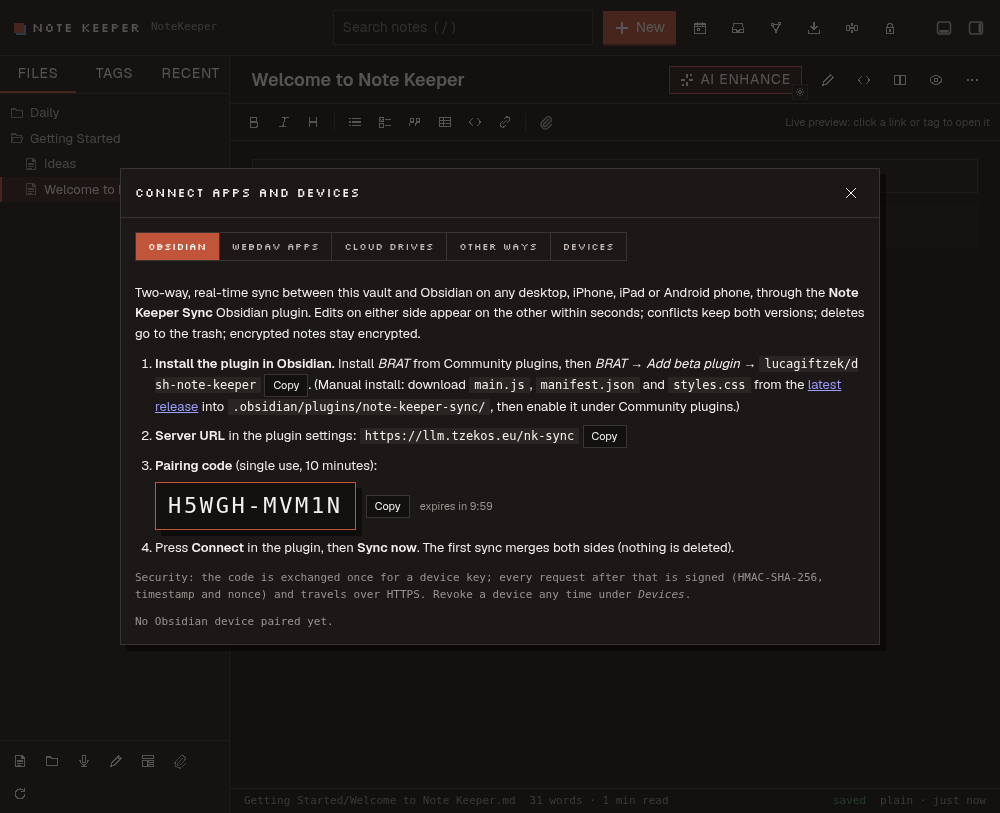
Captured from the live DSH GUI with a custom theme (dark mode).
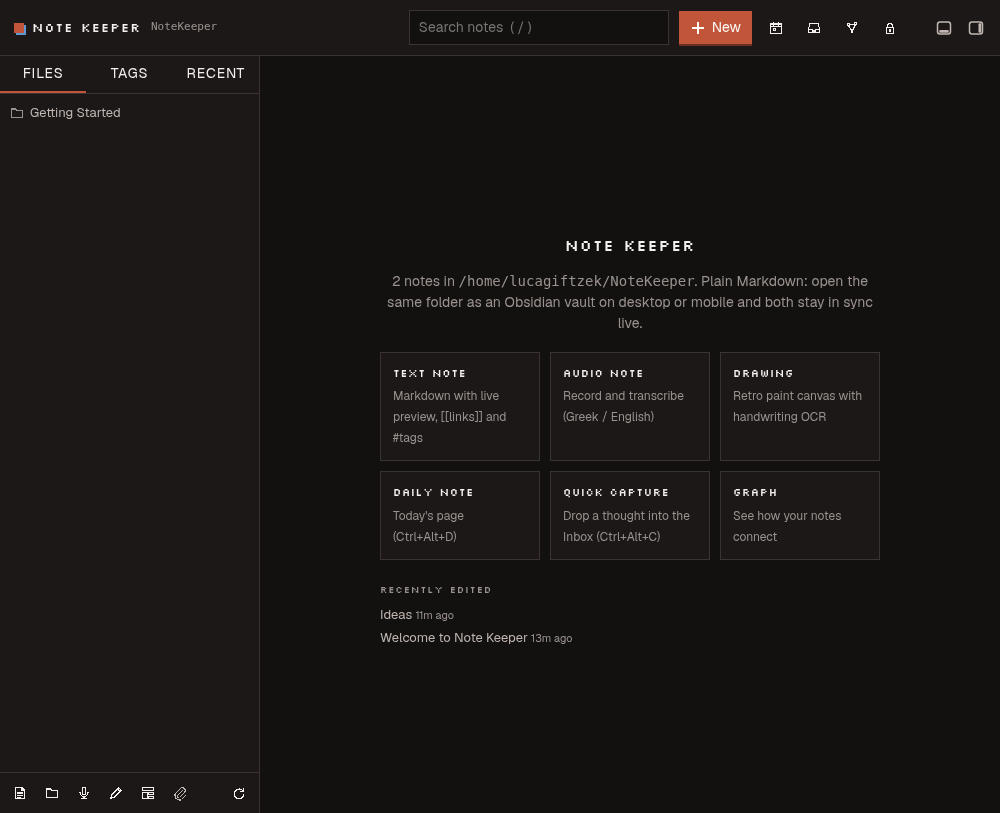 |
 |
 |
 |
 |
 |
Install
Note Keeper installs like any other DSH web plugin, from a checkout: it ships a small Go
daemon that is built on your machine, so dsh plugin add github:... alone is not enough.
Build it (Go ≥ 1.22 and Node ≥ 22.5):
git clone https://github.com/lucagiftzek/dsh-note-keeper.git
cd dsh-note-keeper
npm ci
npm run build      # bin/notekeeperd (Go daemon) + lib/client.js (browser bundle)
Optional:
sudo apt install tesseract-ocr tesseract-ocr-ellfor OCR.Link it into the web profile,
~/.dsh/profiles/web/package.json: add"dsh-note-keeper": "link:/path/to/dsh-note-keeper"todependenciesand"dsh-note-keeper"todsh.profile.bundles, then runpnpm installthere.Optional configuration goes on the plugin row in
~/.dsh/profiles/web/cordis.patch.yml:- id: dsh-note-keeper config: vault: ~/NoteKeeper # or point at an existing Obsidian vault trustedHosts: [dsh.example.com] aiWrite: true aiDelete: trueRestart dsh-web. A Notes row appears in the left sidebar.
Kill switch: DSH_NOTE_KEEPER_DISABLE=1 in the dsh-web environment, or
- id: dsh-note-keeper / disabled: true in cordis.patch.yml.
Configuration
All keys are optional; defaults come from DEFAULTS in lib/index.js.
| Key | Default | Meaning |
|---|---|---|
vault |
~/NoteKeeper |
Vault directory (created if missing). Point at an existing Obsidian vault to share it. ~ is expanded; the NK_VAULT environment variable overrides this. |
trustedHosts |
[] |
Extra hostnames (besides loopback) the browser gate accepts as same-origin. |
requireCookie |
true |
Require the DSH browser-session cookie on every request (reads included). |
binary |
bin/notekeeperd inside the package |
Path to the notekeeperd Go binary. |
tesseract |
tesseract |
Tesseract binary/name used for OCR. |
dailyFolder |
Daily |
Folder for daily notes (Daily/YYYY-MM-DD.md). |
inboxNote |
Inbox.md |
Target note for quick capture. |
attachmentsFolder |
attachments |
Default folder for uploads. |
maxAttachBytes |
0 (= 1 GiB) |
Cap for one assembled attachment (daemon env NK_MAX_ATTACH). |
templatesFolder |
Templates |
Folder scanned for note templates. |
aiWrite |
true |
Whether the notes_* tools may create/modify notes. |
aiDelete |
true |
Whether the notes_* tools may delete (trash) notes/folders. |
Keyboard shortcuts
Global (active while the Note Keeper page is mounted):
| Shortcut | Action |
|---|---|
Ctrl+Alt+N |
New note |
Ctrl+Alt+C |
Quick capture dialog |
Ctrl+Alt+D |
Open/create today's daily note |
Ctrl+E |
Toggle preview mode (while a note is open) |
/ (outside a text field) |
Focus the search box |
In the editor textarea:
| Shortcut | Action |
|---|---|
Ctrl+B / Cmd+B |
Bold |
Ctrl+I / Cmd+I |
Italic |
Ctrl+S / Cmd+S |
Save now |
Tab / Shift+Tab |
Indent / outdent the current line |
Enter |
Continue a list, numbered list or task item; an empty item ends the list |
[[ |
Triggers wikilink autocompletion (arrow keys to navigate, Enter/Tab to accept, Escape to dismiss) |
Obsidian sync guide
Note Keeper's vault is a plain directory of Markdown files laid out the way Obsidian expects, there is no proprietary database or format. This is deliberate: it is what lets the vault be edited from more than one place at once.
- Same machine: open the vault folder (default
~/NoteKeeper) directly as an Obsidian vault. Every change either app makes appears live in the other (Note Keeper watches the folder with fsnotify and refreshes over SSE within a fraction of a second; Obsidian watches it natively). - Other desktops and mobile: use whatever you already rely on to sync a plain folder, Syncthing (Android and desktop), Obsidian Sync, iCloud or Möbius Sync on iOS, or git. Note Keeper does not care which one is used: it treats every external write to the vault the same way it treats its own, live.
- Encrypted notes and Obsidian: an encrypted note is still a syntactically
valid Markdown file (YAML frontmatter with
nk-encrypted: v1plus ank-cipherfenced block of base64 ciphertext), so Obsidian opens it without errors, it just shows the placeholder warning text and the opaque ciphertext block, never the plaintext. Encrypted attachments (.nkencfiles) are opaque binary blobs to Obsidian. Only Note Keeper can decrypt and display encrypted content, Obsidian has no matching plugin. Open and unlock encrypted notes in Note Keeper. - Unrecognisable attachments: a file uploaded into an encrypted folder is
sealed in the browser (AES-256-GCM) before it leaves the page and stored under
a random name (
enc-<18 hex>.nkenc). Its real name, size and type live inside the ciphertext (anNKM1header), so neither the connection (URLs, bodies, chunk boundaries aside) nor the vault, the cloud mirror or the daemon ever learns what the file was. Note Keeper shows the real name after you unlock it. OlderNKE1blobs without the header still open. The note embed inserted on upload references the opaque name, so type links by pasting from the upload, not by guessing the file name. Sealing happens in memory: budget about 4x the file size in browser RAM (roughly 1.2 GB for a 300 MB file).
AI tools
Registered on ctx.get('tools') when the tool registry is available (the
sidebar and daemon still work if it is not). Every call goes through the
same daemon API the browser uses, so path validation, conflict detection and
folder-lock rules apply identically.
| Tool | Purpose |
|---|---|
notes_list |
List the vault (folders/notes, titles, tags, type, encrypted flag), optionally narrowed to a folder. |
notes_search |
Full-text search (accent-insensitive, prefix + phrase matching), filterable by tag or folder. |
notes_read |
Read one note's Markdown, frontmatter, tags, links and backlinks. |
notes_create |
Create a new Markdown note (title → safe file name, optional folder and tags). |
notes_update |
Modify an existing note: replace, append, prepend, or replace_text (exact-match substitution). Conflict-safe: reads, applies, writes with baseMtime, retries once on conflict. |
notes_move |
Rename/move a note or folder; rewrites wikilinks that pointed at it. |
notes_delete |
Move a note or folder to the vault trash (.trash, recoverable). |
notes_mkdir |
Create a folder (and parents). |
notes_capture |
Quick-capture text into Inbox.md (or another target), optionally as a task. |
notes_daily |
Open/create the daily note for a date, optionally appending text. |
notes_tags |
List every tag with its note count. |
notes_links |
Backlinks + outgoing links for one note, or a vault-wide connectivity summary. |
notes_create/notes_update/notes_move/notes_mkdir/notes_capture/notes_daily
are disabled (return a clear error) when aiWrite: false; notes_delete is
also gated on aiDelete: false. Encrypted notes and folders are always
off-limits to models: notes_read refuses to return ciphertext, and any
write tool that would touch an encrypted .md file is refused by the daemon
with code: "locked": the model is told to ask the user to do it in Note
Keeper instead.
Security model (summary)
Two independent layers protect the vault; see docs/ARCHITECTURE.md for the
full threat model.
- Server-side request gate (
lib/security.js): every browser request to/note-keeper/api/*must pass four checks (R1 loopback peer, R2 trusted Host/origin, R3 CSRF markers on mutations, R4 the DSH session cookie) before it is proxied to the Go daemon, which itself only listens on loopback and requires a fresh per-spawn secret (X-NK-Secret) that never appears in a browser-visible surface. - Client-side zero-knowledge encryption (
src/client/crypto.js): passwords are stretched with PBKDF2-SHA-256 (600,000 iterations) into a non-extractable AES-256-GCM key that lives only in an in-memory key ring (auto-forgotten after 10 minutes idle, or on demand). Encryption can be applied per-note or per-folder; a folder carries a.nk-lock.jsonmarker with a KDF salt and a key verifier, never a key or the plaintext. The server categorically refuses to store plaintext inside a locked folder, and thenotes_*AI tools can never read or write encrypted content: "Warning: Loss of the password results in permanent, unrecoverable data loss." There is no recovery path by design.
Development / testing
npm run build          # build:server (Go) + build:client (esbuild bundle)
npm run build:server   # go build -> bin/notekeeperd
npm run build:client   # esbuild -> lib/client.js
npm run check          # node --check over every host-half .js file
npm test               # test:server + test:host
npm run test:server    # go vet ./... && go test -race -count=1 ./...   (server/)
npm run test:host      # node --test test/*.test.mjs                     (host + client logic)
Server tests live under server/internal/*/**_test.go (vault, index, api).
Host/browser-logic tests live under test/*.test.mjs (client logic,
graph-core, paint-core, a jsdom UI smoke test, and host.test.mjs for the
node host half).
Project layout
dsh-note-keeper/
├── lib/                  host half (Node/ESM, loaded by dsh-web)
│   ├── index.js          plugin entry: wires daemon + route + notes_* tools
│   ├── daemon.js         spawns/supervises notekeeperd, HTTP client to it
│   ├── proxy.js          /note-keeper/api/* route: gate + stream to daemon
│   ├── security.js       R1-R4 browser request gate
│   ├── tools.js          notes_* AI tool definitions
│   └── client.js         built browser bundle (esbuild output, checked in)
├── src/client/           browser half source (React, built by scripts/build.mjs)
│   ├── index.jsx         registers the sidebar row + main panel
│   ├── App.jsx           page shell: vault model, views, keyboard shortcuts
│   ├── Editor.jsx        Markdown editor (toolbar, preview, autocompletion)
│   ├── Recorder.jsx      audio note recording (MediaRecorder)
│   ├── Paint.jsx / paint-core.js   retro drawing canvas
│   ├── Graph.jsx / graph-core.js   force-directed graph view
│   ├── crypto.js         zero-knowledge encryption primitives
│   ├── upload.js         chunked upload transport + sealed uploads
│   ├── api.js            fetch client for /note-keeper/api
│   ├── markdown.js       Markdown rendering (marked + DOMPurify) + outline
│   ├── tree.js           vault-tree helpers
│   └── styles.js         CSS
├── server/               the Go daemon (notekeeperd)
│   ├── cmd/notekeeperd/  main: flags, wiring, HTTP listen
│   └── internal/
│       ├── vault/        filesystem operations, path safety, locks
│       ├── index/        in-memory search/link/tag index
│       ├── watch/        fsnotify watcher + SSE hub
│       ├── note/         Markdown/frontmatter/wikilink parsing
│       └── api/          the daemon's HTTP handlers
├── bin/notekeeperd       built Go binary (build:server output)
├── scripts/build.mjs     esbuild script for the client bundle
├── test/                 host + client-logic tests (node --test)
└── cordis.patch.yml      the one bundle row dsh-web loads
License
MIT, see LICENSE.
Built by Luca Tzekos, who also makes Job Opportunities API: employer-direct job data with per-field provenance you can verify yourself, free to read and available as an API. If this plugin is useful to you, a star on this repo or a look at jobopportunitiesapi.org is the best thanks.
No comments yet. Be the first to write one.