🐋 dsh-pajama-whale
Meet the typical DeepSeek Harness developer.
A toy-sized colleague in a blue-whale onesie who lives in your DSH window — and tells you what the agent is doing while you wait.



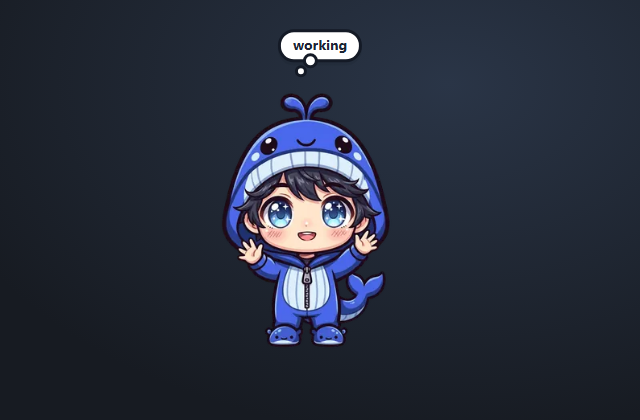
He is a desk toy first and a status indicator second. Push him around the window, fling him at a wall — he squashes flat against it and stays pinned there until you drag him away. Nothing breaks: no gravity, no damage, no opinions about your code. Leave him alone and he dozes off.
Play with him while a long turn runs. He pulls out a laptop when tools start, pops a thought cloud when you are needed, and speaks up when the context is running out, when a turn failed, or when you have been at it for fifty minutes straight.
No configuration. No network calls. The whole thing is one overlay slot.
Install
dsh plugin --profile web add github:lubenkov/dsh-pajama-whale#v0.3.2
Swap web for the profile you boot (desktop, …), then restart the
harness — he lands in the bottom-right corner the first time. The #v0.3.2
suffix pins the tagged release instead of the moving master; drop it to
follow the branch. To remove him:
dsh plugin --profile web remove dsh-pajama-whale
No build step at install time: the artwork ships inlined in client.js, so
dsh plugin add is all it takes — no postinstall hook, no runtime downloads.
It is a pure UI bundle (no dependencies, no host services beyond the ones it
reads through).
Declared for DSH >=0.2.1-rc.2 <0.3.0 in engines.dsh. The plugin market
uses that range to label compatibility; DSH itself does not block a newer host,
but the status integration may degrade — see COMPATIBILITY.md
for the exact API surface and what degrades gracefully.
Play with him
| You | He |
|---|---|
| Drag | Follows the pointer. Release slowly and he stays put; release fast (>120 px/s) and he flies. No gravity, no bouncing. |
| Drag into a wall | Sticks to it, flat: four directions × 8 frames, and the frame is picked by how far you overshoot (up to 110 px) or, after a throw, by impact speed. |
| Click | Shows the current context pressure (or the session title when it is unknown) in the cloud for 5 s. |
| Hover the cloud | Same context reading, while the cursor is there. |
| Click the cloud | Opens the session he is watching. |
He follows the agent
| What the session does | What he does |
|---|---|
| Tools running | Switches to the working pose — laptop out, 12 frames |
| Turn running, no tool activity | thinking, 20 frames |
| Turn finishes | One joy burst |
| Waiting for your approval or an answer | Cloud shows ? |
| Last turn failed | Cloud shows ! error for 6 s |
| Context pressure reaches 80 % | One surprised; cloud shows context N% while it stays ≥80 %, and surprised re-arms below 75 % |
| 50 min of continuous work | Cloud suggests take a break? for 9 s (repeats every 45 min; a pause under 3 min still counts as continuous) |
| A minute of quiet | Falls asleep on a looping 16-frame sleepy; a yawn (13 frames) when you wake him with the cursor — a new turn wakes him silently |
While idle he only blinks (75 %) or wags his tail (25 %), every 1.9–4.5 s, plus
a rare hmm… thought. That is 129 frames across 12 sprite sheets.
One cloud, strict priority
hover / click context → ? waiting → ! error → take a break? →
context N% at ≥80 % → idle hmm… (3.6 s, every 70–160 s). Hovering or
clicking always wins, so the pet never hides the context reading from you.
Cheap and quiet
- Nothing to build, nothing to fetch. All 12 sheets (2.3 MB of WebP,
129 frames) are inlined as data URIs into a single 3.1 MB
client.js. Zero network requests at runtime. - Cheap when idle. The
requestAnimationFrameloop stops as soon as the pet is idle and no pose is playing; pose loops repaint only at their own 8–12 fps. Breathing is a ~3.4 s CSS animation every 25–40 s. Everything pauses while the tab is hidden, and breathing plus random emotions are disabled underprefers-reduced-motion(pose animations still play). - Never in your way. He mounts only into
shell.overlay, and the overlay ispointer-events: noneoutside his body and cloud. - Remembers his place. Position, wall and squash depth live in
localStorageand are clamped when the window resizes.
Language and privacy
English and Chinese strings follow Settings → Language through ctx.locale
(anything else falls back to English). The plugin reads only session status,
context pressure, session title and recent tool activity to choose a pose. It
sends nothing anywhere, has no telemetry, and stores nothing but the pet's
coordinates on your machine.
If he does not show up
- Confirm the profile you installed into is the one you boot.
- Check the DSH version against the declared range. A newer host is not blocked: the pet still renders and drags, but some status channels may be missing.
- Set
localStorage['pajama-whale:debug'] = '1'and reload: the cloud then prints the live channels (session id, slot hooks, running state). Missing channels are listed in COMPATIBILITY.md — the pet still renders and drags without them.
Development
Node 20+; Python 3 with Pillow only for repacking artwork.
python tools/build-sheets.py   # PNG frames -> WebP strips (needs assets/sprites/)
node tools/build-client.mjs    # strips -> client.js data URIs
node tests/validate.mjs        # package, sheets, locales, size budget
CI runs the same validation on Node 20 and 24 and fails if the committed
client.js drifts from its source.
| Path | Role |
|---|---|
src/client.src.js |
readable client source, sheet placeholders |
client.js |
built artifact that ships (inlined data URIs) |
assets/build/*.webp |
packed sprite sheets + manifest.json |
tools/build-sheets.py |
packer (PNG frames → WebP strips) |
tools/build-client.mjs |
inliner (strips → client.js) |
index.js |
empty host half; the pet is browser-side only |
assets/sprites/ (the ~64 MB source artwork pack) is not committed; the packed
assets/build/*.webp strips are, so you never need it unless you redraw
frames.
License
MIT for the code and the artwork.
No comments yet. Be the first to write one.