dsh-model-fold
功能描述:三级级联模型面板(来源 → 模型 → 思考强度),支持识图与思考强度一键开关、能力图标,以及逐模型真实测活并把结果持久化保存。适配 DSH 内核 0.2.2-rc.1。
English: Three-column cascade model picker (provider to model to reasoning effort) with one-click image and reasoning switches, capability icons, and real per-model availability probes whose results persist across restarts. Adapts DSH kernel 0.2.2-rc.1.
给 DSH 的模型选择器换成「来源 / 模型 / 强度」三级级联面板。 不再一条长列表翻到底,也不再打开官方模型菜单。
A three-column cascade model picker for DeepSeek Harness (DSH): provider → model → reasoning effort, with one-click capability switches and real per-model availability probes.
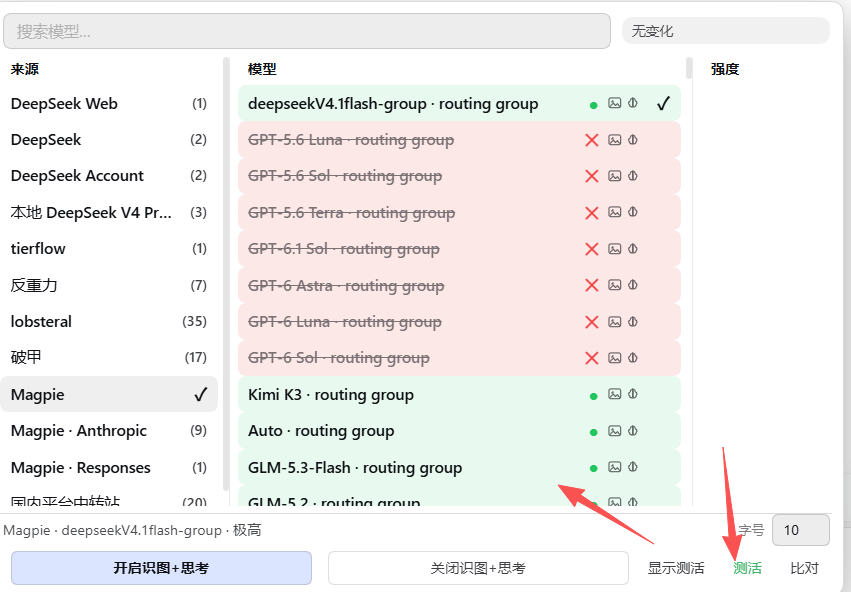
这次大更新做了什么
| 能力 | 说明 |
|---|---|
| 三级级联面板 | 左列来源、中列模型、右列强度,同一浮层并排展示,互不遮盖;点强度直接切换模型 + 档位 |
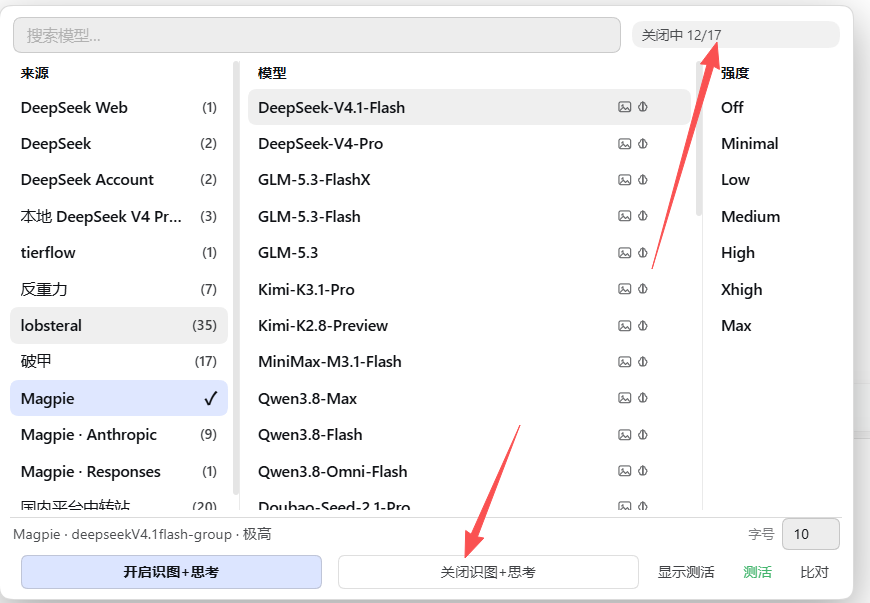
| 识图 / 思考强度一键开关 | 「开启识图+思考」给全部模型补 image 与完整七档 reasoningEfforts;「关闭识图+思考」移除 image、把 reasoningEfforts 置 false,不需要逐个模型手点 |
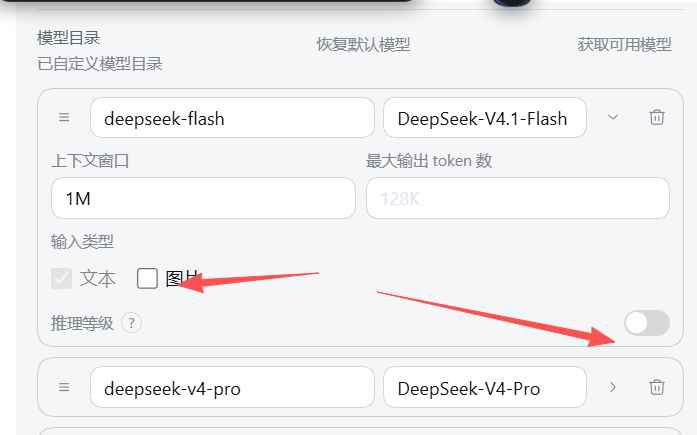
| 模型能力图标 | 模型名后显示黑白图标:图片 = 图片设置已打开;大脑 = 思考强度已打开。只代表设置状态,不代表模型真实能力 |
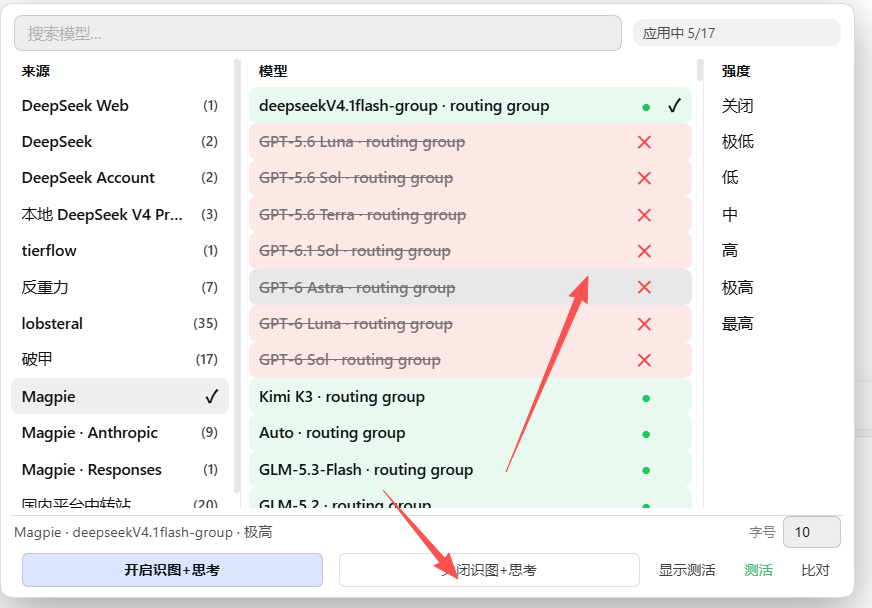
| 逐模型真实测活 | 「测活」对当前来源每个模型发一条 1-token 真实请求:绿色 ● 可用、红色 ✕ 不可用;状态栏实时显示进度 |
| 测活结果持久化 | 结果写入 ~/.dsh/model-fold-probe.json(DSH_HOME 可覆盖),关面板、重启 DSH 后仍在;重测自动覆盖 |
| 显示 / 隐藏测活结果 | 「显示测活」开关控制绿 ●/红 ✕ 的显示;关闭只隐藏,不删除记录 |
| 紧凑布局 | 640px 宽、三列 grid、两行 footer;字号支持 8–15 手动输入 |
截图
| 测活结果 | 关闭识图 + 思考 |
|---|---|
|
 |
| 官方设置里的对应开关 | 关闭后图标消失 |
|---|---|
 |
 |
安装
# 在 DSH profile 目录执行(桌面端由 Electron 管理,见下方说明)
dsh plugin add dsh-model-fold
桌面端(desktop profile)由 Electron 独占管理,CLI 会拒绝直接安装;请把 dsh-model-fold 加进 ~/.dsh/profiles/desktop/package.json 的 dependencies 与 dsh.profile.bundles,再执行 pnpm install,最后彻底退出并重启 DSH。
使用
- 点输入框右下角的模型胶囊,打开三级面板。
- 左列选来源 → 中列选模型 → 右列选思考强度。
- 底部:
- 开启识图+思考:给所有模型打开图片输入与完整思考档位;
- 关闭识图+思考:关闭图片输入与思考档位;
- 显示测活:显示/隐藏上次测活结果;
- 测活:对当前来源逐模型发真实请求(会消耗额度);
- 比对:只比对来源返回的模型清单,不逐个测活;
- 字号:8–15,手动输入。
测活说明
- 走宿主侧
POST /plugin/dsh-model-fold/probe,支持openai-completions/openai-responses/anthropic-messages; - 每个模型发一条
max_tokens: 1的ping请求,HTTP 2xx 视为可用; - 结果保存到
~/.dsh/model-fold-probe.json,客户端 localStorage 兜底; - 模型多的来源(如 Magpie 290 个)需要几分钟,且会消耗每个模型一次极短请求的额度。
图标只表示设置是否打开,不代表模型真实能力;真实可用性以「测活」结果为准。
兼容
- DSH 2.x(desktop / web)
- Node.js ≥ 18
- 宿主侧需要
webServer服务(DSH 默认提供)
开发
node --check lib/client.js
node --check lib/index.js
客户端改动:Ctrl+Shift+R 刷新;宿主改动:彻底退出 DSH 再启动。
License
MIT
No comments yet. Be the first to write one.