dsh-archive-favorites-forge
功能描述:DSH 对话管理工具箱:会话归档连文件一起归档,列表清爽但历史完整;收藏常看会话;按轮次撤销回复并保留轮次快照;一键清理快照与归档档案。适配 DSH 内核 0.2.2-rc.1。
English: Conversation management for DSH: archive a session together with its files so the list stays clean while history survives, star the ones worth keeping, undo the last reply with a per-turn snapshot, and clean up snapshots and archived files from one panel. Adapts DSH kernel 0.2.2-rc.1.
Favourites, copy id+path, per-session delete, idle batch archive, a favourites filter, and edit-resend / undo-turn with automatic file rollback for DeepSeek Harness conversations — additive slot extensions over the shipped archive feature. It edits no official file.
给 DSH 的对话加上收藏、复制 ID+路径、单条删除、批量归档闲置对话、收藏筛选,以及「编辑重发 / 撤销整轮 + 文件自动快照回滚」 —— 全部挂在官方插槽上,不改官方一行代码。



English | 简体中文
Screenshots
1. The session menu — favourite / unfavourite, copy id + path and continue-in-a-new-window added to the shipped 「…」 menu; pin, rename, fork and archive stay on the official rows:
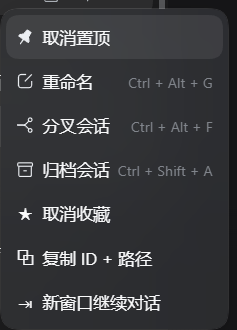
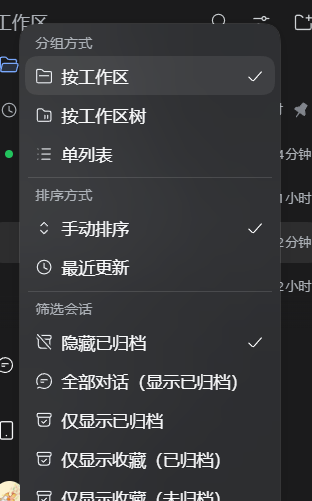
2. Favourites and filters — two extra rows in the official 筛选会话 group, narrowing the sidebar to favourites that are archived and to favourites that are not. The same menu carries grouping and ordering:
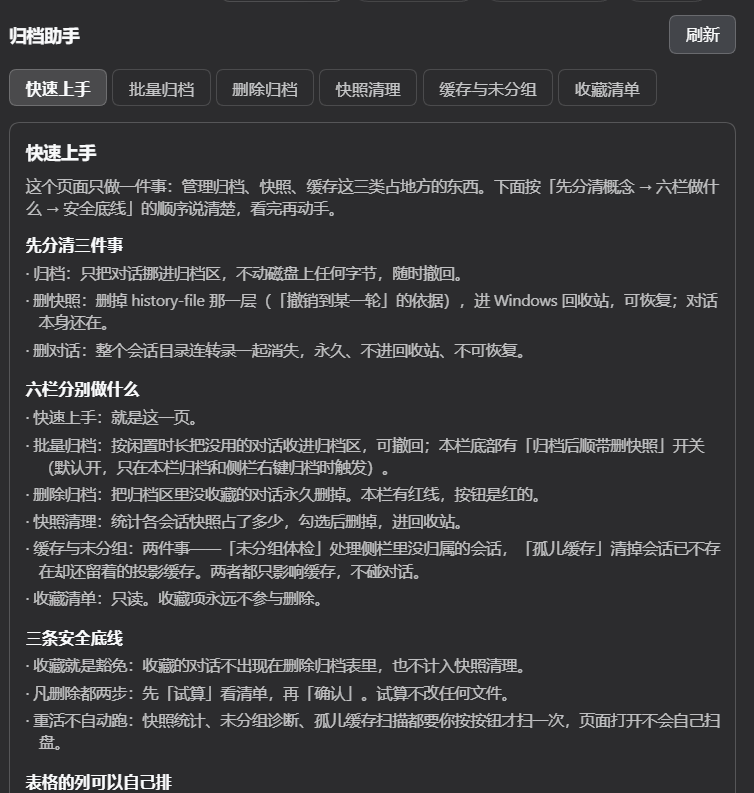
3. Quick start — the landing panel of Settings → 归档助手: three things to keep apart (archive / delete snapshots / delete the conversation), what each of the six panels does, and the three safety rules. Opening the page scans nothing:
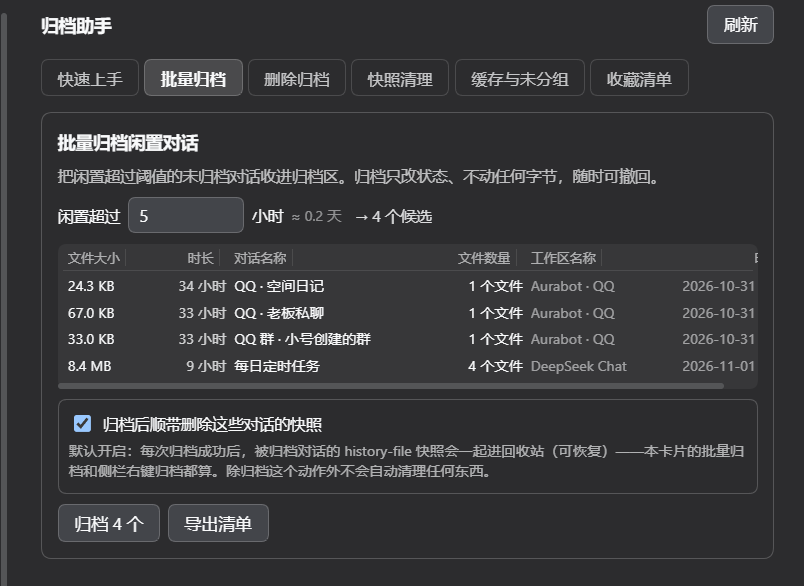
4. Batch archive — pick un-archived conversations by idle time; the six-column table carries real size, idle age, file count, workspace and timestamp. The 「归档后顺带删除这些对话的快照」 switch at the bottom is on by default:
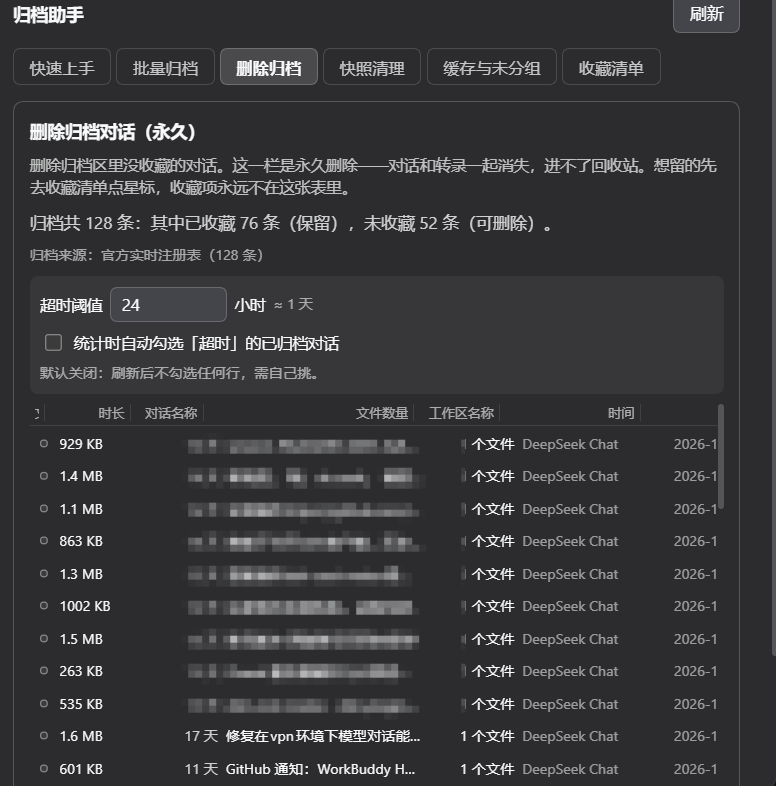
5. Delete archived — lists only archived conversations that are not favourites, behind a red button and two confirmations. The title says outright that this delete is permanent and never reaches the Recycle Bin:
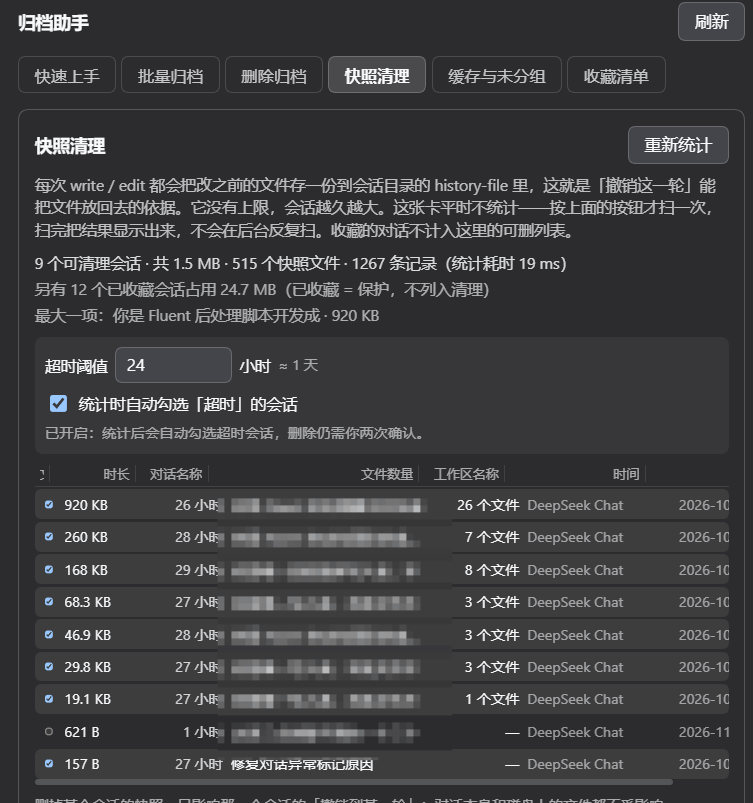
6. Snapshot cleanup — measures what each session history-file occupies, then sends the ticked ones to the Windows Recycle Bin (recoverable). Favourites are never part of the deletable list:
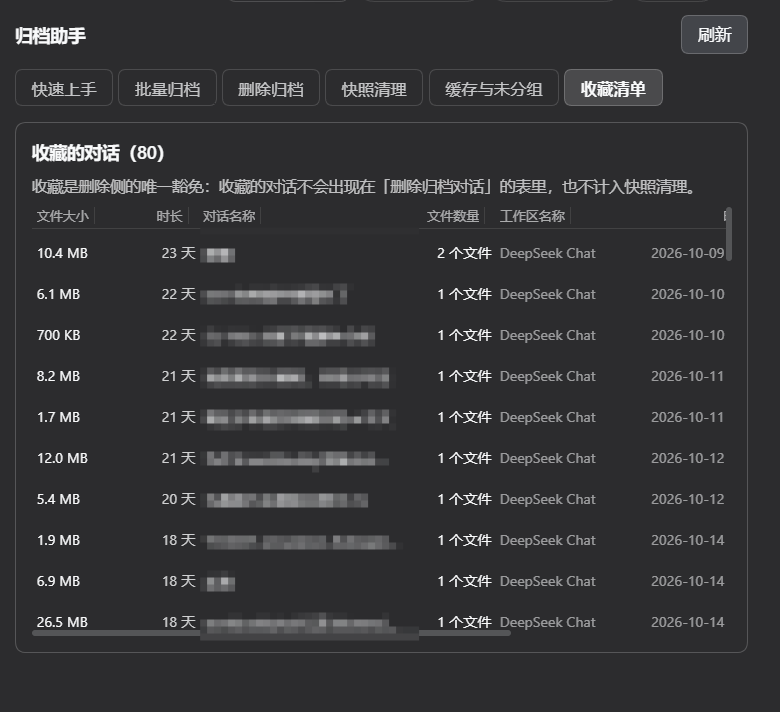
7. The favourites list — read-only. Each row shows the size of the whole session directory, how long it has been idle, its file count and the last update time. A favourite is never deletable:
8. The per-turn buttons — 复制 → ↺ undo → ✏️ edit-and-resend → 🗑 delete under every human message, including the messages you interject mid-turn:

Why this exists
DSH already ships an archive feature: the Workspace registry keeps a global
archivedSessionIds set and @deepseek-ai/dsh-client-ui-workspace renders the
sidebar rows plus a view-options filter. That shipped feature has no
favourites, no per-conversation delete, no copy-id/path affordance, and no
time-based batch archive — and it deliberately refuses to open an archived
conversation. The transcript has no per-message edit or undo either, and
nothing in the harness rolls back the files an assistant turn rewrote. The
sidebar's "Ungrouped" bucket has no explanation and no repair entry point.
This plugin adds those things by attaching to documented official slot points, so it composes with the shipped UI instead of patching it.
Features · At a glance
Every feature below marked "Settings → 归档助手" lives behind a single row of function buttons on one page: pick 快速上手 / 批量归档 / 删除归档 / 快照清理 / 缓存与未分组 / 收藏清单 and only that panel is shown. The other panels are hidden, not unmounted, so a report you just measured is still there when you come back. The choice is remembered across restarts, and a new install lands on 快速上手.
| 中文 | English | |
|---|---|---|
| ① | 收藏对话:归档或未归档的对话都能收藏;「…」菜单项 + 行内 ☆,星标即时生效 | Favourite any conversation — archived or not; a menu row plus an inline ☆ star, applied optimistically |
| ② | 复制 ID + 路径:「…」菜单一键复制会话 ID 与转录文件绝对路径(两行) | Copy id + path — one menu row copying the session id and the transcript's absolute path |
| ③ | 单条永久删除:任意非收藏对话可删,二次确认;删完侧栏立即移除该行 | Per-conversation permanent delete — any non-favourite, behind a confirmation, and the sidebar row disappears at once |
| ④ | 批量归档闲置对话:把闲置超过 N 小时的未归档对话一次性归档,可撤回;候选直接列在卡片里(统一六列,见 ⑱),不必先导出清单才知道要归档什么 | Idle batch archive — archives conversations quiet for more than N hours, undoable; the candidates are listed right in the card in the shared six columns (see ⑱), so you never have to export a list just to see what would be archived |
| ⑤ | 导出清单:制表符分隔的 txt,含对话名称 / 对话ID / 所属工作区 / 闲置时长 / 最后活动时间;可复制路径或直接打开所在文件夹 | Export list — a tab-separated txt with name, id, workspace, idle time and last-activity time; copy its path or reveal it in the file manager |
| ⑥ | 收藏筛选:视图选项菜单新增「仅显示收藏(已归档)」与「仅显示收藏(未归档)」 | Favourites filter — view-options rows for favourites that are archived, and favourites that are not |
| ⑦ | 批量删除:一键永久删除「已归档且未收藏」的对话,清单用统一六列(见 ⑱) | Batch delete — permanently removes the archived-and-unfavourited conversations; the list uses the shared six columns (see ⑱) |
| ⑧ | 删除护栏:收藏项拒删、越出会话根目录拒删、符号链接拒删、逐条报告、批量上限 | Delete guardrails — favourites refused, paths outside the sessions root refused, symlinks refused, per-id reporting, batch cap |
| ⑨ | 编辑重发:任意一条用户消息下多一个 ✏️,点开就是内联编辑框(可拖入文件 / 粘贴图片,最多 10 个附件、单个 8MB),发送即截断到该消息之前并重发 | Edit and resend — a ✏️ under any user message opens an inline editor (drag files or paste images, 10 attachments max, 8 MB each); sending truncates the conversation to just before that message and resends |
| ⑩ | 撤销整轮:↺ 把对话回退到该轮之前,并默认同时还原这一轮里被 AI 改过的文件(确认框里列出将被回滚的路径,可取消勾选只回退对话) | Undo a turn — ↺ rewinds the conversation to before that turn and, by default, also restores the files the assistant changed during it (the confirm dialog lists the affected paths; untick to rewind the conversation only) |
| ⑪ | 文件快照:AI 每次改文件(write / edit / str_replace_editor)前自动留一份内容快照,撤销时按最早的改动记录还原;没有快照的老会话从日志反推 |
File snapshots — every write / edit / str_replace_editor call snapshots the file's prior bytes first; undo restores from the earliest change after the boundary, and falls back to reconstructing from the transcript log for conversations that predate the plugin |
| ⑫ | 未分组体检:只读诊断侧栏「未分组」里到底有哪几条会话、每条为什么在那儿、该怎么处置;先试算再执行,删的一律进回收站 | Ungrouped health check — a read-only diagnosis of exactly which conversations sit in the sidebar's "Ungrouped" bucket, why each one is there, and what to do with it; a dry run comes first and deletes go to the recycle bin |
| ⑬ | 未分组硬门:插件每次启动 8 秒后自检一次,有游离会话就在日志里告警并指路体检卡片;干净则记一行 clean |
Ungrouped boot gate — 8 seconds after every start the plugin re-checks; a non-empty bucket logs a warning naming the first ten ids, a clean one logs a single clean line |
| ⑭ | 孤儿缓存清理:清掉「会话目录已不在、但投影缓存还留着」的孤儿记录——这是「未分组」清完又冒出来的真正原因,目录扫描看不见它。0.36.0 起默认全部可删,要保留置顶/已归档那几条就勾一个框 | Ghost-cache sweep — removes orphan projection records whose session directory is long gone; this is why the bucket keeps reappearing and no directory scan can see it. Everything is deletable by default since 0.36.0; tick one box to spare the pinned / archived rows |
| ⑮ | 隐藏「未分组」分组:一个纯视图开关(默认开启),把侧栏底部那个分组(连组头)整体藏起来,不删任何对话 | Hide the "Ungrouped" group — a pure view switch (on by default) that hides the whole bucket (header and rows) from the sidebar; nothing is deleted |
| ⑯ | 新窗口继续对话:把长对话蒸馏成一份交接书(用户要求时间线 + 任务进度清单 + 团队任务 + 最近进展),先弹窗报告「检测到任务进行到 第 N 轮」,确认后新开一个 新对话-<原名>、继承原对话的预设智慧体并自动把交接书发过去 |
Continue in a new window — distils a long conversation into a handover brief (requirement timeline, task progress, team tasks, latest progress), reports "you are N turns in" first, then on confirm opens 新对话-<original title> with the original agent preset inherited and sends the brief as its first message |
| ⑰ | 快照清理(统计 + 手动删除):设置页「快照清理」栏点「立即统计」才扫一次(渲染时不扫、无定时器),列出每个会话 history-file/ 占了多少、多少个快照文件、多少条记录、不活跃时长;收藏的会话不进可删列表,只在汇总行单独报;可选打开「超时预勾选」(默认关,开前须确认风险)自动勾上超时行,删除仍需先试算再二次确认,删的目录进 Windows 回收站。绝不自动清理 |
Snapshot usage & manual cleanup — one press of "measure now" scans the ledger directories once (never on render, never on a timer), reporting bytes, blob count, row count, idle time and last snapshot time per conversation, in the shared six columns (see ⑱); favourited conversations are lifted out of the cleanup list and reported on a separate summary line; an optional "pre-tick idle rows" switch (off by default, risk acknowledgement required) ticks rows past the threshold after each scan; deletion still needs a dry run plus a confirm, and the directory goes to the recycle bin. Nothing is ever pruned automatically |
| ⑱ | 列表统一六列:每一栏的列表都是同一套列 —— 文件大小 | 时长 | 对话名称 | 文件数量 | 工作区名称 | 时间,由一个共用行组件渲染,缺失值统一显示破折号而不是留空(详见 "The six-column row format");文件大小与文件数量取自该会话的整个目录(转录 + 快照账本 = 删掉它能腾出多少),工作区名称取工作区注册表标题(没有标题才退回文件夹名),且只在你点开那一栏时才量,单次上限 120 行、并发 8;0.38.0 起列顺序可拖动、列宽可拖拽调整,表头与行共用同一套网格所以永远对齐 |
One row format everywhere — every list on the page uses the same six columns (文件大小 | 时长 | 对话名称 | 文件数量 | 工作区名称 | 时间), drawn by a single shared row component, with an em dash for a cell that genuinely has no value instead of a blank one; size and file count come from the whole session directory (transcript + ledger — i.e. what deleting that row frees), the workspace name comes from the workspace registry title (falling back to the folder name), and all of it is measured only when you open that panel, capped at 120 rows per request with a fan-out of 8. Since 0.38.0 the columns are draggable (drag a caption to reorder, drag its right edge to resize) and caption plus rows share one grid, so they always line up |
Where each feature lives
| Feature | UI location |
|---|---|
| Favourite / copy / delete one conversation | Sidebar row 「…」 menu (and a hover ☆ on the row) |
| Idle batch archive, export list, favourites list, batch delete of archived conversations (inlined list, per-row ticks, dry run → confirm, its own pre-tick switch), ungrouped health check, orphan cache sweep, the six-column row format used by every list | Settings → 归档助手 |
| Favourites filter | 视图选项 → 筛选会话 |
| Edit-resend / undo turn / delete one message | The ↺ ✏️ 🗑 buttons under each user message in the transcript |
| Undo and edit confirmation | A modal (shell.overlay) — the only place the plugin draws outside the sidebar |
| Snapshot usage & cleanup | Settings → 归档助手 (the 「快照清理」 card) |
Install
dsh plugin --profile <profile> add dsh-archive-favorites-forge
Then fully quit and reopen DSH. The host half (lib/index.js) has no
watcher in this harness generation, and the client bundle is snapshotted at
startup — so a page refresh alone does not pick up a new version.
How it works
lib/index.js    host half   — favourites store, transcript-path resolver,
                              JSON routes, guarded delete, archive/dearchive,
                              file snapshots + transcript-log parsing
lib/client.js   client half — official slot registrations + two DOM rules
                              (the favourites filter and the transcript buttons)
Slots used (all documented in the harness client contract):
| Slot | What it contributes |
|---|---|
sidebar.workspaces.session.menu.item |
4 rows: favourite, copy id+path, continue in a new window, delete |
sidebar.workspaces.session.row.action |
1 hover ☆ star |
settings.section |
the 归档助手 page |
shell.overlay |
the one confirmation modal used by edit-resend and undo |
Host routes (all under /plugins/dsh-archive-favorites-forge):
| Route | Purpose |
|---|---|
GET /status |
version + state paths, for diagnostics |
GET /favorites, POST /favorite |
the favourites set |
GET /archived, POST /unarchive |
the archived set, and undo of one archive |
GET|POST /idle-archive |
preview and apply the idle batch archive |
POST /export-list |
write the tab-separated list |
POST /reveal |
open the file manager on a path |
POST /session-info |
one session's title / workspace / transcript path |
POST /delete |
guarded permanent delete (batch; the session-menu delete goes through it) |
GET|POST /archive-delete-policy |
the idle pre-tick switch and threshold for the archive-delete list (its own policy file) |
POST /archive-delete |
batch delete of archived-but-unfavourited conversations; the host rebuilds the candidate set, dry run unless confirm: true, favourites refused |
POST /session-turn-info |
one turn's user text, its file-change list, and the rewind boundary |
POST /session-files-restore |
roll back the files changed after a given sequence number |
POST /session-rewind |
shadow the tail of a conversation after a given sequence number, in place — same session id, nothing deleted (0.39.0) |
POST /session-digest |
read-only: distil a long conversation into a requirement-timeline + task-progress brief for a fresh window |
POST /ungrouped-diagnose |
read-only health check: which conversations would land in "Ungrouped", why, and what to do |
POST /ungrouped-cleanup |
one-click cleanup; dry run unless confirm: true, and it re-diagnoses before acting |
POST /ungrouped-explain |
the prose answer to "why does Ungrouped exist, and is it from deleting conversations?" |
GET|POST /ghost-cache-diagnose |
read-only: orphan projection-cache records whose session directory is gone |
POST /ghost-cache-clean |
recycle orphan cache files; dry run unless confirm: true, re-scans first, pinned records kept by default |
Every contribution is registered through ctx.slots.inject — the "register once
the owning entry is mounted" contract — so the plugin never assumes the sidebar
is up, and never holds a reference to a node the host owns.
Two DOM rules exist, both deliberate exceptions:
- The favourites filter. The view-options menu is a plain array with no slot and no trigger id, so that single control is added by finding the official filter row in the DOM and cloning it.
- The transcript buttons. The conversation transcript has no slot for
per-message actions either, so ↺ ✏️ 🗑 are appended after the official copy
button under each user message. The anchor is the single
[data-clock="start"]node per message, and the owner is its[data-chat-flow-kind="user"][data-chat-turn]or[data-chat-flow-kind="steering"][data-chat-turn]ancestor — the harness labels a turn-opening questionuserand a mid-turn interjectionsteering, and both share the sameUserMessageNodeView, so matchinguseralone leaves every interjected message without buttons (fixed in 0.28.2). Never a CSS-module hash (those are re-hashed on every build). AMutationObserverre-runs the scan, so messages that stream in later get their buttons too.
Why the favourites set lives in a file, not localStorage
Renderer localStorage is origin-scoped: the desktop shell, a phone view and a
remote browser are different origins and would each keep their own stars. The
host half persists them to
~/.dsh/data/dsh-archive-favorites-forge/favorites.json
which survives a profile switch, a reinstall, and both ends.
Why the delete is host-side and guarded
There is no official session-delete RPC in this harness generation — the
shipped UI never deletes a session. "Delete this conversation" therefore means
removing the session's own artifact directory under ~/.dsh/sessions/. That is
irreversible, so the host applies these guards before it removes anything:
- a favourited id is refused outright (checked host-side, not just in the UI);
- a resolved path outside the sessions root is refused;
- a symlink is refused;
- the sessions root itself is refused;
- the batch is capped by
maxDeletePerCall.
Each id is reported separately, so one failure never aborts the batch. After a
successful delete the host emits api-session/removed — the harness's own
row-removal event — so the sidebar drops the row immediately instead of showing
it until the next reload.
Why edit and undo shadow the tail instead of forking
Until 0.38.x this was a three-step dance: sessions.fork({ sessionId, atSeq })
opened a new child conversation holding everything before atSeq, the
attachments were re-uploaded, the message was resent into the child, and then
POST /session-replace deleted the original because its own fork had superseded
it. It worked, and it was the wrong shape.
Every undo manufactured a brand-new conversation: new session id, and — because the tool list is serialised at the very front of the request payload — a new prefix. Measured on this machine over 14 consecutive requests: when the payload prefix is byte-identical the upstream cache hit rate holds at 99.4-99.6% and the first token arrives in 5.7-7.0 s; the first request of a forked child hit 2.5% and took 14.5 s. A single tool appearing or disappearing in the list was enough to drop a shared prefix from 100% to 38.4%. Undo was re-paying for the whole context every time.
0.39.0 uses the mechanism the harness itself uses when it compacts:
session.append("user/message", marker, {
  surfaceOp: { op: "replace", startSeq, endSeq },
  sourceEventSeqs: shadowed,
})
The event is appended; nothing is removed from the log. sourceEventSeqs
declares that this new event supersedes every surface node from startSeq to
endSeq, so folding the surface no longer derives wire messages for them. The
session id is unchanged, the transcript file is unchanged, and the original
conversation is still there in full.
Four details that are easy to get wrong:
startSeq/endSeqcome fromsession.surface.nodes, not from log indices. Trace events (turn/start,step/start,tool/call) live in the log but own no surface node; computing the boundary by index lands on a seq the surface does not know and the append is rejected withsurface replace: start seq X not found in surface.- Node 0 is the system prompt and may only be replaced by a single
system/message; the host therefore never starts the shadow at index 0, and reportsonly-the-system-prompt-remainsinstead of guessing. - Undoing twice must not stack. The marker's own seq is greater than
beforeSeq, so a second press would shadow the first marker and append another. The host recognises its own markers (message.idstarting withrewind-) and answersalready-rewoundwithout writing anything. - The marker has to be a
user/message, never asystem/message. The v4 loader acceptssystem/messageonly inside an open turn and step, and an undo is appended afterturn/end. Asystem/messagemarker is written happily and then makes the whole conversation refuse to load, withsystem/message does not match an open turn and step.user/messageis the only surface type a replace may use outside a turn. 0.39.0-0.39.2 shipped the broken shape; 0.39.3 fixes it.
beforeSeq is the sequence number of the event immediately before the
turn's turn/start, not the turn/start itself: the boundary must sit outside
the turn, or the rewind would leave an unclosed turn/start behind.
Rewind is not free. A replacement bumps the surface content generation, so the
next request starts a new request series and the system prompt is re-sent; the
cache prefix breaks partially. That is a different order of magnitude from
forking, which broke it completely. (The harness's own /compact uses the same
primitive and lands at 0-14.8% on the first request afterwards — compressing and
caching are, in the end, opposites.)
This is also why POST /session-replace and the replace flag on
handleDelete are gone: rewind deletes nothing, so nothing needed a delete that
skipped the favourite guard. That route was a public endpoint that permanently
removed a favourited conversation with the guard switched off — dead code,
but the dangerous kind.
Why the file snapshots are content-addressed
Before each write / edit / str_replace_editor call the host copies the
file's current bytes to
~/.dsh/sessions/<workspace-dir>/<session-dir>/history-file/blobs/<sha256>
and appends one line to history-file/manifest.jsonl:
{"seq": 412, "turn": 7, "time": "...", "tool": "edit", "path": "C:\\...", "blob": "<sha256>"}
blob: null means the file did not exist at that moment, so restoring it means
deleting it. Hashing the content means a file edited five times in one turn
is stored once, and rolling back consumes the manifest entries it used (and the
blobs they orphaned), so a rolled-back conversation does not keep growing.
Snapshots are written before the tool runs, so the very first write to a
brand-new file records "did not exist" rather than its post-write content.
Why there is a log-reverse fallback
Conversations that predate this plugin have no manifest. For those, the host
re-reads the transcript (session[.vN].jsonl.zstd, multi-frame zstd, header line
dropped) and applies the inverse of each recorded tool call in reverse order:
edit swaps new_string back to old_string, str_replace_editor create
deletes the file, str_replace swaps new_str back to old_str, insert
removes new_str.
write cannot be inverted — a full overwrite leaves no trace of what was there —
so a conversation whose only changes came from write gets a warning naming
the file instead of a silent no-op. That warning is surfaced in the confirm
dialog, which is why the file list is fetched before the dialog opens.
Why "Ungrouped" is not caused by deleting conversations
The official sidebar's sessionVisible() runs four checks in order:
if (session.origin === "subagent") return false           // 1. subagents out
if (session.blank && session.id !== current) return false  // 2. other blanks out
case "default": return !archived.has(session.id)           // 3. archived out
// 4. only now: "is this session accounted for by a workspace?"
Step 3 returns false outright, so an archived id never reaches the stray
branch that builds the bucket. The chain "delete a conversation → its id lingers
in archivedSessionIds → an Ungrouped group appears" therefore does not exist in
the code. Measured counter-evidence: this machine's archivedSessionIds holds
98 ids whose session directories no longer exist, and the sidebar stayed clean
throughout.
The one real cause is: a session was created but never accounted for by any
workspace. If WorkspaceRegistry.create() misses its attachSession, or the
session's cwd points at a directory that was never registered as a workspace,
it stays stray forever. A plugin cannot intercept the official create path, so
the design is "warn once per boot" + "fix it in one click" — never a silent
auto-delete.
Configuration
| Key | Default | Meaning |
|---|---|---|
enabled |
true |
Master switch for the host routes |
maxDeletePerCall |
500 |
Hard cap on one delete request |
ungroupedCheck |
true |
Boot-time Ungrouped self-check; false silences the warning (the health card still works) |
ungroupedCheckDelayMs |
8000 |
How long after start the self-check runs, in ms |
- id: dsh-archive-favorites-forge
  config:
    maxDeletePerCall: 200
Notes and limits
- The id form: session ids are spelled
session-<uuid>, but artifact directories on an upgraded machine use both<uuid>andsession-<uuid>. Every comparison goes through a normaliser and the resolver tries both spellings, so this works for old and new conversations alike. - Archived conversations cannot be opened — that is shipped DSH behaviour, not this plugin's. Unarchive first if you want to read one.
- Deleting is permanent. It removes the conversation and its transcript. It does not touch your project working directory.
- Blank sessions are never candidates. A "blank" session is the provisional
New Session slot; it has no content to archive and the shipped sidebar hides
every blank session except the currently selected one, so a candidate list
containing one would be impossible to verify. They are excluded from both the
idle pool and the batch-delete set, and the export names the rest the way the
sidebar does (
新会话/未命名). - Candidate lists are intersected with what the sidebar actually lists. A
session that is archived but not rendered (no
cwd) is never counted or acted on. - The plugin reads the Workspace registry to map a session to its owning
folder. It mutates that registry only through the registry's own
archiveSession/unarchiveSessionmethods, and never writes another plugin's internals. 新对话-<original title>loses its last few characters when the original title is long. This is a shipped DSH ceiling, not a limit this plugin adds: thesession-titleservice setsmaxTitleBytes: 80(@deepseek-ai/dsh-base/cordis.patch.yml) andrename()truncates to 80 UTF-8 bytes (three bytes per CJK character, never splitting one). The original titleDeepSeek 智能体团队任务:蒸馏消息回滚与侧边栏未分组排查is 78 bytes; the 10-byte新对话-prefix pushes it to 88, so it is cut to 33 characters / 79 bytes. Scanning all 574 session titles in this install, the longest is exactly 79 bytes — 80 is the global ceiling. The plugin passes the title through verbatim and imposes no length of its own; raising the limit means editingsession-title.config.maxTitleBytesin the profile, which affects every title in the install and needs a restart.
Limits of the file snapshots (read these before trusting a rollback)
- Only three tools are tracked:
write,edit, andstr_replace_editor. Anything else that touches a file — a shell/terminal command, a Python script the assistant ran, a formatter, agit checkout— leaves no snapshot and no log record, so undo cannot see it. If a turn edited files only through the terminal, undo rewinds the conversation and leaves the files alone. - Only absolute paths are recorded. A relative path in a tool argument is skipped, because resolving it against the right base directory is not knowable from the transcript alone, and guessing wrong would snapshot or restore the wrong file.
- A single file larger than 8 MB is skipped (one blob per version, and the cap keeps one long turn from filling the disk). The skip is logged; undo will not restore that file.
- Rollback overwrites whatever is there now. It restores the pre-turn bytes, so edits you made by hand to the same file since then are lost. That is what "undo" means here, but it is worth knowing before ticking the checkbox.
- The edit box is prefilled with the message text only. Attachments that
were on the original message are not carried over — re-attach them if the
resend needs them. The text is written through the harness's own input channel
(
conversation.input.shell(sessionId).setDraft), falling back to the stored draft key when that channel is unavailable. - Undo deletes nothing. Since 0.39.0 the rewind shadows the tail of the same
conversation: no fork, no delete, no new session id. The shadowed turns stop
reaching the model, but their events stay in the transcript file, so the
conversation is never lost — and the row in the sidebar is the same row.
Since 0.39.1 the window says so too: the rows that were just shadowed are
greyed out (struck through, for the messages you typed), and a toast reports
how many messages were hidden. The marks are keyed by the host's own
data-chat-flow-key, never by turn number — after a rewind you often resend immediately, and the new message can legitimately reuse a turn number you just discarded. - A refused click always says why. Clicking a turn action while a request is still in flight, or before the conversation has been resolved, used to return silently — indistinguishable from a broken button. Since 0.39.2 every refusal toasts a reason, and the two real errors also tint the button red.
- Blank conversations are not affected by any of this: they have no turns and no tool calls.
Limits of the snapshot usage card (快照清理)
- It only measures, it never cleans. No timer, no size ceiling, no age policy. Every byte reported and every delete performed follows a button press. Automatic pruning used to exist here and was removed because it could delete the wrong thing silently — it is not coming back.
- Deleting a ledger costs that conversation its rollback history. The conversation itself, its transcript and every file on disk stay exactly as they are; what disappears is the ability to undo a turn in that conversation.
- The delete is per-directory, not per-entry. There is no "drop only the
oldest snapshot" — a session's
history-file/is one unit. Keeping a half-trimmed manifest would let a rollback fail with a missing blob instead of failing cleanly. - Bytes are the ledger on disk right now, including the manifest itself. It is not an estimate of what a dedupe pass could reclaim.
- The numbers are a snapshot in time. The card does not poll. Press the button again to refresh; a scan over a few dozen ledgers takes tens of milliseconds, so refreshing is cheap.
- Idle time comes from the projection cache, not from the ledger. The card
reads the last prompt stamp out of
~/.dsh/storages/session_projcache/sessions/<id>.json. A ledger whose cache row is gone shows-rather than0 minutes— an unknown age must never be able to pass an age threshold by looking brand new. - Favourites are protected twice. They are lifted out of the list for
display, and the host refuses them again on
/snapshot-cleanup(logging the refusal). Hiding a checkbox is a convention; refusing the write is the guard. - The idle pre-tick switch is not a delete switch. It only decides which rows arrive already ticked after a scan. Every delete still costs two clicks, and turning the switch on first shows a risk box that names what will be ticked and what deleting a ledger costs.
- Snapshot deletion and conversation deletion have SEPARATE switches and SEPARATE thresholds. The blast radii differ: losing a ledger costs "undo an old turn", losing a conversation costs the conversation. One shared policy would let a cautious snapshot threshold silently authorise deleting chats, so the two policies live in different files.
Limits of deleting a conversation
- Deleting a conversation always deletes its snapshot ledger, and no switch
can change that. Both delete entry points (the sidebar row menu and the
settings page batch delete) call the same host function, which removes the
whole session directory;
history-file/lives inside it. - That delete is permanent and does not go to the recycle bin. Star the conversation instead (favourites are refused), or delete only the ledger — ledger deletion does go to the recycle bin.
- Archiving is not deleting. It only writes registry state; the transcript and the ledger both stay. Only the "drop snapshots on archive" switch sends the ledger to the recycle bin, and that switch is on by default since 0.35.0.
Limits of the archive-purge switch
The 批量归档 card carries a switch called 归档后删除快照. When it is on, every conversation
this card archives also has its history-file/ ledger sent to the Windows recycle bin.
- On by default since 0.35.0. Switching it off is one gesture; switching it back on costs the risk acknowledgement again (tick, then confirm in the risk box).
- It only fires inside the archive request you just made. Refreshing, undoing, measuring and previewing never touch a ledger.
- The sidebar right-click 归档 is covered too.
archiveSessionemits no event of its own, but the archive set lives in the storage-domainworkspaceglobal record and every write to it emitsdomain/changed; the plugin subscribes to that, so archiving a single conversation from the harness sidebar drops its ledger exactly like the batch button does. - On by default since 0.35.0. A missing policy file — or one that cannot be parsed — reads as ON; only an explicit
enabled: false, written when you untick the box, keeps the ledger. Re-arming it from OFF still costs the risk acknowledgement. - The first observed change only seeds a baseline. A put carries the whole archive set, so the plugin diffs it against the previous one. Without that baseline the first event would look like "everything was just archived" and would sweep every ledger on the machine; ledgers archived while the switch was OFF are therefore never purged retroactively.
- The baseline is armed at plugin load time (0.34.1+). It used to be taken from the first
archive event, which meant every restart swallowed exactly one archive — precisely the
"flip the switch on, archive one to try it" action. It is now read from the live registry at
startup and the log shows
watch armed — baseline of N. If the registry is not readable yet the baseline stays empty and the first-event path applies (degraded, never unsafe). - Deletion still goes to the recycle bin. There is no timer, no size ceiling and no age sweep — those three stay off the table permanently.
Limits of the archive-delete card (删除归档)
- The list comes from the live archive registry, not a cache.
/archivedis re-read every time, so a conversation archived or unarchived a second ago is already reflected. - The host rebuilds the candidate set; the client only says what it wants.
/archive-deleterecomputes "archived ∧ visible in the sidebar ∧ not blank ∧ not favourited", intersects it with the submitted ids, reportsmissingfor anything that no longer qualifies, and refusesrefusedFavorites. - Favourited archived conversations never appear in the list. Same double protection as the snapshot card: lifted out for display, refused again host-side.
- The delete is permanent and does NOT use the recycle bin. It removes the conversation together with its transcript — unlike deleting a ledger, which leaves the conversation and the files alone. The confirmation says so.
Limits of the settings switcher
- The six functions are six PANELS of one page, not six routes: the address
does not change, and a reload lands on the last panel thanks to
dsh-aff-settings-viewinlocalStorage. - Clearing site data (or switching profile) falls back to the first panel (快速上手). Nothing is lost — the fallback is a view, not data.
- Hidden panels stay mounted. Measure the snapshot usage, switch to another panel, come back: the report is still on screen.
- The 刷新 button in the top-right dispatches by panel: it always re-reads the archive list and the favourites set, it refreshes the candidate preview when 批量归档 is open, it re-runs the snapshot scan when 快照清理 is open, and it re-runs the ungrouped diagnosis when 缓存与未分组 is open. After it runs, a small line appears to its left — 「刚刚刷新:快照统计」 — naming what it just did, even when the numbers did not change. A button that does nothing visible is itself a bug report.
- Opening the page still scans nothing: each inspector card records the refresh counter it mounted with and only re-runs when that counter actually changes, so the old promise (no scan on render, no timer) is intact.
The six-column row format (since 0.37.0, adjustable since 0.38.0)
Every list on the settings page — 快照清理, 删除归档, the idle candidates in 批量归档, 未分组体检, 孤儿缓存, 收藏清单 — renders through the same six columns, always in this order:
文件大小 | 时长 | 对话名称 | 文件数量 | 工作区名称 | 时间
One SessionRow component draws every row; one ListHead component draws every caption (the column names live in the LIST_COLUMNS constant). No panel builds its own columns, so the same conversation looks the same wherever you meet it.
0.38.0 · the caption and the rows are one grid, and the columns move
Why a grid. Through 0.37.x each row was a flex line, but row tails were not the same width: 收藏清单 carries 已归档 + ID + 路径 + 取消收藏 (~205px), 未分组 carries a 建议 badge (~116px), 孤儿缓存 only a 62px badge. The caption has no tail, so in every panel the last column was pushed a different distance left — which is exactly what "the columns do not line up" looked like. No amount of width tuning fixes that; caption and rows now share one
gridTemplateColumns, and the caption reserves an equally wide track for the tail (TAIL_ADVISE/TAIL_BADGE/TAIL_ACTIONS).Drag a caption to move that column. Drop it on another caption and it takes that slot. All six columns move in every panel at once — they read one layout.
Drag the grip on a caption right edge to resize. Live while dragging, written once on release (a resize is not a reason to hit the disk per pixel). Double-click the grip to cycle default / +60 / +140. The grip is focusable: arrow keys step 10px, Enter cycles, Backspace restores that column.
Order and widths are stored locally (
localStoragekeydsh-aff-column-layout), so every panel and every restart agrees. Once you have changed something a 「恢复默认列」 control appears in the header — it is hidden while the layout is still the default, because a reset button on a page whose default is already right is an invitation to press it.A broken stored layout cannot eat a column. Anything read back passes
normaliseColumnLayout: unknown keys are dropped, missing ones are appended in default order, widths are clamped to each column min/max. One missing column means one missing fact in every list, so the file is never trusted.The dash is not decoration. A cell that genuinely has no data prints
—— it is not left blank and the column is not dropped. A blank cell pushes every later column one slot to the left, which is exactly how two lists end up looking like two different schemas.The dash is a promise. No cell is ever filled by scanning the disk behind your back. For real numbers, press that card's own button (立即统计 / 诊断 / 扫描) or just open the panel.
What each column means: 文件大小 = bytes in the session's whole directory (transcript +
history-file/ledger) — that is, what deleting the row frees; 时长 = how long ago the 时间 stamp is (one colour for the whole column — whether a row is past the threshold is answered by its checkbox, not by a hue); 文件数量 = file count of that directory; 工作区名称 = the workspace registry title (e.g. 「DeepSeek Chat」), falling back to the cwd's last segment; 时间 = last snapshot write (archive/idle rows use the conversation's update time, 未分组 uses creation time, favourites use the starred moment).0.37.2 fixed three more. 时长 stopped tinting the rows past the threshold (two colours in one column read as two columns). A list that runs out of horizontal room scrolls sideways instead of crushing 对话名称 (收藏清单 had squeezed names down to
De…because its rows also carried three buttons). And 收藏清单 no longer prints dashes for 文件大小 / 文件数量 — a favourite is stored as{at,title,cwd}, so the page now asks the host to measure that session's directory.0.37.1 corrected three of those meanings. 0.37.0 pointed 文件大小 / 文件数量 at the snapshot ledger, and a ledger only exists for conversations that edited a file — 9 of the 212 archived sessions with a directory on this machine — so both columns read a dash on 96% of the rows. The workspace column printed the cwd's last segment (folder names like
workspace), not the workspace name at all. Size and count now measure the whole directory; the name comes from the registry.
Cost policy (do not relax it). The archive, idle and favourite lists used to know only a title and a timestamp. Since 0.37.1 they measure two things per row — the whole session directory (size + file count, so the delete card can answer "what does this free") and the ledger (for 时间) — but only when you open that panel or press its button, at most 120 rows per request (the page renders 60, so the cap is invisible), with a fixed fan-out of 8. Walking 212 session directories took 46 ms here for 568 MB, so the numbers are cheap; they still never run on a timer, and never on render.
Limits of the Ungrouped health check
- It treats the symptom, not the disease. The plugin cannot intercept the official create path that fails to register a session, so all it can do is tell you which conversations are stray, why, and fix them in one click — plus warn once per boot.
- Deletes always go to the recycle bin
(
Microsoft.VisualBasic.FileIO.FileSystem.DeleteDirectory(..., 'SendToRecycleBin')). If the recycle-bin call fails it degrades to moving the directory into<dshHome>/sessions_quarantine_<stamp>/; it never hard-deletes. You clean that quarantine folder up yourself. - The conversation you are currently in is never touched automatically — it is labelled "needs a human" and skipped.
- At most 50 items per run (
maxItems); the rest are reported asbudget-exhaustedand a second click picks them up. - The host re-diagnoses before acting. What the page shows is a snapshot from a few seconds ago, and a session may have been registered in the meantime, so what actually runs is "still stray right now" — not the list the client sent.
- The check is cheap. It decodes only the first zstd frame of each session log to read the header (the four-step exclusion test needs nothing else), and decodes full text only for the few sessions that actually land in the bucket. Measured on this machine — 653 session directories, 746 MB of logs — 0.43 s. The first version decoded every frame of every log and took 12.6 s, blocking the main thread long enough to look like a freeze.
- One kind of entry is invisible to the check. Records that exist only in the
projection cache (
~/.dsh/storages/session_projcache/sessions/<id>.json) whose session directory is long gone. The check scans directories and the boot gate reads the registry, so both reportcleanwhile the sidebar still draws the bucket. Those are handled by the 孤儿缓存 card inside 「缓存与未分组」.
Ghost cache (orphan projection records) · 孤儿缓存
This is the real reason the bucket keeps coming back, and it deserves its own paragraph.
When a session directory ~/.dsh/sessions/<workspace>/<id>/ is deleted,
storages/session_projcache/sessions/<id>.json is not deleted with it. That
file still holds the title, token usage, context pressure, turn outline and model
selection, so the running sidebar happily draws the row (drawing a title needs no
directory) — and the id is in nobody's sessionIds, so it lands in the stray
branch and shows up under "Ungrouped".
Which produces the contradiction you have probably seen: check-ungrouped.js
scans directories and reports 0, the boot gate reads the registry and reports
clean, yet the sidebar clearly draws the group. Neither can see cache ghosts.
Measured on this machine: 984 cache files vs 657 session directories →
364 ghosts, 9.77 MB, of which the oldest 318 are more than a week old.
There is also a false-alarm class worth knowing about: a freshly created
session that has never been used carries no blank flag in its header — the
harness writes sessionListMetadata.blank into the projection cache instead. A
header-only check reports such a session as a stray under "Ungrouped" while the
sidebar never draws it. The health check now consults the cache as well, excludes
the row when blank: true (matching the official rule), and treats an unreadable
or missing cache as "unknown" rather than guessing.
The 「孤儿缓存」 card inside 「缓存与未分组」:
- Scan lists orphan cache records read-only (count, size, title, id); the row tail is tagged "置顶" or "已归档" — a label only, no longer a keeper.
- Two-stage: "试算(不修改任何文件)" first, then a red "确认清理" box.
- Goes to the recycle bin (
DeleteFile, recoverable); on failure it degrades to<dshHome>/projcache_quarantine_<stamp>/. - Everything is deletable by default, pinned and archived rows included (0.36.0). A list that offers to delete must do what its confirm button says: those two classes used to be skipped by default, and on this machine 85 of the 86 ghosts happened to carry an archived orphan marker — so the confirm button deleted nothing while the page showed a long list. That marker describes a conversation that no longer exists; it says nothing about whether the cache file is worth keeping.
- To spare them, tick the box: 「保留已归档 / 置顶的那几条」 is an explicit
checkbox (off by default), mapping to
keepPinned: true/keepArchived: true. The oldincludePinned/includeArchivednames are still accepted but their meaning does not flip — a truthy value is ignored rather than reinterpreted as "keep", so one word never means opposite things across versions. - Deletes no conversation — the directory is already gone, so there is no conversation left to delete.
- The host re-scans before acting and only removes what is still a ghost; the list the client submitted is not trusted.
- The boot gate now runs twice: the Ungrouped check, then immediately a ghost scan — which only warns about the sweepable part and drops to a one-line info when the keep box is on and nothing is sweepable (otherwise it would shout on every boot about rows it is designed never to touch).
- Deleting a conversation now drops its projection cache too (0.28.7). A
session is two halves: the directory and the cache file. Older builds deleted
only the directory, so every delete left a ghost behind — that is the mechanism
behind "it comes back after you clean it".
handleDeletenow removes<id>.jsonright after the directory (trying both the bare uuid and thesession-<uuid>spelling); a failure is logged as a warning and never blocks the delete.
Hiding the "Ungrouped" group
The 「未分组体检」 card in Settings has one checkbox: 「在侧栏隐藏「未分组」分组(连同组头一起隐藏,不删除任何对话)」.
- On by default. An unset preference means hidden; only an explicit
"0"brings the group back. It is the sidebar's ownerless fallback bucket, nobody asked for it, and every entry in it is reachable through the health card. - Pure view switch. No host route, no
workspace.jsonwrite, no session directory or cache file touched; untick and it is back instantly. - Cannot hit a real workspace. The official group header carries
data-row-key="workspace:<key>"and the ungrouped bucket's key is the empty string, so the selector can only ever match that ownerless bucket. - Hides the container, not the header. The official structure is
div.groupSection > [header, div[role=group]]; hiding only the header would leave its rows orphaned under the previous group. The plugin marks the header'sparentElementand hides the whole block. - Survives restarts (
localStorage['dsh-aff-hide-ungrouped']), and the gate attribute is removed when the plugin is disabled — so the group always comes back rather than staying hidden with no UI left to undo it.
Development
lib/index.js                 host half
lib/ungrouped-guard.js       self-contained Ungrouped diagnose/cleanup module
lib/client.js                client half (a __ModuleLoader__ bundle)
test/probe-client.mjs        DOM-stub probe of the client contract
test/probe-filehistory.mjs   end-to-end probe of the snapshot/rollback bytes
test/probe-rewind.mjs        probe of the in-place rewind: refusals, no-ops, the exact append, and a mirrored copy of the harness's surface planner rules (each with a negative control)
test/probe-ungrouped-guard.mjs isolated probe of the Ungrouped guard + ghost cache + blank-session detection (fake home, 11 session fixtures + 6 cache fixtures + perf contract)
test/probe-snapshot-usage.mjs  isolated probe of the snapshot usage scan (read-only, concurrency, three-layer path guards)
test/probe-digest.mjs        isolated probe of the handover brief (fake home, 18 events + a 60-requirement conversation)
test/probe-sidebar-watch.mjs probe of the domain/changed watcher that purges snapshots on a sidebar archive
test/probe-delete-ledger.mjs proves that deleting a conversation always takes its snapshot ledger with it
Run all eight (808 assertions):
node test/probe-client.mjs
node test/probe-filehistory.mjs
node test/probe-rewind.mjs
node test/probe-ungrouped-guard.mjs
node test/probe-snapshot-usage.mjs
node test/probe-digest.mjs
node test/probe-sidebar-watch.mjs
node test/probe-delete-ledger.mjs
They answer different questions and neither substitutes for the other.
probe-client.mjs runs the real bundle against a stubbed DOM and proves the
client contract (which slots get registered, what each component renders, that
the sidebar enhancer does not eat the sidebar). probe-filehistory.mjs builds a
throwaway fake DSH home — a multi-frame zstd session log and real files on disk —
and proves the one claim a contract test cannot: that undoing a turn actually
puts the previous bytes back. It reproduces the real ordering (the tool/call
event is published before the tool runs, so the snapshot must capture the
pre-edit bytes), and it exercises the log-reverse fallback used for
conversations whose events predate the plugin, which never published a
session/event of their own.
Both suites write only inside .probe-* directories in this repo and delete
them on the way out.
probe-ungrouped-guard.mjs points DSH_HOME / DSH_AFF_SESSIONS_ROOT /
DSH_AFF_WORKSPACE_FILE / DSH_SESSION_ID at a fake home and builds nine
multi-frame zstd sessions covering every step of the four-check verdict, all five
advice classes, two guards and the item budget. What it really proves is that a
dry run writes nothing: with the default dryRun, the registry is never
called, nothing is emitted, all nine directories are still on disk, and
workspace.json is byte-identical.
It also covers the orphan-cache half: four projection-cache fixtures — one whose
session directory is still on disk, one plain ghost, one pinned ghost and one
archived ghost — assert that a session with a directory is never called a ghost,
that exactly the three orphans are picked out, that all three are advised
delete (0.36.0: pinned and archived are no longer keepers by default), that a dry
run touches neither the cache files nor workspace.json, that the default plan
contains all three with zero skips, that keepPinned: true is the only way a pinned
ghost is spared, that keepArchived: true is likewise the only way an archived ghost
is, that the legacy includePinned / includeArchived names no longer change the
plan, that a path outside the cache root is refused, that an entry with no file is
skipped rather than deleted, and that maxItems caps the plan. The two halves
together are the whole answer: when the directory scan says clean, the cache scan
is what can still tell the truth.
probe-digest.mjs builds a log shaped like a real conversation — reasoning
blocks, tool/call, tool/result, a steering injection, two todo/write
snapshots and two revisions of the same team/task — and proves the brief's two
core promises: every real requirement is on the timeline, and the newest
task snapshot wins and is named as the place to resume. It also proves what must
be dropped (reasoning, tool arguments and tool results never reach the text),
that a steering injection is not counted as a requirement, that a 60-requirement
conversation is thinned in the middle rather than truncated at the tail, and
that the client creates the new session only inside onConfirm — reading the
brief must never leave a stray empty conversation behind.
The probe is not a formality — it has repeatedly caught bugs that a syntax check and a careful read both passed, including:
- a project-directory encoder producing
C--Usersinstead ofC-Users, which would have handed every "copy path" a nonexistent file; - a resolver that only tried the bare-uuid directory form, silently failing for
the sessions using the
session-prefix; - a hiding rule that was not gated on the favourites set having loaded, so it could empty the entire sidebar;
- an archive-load failure that silently disabled the whole favourites filter, because two independent gates shared one flag.
It asserts against the real directories and the real registry on the
machine, plus DOM fixtures that mirror the official markup exactly (including
the selection tick being a bare <svg> on the selected row only) — which is
what exposed each of those.
License
MIT.
No comments yet. Be the first to write one.