CodeGraph
Generate interactive, single-page flowchart and sequence-diagram HTML from any codebase, with click-to-jump-to-source in your editor. An AI agent reads your code and produces the graph; this repo provides the skill, validator, and HTML builder.
What it does
Turn a request like "use CodeGraph to draw the login flow as a flowchart" into a self-contained graph.html you can open in any browser:
- The agent reads your repo and produces two artifacts:
graph.mmd— a flowchart and/or sequence diagram using the supported portion of official Mermaid syntax (see Mermaid support).graph.locs.json— exact semantic source locations for flowchart nodes and edges, and sequence actors and messages ([file, line, status?]).
- A validator checks Mermaid syntax, location structure, ID/edge alignment, paths, and line ranges. The agent reads source context to verify that labels describe the referenced statements; validation cannot prove natural-language semantics.
- A builder inlines the vendored Mermaid engine, renderer, styles, and graph data into one HTML file with zoom / pan / hover / click-to-jump.
Review mode: give the agent a PR, commit, or base..head range and it highlights added / modified / removed nodes and edges so reviewers see the change in context.
CodeWalkthrough (second workflow): ask the agent to explain a module or flow. It produces a single-file, long-form interactive explainer with inline SVG/CSS/JS, source links, and a collapsible source pane in a browser; in DSH the source link opens the Harness code pane. The intake can also add an optional 3–5 question self-test at the end, with multiple-choice or click-to-reveal answers.
The HTML has zero runtime dependencies — no server, no CDN, no npm install on the viewer's machine.
Mermaid support
CodeGraph uses the official Mermaid 11.12.0 engine, fixed and vendored with the skill; see vendor/mermaid-manifest.json for bundle details. The supported contract is Mermaid syntax accepted by that pinned version and representable in CodeGraph's flowchart / sequence view. Each file may contain one flowchart and/or one sequence diagram; other diagram types are outside this contract.
Common constructs include flowcharts with graph / flowchart headers in TD, TB, BT, LR, or RL, common node shapes, labeled and styled edges, chains, subgraphs, classes, quoted and multiline labels; and sequence diagrams with actor / participant declarations (including implicit participants), activation, notes, loop, alt, opt, par, critical, and break fragments, rect / box grouping, and autonumber. This is a representative list, not a complete compatibility table; CodeGraph imposes no arbitrary two-level nesting limit. Use syntax accepted by the pinned engine and simplify constructs the source-navigation view cannot represent faithfully.
Source mappings remain exact and complete for semantic flowchart nodes and edges, and sequence actors and messages. Subgraph / group containers, notes, and fragment markers are visual-only and do not need locations. Rendering uses Mermaid strict security. Mermaid callbacks and links do not replace CodeGraph's source navigation. External ELK layouts and image / icon assets are not bundled; external images and icons are not guaranteed to work offline.
Mermaid and the other browser assets are vendored into generated HTML, so generation and viewing need no runtime npm install or network access. Development dependencies for rebuilding the vendored assets are separate.
Example output
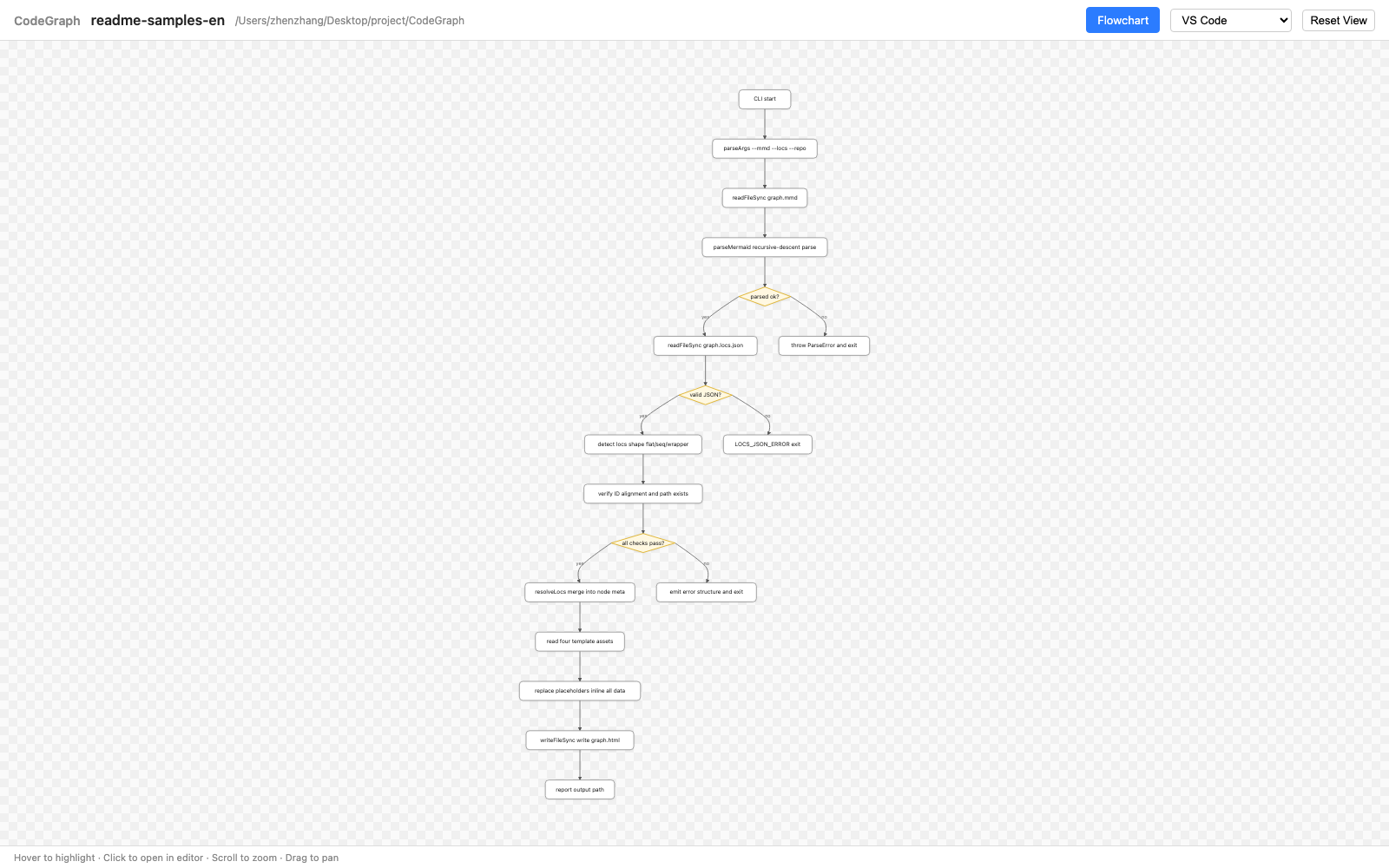
Flowchart (zoom / pan / hover / click any node to jump to its source line):
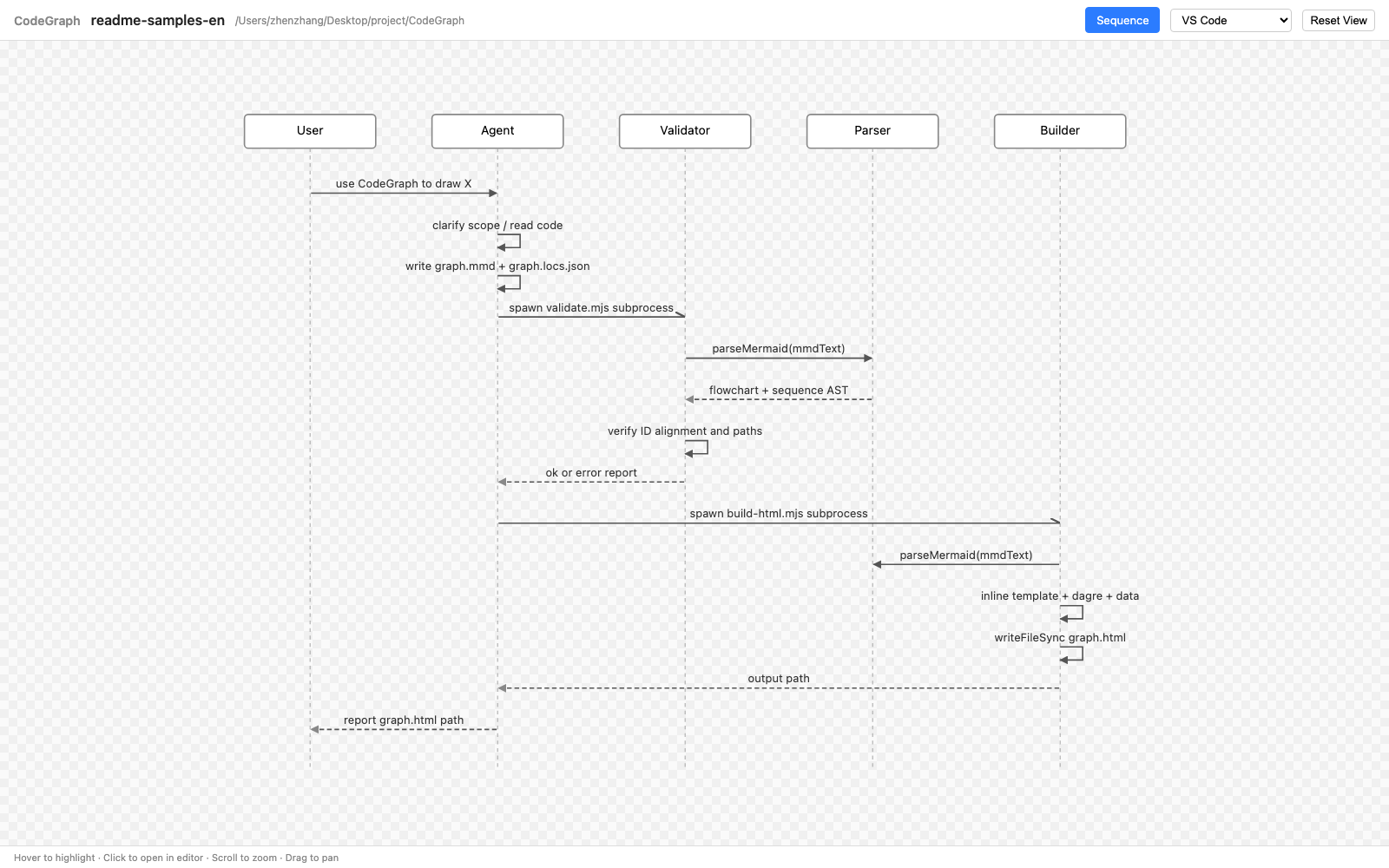
Sequence diagram (sync / return / async arrows, hover the line or the label):
Install
Requirements
- Node.js 18+ (uses native
node:*ESM imports; nonpm installneeded for graph generation or viewing — development build dependencies are separate). - A supported editor for click-to-jump (see below).
- An AI agent that supports skills (e.g. Claude Code), or run the scripts manually.
Add to Claude Code
Install the plugin from this repository's marketplace:
claude plugin marketplace add longbowzz/CodeGraph
claude plugin install codegraph@codegraph
Inside a session, /plugin install codegraph@codegraph --marketplace longbowzz/CodeGraph
does both steps. To use the skill without a plugin manager, symlink or copy
skills/codegraph/ into ~/.claude/skills/codegraph/ (or a project-local
.claude/skills/codegraph/).
Any Agent Skills-compatible agent
The skill follows the standard Agent Skills layout, so the skills
CLI can install it into Claude Code, Cursor, Codex, and other compatible agents
(Node.js 22.20+):
npx skills add longbowzz/CodeGraph --skill codegraph
Run it from the target project; add -g to install for all projects, or
-a claude-code to skip the agent picker.
DeepSeek Harness plugin
The dsh/ bundle adds CodeGraph to DeepSeek Harness:
- a
codegraphruntime skill andcodegraph_build/codegraph_listtools for diagrams; - a
codegraph_walkthrough_buildtool for interactive CodeWalkthrough explainers; - chat result cards for builds;
- a right-sidebar graph/walkthrough tab; clicking a source reference opens that line in the Harness preview.
Install the published bundle:
dsh plugin --profile web add -w @longbowzz/dsh-codegraph
The -w flag adds the bundle to the profile's workspace root; pnpm requires it
on some DSH builds.
For local development, install the checkout instead:
dsh plugin --profile web add -w /absolute/path/to/CodeGraph. The package ships
skills/codegraph, so no separate checkout is needed at runtime. Reload the DSH
page if the skill, tools, or graph tab do not appear.
Then ask:
Use CodeGraph to draw the login flow as a sequence diagram.
The agent loads the codegraph skill, produces the graph, and returns a card.
Click Open graph, then click any graph element to jump to its source line.
If the skill, tools, or graph tab do not appear, reload the DSH page.
For a guided explainer instead of a diagram, ask:
Use CodeGraph to explain the refund flow as an interactive webpage.
The agent asks a few intake questions, reads the relevant code and tests, and
builds a single-file walkthrough.html with vertically scrolling sections, inline SVG/CSS/JS,
and source links. In a browser it has a collapsible source pane; in DSH it uses
the Harness source pane. It runs a static and runtime self-check before
returning the artifact. See the
CodeWalkthrough contract.
See dsh/README.md for configuration and limitations.
Verify
node CodeGraph/skills/codegraph/scripts/_smoke-parser.mjs
node CodeGraph/skills/codegraph/scripts/_smoke-validate.mjs
Both should report all-pass.
Usage
Via Claude Code skill (recommended)
In any repo you want to analyze, just say:
Use the CodeGraph skill to draw the X flow as a flowchart / sequence diagram.
The agent will:
- Ask you to pick an editor the first time (writes
.codegraph/config.json). - Clarify scope with you (≤ 3 rounds).
- Read your code and produce
graph.mmd+graph.locs.json. - Validate, retry on errors, build the HTML.
- Report the output path.
Manual
node skills/codegraph/scripts/validate.mjs \
  --mmd path/to/graph.mmd \
  --locs path/to/graph.locs.json \
  --repo /path/to/your/repo

node skills/codegraph/scripts/build-html.mjs \
  --mmd path/to/graph.mmd \
  --locs path/to/graph.locs.json \
  --repo /path/to/your/repo \
  --out path/to/graph.html \
  --editor-config /path/to/your/repo/.codegraph/config.json
CodeWalkthrough
CodeWalkthrough is the second workflow of the same skill. The agent writes a
body-fragment HTML file with section.cw-section sections and data-source /
data-code references, then builds:
node skills/codegraph/scripts/build-walkthrough.mjs \
  --content path/to/content.html \
  --repo /path/to/your/repo \
  --topic "Refund flow" \
  --language en

node skills/codegraph/scripts/verify-walkthrough.mjs \
  --file /path/to/your/repo/.codegraph/output/<stamp>-refund-flow/walkthrough.html \
  --repo /path/to/your/repo
The output is a single walkthrough.html; open it in a browser for the
collapsible source pane, or in DSH for the Harness code pane. See the
CodeWalkthrough contract.
Location data format
The recommended flowchart format separates node locations from edge locations:
{
  "flowchart": {
    "nodes": {
      "A": ["src/handler.ts", 12],
      "B": ["src/auth.ts", 8, "modified"]
    },
    "edges": [
      {"from": "A", "to": "B", "occurrence": 1, "loc": ["src/handler.ts", 25, "modified"]}
    ]
  }
}
For A --> B, this maps the edge to the actual call in the handler. Each location
is [file, line] or [file, line, status]: paths are relative to the analyzed repo,
lines are 1-based and within the file, and optional status is added, modified,
removed, or unchanged (the default). A single flowchart also accepts unwrapped
{ "nodes": {...}, "edges": [...] }. The new format requires exactly one location
record for every edge, including unlabeled, dashed, repeated, and chained edges.
Edge identity is JSON.stringify([from, to, occurrence]). occurrence counts
from 1 per directed endpoint pair, in Mermaid order, expanding chains left to
right. For A --> B --> A followed by A --> B, the identities are
["A","B",1], ["B","A",1], and ["A","B",2]. Unrelated edges do not change
the counter. Reordering edges with the same directed endpoints requires
regenerating their matching location records; labels and styles are not identity.
Sequence diagrams use { "actors": { ... }, "messages": [...] }; message
locations follow message-arrow order exactly. For both diagram types in one
Mermaid file, use { "flowchart": { "nodes": {...}, "edges": [...] }, "sequence": { "actors": {...}, "messages": [...] } }.
Behavior nodes must point to the actual statements implementing their labels; only entry/declaration nodes may use definition lines. Edges point to actual caller-side calls, publishes, branches, or returns, and sequence messages to where the send/call/return actually happens. Locations may repeat for the same real statement. The generating agent must read the surrounding source to verify each reference, never invent a location or substitute a convenient function header. If one source location cannot express an element faithfully, split the diagram or narrow its semantics. The validator checks structure, paths, and line ranges; it cannot prove this semantic correspondence.
Legacy input: old flat node maps ({ "A": [file, line], ... }, also inside a
flowchart wrapper) remain readable. Their edges use an approximate source
fallback. New generation uses explicit nodes/edges with full edge coverage.
See the skill contract for paired
flowchart and sequence examples.
Output structure
<repo>/.codegraph/
├── config.json                              # editor choice (auto-generated)
└── output/
    └── <YYYYMMDD-HHMM>-<topic-slug>/
        ├── graph.mmd                        # topology (graph workflow)
        ├── graph.locs.json                  # file:line lookup (graph workflow)
        ├── graph.html                       # final graph artifact
        ├── walkthrough.html                 # CodeWalkthrough artifact
        ├── walkthrough.meta.json            # CodeWalkthrough metadata
        └── walkthrough.content.html         # authored body fragment
Each invocation produces a new timestamped subdirectory — history is preserved, never overwritten.
Supported editors
Click-to-jump uses OS-level URL schemes (no helper app required).
| Editor | URL scheme | macOS out-of-box |
|---|---|---|
| VS Code | vscode://file... |
✅ |
| VS Code Insiders | vscode-insiders://file... |
✅ |
| Cursor | cursor://file... |
✅ |
| IntelliJ IDEA | idea://open?... |
✅ |
| PyCharm | pycharm://open?... |
✅ |
| WebStorm | webstorm://open?... |
✅ |
| GoLand / PhpStorm / Rider / CLion / RubyMine | <product>://open?... |
✅ |
| Web (in-browser) | — | ✅ |
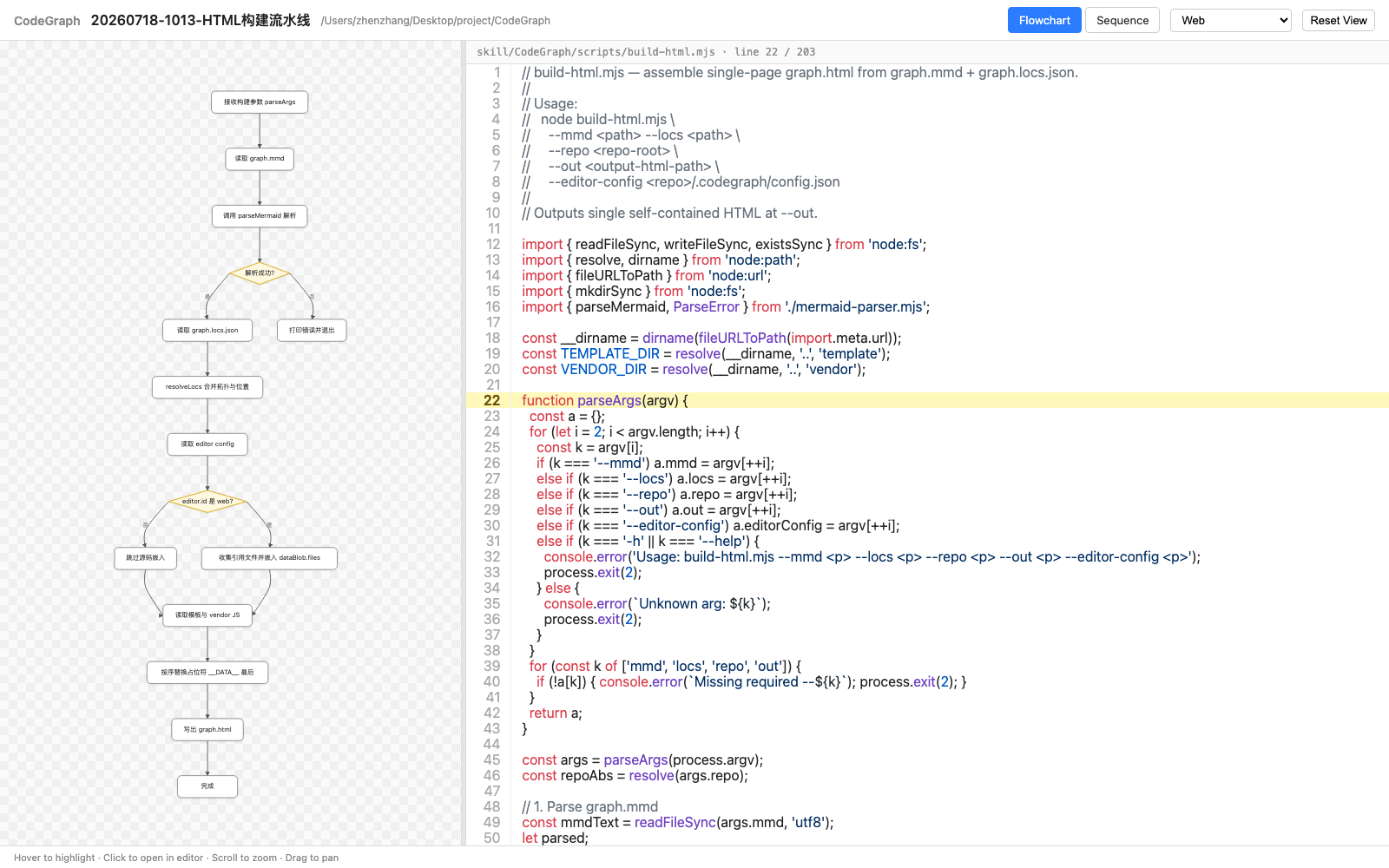
The Web editor doesn't launch an external app. Instead, the builder embeds every source file referenced by the graph into the HTML at build time, and clicking a node opens the source in a right-side code panel inside the same browser tab — syntax-highlighted and scrolled to the target line. A draggable splitter divides the canvas from the code (default canvas:code = 1:2; double-click the splitter to reset). Use this when no supported editor is installed locally.
Not supported (no native URL scheme): Sublime, Zed, Neovim, Vim, Trae.
Safari shows a confirmation prompt on every click. Chrome / Firefox / Edge ask once and remember. Recommend Chrome for frictionless jumping.
Project layout
CodeGraph/
├── .claude-plugin/               # Claude Code plugin + marketplace manifests
├── skills/codegraph/
│   ├── SKILL.md                  # Agent instructions
│   ├── scripts/
│   │   ├── mermaid-parser.mjs    # Mermaid syntax parser and graph model
│   │   ├── validate.mjs          # Schema + ID + path validator
│   │   ├── build-html.mjs        # Single-page HTML builder
│   │   ├── _smoke-parser.mjs     # Parser tests
│   │   └── _smoke-validate.mjs   # Validator tests
│   ├── template/
│   │   ├── page.html
│   │   ├── render.js             # SVG renderer + zoom/pan + click handler
│   │   └── styles.css
│   └── vendor/
│       ├── mermaid-manifest.json # Pinned version and bundle metadata
│       ├── mermaid.min.js        # Fixed official Mermaid browser bundle
│       ├── mermaid-parser.bundle.mjs # Official Mermaid parser for Node.js
│       └── highlight.min.js      # Bundled highlight.js (source code panel)
├── dsh/                          # DeepSeek Harness bundle (skill + tools + UI)
├── images/                       # README screenshots
├── package.json                  # npm bundle manifest for the DSH plugin
├── LICENSE
└── README.md
Contributing
Issues and PRs welcome. Run the script regression suite from the repository root before submitting:
npm test
This requires Node.js and Git, with no dependency install or browser. It covers Mermaid parsing, location validation and format compatibility, Git diff extraction, HTML building, source embedding/escaping, and output verification. Fixtures use temporary directories and are cleaned up. Pull requests and pushes to main run the same suite on Node.js 18 and 22 through GitHub Actions.
For WORKTREE reviews, staged and unstaged changes are included; untracked files appear only after git add. Diff regressions cover deletions, renames, multiple hunks, line insertions/deletions, missing final newlines, spaces/Unicode in filenames, and invalid references. CLI tests verify argument errors, exit codes, and structured validation failures.
For renderer, template, or vendor changes, also run the browser suites with a Python environment containing Playwright and Chromium:
python3 -I skills/codegraph/scripts/_semantic-location-test.py
python3 -I skills/codegraph/scripts/_mermaid-browser-test.py
These create their own fixtures and check real source clicks, diagram geometry, review mode, themes, and offline rendering. Rebuilding vendored assets remains a separate development check: npm ci --ignore-scripts && npm run build:mermaid.
License
MIT.
No comments yet. Be the first to write one.