dsh-font-probe
给 DeepSeek Harness 的 Web 界面换字体、调排版,全程在设置里点,不动 app.asar。
中英文字体分开设、字号分正文与代码、字距行距段距首行缩进四根滑块, 改完先在吸底总预览里看准,再一键确认 —— 配置写回 profile,重启不丢。




中文优先。English readers: see English at the bottom.
为什么需要它
DSH 的 GUI 只内置了配色方案和正文字号(10–22px),没有字体族选项。
想换字体,直觉做法是改 app.asar 里的 CSS —— 但那是应用本体,
每次升级都会被覆盖,而且改坏了很难还原。
这个插件走 Cordis 的客户端插件通道,用公开的 styles.insert() 注入样式,
只覆盖 CSS 自定义属性,不修改任何应用文件,因此:
- 升级 DSH 不会丢设置
- 卸载插件即完全还原
- 配置存在 profile 里,可携带、可版本控制
功能
| 能力 | |
|---|---|
| 中文字体 | 汉字独立设族名。点名称展开预设,其它族走「浏览本机字体…」 |
| 英文字体 | 只作用于拉丁字母与数字,汉字仍用中文字体。留空则不区分 |
| 代码字体 | 代码块 / 终端 / 行号的等宽字体,同样可浏览本机字体 |
| 正文字号 / 代码字号 | 同一行左右并排,中间竖线分隔 |
| 界面字重 / 标题字重 | 同一行左右并排。界面字重管 body 与正文段落,标题字重只影响 Markdown 标题;标题留空则跟随界面 |
| 字距 | 滑块 0–3px |
| 行距 | 滑块 0–12px,在应用自身行高之上叠加,不是替换 |
| 段距 | 滑块 0–24px,段落之间 |
| 首行缩进 | 滑块 0–4em,随字号缩放 |
| 总预览 | 吸底卡片,字体 / 字重 / 字距 / 行距 / 段距 / 缩进 / 代码样张一起实时预览(含标题样张) |
| 预览可伸缩 | 上缘拖动条调高度(80–560px),标题行可整块隐藏;偏好记在本地 |
| 缺字体可下载 | 展开预设时自动检测本机是否安装,缺的显示「下载」直达官方页 |
| 确认制 | 所有改动先进草稿,点「确认应用」才生效并落盘 |
| 恢复默认 | 一键清空草稿(仍需确认才生效) |
全部设置在 设置 → 文字显示设置。
截图
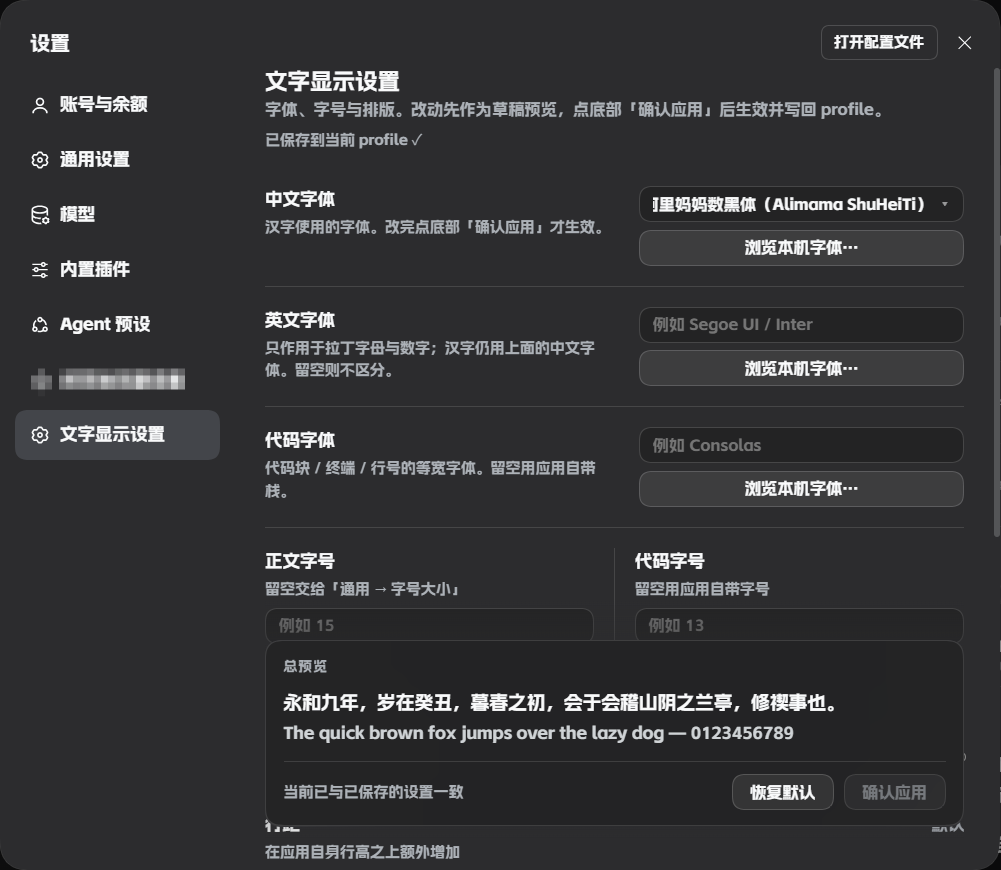
深色主题下的完整设置页:中英文字体各自独立、代码字体同样可浏览本机字体, 正文字号与代码字号左右并排,底部是吸底的总预览与确认栏。
安装
一条命令,不需要 git:
dsh plugin --profile desktop add dsh-font-probe
装完重启应用(托盘右键 → 退出应用 → 重新打开), 侧栏「设置」里就会出现「文字显示设置」。
其它安装方式首次安装后必须重启:插件是双半体(host + client), host 半体的配置 schema 要由模块加载器导入一次才生效。
从 GitHub 源码装(需要本机有 git):
dsh plugin --profile desktop add github:lohana20061023-29/dsh-font-probe
从 Release 的 tarball 装(不需要 git,也不需要 npm 源):
dsh plugin --profile desktop add https://github.com/lohana20061023-29/dsh-font-probe/releases/latest/download/dsh-font-probe-1.5.2.tgz
从本地目录装(适合改代码调试):
dsh plugin --profile desktop add G:/path/to/dsh-font-probe
更新与卸载
dsh plugin --profile desktop update dsh-font-probe
dsh plugin --profile desktop remove dsh-font-probe
卸载后样式表随之移除,界面字体立即回到应用默认。
用法
- 打开 设置 → 文字显示设置
- 挑中文字体、英文字体、代码字体与字号,拖四根滑块调排版
- 盯着底部总预览看效果
- 满意了再点 确认应用
没点确认之前,界面、CSS 变量、profile 三者都不会变 —— 可以放心反复试。
原理
插件只做两件事:注入 CSS 自定义属性 和 在一个样式表里写少量规则。
字体族
--dsw-font-family 是应用正文的字体令牌。插件合成为:
--dsw-font-family: "英文字体", "中文字体", <应用自带栈>;
CSS 字体栈按字符逐个回退:字母在 英文字体 里命中,汉字因为它没有字形而落到
中文字体。顺序反过来就不成立 —— 中文字体通常自带拉丁字形,放前面会让英文字体
永远轮不到。
字号与排版
| 目标 | 手段 |
|---|---|
| 正文 | 覆盖 --dsh-content-font-size |
| 代码 | pre, code, kbd, samp { font-size: … }(应用把代码字号写死在规则里,没有令牌) |
| 字距 / 行距 / 段距 / 缩进 | 只作用于 [class*="_markdown"],不碰设置面板自己的文字 |
行距是叠加而非替换,所以改字号时行高仍会等比变化:
line-height: calc(24px + var(--dsh-content-font-delta, 0px) + <你的值>px) !important;
长字体名
原生 <select> 只能截断,无法动画。插件改成自绘触发按钮:
渲染后实测溢出像素写进 --fp-marquee-x,只在真的溢出时挂 keyframes 缓慢左右往返。
已知限制
- 只影响 Web GUI,不含 Native 窗口/菜单字体
- 排版四项只对对话正文生效,不改侧栏、按钮等界面文字
- 「浏览本机字体」依赖 Local Font Access API(Chromium 内核有), 不支持时退回预设列表
- 「正文字号」留空 = 交给应用自己的「通用 → 字号大小」;一旦设置,就会覆盖应用的字号
- 字体必须本机已安装,插件不带字体文件
- 某些字体只有单一字重(例如阿里妈妈数黑体只有 Bold),选中后整体会偏粗 —— 这是字体本身的性质
兼容性
- DSH 桌面版 /
dsh web - 依赖
@deepseek-ai/dsh-client-ui-renderer、@deepseek-ai/dsh-client-ui-settings - 无第三方运行时依赖
开发
dsh-font-probe/
├── package.json        # dsh.client 声明 + dsh.bundle.patch
├── cordis.patch.yml    # 把插件插入 bundles
├── index.js            # host 半体:Config schema(字段必须 .volatile())
└── client.js           # client 半体:设置页 + 样式注入
改 client.js:应用运行中会被 client-hmr 自动推送(约 500ms),刷新即可见。
改 index.js / package.json:必须重启应用(ESM 按 URL 缓存,热更不会重载 host)。
深入的踩坑记录(配置写入链路、volatile、服务就绪时序等)见
docs/INTERNALS.md。
更新日志
见 CHANGELOG.md。
许可
English
A client plugin that changes the DeepSeek Harness web UI font from Settings —
no app.asar edits, so DSH upgrades never overwrite your setup.
- Separate CJK / Latin / code font families, each pickable from the installed fonts
- Content and code font sizes
- Typography sliders: letter-spacing, line-height, paragraph spacing, first-line indent
- A sticky total preview that mirrors every draft change
- Draft-and-confirm model: nothing applies until you press Apply
- Settings persist to the profile and survive restarts
# from npm — one command, no git needed
dsh plugin --profile desktop add dsh-font-probe

# from source (requires git on your machine)
dsh plugin --profile desktop add github:lohana20061023-29/dsh-font-probe
Restart the app once after installing. Everything lives under Settings → 文字显示设置 (Interface text).
Licensed under MIT.
No comments yet. Be the first to write one.