dsh-peakrate ⛰️
Peak / off-peak rate badges for DeepSeek Harness — see what each model actually costs right now, per provider, per model, before you switch to it.
🌐 简体中文: README.zh.md · English: README.md








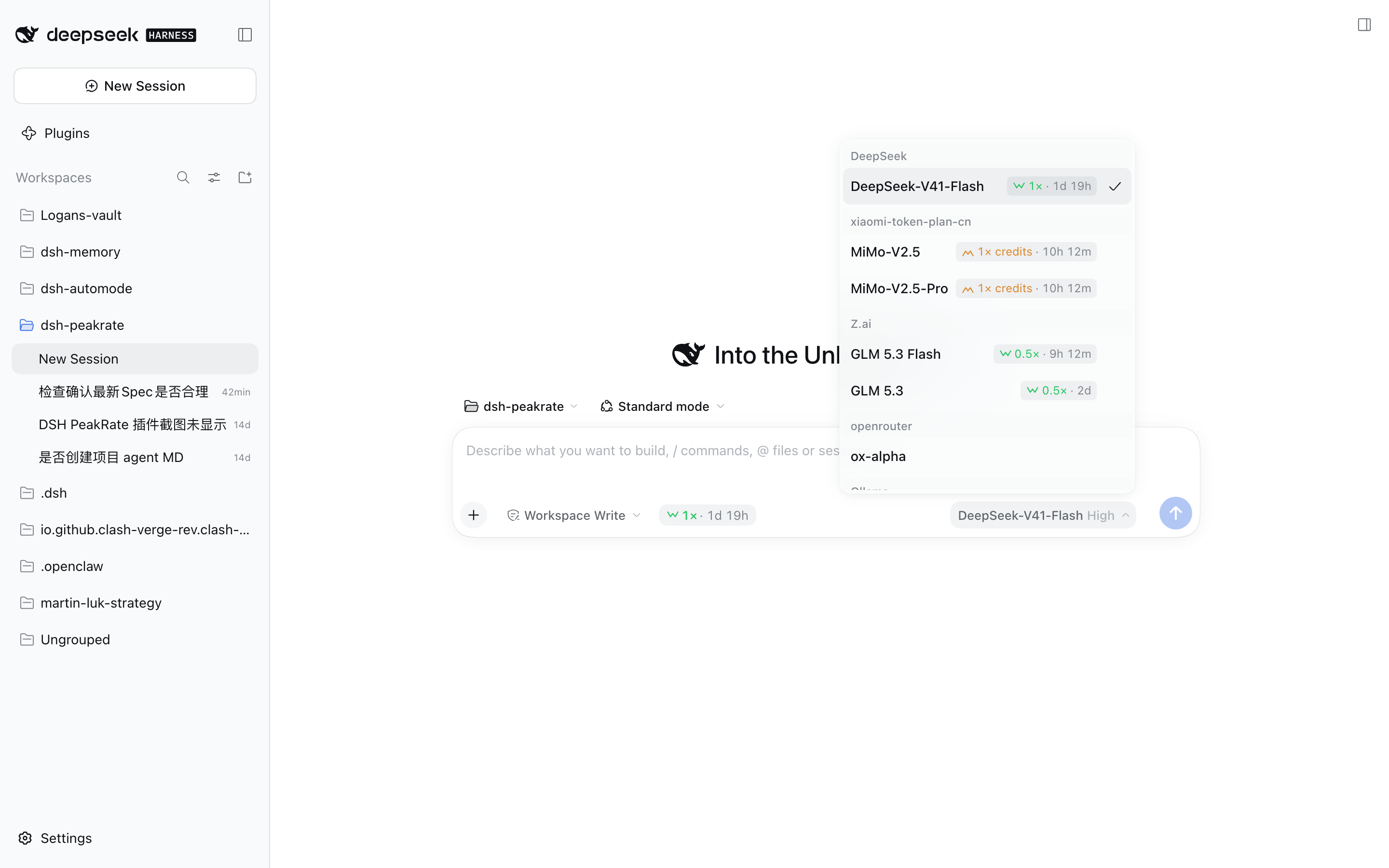
Every provider bills on its own clock. DeepSeek charges more during peak hours by Beijing time; Ollama's window is UTC; Z.ai runs limited-time campaigns with their own date ranges. Route the same model through two of them and the rate you are paying can be different at this very moment.
dsh-peakrate reads the schedule that applies to each provider, works out the state at this moment, and puts the answer where you are already looking — on every row of the model selector, and next to the composer.
Three states, not two. Peak and off-peak are the familiar pair. The third — campaign — is a limited-time promotional window with its own date range and weekday filter, and it outranks the regular cycle while it lasts.
One rule that matters: every window is evaluated against real timestamps, so DST transitions and windows that cross midnight come out correct rather than approximately correct.
✨ Key features
- ⛰️ Per-provider judgement — each provider is evaluated in its own IANA time zone against its own schedule. No DeepSeek-only assumptions.
- 🌗 Three rate states —
peak,offPeak, andcampaign(date-ranged promotional windows that take precedence over the regular cycle). - ⏱️ Switch countdown — not just the current rate, but when it ends and what it becomes:
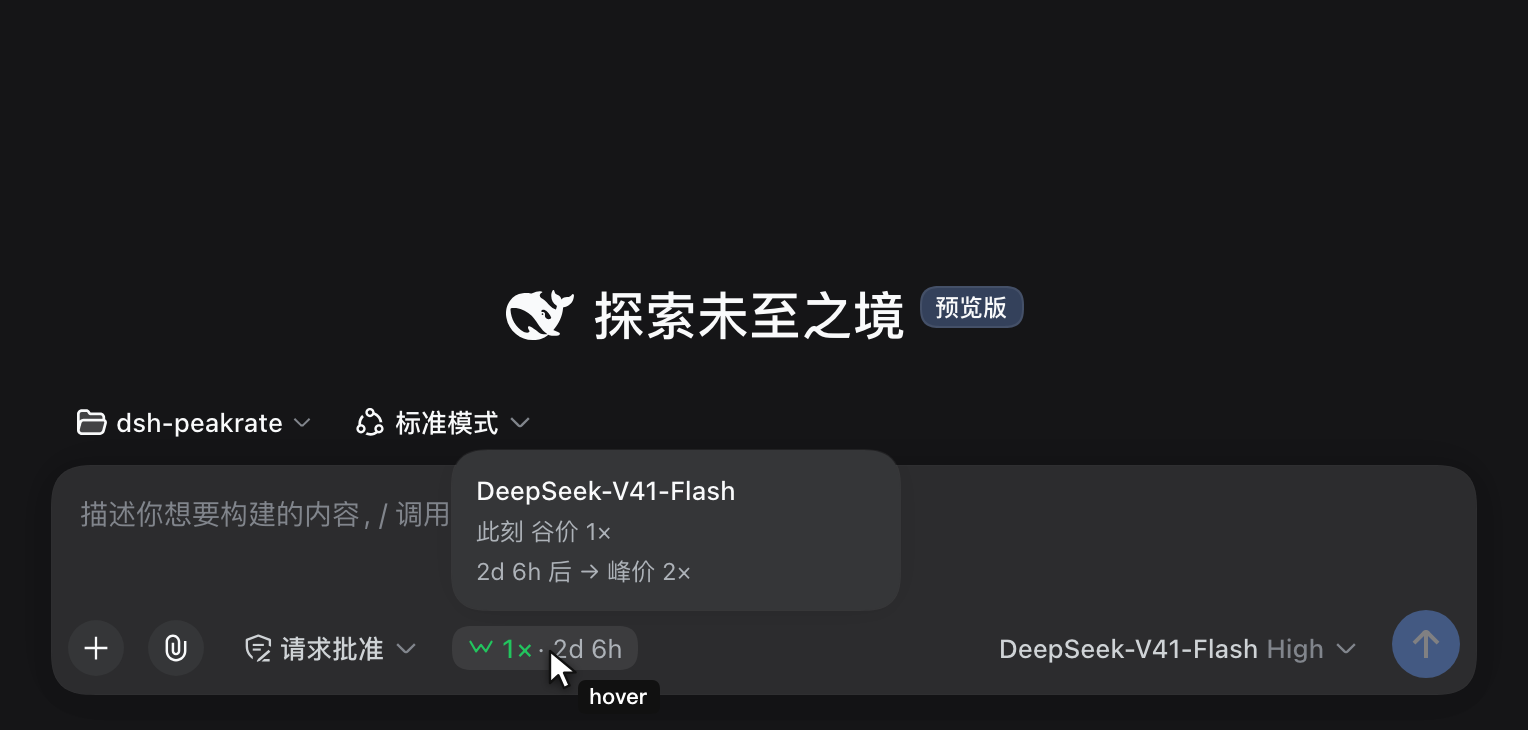
1× · 2d 7h,2d 6h → 2×. - 💬 A theme-aware hover card — the detail is drawn in-page, not an OS tooltip, so it matches the harness styling and is reachable by keyboard focus too.
- 📋 Every row in the model selector — compare providers before switching. Selection only ever happens from this panel, so the information lands exactly where the decision does.
- 📌 Composer tool-row badge — the current model's rate and countdown, one glance away, no menu required.
- 🔄 Live catalog — the host half refreshes the shared catalog every 24 hours and serves it to the page over a fenced route, so a data update reaches the badges without a rebuild. Refresh now is one click away in the coverage panel.
- 🔍 Coverage panel — on this plugin's page under the Plugins sidebar panel, every configured provider × model with what it matched, plus a warning for any provider where nothing at all matched. That shape is a silent misconfiguration, and it is the one thing this plugin is designed never to hide.
- 🧭
npm run audit— an offline coverage sweep over the live provider × model set, flagging providers that need a decision. - 🪶 Zero runtime dependencies — time arithmetic is
Intl.DateTimeFormatandDate. No date library. - 🎨 Design-token styling — colours come from the harness's own
--dsw-*tokens, so it follows light/dark with everything else. - 🌐 Bilingual — every string goes through the harness locale service; the plugin ships complete English and 简体中文 dictionaries and follows your harness language setting.
📚 Table of contents
- Install
- What you see
- How it works
- Coverage panel
- Configuration
- Data source & freshness
- Architecture
- Compatibility & contributions
- License
Install
# <profile> is your DSH profile — usually `web`. `--profile` is required:
# `dsh plugin` forwards to pnpm inside that profile's directory.
dsh plugin --profile web add dsh-peakrate
From a local checkout:
dsh plugin --profile web add ./path/to/dsh-peakrate
Prerequisite:
dsh pluginis a thin wrapper that forwards to pnpm inside the profile directory, sopnpmmust be on yourPATH(dsh plugin …printspnpm not found on PATH — install pnpm to manage profile pluginsotherwise).
Heads-up: this plugin replaces the official model selector. It takes over the
conversation.input.modelslot, so the picker you open from the composer is this plugin's own component rather than the built-in one. The takeover is deliberate and a functional superset — keyboard navigation, aria wiring, portal positioning, loading / empty / error / retry states and the reasoning-effort submenu are all preserved, and the per-row rates are added on top. The upstream component is MIT and the ported revision is pinned insrc/client/ModelSelect.tsx. Because the slot is replaced rather than extended, a future DSH release that restructures the picker can require re-porting — see Compatibility.
Restart dsh web after installing. The plugin declares a settings namespace on the host half, and host code is only read at boot. After the restart the coverage panel appears on this plugin's page in the Plugins panel (sidebar → Plugins → dsh-peakrate), together with one editable field: the background refresh interval.
What you see
In the model selector — open the picker you already use (the shot at the top), and every row carries the rate that applies to that model at this moment. The same rate stays visible in the composer tool row below, so what you are paying never leaves your sight.
Every shape of rate is in play above: 2× peak, 1× and 0.5× off-peak, a 0.8× credits plan, and a limited-time Campaign window. Models with no time-based pricing simply carry no badge — that is the honest state, not a missing lookup.
Hover the badge for the detail: the state now, and what it becomes and when. The card is drawn by the plugin itself (not an OS tooltip), so it follows the theme and is reachable by keyboard focus too:
The three states
| State | Meaning | Colour | Icon |
|---|---|---|---|
peak |
Standard rate | warning (amber) | twin peaks |
offPeak |
Discounted rate | success (green) | twin valleys |
campaign |
Limited-time promotion | success (green) | sparkle |
Colour carries expensive vs. cheap; the icon carries which state it is. The icons are deliberately landscape shapes rather than trending arrows — an arrow reads as "this is about to go up or down", while a peak is simply a high point. Direction and shape are not the same claim.
A row shows nothing at all when no profile matches that model. That is intentional: a model without time-based pricing should not be decorated with a rate it does not have.
How it works
provider id ──┐
              ├─► alias ──┐
model id ─────┘           ├─► profile ─► schedule ─► state at now ─► badge + countdown
                          │
catalog (live or bundled) ┘
- Match. The provider id goes through an alias table (
ollama→ Ollama). Provider ids are local labels you chose; the alias table is how a label becomes a billing reality. The model id is then normalised (a:tagsuffix is stripped, case and separators unified) and matched against per-provider model patterns. - Evaluate. The matched profile's
scheduleis evaluated in its own time zone. Three things are considered together, highest priority first: any active override (a dated promotional or campaign window), then public holidays, then the ordinary weekday filter and peak windows.- Public holidays are off-peak in full. Providers that publish Chinese public holiday dates are billed at the off-peak rate for the whole day, so a holiday landing on a weekday is not peak. The holiday dates — like every window and multiplier — come from the data source; nothing is hard-coded, so upstream changes apply on the next refresh.
- Overrides still win, because they are the more specific rule in the same data source (a promotion can deliberately price a holiday differently).
- Render. The state and its countdown are rendered in the model selector, the composer tool row, and the coverage panel.
Time correctness
The arithmetic deliberately avoids "wall-clock minutes plus 1440" shortcuts, which produce countdowns that are off by an hour across a DST boundary — and off by a day at a window edge. Instead, wall-clock candidates are converted back to real timestamps and compared against now.
Cross-midnight windows (23:00–09:00) belong to the day they start, so the early-morning half is judged against the start day's date and weekday. This holds for promotional overrides exactly as it does for ordinary peak windows.
Extending coverage
Judgement is made against a curated catalog, so a provider is either mapped or documented as deliberately unmapped. There is no third, silent outcome — the coverage panel and the test suite both enforce that:
- a provider whose endpoint resells another vendor's pricing (a gateway) inherits the upstream schedule — the catalog lists direct vendors, not resellers;
- a provider with genuinely no time-based pricing gets an explicit entry with a written reason;
- anything else shows up as a warning in the coverage panel.
What is covered
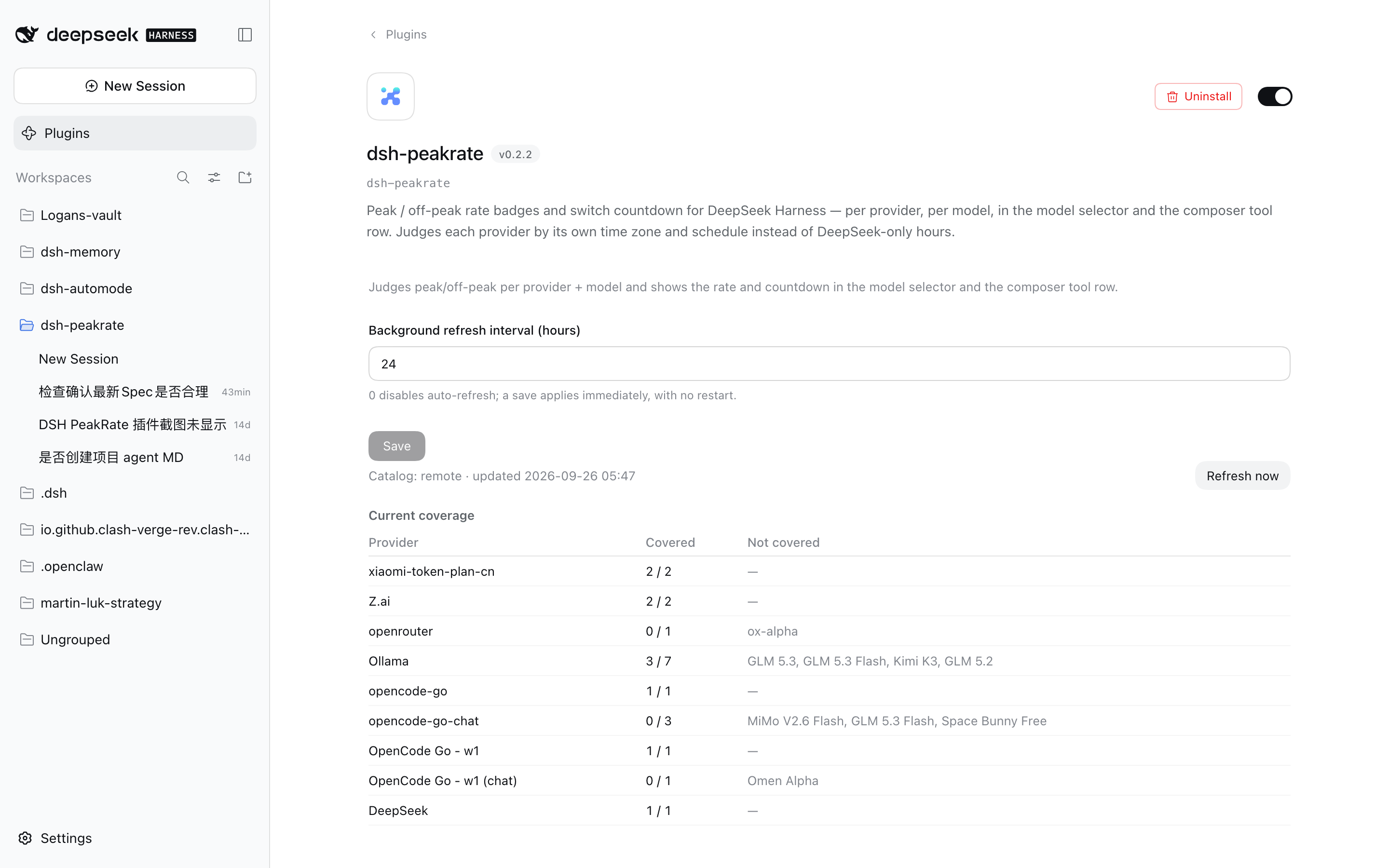
Plugins panel → dsh-peakrate. It does four jobs: show coverage, surface a silent misconfiguration, edit the refresh interval, and refresh the catalog on demand.
| Column | Meaning |
|---|---|
| Provider | The configured provider, as the harness knows it |
| Covered | How many of its models matched a profile |
| Not covered | The models that matched nothing |
A provider where nothing at all matched is raised to the top as a warning. Partial coverage is deliberately not flagged: a provider commonly mixes models with and without time-based pricing (an Ollama group holding both DeepSeek and GLM, for instance), and flagging every such row would be noise.
The source line at the top (visible in the screenshot above) reports whether the current catalog is the remote one or the bundled snapshot, with Refresh now beside it. enabled and refreshIntervalHours are editable here and take effect immediately.
Configuration
Configuration lives in the profile's cordis.patch.yml:
- id: peakrate
  config:
    # provider id → catalog provider name
    providerAliases:
      my-gateway: DeepSeek
    # provider-scoped model patterns; first match wins
    modelMappings:
      - provider: my-gateway
        match: "^deepseek-v4"
        profile: deepseek-v4
      - provider: my-gateway
        match: "glm-5\\.3-flash"
        matchIsRegex: true
        profile: zai-glm-5-3-flash
    # fetch interval; 0 disables the background refresh
    refreshIntervalHours: 24
    catalogUrl: https://offpeakclock.com/pricing.json
    cachePath: ~/.dsh/peakrate/pricing.json
| Option | Default | Description |
|---|---|---|
enabled |
true |
Background refresh switch. Also editable in the coverage panel. |
refreshIntervalHours |
24 |
Hours between catalog refreshes. 0 disables it. Also editable in the panel. |
catalogUrl |
the public catalog | Remote catalog URL. |
cachePath |
~/.dsh/peakrate/pricing.json |
On-disk cache of the last successful fetch. |
providerAliases |
built-in table | Extra provider id → catalog provider mappings. Yours win over the built-ins. |
modelMappings |
built-in table | Extra provider + model pattern → profile mappings. Yours are tried first. |
customProfiles |
[] |
Additional profiles: override a bundled entry by id, or add a new one. They take part in badge judgement too. |
modelMappings entries are prefix matches by default; set matchIsRegex: true for a regular expression. Invalid regexes do not throw — they simply never match.
customProfilesfully applies, badges included. The host serves its merged catalog over/peakrate/catalog, so a custom profile takes part in badge judgement exactly like a bundled one — either overriding a bundled entry byid, or adding a new one. Verified: pointingdeepseek-v4at a custom profile withpeak: 9×changes both the served catalog and the badge to9×.
Data source & freshness
The catalog is offpeakclock.com/pricing.json (schemaVersion: 1), a community-maintained snapshot of provider peak/off-peak schedules.
How an update reaches your screen:
- The host fetches the catalog at boot and every
refreshIntervalHours(default 24h), validates it, and caches it to disk. - The host serves the current catalog over
GET /peakrate/catalog, and re-fetches on demand forPOST /peakrate/catalog(the Refresh now button). - The client asks for it once at startup and re-renders when it arrives. If the request fails — offline, first run, blocked — it silently falls back to the snapshot bundled at build time, so the badges never disappear because of a network problem.
Because the page reads the host's live catalog, a data update reaches the badges without rebuilding or reinstalling the plugin. The bundled snapshot remains as the offline fallback.
The route is fenced
/peakrate/catalog is not an open endpoint. It applies the same browser-trust fence as the harness's own /api route, defending the two confused-deputy paths a browser opens against a local HTTP server:
- DNS rebinding — the
Hostheader (which rebinding cannot forge) must be loopback or atrustedHostsauthority; anything else is403. - Cross-site requests —
Sec-Fetch-Site: cross-siteis refused, and any attachedOriginmust matchHost.
It is a trust fence, not an authentication layer: network reachability stays the webserver's business. The endpoint serves public pricing data.
Fetched catalogs are validated strictly: unknown schema versions, malformed clock values, zero-length windows, non-YYYY-MM-DD dates and duplicate profile ids are rejected at parse time rather than producing a wrong judgement later.
Architecture
| Module | Responsibility |
|---|---|
index.ts |
host: catalog fetch/cache, user config, settings namespace, serving route |
catalog.ts |
parse + validate the catalog document |
catalog-route.ts |
the fenced /peakrate/catalog route |
schedule.ts · matching.ts · coverage.ts |
pure: state + countdown / provider+model matching / coverage report |
client/ |
the three surfaces, runtime catalog fetch with fallback, selector fork, icons, styles |
schedule.ts, matching.ts and coverage.ts are pure and runtime-independent; every time boundary and matching rule is covered by unit tests.
Surfaces
| Where | Slot | Kind |
|---|---|---|
| Composer tool row | conversation.input.left |
additive |
| Model selector | conversation.input.model |
deliberate takeover (functional superset) |
| Coverage panel | plugins.bundle.config |
additive, keyed by the bundle's npm package name (dsh-peakrate) |
The model-selector takeover ships a complete superset of the official component — keyboard navigation, aria wiring, portal positioning, loading, empty, error and retry states, and the reasoning-effort submenu. The upstream package is MIT and the ported version is recorded in src/client/index.tsx; the guard test in test/bundle-contract.test.ts fails the build if any other shipped-UI slot is ever shadowed.
Compatibility & contributions
Tested with
| DeepSeek Harness | 0.1.7-rc.2 on macOS |
| Install path | verified end-to-end on a freshly created profile using the published npm package (dsh plugin --profile … add dsh-peakrate) — bundle registration, the catalog route, all three surfaces and a clean console |
| Not yet verified | other DSH versions; Linux and Windows; profiles that already customise the model selector |
The most likely thing to break is the selector takeover: it replaces a shipped-UI slot, so an
upstream release that changes the picker's structure needs the port refreshed. The revision the
port was taken from is recorded in src/client/ModelSelect.tsx.
- Requires a DeepSeek Harness build providing the
conversation.input.modelandplugins.bundle.configslots. Upstream selector ported from@deepseek-ai/dsh-client-ui-model-selection@0.1.7-rc.2. - Peer dependencies:
@deepseek-ai/cordis,@deepseek-ai/schemastery. - Commits follow Conventional Commits. The changelog follows Keep a Changelog.
- Releases are cut by pushing a
v*tag; the release workflow runs typecheck + tests, builds, publishes to npm with provenance, and opens the GitHub Release fromCHANGELOG.md. - Issues and pull requests are welcome at github.com/log-li/dsh-peakrate.
Contributors
| Contributor | Role |
|---|---|
| @log-li | Author and maintainer |
License
MIT © Logan Lin
No comments yet. Be the first to write one.