dsh-mcp-status
English · Русский




A DeepSeek Harness plugin that puts an MCP button in the chat header. One click and you see which MCP servers are connected — and which of them answer right now, with the number of tools each one actually exposes.
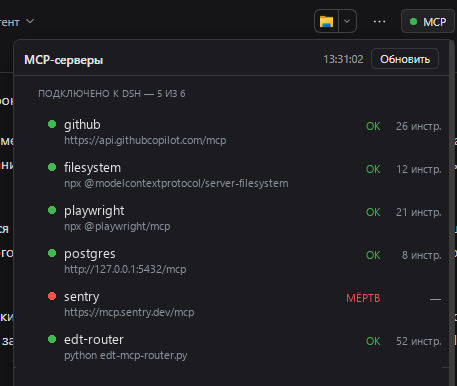
Example servers, addresses and names in the screenshot are placeholders.
Contents
- Why this exists
- What you get
- How it works
- Wire format
- States
- Configuration
- Installation
- Standalone probe
- Troubleshooting
- Limitations
- License
Why this exists
DSH connects MCP servers once, at startup. When one of them is down, the symptoms are indirect: a tool that used to be in the model's toolset is simply not there, or a call fails with a transport error. The configuration file only tells you what should be connected, not what is.
An endpoint that holds a TCP port but never completes the MCP handshake looks
"up" to any port checker. This plugin answers a stricter question: does the
server complete initialize + tools/list right now, and how many tools does
it return? That is the same thing the Harness itself needs in order to give
the model those tools.
What you get
| Element | Where | What it shows |
|---|---|---|
| Status pill | chat header, conversation.session.header.utilities |
a dot: green when everything answers, red when something is dead |
| Server list | inside the popover | name, endpoint, state, response time, tool count |
| EDT block | inside the popover | which 1C:EDT projects are currently serving MCP, discovered from each project's .mcp.json |
| Refresh button | popover header | forces a probe; the timestamp changes when the new result lands |
The answer is cached, so opening the panel is instant even though a full probe takes ~15 seconds.
How it works
Two halves in one package — the usual shape for a DSH plugin with a UI.
flowchart LR
    subgraph host["Host · Node"]
        A["apply(ctx)"] --> B["webServer.register<br/>GET /plugin/mcp-status"]
        A --> C["refresh()<br/>startup + every 5 min"]
        C --> D["spawn python<br/>mcp_status.py --json --out file"]
        D --> E[("cache<br/>data · fetchedAt")]
        E --> B
    end
    subgraph client["Client · browser"]
        F["McpStatusButton"] -->|"fetch, every 20 s"| B
        F --> G["popover<br/>servers + EDT"]
    end
Host half — index.js
Declares export const inject = ['webServer'], registers the route inside
ctx.effect, and runs the probe at startup and then every five minutes. The
probe is a child process: it writes JSON to a file, the plugin reads that file,
caches it and serves it.
Client half — client.js
A classic script that registers itself through window.__ModuleLoader__.load
and exports { inject: ['slots'], apply(ctx) }. It places a React component
into the conversation.session.header.utilities slot — the same band as the
locale and Markdown controls. The component polls the route on mount, then
every 20 seconds; while the host reports refreshing: true it polls every
1.5 seconds, so the timestamp changes the moment the result is ready instead of
half a minute later.
A handshake and not a port check
For every configured server the probe performs a real MCP handshake:
POST initializewithAccept: application/json, text/event-stream, following the307redirect some servers answer on/mcpbefore/mcp/.- Capture
Mcp-Session-Idand sendnotifications/initialized— several FastMCP-based servers rejecttools/listwith "Invalid request parameters" without it. POST tools/listwith that session header; parse either a plain JSON body or an SSE stream (data: {...}blocks).- For
stdioservers: spawn the configured command, speak newline-delimited JSON-RPC over stdin/stdout, with separate timeouts per stage — a router can take 12 seconds ontools/listbecause it rescans its port range first.
Why a Python child process
That logic already exists as a tested Python script (scripts/mcp_status.py,
standard library only). Re-implementing the transport edge cases in JavaScript
would create a second source of truth, so the host half simply runs the script
and caches its JSON. The script ships inside the package — no external
dependency.
One consequence worth knowing: the child's stdout is not captured through a
pipe. The script writes its result to a file (--out), the plugin reads and
deletes it. Pipes are fragile under sandboxed shells; a file handoff works
everywhere.
Wire format
GET /plugin/mcp-status returns the cache envelope:
{
  "ok": true,
  "fetchedAt": 1793269934399,
  "durationMs": 14984,
  "refreshing": false,
  "error": null,
  "data": {
    "generatedAt": "2026-10-29T13:32:14",
    "config": "C:\\Users\\me\\.dsh\\profiles\\desktop\\cordis.patch.yml",
    "servers": [
      {
        "name": "edt-router",
        "transport": "stdio",
        "endpoint": "python edt-mcp-router.py",
        "state": "ok",
        "ms": 12293,
        "tools": 52,
        "detail": ""
      },
      {
        "name": "postgres",
        "transport": "http",
        "endpoint": "http://10.20.30.40:8000/mcp",
        "state": "dead",
        "ms": 2041,
        "tools": null,
        "detail": "порт закрыт (connection refused)"
      }
    ],
    "commentedOut": ["mcp-metadata"],
    "edt": [
      {
        "project": "My project",
        "url": "http://10.20.30.41:8765/mcp",
        "state": "ok",
        "tools": 50,
        "detail": ""
      }
    ],
    "orphanPorts": []
  }
}
Addresses above are examples and do not belong to any real network.
?refresh=1 starts a background probe and immediately returns the previous
cache with refreshing: true. The UI keeps polling until refreshing flips
back.
States
| State | Meaning |
|---|---|
ok |
Handshake succeeded; tools is what the server returned. |
warn |
initialize succeeded, tools/list failed: alive but broken. detail carries the reason. |
dead |
Connection refused, timeout, HTTP error, or a non-MCP response. |
off |
The config row has disabled: true. |
skipped |
Not probed (for example an EDT project without a URL). |
Configuration
All keys are optional and live in the loader row:
| Key | Default | Meaning |
|---|---|---|
pythonPath |
the DSH runtime Python | Interpreter for the probe script. |
scriptPath |
scripts/mcp_status.py in the package |
Your own copy if you change the probe. |
intervalMs |
300000 (5 min) |
Background refresh period; minimum 15 s. |
- insert:
    - id: mcp-status
      name: '@local/dsh-mcp-status'
      config:
        intervalMs: 60000
Installation
The package is a bundle: it ships a dsh.bundle.patch that inserts its own
loader row.
Link it into the profile:
cd ~\.dsh\profiles\desktop
pnpm add "link:<absolute path to this package>"
Add the name to the bundle list in
~/.dsh/profiles/desktop/package.json:"dsh": { "profile": { "bundles": ["@deepseek-ai/dsh-base", "@deepseek-ai/dsh-web-app", "@local/dsh-mcp-status"] } }Restart DSH. The host half activates with the profile; the client half appears on the next page load.
To remove it, drop the name from bundles and run pnpm install again.
[!NOTE] The name
@local/dsh-mcp-statusis arbitrary: a private package that is never published to npm. Rename it inpackage.jsonand incordis.patch.yml, plus the profile's dependency key and bundle list.
Standalone probe
scripts/mcp_status.py runs without the UI:
python scripts/mcp_status.py                            # human-readable table
python scripts/mcp_status.py --json                     # machine-readable
python scripts/mcp_status.py --json --out result.json   # write to a file
python scripts/mcp_status.py --no-edt                   # skip the 1C:EDT block
python scripts/mcp_status.py --edt-roots 'D:\projects'  # EDT roots, when the router row carries none
Exit code 1 means at least one server is dead, 0 means all answered — handy
for cron.
Troubleshooting
| Symptom | Cause / fix |
|---|---|
| No button after install | The client half is registered on page load. Reload the page (F5), not just the app. |
| Route answers 404 | The host half did not activate. Look for [mcp-status] warnings in the DSH stderr; check the loader row and that the package resolves from the profile. |
cannot get property "webServer" without inject |
Cordis forbids reading a service without declaring it. The plugin declares inject = ['webServer']. |
| "Checking…" for ~15 s | Expected: the stdio router rescans its port range on every tools/list. HTTP servers alone answer in ~200 ms. |
dead for EDT projects |
That EDT instance is not running. .mcp.json keeps the port from its last run — not an error. |
Everything is dead |
Nothing is reachable: check the MCP processes/containers, then press Refresh. |
The package appends .activation.log next to itself when the module is imported
and when apply throws. It is git-ignored.
Limitations
- The route is a plain
webServerroute, not an authenticated/apiroute. It exposes only names, endpoints and states on loopback, but if you bind DSH to a non-loopback address, this route is reachable too. - The EDT block is 1C-specific; elsewhere it simply finds no projects.
- The client half receives no configuration (DSH creates client entries without it), so all tuning lives in the host row.
No comments yet. Be the first to write one.