dsh-hub-oauth-gateway
v1.10.0 · formerly dsh-usage-stats
Local-first usage center for DeepSeek Harness Web. Tokens, estimated cost, account balances, subscription quotas, trends, forecasts, alerts, and exports — plus coding-subscription OAuth (Grok Build, Codex, Kimi Code, Claude Code), an optional loopback API gateway, and opt-in local auth/usage monitoring. No tokens in chat.



English · 中文版 · 日本語 · 한국어 · Português (BR) · Español · Français · Deutsch · Русский
Upgrade / 升级: Follow the versioned steps in
docs/01-install.md. Hub1.10.0and Subscription0.6.2share the verified DSH0.1.1-rc.2contract. Keep profile, configuration, and credential files, update both plugins in the same Web profile, then restart the existing DSH Web process once.dsh-coding-oauth-core@0.1.0remains their shared npm dependency, not a separate DSH plugin.
Name change
First published as dsh-usage-stats. The package and repository are now dsh-hub-oauth-gateway (effective with 1.1.0). Remove any old entry before reinstalling. Local data files and the internal Cordis plugin id stay the same, so historical usage is preserved.
| Use this | Still works / unchanged | |
|---|---|---|
| npm (recommended) | dsh plugin --profile web add dsh-hub-oauth-gateway |
Old npm name is no longer updated |
| GitHub / development | dsh-hub-oauth-gateway |
— |
| Cordis plugin id | usage-stats |
unchanged |
| SQLite database | ${DSH_HOME}/storages/usage-stats-v1.sqlite |
unchanged |
| CLI | dsh-coding-oauth |
dsh-grok-build (alias) |
Release history lives in CHANGELOG.md.
Features
- Quick Peek + Full Dashboard — floating HUD (or sidebar button); tabbed overview / trends / accounts / details / local; today / 7d / 30d / month; compare prior period; manual refresh.
- Tabbed Settings — Display / Accounts / Gateway / Capabilities / Providers / Fees under Settings → Usage Center.
- Presets and modules — Minimal, Quota, Cost, Analyst; custom module order; density, motion, provider aliases and colors.
- Activity heatmap — 370-day calendar + streak in the configured timezone.
- Local history — projects DSH usage into SQLite by
(session, turn, step); later samples replace, never double-count. - Cost estimates — user-owned per-million prices with coverage ratio; missing prices are never treated as free.
- Subscription fee ledger — local subscription/top-up costs; payback multiples when currencies match.
- Trends and forecasts — hour/day/week/month buckets; bounded linear extrapolation as a distinct series.
- Account and quota adapters — balances, windows, reset times, stale/last-success, soft alerts (no hard blocks, no outbound notify).
- CSV / JSON export — filtered, daily, or bundle layouts; optional session redaction; spreadsheet-injection defense.
- Coding-subscription OAuth — Grok Build, Codex, Kimi Code, Claude Code via device code / browser / PKCE paste; models appear as
(OAuth); one-way CLI credential Pull. - Optional loopback API gateway — default-off OpenAI/Anthropic-compatible server for your own tools.
- Optional capabilities — Codex search / images / usage / Fast and Grok Imagine default off; apply live.
- Opt-in local monitor — read-only CLI auth snapshots and cross-tool token scans (never conversation content).
- Bilingual UI — Chinese and English through DSH locale services.
Product research: docs/research/usage-analytics-landscape.md. Architecture: docs/02-architecture.md.
Screenshots
Captured against DeepSeek Harness Web with this plugin installed (empty local history is normal for a fresh profile).

Floating HUD — today’s metric plus multi-account quota chips
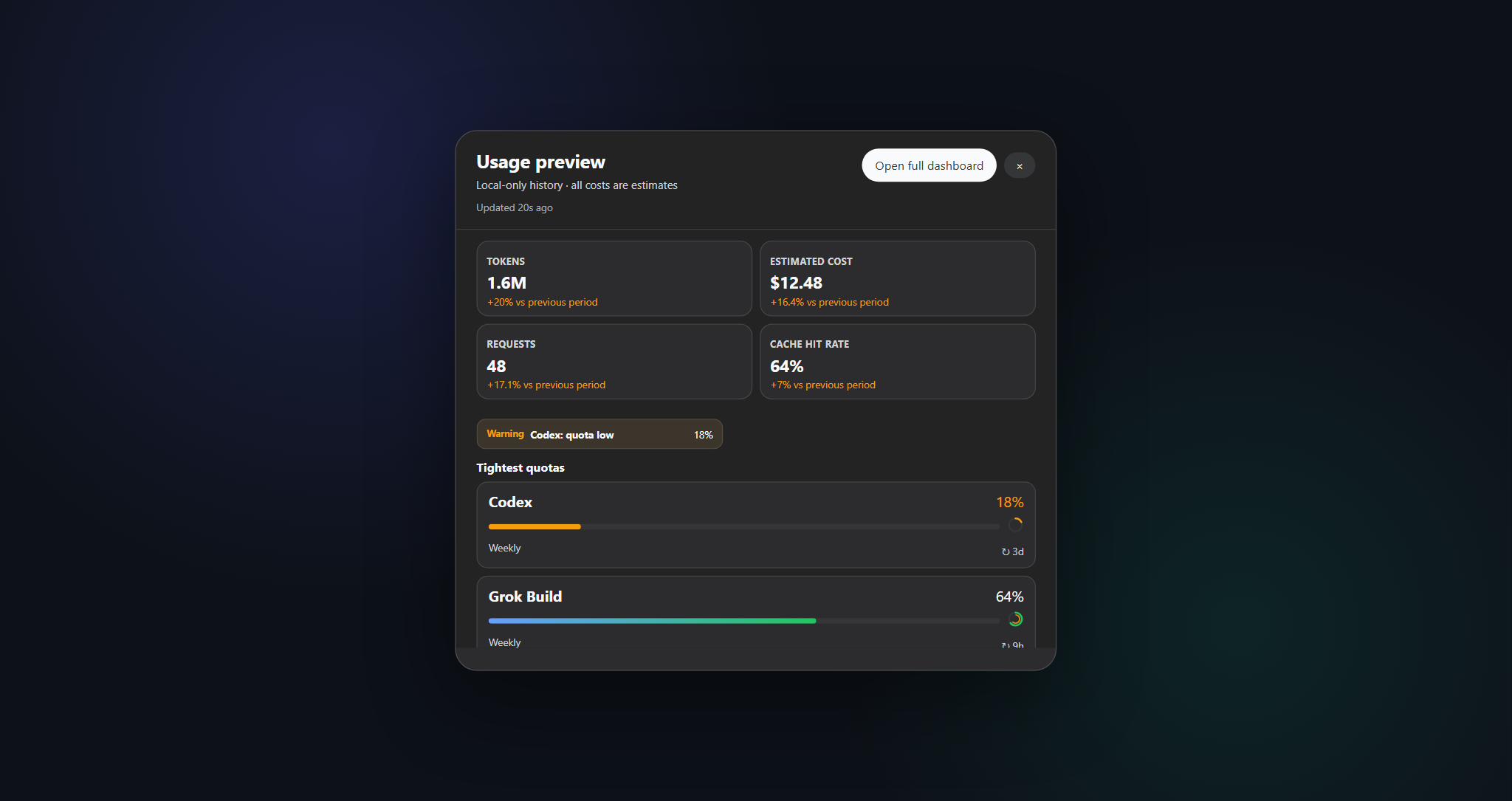
Quick Peek — compact 2×2 KPIs with a one-click jump to the full dashboard
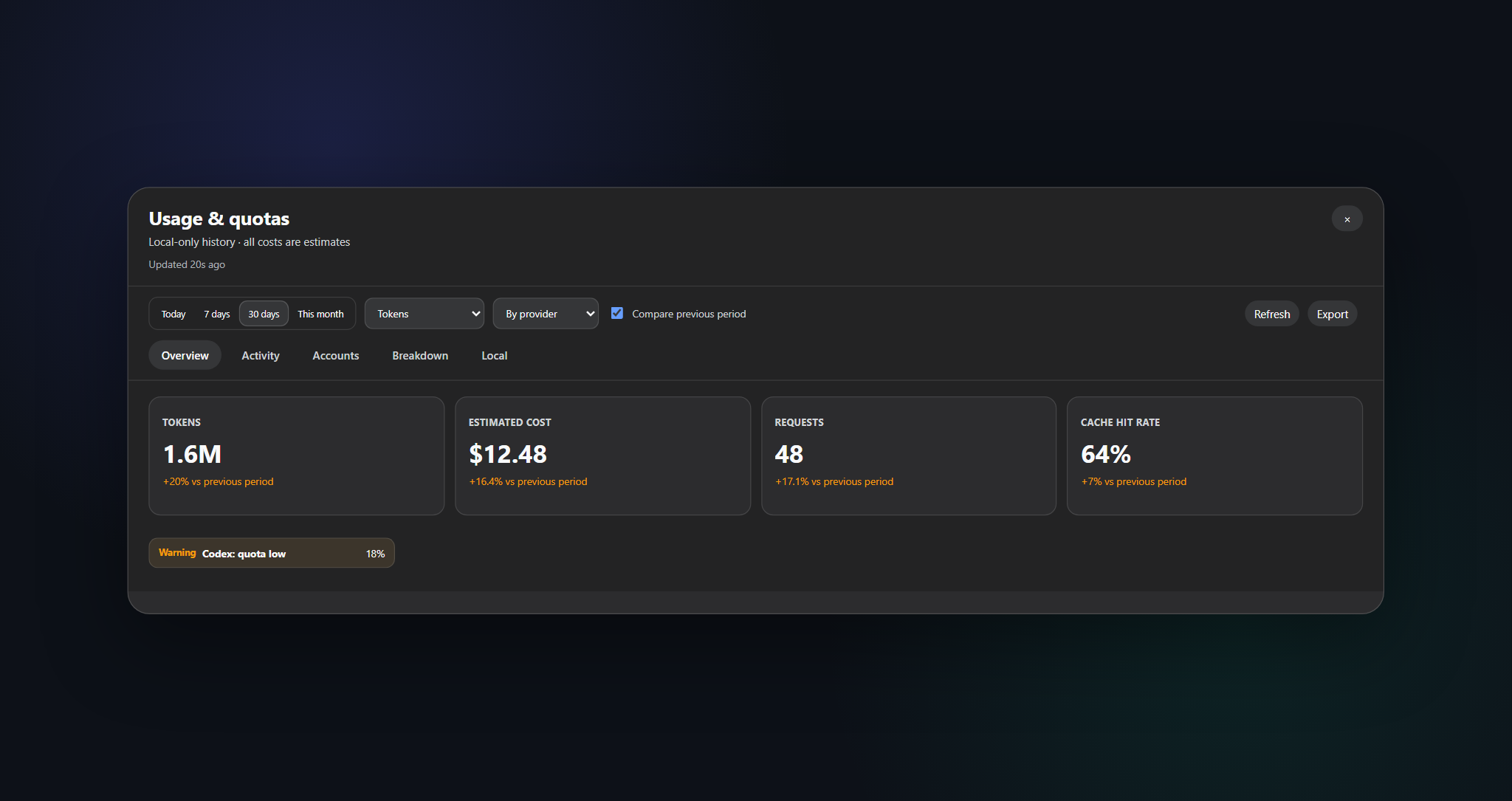
Full dashboard — ranges, tabs, refresh, and CSV / JSON export
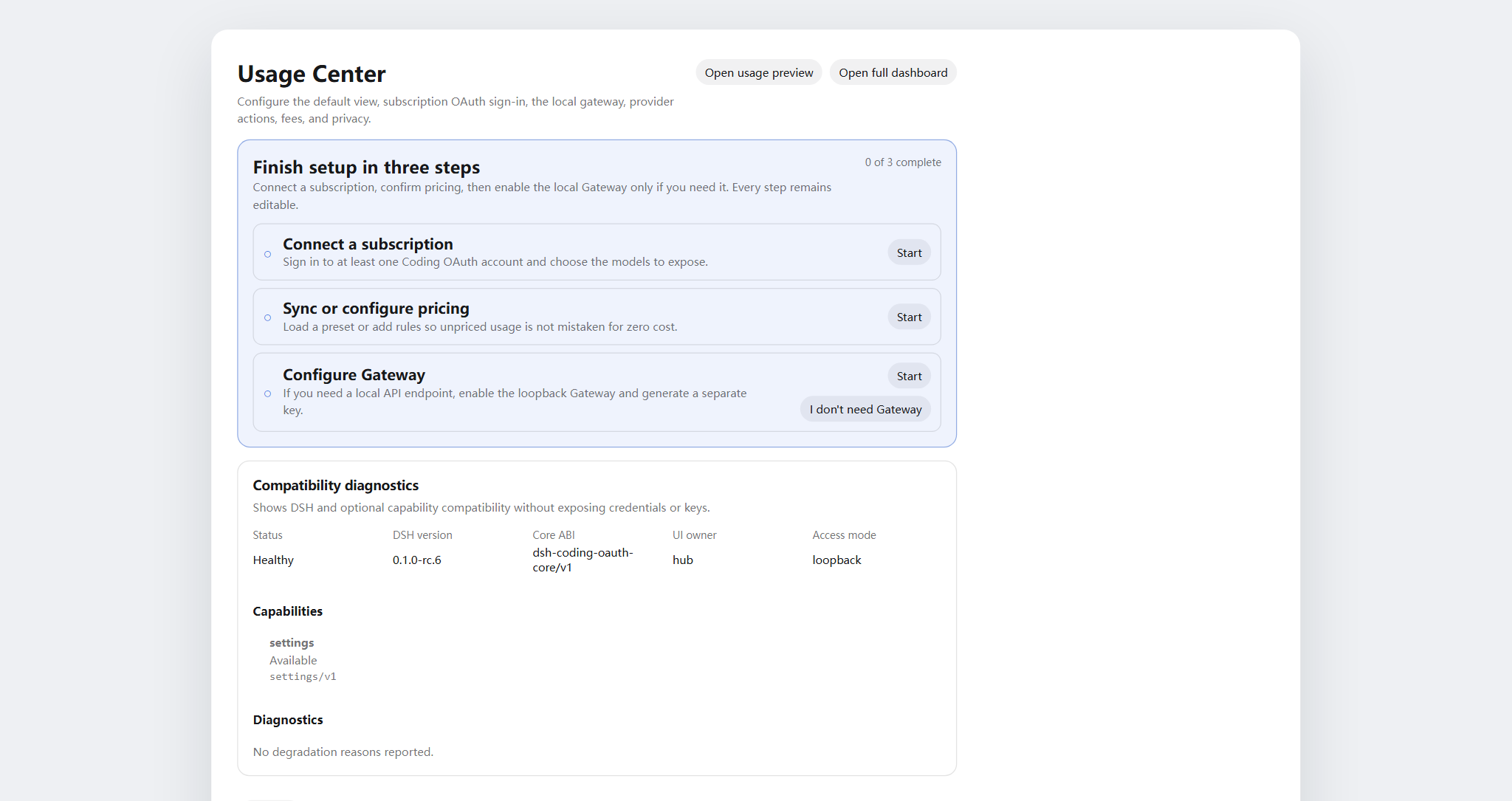
Settings → Usage Center — Display / Accounts / Gateway / Capabilities / Providers / Fees
Problems this plugin solves
| You searched / saw | What was actually broken | What this plugin does |
|---|---|---|
| Usage / cost / quota scattered across CLIs and providers | No single local history or coverage-aware cost view | SQLite projection + price rules + account adapters in one Usage Center |
| SuperGrok / ChatGPT Plus / Kimi Code / Claude Pro in DSH without another API bill | Built-in routes are often pay-as-you-go API keys | Local OAuth routes coexist with existing API-key providers |
本轮运行失败 API key is invalid / AUTH mid-turn |
GUI maps every AUTH to that banner; OAuth access tokens expire |
Proactive refresh and AUTH-aware retry on coding OAuth routes |
| Want OpenAI/Anthropic-compatible tools against subscription sessions | No safe local bridge | Opt-in loopback gateway (not a public relay) |
| Token Monitor-style CLI status without pasting secrets | Manual file digging or chat paste | Opt-in localMonitor / localUsage on hardened allowlisted paths |
Quick start
# 1. install the current npm release into the web profile
dsh plugin --profile web add dsh-hub-oauth-gateway

# 2. restart the resident DSH Web process (operator chooses when)
# `dsh web` is the official CLI alias for the web profile, not a service-unit name.
# Restart the existing process with the process manager actually configured on this machine.
Then open Settings → Usage Center. For Accounts / Gateway / Capabilities, sign in or enable switches as needed. Full install options (npx installer, GitHub tarball, proxy) are in docs/01-install.md.
Table of contents
- Name change
- Features
- Screenshots
- Problems this plugin solves
- Quick start
- Requirements
- Install
- Usage
- Settings
- Coding OAuth
- Local API gateway
- Optional capabilities
- Runtime configuration
- Credentials
- Data and migration
- Privacy and security
- Architecture
- Documentation
- Contributing
- License
Requirements
- DeepSeek Harness Web, verified against
@deepseek-ai/dsh 0.1.1-rc.2 - Node.js
^22.19.0 || >=24.0.0 - Loopback DSH Web backend; a controlled local HTTPS reverse proxy to an authenticated private network is OK. Do not expose the plugin API alone or publish unauthenticated to the public internet.
Install
dsh plugin --profile web add dsh-hub-oauth-gateway
dsh plugin --profile web update dsh-hub-oauth-gateway
dsh plugin --profile web remove dsh-hub-oauth-gateway
Compatible installer when the plugin manager is missing: npx --yes dsh-hub-oauth-gateway-install. GitHub /path/to/*.tgz and development path installs are documented in docs/01-install.md. After install, restart the existing DSH Web process through the process manager configured on your machine, then refresh http://127.0.0.1:3080; DSH does not publish a universal service-unit name.
Usage
- Open Quick Peek from the floating HUD (or sidebar button under Settings → Display → entry mode). Settings also links Peek / Full Dashboard.
- In Full Dashboard, switch overview / trends / accounts / details / local; pick range, metric, and provider/model dimensions.
- Use the refresh button for immediate projection and account refresh. Ordinary GET reads local snapshots only.
- Configure Display / Accounts / Gateway / Capabilities / Providers / Fees under Settings → Usage Center.
- Costs are always estimates — watch the coverage percentage; unpriced tokens are not free.
CLI: dsh-coding-oauth login [--pkce] | import | status | logout (dsh-grok-build is an alias).
Settings
Settings → Usage Center uses six top tabs: Display, Accounts, Gateway, Capabilities, Providers, and Fees. Signed-in provider cards collapse until expanded. Each Providers card maintains its own auth inline — save/clear API keys, Copilot device auth, per-provider refresh — and OAuth cards link straight to Accounts sign-in / pull.
Coding OAuth
On the Accounts tab, sign in to Grok Build, Codex, Kimi Code, or Claude Code (device code preferred on remote/headless hosts; browser/PKCE can paste a code or full redirect URL). Authenticated models appear in the selector with (OAuth).
Allowlisted official CLI OAuth files are discovered read-only. Sync is an explicit one-way Pull (discover → preview → confirm), never auto-import and never writes official CLI files.
Local API gateway
Default off. When enabled, an isolated node:http listener (not the DSH web port) serves GET /healthz, GET /v1/models, POST /v1/chat/completions, POST /v1/responses, and POST /v1/messages on loopback, reusing signed-in OAuth sessions. Bind stays YAML-only; non-loopback bind requires a Bearer key. This is not a remote relay. Details: docs/01-install.md.
Optional capabilities
Seven switches default off and apply live: codexSearch, codexImages, codexImageEdits, codexUsage, codexFast, grokImagineImage, grokImagineVideo. Codex Fast / private endpoints and Grok Imagine stay fail-closed until enabled. See docs/01-install.md and docs/03-configuration.md.
Runtime configuration
Merge config under the existing Cordis entry — do not add a second entry:
# ~/.dsh/profiles/web/cordis.patch.yml
- insert:
    - id: usage-stats
      name: dsh-hub-oauth-gateway
      config:
        refresh:
          usageSeconds: 30
          accountMinutes: 5
          accountConcurrency: 3
          timeoutMs: 15000
        retention:
          usageDays: 730
          accountSnapshotDays: 180
          preserveDeletedSessions: true
        pricing:
          baseCurrency: USD
        accounts:
          monitors: {}
        oauthDevice:
          copilotClientId: YOUR_PUBLIC_OAUTH_CLIENT_ID
        codingOAuth:
          enabled: true
        localMonitor:
          enabled: false
        localUsage:
          enabled: false
          intervalMinutes: 30
Full field reference, monitors, proxy, and pricing import: docs/03-configuration.md and docs/01-install.md. Legacy root config.monitors maps to config.accounts.monitors (do not set both).
Credentials
- Stored through the DSH credential seam; the browser only receives
configured/source/writablemetadata — never values. - Local CLI import (Claude, Codex, Gemini, Grok, Amp) never logs absolute paths.
- Copilot device flow keeps the device code server-side; the browser holds only a random flow ID. Configure your own public OAuth client ID before enabling.
- Coding OAuth files:
$DSH_HOME/.grok-build-auth.jsonand other*-oauth-auth.json(0600, atomic write). No HTTP status, log, or UI may return a token.
Data and migration
${DSH_HOME:-~/.dsh}/storages/usage-stats-v1.sqlite
Directory 0700, main file 0600, WAL. Default retention: 730 days usage facts, 180 days account snapshots. First-start migration and rollback notes: docs/04-migration-v1.md.
Privacy and security
- Loopback peer + loopback Host by default. A trusted HTTPS reverse proxy must satisfy the full owner policy: trusted peer, exact HTTPS Origin and matching public Host, owner proof, same-origin Fetch Metadata, and CSRF for mutations; forwarded headers alone do not grant access, and incomplete policy fails closed.
- Ordinary GET is local-only; credential-bearing refresh is explicit POST or scheduled.
- Monitors: HTTPS by default, no URL-embedded credentials, manual redirects, size limits, DNS pinning before connect.
- SQLite excludes credentials, prompts, responses, cwd, and raw provider payloads.
- Analytics and estimates are not invoices. Query only accounts and endpoints you own or are authorized to use.
Threat model and reporting: .github/SECURITY.md.
Architecture
flowchart LR
    subgraph DSH["DSH Harness Web"]
        UI[Settings / Peek / Dashboard] --> API[usage-stats v1 API]
        UI --> OAuthUI[Accounts / Gateway / Capabilities]
    end
    API --> SQLite[(Local SQLite)]
    API --> Adapters[Account adapters]
    OAuthUI --> CodingOAuth[coding-oauth routes]
    CodingOAuth --> Creds["$DSH_HOME/*-oauth-auth.json"]
    CodingOAuth --> LLM[LLM OAuth routes]
    LLM --> Providers[Grok / Codex / Kimi / Claude]
Details: docs/02-architecture.md · 中文. OAuth attribution: docs/oauth-provenance.md.
Documentation
| Doc | Purpose |
|---|---|
docs/01-install.md |
Installation, proxy, gateway, capabilities, troubleshooting |
CHANGELOG.md |
Release history |
docs/00-project-rules.md |
Publication layers, versioning, release loop |
docs/02-architecture.md |
Internal architecture · 中文 |
docs/03-configuration.md |
Runtime configuration reference |
docs/04-migration-v1.md |
1.0 data migration |
.github/CONTRIBUTING.md |
Contribution guide |
.github/SECURITY.md |
Security policy |
Contributing
Verify in Cursor Cloud / this repo’s cloud workspace with the declared Node.js and pnpm (Docker sandbox is optional, not required). Use an isolated DSH_HOME for DSH smoke tests. See .github/CONTRIBUTING.md. Keep secrets, prompts, and personal paths out of issues, PRs, screenshots, and logs.
If your language is missing from the switcher, open a PR with a README translation and we will add it.
License
MIT · see NOTICE. Independent community project; no vendor endorsement is implied. Coding-OAuth portions retain Apache-2.0 attribution where required (LICENSES/Apache-2.0.txt).
No comments yet. Be the first to write one.