dsh-plan-meter

A DeepSeek Harness plugin that shows your Bailian Token Plan quota in the Web UI: monthly / weekly / 5-hour windows, used and remaining percentages, reset times with countdowns, add-on credits, reset cards and subscription status.
dsh-plan-meter is the package name; this repository is dsh-token-meter. The plugin reads quota through the official Bailian CLI login — it does not ask for a console cookie, an API key or a RAM AccessKey.
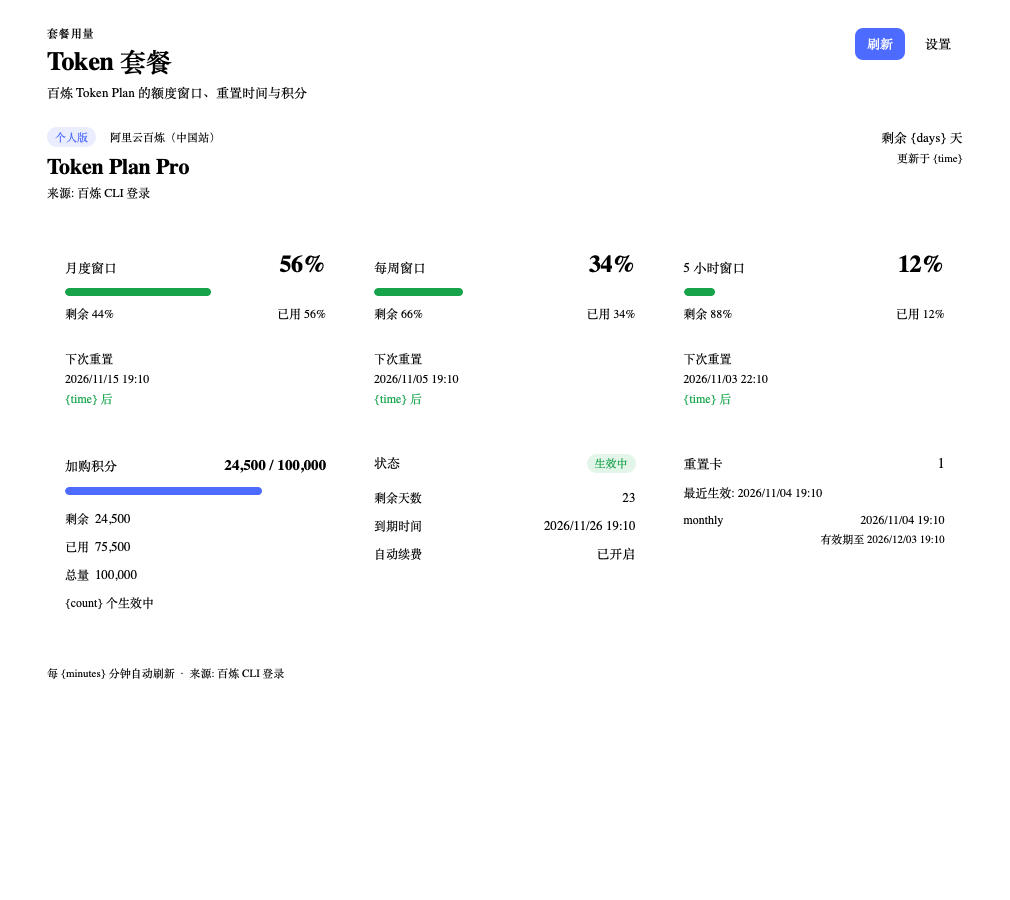
The screenshot uses demonstration values.
What it shows
- Monthly window — the percentage the console reports, remaining quota, next reset time and a live countdown.
- Weekly and 5-hour windows — same treatment, so a short-term spike is visible before the monthly number moves.
- Subscription — plan code, status, remaining days, expiry date and auto-renew flag.
- Add-on credits — remaining / used / total, plus the number of active add-ons.
- Reset cards — nearest effective time and expiry when the plan has them.
- Freshness — last successful read, stale marker, manual refresh and a configurable auto-refresh interval.
The panel is a dedicated sidebar page, and a compact footer chip shows the monthly remaining percentage and opens the page.
Requirements
- DSH
>= 0.2.0(Desktop or awebprofile). - The official Bailian CLI, signed in to the account that holds the Token Plan:
npm i -g bailian-cli
bl auth login
The login command opens a browser; complete the Alibaba Cloud sign-in there. The CLI stores the console token in ~/.bailian/config.json. For the international site use:
bl auth login --console --console-site international
Install
DSH Desktop (recommended)
- Open Settings → Plugins.
- Choose Install from GitHub (or the plugin market once listed).
- Enter
https://github.com/lkpsg/dsh-token-meter. - Reload the window if the host asks for it.
The Desktop app owns its profile, so the CLI install path below is for web / headless profiles only.
CLI (web / headless profile)
dsh plugin --profile web add github:lkpsg/dsh-token-meter
For local development:
dsh plugin --profile web add link:/absolute/path/to/dsh-token-meter
Setup
- Install and sign in to the Bailian CLI as shown above.
- Open Plan usage in the DSH sidebar.
- If the panel still says “Connect the Bailian CLI”, click Check again.
The plugin reads the token on every fetch, so a CLI re-login takes effect without restarting DSH. Sign out with bl auth logout; the panel returns to the setup card.
Region
- Region — Mainland China or Alibaba Cloud international site. The region must match the console site used by
bl auth login. - Refresh interval — 1–1440 minutes.
How it works
┌──────────────────────── DSH Web UI ────────────────────────┐
│  sidebar page / footer chip                                │
│  GET /dsh-plan-meter/api/summary                           │
└──────────────────────────┬─────────────────────────────────┘
                           │ same-origin JSON
┌──────────────────────────▼─────────────────────────────────┐
│  host half (Node)                                          │
│  ConfigStore ── settings.json (0600)                       │
│       │                                                    │
│       └── reads ~/.bailian/config.json access_token        │
│                    │                                       │
│                    ▼                                       │
│  Bailian provider ── POST /cli/api.json (Bearer)           │
└──────────────────────────┬─────────────────────────────────┘
                           │
                 Bailian console gateway
The token is owned by the CLI. The plugin never writes ~/.bailian/config.json, never copies the token into its own storage, and never returns it to the browser.
Settings
| Setting | Default | Notes |
|---|---|---|
| Region | Mainland China | Mainland (bailian.console.aliyun.com) or Alibaba Cloud international site |
| Refresh interval | 10 minutes | 1–1440 minutes; the panel also refreshes on demand |
Clicking Refresh bypasses the cache. Background polling runs every 30 seconds while the page is visible, but the host only re-reads Bailian after the configured interval, and failed attempts are throttled for 30 seconds.
Environment variables
| Variable | Purpose |
|---|---|
BAILIAN_CONFIG_DIR |
Directory containing the CLI's config.json (default ~/.bailian) |
DSH_PLAN_METER_STATE_DIR |
Plugin state directory (default $DSH_HOME/storages/dsh-plan-meter) |
DSH_PLAN_METER_STATE_DIR is mainly a test hook; it only stores display settings.
Repository layout
src/
  index.ts                 host entry (Cordis apply)
  shared/
    types.ts               wire types
    format.ts              percentages, dates, countdowns
    locales.ts             zh/en dictionaries
  host/
    config.ts              settings + read-only CLI token access
    service.ts             cache, refresh and settings use-cases
    http.ts                same-origin routes
    errors.ts              MeterFailure -> wire error
    json.ts                defensive field readers
    providers/bailian/
      index.ts             CLI transport + snapshot assembly
      console.ts           CLI gateway request/response
      parse.ts             usage / subscription / credits parsing
  client/
    index.tsx              slots, locale, store wiring
    components.tsx         page, footer chip, setup/settings cards
    store.ts               polling + mutations
    api.ts                 same-origin fetch helpers
    styles.css             DSH theme-token styles
There are no runtime dependencies. React is provided by the DSH client shell; the host uses Node's built-in fetch, crypto and fs.
Development
npm install
npm run check          # tsc --noEmit + build + node --test
npm run build          # lib/index.js + lib/client.js
npm test
The client bundle deliberately keeps react and react/jsx-runtime external. Run npm run typecheck before sending a PR; test/build.test.mjs also checks the bundle shape.
The repository's tests never call the live gateway; test/provider.test.mjs mocks fetch and covers the personal path, missing-token and expired-login cases.
Privacy and security
- No telemetry, analytics or third-party calls. The only outbound requests are to Bailian console hosts.
- The CLI token is read from
~/.bailian/config.jsonat fetch time and is never copied into plugin storage or returned across the HTTP boundary. - The plugin's settings file is written with
0600permissions and atomic renames. - Route mutations are refused from cross-site pages and from non-loopback
Hostheaders. - The plugin is not affiliated with Alibaba Cloud. The console API is internal and may change; treat failures as expected until the parser is updated.
Limitations
- A working
bl auth loginis required; there is no cookie, API-key or AccessKey fallback. - CLI tokens can expire. Re-run
bl auth login; the panel picks up the new token on the next refresh. - Only Token Plan quota is read. Model inference and API-key management remain in the Bailian console.
- Team Token Plans are not read: their seat/summary APIs require OpenAPI AK/SK rather than the console login. This version is personal-plan only.
- The international gateway is implemented from the CLI profile table but is less exercised than the mainland path.
sk-...API keys cannot read Token Plan quota; this is a platform limitation, not a plugin switch.
No comments yet. Be the first to write one.