dsh-horizontal-panel-dock
把 DeepSeek Harness 侧栏里竖排的面板入口,压成「新会话」按钮正下方的一行横向图标。
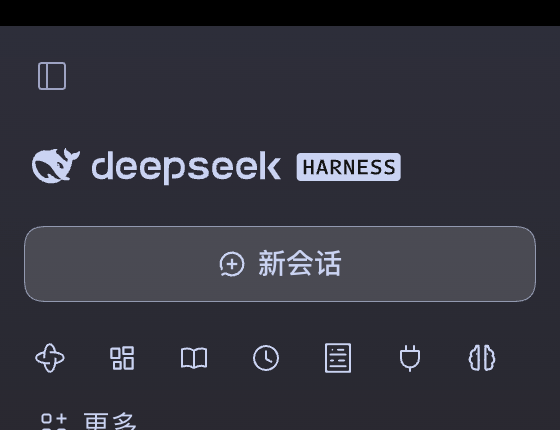
效果
- 面板入口从竖排列表变成一行 28px 图标,宽度不够时横向滚动
- 图标仍是 DSH 自己的,选中/悬停沿用主题色
- 「更多」保留文字和下拉菜单
- 「新会话」按钮、工作区、会话列表都不动
安装
前提:DSH 的桌面版或 Web 版(这是 bundle 插件,profile 需要支持 dsh.profile.bundles)。
从 GitHub 安装:
dsh plugin add github:liuyiwei521/dsh-horizontal-panel-dock
然后把包名加进该 profile 的 package.json:
{
  "dsh": {
    "profile": {
      "bundles": ["@liuyiwei521/dsh-horizontal-panel-dock"]
    }
  }
}
刷新窗口即可。本地开发也可以直接 dsh plugin add link:/path/to/this/repo。
使用
- 图标行就是原来的入口,点哪个切到哪个面板
- 侧栏「更多」菜单里有两项:
- 切回纵向入口列表:还原成原来的竖排(同时把之前取消固定的入口重新固定)
- 显示全部入口(n):把之前取消固定、因此不在行里的入口放回来
原理(以及为什么不用插槽)
DSH 侧栏的入口列表 sidebar.panellist 是 factory 声明的插槽(factory "sidebar.panel.icon"),插件往里注入会直接抛错,整个插件加载失败;sidebar.session.action 虽然能注册,但返回内容会被塞进 32px 高的「新会话」按钮里被裁掉。
所以这里只做样式层覆盖,用 CSS module 的类名后缀选中那几行:
[class*="_panelList"] { flex-direction: row; gap: 2px; ... }
[class*="_panelRow"]  { width: 28px; height: 28px; padding: 0; ... }
哈希前缀(形如 kB3qhq_)每次构建都变,后缀 _panelList / _panelRow / _panelTitle / _panelUnpin / _moreAnchor 才是稳定的。不改组件树、不替换侧栏。
兼容性
- 已验证:macOS 桌面版 DSH 0.4.x(客户端
ui-sidebar0.2.2-rc.3)。 - Windows、Web profile 未验证。
- DSH 升级若重命名这些类名,图标行会恢复竖排。 插件会在加载 3 秒后往控制台打一条
[dsh-horizontal-panel-dock] sidebar panel classes not found in this DSH build, 提示你去client.js顶部改DOCK_CSS里的后缀。 - 「插件」这一行是 DSH 固定的(
FIXED_PANEL_ID),既不能从行里移除,也不能改变顺序; 其余入口的顺序跟随各插件注册时的order。
卸载
dsh plugin remove @liuyiwei521/dsh-horizontal-panel-dock
并把包名从 dsh.profile.bundles 里删掉。
English
Turns DSH's vertical sidebar panel launchers into one horizontal icon row directly under the
New-session button, by overriding the sidebar's CSS-module class suffixes — no slot takeover, no
DOM surgery, no change to workspace/session logic. Install with
dsh plugin add github:liuyiwei521/dsh-horizontal-panel-dock, add the package name to
dsh.profile.bundles, reload the window. If a DSH update renames those classes the row silently
reverts to vertical, so the plugin logs a console warning naming the selectors to update.
License
MIT
No comments yet. Be the first to write one.