DSH Sidebar History for DeepSeek Harness
English · 简体中文 · 繁體中文 · 日本語 · Español · Website · Download
DSH Sidebar History is a DeepSeek Harness sidebar plugin that puts TODO progress and the latest saved assistant reply in your chat history. Find unfinished work and reopen the right session without opening every conversation.
This independent, MIT-licensed plugin uses DSH's official projection and sidebar slot APIs. It does not modify upstream DSH.
Feature video
An order check is running, but the native sidebar only shows its title. Open History cards, then watch the card move from 0/3 to 2/3 and retain the model's saved reply. Publish release stays pending. The complete English recording preserves the real wait and final result; the eight-second progress preview is a continuous sidebar crop. The complete video shows the history switch and the full reply.
Archived real API progress story. Its recorded package hash matches 0.2.2. The current 0.2.3 API recordings and verification remain linked below.
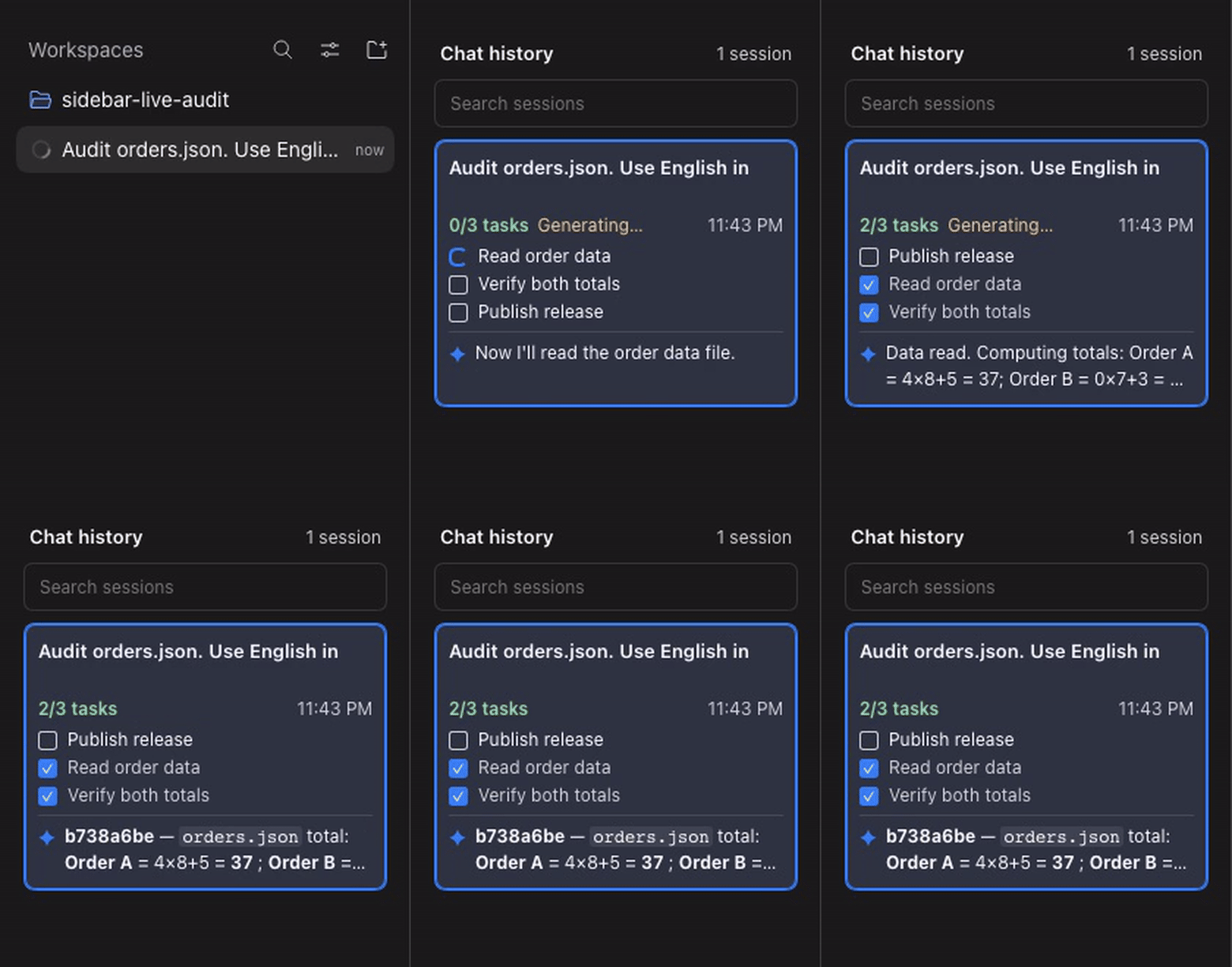
Full-frame source excerpt (0.2.2) · MP4

Verified real API media for 0.2.3. The five language captures passed actual-text, pixel, provenance and playback checks. See the verification report.
Full-frame eight-second preview

Watch the demo with a written walkthrough · Real API video · Actual browser snapshot · API receipts

A fresh DSH session calls the official DeepSeek API. The model reads generated demo order inputs, updates the native TODO list and submits its own reply. The sidebar shows 2/3 completed tasks and the actual saved answer. HTTP response IDs, usage, tool-use IDs and persisted messages are cross-checked. A second real API session and reload recovery are verified after recording.
The video preserves the exact original capture bytes and real elapsed time. The screenshot comes from that same API run. No scripted model, seeded assistant message, seeded task event or mock endpoint is used. Media provenance and hashes · Media QA.
Install the plugin to show the same progress and reply previews in your own DSH history. See the five-language story and source record. The earlier 20-second edit used a controlled adapter and has been withdrawn from release demonstration use; its original bytes and correction remain in the source record.
Find and resume work
This checkout builds version 0.2.3. The latest published Release can lag behind the checkout; the installation below builds this source.
Each compact card shows its title, update date, completed/total count, up to three tasks, and a two-line assistant preview. Active and pending tasks take precedence over completed tasks. Use Workspaces & archives at the foot to open DSH's workspace browser and session actions. History cards returns to the same search, scroll position, and focused session. DSH keeps control of the sidebar shell, collapse, and mobile drawer.
Task state comes only from todo/write. A new turn/start clears the previous turn's tasks, matching DSH's own TODO lifecycle. Earlier reply identifies a retained text reply from an earlier turn. No task list this turn does not mean that previous work is complete. Generating and native stop or failure states describe the current turn. A tool-only or empty message keeps the latest useful text reply. Interrupted messages, reasoning, tool results, and uncommitted attempts never become the preview.
Markdown previews render bold, emphasis, strikethrough, and code with the same GFM grammar used by DSH. Lists and tables become compact readable text. Links show their labels and images show their alt text. The read-only preview does not navigate, load remote images, or interpret raw HTML. Open the conversation for the full native rendering. Card descriptions expose task counts, individual task states, reply text, and turn context to accessibility APIs.
The host stores a bounded sidebarHistory projection in each session's normal summary. Version 2 replays old checkpoints from durable logs without activating historical agents. Cold cards read projections on demand, with explicit loading and failure states. The client renders the viewport plus overscan. Archived sessions stay hidden. Search combines cached titles and replies with DSH's official content search. A failed remote search keeps local matches, marks the results incomplete, and offers Retry search. A result-limit notice identifies truncated content search. Remote-only matches and their scroll position survive a navigation round trip. Keyboard navigation supports Up, Down, Home, End, and Enter.
The sidebar supports English, Simplified Chinese, Traditional Chinese, Japanese, and Spanish, following DSH's language setting. Each README points to its own language-specific media in locales.json. The Traditional Chinese native-host pack covers 17 namespaces and 1829 keys, including the demonstrated screens; other host namespaces can fall back to Simplified Chinese. Language-pack provenance records the sources and scope.
Install
Requirements: Node.js >=24.9.0 and an existing DSH Web installation. The verified target is DSH 0.2.2-rc.1, upstream commit fcc0ad462172522aaf5c93a7b2e01f6b9f0b0159. The declared DSH range is >=0.2.2-rc.1 <0.3.0; other versions in that range have not been independently verified.
Build a local tarball and install it into the web profile:
git clone https://github.com/liush2yuxjtu/dsh-sidebar-history.git
cd dsh-sidebar-history
npm pack
dsh plugin --profile web add "$PWD/dsh-sidebar-history-0.2.3.tgz"
Open DSH Web. The history sidebar displays cards for your unarchived sessions. Replace web if you use another Web profile. The profile option must appear before add. You can also install the tarball with DSH's plugin manager. See the upstream installation guide.
The package ships a prebuilt browser module. Maintainers edit src/client.mjs and src/markdown-preview.mjs, then run npm run build:client. npm run build rejects a stale bundle or bundled license notice. DSH resolves runtime dependencies. Do not install a second React runtime. These instructions install from this repository; they do not assume an npm registry release. DSH's APIs are pre-stable, so check compatibility before upgrading.
Telemetry and privacy
Maintainers can run npm run telemetry:collect with authorized GitHub access to collect repository views, clones, referrers, stars, and release asset downloads. The script writes local JSON and Markdown reports. Unavailable traffic APIs are marked BLOCKED, not recorded as zero.
Optional Usage statistics in the sidebar footer sends fixed action events to Supabase only after explicit opt-in. It is off by default and respects browser Do Not Track and Global Privacy Control. No chat, TODO text, search terms, session IDs or installation IDs are sent. Events expire after 30 days. The dialog shows accepted/failed counts and provides a test button and revocation. This measures event counts, not unique users or retention. Hosting infrastructure can observe network metadata. See the telemetry guide for fields, limits and owner-only reports.
Verify
Read AGENTS.md and the verification surfaces. Use a built upstream checkout with frozen dependencies, Node.js >=24.9.0, and Chromium.
export DSH_SOURCE_ROOT=/absolute/path/to/built/deepseek-harness
npm ci --ignore-scripts --legacy-peer-deps
npm run setup:hooks
npm run verify
DSH_SOURCE_ROOT=/absolute/path/to/built/deepseek-harness npm run verify:browser
npm run verify:live
npm run verify:media
npm run verify:commit
Set DSH_SOURCE_ROOT, or the local Git setting dsh.sourceRoot, for later commands. Set DSH_CHROMIUM_PATH if Chromium is not available through upstream Playwright. Supply existing authorized credentials through DEEPSEEK_API_KEY or a private DSH_PROVIDER_ENV_FILE. Keep credentials outside Git.
verify checks units and package structure. verify:browser uses an explicit controlled adapter for regression tests. These checks do not establish real-model acceptance. verify:live makes actual API calls through DSH. The Git hook and verify:commit export the staged tree and require fresh unit, browser, media, and real API checks. Missing access or failed assertions refuse the commit. Run evidence stays in ignored .runtime/.
Project links
- Architecture and decisions
- Verification report
- Discovery and repository metadata
- Public website and installation guide
- DeepSeek Harness upstream
- MIT license
Find related plugins through the dsh-plugin and dsh-plugins GitHub topics. This project is not an official DeepSeek product.
No comments yet. Be the first to write one.