DSH Channels for DeepSeek Harness
DSH Channels is an open source DeepSeek Harness (DSH) plugin for team chat, persistent AI mission threads, and channel memory. Chat with people in a shared channel. Mention @deepseek to start an agent task or continue its existing DSH Session.
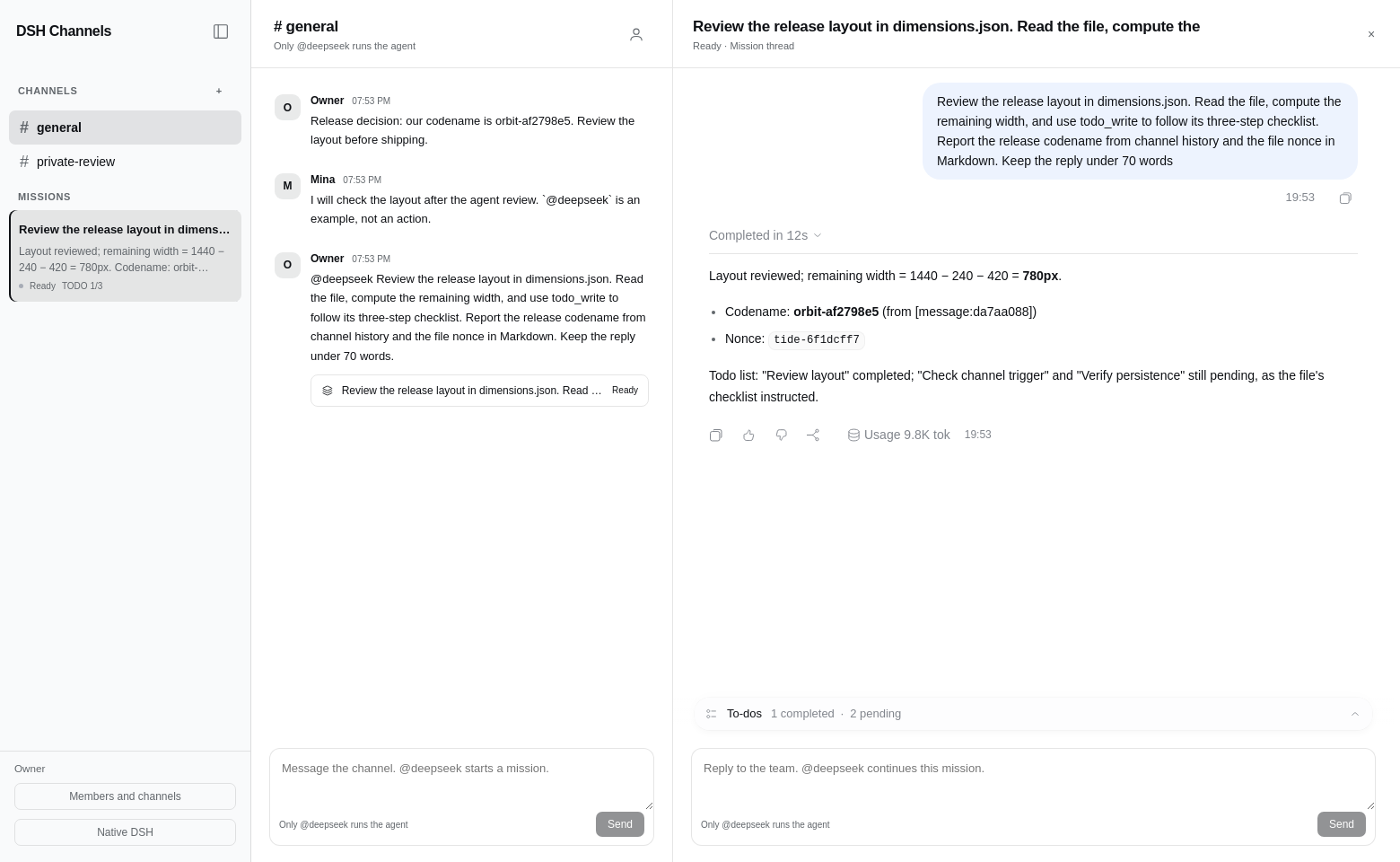
Mention to Mission: ordinary messages stay as human chat. Each explicit mention creates or continues a mission with native assistant messages, tools, summaries, and TODO progress.
Working alpha for trusted DSH workspaces. Requires Node.js 24.9 or later and DSH 0.2.2-rc.1. Read the Host access boundary before inviting teammates.
Install · Use · Trigger rules · Real screen flow · Verification evidence · FAQ
Why use DSH Channels
- Keep team decisions in a shared channel without running an agent for every message.
- Turn an explicit
@deepseekrequest into a separate mission thread and native DSH Session. - Reopen a mission with its assistant history, tool output, summary, and actual TODO progress.
- Give a new mission relevant channel history and earlier mission summaries, within a defined memory limit.
Walk through the real screens from human chat to a mission, a contextual reply, and memory across Sessions. The screenshots come from real Chromium and the official DeepSeek API.
Install
The tested DeepSeek Harness revision is fcc0ad462172522aaf5c93a7b2e01f6b9f0b0159. Install the package into the DSH Web profile:
git clone https://github.com/liush2yuxjtu/dsh-channels.git
cd dsh-channels
npm pack --ignore-scripts
dsh plugin --profile web add "$PWD/dsh-channels-0.1.0.tgz"
dsh web
Enable the bundle in DSH's plugin manager. Configure your DeepSeek credential in the Host settings. The browser never receives the model API key. The plugin does not change upstream files.
Use
- Open Channels. The first authenticated Host browser creates the owner identity and
generalchannel. - Send ordinary messages to chat with people. They make no model request.
- Send
@deepseekfollowed by a task. Its mission opens on the right with the native conversation history and tools. - Reply normally to leave a team note. Mention
@deepseekin that thread to continue the same Session. - Use Members and channels to create a channel or a one-time invitation. A second trusted browser joins with its own name and invitation.
- Select Native DSH to restore the original navigation, composer, Settings, and Plugins. Select Open DSH Channels to return.
The sidebar shows mission titles, actual assistant summaries, and progress from native todo/write events. It does not infer task completion from prose.
Trigger rules
| Message | Agent behavior |
|---|---|
Please review this |
Save a human message |
@deepseek review this |
Start a mission |
@DeepSeek review this |
Start a mission |
| Mention inside a thread | Continue that mission's Session |
| Ordinary reply inside a thread | Save a team note |
Inline code, fenced code, quoted lines, email, or @deepseekish |
No trigger from those occurrences |
| An empty mention | Reject it and keep the draft |
When a valid mention appears outside code or a quotation, the parser keeps the code and quoted material in the task. It removes valid mention tokens and trims surrounding whitespace and punctuation.
Memory and access
Each prompt includes at most the last 50 messages and 12 saved mission summaries from its own channel, within 24,000 characters. Context carries message and mission IDs. The current thread retains its normal DSH Session history. This is channel-scoped context and saved mission memory, not a global memory system.
The server derives authors from member tokens and checks channel membership on every read, post, invite, and retry. It stores SHA256 hashes of member and invitation tokens. Messages and delivery intent save together before a model prompt. Stable outbox request IDs let DSH deduplicate accepted work after retries.
Use this release with trusted teammates on a trusted Host. Plugin member access restricts plugin data. DSH owner browser credentials still grant access to the entire Host and its other Session APIs. A channel invitation does not turn an owner authentication URL into an isolated guest login. Do not share that URL with untrusted users.
Identity tokens and drafts remain in browser local storage. Host messages, invitations, mission bindings, and receipts remain in the DSH storage domain. Deleting browser data loses that browser's member token. There is no account recovery UI in this release.
FAQ
Does a normal channel or thread reply run DeepSeek?
Ordinary replies save human messages. Only an explicit valid @deepseek mention starts or continues agent execution. Code examples, quoted lines, URLs, and escaped mentions do not trigger it. See the trigger rules.
Does each mission have its own DSH Session?
Each root mention creates a separate mission and native Session. Mentions inside that mission continue the same Session. The sidebar keeps its title, actual reply summary, and TODO count available between visits.
What does channel memory include?
The current mission keeps its Session history. New execution also receives the same channel's recent messages and saved mission summaries. It does not scan every Session on the Host. See the memory limits and access model.
Is DSH Channels a Slack bot?
DSH Channels brings a Slack-style channel and thread workflow into DeepSeek Harness. It runs inside DSH and does not connect to Slack or require a Slack account.
Can I use this as a public chat service?
This alpha targets trusted teammates who already have access to a trusted DSH Host. Plugin membership limits plugin data. An owner login still controls the wider Host, so it is not an isolated guest account.
Get help
Compare DSH collaboration plugins and adjacent tools by user task, trigger policy, persistence, and Host boundary. See the task guide for concise, source-linked answers, and the GEO evaluation protocol for reproducible measurements and their limits.
For a reproducible problem, report it in GitHub Issues. Include your DSH version, Node.js version, expected behavior, and reproduction steps. Keep API keys, owner login URLs, member tokens, and private channel messages out of reports.
See the full verification report for tested behavior and limits. For related projects, browse this author's DSH plugins or the DSH plugin topic.
Verify
npm run verify
DSH_SOURCE_ROOT=/absolute/path/to/built/deepseek-harness \
DSH_API_KEY_FILE=/private/path/to/deepseek.key \
npm run verify:live
node scripts/install-hooks.mjs
The live test uses the official DeepSeek API and real Chromium. It records API response IDs and token usage. It matches reply text, tool-call IDs and arguments, and TODO updates against persisted DSH events. It checks silent human messages, independent missions, contextual replies, same-channel memory, server access checks, browser reload, mobile navigation, and Native DSH restoration.
node scripts/cold-restart.mjs tests two real DSH CLI processes against the same durable storage. The pre-commit hook exports the exact staged tree and runs fresh checks. Missing runtime or credentials fails the commit. Runtime authentication URLs, credentials, and private data stay out of Git.
See verification evidence and implementation decisions.
Limits
The first release stores one bounded workspace document. It supports 100 channels, 200 identities, 10,000 human messages, 2,000 missions, 10,000 delivery receipts, and 1,000 invitations. Reaching a limit refuses new writes without deleting pending work. Export or migrate storage before increasing those limits. It is not intended as a high volume public chat server.
DSH's plugin API is pre-stable. This plugin targets the version above. It adds no telemetry or analytics of its own.
License
MIT. The test runner and response-provenance checks build on the MIT-licensed dsh-slack project by the same author.
No comments yet. Be the first to write one.