Status card — a DSH plugin
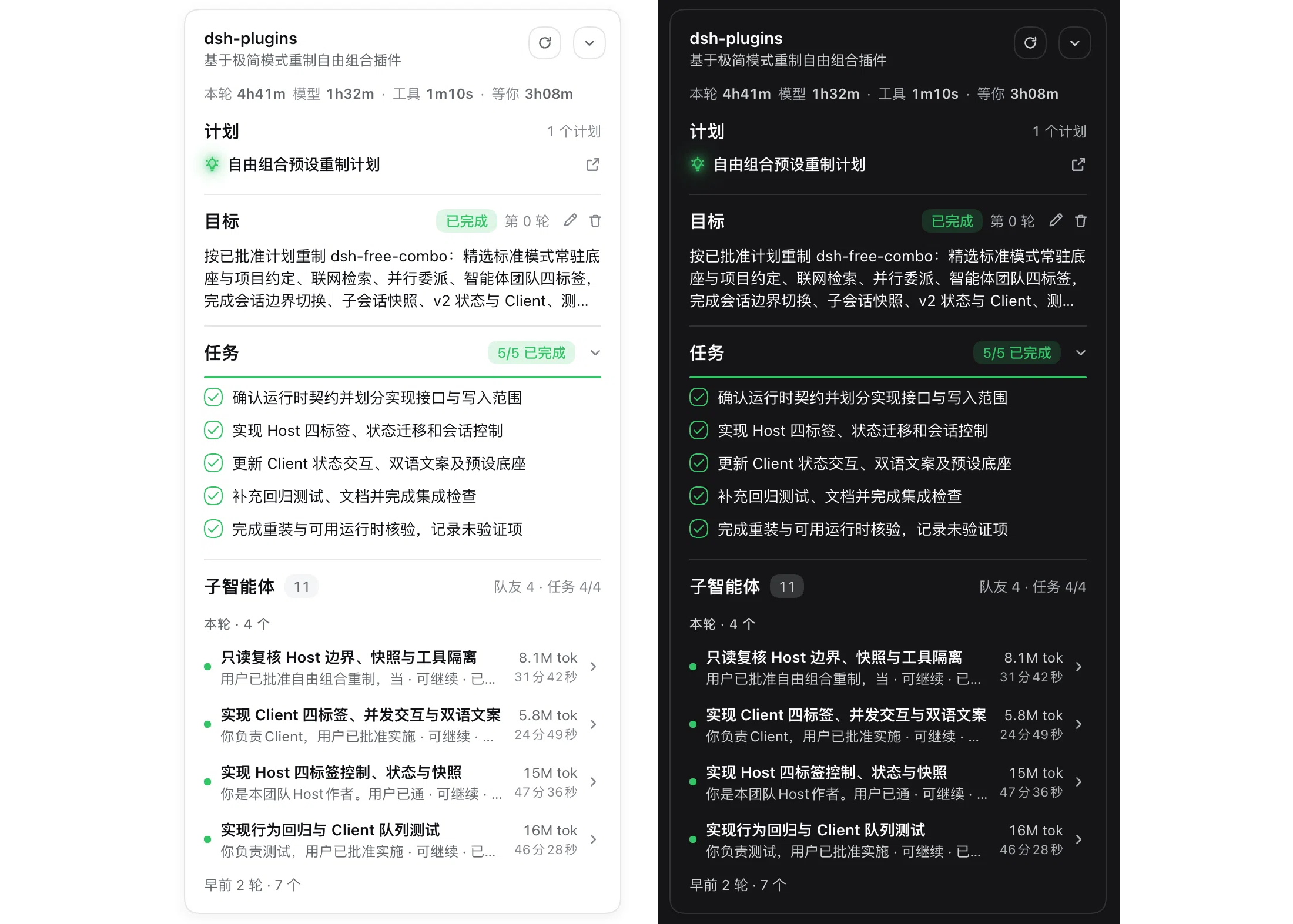
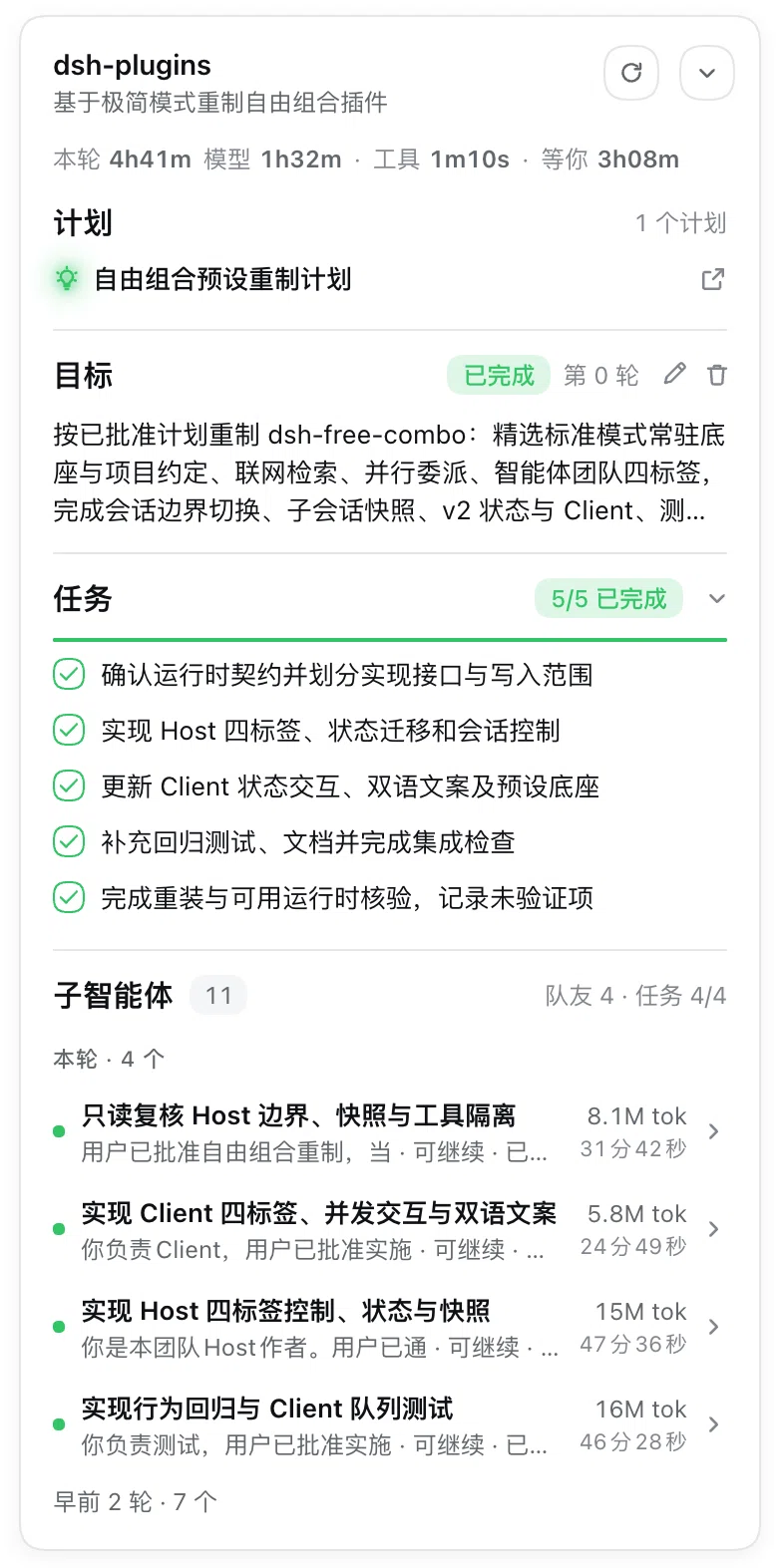
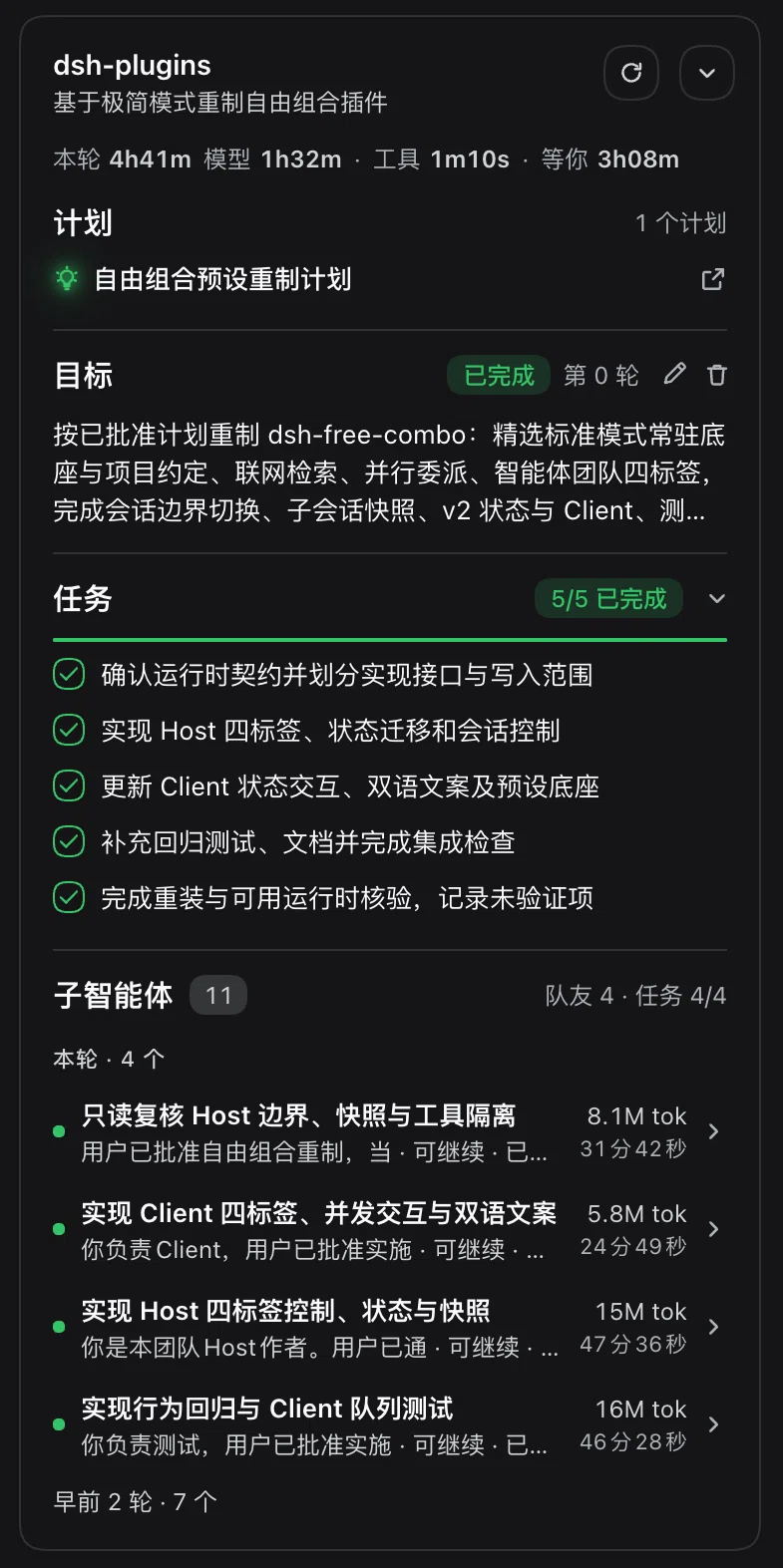
A permanent card floating at the top-right corner of the content area in DSH Web. It gathers the to-do list, the goal, the plans you submitted, the files this session changed, the mode badge, the subagents and the background jobs into one place — plus one line that says where this turn's time went.
The to-do list is collapsible and carries a progress bar; the goal can be edited / paused / resumed / cleared right inside the card; a submitted plan opens in the right-hand preview pane; a subagent row jumps to that sub-session. The card follows content-area resizes and right-panel open/close, and can be collapsed. When the content area gets narrow, the card pushes the text column to the left; at the limit it shrinks into a single round button and expands again when the window grows back. It hides itself while you are looking at a global panel (plugins, schedules, …).
@author liuh
Behavior
| Block | Content | Interaction |
|---|---|---|
| Header | Project name (directory name of the session cwd, full path on hover) + subtitle (session title, falls back to "Agent workspace") |
Two host-style round buttons (28px, 1px hairline, white fill, 16px icon inside): ⟳ re-fetch changes, ⌄ collapse the card |
| Accent color (theme) | Every accent in the card — to-do check ring, 2px progress bar, progress pill, plan bulb and its glow, status dots, goal action buttons, focus ring — reads one color family. Four presets: green (default), blue (#4176e6), amber, red, values taken from the host's static 500 scale (same value in light and dark) |
Color dots in the plugin detail page (Plugins → this package → "Accent color"); the card re-colors on the spot. The choice is stored in browser local storage and survives a refresh. Error/warning colors and file-type icons deliberately do not follow the theme |
| Collapsed form | The whole card collapses into a 34px round button (1px hairline, white fill + shadow, same as the host's "back to bottom" button) showing a < chevron |
Click the button to expand. Both forms are always in the DOM and animate into each other (~220ms, slight overshoot), sharing the same center point as the header's collapse button; prefers-reduced-motion switches instantly. The collapsed form takes no width. When there is no room for the card it auto-collapses into this button and expands back on resize |
| Turn timing | One bare line under the header (no background, no radius, no padding, left edge aligned with every other row): the total This turn 25m32s, then the breakdown model 2m44s · tools 3m04s · waiting 1m12s, all at the same 12px/600 with tabular digits and muted separators |
Read-only. The three segments never overlap (approval time is subtracted from tool time), so the total equals their sum and never exceeds wall-clock. No waiting segment when there was none; the line is not rendered at all when the turn has no records. Refetched every 2s while running, recomputed every 1s while waiting. Waiting counts only time a human held the agent up: ask_user_question from ask to answer, plan approval, and approval prompts (approval/asked → approval/decided). After turn/end the numbers freeze — idle time between turns is not "waiting" |
| To-dos | The official todos projection: a check ring (done = hollow green ring + 14px green check; running = the whole ring spins; otherwise an empty grey circle), a green progress pill next to the title and a 2px progress bar below |
⌄/› in the section head collapses the list (the progress stays in the header). Above 6 items the list folds with a "Show all" entry, hard cap 200 |
| Goal | The official goal projection: phase (active / paused / blocked / completed), turn number, goal text, blocked reason |
Edit (inline textarea in the same row, Enter saves / Esc cancels), pause, resume, clear — through the official remote.goals remote with the same CAS reference as the host |
| Plans | Plans submitted in this session, served by the plugin's host route (exit_plan_mode titles, newest first, up to 20). A bare row (no fill, same width as the content above) with a self-drawn "bulb + sparks" glyph in the accent color and an external-link icon at the right end |
Click a row to open that plan in the right-hand preview pane using the official plan preview type |
| Changed files | Session-wide list of changed paths de-duplicated by path (colored file-type icon per extension — js / ts / json / py / rs / go / java / C family / shell / css / config (yaml·toml·ini) / sql / markdown / excel / html / image / pdf / ppt / video / word / generic code / other) with +added / -deleted totals. With several turns the list splits into "This turn · n files" and "Earlier changes · n files" |
Click a row to open that file in the official change-review pane |
| Subagents | Sub-sessions whose parentId points at this session; the row mirrors the official directory row: status dot + two-line text (spawn label; session title · mode · activity) + token usage and elapsed time on separate right-aligned lines + chevron. Rows are grouped by delegation turn: the current turn is expanded, older turns fold into "Earlier N turns · m". agentTeam teammates are not shown as a second row — a teammate already is a sub-session |
Click a row to switch the whole workspace to that sub-session through ctx.uiWorkspace.openSession(...). A teammate row without a session yet (still provisioning) is a fallback and is not clickable |
| Background jobs | Jobs the agent started in the background, mirroring the host's own background-task panel: status dot, bash kind pill, the command in mono, the settled reason (exit code: 0) and the duration — or the live 2/10 progress while it runs. Running jobs are always listed; finished ones fold into a "n finished" group — collapsed by default, even when nothing is running — with a Clear button on the right |
Stop on every running row (two-step, like the host: the 20×20 square turns into a red-outlined "Confirm stop" label, a second click sends it, 3s without a second click disarms). Read-only otherwise. Clear only hides finished rows in this browser session — the host keeps its records. Live output is still opened from the host's panel, not here |
When to show: permanent on a session page (rendered whenever a main session exists). Blocks render when they have content; when everything is empty the body shows "No tasks or changes yet" — the card itself stays. A turn's timing alone counts as content.
Data sources
| Block | Source | Notes |
|---|---|---|
| Session / project name / subagents | useSessions from the slot props (sessions projection) |
Main session = the generation with retainedBy.mainView > 0 |
| To-dos / goal / teammates | SessionSummary.projectionValues[key] |
Official, already-folded projection values; the client only reads them, a missing value hides the block |
| Subagent delegation turn | subagentTurns: { [childId]: turn } from the same host route |
The host records the turn in effect when it sees subagent/catalog; rows without an attribution are counted as the current turn |
| Background jobs | ctx.jobs — the client service of @deepseek-ai/dsh-api-job-controller, obtained lazily with ctx.inject(['jobs'], …): state (getSnapshot() / subscribe) for this session's rows, watchRows(sessionId) for the subscription lifetime, kill(sessionId, jobId) for the stop button |
Rows are the host's own JobView (id / kind / label / status / progress / detail / startedAt / finishedAt / output); live = running or stopping; ordering matches the host panel (live by start time ascending, finished by finish time descending). The whole block disappears when the service is absent |
| Changed files | Plugin host route GET /api/status-card.changes?sessionId=… |
See "How it works" |
| Submitted plans | plans: [{ callId, title, seq }] from the same route |
Plan mode writes no file, the body only lives in the exit_plan_mode tool arguments; the host scans the session log for the index |
| Goal actions | ctx.remote.goals.edit / pause / resume / clear (obtained lazily with ctx.inject) |
Same host remote as the official goal bar, { id, revision } CAS |
| Text column width | CSS variable --dsh-chat-content-width on the content element (exported by the host layout) |
The host writes a clamp(…), so it is landed into pixels with a temporary probe element (removed right after); unparsable → 820px fallback |
| Turn timing | timing: { turn, modelMs, toolMs, waitMs, waitSince } from the same route |
Folded on the host from event time: model = step/start → assistant/message, tools = tool/call → tool/result paired by callId (the ask_user_question span is not tool time), waiting = settled wait intervals (question / plan approval / approval prompt, [from,to] merged), still-waiting exposed as waitSince so the client can grow the number between requests |
How it works
- Seat:
shell.overlay(declared bydsh-client-ui-layout, kind = list, scope = root). The card isposition:absoluteand measured against the main content element ([data-conversation-content]);anchor.offsetParentis the overlay coordinate system.ResizeObserverfollows content area and right panel,window.resizeas fallback, and the fallback position (top:78 / right:20) is used until the first successful measurement. - Content width handling (push + auto-collapse): if the text column (the centered column) right edge
and the card left edge would collide, the plugin writes
padding-righton the content element (= 2 × push amount) with aPUSH_TEXT_GAPof 16px. When pushing further would leave less thanPUSH_MIN_LEFT= 12px on the left, the card auto-collapses into the 34px button (PUSH_FAB= 54px) and goes back to the card form once the extraFIT_HYSTERESIS= 24px of hysteresis says it fits again. A manual expand applies to the current width; any width change (signature = content width : column width) drops the manual choice back to automatic logic. If the width cannot be measured the card is never hidden. - The anchor container stays in the DOM (
pointer-events:none, zero size); only the card body is toggled by a gate — otherwiseoffsetParentdisappears, the width reads back as "unknown" and the card flickers in and out. - Takes over the official to-do dock: the current generation of the main content element gets
data-status-card-hide-todo, and one CSS rule hides the display-only official to-do panel above the composer ([data-testid="todo-panel"]). The official goal bar stays (it has actions). The marker is removed whenever a gate hides the card, so you never lose both views. - Panel gate: rendered only on session pages.
PanelInfo.activePanelId === nullmeans the center panel shows the session; any other value means a global panel is open, and the card stays out of the way. Missing hook → treat it as a session page (never silently disappear). - Styling:
--dsw-*theme tokens only, injected withctx.effectand removed on unload. No color literals outsideicon.svg. Card width 372px (CARD_WIDTHmust match.sc_card),--sc-pad16px, 28px row height, 1px separators between blocks + 12px gaps (no separator before the first block), three text levels (--sc-fg-strong/--sc-fg/--sc-fg-weak), font sizes 14 / 13 / 12 / 11. No grey surfaces anywhere: plan rows, goal body and subagent rows are bare content and only get a hover pill. - One accent source:
--sc-themeon the card root,--sc-accentfollows it,--sc-accent-weakis derived withcolor-mix. The preset is written todata-sc-themeand stored inlocalStorage['dsh-status-card:theme'](validated against a whitelist; anything illegal falls back to green). The color picker lives inplugins.bundle.config(key= package name), rendered only on the bundle detail page. - Rows come from one place: a
Rowcomponent and agrid-template-columns: 16px minmax(0,1fr) autogrid; the subagent row is the same grid plus a trailing 12px chevron column. Numbers usetabular-numsand a fixedmin-width. - Collapse is a
data-stateswitch, not a second tree: both forms stay mounted, the anchor flips tofab, CSS transitions both sides (transform:scale(.16)+ fade for the card, the reverse for the button), andvisibilityis delayed to the end of the animation. - Section order is fixed: timing → plans → goal → to-dos → changes → subagents (the smoke suite pins it).
- Icons are self-drawn SVG: one monochrome family (10/12/14/16px,
stroke: currentColor) and a colored file-type family (16px, 28-grid view). Official icon packages belong todsh-client-ui-primitivesand must not be imported by a plugin. - Host half (
index.js): scans the session log forworkspace/changesandexit_plan_modeplans, keeps an incremental per-session index, folds the turn timing described above, and serves everything fromGET /api/status-card.changes(no-store,lastSeq/lastTurn/plans/timing/subagentTurns). It adds no session event types and writes no official state: the plugin is read-only.
Development
npm test           # 101 component-level smoke assertions (reads sources only, writes nothing)
npm run test:mutate # 103 mutations: each one must turn a named assertion from PASS to FAIL
Node 22+ is enough; there is no build step and no dependency. See docs/VERIFICATION.md for what has actually been checked on a live host, and what has not.
Install
Requires DSH 0.2.1-rc.3 or newer (the card is built against the shell.overlay seat and the session
controller of that line).
# straight from GitHub (tracks main)
dsh plugin --profile web add github:liuhusk/dsh-status-card

# or pin a release tag (see Releases)
dsh plugin --profile web add github:liuhusk/dsh-status-card#v0.22.0
Or from a local checkout, through the in-app plugin manager (Creator mode / Full access):
install_bundle with the absolute path of this directory, and remove_bundle with
@liuhusk/dsh-status-card to uninstall. After changing client code, refresh the page; replacing an
already installed package with the same name needs a host restart to get a new module generation.
No npm publish: install straight from this repository.
Screenshots
Full-height captures of the card (the wide image at the top is the two of them side by side, which is what the plugin marketplace displays):
| Light | Dark |
|---|---|
 |
 |
Files
| File | Purpose |
|---|---|
| client.js | Card UI + the accent-color block in the plugin detail page: seat registration, projection reads, change fetching, style injection, locale dictionary, theme storage |
| index.js | Host half: session-wide change summary, plan index, turn timing, authenticated route /api/status-card.changes |
| cordis.patch.yml | Inserts the dsh-status-card row |
| package.json | Package name, dsh.bundle, dsh.client (platform / immediately / inject), icon |
| locale/en.json, locale/zh.json | Title and description shown in the plugin manager |
| icon.svg | Plugin card icon: a small card floating in the corner |
| screenshots.json | Screenshot list consumed by the plugin marketplace |
| docs/VERIFICATION.md | What was verified on a real host, and what was not |
| test/smoke.mjs | 103 smoke assertions, npm test |
| test/mutate.mjs | 103 mutations proving the smoke assertions are not vacuous, npm run test:mutate (each mutant only re-runs the cases it is expected to break; 8 in parallel, ~6s) |

Known limitations
- Line counts per file come from the last turn that touched the file (identical to the pane you open),
not a cross-turn accumulation — so "this turn" / "earlier changes" are grouped by last-touch turn, and
the
+added / -deletedtotals are sums over a de-duplicated list, not a git diff. - The card occupies a corner of the content area even when empty (collapsing it reduces that to the header).
The only case with no card at all is a content area narrower than
MIN_CONTENT_WIDTH= 360px. - The push behavior is the one place where the plugin writes to a host element (
padding-right); it restores the original inline style when the element changes or the plugin unloads. - A manual expand can really overlap the text column (the gap may go negative) — the plugin does not argue with the user about it, it only re-evaluates on the next width change.
- The collapsed state is remembered per page session (module-level), not across reloads. Right-panel sub-sessions do not get a card of their own.
- The accent choice lives in browser local storage: it does not follow your account across browsers, devices or cleared site data.
- "Waiting" counts only approval prompts and
ask_user_question. A question asked by some other MCP tool, or you simply walking away, is not counted. - Subagent rows only jump to the session; there is no recursive expansion of nested sub-subagent trees. A teammate row without a durable sub-session cannot be clicked.
- File-type icons are not brand logos: the plugin may only use
--dsw-*tokens, so it draws the same page shape with a white glyph and a per-language color. Markdown / JavaScript / JSON colors were checked by eye, the rest only by assertions. - The goal projection does not expose
activation(armed/disarmed), so the button only followsphase; a disarmed-but-active goal answersGOAL_INVALID_TRANSITION, which the card displays verbatim. - The official goal bar stays visible, so a goal has two sets of buttons that share the same remote and CAS
reference. Whichever loses gets
GOAL_STALE_REVISIONand shows it. - The plan index survives a host restart (derived from the session log); per-file line counts do not,
because
workspaceChanges.summaryis in-process. - Subagent elapsed time reflects the render instant (no per-row timer); job durations tick once per second and the turn-timing line recomputes once per second while waiting.
- Background jobs are read-only except Stop: the card does not open live output, does not spawn, and does not touch the host's job records. "Clear" only hides finished rows in this browser session, so a refresh brings them back. Only jobs of the current main session are listed.
License
MIT © 2026 liuh
No comments yet. Be the first to write one.