dsh-context-tone
DeepSeek Harness 的纯客户端 Web 插件:按上下文占用档位给输入区上方的「圆环 + 百分比」胶囊改色,并在百分比数字右侧显示档位 emoji。
- 只改圆环填充色与百分比文字颜色;没有横幅、提示音、抖动动画。
- 不引入表情包与图片素材,不依赖其他插件。
- 插件只读胶囊上的百分比数字,不读取对话内容。
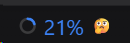
| 占用低(平静档:官方灰 + 🥰) | 占用 21%(注意档:蓝 #3b82f6 + 🤔) |
占用 30%(偏高档:橙 #f97316 + 😖) |
|---|---|---|
 |
 |
 |
档位
| 档位 | 占用区间 | 圆环与百分比 | 百分比右侧 |
|---|---|---|---|
| 平静 | 低于第一档(默认 < 12%) | 官方原色(灰,不覆盖) | 🥰 |
| 注意 | ≥ 12% | 蓝 #3b82f6 |
🤔 |
| 偏高 | ≥ 25% | 橙 #f97316 |
😖 |
| 警戒 | ≥ 35% | 深橙 #ea580c |
😭 |
| 危急 | ≥ 50% | 红 #ef4444 |
😰 |
| 危急+ | ≥ 80% | 深红 #dc2626 |
😵 |
五个分界值、五档颜色、六档 emoji 都能在插件配置页修改;emoji 留空即不显示(平静档同理)。
安装
宿主要求:DeepSeek Harness >= 0.2.1-rc.2,桌面端与 dsh web 通用。
# 装 GitHub 源
dsh plugin --profile desktop add github:lin114514-desng/dsh-context-tone

# 或装随 Release 发布的安装包
dsh plugin --profile desktop add "https://github.com/lin114514-desng/dsh-context-tone/releases/download/v0.2.1/dsh-context-tone-0.2.1.tgz"
--profile 按实际端填:桌面端是 desktop,dsh web 起的档是 web。命令参数交给 pnpm,所以 npm 包名、github: 简写、安装包直链都可用。
装完强刷页面(Ctrl+Shift+R)。要手工核对安装结果或准备回滚,步骤见 INSTALL.md。
配置页
侧栏 插件 → 本包 → 行 dsh-context-tone → 配置。
页面内容:
- 总开关(关掉后胶囊回到官方原色,emoji 消失)
- 五个分界值(1–100 整数,严格递增)
- 五档颜色(
#RRGGBB,取色器与十六进制输入双向联动)与六档 emoji - 档位预览:按当前草稿值列出每档的区间、颜色与 emoji
- 保存 / 放弃修改 / 恢复默认
保存走 form.mutate([{ op: 'set', path: [...], value }], revision);版本过期时页面提示「设置已在别处更新」,不覆盖别人的修改。
工作原理
- 锚点:
[data-composer-dock]内、带svg两圆与NN%文本的button[aria-haspopup="dialog"](不依赖 CSS Modules 哈希类名)。 - 着色:给按钮加
data-dsh-ctx-tone="<档位>"、data-dsh-ctx-emoji="<emoji>"与内联变量--dsh-ctx-tone-color,由一条注入样式把圆环circle:last-of-type的stroke和按钮内百分比span的color指到该变量。 - emoji:
::after { content: attr(data-dsh-ctx-emoji) }落在百分比右侧;按钮本身是 inline-flex + 6px gap,位置与官方布局一致。 - 重扫:
MutationObserver观察document.body的 childList / subtree / characterData,加窗口 resize,120ms 节流;不观察 attributes、不改文本节点,不会自触发。 - 清理:关闭总开关或插件卸载时移除全部属性、内联变量与注入样式,胶囊回到官方外观。
流式输出期间官方会把 ContextMeter 临时卸载,重扫会在它回来时重新上色。
配置与持久化
宿主半边 lib/index.js 用 @deepseek-ai/schemastery 声明行 Config(命名空间 = 行 id dsh-context-tone),值写进当前 profile 的 patch 层并跨窗口共享。客户端通过 configForms.get('dsh-context-tone') 读快照并订阅变更;服务未就绪时先用内置默认值,就绪后自动接管。
兼容性
dsh.client只声明platform: "web":没有inject模块清单,启动图里不存在需要解析的第三方模块边。- 客户端只
require('react')(client baseline seed 模块),不 require 任何@deepseek-ai/*包。 - 宿主半边的 schemastery import 是 try/catch 惰性加载:模块缺失时行 Config 缺席,着色引擎仍按内置默认值工作。
- 无 dependencies / peerDependencies / 安装脚本;
lib随包提交,无需构建。 - 配置页 slot 为
plugins.row.config(插件面板行详情页)。
开发与验证
node --check lib/client.js
node --check lib/index.js
pnpm test          # 等价于 node tools/smoke-client.mjs
pnpm pack          # 产出 dsh-context-tone-0.2.1.tgz
tools/smoke-client.mjs 用最小 DOM/React 桩执行客户端半边,覆盖默认档位着色、平静档不动、自定义分界与颜色、空 emoji 抑制、总开关关闭清理、乱序分界回退默认、配置页渲染与保存 ops/revision。
tools/toggle-dsh-context-tone.mjs 对运行中的 GUI 发回环请求,用于热挂载/卸载/查状态:
node tools/toggle-dsh-context-tone.mjs status --port <GUI 端口>
文件结构
dsh-context-tone/
├── package.json            # 包清单:exports ./client、dsh.bundle.patch、dsh.client.platform
├── cordis.patch.yml        # 挂一个 loader 行(id = 包名),让 client-modules 扫描客户端半边
├── lib/index.js            # 宿主半边:name + Config(无副作用)
├── lib/client.js           # 浏览器半边:着色引擎 + 配置页
├── icon.svg                # 插件页图标(五段彩色圆环)
├── README.md
├── INSTALL.md              # 安装核对与回滚
├── RELEASE.md              # 发版与插件市场投稿
├── LICENSE
├── tools/smoke-client.mjs             # 无浏览器桩测试
└── tools/toggle-dsh-context-tone.mjs  # 热挂载/卸载辅助(只走 127.0.0.1 回环)
许可证
English
A client-only web plugin for DeepSeek Harness. It colors the context meter ring and percentage by occupancy tier and appends a tier emoji, with five thresholds, five colors, and six emoji editable in the plugin settings page.
Requires DeepSeek Harness >= 0.2.1-rc.2 (desktop and dsh web).
dsh plugin --profile desktop add github:lin114514-desng/dsh-context-tone
Reload the page (Ctrl+Shift+R) after installing. Settings live under Plugins → this package → row dsh-context-tone → Configure. Everything is client-side: the plugin only reads the percentage already rendered on the official context meter, never conversation content.
No comments yet. Be the first to write one.