DSH-Mem0
English | 简体中文

A universal Mem0 long-term memory plugin for DeepSeek Harness (DSH).
Repository: https://github.com/light-cheng/DSH-Mem0
Three backends are supported:
- Mem0 Platform: the managed Mem0 API; only an API key is required, and it is the best fit for most users.
- Self-hosted server: connect to your own Mem0 REST service.
- OSS Python sidecar: reuse a local Mem0 Python SDK / Qdrant / embedding setup, suitable for local bge-m3, Qdrant and similar self-hosted environments.
Features
- Automatic recall: on every turn, the latest real user message is used to search for related memories, injected into the model context as a
<mem0-relevant-memories>data block. A failed or timed-out search never blocks the model request. - Automatic capture and filtering: after a turn completes normally, the turn's user messages and the final assistant reply (not the intermediate narration between tool calls) are handed to Mem0 for fact extraction and storage, so long tool-heavy turns are still captured; interrupted, failed or rejected turns are not saved. The default heuristic filter skips greetings, short acknowledgements and command-only turns to reduce low-value memories.
- Editable memory summary: a structured summary is derived from stored memories, ranked by pinned/importance metadata and then freshness (newer facts first, decaying over roughly 90 days; text length only breaks ties), and injected before relevant memories. It has its own token budget, can be edited directly in the settings page, and can be read or rewritten by the agent through
mem0_profile_get/mem0_profile_update/mem0_profile_reset. Manual edits survive weekly hygiene; Rebuild from memories restores the generated version. - Memory budgets and weekly hygiene: recall memories and the profile each have a token budget; a memory hygiene pass runs every 7 days by default to deduplicate and prune the oldest over-budget memories. It only ever deletes memories written by this plugin (
metadata.source: "dsh"), and automatic passes only preview until you confirm a manual run in the settings page. - Explicit tools:
mem0_search,mem0_add,mem0_get,mem0_update,mem0_delete,mem0_status, plusmem0_profile_get,mem0_profile_update,mem0_profile_resetfor the memory summary. - Switchable backends: Platform, self-hosted server and local OSS sidecar share the same tools and automatic memory logic.
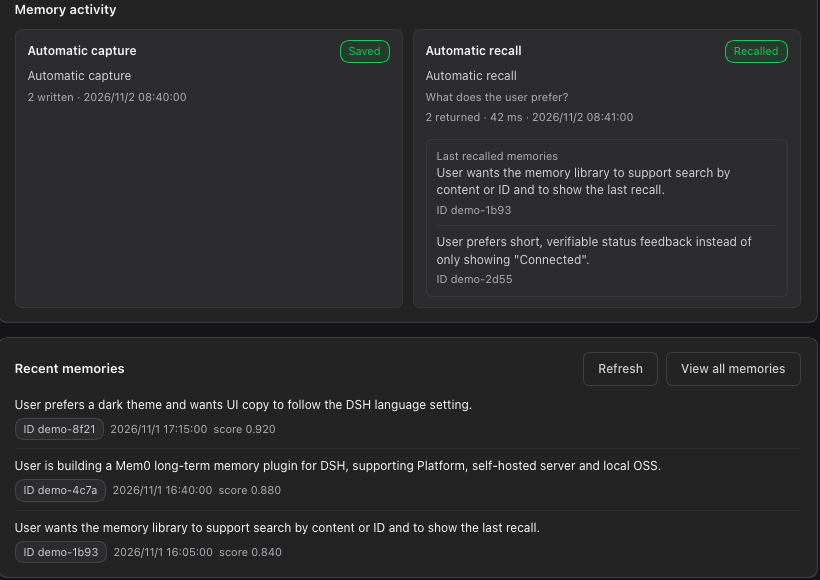
- Verifiable memory activity: the settings page shows the last automatic capture / recall status and the most recently written memories (text, ID, time); it can open a Memory library to search every memory stored for the current user. Last recalled memories shows the texts that the most recent recall actually matched.
- Foreground status icon: below the chat composer there is a hollow globe made of dots of different sizes. It rolls along a tilted direction while automatic capture/recall is active, turns light blue and keeps rolling on success, and turns red on failure. The silhouette stays circular while rolling and never squashes. It uses dark dots in light themes and light dots in dark themes.
- Bilingual UI and memory text: labels follow DSH's language setting. With
translateMemorieson (off by default), stored memory text is translated into the page language with the current DSH model, cached, and falls back to the original text when no model is available. - Security boundaries: the sidecar listens only on a random
127.0.0.1port with a random token; common secrets are redacted before capture/recall;mem0_statusnever returns the API key.
UI
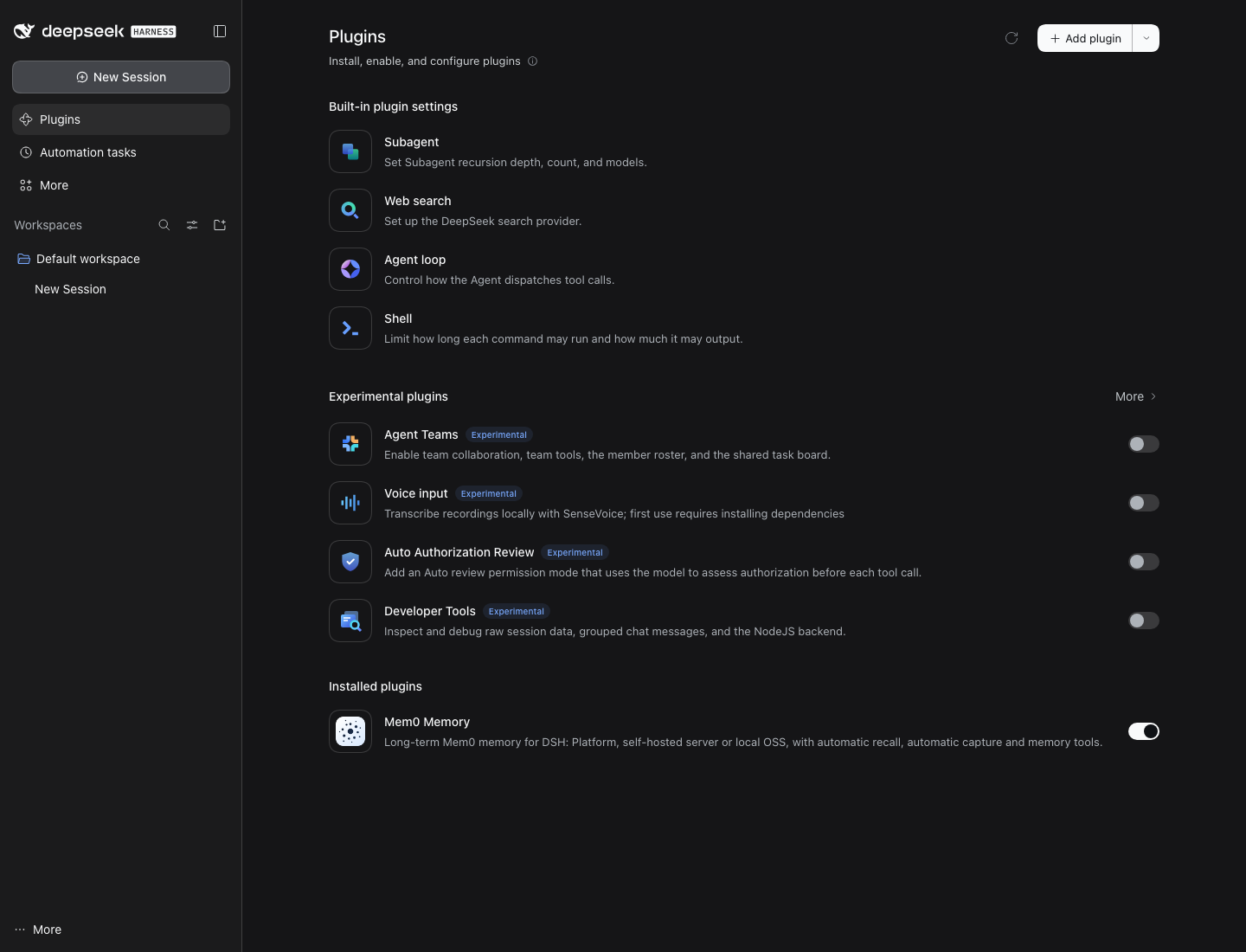
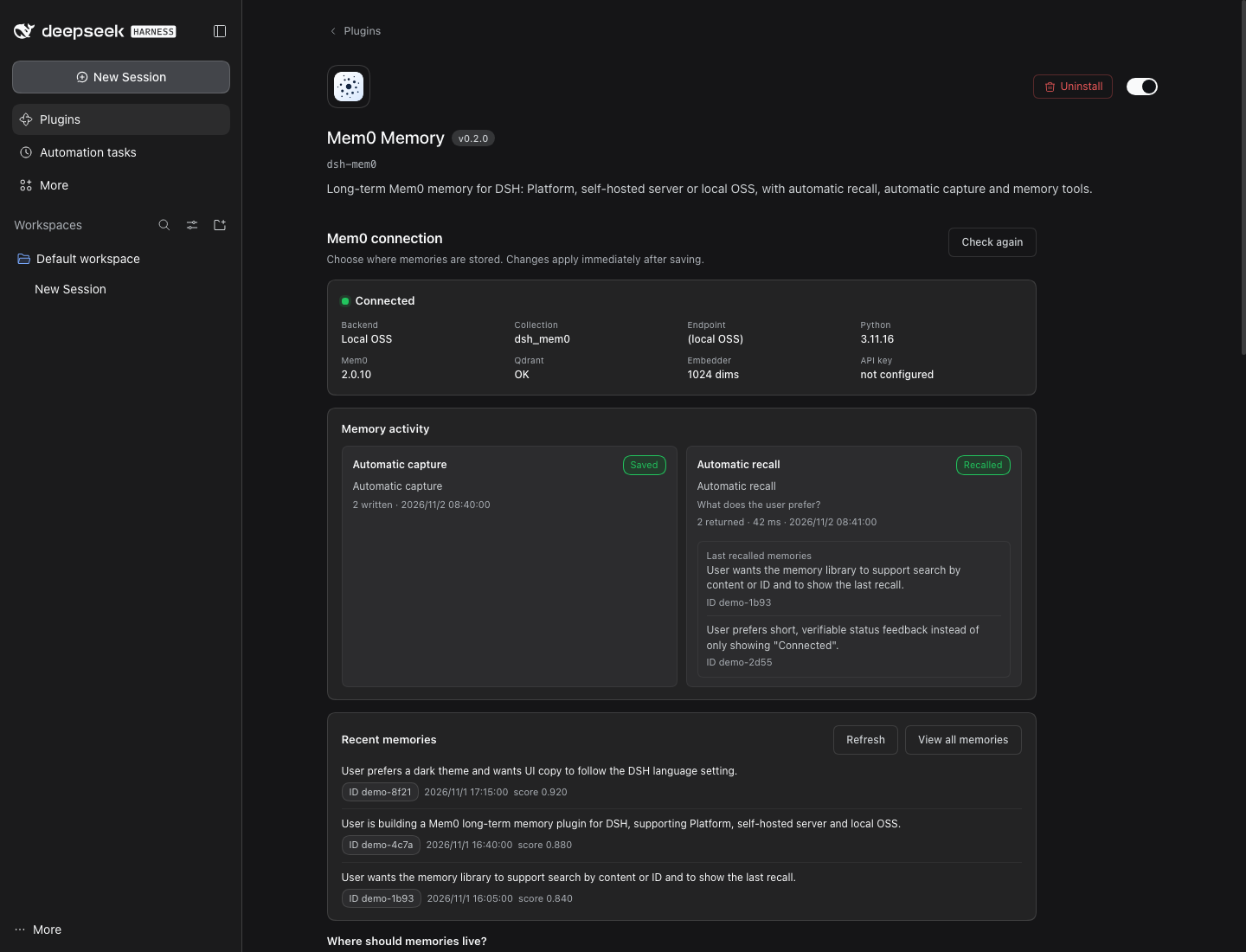
After installation, open Plugins in the DSH sidebar and open Mem0 Memory under Installed plugins. You can choose a backend, inspect live connection status and save settings directly in the bundle detail page:
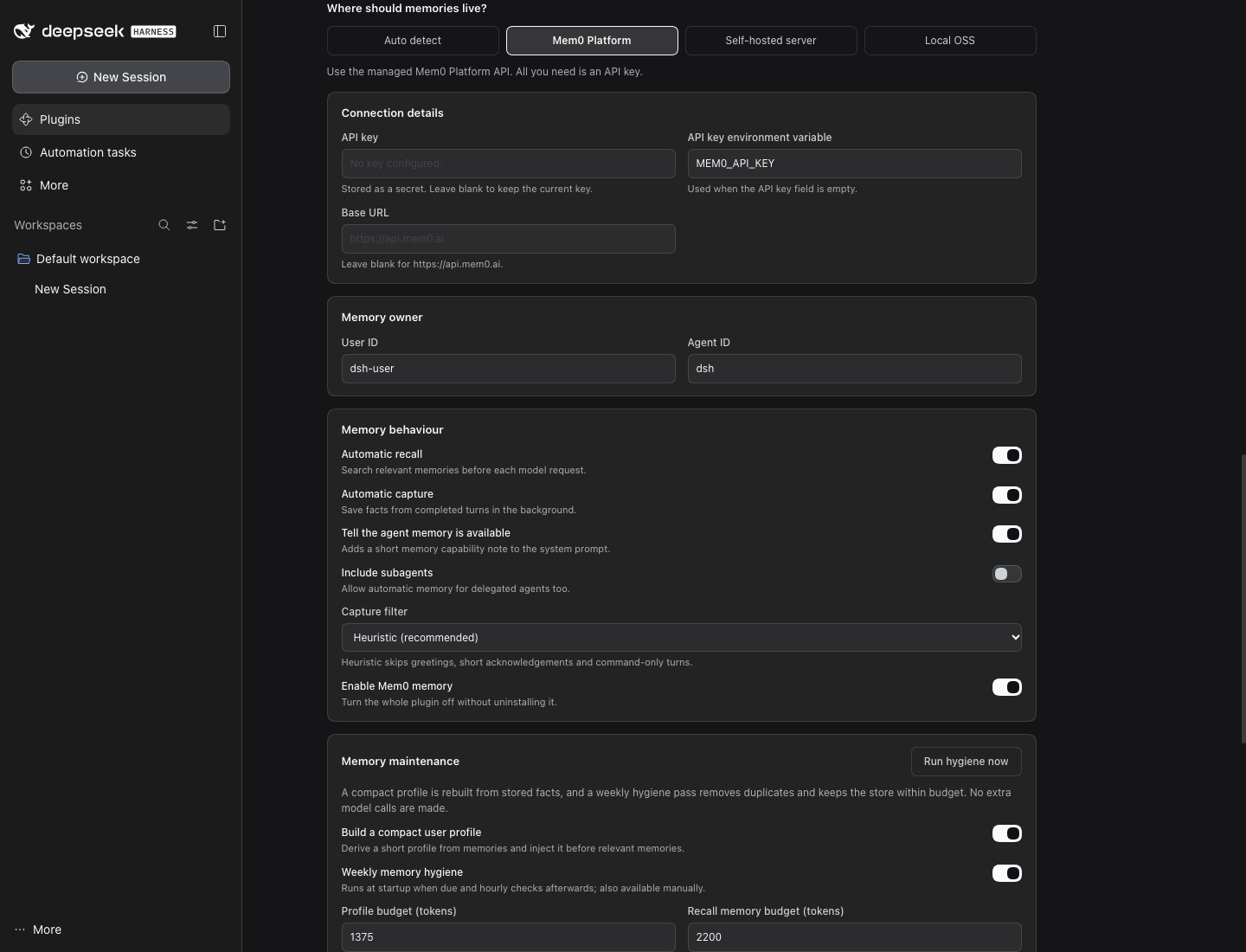
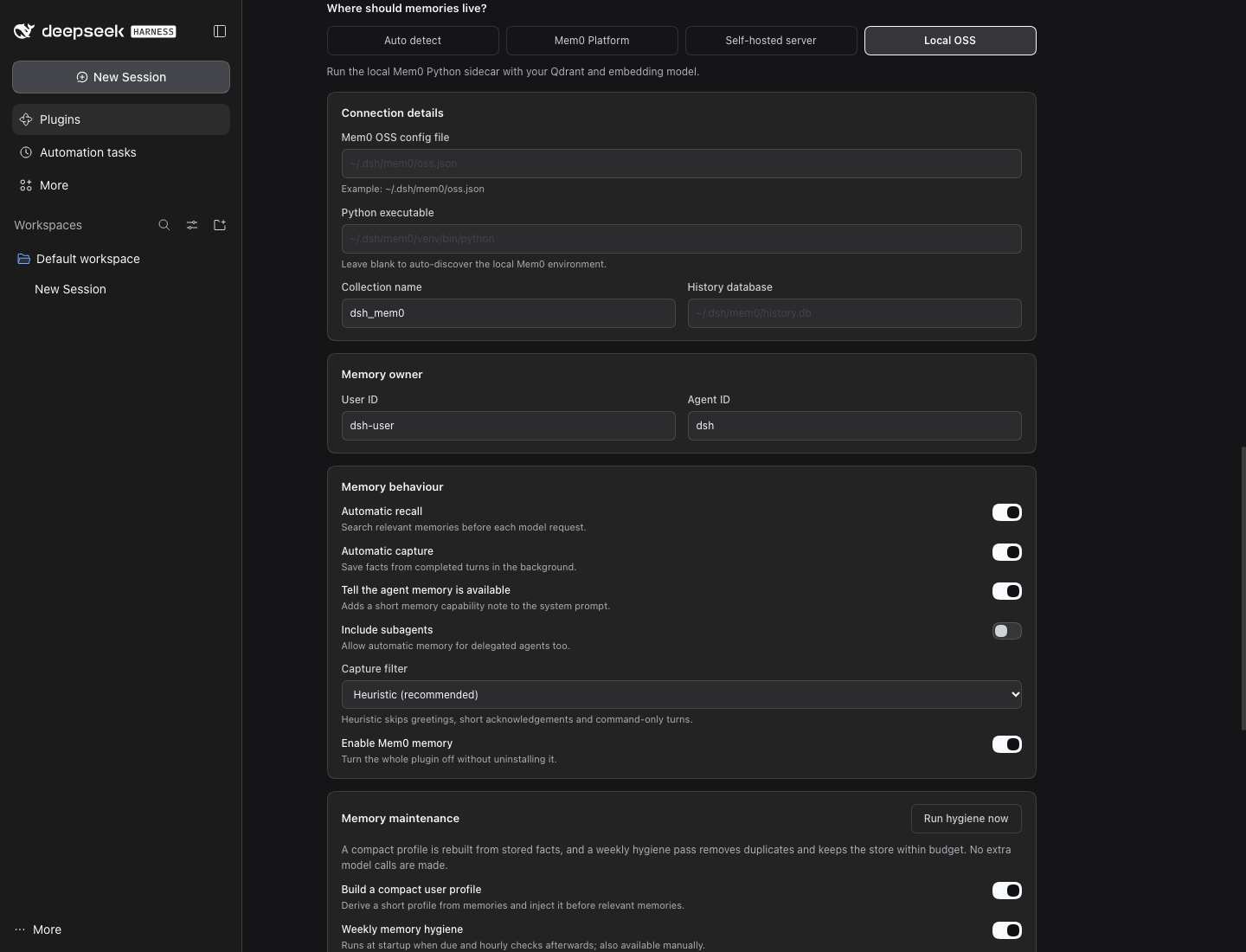
Each backend has its own fields and guidance:
The Test connection button calls the same read-only health check as mem0_status, showing the current backend, collection, Python/Mem0/Qdrant/Embedder status, and never the API key.
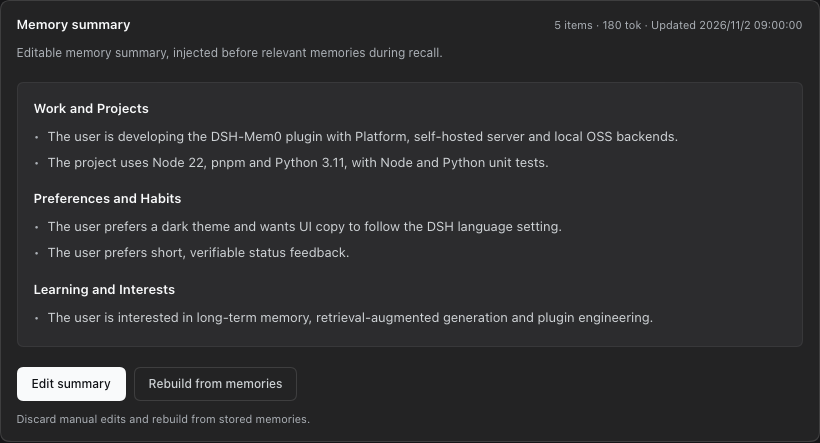
Memory summary is the editable summary injected before relevant memories. It is shown as structured sections; use Edit summary to edit it and Rebuild from memories to regenerate it from the store. Manual edits survive weekly hygiene.
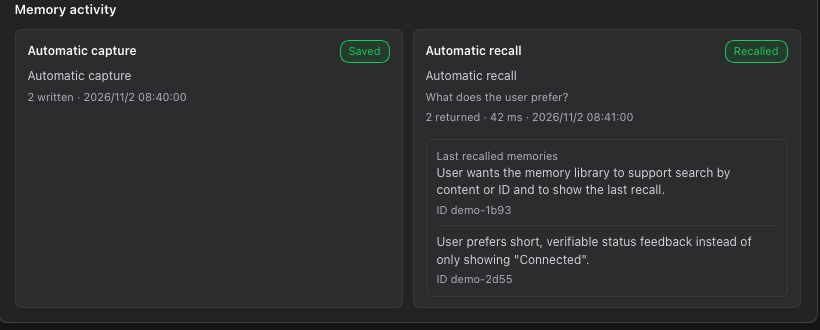
Memory activity records the latest automatic capture and recall results; Recent memories reads the backend directly and shows real memory text, ID and time. This makes it clear whether automatic capture actually worked. A capture that ran but wrote nothing (no memory added, updated or deleted) shows a grey Nothing new badge instead of the green Saved, and the composer status says Nothing new to remember. Platform and server answers that report no counts keep the Saved badge.
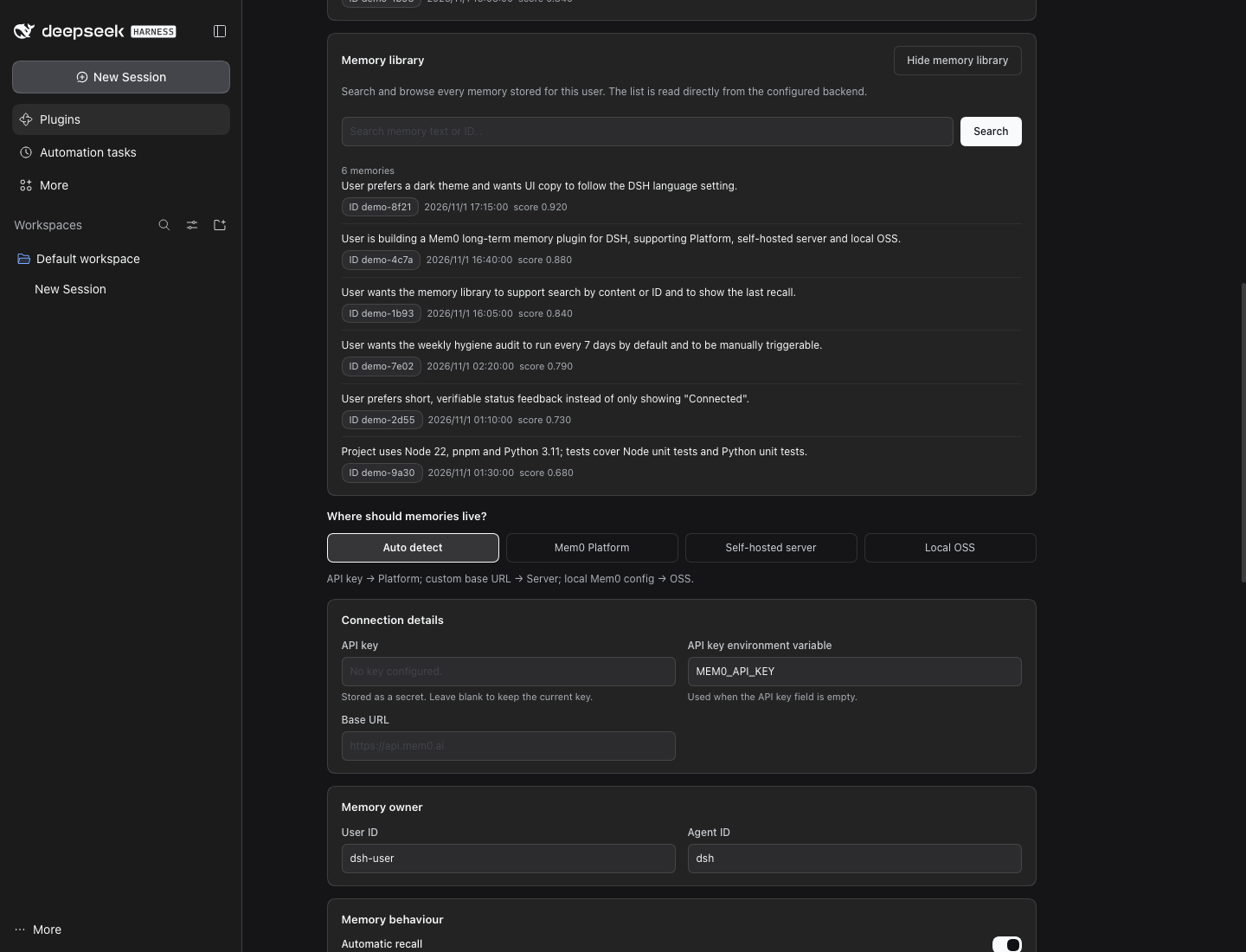
View all memories opens the Memory library, where every memory stored for the current user can be searched by content or ID. Memories this plugin wrote (metadata.source = "dsh") have a Delete button. It first shows the memory's full text and ID and asks for confirmation; only then is that one memory deleted, its cached translation dropped and the list reloaded. Memories written by other apps or for another Mem0 user have no button, and the plugin's route (DELETE /dsh-mem0/gui/memories?id=…) refuses them with HTTP 403 and the reason. There is no bulk delete, clear-all or delete-by-filter. Last recalled memories shows the texts, IDs, count and latency of the most recent automatic recall:
The Memory summary card shows the editable, structured summary that is injected before relevant memories. Save a manual version or rebuild it from the store:
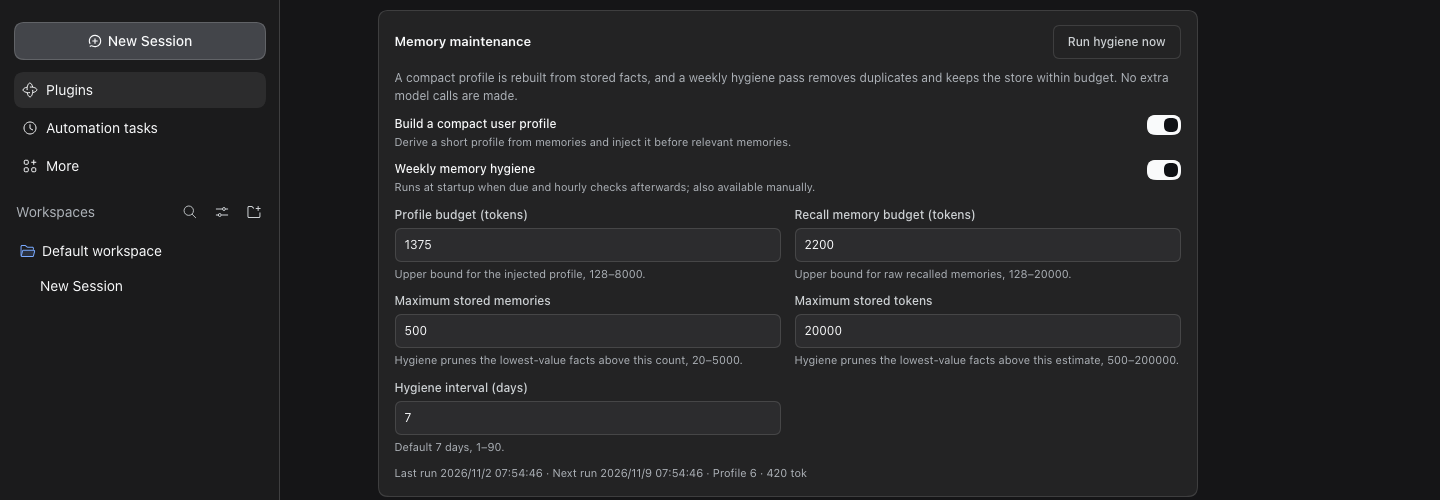
The Memory maintenance section lets you adjust the memory summary budget, recall budget, storage limits and hygiene interval, and shows the last/next hygiene time, the latest hygiene report (scanned, duplicates, pruned, deleted, failed, run time and trigger) and current memory size. Run hygiene now first computes a preview and asks you to confirm "delete N memories" before removing duplicates and over-budget memories written by this plugin; a manually edited memory summary is preserved.
The dot-matrix globe below the chat composer stays still while idle, rolls along a tilted direction while recording, and turns light blue and keeps rolling on success. The rolling animation uses a 3D projection, so the dot sphere keeps a circular silhouette and does not squash or deform; it stays still when the system requests reduced motion.
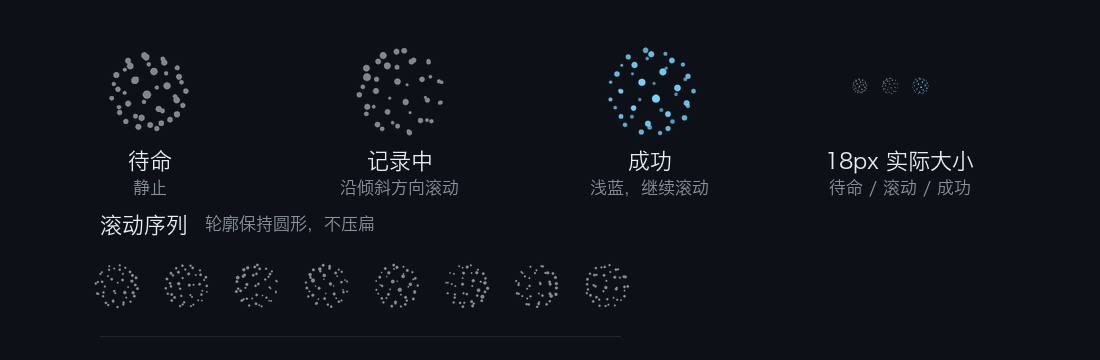
The actual status bar at the bottom of a conversation (cropped):

When Test connection succeeds, the status card shows a green Connected chip:

The UI follows DSH's language setting. When translateMemories is on (off by default, see Privacy and data), the visible memory text, memory summary and recall preview are translated into the page language with the current DSH model; otherwise, or when translation is unavailable, the original text is shown. A Chinese screenshot is available in the Chinese README.
Memory maintenance
The Memory maintenance section separates several budgets that are easy to confuse:
- Memory summary budget: upper bound for the
<mem0-user-profile>block, 1375 tokens by default. - Recall memory budget: upper bound for the
<mem0-relevant-memories>block, 2200 tokens by default. - Storage limits: maximum number of memories (default 500) and estimated tokens (default 20000) retained after hygiene.
Hygiene runs every 7 days by default and can be set to 1–90 days. It runs once at plugin startup if due, then checks hourly. It deletes only duplicates and the oldest over-budget memories, and only among memories this plugin wrote (metadata.source: "dsh", set by auto-capture and mem0_add). Memories written by other apps under the same userId are read into the summary but never deleted and do not count toward the storage limits. Until you have confirmed one manual Run hygiene now, automatic passes are dry runs: they write a report marked "Preview, nothing deleted" listing what would be deleted, and delete nothing. Each pass deletes at most 100 memories. The profile and hygiene history are stored in the current DSH profile's dsh-mem0/maintenance.json, not written back to Mem0. The latest report stays visible in the Memory maintenance card, including the scanned, duplicate, pruned, deleted and failed counts, run time and trigger; a manual Run hygiene now also returns the same counts.
The generated memory summary uses local deterministic logic without extra model calls. Facts are grouped into sections by topic. You can edit it at any time; manual edits are stored in maintenance.json and are not overwritten by hygiene. Use Rebuild from memories to return to the generated version. Section headings follow the dominant language of the memories (Chinese when most facts are Chinese, English otherwise).
To keep DeepSeek's prefix cache warm, the summary is a system-prompt section (plugin:dsh-mem0:profile) that changes only when the stored summary changes. The per-turn <mem0-relevant-memories> block is a runtime context (mem0:recall), which DSH appends next to the latest user message, so it never rewrites earlier history.
Working with context plugins
Context-management plugins (for example dsh-strata) can recognise what DSH-Mem0 injects by these names and tags. They are stable across releases; changing any of them is a breaking change, and test/interop-contract.test.js guards them.
| What | Where it goes | Name | Text starts / ends with | Changes |
|---|---|---|---|---|
| Memory summary | system-prompt section | plugin:dsh-mem0:profile |
<mem0-user-profile> … </mem0-user-profile> |
only when the stored summary changes |
| Recalled memories | runtime context, always last | mem0:recall |
<mem0-relevant-memories> … </mem0-relevant-memories> |
usually every turn |
- DSH joins all runtime contexts into one snapshot and appends it to history as a user-role message with
source.kind: "runtime-context"whenever the joined text changes. Older snapshots stay in history, so their recall blocks are stale: a context plugin can trim or drop them without a model summary and without keeping the original, because Mem0 can recall again at any time. The newest snapshot should be left alone. - The snapshot is not user input. Automatic capture only reads
user/messageevents whose source isuser, so recall blocks are never captured back into Mem0. - Capture runs on
turn/endfrom the text DSH-Mem0 buffered from that turn's events (the user messages and the final assistant reply). It does not read session history or tool output, so trimming history at the end of a turn, before or after capture, does not change what is saved. - Memory text in a recall block has forged block tags removed, so each block contains exactly one opening and one closing tag.
dsh-strata
With dsh-strata installed, the two plugins follow a shared contract:
- Shared recall budget. Before each recall, DSH-Mem0 asks Strata's optional
strataBudgetservice how many tokens the recall block may use this turn: the fullmemoryBudgetTokensnormally, half once the context passes 65% (tight), and at most 512 tokens past 75% (critical). An allowance of 0 skips recall for that turn. The block is fitted with Strata's token counter, the same one its thresholds use. Without Strata, or if the service fails or returns something unusable, recall usesmemoryBudgetTokensas before. The memory summary is never shrunk per turn: it sits in the cached system prompt, and changing it every turn would cost more than it saves.mem0_statusand the Recent activity card show the last budget, e.g.recall budget 1100 / 2200 (strata: tight). - Fold summaries as a memory source (
captureStrataFolds, off by default). When it is on, together with automatic capture, each first-level fold summary that Strata lands (strata/fold-landed, tier 1 only, main-agent sessions only) is redacted and saved through the same capture queue, with metadatasource: "dsh",via: "dsh-strata",fold,tierandsession_id, so hygiene treats it like any other capture. These are the same turns automatic capture already saved, a second time as a cleaner summary; Mem0's own inference merges repeated facts. Empty or low-value summaries are skipped. Recall blocks are never written to Strata's archive, and Strata drops stale recall snapshots instead of folding them.
Architecture
DSH Agent
  ├─ system-prompt/assemble ──┐
  ├─ session/event            ├─> Node plugin (index.js + lib/)
  ├─ mem0_* tools            ─┘        │
  │                                     ▼
  │                          backend adapter (one of)
  │                          ├─ Mem0RestClient (platform / server)
  │                          └─ Mem0SidecarClient (oss)
  │                          (shared HTTP, timeouts, circuit breaker: lib/http.js)
  │                                     │
  │                                     ▼
  │                          Mem0 Platform / self-hosted server / local Python Mem0
Installation
Install this directory through the DSH Plugin Manager (development/local install):
plugin_manager action: install_bundle
target: <absolute path to this directory>
Or use the DSH CLI:
dsh plugin --profile desktop add link:"$(pwd)"
After the package is published to npm, install it by package name:
dsh plugin --profile desktop add dsh-mem0
If DSH reports restart-required, restart DSH before verifying.
A local
link:install makes DSH show the absolute checkout path under Code source in the plugin detail page. That is install metadata from the local profile, not part of the package.npm packand registry installs contain no local paths; installingdsh-mem0from npm shows the package source instead. The published screenshots are captured so that this local-only row is not included.
Configuration
After installation, configure it visually in Plugins → Mem0 Memory in the DSH sidebar (recommended); you can also write the profile's cordis.patch.yml. Full YAML example:
- id: dsh-mem0
  name: dsh-mem0
  config:
    backend: platform
    apiKey: "your-platform-api-key"
    userId: "your-user-id"
    agentId: "dsh"
Backend modes
Platform (simplest, recommended for new users)
config:
  backend: platform
  apiKey: "your-platform-api-key"
  userId: "your-user-id"
The key does not have to be in the plugin config. Recommended: store it in DSH credentials (for example ~/.dsh/.credentials.yaml), so it never appears in the profile config:
version: 1
refs:
  MEM0_API_KEY: m0-your-key
and refer to it by name (this is the default):
config:
  backend: platform
  apiKeyEnv: MEM0_API_KEY
Lookup order: a literal apiKey in the config, then DSH credentials for the name in apiKeyEnv (the store first, then the launching environment and .env files), then the environment variable of that name. With credentials, a rotated key applies on the next request without a restart. mem0_status reports where the key came from (key source: config, credentials, env or none), never the key.
Note on
backend: auto: ifMEM0_API_KEY(or the name inapiKeyEnv) is stored in DSH credentials or set in DSH's environment,autopicks the cloud Platform even when a local OSS config exists.mem0_statusand the settings page show why the backend was chosen ("backend choice"). Setbackendexplicitly if you want a specific one.
Self-hosted Mem0 server
config:
  backend: server
  baseUrl: "http://127.0.0.1:8888"
  authType: apiKey
  apiKey: "your-server-key"
  userId: "your-user-id"
authType supports apiKey (X-API-Key), bearer, token and none (for local services with AUTH_DISABLED=true).
OSS Python sidecar (local Qdrant / bge-m3)
First prepare a Mem0 OSS config file, for example ~/.dsh/mem0/oss.json; see examples/oss-config.example.json.
config:
  backend: oss
  pythonPath: "~/.dsh/mem0/venv/bin/python"
  mem0ConfigPath: "~/.dsh/mem0/oss.json"
  collectionName: "dsh_mem0"
  userId: "your-user-id"
  # Optional: extra environment variables the sidecar may see (see below)
  # sidecarEnv: ["MY_GATEWAY_API_KEY"]
The Python environment needs:
python3 -m venv ~/.dsh/mem0/venv
~/.dsh/mem0/venv/bin/pip install "mem0ai>=2.0.10,<3" qdrant-client openai
This version does not silently install Python or Qdrant when the plugin loads, and does not modify the system Python. The settings page shows connection errors; prefer Platform, or prepare the local environment manually with the commands above. A better future flow is a guided environment check + explicit one-click venv creation in the settings page, rather than automatic execution at plugin install time.
The sidecar reads oss.llm, oss.embedder and oss.vector_store from mem0ConfigPath and overrides the collection name with collectionName; other Mem0 clients can keep using their own collections.
Fact-extraction output budget. Two keys in oss.llm.config control Mem0's fact-extraction call:
| Key | Default | Meaning |
|---|---|---|
max_tokens |
8000 (when unset) |
Output budget of each extraction call. Mem0's own default is 2000, but a hybrid reasoning model (e.g. DeepSeek V4.1 Flash) spends part of that budget on thinking; measured through magpie, 2 of 3 extractions of a 1.4K-character fold summary stopped at finish_reason=length with 2000. A value you set is always used. |
reasoning_effort |
not sent | Sent with every extraction call when set. Mem0 itself sends it only to models it knows as reasoning models (o1/o3/gpt-5), so for other models the sidecar adds it. "none" turns thinking off on gateways that support it (magpie's workbuddy/deepseek-v4.1-flash: no reasoning tokens, about 850 output tokens, roughly twice as fast). Leave it unset if your endpoint rejects the parameter. |
{ "oss": { "llm": { "provider": "openai", "config": {
  "model": "workbuddy/deepseek-v4.1-flash",
  "openai_base_url": "http://127.0.0.1:3425/v1",
  "max_tokens": 8000,
  "reasoning_effort": "none"
} } } }
When an extraction answer is still cut off (finish_reason=length), the capture is retried once with twice the output budget (up to 65536). A failed extraction records its finish_reason, output budget and prompt / output / reasoning token counts in the failure history, the Memory activity card and sidecar.log (numbers only, never text). Extraction failures (cut off, refusal, not JSON, empty) do not count toward the circuit breaker: the LLM answered, so pausing memory would not help. Only connection, timeout, auth and server failures do.
The sidecar does not inherit DSH's whole environment. It gets PATH, HOME, locale, proxy and CA-bundle variables, Python/virtualenv/Conda variables, model-cache variables (HF_*, TRANSFORMERS_*, TORCH_* …) and the provider prefixes Mem0 OSS falls back to when oss.json has no api_key (OPENAI_*, AZURE_*, ANTHROPIC_*, GOOGLE_*, GEMINI_*, AWS_*, OLLAMA_*, DEEPSEEK_*, GROQ_*, TOGETHER_*, MISTRAL_*, LITELLM_*, QDRANT_* and similar). MEM0_API_KEY and OPENROUTER_API_KEY are not passed. If your providers read a variable with another name, list it in sidecarEnv. The per-process token is sent on the sidecar's stdin, never as a command-line argument.
Legacy config locations. When mem0ConfigPath or pythonPath is not set, the plugin looks in ~/.dsh/mem0/ first. For setups that predate that folder it then also checks ~/.hermes/mem0.json and ~/.hermes/hermes-agent/venv/bin/python (read-only). New installs never need these; set the two options, or move the files into ~/.dsh/mem0/, to stop using them. The list lives in lib/legacy-paths.js.
When the sidecar is still starting (first use, or after it crashed), automatic recall skips that turn instead of waiting and the sidecar keeps starting in the background; tools and capture wait for it (startup is bounded at 15 s).
Low-spec machines (CPU-only embeddings)
Measured on a hybrid setup (cloud LLM for extraction, local bge-m3 embeddings, local Qdrant). Extraction runs in the cloud, so the local embedding model is what decides whether recall stays fast.
- Keep the embedding model loaded. Ollama unloads a model after 5 idle minutes by default. The first recall after a break then waits for a cold load: about 2.5 s for bge-m3 on an i5-13500H, longer when memory is tight. Set
OLLAMA_KEEP_ALIVE=-1(never unload) or a long value such as24hin the environment of the Ollama service. On Windows, add it as a user environment variable, then quit Ollama from the tray and start it again. bge-m3 needs about 1.2 GB of RAM while loaded. recallTimeoutMs: the default is 5000. If the model can still be unloaded (no keep-alive, or memory pressure), use 8000. A recall that times out only skips memories for that turn. Until it finishes, though, the sidecar keeps working on it, so the next recall can time out too.addTimeoutMs: the default 120000 is plenty. With a cloud extraction model, captures took under 10 s in our tests.- Embedding model: keep bge-m3 if you write in Chinese. Smaller English-centric models (
nomic-embed-text,all-minilm) recall Chinese poorly. Switching models also changes the vector size, so it needs a newcollectionName, and the old memories stay in the old collection.
All options
| Field | Default | Description |
|---|---|---|
backend |
auto |
auto / platform / server / oss |
apiKey |
empty | Platform or server API key (prefer DSH credentials, see apiKeyEnv) |
apiKeyEnv |
MEM0_API_KEY |
Name of the API key in DSH credentials, or of the environment variable |
baseUrl |
Platform: https://api.mem0.ai; server: http://127.0.0.1:8888 |
API endpoint |
authType |
apiKey (Platform is fixed to token) |
apiKey / bearer / token / none |
pythonPath |
auto-discovered | OSS-mode Python interpreter |
mem0ConfigPath |
~/.dsh/mem0/oss.json |
OSS-mode Mem0 config file |
collectionName |
dsh_mem0 |
OSS-mode Qdrant collection |
historyDbPath |
~/.dsh/mem0/history.db |
OSS sidecar local history database |
userId |
dsh-user |
Memory owner |
agentId |
dsh |
Agent identifier attached on DSH writes; recall currently filters by userId, not agentId |
autoRecall |
true |
Automatic recall |
autoCapture |
true |
Automatically save completed turns |
announceToAgent |
true |
Announce memory capability to the model |
includeSubagents |
false |
Enable automatic memory for subagents |
captureMaxChars |
450 |
Per-message truncation limit for automatic capture |
captureFilter |
heuristic |
heuristic skips low-value turns; off saves every completed turn |
recallTopK |
5 |
Number of automatic recall results |
memoryBudgetTokens |
2200 |
Token limit for the recalled-memory block, 128–20000. This is the real limit (CJK ≈ 1 token per character, Latin ≈ 4 characters per token); there is no smaller character cap |
profileEnabled |
true |
Generate and inject a compact user profile |
profileBudgetTokens |
1375 |
Token budget for the injected profile |
storeMaxMemories |
500 |
Maximum memories retained after hygiene |
storeMaxTokens |
20000 |
Estimated token limit for retained memories after hygiene |
hygieneEnabled |
true |
Enable memory hygiene |
hygieneIntervalDays |
7 |
Hygiene interval in days, 1–90 |
translateMemories |
false |
Translate memory text on the settings page with the DSH default model (sends memory text to that model) |
captureStrataFolds |
false |
Also save dsh-strata's tier-1 fold summaries (needs autoCapture and dsh-strata). A second, cleaner copy of turns already captured; see dsh-strata |
timeoutMs |
30000 |
Timeout for each backend request on every backend (Platform, server and OSS): tools, listing, hygiene. Writes and automatic recall use the two settings below |
recallTimeoutMs |
5000 |
Timeout for automatic recall, 100–60000; on timeout the turn continues without recalled memories |
addTimeoutMs |
120000 |
Timeout for storing memories (capture and mem0_add), which may run LLM fact extraction, 1000–600000 |
sidecarEnv |
[] |
OSS: names of extra environment variables passed to the sidecar, on top of the built-in allowlist |
enabled |
true |
Master switch |
Changes saved in the settings page or the profile config apply on their own: the plugin restarts itself when the loader commits new values (loader/volatile-update), so no manual reload or DSH restart is needed. With backend: auto, storing or removing the key in DSH credentials restarts it too.
Tools
| Tool | Purpose |
|---|---|
mem0_search |
Semantic search; returns [mem0:<id>] and relevance |
mem0_add |
Store one persistent fact verbatim (infer:false) |
mem0_get |
Read by ID, or list for the configured user; ownership is checked |
mem0_update |
Update text by ID; ownership is checked |
mem0_delete |
Delete one memory by ID; no bulk delete/reset |
mem0_status |
Check backend connection and storage status |
mem0_profile_get |
Read the editable memory summary |
mem0_profile_update |
Replace memory summary text; empty clears it |
mem0_profile_reset |
Rebuild memory summary from stored facts |
Tests
pnpm install --ignore-scripts
npm run check   # node --check on every .js/.mjs/.cjs file
node --test     # tests that need a local port skip with a reason where binding is not allowed

# Python tests: config building and the HTTP handler (fake service, no mem0ai needed)
PYTHONPYCACHEPREFIX="$PWD/.pycache" \
  python3 -m unittest discover -s python/tests -v

# Real local OSS smoke test (creates and deletes a temporary Qdrant collection)
node scripts/smoke-sidecar.mjs
Privacy and data
What leaves this machine
| Backend / feature | Sent | To |
|---|---|---|
| Platform | Captured conversation text (user and assistant messages, redacted and truncated; with captureStrataFolds, also redacted dsh-strata fold summaries with metadata via, fold, tier), recall queries, userId/agentId, metadata source, channel, session_id |
https://api.mem0.ai (or your baseUrl) |
| Server | The same | Your self-hosted Mem0 server |
| OSS | The same, via a loopback-only sidecar | The LLM, embedder and vector store in your oss.json; if those are cloud APIs (e.g. OpenAI), the text goes there |
Memory translation (translateMemories, off by default) |
Memory text shown on the settings page, up to the full list when the memory browser opens | DSH's current default model, which may be a cloud model |
The working directory is not sent. With backend: auto, an inherited MEM0_API_KEY alone selects the Platform; check "backend choice" in mem0_status or the settings page.
What is stored locally
<DSH profile>/dsh-mem0/maintenance.json(mode 0600): the memory summary text and hygiene reports. Reports keep only memory ids, counts and reasons, not the text of deleted memories.<DSH profile>/dsh-mem0/failures.json(mode 0600): the last 20 memory failures (time, kind, backend, cause, failing component, duration, short message). Messages are redacted and shortened before they are stored: no API keys, tokens, memory text or home-directory paths. Delete the file to clear the history.<DSH profile>/dsh-mem0/sidecar.log(mode 0600, OSS backend only): the sidecar's stderr plus its start and exit events (exit code or signal, uptime). Each line is redacted before it is written (keys, tokens; home-directory paths shortened to~). LLM answers are never logged (only their length and how they start), and Mem0 warnings that quote memory or message text are scrubbed. Capped at 512 KB, with one rotated copysidecar.log.1. Delete both files to clear it.<DSH profile>/dsh-mem0/translation-cache.json(mode 0600, only when translation is on): memory text and its translation in plain form. Entries are dropped when a memory is deleted throughmem0_deleteor hygiene; memories deleted elsewhere stay until the cache evicts them (2,000 entries max). Delete the file to clear it.- OSS mode:
historyDbPath(~/.dsh/mem0/history.db) and the Qdrant data of your OSS setup.
Other notes
- In Platform/server mode, memories are stored by the corresponding service; read that service's privacy and retention policy.
- In OSS mode, memories are stored in the Qdrant/embedder/LLM services you configure.
autoCaptureis enabled by default; set it tofalseif you do not want automatic saving. The defaultcaptureFilter: heuristiconly skips clearly low-value turns; common secrets (API keys such assk-,tvly-,AIza…, JWTs,Bearertokens, passwords in URLs,password=/密码:phrasing, private keys) are still redacted before writing, but regular expressions are not a substitute for full secret management.- Weekly hygiene deletes duplicates and over-budget memories written by this plugin, and only after you have confirmed one manual run. Deletion is real and there is no recycle bin; if you want full manual control, set
hygieneEnabled: false. The profile is still built when missing, but memories are not automatically deleted. - The sidecar listens only on loopback, with a random port and random token; the token reaches the sidecar on stdin (not visible in
ps), and the sidecar gets an allowlisted environment rather than all of DSH's;mem0_statusnever returns the API key.
Marketplace notes
- Package name:
dsh-mem0,private: false, withdsh.bundleanddsh-pluginkeywords. - Marketplace inclusion requires a public GitHub repository, the
dsh-plugintopic, a repository at least 1 day old, and adata/plugins/<owner>__<repo>.ymlentry inawesome-dsh-pluginwith categorymemory. - The repository is linked through
repository/homepage:https://github.com/light-cheng/DSH-Mem0. It includesscreenshots.jsonwith eight marketplace screenshots, plus localized sets underassets/screenshots/(Chinese) andassets/screenshots/en/(English). The market readsscreenshots.jsonfrom this repository; only the plugin YAML is submitted to awesome-dsh-plugin. - The plugin ships a visual settings page (
dsh.client+plugins.bundle.config). A GUI is not required for listing, but this plugin provides one so users can configure all three backends and test the connection right after installation. - OSS mode depends on external Python/Qdrant/embedding services; the README states this clearly and does not describe the plugin as "zero dependencies".
Release notes
Release notes are bilingual with English first: RELEASE.md.
License
MIT.
No comments yet. Be the first to write one.