model-failover-manager
DSH 插件:把 composer 的模型选择位换成带「路由分组」的选择弹窗,并在模型彻底失败后自动切换到组内下一个可用模型。依赖 dsh-llm-error-retry,并在弹窗里内嵌它的「错误重试」页签——一次安装即可用。
界面里叫「模型故障转移」。设置入口:设置 → 模型故障转移。
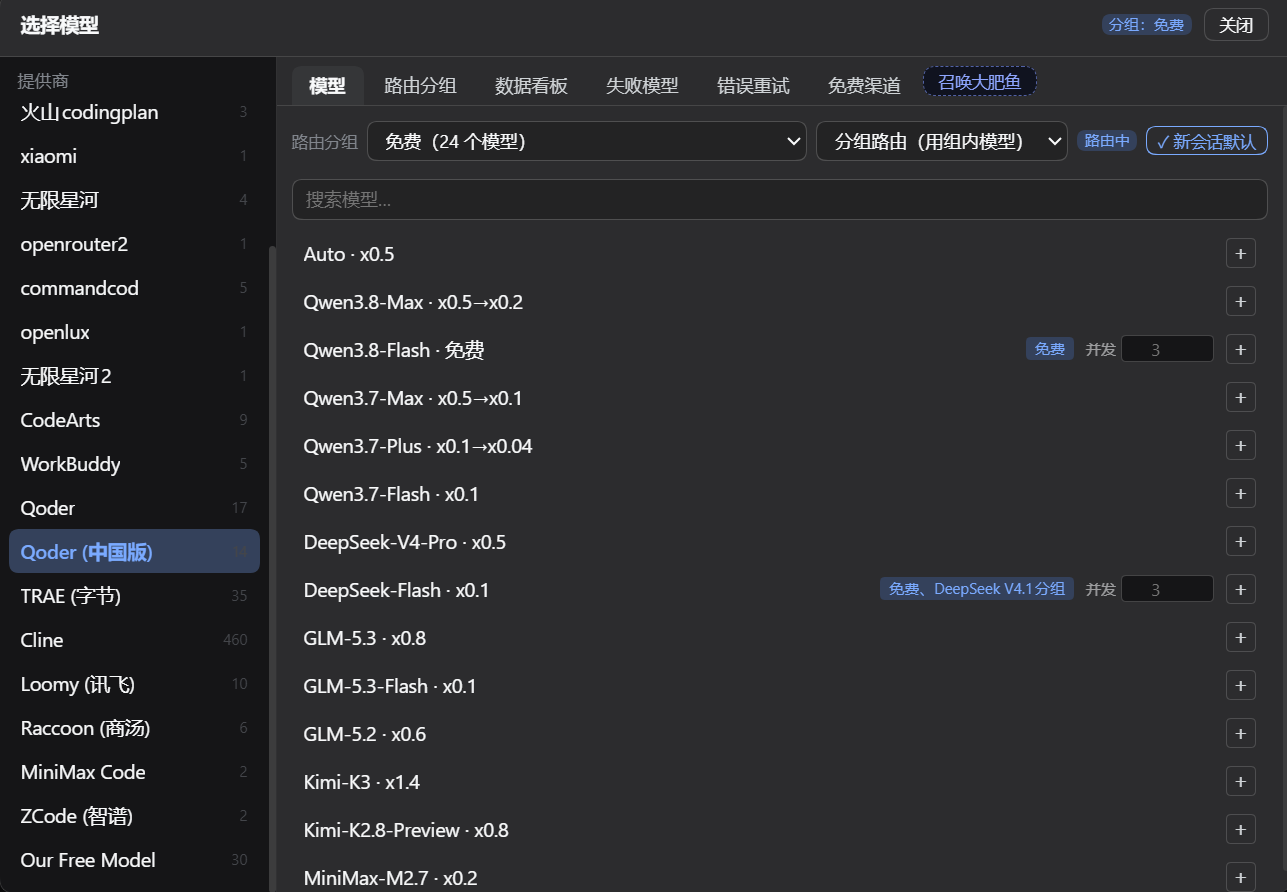
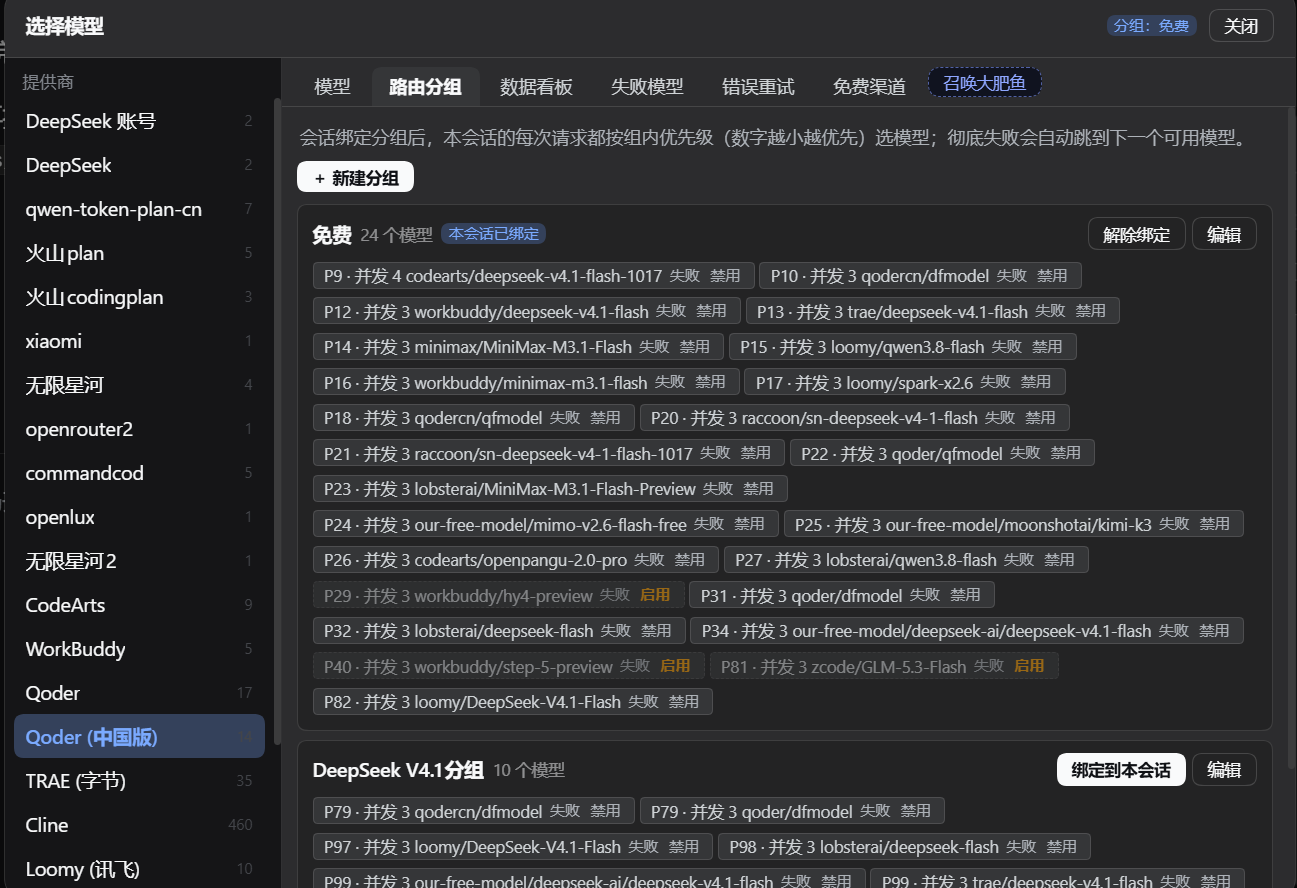
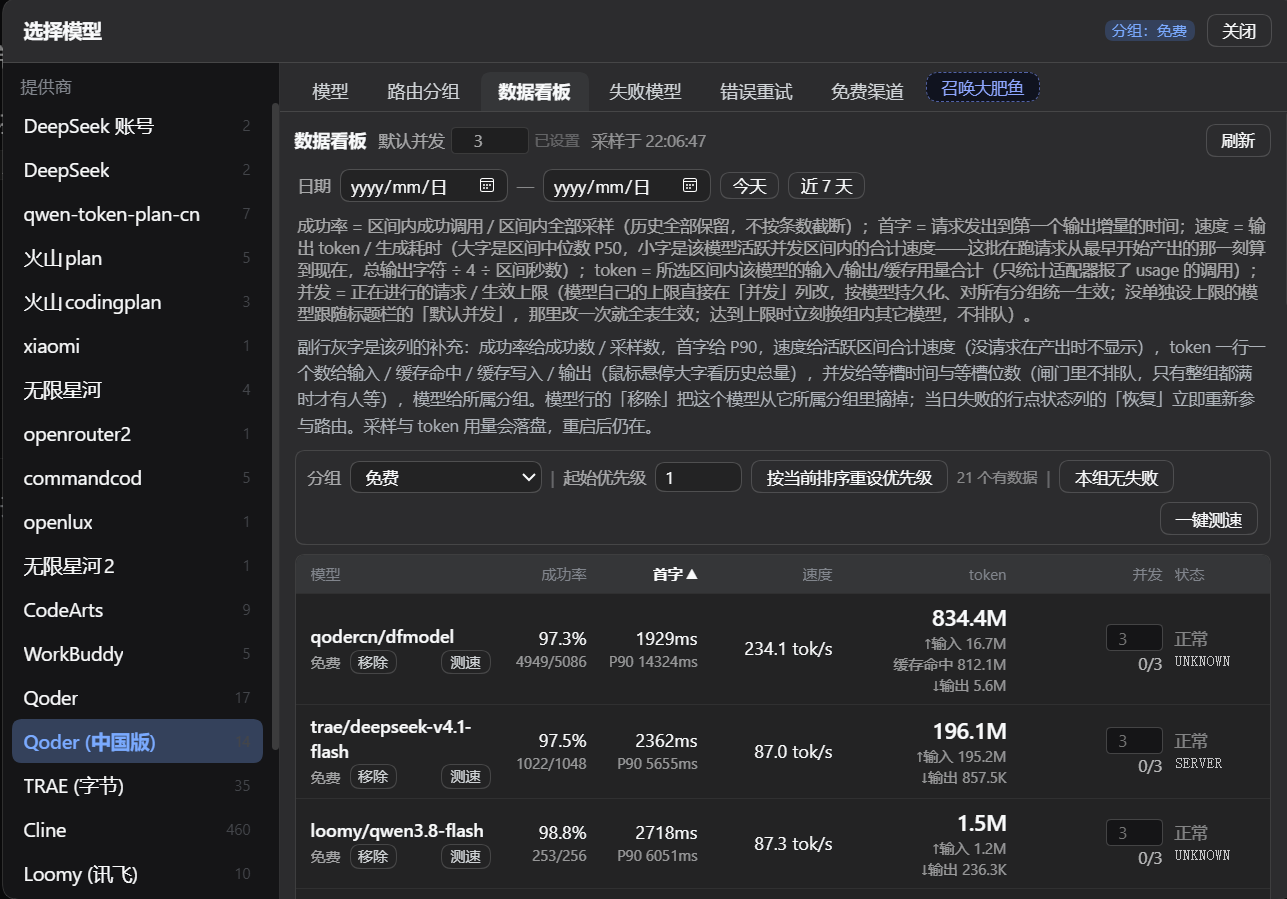
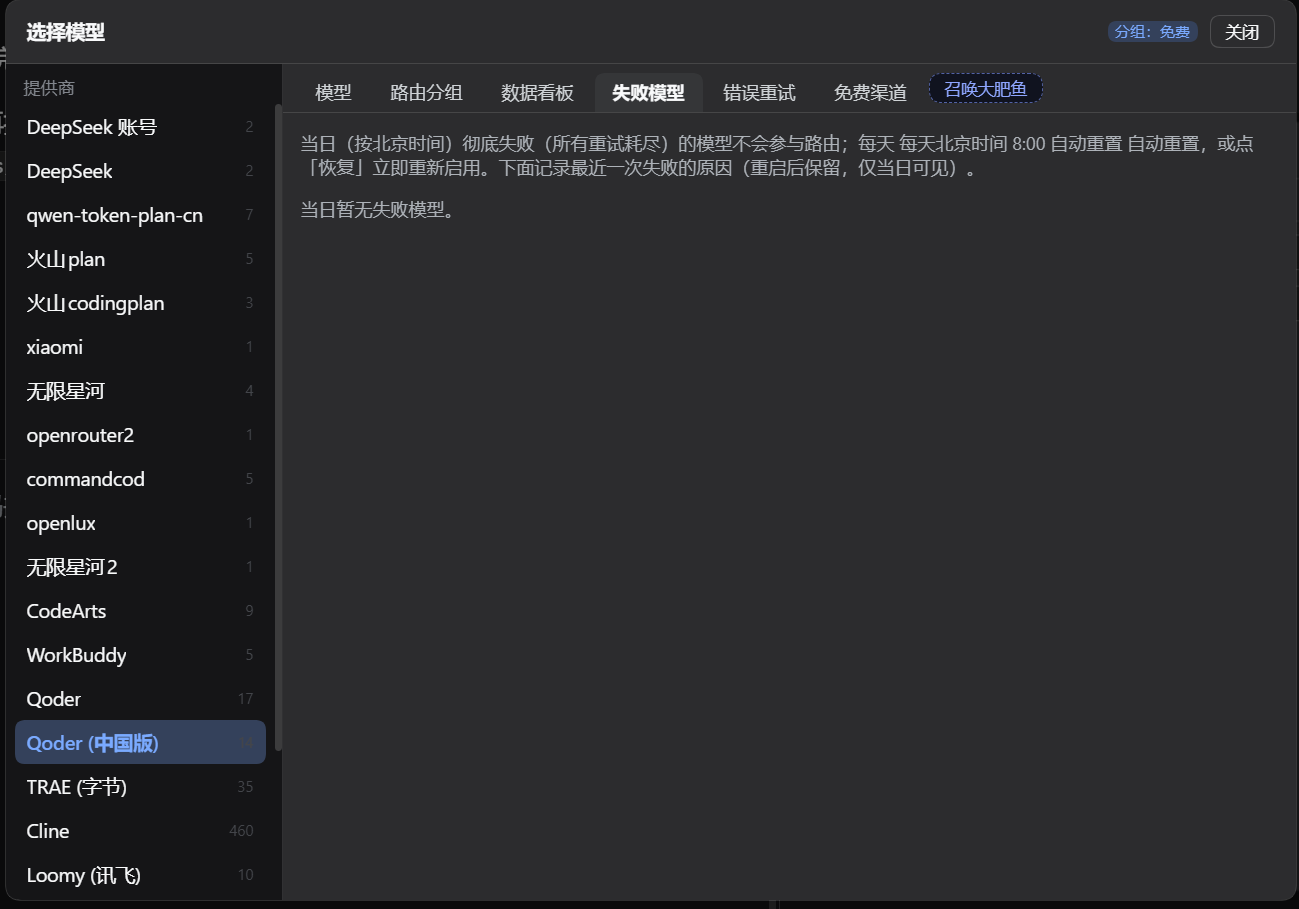
弹窗六个页签,按排障时的动线排列:
| 页签 | 做什么 |
|---|---|
| 模型 | 左栏供应商、右栏模型,点 + 加进分组;顶部选路由分组、绑定模式与「新会话默认」 |
| 路由分组 | 每组一份有序模型清单(数字越小越先试),可配生效时段与截止日,就地用 ↑ ↓ 调优先级、✕ 移出分组,逐个开关失败/禁用 |
| 数据看板 | 每个模型的首字延迟、输出速度、token 用量、并发现场、成功率;可一键测速、按当前排序重设优先级 |
| 失败模型 | 当日彻底失败的模型与最近一次失败原因,逐个或一键全部恢复 |
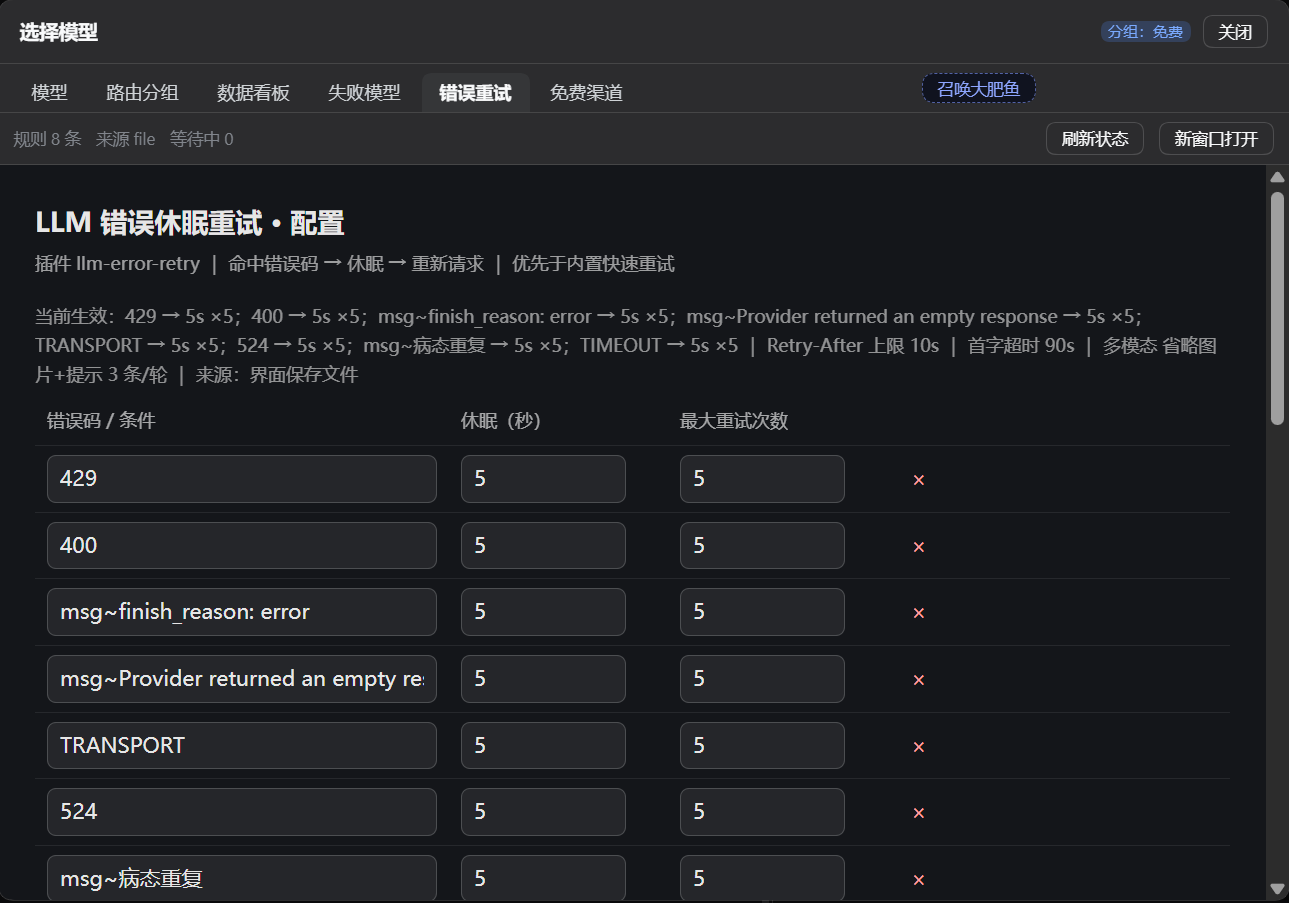
| 错误重试 | 内嵌 dsh-llm-error-retry 自己的配置页,保存即生效 |
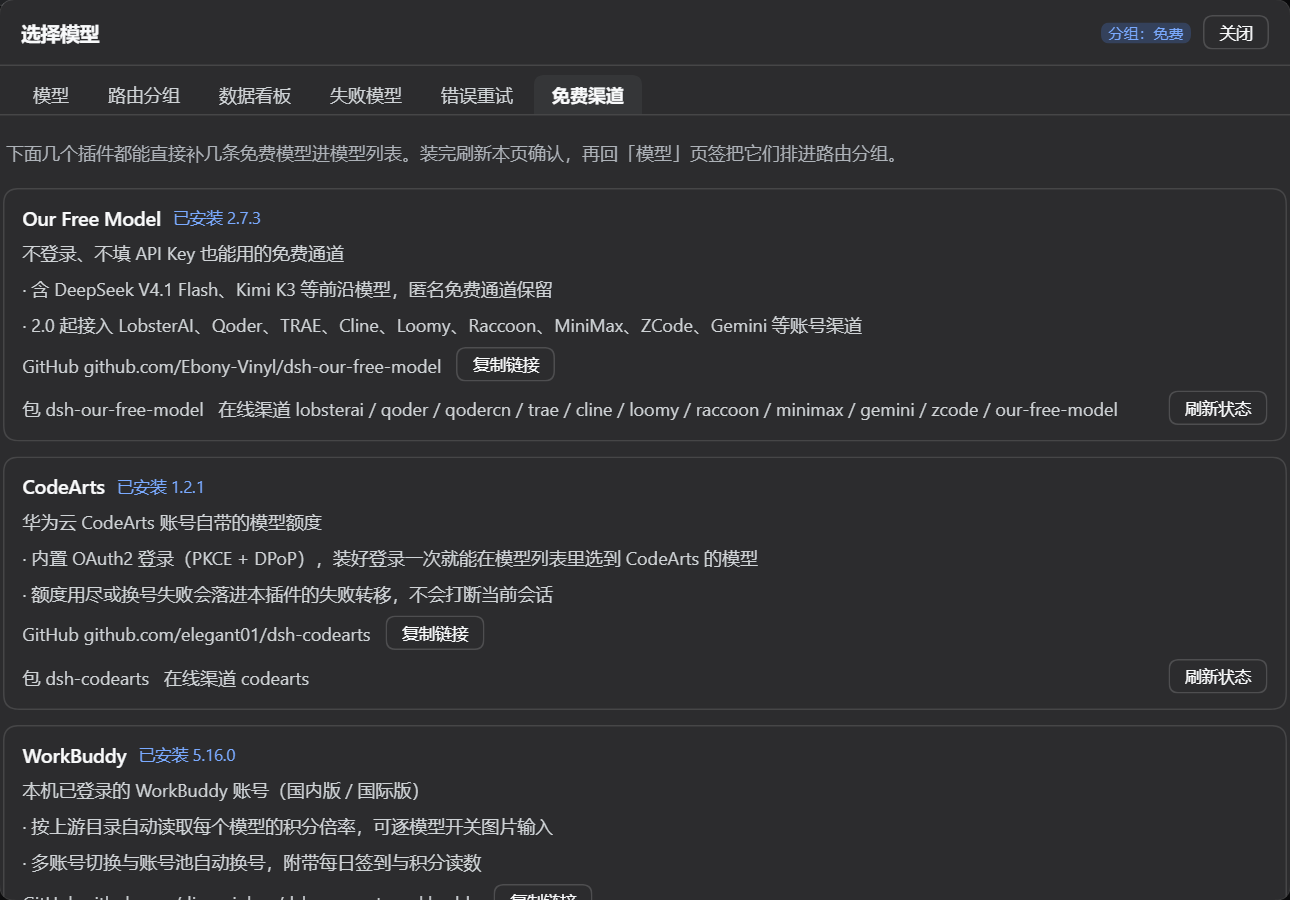
| 免费渠道 | Our Free Model / CodeArts / WorkBuddy / Trae / Qoder / Providers Hub 六个能直接补免费模型的插件,带 GitHub 地址与一键安装(Our Free Model 排第一张,Providers Hub 排最后一张) |
界面
它做什么
- 接管模型选择位:以
priority: -1注册conversation.input.model,遮蔽内置选择器。- 「弹窗模式」为左右分区弹窗(左:供应商,右:模型),右侧含「模型」「路由分组」「数据看板」「失败模型」「错误重试」「免费渠道」六个页签;「错误重试」整块留给重试插件自己渲染的配置页,「免费渠道」整块放推荐卡片(两者都让出左栏)。新装默认开启。
- 关掉后是紧凑下拉,一屏只列十几个模型,没有分栏与页签。
- 触发按钮显示 供应商 · 模型名 · 思考强度;已绑定分组时另有一个分组徽标。
- 路由分组:可建多个分组,每组是一份有序模型列表(
priority决定尝试顺序)。组内每个模型块上都可就地调顺序:↑ ↓ 把它在清单里上移/下移一位(只交换这两个条目的priority,其它模型的数字保持原样),✕ 把它移出本分组(删掉这一条,别的分组、时段、截止日都不受影响;要加回来去「模型」页签)。- 每个模型可配生效时段:多段,两端包含(
from与to都算在时段内),from > to表示跨午夜(如 22 → 6)。 - 每个模型可配截止日,过期后不再参与路由。
- 时段未配置、为
null或空字符串,一律视为「全天」。
- 每个模型可配生效时段:多段,两端包含(
- 两种绑定模式
route:用绑定分组里的模型(会实际改变会话当前模型)。failover:保持会话当前模型,只有它彻底失败后才兜底切到组内下一个。
- 失败后自动续跑:监听
agent/request-error,以 prepend 注册并先await next(),因此一定是在所有重试策略都表态放弃之后才接手。接手后标记失败、切换到组内下一个可用模型,并自动续跑,不用你重发。- 两条入口都接:
agent/request-error(流开起来后以 error/aborted 结束)与agent/error(请求还没发出就抛,例如UNKNOWN_MODEL、适配器同步报错)。任一条处置过的轮次,另一条按turn认出并跳过,不会一次失败连跳两个模型——所以本插件不依赖「自己恰好是最外层」这个前提,内层重试插件即使短路了整条瀑布链,失败仍会从agent/error那条入口被路由出去。 - 续跑不是「同一轮内重试」:新版 dsh 在**步骤准备(pre-step)**时就把本步用于请求的
provider/model/effort固定下来,agent/request已废弃,在那里改模型会让宿主直接报错并让整轮崩掉。所以失败后切换走agent.model.select()(写一条 durablemodel/selection,从下一个步骤生效),并在该会话回到idle后补一条续跑消息开下一轮。
- 两条入口都接:
- 每轮健康检查:每次发消息(驱动器刚启动、尚未进入
pre-step的窗口)都判定一次「这个会话此刻要用的模型现在还能不能用」——仍可用就保留(不覆盖你手选的模型),只有它此刻在分组内不可用(被标记当日失败、超出北京时间时段、过了截止日)才切到组内下一个可用模型;当前模型压根不在分组里时不插手。判据都是「此刻」的,时段与截止日随时间变化、失败标记会被重置或过期。 - 子代理继承路由(默认行为):「子代理跑什么模型」由宿主在创建时决定——它把父会话请求头里的
provider/model/effort复制成子代理的 AgentOptions。本插件不写任何选择去覆盖它,所以子代理天然继承父会话当前实际在用的模型(父会话切到组内第 2 个,子代理也跑第 2 个,不会被拽回第 1 个)。分组绑定同样沿session.header.parentSession向上继承;只有继承来的模型此刻不可路由(已失败/不在时段/过截止日)时才按组内优先级换一个。 - 子代理可单独选模型/分组:子代理会话的资源位里同样能换模型、绑分组,选中即只作用于该子代理(走
agent.model.select(),不经宿主对子代理一律拒绝的sessionController.selectModel);它的分组选择不参与「新会话默认分组」。 - 默认分组:新会话(startup/clear)自动沿用上次的选择(分组 + 模式);
resume/compact不动,尊重旧会话既有选择。 - 在分组里直接停用模型:路由分组页签里每个模型块都带两个开关——「失败」把它标记为当日失败(与自动失败共用同一份记录:日界线到期、会话成功一轮、或点「恢复」都会解除,
code=MANUAL),「禁用」则把它持久挡在所有分组之外(写进分组条目的disabled字段,不随日期恢复,只由你手动「启用」解除)。两者互不覆盖:routable()先判禁用再判失败。 - 失败模型记录:按「使用日」记录失败模型(北京时间,日界线默认早上 8:00,见
failResetHour),同时保存失败原因(错误码 + 最近一次错误信息)。在弹窗的「失败模型」页签里可展开查看原因,也可逐个或一键全部恢复。到日界线自动过期;会话成功完成一轮也会立即恢复对应模型。所有时间口径固定按北京时间计算,与宿主机时区无关。 - 压缩旁路守卫(
compactionGuard):billion-context生效时,qoder/qodercn这类走 WASM 加密端点的 provider 拿不到任何上下文压缩;插件把这类 provider 降为分组里的兜底候选,并在/status里标出被降级的模型与此刻正跑在无压缩链路上的会话。见「与 billion-context 的配合」一节。 - 交还控制权:你手选模型、解绑分组或删除分组后,插件即不再接管该会话的模型。
- 换账号只对 Our Free Model 的模型生效:少数历史上的渠道退役后账号还留在该插件的池里,因此「池里有这个 provider 的账号」不等于「这个 provider 归它管」。
codearts(由dsh-codearts提供、账号由它自己的池管理)默认不在换号范围内,失败直接走分组路由,见ofmHandoffExcludeProviders。
与 Our Free Model 的配合
若失败的模型属于 dsh-our-free-model 提供的渠道,插件会先尝试换账号,而不是直接换模型:
- 不论错误类型,只要该模型还有别的可用账号,就换账号重试一轮;账号试完仍失败才交给分组路由换模型。
- 换号通过给账号写一个池级冷却标记实现,让该渠道适配器下次选号时跳过刚失败的账号。
- 插件不读取也不修改该渠道的凭据;只通过它注册的
accountPool服务调用getAvailableAccount/updateModelRateLimit/listAccountsByProvider。 - 未安装该插件时,这段逻辑静默跳过。
- 「属于哪个插件」由
ofmHandoffExcludeProviders决定,而不是由池里有没有账号决定:池是按 provider 字符串存的持久表,渠道退役后账号条目仍在,只看账号会把别的插件提供的模型也卷进换号流程(例如codearts的 429 被当成换号,冷却一个本次没用到的账号,还挡掉了本该发生的分组路由)。默认排除codearts。
六个免费渠道插件的 provider 前缀
「免费渠道」页签里的六个插件都会往宿主 llm 注册 provider,其中好几个用同名 id:qoder、qodercn、trae、cline、loomy、raccoon、minimax、zcode、gemini、codearts、workbuddy …。宿主的 llm 注册表对同一个 provider 只允许一个 adapter(packages/llm/llm/src/index.ts 的 prepareRoutes 会抛 DUPLICATE_ADAPTER,且整组 all-or-nothing),后注册的一方要么撞错,要么被 registerAdapterIdempotent 静默吞掉——两条路都表现为「装了但模型没出现」。
方案是每个插件一个 provider 前缀,用插件名各单词的首字母:
| 插件 | 前缀 | 真实注册表里的 id |
|---|---|---|
dsh-our-free-model |
ofm- |
ofm-qoder、ofm-trae … |
dsh-codearts |
ca- |
ca-codearts |
dsh-connect-workbuddy |
cw- |
cw-workbuddy |
dsh-connect-trae |
ct- |
ct-trae |
@dmh2002/dsh-connect-qoder |
cq- |
cq-qoder |
dsh-providers-hub(Providers Hub;旧名 dsh-codearts-auth) |
caa- |
caa-codearts、caa-buddy … |
- 前缀加在真实注册表侧,由 llm 门面在 cordis 的
isolaterealm 内provide llm时拼上。插件自身代码一行都不改:它内部那些硬编码的裸 id 表照旧,门面对它呈现裸 id,对真实注册表呈现带前缀的 id。 - id 和显示名一起加前缀:门面把
providerInfo的 name 与设置页目录的displayName一并翻成ca-CodeArts/ofm-Qoder这种形态(幂等:已带本前缀的名字原样返回,套两层门面不会变成ca-ca-CodeArts)。只加 id 不加名字,界面里会出现并排的两个 "CodeArts"——模型选择器拿group.provider.name当分组标题,设置页拿entry.displayName当行标题,两处都只看名字。 - 界面里 provider 会显示成
ca-CodeArts这种(模型页签、看板、日志都是注册表 id 与注册表名),而分组文件、配置、失败表里始终是裸 id(codearts)——两者由本插件换算。 - 目录注册的
replace也要翻译:渠道插件会在设置变更时用directory.replace(…)重发整张目录(dsh-connect-workbuddy的syncRegionRegistration就是),门面在返回的 handle 上包了一层 translate,否则一次设置变更就会用裸 id 把带前缀的那份覆盖掉。 - 未打门面的插件仍是裸 id。只有部分插件装了门面时,注册表里会同时存在裸
trae与ofm-qoder这种混合视图,本插件两种都认。 - 未打门面时的命名冲突依旧存在(那是部署问题,不是本插件能绕开的):见下面「门面部署」两行。
门面部署(写在 $DSH_HOME/cordis.patch.yml)
每个渠道一行门面条目(在自己的 realm 里 provide llm)+ 该渠道 Loader 条目的一行 isolate(把它关进同一个 realm)。前五个渠道各 2 行,codearts-auth(Providers Hub)那条要多隔离 11 个服务名(见本节末),合计 22 行。home 层最后应用,能覆盖 profile 与插件自带的 patch:
# 每个渠道:一行门面(自己的 realm)+ 一行 isolate(把自己的条目关进同一个 realm)
- insert:
    - id: mfm-prefix-ofm
      name: ./plugins/model-failover-provider-prefix/llm-prefix-facade.mjs
      isolate:
        llm: mfm-ofm
      config:
        prefix: ofm-
- id: our-free-model
  isolate:
    llm: mfm-ofm
- insert:
    - id: mfm-prefix-ca
      name: ./plugins/model-failover-provider-prefix/llm-prefix-facade.mjs
      isolate:
        llm: mfm-ca
      config:
        prefix: ca-
- id: llm-codearts
  isolate:
    llm: mfm-ca
- insert:
    - id: mfm-prefix-cw
      name: ./plugins/model-failover-provider-prefix/llm-prefix-facade.mjs
      isolate:
        llm: mfm-cw
      config:
        prefix: cw-
- id: dsh-connect-workbuddy
  isolate:
    llm: mfm-cw
- insert:
    - id: mfm-prefix-ct
      name: ./plugins/model-failover-provider-prefix/llm-prefix-facade.mjs
      isolate:
        llm: mfm-ct
      config:
        prefix: ct-
- id: trae
  isolate:
    llm: mfm-ct
- insert:
    - id: mfm-prefix-cq
      name: ./plugins/model-failover-provider-prefix/llm-prefix-facade.mjs
      isolate:
        llm: mfm-cq
      config:
        prefix: cq-
- id: qoder
  isolate:
    llm: mfm-cq
- insert:
    - id: mfm-prefix-caa
      name: ./plugins/model-failover-provider-prefix/llm-prefix-facade.mjs
      isolate:
        llm: mfm-caa
      config:
        prefix: caa-
- id: codearts-auth
  isolate:
    llm: mfm-caa
    # 以下 11 个必须一起隔离,原因见本节下一条
    lobsteraiAuth: mfm-caa
    qoderAuth: mfm-caa
    qodercnAuth: mfm-caa
    traeAuth: mfm-caa
    clineAuth: mfm-caa
    loomyAuth: mfm-caa
    raccoonAuth: mfm-caa
    minimaxAuth: mfm-caa
    zcodeAuth: mfm-caa
    geminiAuth: mfm-caa
    accountPool: mfm-caa
- 每个渠道的两行必须同时存在,label 必须一致。 只加门面 = 多一个空 realm;只 isolate 不给门面 = 该插件拿不到
llm,模型全部消失。 - 这些是 Loader 条目的
id,不是包名。 本机当前实际值:our-free-model(dsh-our-free-model)、llm-codearts(dsh-codearts)、dsh-connect-workbuddy(dsh-connect-workbuddy)、codearts-auth(dsh-providers-hub,旧名 dsh-codearts-auth);trae/qoder两行要等对应连接器装上后才存在。改包名(dsh-providers-hub)不影响这一行;id一旦改掉或写错,isolate就落在了别的条目上——宿主只出一条 warning,插件照样启动,但那个渠道的模型会全部消失。 - 每个渠道用自己的 label(
mfm-ofm、mfm-ca…),不要与别的插件共用。 - 渠道插件本身必须真的在跑,这行 isolate 才有意义。 Loader 只创建 profile 的
dsh.profile.bundles列表里那些包带来的条目;没列进去的包,它自带的cordis.patch.yml连 compose 都不参与,- id: <条目>就成了一条打空的 warning(宿主只 warn 不报错)。所以启用dsh-providers-hub(Providers Hub,旧名 dsh-codearts-auth)要改两处:profile 的package.json里dsh.profile.bundles加上它,再把 profilecordis.patch.yml里的- id: codearts-auth+disabled: true去掉。两处必须同批改。 - ⚠️ 门面条目必须放在没有
dsh.client声明的独立包目录里。client-modules按包名归并 bundle:门面文件所在的包一旦在package.json里声明了dsh.client.platform,就会被算成「同名包的另一个 client bundle」,与真正带 client 的那个包互相覆盖,宿主直接启动失败——这是上次把 DSH 搞崩的直接原因。所以那个包的package.json只有private+type: module+main/exports,不含任何dsh字段。 - ⚠️
dsh-providers-hub(旧名dsh-codearts-auth)还要额外隔离 11 个 cordis 服务名,否则会连带打死 Our Free Model 的渠道。 这两家不只撞 provider 名,还撞 cordis 服务名:两边都用super(ctx, \${product.id}Auth`)各自注册lobsteraiAuth、qoderAuth、qodercnAuth、traeAuth、clineAuth、loomyAuth、raccoonAuth、minimaxAuth、zcodeAuth、geminiAuth和accountPool这 11 个。cordis 的provide对同名服务直接抛service "" has been registered at <...>(vendor/cordis/src/reflect.ts:302-305),谁先装载谁占名;后装的一方在自己apply的第一句就抛,整个聚合包(channels pack)的 apply 中断 ⇒ 它的十条渠道 adapter 一条都不会注册 ⇒ 那个插件在模型页签里彻底消失。实测就是「装了 Providers Hub,Our Free Model 的 qoder/trae/cline … 全不见」。把上面那 11 个服务名连同llm一起塞进codearts-auth条目自己的 realm,两边就能并存(已实测同屏共存:ofm-*11 条 +caa-*27 条)。**这 11 个名字来自两家当前版本的实现,任一方升级后需要重新核对**(对法:grep -n "super(ctx" dsh-providers-hub/lib/*-auth.js(装旧包名时看同名目录)与 OFMvendor/channel-pack/pack.js里各家id的Auth` 后缀)。 - 本插件对两种视图都做了归一,全部换算集中在
provider-prefix.mjs:bareProvider()剥前缀(失败计数、并发、容量冷却、速度采样、ofmHandoffExcludeProviders、免费渠道认领都按裸 id 记账),providerEquals()做渠道等价(裸 id 与自己的前缀等价、不同插件的前缀互不等价),liveProviderIdOf()在真正下发给llm时换回注册表此刻认识的 id(按ofm- → ca- → cw- → ct- → cq- → caa-的顺序试,即免费渠道卡片顺序)。装卸门面不需要改用户数据。 - 怎么确认生效:
/api/model-failover/free-channels里每张卡片认领到的都是带自己前缀的 id,/status.allModels里仍是裸 id;模型页签与设置页的提供商行显示的是ca-CodeArts这种带前缀的名字(读llm.listProviders()的name与llm.listConfigurableProviders()的displayName)。改了门面代码要重启 DSH 才生效——模块只在启动时 import 一次。
与 dsh-codearts 的配合
dsh-codearts 有一个已知的失败模式,本插件会兜住:报「429 没有可用账号」,但账号和积分都正常。
它的 chatCompletions 里,pool.pick() 从第一次就返回 undefined 时一个上游请求都不会发出去,直接回这句 429 —— 真实含义是「本地池挑不出号」。而它的账号池只有 coolUntil(冷却,成功或到期可清)和 disabled(停用,没有任何清除路径);disabled 由 session_dead 写入,而它的 classify() 把 HTTP 401 和 403 都判成 session_dead —— 上游偶发一次 403(临时凭证临期、并发上限、权益校验)就让该号永久停用,两个号都撞上后池彻底变空,此后每次请求都是这句 429,直到重启宿主。
本插件的处置:识别这句固定文案 → 重启承载 dsh-codearts 的 Loader 条目(entry.fiber.restart(),让它重新 apply、重建账号池;不写配置、不改 cordis.yml、不重启整个宿主)→ 等它的 provider 重新注册回 llm 注册表 → 同一步重试(selection 没变,retry 安全)。30 秒冷却防抖;自救失败时不把模型标成「当日失败」,也不切模型,只记一条诊断。
CodeArts 凭据镜像(原 dsh-codearts-resign-bridge 已并入)
billion-context(bili)改写请求体之前必须用当前账号的 AK/SK 重算签名,而它只按入站请求里的 AK 去 credentials 的 ref 里挑匹配的那份。CodeArts 的 AK/SK 随刷新轮换,静态 ref 里的副本很快过期,于是签名对不上 → 403 signed_request_requires_resign → 该账号被标 disabled → 最终又冒成「429 没有可用账号」。这一层原先是独立插件 dsh-codearts-resign-bridge 的活,现在由本插件直接做,那个插件可以卸掉(装两个不会跑两份,但也没必要)。
- 候选 ref 从哪来:
$DSH_HOME/jet-hub/state.json里 provider 为codearts且未禁用的记录,按出现顺序取credentialRef;不足时用codeartsResignBridgeFallbackRefs补齐。这里只读状态文件,不碰任何凭据内容。 - 写什么:每
codeartsResignBridgeIntervalSeconds(下限 10 秒)读$DSH_HOME/.codearts-accounts.json(dsh-codearts自己的账号库,唯一持有可刷新凭据的一方),把每个未过期账号写成 bili 认识的access_key_id/secret_access_key/security_token/expires_at,各自写进对应的 ref。多账号必须分别镜像:bili 会按 AK 挑匹配的那份,只镜像一个号时另一个号的请求只能拿到错误凭据重签而 401。 - 没变化就不写:内容与上一轮相同就跳过写入,所以稳定的账号不会每 10 秒刷一次磁盘,只有 CodeArts 侧轮换那次才落盘。
- 缺东西时不硬来:没有
credentials服务(dsh-credentials未装载)或没有可用账号时不动手,只把原因写进现场(skipReason),日志压成「首次一次 + 之后每 10 次一次」。 - 怎么调:设置页有「CodeArts 凭据镜像」开关、间隔输入框与「立即同步」;
POST /resign-bridge/sync也能量外触发一轮。间隔越短,轮换后「用旧 AK 签出来的请求被上游判 401」的窗口越小——10 秒是可设的最小值。
闸门:镜像健康 ≠ bili 能用
bili 的候选 ref 完全由 jet-hub/state.json 决定:它只读这个文件,并跳过 enabled === false 的记录。于是存在一个很隐蔽的失败形态——用户在 Jet Hub 里关掉 codearts 供应商(一次动作同时写账号 enabled:false、providerClosed.codearts:true 和模型黑名单),候选清单随之清空,bili 在转发前直接回 403 signed_request_requires_resign。
坑在于:这一层有 fallbackRefs 兜底,镜像永远会成功——mirroredRefs、accountCount、lastError 全都健康,而 bili 一个 ref 都枚举不到。用户看到的是一句「本地代理拦下了这条签名请求」,照提示去查凭据只会白忙(凭据其实新鲜且已镜像)。
所以本插件把闸门单独读出来,而不是靠镜像成功去推断:
- 看得到:
/status.resignBridge.gate与/status.codeartsSelfHeal.gate回{closed, accountsTotal, accountsDisabled, seeableRefs, staleRefs}。seeableRefs就是 bili 真正枚举得到的数量,为 0 即必然拒收。闸门开合变化时打一条 warn/info,同一形态只报一次。 - 自愈只在真失败后触发:关掉供应商是用户的显式决定,若在 10 秒一轮的镜像里自动打开,等于插件不认用户的意图。只有真实请求已经被 bili 拒掉(403
signed_request_requires_resign且闸门见seeableRefs === 0)才自愈:经 Jet Hub RPCprovider.setEnabled重新打开该供应商(同时清掉providerClosed、模型黑名单与账号停用位),再重同步一轮凭据镜像,然后同一步重试。自愈有 60 秒冷却,避免和用户反复拉锯。 - 走 RPC,不碰文件:
jet-hub/state.json是运行中进程的内存快照整体回写目标,外部改它会被下一次保存静默覆盖(实测过一次:手改磁盘后宿主一落盘就回到关闭态)。RPC 同时写内存与磁盘。认证用自签的浏览器会话 cookie——/api的 cookie 是 HMAC 自包含令牌,密钥就在本机凭据库,插件能自己签,不需要人工登录或重启。
与 dsh-llm-error-retry 的配合
「所有重试耗尽后才换模型」里的重试由 dsh-llm-error-retry 负责,本插件不重写它的规则引擎:
- 一次安装两件:
package.json的dependencies声明了它,装本插件时会一并装上;本插件的cordis.patch.yml又同时插入它的 Loader 行。两件都做是因为它虽然声明了dsh.bundle,但作为传递依赖不会被自动选中——profile 只给直接依赖里声明 bundle 的包自动加行,所以缺了那一行就是「装上了但没生效」。 - 配置在同一个弹窗里:弹窗的「错误重试」页签直接内嵌它的配置页(同源
/llm-error-retry,用iframe而不是重写一份编辑器)。规则表、首字超时、Retry-After上限、最大续写这些的编辑与保存都在它自己的页面里完成,保存即生效(写$DSH_HOME/llm-error-retry/rules.json);本插件只探测它有没有挂载,没挂载时给出安装提示和「重新探测」。分开写一份表单会变成同一份规则两套说法,校验、生效时机、落盘位置都会各说各话。 - 重复安装不会跑两份:两条安装路径(本插件带进来的、以及单独装它的)插入的 Loader 行都用同一个
id: llm-error-retry。Loader 的条目按id存放,同id的多行只合成一个条目(后出现的那行生效),所以两个插件都在的 profile 里仍然只有一个重试实例——一次失败不会被两条重试链各重试一遍。行里的name写裸包名dsh-llm-error-retry,由 profile 的node_modules解析,与哪种路径装进来的无关。 - 它在路由前面:重试先跑完才轮到本插件换模型(见「失败切换的判定过程」),所以给
400这类「换个模型才有意义」的错误配规则会拖慢切换——在「错误重试」页签里放宽或删掉那条规则即可。 - 数据各管各的:本插件写
$DSH_HOME/model-failover-manager/,重试规则与等待状态在$DSH_HOME/llm-error-retry/。
免费渠道推荐
弹窗的「免费渠道」页签列六个「装上一登录就多几条免费模型」的插件,顺序固定、Our Free Model 排第一张(不登录、不填 Key 就能用,其余五条都要登录本机账号),每个卡片带一句定位、两条事实、GitHub 地址(一键复制)与安装状态:
| 渠道 | 包 | 提供什么 |
|---|---|---|
| CodeArts | dsh-codearts |
华为云 CodeArts 账号自带的模型额度,内置 OAuth2 登录(PKCE + DPoP) |
| WorkBuddy | dsh-connect-workbuddy |
本机已登录的 WorkBuddy 账号(国内版 / 国际版),按上游目录读每个模型的积分倍率,支持多账号换号与每日签到 |
| Trae | dsh-connect-trae |
本机已登录的 Trae 账号,国内版 / 企业版 / 国际版各注册一个 provider;附每日签到与积分读数,企业版默认关闭 |
| Qoder | @dmh2002/dsh-connect-qoder |
Qoder(通义灵码)账号额度,只需一个 PAT(pt- 开头),支持多账号池、每日签到与自动换号;国内版 qoder 与国际版 qoder-global 可同时启用 |
| Our Free Model | dsh-our-free-model |
不登录、不填 API Key 的免费通道,含 DeepSeek V4.1 Flash、Kimi K3 等;2.0 起接入 LobsterAI、Qoder、TRAE、Cline、Loomy、Raccoon、MiniMax、ZCode、Gemini 等账号渠道 |
| Providers Hub | dsh-providers-hub |
一个插件接入二十多家免费渠道的账号(华为云 CodeArts、腾讯 CodeBuddy、有道 LobsterAI、Qoder、TRAE、Cline、MiniMax、智谱 ZCode、Gemini、Accio、讯飞 AStudio 等),登录一次就在模型列表里多出该渠道的模型;带多账号池、静默续期与本地 OpenAI 兼容网关 |
六个插件合计覆盖 23 个第三方平台 —— 去重后的并集,一个平台只算一次。下面 23 行就是全部;第三列说明它由哪几张卡片提供(Qoder 三张卡片都能接,这里也只占一行):
| # | 平台 | 由哪些卡片提供 |
|---|---|---|
| 1 | Qoder(通义灵码) | Our Free Model、Qoder、Providers Hub |
| 2 | TRAE(字节) | Our Free Model、Trae、Providers Hub |
| 3 | 华为云 CodeArts | CodeArts、Providers Hub |
| 4 | WorkBuddy | WorkBuddy、Providers Hub |
| 5 | Cline | Our Free Model、Providers Hub |
| 6 | 有道 LobsterAI | Our Free Model、Providers Hub |
| 7 | 讯飞 Loomy | Our Free Model、Providers Hub |
| 8 | 商汤 Raccoon | Our Free Model、Providers Hub |
| 9 | MiniMax Code | Our Free Model、Providers Hub |
| 10 | 智谱 ZCode | Our Free Model、Providers Hub |
| 11 | Gemini Code Assist | Our Free Model、Providers Hub |
| 12 | 腾讯 CodeBuddy | Providers Hub |
| 13 | OpenCode | Providers Hub |
| 14 | OfficeAce | Providers Hub |
| 15 | 阿里 Accio | Providers Hub |
| 16 | 讯飞 AStudio | Providers Hub |
| 17 | AutoClaw(智谱) | Providers Hub |
| 18 | 魔搭 ModelScope | Providers Hub |
| 19 | 七牛云 Qiniu | Providers Hub |
| 20 | Codely(Unity) | Providers Hub |
| 21 | MonkeyCode | Providers Hub |
| 22 | 百智云 | Providers Hub |
| 23 | 超级麦吉 MagiCrew | Providers Hub |
「40 多条路由」是同一批渠道的另一种数法:路由按注册表 provider id 数,同一平台的国内版 / 国际版 / 企业版各占一条(Our Free Model 1 + 10、CodeArts 1、WorkBuddy 2、Trae 3、Qoder 2、Providers Hub 28 = 47 条),去重后仍落在 23 个平台上。一个平台被两个插件同时提供是常态:专用连接器装了那些 id 就归它,没装则留给聚合渠道,同一时刻只算一处。
其中只有 Our Free Model 内置的匿名通道免登录;其余五条都要求你已有对应平台的账号(或本机已登录它的桌面客户端),插件只是把那份额度接进 DSH。桌面端另有 EAC 协付渠道。
装完之后它们提供的模型就和别的模型一样出现在「模型」页签里,可以排进路由分组——本插件的失败切换与「与 Our Free Model 的配合」里的换号逻辑对它们同样生效。
一键安装走插件市场的同一个引擎。 按钮调的是宿主的 pluginManager.installBundle(spec),也就是插件市场(dshmarket)和执行 dsh plugin add 时用的那条路径,本插件不自己跑 pnpm、不自己改 profile 清单。三条边界:
- 不代批构建脚本。 装包需要执行安装/构建脚本时,宿主返回待批准项;页签只把这件事原样显示出来(
pendingBuilds),批准与否由你在插件管理里决定。 - 状态是现场的。 「已安装 / 未安装」读
pluginManager.listBundles()里该 profile 的依赖,在线渠道读llm注册表现场算——装了但没登录时,卡片会显示「已安装」而「在线渠道」为空,这两个本来就该分开看。 - 推荐表是固定的六条。 候选写死在宿主半的
FREE_CHANNELS(包名、安装 spec、provider 匹配),介绍文案与 GitHub 地址写在client.js的FREE_CHANNEL_COPY。加一条要两边同时改;宿主不认识的新 id 不会出现在页签里。
Trae 与 Qoder 这两条是专用连接器,与 Our Free Model 内置的同名渠道(它也接 Trae、Qoder 账号)撞号。归属按现场状态定:专用连接器装了就由它认领这些 provider id(ct-trae / cq-qoder 这种带自己前缀的,或未打门面时的裸 trae / qoder),没装则留给聚合渠道——所以只装 Our Free Model 时,那些 id 仍会算在它那一张卡片上,不会凭空消失,也不会两张卡片重复计数。
认领按注册表原始 id 计数(不是按裸名去重):打了门面后 ofm-qoder 与 caa-qoder 是两条不同的在线路由,会同时出现在各自的卡片上;同一张卡片里 ofm-qoder 与裸 qoder 并存也照列。判定归属时先用渠道自己的前缀剥裸名(channelBare),别的插件前缀下的 id 不参与本渠道的归属——所以 caa-codearts 归 Providers Hub,不会被算成 dsh-codearts 的那张卡片。
Providers Hub 是第二个聚合渠道,认领顺序是专用连接器(codearts / workbuddy / trae / qoder)在前,然后聚合渠道按推荐表顺序认领——Our Free Model 先、Providers Hub 后,所以 Our Free Model 仍拿大头,Providers Hub 只拿没人认领的那些。它自己的 provider 正则不含 codearts 与 workbuddy,这两个裸名因此仍只算在各自的专用卡片上:装没装 Providers Hub 都不影响那两张卡上的「在线渠道」。而它自己前缀下的 id(caa-codearts、caa-buddy…)无论正则怎么写都归它——前缀本身就是归属声明,不需要靠在正则里再列一遍。
Providers Hub 的安装 spec 用插件市场里这条的包名 dsh-providers-hub(GitHub 地址指向上游 iJetLi/dsh-providers-hub 仓库;市场页给的安装命令是 GitHub 源,这里走 npm 同名包,pnpm 装 profile 时更快、也能锁版本)。该包 0.2.0-rc.11 起从 dsh-codearts-auth 改名,npm 上两个包名同发同版本、各自 tarball 的 cordis.patch.yml 都写自己的包名,所以两种都装得上;宿主除 pkg 外还记了 legacyPkg,老 profile 里装的是旧名也照样报「已安装」,不会提示你再装一份。
已知不足:这一页只负责「装上」,登录、扫码、账号池这些各自的引导在它们自己的界面上。Our Free Model 的安装 spec 走 npm 包名——npm 上的版本比 GitHub 主干旧一些,但 GitHub 源要拉 83MB 的仓库 tarball,而且 pnpm 每次安装 profile 都会重拉一遍,GitHub 慢的时候整个插件市场的更新都会被拖过上限,所以这里不用它。想装最新 GitHub 版本就手动 dsh plugin add github:Ebony-Vinyl/dsh-our-free-model,但要清楚这个代价。
与 billion-context 的配合
billion-context(bili)在 DSH 里是唯一的上下文压缩器:它一生效,bili-compaction-gate 就把宿主自带的 compaction-basic 置为 disabled。而 bili 的原生通道只改写它认得的模型端点——/chat/completions、/v1/messages、/completions、/responses、/conversations 与 Gemini 的 /models/<name>:<method>,其它 POST 原样直发、不压缩。
qoder / qodercn 的推理走 WASM 加密端点 POST /algo/api/v2/service/pro/sse/agent_chat_generation?Encode=1:正文由 WASM 加密,Authorization 是 WASM 生成的 COSY.<payload>.<sig> 签名,bili 既认不出这个路径,也没有它的密文编解码器。两件事叠加的后果是:这些会话既没有 bili 压缩,也没有宿主自带压缩,历史只涨不降,bili 的压缩工具也不在请求里,最终在上下文上限处硬失败。
这是硬约束,不是本插件要绕开的缺陷:压缩的前提是读出明文正文,而解密与签名都由 qoder 的 WASM 持有,bili 那条链路上没有谁代劳。插件不解密,而是把请求改道(见下节)。万一 shim 不可用——配置里关掉了、dsh-providers-hub 不在、或者 bili 没启用——守卫负责「别让它悄悄发生、别把路由往这条链路上推、把修法说清楚」:
- 路由降级:分组里只要有压缩代理看得见的模型,
pickCandidate就优先选它们;名单内的 provider 只在全组都不可压缩时才作为兜底被选中。既不把用户往无压缩链路上推,也不让只配了 qoder 的分组变成「无模型可用」。 - 失败留痕:名单内 provider 的请求失败时,仍按原流程标记当日失败并切换,同时把结论写进
/status.compressionGuard.lastDiagnosis(带一行可执行的修法),并给failureLog的对应条目挂uncompressed: true,排障时一眼看出这次失败发生在没有压缩的链路上。- 这类失败重试没有意义、换模型才有意义;换到哪个由分组路由决定,诊断不改变切换路径。
- 判定 bili 是否在压缩:只读全局量
__BILI_DSH_COMPACTION_VERDICT__,值为'active'才算在压缩。它由 bili 在 dsh-native 的apply(ctx)里、plan.mode !== 'off'时无条件置位——只要 bili 原生通道启用就是active,不需要压缩代理真的连上,也不依赖端口、鉴权与网络;bili-compaction-gate读的是同一个量,两边判定不会分叉。bili 没启用时宿主自带压缩还在跑,这些 provider 照常有压缩。
「压缩旁路」要四个条件同时成立:compactionGuard 开着、provider 在 uncompressedProviders 名单里、bili 此刻在压缩,并且 shim 没有接管它。前三条缺一条都不算;shim 装上之后 qoder/qodercn 的请求已经以明文进 bili,压缩照常发生,因此它们自动退出这份名单、路由也不再被降级。
| 键 | 默认 | 说明 |
|---|---|---|
compactionGuard |
true |
总开关。关掉后名单内的 provider 恢复原优先级参与路由,失败也不再打压缩旁路诊断 |
uncompressedProviders |
["qoder", "qodercn"] |
声明哪些 provider 的端点注定绕过 bili 压缩。写裸 id(qoder,不是 ofm-qoder)—— 守卫判据会先把注册表 id 剥成裸名。写成 [] 表示一个都不声明,效果等同于关掉守卫 |
压缩链路对「带前缀的 provider」是透明的
六个渠道各打一个门面之后,注册表里是 ca-codearts、ofm-qoder、ct-trae 这种 id,而压缩链路的每一环都是按裸名写的。所以每一环都必须先归一,否则加前缀会悄悄打挂压缩:
| 环节 | 归一方式 |
|---|---|
压缩旁路守卫 compressionGapOf |
先 bareProvider(provider) 再查 uncompressedProviders,返回的也是裸名 |
qoder shim 覆盖判定 qoderShimCovers |
QODER_SHIM_PROVIDERS.has(bareProvider(provider)) |
trae shim 覆盖判定 traeShimCovers |
同上;并额外要求该 provider 的某一条注册表路由出现在 status.targets 里(trae-global 没接管、trae 接管了时不能被当成全覆盖) |
| shim 认领 adapter(两家) | collectShimRegistrations / collectAdapters 按裸名分组、同裸名的多条活路由逐条全收(ofm-qoder 与 caa-qoder 各有一份加密器拷贝,只收一条会有另一条静默直发) |
trae shim 接管判据 isTraeShimProvider |
TRAE_SHIM_PROVIDERS.has(bareProvider(id)) |
codearts 自救 isCodeartsFailure |
providerIdentity(id) 取 {prefix, bare}:裸名必须是 codearts 且前缀为 '' 或 ca-——刻意排除 caa-,那是 Providers Hub 的路由,重启 dsh-codearts 救不了它 |
只有一处不能加前缀:$DSH_HOME/jet-hub/state.json 里账号的 provider 字段必须留裸 codearts。bili 的 codeartsRefCandidates() 按字面量 provider === "codearts" 枚举重签凭据,写成 ca-codearts 会让重签臂失明、压缩直接退回「拒绝转发」(400/403)。这是 Jet Hub 账户库的命名,与 DSH 的 llm 注册表 id 是两套东西。
qoder 压缩 shim
上面的「路由降级」只是避让;真正的解法是把 qoder 的请求改成 bili 认识的协议跑一趟:明文进 bili,压缩完再还原成 qoder 的加密 wire。落地成两段:
- 换掉请求:
QoderEncryptedInfer#prepareInfer被替换,不再返回 WASM 加密请求,而是返回一个明文 OpenAI 请求指向本机 shim(http://127.0.0.1:47001/qoder/<rid>/chat/completions)。路径以/chat/completions结尾,正是 bili 原生通道认得的那几种之一;rid放在路径段而不是查询串,因为中继层可能改写或剥离查询串。 - 压缩后还原:这次
fetch发生在会话回合内,bili 会带上会话归属、把messages压缩,再转发回 shim。shim 用压缩后的messages重建 qoder 的ask(history本来就是 OpenAI 形状,映射几乎是恒等变换,系统消息、工具定义、采样参数原样带回),调用原始prepareInfer重新加密,用node:https直连 qoder,再把上游的包装 SSE 拆成裸 OpenAI 帧穿回 adapter。凭据不需要复制——shim 复用的正是被截获的那个 WASM 上下文(this)。
响应方向为什么要拆包:qoder 的响应是 OpenAI 形状的 SSE 外面包了一层信封(data:{"headers":…,"body":"<真正的 JSON>"}),adapter 自己有 unwrapQoderEnvelopeStream 会拆,但 bili 读的是同一份字节、只认裸 OpenAI 帧。包装帧里既没有 choices 也没有 finish_reason,bili 到 EOF 都等不到终止事件,判「流被截断」,于是丢掉本地的 reply 记录并塞一条 in-band error 给客户端。所以 shim 逐帧拆信封、丢掉 firstTokenDuration/serverDuration 这类计时心跳、把信封内的错误摊平成 {code,message,type:'model_error'},并按 \n\n 分帧(只给 \n 会让 bili 把多帧并成一段解不出来,这正是「stream truncated」的真因)。拆完之后两种解析器都满意:bili 看到标准帧(含 data: [DONE]),adapter 的 unwrap 对裸帧原样放行。非 text/event-stream 的响应(错误回包)原样穿回,不拆。
补丁打在哪个加密器上
这是整件事最容易踩空的地方:运行时真正在用的 QoderEncryptedInfer 不是 dsh-providers-hub(旧名 dsh-codearts-auth)里的那份。dsh-our-free-model 把整个 qoder adapter 与 WASM 桥内联打包进自己的 vendor/channel-pack/pack.js 并在那里注册 qoder / qodercn —— 它是模块局部变量,不导出、也不在任何可遍历的对象图上(Cordis 的访问守卫还会挡住对 adapter 对象图的读取)。给独立包打补丁后,真实请求照发加密端点,而计数一直是 0。
所以 shim 按三条线索找目标,命中几条打几条:
| 线索 | 何时命中 |
|---|---|
globalThis.__mfQoderEncryptor |
pack.js 里带注入口(本插件会补这一行) |
磁盘上 dsh-providers-hub/lib/qoder-wasm.js(旧包名目录同理) |
有些装机方式下 qoder 不由 dsh-our-free-model 接管 |
⚠️ 注意同一文件的两个 URL 变体(Windows 盘符大小写 file:///D:/ 与 file:///d:/)在 Node 的 ESM 缓存里是两个不同的模块实例,各有一份类。shim 会逐个 import 并全部打补丁,所以 /status.qoderShim.targets 里通常能看到两条 wasm: 加一条 pack:。
注入口会被升级覆盖:dsh-our-free-model 的自更新会用官方发布包整份替换 pack.js,那一行随之消失。所以 shim 每次装载都核对一次,缺失时自动补回,结果写在 /status.qoderShim.hookRepair;补的是别人的包,因此只在确实缺失且能唯一定位类定义末尾时动手,定位不唯一就只报告不动文件。
三个配置项:
| 键 | 默认 | 说明 |
|---|---|---|
qoderShim |
true(本仓库的 patch 里显式写 true) |
总开关。关掉后回到「路由降级 + 诊断」的老行为 |
qoderShimPort |
47001 |
shim 监听端口,只绑 127.0.0.1 |
qoderShimWasmPath |
自动探测 | 显式指定 qoder-wasm.js 的绝对路径;默认在 $DSH_HOME/profiles/*/node_modules/dsh-providers-hub/lib/(旧包名同名目录也算)下找 |
装不上(模块缺失、导出对不上、端口占用)只告警并自动退回直发,不会阻断插件启动;原因写在 /status.qoderShim.lastError 里。
「装上了」和「真的接管了」是两件事
installed 只说补丁挂到了某个原型上;真正决定 qoder 有没有压缩的是 effective——补丁挂到了运行时此刻在用的那份加密器。这两个值分开,是因为踩过一次很难查的坑:
dsh-our-free-model 挂 pack.js 用的是 ctx.inject(['credentials','commands','llm']) 的 scoped fiber,比本插件 apply 更晚。shim 早期只在启动时读一次 globalThis.__mfQoderEncryptor,读到空就永久放弃,于是 installed:true、hookRepair.state:'ok'、守卫也认为 qoder 已被覆盖,而实际一个请求都没改道——状态全绿、压缩为零。现在改成持续认领:读不到就每 1.5 秒再读(最多约 10 分钟,unref 定时器,不挡进程退出),认领到就现场打补丁、把 effective 置 true 并记 adoptedAt。/status.qoderShim.adoptTicks 是已经重试过多少拍。
因此:
| 字段 | 含义 |
|---|---|
effective |
shim 是否已经接管运行时在用的加密器。守卫与路由只看这个 |
liveSeen |
此刻实时读 globalThis.__mfQoderEncryptor 有没有值(effective 是认领那一刻的快照) |
hookRepair.state |
ok 已在 / repaired 刚补回(下次宿主启动生效)/ stale 钩子在但不指向这个类 / skipped 定位不到不敢动 / failed 写不进去 / pending-restart 文件里有、当前进程还没执行到 |
pending-restart 就是上面那个坑的显式化:文件侧完好、进程侧还没拿到类。它不是"正常",只是"再等一会儿或重启就会好"。
两处细节值得知道:
- shim 自己也能热更新:监听端口与 prototype 补丁放在进程级
globalThis槽里,宿主用带构建号的动态import装载模块。改完 shim 代码后重载插件,同端口再装一次只更换「请求处理实现」,服务器与既有 keep-alive 连接都不重建,因此不会打断进行中的请求。 rid不会用完即删:adapter 遇到 409duplicate_request、或排队(model_queued)之后会原样重发同一个请求,那时rid必须还能命中,否则重发会变成 410。条目只按 TTL(120 秒)与容量(256 条)淘汰。
怎么确认它真的在压缩
压缩不是每轮都发生,bili 有两个前提,实测确认过:
- 这条请求得进 bili 的 main 车道。bili 把
max_tokens在(0, 200]且没有 request agent 的请求判为 side request(SIDE_REQUEST_MAX_TOKENS=200),side 车道 bypass 压缩、超过窗口直接 413。正常对话的max_tokens远大于 200,所以真实会话不受影响;写探针时要把maxTokens设到 201 以上,否则会看到"body 逐字节不变"的假象。 - 得跨过触发线。默认
nudge.maxContextLimitPct = 0.75:正文用量越过模型窗口的 75% 才开始压。实测同一会话内 60 轮 × 6000 字符,前 40 轮folded不动,第 50 轮起开始压(正文 360266 → 250945,净减 109321 字符)。
取证只看两个字段,不要看 compacted:
/status.qoderShim.folded:正文真的变短的次数。/status.qoderShim.lastExchange.contentShrank与beforeContent/afterContent:最近一次往返的正文净长度对照。
compacted 会把 bili 往 system 里注入前言也算作"变了",所以它涨了不等于压了。这也是 folded 单独存在的理由。
别只看 lastExchange 下结论。 adapter 的重试循环会让一次调用打出好几次往返,lastExchange 只留最后一条,被后面那次覆盖掉的往往才是大请求。诊断时看 recentExchanges(最近 6 次往返的规模与结果):folded 为 0 而 recentExchanges 里全是 shrank: true,说明压缩在发生、只是最后一次是小请求。
一次实测(qodercn/dfmodel,60 轮 × 20000 字符的合成请求):
recentExchanges[].{beforeCount:66, afterCount:67, beforeContent:390286, afterContent:271485, shrank:true}
lastExchange.diff[1] = {kind:"shrunk", role:"user", beforeLen:6003, afterLen:4108, delta:-1895}
条数没变、正文少了 30%,逐条看是每条消息被换成了带 <acp tokens="1.5K">m0000N</acp> 表头的摘要块——这就是 bili 的压缩。
在 /status 里看
/status 的 compressionGuard 是守卫此刻的现场(只读):
"compressionGuard": {
  "enabled": true,
  "biliActive": true,
  "uncompressedProviders": ["qoder", "qodercn"],
  "shimCovered": ["qoder", "qodercn"],
  "downgradedModels": [{ "groupId": "g-1", "provider": "qoder", "model": "..." }],
  "degradedSessions": [{ "sessionId": "...", "provider": "qoder", "model": "..." }],
  "lastDiagnosis": { "at": 1730000000000, "provider": "qoder", "model": "...", "code": "CONTEXT_LENGTH_EXCEEDED", "hint": "billion-context(bili)现在是唯一的压缩器,但…" }
}
enabled/biliActive:守卫开没开、bili 此刻是不是唯一压缩器。任一为false,下面两份名单都说明不了「此刻真的拿不到压缩」。uncompressedProviders:生效中的名单。shimCovered:名单里已被压缩 shim 改道的 provider。它们不再计入downgradedModels/degradedSessions——请求已经以明文进 bili,压缩照常。downgradedModels:所有启用分组里会被降为兜底的条目,最多 50 条。不剔除当日失败、超出时段、过了截止日的条目——它们本来也不参与路由。degradedSessions:本插件已接管、且生效模型落在名单里的会话,也就是此刻正跑在无压缩链路上的那些。lastDiagnosis:最近一次压缩旁路失败的结论(at是毫秒时间戳);一次都没发生过时为null。
/status.qoderShim 是 shim 此刻的现场:
"qoderShim": {
  "enabled": true, "installed": true, "effective": true, "liveSeen": true,
  "port": 47001, "wasmPath": "…/dsh-providers-hub/lib/qoder-wasm.js",
  "targets": ["wasm:…qoder-wasm.js", "wasm:…qoder-wasm.js", "pack:__mfQoderEncryptor"],
  "intercepted": 12, "forwarded": 12, "compacted": 12, "folded": 4, "fallback": 0,
  "adoptTicks": 0, "adoptedAt": "2026-10-27T11:05:12.000Z",
  "hookRepair": { "state": "ok", "detail": "注入口已在",
                  "copies": [{ "scope": "plugins", "state": "ok" },
                             { "scope": "profile:web", "state": "ok" }] },
  "portals": 2, "seenRequests": 12,
  "recentExchanges": [
    { "beforeCount": 66, "afterCount": 67, "beforeContent": 390286, "afterContent": 271485, "shrank": true }
  ],
  "lastExchange": {
    "beforeCount": 1045, "afterCount": 302,
    "beforeContent": 1209786, "afterContent": 337396,
    "contentShrank": true, "changed": true, "diff": [ … ]
  },
  "lastError": null, "lastAt": 1730000000000
}
intercepted/forwarded:被截下来改道的次数、成功重新加密并发出上游的次数。两者相差说明有请求在还原阶段失败,看fallback与lastError。compacted:回来的messages与发出去的不一样(含 bili 注入系统提示)的次数。folded:其中正文真的变短的次数。这是「上下文被压下来了」的证据;只看compacted会被 bili 注入的提示词误导,它也会让messages变。lastExchange:最近一次往返的对照,beforeContent/afterContent是正文净长度(只算content,不算 JSON 字段名与工具定义),diff逐条列出哪几条消息被改、长了还是短了。recentExchanges:最近 6 次往返的规模与结果。lastExchange只留最后一条,而 adapter 的一次调用会因重试打出多次往返,最后那条常常不是大请求——判断「到底压没压」要看这里有没有shrank: true的大样本。fallback:退回直发的次数(ask形状不合法、重新加密失败、rid过期等),配lastError看原因。installed/effective/liveSeen:补丁挂上没有 / 有没有接管到运行时那份 / 此刻实时读有没有值。判压缩只看effective。adoptTicks/adoptedAt:等待认领重试了多少拍、什么时候认领到的。ticks长时间在涨而effective仍为false,说明pack.js里的注入口没被这个进程执行到。targets:实际打了补丁的目标。出现pack:__mfQoderEncryptor才说明接管了运行时真正在跑的那份加密器。hookRepair:pack.js注入口的检查结果,copies逐份列出(plugins与profile:<name>是两份不同文件,宿主读的是后者)。repaired表示刚补回(下一次宿主启动生效),pending-restart表示文件里有、进程还没执行到。portals/seenRequests:在 adapter 的fetchImpl上装的观测点数量与经过它的请求数。它只用来确认「请求到底走向 shim 还是直连加密端点」,不参与压缩。
trae 压缩 shim
TRAE 的推理请求走自己的 SOLO wire:POST /api/agent/v3/llm_utils_chat,body 是 SOLO JSON(content 是 [{type:"text"}]、assistant 的 tool_calls 用 function_call、tools.parameters 是 JSON 字符串、model 与 config_name 双字段),响应是 SOLO 自定义 SSE(event: output / token_usage / done)。bili 只改写它认得的协议路径(/chat/completions、/v1/messages …),这个路径不在白名单里 ⇒ 请求被 DIRECT 直发、一次也不压缩;而 bili 一旦生效又会关掉宿主自带的 compaction-basic,于是 TRAE 会话等于完全没有压缩,历史只涨不降。
处理办法与 qoder 同形,但没有加密要解,难的只是协议差异被搬到了压缩的两端:
- 接管:给活着的 TRAE adapter 包一层实例属性
fetchImpl(adapter 的send()最终就是this.fetchImpl(url, init),这是唯一不需要拿到内部类的接缝)。接管条件写得很窄——只有「URL 以/api/agent/v3/llm_utils_chat结尾 且 method 为 POST」才进改造;拉模型目录、刷新凭据那些请求原样透传。 - 折成 OpenAI 送进 bili:把 SOLO body 折成 OpenAI body(
config_name/function/model_auto_selection之类 SOLO 专属字段先摘掉,否则 bili 按 OpenAI 语义读会误判上下文),改指本机 shimhttp://127.0.0.1:47011/trae/<rid>/chat/completions。路径以/chat/completions结尾、又是会话内发起的 POST,bili 的原生 fetch 链就会把它改写进代理并压缩。 - 压缩后还原 SOLO:shim 拿到的是已经被压过的 OpenAI body,以原始 SOLO body 为底还原(只覆盖
messages/tools/ 采样字段,保住config_name、function通道与 Max 模式那几项),再用原始请求头直发上游——刻意绕开 bili,免得它按 OpenAI 协议把 SOLO 请求再改写一次。 - 回程重建成 SOLO SSE:实测 bili 的返回腿只透传 OpenAI
data:帧,SOLO 的event:行会被整段丢弃。所以 shim 把上游 SOLO SSE 转成 OpenAI SSE 写回,包装器拿到响应后再本地把 OpenAI SSE 重建为 SOLO 事件交给 adapter —— adapter 看到的永远是自己认识的那套事件。
任何一步失败都退回原始行为:转换失败、body 不是字符串、shim 没起来、上游非 SSE —— 一律把原始 fetchImpl 的响应原样交给 adapter。回环请求本身抛错时不吞,原样抛回 adapter 的 TRANSPORT 分支(那里本来就有重试与换号)。端口被占是常见触发(旧实例没退干净、或另一份部署用了同一个端口),shim 把它折成可捕获的失败并还原已装的包装,原因进 /status.traeShim.startError。
| 键 | 默认 | 说明 |
|---|---|---|
traeShim |
true |
总开关。关掉后 TRAE 回到「DIRECT 直发、没有压缩」 |
traeShimPort |
47011 |
shim 监听端口,只绑 127.0.0.1 |
与 qoder shim 的差别值得知道:
- 它不依赖任何第三方内部模块,只需要 llm 注册表里有一个活 adapter,所以默认开启;qoder 的要打
pack.js注入口,默认值才保守。 - 它的接管清单是三个裸 id:
trae、trae-enterprise、trae-global。装上门面之后注册表里是ct-trae/ofm-trae这种带前缀的 id,判据先bareProvider()剥前缀,再要求该 provider 的某一条注册表路由出现在/status.traeShim.targets里——「trae接管了、trae-global没接管」不能被当成全覆盖。 - 它按 adapter 实例记包装(
WeakMap)。adapter 被它自己的 fiber 重启换掉后,旧实例会被回收,新的那份由 10 秒一轮的对账定时器重新认领(rebindTicks是已重试的拍数)。
取证只看一个字段:/status.traeShim.folded(正文真的变短的次数)。compacted 会把 bili 注入系统提示也算成「变了」,涨了不等于压了;intercepted 只说明请求被改道,不说明压缩真的发生。lastExchange 给最近一次往返的 beforeCount / afterCount / beforeContentChars / afterContentChars / contentShrank 与逐条 diff;returnLeg 分开记「bili 回了几帧 OpenAI」(openAiFrames)、「我们重建出几帧 SOLO」(soloFrames)、「重建失败/空重建」(rebuildErrors / emptyRebuilds)——回程出问题时,看这三者就能分清是 bili 没回还是回了没转出来。
安装
dsh plugin add https://github.com/liaoyuqing/model-failover-manager
这一条会连 dsh-llm-error-retry 一起装上:它在 dependencies 里,固定到 5543c34(0.20.0)。它不在 npm 上,拉的是 GitHub 源,所以这一步要能连上 github.com;拉不下来时整次安装会失败并报错,不会留下半个插件。
也可以手工放置:把本仓库放进 $DSH_HOME/plugins/model-failover-manager/、把依赖放进 $DSH_HOME/plugins/dsh-llm-error-retry/,然后在 $DSH_HOME/cordis.patch.yml 里注册两行:
- insert:
    - id: model-failover-manager
      name: ./plugins/model-failover-manager/host.mjs
    - id: llm-error-retry
      name: ./plugins/dsh-llm-error-retry/host.mjs
DSH 版本要求
package.json 用 engines.dsh 声明兼容范围(当前 >=0.2.1-0 <0.3.0,含 rc/alpha 等预发布)。DSH 的插件管理与装载按它校验:运行时版本不落在范围内会拦下安装/激活并给出诊断;确需强装用 dsh plugin allow-version 对该 name@version + 精确运行时版本放行。宿主接口(slots、modelDirectories、agent/request-error 等)变动时同步更新此范围。
使用
- 打开 设置 → 模型故障转移:切换弹窗模式(新装默认开启),增删改路由分组(模型优先级、生效时段、截止日),或恢复失败的模型。
重试规则不在这里改——模型弹窗的「错误重试」页签内嵌了
dsh-llm-error-retry自己的配置页。CodeArts 凭据镜像的开关、同步间隔与「立即同步」也在这页(见「CodeArts 凭据镜像」)。 - 在会话里点模型位:选模型,并(可选)把某个分组绑定到当前会话,选择
route或failover模式。 - 之后该会话按绑定策略工作;绑定会落盘,重启后继续生效。
失败切换的判定过程
- 一次请求失败,内层重试策略(内置
llm-retry、本插件带进来的dsh-llm-error-retry等)先依次表态;后者的规则就在弹窗的「错误重试」页签里。 - 只有它们都放弃后,本插件才接手。两条入口都接:
agent/request-error(流已经开起来、随后以 error/aborted 结束)与agent/error(请求还没发出就抛,例如UNKNOWN_MODEL、适配器同步报错)。任一条入口处置过的轮次,另一条按turn认出并跳过,不会一次失败连跳两个模型——所以本插件不再依赖「自己恰好是最外层」这个前提。 - 若错误是
dsh-codearts的「本地池挑不出号」那句 429:重启它的 Loader 条目重建账号池,等适配器就绪后同一步重试(见「与 dsh-codearts 的配合」)。 - 若失败模型属于 Our Free Model 且该 provider 不在
ofmHandoffExcludeProviders里:先换账号重试(见上一节)。 - 请求本身被拒(上下文超限 / 参数不合法 / 该模型不支持这个模态)不写「当日失败」:模型没坏,只是这条请求它吃不下。判据同时看机器码(
CONTEXT_WINDOW_EXCEEDED、INVALID_ARGS,以及上游透传的INVALID_REQUEST等)与上游文案(prompt is too long、「超过模型上限」、「内容太长了,请精简输入或开启新对话」等),命中即跳过换号、直接换模型,并把该模型记进「本轮已被拒」名单,避免下一轮又选回它。 - 否则把该模型标记为「当日失败」,然后按绑定决定目标:
route:取组内下一个可用模型;failover:同样取组内下一个可用模型作为兜底;- 未绑定分组:在该模型所属的每一个启用分组里找替代者,先找优先级不差于它的,找不到就放宽到整组(宁可降级也不原地不动);
- 真的一个都找不到时不切换,只记录。
- 切换成功即让同一轮继续;续跑消息等 agent 回到 idle 后投递,若 30 秒还没等到那条边沿则补投一次(投递失败时条目留在队列里等下一个窗口再试,卸载时丢弃会记
continuation/dropped)。失败状态在日界线(默认北京时间 08:00)过后清除,该会话成功完成一轮时也会立即清除。
并发与临时切换
每个模型可以单独设并发上限,作用于所有路由分组:同一个模型挂在多个分组、多个会话绑不同分组时连的是同一批上游账号,上限必须统一,所以它记在按模型索引的表里(model-concurrency.json),不在分组成员上。这张表的键是「渠道裸 id + 模型」,与闸门、失败表、采样桶同一口径:分组条目写 trae、注册表里是 ofm-trae 时,两边数的是同一批槽位,上限才真的管得到。界面上的入口在模型弹窗的模型行右侧。正整数即上限;留空跟随 defaultConcurrency;0 表示不限。defaultConcurrency 是出厂值(写在 cordis.patch.yml),实际生效值可以在数据看板标题栏改:改一次就对所有没单独设上限的模型生效,覆盖值存进 settings.json(defaultConcurrency: null 表示没覆盖、跟随 config),重启后仍在。界面上「跟随配置 / 已设置」就是这两种状态。闸门挂在 llm/stream 上:一次流式请求进入时占一个槽位,流出(完成、报错、取消)时释放。占槽位同时也是计数:没配上限(0)的模型不会被判满,但从进入的那一刻就记进「进行中」——所以看板上它的并发数也是真实值,只是主值写成 N(不限) 而不是 N/上限。上限与计数是两件事,0 只意味着不限,不意味着不数。
占不到槽位的处理是换模型,不是排队:闸门当场不调用下游适配器,直接以 CAPACITY_TIMEOUT 收尾;宿主把这个失败交给本插件,本插件按分组路由切到组内空闲的模型(pickCandidate 本来就跳过已满的模型,所以满员的那个不会被选中,也就没有「等它空出来」这一步)。只有整组都满、无处可换时才真的等:那时等的是那个目标模型的槽位,上限由 concurrencyQueueTimeoutMs 控制(0 = 无限等),等到就切过去,超时才记为 all-capacity 放弃。并发类失败不写「当日失败」——它只说明此刻太挤,模型本身没坏,停一整天不合理。取而代之的是一次短冷却(capacityCooldownMs,默认 30 秒):冷却期间 pickCandidate 跳过它,到期自动回到候选队列。
被换走的会话记在 capacitySwitches 里。当原模型重新空闲、且距离换走已超过 capacitySwitchRevertMs(默认 30 秒),下一轮会自动切回原模型。这个保护期避免两个模型在边界处来回跳。
codearts 的那句 429 单独处理:如果账号池里的账号全是 capped(并发占满、账号本身没坏),重启账号池只会打断正在跑的请求,所以按并发类失败临时换模型,不动账号池。只有池里确实全被禁用或冷却时才重启。
「数据看板」页签(模型弹窗里,打开时每 3 秒刷新)显示每个模型的首字延迟、输出速度、token 用量、成功率、并发现场与状态,列头可点击排序(升序 → 降序 → 默认序,无数据的行恒排末位)。状态列只画最严重的那一个状态(当日失败 > 已禁用 > 并发冷却 > 正常),列宽固定——否则带错误码的行会把自己的列撑宽、把模型名挤窄,整张表看着就像错位了。状态列的副行常驻显示错误码(过长时截断),鼠标放上去看完整报错文案:当日失败的行取失败记录里的原因(那是「所有重试耗尽后」的最终结论),没有失败记录时取最近一次采样失败的信息。错误码与文案必须成对——只有码看不出上游到底说了什么,只有文案又没法归类;两者都没有就不显示,不拿空壳糊弄。文案只收真正的文本:上游把非 Error 的抛出值归一化后,message 可能就是字符串 "[object Object]",那不是给人看的话,这时只留错误码。「恢复」按钮紧跟在状态标签后面(与「当日失败」同一行),错误码独占副行——两者挤在一行会把错误码压成省略号。模型名下方的副行除了所属分组,还挂着这一行自己的动作(单个模型测速、从路由移除)。「并发」列的主值位置是输入框,改上限不用再切到「模型」页签。表格上方有一行「指标说明」开关,默认收起——列名已经说明每条是什么列,真要抠口径(成功率的分母、首字与速率怎么算、P50/P90、并发怎么计)时展开,免得说明常驻把表格挤矮。
速度列:主行是区间内输出速度中位数(P50,回答「这个模型平时多快」,用来挑模型),副行是当前这批活跃请求在同一个区间里合起来的速度(回答「这条链路此刻被占了多少」):区间起点取这批请求里最早吐首字的那一刻,区间内的总输出字符 ÷ 4 ÷ 区间秒数就是这个合计速度——几个请求一起跑时它自然大于单个请求,也随请求结束自然回落。它不等于「各请求自己的速率相加」:那样刚起步的请求会被算成一个虚高的瞬时值,长跑请求又会把它的历史平均摊进来,加起来既不是此刻的吞吐,也不随并发口径可比。实时值拿不到真实 token,按输出字符估,所以只在有请求产出时显示;流一结束副行就消失,改由下一次采样进入 P50。没有请求在产出时副行留空,不写 0。
成功率列:主行是区间内成功调用 / 区间内全部采样,副行写「成功数/采样数」。样本少于 5 条时只显示数值、不标黄,避免 2 条错 1 条就把整行染红;失败多到 90% 以下才转成警示色。
token 列:主行是所选区间内的总用量(输入 + 输出 + 缓存命中 + 缓存写入),跟着日期筛选走——筛到某一天,这个数就只算那一天。副行把拆分一行一个数摊开:↑输入 / 缓存命中 / 缓存写入 / ↓输出,一行一个是因为挤在一行里会被列宽截掉,而缓存命中恰恰是最该看见的那个数。历史总量(不随筛选变化)放在悬停提示里,和「有 token 数据的样本 / 总样本」一起给。缓存命中的 token 是输入的一部分——DSH 的 TokenUsage 把它们拆成 cacheReadTokens / cacheWriteTokens 单独报(billed input = 三者之和,见 packages/llm/llm/src/types.ts),只看 inputTokens 会把命中缓存的那部分整段丢掉。四者都只累加适配器报了 usage 的调用,所以悬停提示标明样本覆盖范围——没有 usage 的 provider 会一直显示 —,而不是 0(0 会被读成「确实没用量」,与「没记」是两件事)。
token 列的排序键跟大字是同一个数(区间内总量),不按历史总量排:否则点表头排出来的序和肉眼看到的数不一致。
顶部有日期筛选:两个 YYYY-MM-DD 输入框 +「今天」「近 7 天」「全部」快捷项,按北京时间整天、两端包含。筛选在宿主侧做:成功率、分位数、token 合计都要按所选区间算,不能先在界面里取一段缓冲再汇总。
采样不设条数上限:每个模型保留启动以来的全部调用样本。条数上限会把「所选区间」偷换成「最近 N 条」——筛选早一点的日期、或模型一天里跑上万次,成功率和 token 合计就只是最后一段的和。单条样本只有几十字节,按条数砍掉的是用户要看的历史。
样本会落盘到 dataDir/metrics.json(全量样本,写盘防抖 1.5 秒、卸载时强制刷新),所以看板数据跨重启保留。老样本缺 token 字段时按「无数据」处理,不补 0。
一行 = 一个渠道 + 一个模型,记账键必须统一
看板的一行是「一个渠道 + 一个模型」,不是「某个分组里的一条」。同一渠道同一模型同时挂在「免费」与「DeepSeek V4.1分组」里时只出一行,副行列出它所属的全部分组(多于两个收敛成「A、B +N」,完整名单在悬停提示里)。这不是为了省地方:闸门、失败表、采样桶按的都是同一个身份——同一批请求连的是同一个上游账号池,分成两行会让同一批样本被算两次,看起来像两个模型各跑了一半。
所以记账键(失败键、并发表键、采样桶键、看板行键)一律是「渠道裸 id + 模型」:ofm-trae 与裸 trae 是同一个渠道的两种路由写法,都记进 trae/... 这一个桶。三个后果值得记住:
- 分组条目写裸
trae、宿主注册表里是ofm-trae时看板照样有数据;反过来(条目写带前缀的 id)也一样。前缀只决定「哪条路由真的被调用」,不改变统计口径。 - 并发上限按同一个键生效:给
trae/deepseek-v4.1-flash设 3,走ofm-trae还是裸trae数的都是同一批槽位。旧版把两套键分开记,看板对这些条目永远显示 0 次采样、inflight恒为 0、并发上限形同虚设——这一版修的就是它。 - 早期
metrics.json用注册表 id 当键(ofm-trae/...、ca-codearts/...)。启动时这类旧桶会并进裸名桶(按at升序重排,只迁一次、幂等),升级后历史不会凭空消失。
测速也计入首字与速度统计
「一键测速」和每行的单模型「测速」发的都是真实的 llm.stream 最小请求,所以这次往返会作为一条普通采样进历史列——首字、速度、token、成败都算;行内副行同时给出本次实测值(实际命中的路由 route、整次耗时 elapsedMs)并注明「已计入统计」。成功率列的悬停提示会写明区间内有多少条样本是测速打出来的(probeSamples):「这个模型平时多快」和「我刚测了一下」是两件事,混着看会误读。
测速不受并发闸门拦截:一个正被会话打满的模型,恰恰是用户最想确认的那一个,所以闸门对测速请求超出上限也放行(照常计数、照常记样本),不会当场判 CAPACITY_TIMEOUT。这只对测速生效;真实会话调用仍然是「满了就换模型」。
测速结果一出来界面就立刻回刷历史列(任务从 running 变 false 的那次响应直接触发刷新),不必等下一个 3 秒轮询周期;点测速时若已有任务在跑(HTTP 409),界面接上那次任务的快照继续显示进度,而不是把面板清成「启动失败」。
请求被拒也算失败,也要换模型
有一类失败既不是网络问题、也不是账号或额度问题:上游按参数拒绝了这条请求。最典型的是输入超过模型上下文上限(prompt is too long、本次输入加上历史对话超过了模型上限、CONTEXT_WINDOW_EXCEEDED),adapter 通常会把它归成 400 / code: client。
这类失败的处置方向与其它失败相反:
- 换账号没用——同一个模型换个凭据,上限还是那个上限;
- 原地重试也没用——重发同一条请求只会得到同一个结果;
- 不能标记当日失败——模型本身是好的,只是这一条请求太大,停用一整天是错的。
唯一有效的是换一个上下文窗口更大的模型。所以插件把这个失败单独识别出来(机器码 + 上游文案两条判据),跳过换账号分支,直接进分组路由,并且不写「当日失败」。
代价是「不写当日失败」意味着下一轮按优先级还会选中它。为此插件按会话维护一份「本轮已因请求被拒跳过」的名单,选下一个模型时把这些排除掉;切到新模型后清空。否则同一轮会反复选中那个超限模型,每次都白烧一次上游请求。
注意这类失败的先后顺序由重试插件决定:如果 llm-error-retry 给 400 配了规则,它会先把这条请求重试到预算耗尽(默认 5 次 × 5 秒 ≈ 25 秒),之后才轮到本插件路由。要减少这段等待,需要在重试插件的规则里放宽或去掉 400(弹窗的「错误重试」页签就是它的规则页)。本插件只负责在轮到它时把模型换对。
切换不会暂停目标
goal-round-driver 监听 agent/error,任何 agent 错误都会让它 disarm 当前活跃目标;而本插件换模型的代价正是「让本轮以错误收尾」(selection 在 pre-step 已冻结,只能下一轮生效)。两个机制叠加的结果就是:每次故障转移都会把进行中的目标顺手改成 disarmed,界面上显示成「已暂停的目标」。
插件在切换时记下该会话当时的活跃 goal ref(只记 phase=active && activation=armed 的),在投递续跑消息之前用 goals.resume() 把授权恢复回去。两条入口都必须抢在 goal-round-driver 前面读到这份现场:agent/error 是同步 emit,多个监听器跑在同一个调用栈里,所以该监听器 prepend 并让 goalRevivalOf 出现在第一个 await 之前——晚一步读到的只会是已经 disarmed 的目标。恢复用记下的 revision 做 CAS:期间被用户 edit / resume / complete 过就放弃,用户主动 pause 的目标也绝不复活——只有被这次切换误伤的目标会被救回。goal 插件未安装或恢复失败时只记日志,不影响续跑本身。
HTTP 接口
宿主半在 /api/model-failover 下提供(界面自身使用):
| 方法 | 路径 | 用途 |
|---|---|---|
| GET | /status |
分组、当日失败模型、会话绑定、默认分组、最近失败的判定日志、设置、failResetHour、ofmHandoffExcludeProviders、压缩旁路现场(compressionGuard)、凭据镜像现场(resignBridge:开关、间隔、lastSyncAt、mirroredRefs、skipReason、gate 闸门现场),以及 codearts 自救现场(codeartsSelfHeal:loader 条目、账号槽位、blockedBySignature、gate、gateHealCooldownMs) |
| POST | /settings |
保存界面设置(dialogMode、看板排序 metricsSort、默认并发 defaultConcurrency、凭据镜像 resignBridgeEnabled 与 resignBridgeIntervalSeconds)。dialogMode 出厂为 true(新装即弹窗),只有显式传 false 才落成下拉;defaultConcurrency 取 0..999 的整数(0 = 不限),null 或空串表示清除覆盖、回落到 config 里的出厂值;越界或非整数返回 400 |
| GET / POST / PUT | /groups |
读取 / 新建 / 更新分组。PUT 的 models 是整体替换:看板的「移除」用它把某个模型从所属分组的清单里摘掉,其余模型与优先级保持不变 |
| DELETE | /groups/:id |
删除分组并解绑其会话 |
| GET / POST | /session-group |
读取 / 设置会话绑定(groupId + mode) |
| GET / POST | /default-group |
读取 / 设置新会话默认分组 |
| POST | /failed/mark |
手动把某个模型标成当日失败(code=MANUAL) |
| POST | /failed/reset |
恢复一个模型的失败状态 |
| POST | /groups/model-disabled |
禁用/启用某个模型参与路由(写 disabled 字段,覆盖所有含它的分组) |
| POST | /model-concurrency |
设置/清除某个模型的并发上限(concurrency 正整数即设置,null/0/"" 清除覆盖回落到 defaultConcurrency);按模型索引,作用于所有分组 |
| POST | /resign-bridge/sync |
立刻同步一轮 CodeArts 凭据镜像:成功回 200 {ok:true, resignBridge};镜像没挂载时回 503 |
| POST | /groups/reorder-priority |
按看板当前排序重设某个分组的优先级:{groupId, start, order: [{provider, model}]},按 order 的顺序从 start 起连续写回(start 缺省 1,需 1..999)。不在该分组里的名字被忽略,重复条目只认第一次 |
| GET | /speedtest |
测速的进度快照:{running, startedAt, finishedAt, total, done, targets, results};targets 是本次覆盖的模型清单(界面用它标出「哪几行正在测」),results 每项含 provider/model/route/ok/ttftMs/tps/inTokens/outTokens/elapsedMs/errorCode(route 是这次实际命中的注册表 provider id,probe: true 标记它同时也是看板里的一条采样) |
| POST | /speedtest |
启动一次测速:{models: [{provider, model}]}(整组或单个模型都走这里)或 {groupId}(整组,跳过已禁用的模型;显式点名的清单不排除禁用模型,方便排查一个被禁用的模型到底通不通),可选 timeoutMs(5s..120s,默认 45s)与 parallel(1..6,默认 2)。立即返回任务快照,任务在后台跑;已有任务在跑时返回 409 |
| GET | /free-channels |
免费渠道推荐现场:{managerAvailable, channels:[{id, pkg, spec, installed, version, providers}]}。installed 读 pluginManager.listBundles()(null = 取不到插件管理服务,界面显示「状态未检测」),providers 是此刻 llm 注册表里匹配该渠道的 provider id;被前面已安装的渠道认领走的 id 不重复列出(Trae / Qoder 与 Our Free Model 撞号时按安装状态归属) |
| POST | /free-channels/install |
一键安装某个推荐渠道:{id},转调 pluginManager.installBundle(spec)。成功回 200 {ok:true, message};需要批准构建脚本、未知 id、没有插件管理服务都回 409 {ok:false, message, pendingBuilds?}——待批准项原样抛回,不代批 |
| GET | /session-info?sessionId= |
单个会话解析后的有效分组、是否继承、当前模型覆盖 |
| POST | /session-model |
直接给某个会话定模型(子代理会话只能走这条路) |
| GET | /debug/sessions |
只读诊断:列出活会话的 header、覆盖、绑定与继承解析结果 |
| GET | /debug/status-log?sessionId=&limit= |
只读诊断:最近 200 条运行态事件(agent/status、转发给界面的 api-session/status、续跑排队与投递),带自增 seq 与毫秒时间戳 |
| GET | /metrics?since=&until= |
每个渠道 + 模型的首字延迟与输出速度(P50/P90)、等槽时间、样本数、并发现场与并发冷却剩余;数据看板页签用它。一行 = 一个渠道 + 模型(多分组去重),另带 groups: [{id, name}] 与 groupNames: string[](它所属的全部分组)以及 probeSamples(区间内由测速打出的样本数)。since/until 为 YYYY-MM-DD(北京时间整天,两端包含),省略即统计全部保留的样本;非法值被忽略。每行另带 lifetimeInTokens/lifetimeOutTokens/lifetimeCacheReadTokens/lifetimeCacheWriteTokens/lifetimeTokenSamples——该模型的全量历史用量(含缓存命中),不随筛选变化;lastErrorCode/lastErrorMessage 是区间内最后一次失败的错误码与完整报错文案(看板上悬停显示的就是它);aggregateTps 是该模型活跃并发区间内的合计速度:把此刻还在跑、且已经吐出过增量的请求放进同一区间(起点 = 它们中间最早吐首字的那一刻,终点 = 采样时刻),区间内的总输出字符 ÷ 4 ÷ 区间秒数(拿不到真实 token,按输出字符估,1 token ≈ 4 字符);等首字的请求既不贡献字符也不拉长区间,没有请求在产出时为 null——它只描述当下,不参与区间统计 |
「错误重试」页签不经过这里的接口:它直接读写 dsh-llm-error-retry 自己的 GET/POST /llm-error-retry/api/config(同源,iframe 内嵌),本插件只负责探测与把页面放对位置。
数据看板
- 排序会被记住:点表头(升序 → 降序 → 回到默认序)后写回
settings.json,刷新页面、换个浏览器、甚至重启宿主之后打开看板,仍是上次那一列与方向;认不出的旧值回落成默认序,不会让插件带病启动。 - token 列的大字是所选区间内的用量:主行显示该模型区间内的输入+输出+缓存命中+缓存写入合计,跟着日期筛选走;副行一行一个数(
↑输入/缓存命中/缓存写入/↓输出),一行一个是因为挤在一行会被列宽截掉,而缓存命中最不该被截。历史总量(不随筛选变化)与「有多少条样本带 token」放在悬停提示里。表头排序用的是同一个区间内数值。 - 按当前排序重设优先级:表格上方的操作条可选目标分组、填起始优先级,然后按当前排序把有采样的模型从起始序号连续编号;没有数据的模型被排除、保持原优先级不变(操作条上直接显示会有几个模型参与)。
- 一键测速:对目标分组里未禁用的模型各发一次最小请求(真实走
llm.stream,所以这一次测量也会作为一条普通采样进入历史列),任务在后台执行、界面每 1.5 秒轮询进度,结果按模型显示在名称下方并注明「已计入统计」;同一时刻只允许一个测速任务——并测会把首字延迟测成排队时间。点测速时若已有任务在跑(409),界面接上那次任务的快照继续显示进度。 - 单个模型单独测速:每行模型名下方都有「测速」按钮,只测这一个模型,不牵连整组。它不受当前分组下拉的限制,分组里已禁用的模型也能测——单独点某一行的场景恰恰是排查「这个模型到底通不通」。要同时测整组还是用操作条上的「一键测速」。
- 恢复失败模型:当日失败的行在状态列直接给「恢复」按钮(只清这一个模型的失败记录);操作条上的「恢复本组失败 (N)」只清当前分组里的失败模型——不带模型名的
/failed/reset会清掉全天全部失败,跨了分组就是越权。 - 并发上限在看板上直接改:「并发」列的主值位置换成输入框,与「模型」页签的模型行共用同一份提交逻辑(按模型持久化、对所有分组统一生效):正整数即写死,留空或 0 = 跟随
defaultConcurrency。没有单独设上限的模型跟的是数据看板标题栏那个「默认并发」(输入框就在标题栏上,改一次全表生效,存settings.json)。这一格分两行:上行是输入框,下行是「进行中 / 生效上限」——有上限时是N/上限,没配上限时是N(不限),两种写法都带当前进行中的实时值,不因为没设上限就把这一格留空;等槽时间与等槽位数(只有整组都满时才有人等)接在下行后面。并排一行放不下:76px 的列里输入框先占掉一半,剩下的读数只剩省略号。 - 从路由移除:模型名下方的「移除」按钮把这个模型从它所属的那个分组里摘掉(看板一行可能同时属于多个分组,这一行只按首个分组动,想彻底离开路由要到每个分组里各移除一次),分组里其它模型与它们的优先级都不动。与「禁用」的区别:禁用留着条目、只是不参与路由;移除连条目一起删,想加回来得从「模型」页签重新 +。
数据文件
默认放在 $DSH_HOME/model-failover-manager/:
| 文件 | 内容 |
|---|---|
groups.json |
路由分组(模型、优先级、时段、截止日) |
session-bindings.json |
会话 → 分组 + 模式的绑定 |
default-binding.json |
新会话沿用的默认绑定 |
failed.json |
按使用日(默认北京时间 8:00 为界)记录的失败模型(含错误码与原因) |
settings.json |
界面设置:模型选择是否用弹窗(dialogMode)、看板排序、默认并发覆盖值、凭据镜像开关与间隔覆盖值(resignBridgeEnabled / resignBridgeIntervalSeconds,null = 跟随 config)。只记用户改过的值;没写过 dialogMode 时按出厂值(弹窗)运行 |
model-concurrency.json |
按模型记录的并发上限(渠道裸 id/模型 → 上限),对所有分组生效;旧版用注册表 id 当键(ofm-qoder/...),启动时并到裸名键上 |
重试规则不在这里:它属于 dsh-llm-error-retry,存在 $DSH_HOME/llm-error-retry/(rules.json 保存界面改过的规则,status.json 是等待与最近事件)。两个插件的目录互不读写。
凭据镜像也不在这里:它读 $DSH_HOME/.codearts-accounts.json 与 $DSH_HOME/jet-hub/state.json,写入目标在 credentials 服务(文件是 $DSH_HOME/.credentials.yaml),自己不落盘。
配置
cordis.patch.yml 中该行可选配置:
| 键 | 默认 | 说明 |
|---|---|---|
dataDir |
$DSH_HOME/model-failover-manager |
上述数据文件的目录 |
failResetHour |
8 |
「当日失败」的日界线小时(北京时间整点,0..23);到点自动清除失败标记。改值后配置变化会让 Loader 重新应用,无需重启 |
ofmHandoffExcludeProviders |
["codearts"] |
不走 Our Free Model 换号的 provider;这些 provider 失败后直接进分组路由。写成 [] 表示不排除任何 provider |
compactionGuard |
true |
压缩旁路守卫总开关:bili 生效时把 uncompressedProviders 里、且未被 shim 接管的 provider 降为分组兜底候选,并在失败时写压缩旁路诊断 |
uncompressedProviders |
["qoder", "qodercn"] |
端点注定绕过 bili 压缩的 provider 名单(见「与 billion-context 的配合」)。写成 [] 等同于关掉守卫 |
defaultConcurrency |
0 |
出厂值:模型没在 model-concurrency.json 里配置上限时沿用的并发上限(0 = 不限)。界面上的实际生效值存在 settings.json,可在数据看板标题栏改;清空覆盖即回到这里的出厂值。见「并发与临时切换」 |
concurrencyQueueTimeoutMs |
180000 |
整组模型都满、路由无处可换时,等目标模型槽位释放的上限;超时记为 all-capacity、本轮不再切换。0 = 无限等 |
capacityCooldownMs |
30000 |
并发类失败后的临时冷却时长:期间该模型不参与路由挑选,到期自动恢复 |
capacitySwitchRevertMs |
30000 |
因并发临时切走后,至少待这么久才允许切回原模型(防止两个模型来回抖) |
codeartsResignBridge |
true |
CodeArts 凭据镜像总开关(原 dsh-codearts-resign-bridge 的功能)。关掉后不再向 credentials 的 ref 写账号凭据,bili 的重签会重新退化成「匹配不到 → 403」 |
codeartsResignBridgeIntervalSeconds |
10 |
镜像同步间隔(秒,下限 10、上限 3600)。界面里改过的值存 settings.json,优先于这里 |
codeartsResignBridgeFallbackRefs |
["CODEARTS_ACCOUNT_FFEFCE9A", "CODEARTS_ACCOUNT_8B3F0C8E"] |
jet-hub/state.json 里的候选 ref 不够分给每个账号时,按顺序用这些 ref 补齐 |
所有时间口径固定按北京时间计算,与宿主机时区、TZ、LANG 无关。路由时段(windows 的 from/to)的小时也按北京时间解释;截止日 until 按自然日比较。
不配置即可正常工作。
插件市场
- 卡片图标:
assets/icon-180.png(方形位图,卡片约 96px 显示)。市场条目的icon:指到这张,icon.svg留给插件管理器。 - 详情截图:仓库根的
screenshots.json列出 1 到 8 张仓库内相对路径,市场详情页按这个顺序横滑展示。换图只改这一个文件并推送,下一次构建自动生效,不用去市场仓库提 PR。 - 卡片描述:来自 awesome-dsh-plugin 的
data/plugins/liaoyuqing__model-failover-manager.yml,要求不超过 50 字、且每句话都能在代码里对上。改它要往那个仓库提 PR;与package.json的description、locale/*.json的meta.description用同一句。
仓库内容
| 文件 | 说明 |
|---|---|
host.mjs |
宿主半,也是 package.json 的 main(内含并发闸门与临时切换、按模型并发上限、codearts 账号池自救、CodeArts 凭据镜像的接线、压缩旁路守卫、qoder 与 trae 两个压缩 shim 的接线、/metrics)。版本号写在文件内的 HOST_VERSION,不再用文件名区分 |
provider-prefix.mjs |
provider 前缀换算(纯函数,无副作用):六个插件各一个前缀、bareProvider / providerEquals / liveProviderIdOf 用的身份与等价判断、免费渠道认领算法。背景见「六个免费渠道插件的 provider 前缀」 |
codearts-resign-bridge.mjs |
CodeArts 凭据镜像(原独立插件 dsh-codearts-resign-bridge 的功能,已并进来):读账号库与候选 ref,把每个可用账号写成 bili 认识的字段 |
qoder-compress-shim.mjs |
qoder 压缩 shim:截 prepareInfer、收压缩后的明文、重建 ask 并重新加密发上游;含 pack.js 注入口的自动补回、运行时加密器的延迟认领 |
trae-compress-shim.mjs |
trae 压缩 shim:接管 TRAE adapter 的 fetchImpl,把 SOLO body 折成 OpenAI 送进 bili 压缩、再以原始 SOLO body 为底还原后直发上游,回程把 OpenAI SSE 重建为 SOLO 事件;失败一律退回原始行为 |
trae-compress-shim.selfcheck.mjs |
trae 压缩 shim 的离线自检(不随包发布):折/还原/回程重建的往返用例,以及端口被占时只 reject、不崩进程 |
client.js |
浏览器半(DSH dynamic client bundle),六个页签、免费渠道卡片与 GitHub 复制都在这里 |
cordis.patch.yml |
安装用的 bundle patch:插入本插件的 Loader 行,以及依赖 dsh-llm-error-retry 的那一行(同 id 保证重复安装只有一份) |
locale/en.json、locale/zh.json |
界面文案。meta.detail 指向插件市场详情页要渲染的文档(docs/market.zh.md / docs/market.en.md),图片按文档所在目录解析 |
docs/ |
六个页签的界面截图(preview-*.png,本 README「界面」一节与市场详情文档都引用)与两份市场详情文档 |
screenshots.json |
插件市场详情页的截图清单:1 到 8 张仓库内相对路径,第一条是「模型」页签大图 |
assets/icon-180.png、assets/icon-512.png |
卡片图标的位图版(市场条目 icon: 指 180 那张) |
icon.svg |
插件管理器里的矢量图标 |
已知限制
- 依赖 DSH 的
slots、modelDirectories、sessions、remote、remote.session服务与agent/request-error事件;宿主接口变动时需同步跟进。 - 失败状态到日界线(默认北京时间 8:00)统一过期,没有按失败原因分级退避或熔断;同一使用日内失败得越早、被挡得越久。并发类失败不进这套状态,走的是几十秒的临时冷却。
- 与其它免费渠道插件的 provider 撞号靠部署侧的
isolate+ 门面条目解决(见「门面部署」,前五个渠道各 2 行、Providers Hub 再多隔离 11 个服务名,合计 22 行),插件本身装好不会自动改$DSH_HOME/cordis.patch.yml:没写那些行时,各插件仍注册撞号的裸 id,后注册的一方被DUPLICATE_ADAPTER拒掉或被静默吞掉,而本插件只能把两边都见过的 id 归一,不能让它们共存。 - 换账号能力依赖
dsh-our-free-model是否安装;未安装时只有分组换模型这一条路径。「这个 provider 是否归它管」靠ofmHandoffExcludeProviders显式声明,不自动推断。 - qoder 压缩 shim 依赖
dsh-our-free-model的pack.js里那一行注入口。该包升级会整份替换pack.js,钩子随之消失;插件会自动补回并写进/status.qoderShim.hookRepair,但补回要等下一次宿主启动才生效。若上游某次改动了类定义的形状导致无法唯一定位,插件只报告、不改文件,此时 qoder 会退回「无压缩直发」(targets里没有pack:条目即为这种情况)。 - 判断 qoder 到底有没有压缩,只认
/status.qoderShim.effective与folded,不要看installed:installed在「补丁挂在没人用的那份加密器上」时同样为true,2026-10-26 就是这样静默失效过一整天。 - 「免费渠道」页签只负责安装,不负责登录与账号配置:六个推荐插件各自的登录、换号、积分都在它们自己的界面里。推荐表固定六条,也只在这六个包缺失时显示「安装」按钮;已安装的渠道不提供卸载入口(用插件管理或
dsh plugin remove)。 - 页签里的安装 spec 一律是 npm 包名,不推荐
github:/git+源:那类依赖要拉整个仓库 tarball(dsh-our-free-model有 83MB),pnpm 在每次安装 profile 时都会重拉没缓存的那份、codeload 又不支持断点,GitHub 一慢就把插件市场的更新拖过 15 分钟上限并整批回滚——2026-11-01 这台机器就是这样卡死的。dsh-llm-error-retry没有 npm 包,是本条唯一的例外,它体积很小。 - 对
dsh-llm-error-retry的依赖固定到具体 commit(5543c34,0.20.0),不是版本范围:「错误重试」页签内嵌的是它的页面与/llm-error-retry/api/config,字段或路径一变页签就空,所以升级它要连这个页签一起验。 pack.js有两份副本($DSH_HOME/plugins/下的开发副本与$DSH_HOME/profiles/<name>/node_modules/下宿主真正 import 的那份),尺寸与 mtime 会不同。插件对每一份都做检查,hookRepair.copies逐份列出;只补plugins那份是不够的。
English
A DSH plugin that replaces the composer's model seat with a grouped model picker, and automatically fails over to the next usable model in the bound group once a model has exhausted every retry policy.
Registers
conversation.input.modelwithpriority: -1, so it shadows the built-in selector: a split-pane dialog by default (providers on the left, models on the right, six tabs above them: models, routing groups, dashboard, failed models, error retry, free channels), or a compact dropdown once the dialog toggle is turned off. A fresh install runs in dialog mode.The error retry tab embeds
dsh-llm-error-retry's own configuration page in an iframe (same origin,/llm-error-retry) instead of re-implementing the editor: one rule table, one place to save it. The tab probes the plugin, and when it is not mounted it says so and offers a re-probe.It also mirrors CodeArts credentials (the job the standalone
dsh-codearts-resign-bridgeplugin used to do, so that plugin can be uninstalled): everycodeartsResignBridgeIntervalSeconds(minimum 10 s) it readsdsh-codearts's account store, maps each unexpired account onto the refsbillion-contextscans for re-signing, and writesaccess_key_id/secret_access_key/security_token/expires_atonly when the value actually changed. bili matches credentials by the inbound AK, so each account needs its own ref; a static ref outlives the rotated key and the request is rejected with403 signed_request_requires_resign. Toggle, interval and a manual sync live in Settings.The free channel tab recommends six plugins that add free models — CodeArts (
dsh-codearts), WorkBuddy (dsh-connect-workbuddy), Trae (dsh-connect-trae), Qoder (@dmh2002/dsh-connect-qoder), Our Free Model (dsh-our-free-model), and Providers Hub (dsh-providers-hub, formerlydsh-codearts-auth, which reaches the accounts of more than twenty free channels through one plugin) — each with a one-line pitch, its facts, a copyable GitHub address, and an install button. Installing goes throughpluginManager.installBundle, the same engine as the plugin market anddsh plugin add; a package that needs its install scripts approved comes back as a pending-build report rather than being approved for you. "Installed" is read from the profile dependencies and "providers online" from the livellmregistry, so a channel that is installed but not logged in shows both facts separately. Trae and Qoder are dedicated connectors whose provider ids (trae,trae-enterprise,trae-global,qoder,qoder-global) overlap with the ones the aggregators register for the same accounts. A claim goes to a dedicated connector first (codearts,workbuddy,trae,qoder), then to the aggregators in card order — Our Free Model before Providers Hub — so Our Free Model keeps the bulk of what it already served and Providers Hub gets only what nobody claimed. Providers Hub's own provider pattern leaves outcodeartsandworkbuddy, so those two ids stay on their dedicated cards whether or not it is installed, and no id is counted twice.The six free-channel plugins all register providers whose ids collide —
qoder,qodercn,trae,cline,loomy,raccoon,minimax,zcode,gemini,codearts,workbuddy— and the host keeps one adapter per provider, so whichever side registers last is either rejected withDUPLICATE_ADAPTERor swallowed silently. Each plugin therefore gets its own id prefix, applied on the real registry side by an llm facade inside a cordisisolaterealm:ofm-(Our Free Model),ca-(dsh-codearts),cw-(WorkBuddy),ct-(Trae),cq-(Qoder),caa-(Providers Hub). The plugins themselves are untouched: the facade shows bare ids to its consumer and prefixed ids to the real registry, so the dialog listsofm-qoderwhile group files, the config and the failed-model table keep sayingqoder. Both the id and the display name are prefixed (ca-CodeArts): the model picker titles groups bygroup.provider.nameand the settings page titles rows byentry.displayName, so prefixing ids alone leaves two identical "CodeArts" headings side by side. Prefixing is idempotent, and the handle returned byregisterConfigurableProvidersalso translatesreplace(), because channel plugins re-send the whole directory on settings changes (dsh-connect-workbuddy'ssyncRegionRegistration) and would otherwise overwrite the prefixed entries with bare ids. A plugin without the facade still registers bare ids, and both views may coexist. Deployment is a facade row plus anisolaterow per channel in$DSH_HOME/cordis.patch.yml(22 rows: Providers Hub also needs the 11 cordis service names below in its isolate); each pair must use the same label, and the facade entry must live in a package directory with nodsh.clientdeclaration —client-modulesmerges bundles by package name, so a second client bundle under the same name makes the host fail to boot (that is what broke DSH last time). Providers Hub also collides on cordis service names, not just provider ids: it and Our Free Model both registerlobsteraiAuth,qoderAuth,qodercnAuth,traeAuth,clineAuth,loomyAuth,raccoonAuth,minimaxAuth,zcodeAuth,geminiAuthandaccountPoolthroughsuper(ctx,${product.id}Auth), and cordis throws on a duplicate service name — aborting the later plugin's wholeapply, so none of its channel adapters register and it vanishes from the model tabs. Itsisolatetherefore lists those 11 names next tollmunder the same label; recheck them after either side upgrades. All conversion is centralised inprovider-prefix.mjs:bareProvider()for accounting keys,providerEquals()for channel identity (a bare id equals its own prefixed form, two different plugins never equal), andliveProviderIdOf()to hand the registry the id it actually knows, tryingofm- → ca- → cw- → ct- → cq- → caa-in card order.Compression is transparent to prefixes. Every compression-path predicate normalises to the bare name first:
compressionGapOf(thecompactionGuardbypass list),qoderShimCovers/traeShimCovers(plus astatus.targetscheck per route, so a partially adopted trae family is not reported as fully covered), and both shims' adapter claims, which bucket by bare name and keep every live route with that name (ofm-qoderandcaa-qodereach carry their own encryptor copy).isCodeartsFailureusesproviderIdentity()and accepts only a barecodeartswith prefix''orca-, deliberately excludingcaa-(Providers Hub's route).uncompressedProvidersis therefore written in bare ids. The one place that must not be prefixed is the accountproviderfield in$DSH_HOME/jet-hub/state.json: billion-context enumerates resign credentials with a literalprovider === "codearts", so a prefixed value blinds the resign arm and compression degrades to a refusal (400/403). That file is Jet Hub's account store, not the DSH llm registry.Routing groups hold an ordered model list; each model may declare active time windows (multiple segments, inclusive ends, midnight-crossing) and an expiry date.
Two binding modes per session:
route(use the group's models) andfailover(keep the current model, switch only after it fails completely). Bindings persist across restarts.On
agent/request-error— prepended, and only after every inner retry policy has declined — it marks the model failed for the current day and continues the same turn on the next routable model. It also watchesagent/errorfor failures that never reach a stream, and either entry recognises the turn the other one already handled, so one failure never skips two models. It therefore does not rely on being the outermost listener: an inner retry plugin that short-circuits the waterfall cannot keep the failure from being routed.The switch takes effect from the next step, and the interrupted work continues on its own: the plugin queues a continuation message once the session is idle again. If that idle edge never arrives, a 30-second failsafe delivers it, and a delivery that throws keeps the message queued for the next window instead of dropping it — a switched model with a silent session is the one outcome a user cannot fix by hand.
For models served by
dsh-our-free-modelit first tries another account, by writing a pool-level cooldown marker through that plugin'saccountPoolservice; it never reads or modifies those credentials. Providers listed inofmHandoffExcludeProviders(defaultcodearts, served bydsh-codeartswith its own account pool) skip that step and go straight to group routing, because the pool keeps accounts for retired channels.Failed models are recorded per day together with the error code and latest message, and can be inspected and cleared from the dialog.
Qoder models encrypt their bodies with a WASM codec, so billion-context cannot compress them. When
qoderShimis on,prepareInferis intercepted: the request leaves as plaintext OpenAI JSON (a path bili compresses), comes back to a loopback shim with the compactedmessages, and is re-encrypted there with the original codec before going upstream. Responses are unwrapped on the way back: qoder'sdata:{"headers":…,"body":"…"}envelope frames become bare OpenAI frames with the\n\nframing bili needs, timing-only heartbeats are dropped, envelope errors are flattened to{code,message,type:'model_error'}, and non-event-stream replies pass through untouched. Leaving the envelope intact is what made bili report "stream truncated" and discard its reply record. The encryptor that actually runs is the one inlined intodsh-our-free-model'spack.js, not the standalone package, so the shim patches that copy through a hook line it repairs automatically when an upgrade drops it. The shim itself hot-swaps on plugin reload (port and prototype patch live in a process-level slot), and request ids stay valid for retries so a 409 resend still works.Every date and hour is computed in Beijing time (
Asia/Shanghai), independent of the host's timezone,TZandLANG. The fail-over day boundary defaults to 08:00 and is configurable throughfailResetHour; the account-handoff exclusion list throughofmHandoffExcludeProviders.Each model may cap its concurrency, and the cap applies to every routing group: one model reached through several groups talks to the same upstream accounts, so the limit is keyed by model (
model-concurrency.json), not stored on the group entry. An empty cap followsdefaultConcurrency;0means unlimited.defaultConcurrencyincordis.patch.ymlis the factory value: the effective one is editable from the dashboard header and stored insettings.json(nullmeans not overridden), so one edit applies to every model without its own cap and survives a restart. A gate onllm/streamtakes a slot when a stream opens and releases it when the stream ends, errors, or is cancelled. Taking a slot is also the count: an uncapped model (0) is never judged full, but it is counted as in flight from the moment it enters — so the dashboard reports a real number for it too, written asN (unlimited)rather thanN/cap. The cap and the count are two separate facts; unlimited means unlimited, not uncounted. A request that cannot get a slot does not queue: the gate skips the adapter entirely and fails it asCAPACITY_TIMEOUT, and routing switches the session to a free model in the group (candidate picking already skips full models). Only a group that is full end to end makes anything wait — for that model's slot, up toconcurrencyQueueTimeoutMs(0waits forever); when a slot frees the session switches, and on timeout routing gives up for the turn (all-capacity).Capacity failures never mark a model failed for the day — being busy says nothing about the model's health. They take a short cooldown (
capacityCooldownMs, 30s by default) instead, during which candidate picking skips the model; it returns automatically. Sessions moved away are remembered and switched back once the original model is idle andcapacitySwitchRevertMshas elapsed, so two models cannot bounce a session back and forth.The dashboard shows first-token latency, output speed, token usage, live concurrency, and state per model, with click-to-sort headers (ascending, descending, then the default order; rows without data stay last). The state column draws only the most severe state (failed today > disabled > cooling > normal) and has a fixed width: an auto-width last column let a row with an error code widen its own cell and squeeze the model name, which reads as misaligned columns across the table.
The state column's second line always shows the error code (truncated when long), and hovering it reveals the full error message: a row that failed today uses the reason from the failure record (the verdict after every retry was exhausted), a row that only saw failed calls uses its most recent sample failure. Code and message travel together — the code alone does not say what the upstream said, and the message alone cannot be categorised; when neither exists nothing is drawn rather than an empty shell. Only real text counts as a message: the host normalises a non-Error throw into the string
"[object Object]", and that is not something to show, so such a row keeps its error code and drops the message. The restore button sits right behind the state label on the same line, so the error code keeps the second line to itself.A success-rate column shows successful calls over all samples in the selected range, with the raw counts underneath. Ratings stay neutral below five samples — one failure out of two should not paint a whole row — and turn to the warning colour only under 90%.
A date filter sits above the table: two
YYYY-MM-DDinputs plus today / last-7-days / clear shortcuts, resolved to Beijing whole days with both ends inclusive. Filtering runs in the host so that success rate, percentiles, and token totals are all computed over the range you picked.Samples have no count cap: every model keeps every call it has seen since the plugin started. A cap would quietly redefine the statistics as "the latest N" — a range that starts earlier, or a model busy enough to pass the cap in a day, would report only the tail of what was asked for.
The token column's large number is the usage inside the selected range — input plus cache hits plus cache writes plus output — so it follows the date filter. Underneath, each figure gets its own line (
↑input/cache hits/cache writes/↓output): one number per line, because sharing a line gets them truncated by the column width and the cache hits are the last thing to lose. The lifetime total (unaffected by the filter) and the sampled-call coverage live in the tooltip, and the column header sorts by the same range total the large number shows. Cached input is part of the input: DSH'sTokenUsagereportscacheReadTokens/cacheWriteTokensseparately frominputTokens(billed input = the three summed, seepackages/llm/llm/src/types.ts), so summing onlyinputTokensdrops the cache-hit portion entirely. A provider that never reportsusageshows—rather than 0, which would read as "used nothing" instead of "not recorded". Samples persist todataDir/metrics.jsonin full (debounced 1.5s and flushed on unmount), so the dashboard survives a restart; older samples without token fields count as no data rather than 0.The dashboard remembers its sort: clicking a header (ascending, descending, then the default order) writes it to
settings.json, so a page reload, another browser, or a host restart all come back to the same column and direction. A stored value this build does not recognize falls back to the default order instead of failing activation.The action bar above the table applies the current sort as routing priorities: pick the target group and a starting number, and every model with samples is numbered consecutively from it, in the order shown. Models without data are excluded and keep their existing priority.
One-click speed test: every enabled model of the target group gets one minimal request through the real
llm.stream(so the measurement also feeds the samples above). The run happens in the background while the dialog polls its progress every 1.5s, showing first-token latency and tokens/s under each model; only one run may be active at a time, because measuring in parallel would report queueing as first-token latency.Per-model speed test: every row has its own 测速 / probe button under the model name, measuring just that model. It ignores the group selector and, unlike the group run, also probes a model the group has disabled — checking whether a disabled model actually answers is exactly why you would click a single row.
Restore failed models from the dashboard: a row that failed today gets a 恢复 / restore button in the state column (clears that model's failure record only), and the action bar gets a 恢复本组失败 (N) / restore this group's failures (N) button that clears the failures of the models in the selected group only — an unqualified
/failed/resetclears every failure of the day, which would overreach into other groups.The concurrency cap is editable right on the dashboard: the 并发 / concurrency column's main value is an input box sharing the model row's submit logic (persisted per model, applying to every group): a positive integer sets it, empty or 0 follows
defaultConcurrency. The cell has two lines: the input box on the first, the livein-flight / effective capon the second —in-flight (unlimited)when no cap is set, so the cell still shows the current count instead of going blank — with the wait and queue detail trailing it. Side by side they did not fit: the input box took half of a 76px column and the reading that matters collapsed to an ellipsis.Remove from routing: the 移除 / remove button under the model name drops that model from the group the row belongs to, leaving the other models and their priorities alone. It differs from 禁用 / disable: disabling keeps the entry and only bars it from routing, while removing deletes the entry, and re-adding it later needs the + on the model tab. A model in two groups appears as two rows, so removing it from routing means removing it from every row it has.
Some failures are neither network nor account nor quota: the upstream rejected the request itself. The common case is input beyond the model's context window (
prompt is too long,CONTEXT_WINDOW_EXCEEDED), which adapters usually class as400/code: client. Swapping credentials cannot change a context limit, retrying the same request reproduces the same rejection, and the model is not broken — only this one request is too large. The plugin recognizes the failure (machine code plus upstream wording), skips the account handoff, and routes to another model without marking the model failed for the day. Because it is not marked failed, a per-session list of "already rejected this round" keeps the next pick from choosing the same over-limit model again; the list clears once the switch succeeds. Ordering is still the retry plugin's call: ifllm-error-retryhas a rule for400, that request is retried to budget exhaustion before this plugin sees it.A model switch must not pause an active goal.
goal-round-driverdisarms the current goal on anyagent/error, and switching models requires ending the turn with an error (the step selection is frozen at pre-step), so every failover would otherwise leave an active goal disarmed — shown as a paused goal. The plugin records the goal ref before switching (phase=active && activation=armedonly) and callsgoals.resume()before delivering the continuation. The recordedrevisionis a CAS guard: a goal edited, resumed, or completed meanwhile is left alone, and a goal the user paused is never revived. An absent goal service or a failed resume only logs; the continuation still runs.A
429from codearts whose pool accounts are all merelycappedswitches models temporarily rather than restarting the account pool, because restarting would abort the requests that are still running.The dashboard tab (in both the settings page and the model dialog; polls every 3s while open) shows per-model time to first token and output speed (P50/P90), slot wait time, sample counts, live concurrency, and cooldown remaining.
License
Apache-2.0
No comments yet. Be the first to write one.