dsh-usage-heatmap
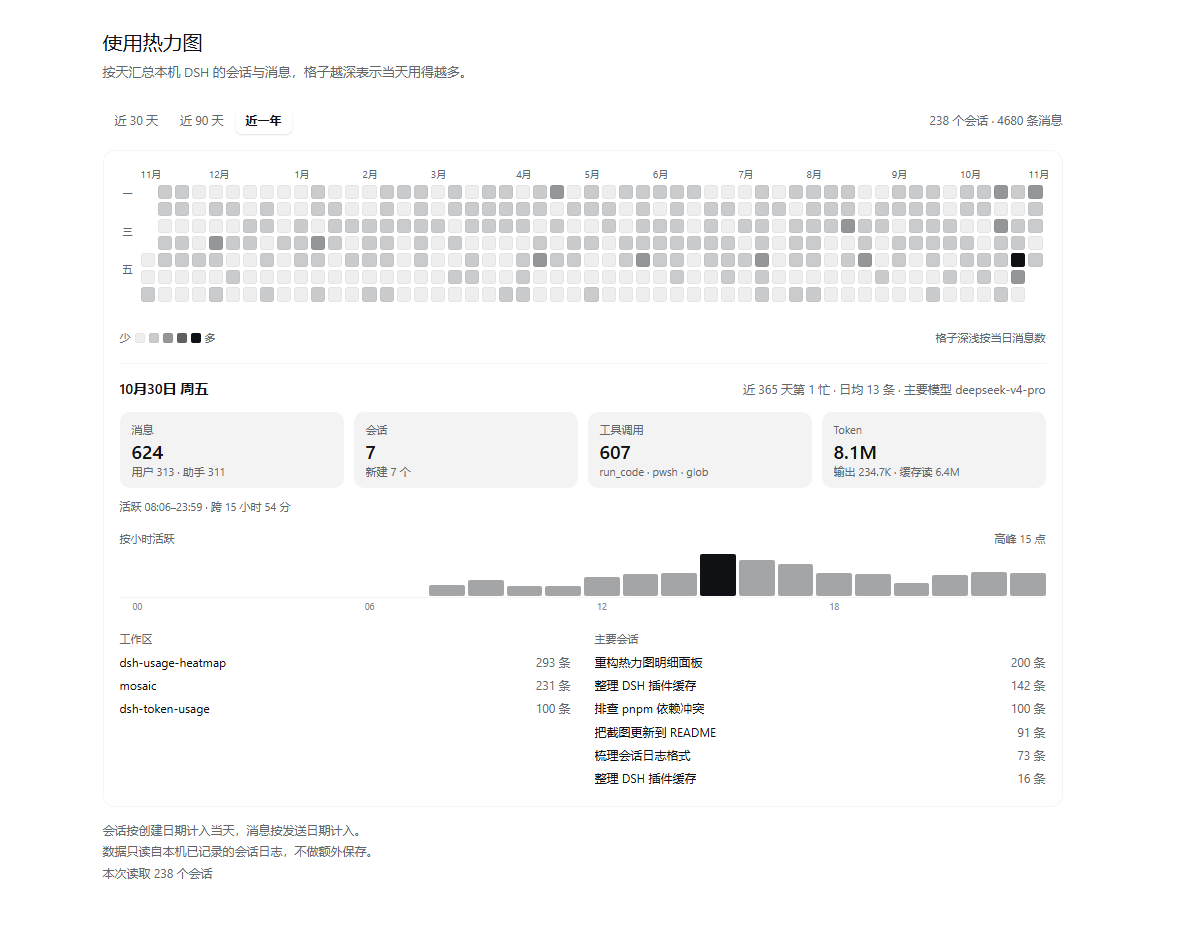
A DeepSeek Harness (DSH) Web UI plugin: one left-sidebar entry that opens a full-panel calendar heatmap of daily session and message counts, computed from the session logs this machine already stores.
Features
- A calendar, not a blank card. Every day in the range is a visible square; a stretch with no usage still reads as a heatmap. Ranges: last 30 / 90 / 365 days, laid out as Monday-to-Sunday week columns with month and weekday labels.
- Grid first, data later. The calendar is painted from local dates immediately (a skeleton of pale squares), and the counts only repaint the cells when they arrive. A failed load keeps the grid and shows the error inline with a retry button.
- Each day opens up. Selecting a cell expands a detail card below the calendar: the message split (user vs assistant), sessions (active vs newly created), tool calls plus the busiest tools, token usage (output and cache reads), the hour-by-hour activity shape with its peak, first/last activity and its span, the workspaces worked in, and the busiest sessions with their titles. The day's two headline numbers come from the calendar itself, so they paint instantly; the rest arrives from a dedicated per-day detail route.
- Fast reopen. Per-session day counts are cached on disk, so opening the panel only re-reads sessions whose log file changed — normally just the conversation being written. A background warm-up runs a few seconds after startup.
- Account-scoped cache. One cache file per DSH account, so usage never leaks across accounts.
- Read-only and local. Nothing is uploaded and nothing is written outside
the cache. Colors come from
--dsw-alias-*theme tokens, so light and dark themes both work.
What it counts
| Field | Meaning |
|---|---|
sessions |
logical sessions whose header createdAt falls on that day |
messages |
user/message + assistant/message events whose own time falls on that day, across every session on the machine |
detail |
for one selected day: user/assistant messages, active vs newly created sessions, tool calls, token usage, hourly activity, workspaces, busiest sessions |
Events before a forked/subagent session's inheritedEventCount are skipped, so
an inherited log prefix is not counted twice.
Install
This package is a DSH profile bundle (dsh.bundle.patch + dsh.client).
From a local checkout:
Quit DSH.
In the profile's
package.json(for example~/.dsh/profiles/desktop/package.json) add the dependency and list the bundle:{ "dependencies": { "dsh-usage-heatmap": "link:D:/dsh-usage-heatmap" }, "dsh": { "profile": { "bundles": ["...existing bundles...", "dsh-usage-heatmap"] } } }A git checkout works the same way — point the dependency at the cloned directory.
Start DSH. The left sidebar gets the 使用热力图 / Usage heatmap entry.
The checked-in client.js is already built, so a fresh checkout needs no
package install and no build to run. Only plugin development needs pnpm
(see Development).
If you previously installed an auto-generated local version of this plugin, disable or remove that entry first so the sidebar only shows one heatmap.
Cache and the HTTP routes
The Host half reads sessions through ctx.sessionQuery and serves two JSON
routes:
GET /_dsh/dsh-usage-heatmap/heatmap?from=<ms>&to=<ms>&tz=<minutes east>&refresh=1
GET /_dsh/dsh-usage-heatmap/detail?date=<YYYY-MM-DD>&tz=<minutes east>
Cache files live under $DSH_HOME/dsh-usage-heatmap/:
cache-<account>.jsonstores, per session, its message counts by day plus the log file identity (mtime:size) they came from.- A request re-reads a session only when that identity changed; unchanged sessions are reused, a disappeared session drops out, and a failed re-read keeps the last good counts.
- Delete the cache files to force a full rebuild;
refresh=1rebuilds once.
Day detail route
Selecting a day asks the second route for that day's breakdown. It reuses the same rolling cache to decide which sessions were
active on that date, so a click re-reads only those logs — normally a handful —
instead of replaying the whole corpus. One response is bounded to the 150 most
active sessions of the day, plus the top tools, workspaces, sessions and models.
Titles and workspaces come from the session log itself (the latest
session/title event and the header cwd), and the client remembers each
day's answer for the rest of the page session. A day detail request after the
calendar has loaded does not rebuild the whole cache: it uses the same fresh
dataset the calendar request just wrote.
Repository layout
.
├── index.js                  # Host entry: re-exports the plugin from src/host/
├── client.js                 # Client entry, GENERATED from src/client/ by the build
├── src/
│   ├── client/               # Web half sources (bundled into client.js)
│   │   ├── index.js          #   loader registration root (default export = plugin)
│   │   ├── plugin.js         #   Cordis plugin: locale, stylesheet, main + sidebar slots
│   │   ├── constants.js      #   ids, routes, ranges, cell sizing
│   │   ├── time.js           #   local-day keys, calendar dates, day formatting
│   │   ├── format.js         #   number, clock and duration formatting
│   │   ├── calendar.js       #   week-column layout, skeleton days, heat levels, cell geometry
│   │   ├── data.js           #   fetch + React hooks for the calendar and one day's detail
│   │   ├── styles.css        #   panel CSS (inlined into the bundle by the build)
│   │   ├── i18n/{zh,en}.js   #   UI copy dictionaries
│   │   └── components/       #   PanelIcon, StatTile, DayDetail, HeatmapBody, UsageHeatmapPage
│   └── host/                 # Host half sources (run directly by Node, no build)
│       ├── plugin.js         #   Cordis plugin: route registration, locking, cache warm-up
│       ├── routes.js         #   request parsing + JSON responses for both routes
│       ├── dataset.js        #   calendar payload aggregation
│       ├── detail.js         #   one-day breakdown aggregation
│       ├── sessions.js       #   session listing, log freshness probe, message counting
│       ├── cache.js          #   per-account cache file read/write
│       ├── time.js           #   day keys, day enumeration, local-day parsing
│       └── constants.js      #   routes, limits, cache paths
├── scripts/build-client.mjs  # esbuild bundle -> client.js (lazy-CJS loader wrapper)
├── test/                     # node:test suites for the Host routes and the client bundle
├── cordis.patch.yml          # Bundle patch that inserts the plugin row
├── package.json              # DSH package metadata (bundle + client halves)
├── locale/                   # Sidebar label / description (zh, en)
├── icon.svg                  # Sidebar glyph
└── docs/                     # README preview images (sample data)
The DSH Web client loads one lazy-CJS bundle per package (the ./client
export), so src/client/ is bundled ahead of time into the committed
client.js. The bundle only registers a factory with
window.__ModuleLoader__, exactly like a compiled DSH client plugin. The Host
half is plain Node ESM and runs straight from src/host/.
Development
Requirements: Node.js (20+) and pnpm.
pnpm install          # once: installs esbuild (dev-only)
pnpm run build        # bundle src/client/ -> client.js
pnpm test             # node:test suites (build first: they load client.js)
- Client half: edit
src/client/**, runpnpm run build, restart DSH.client.jsis generated — never edit it by hand. - Host half: edit
src/host/**and restart DSH; no build involved. node scripts/build-client.mjs --sourcemapkeeps function names readable and emitsclient.js.mapfor debugging (not committed).
The Host half writes its cache on the first request, so the first open after a cold cache rebuild may take a few seconds; later opens are incremental.
License
No license has been chosen yet. Add one before publishing if you want others to reuse this code.
No comments yet. Be the first to write one.