dsh-better-todo


English | 中文
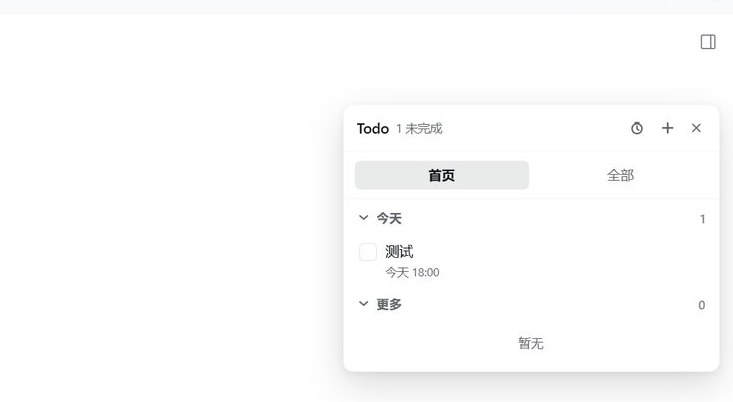
A todo panel for the DeepSeek Harness Web UI. It floats above the right side of the window, snaps to whichever edge you drag it near, and carries a pomodoro timer in its header.
Features
- Floating panel, four-edge snapping — drag the header to move it; release and it settles against the nearest window edge (left / right / top / bottom) so it never ends up half off-screen. Double-click the header to reset the position.
- Sidebar launcher — a
Todorow sits beside Settings and shows how many items are still open. The panel remembers whether it was open. - Two views —
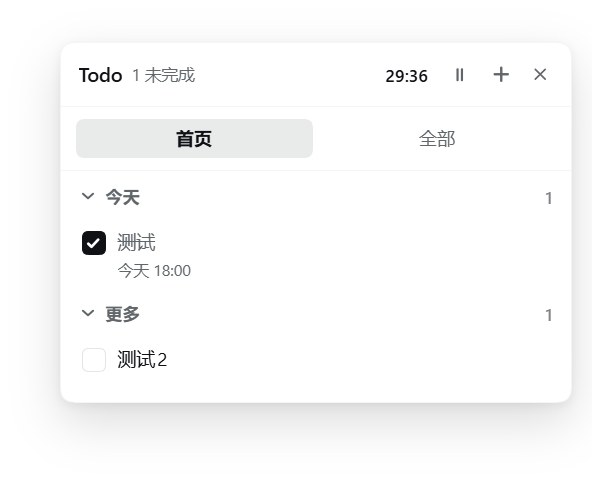
Homegroups items into Today (due today) and More (everything else, including items with no due date), both collapsible.Allsplits unfinished and finished; the finished list shows 10 at a time and loads 20 more per click. - Detail page, then edit on demand —
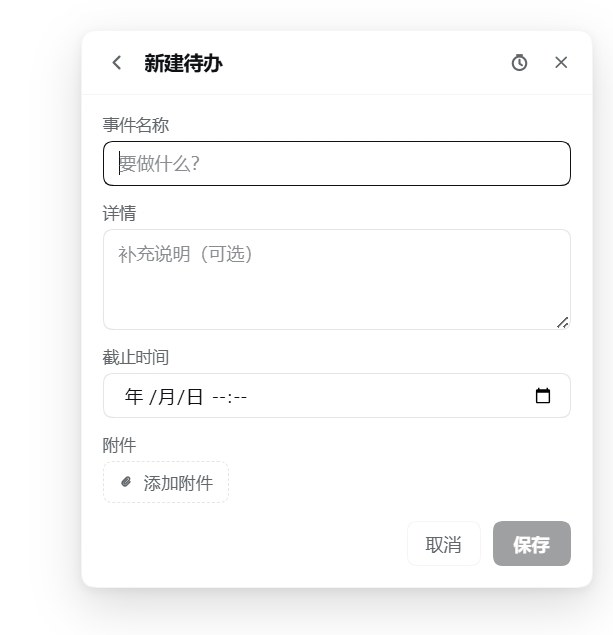
+opens a form for the title, details, due time and one attachment. Clicking an item opens a read-only page first; nothing can be changed until Edit in the top right switches it to the form. - Attachments behave by type — clicking an image attachment opens it full-screen (click the backdrop or press Escape to close); any other file downloads.
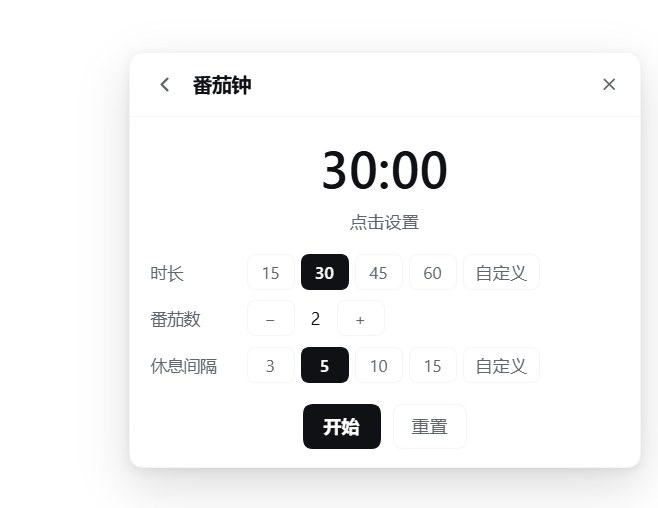
- Pomodoro timer — the clock in the panel header opens a timer page: focus length (presets 15 / 30 / 45 / 60 minutes, or any value from 1 to 180 typed by hand), a round count (1–12) and a break interval (presets 3 / 5 / 10 / 15, or any value from 1 to 120). The countdown stays visible in the header, with a pause / resume button right beside it that freezes the remaining time and continues from there.
- A phase ends, then waits for you — when focus or break hits zero it does not switch phases on its own: the countdown stops, an alert appears in the panel (reopening it if it was closed) and Windows gets a toast. The next phase starts when you press Start break or Start focus; Later tucks the alert away.
- Bilingual UI — Chinese and English, following the app's language setting.
- The agent can read and write — the plugin registers
todo_list,todo_add,todo_update,todo_removeandtodo_attach, so "tick that one off", "add a note", "attach this screenshot" all work by asking; the panel syncs a few seconds later. /todoin the composer — for fast entry:/todolists,/todo add Write the report,/todo finish 3. Parsed by fixed rules, so it costs no model call.- Survives restarts — the list, the attachment files, the panel position and the timer settings live in one JSON document under
~/.dsh/todo-panel/, written by the plugin's Host half. Nothing is uploaded anywhere.
Screenshots
| The list | A new item | The pomodoro |
|---|---|---|
 |
 |
 |
Install
dsh plugin --profile web add https://github.com/lewisyoung0914/dsh-better-todo
Then restart dsh web (or the desktop app) and refresh the page. Once the plugin is listed in the market you can install it by name instead:
dsh plugin --profile web add dsh-better-todo
Requires a DSH build that provides the web client slots shell.overlay and sidebar.footer.action. The package declares its host requirement in engines.dsh:
>=0.2.1-rc.1 <0.2.2-0 || >=0.2.2-rc.1 <0.3.0-0
Two branches, because of how node-semver treats prereleases: a prerelease version only satisfies a range when some comparator on its exact major.minor.patch tuple also carries a prerelease tag. A single >=0.2.1-rc.1 <0.3.0 would silently reject 0.2.2-rc.1, the build this is developed against.
Usage
| Action | Where |
|---|---|
| Open / close the panel | the Todo row at the sidebar foot |
| Move the panel | drag the header; edges snap on release |
| Reset the position | double-click the header |
| Create an item | + in the panel header |
| Edit an item | click its text |
| Complete an item | the checkbox on its left |
| Open the timer | the clock (or the running countdown) in the panel header |
| Pause / resume the countdown | the ⏸ / ▶ beside it |
| Manage the list without touching the mouse | type /todo in the composer |
Inside the timer page, Start / Pause control the current phase and Reset returns to idle with the counter cleared. Settings can only be changed while the timer is idle, so a running countdown never jumps.
Notifications
A phase end does two things so you cannot miss it:
- an alert appears in the panel (reopening it when it was closed) with Start break / Start focus and Later;
- a Windows toast is raised.
The toast goes through the page's Notification API first; when that is unavailable — no permission, or a host that cannot show one — the plugin's Host half falls back to a toast from PowerShell. Permission is requested the first time you press Start.
Known limits:
- A window minimised for a long time has its timers throttled by Chromium, so a notification can arrive up to about a minute late. The plugin re-checks the phase as soon as the window becomes visible again.
- Windows Focus Assist / Do Not Disturb suppresses the toast; that is outside the plugin's control.
- When notifications are refused, the in-panel alert still works.
Agent access
The Host half registers one set of tools, available in every conversation once the plugin is installed.
Read:
| Tool | Parameters | Returns |
|---|---|---|
todo_list |
status: all (default) / open / done; limit: 1-200, default 100 |
title, details, due time, completion state, attachment names |
Write (each one changes your list; the panel picks the change up within seconds):
| Tool | Parameters |
|---|---|
todo_add |
title (required), detail, due |
todo_update |
id (required) plus any of title / detail / due / done — done ticks or unticks it |
todo_remove |
id (required) |
todo_attach |
id (required), path (a local file, at most 32 MB) — a screenshot is just an image file |
So "tick off the workbench test", "add a note to that one: waiting on the API", "attach this screenshot to item 4" all work.
Synchronisation uses the document's rev counter: the panel saves with the revision it last saw, the Host answers 409 when someone else moved on, and the panel merges and saves again. An idle panel polls every four seconds, so an agent's change shows up on its own.
The tools register when the plugin loads, so after installing it or editing index.js, reload the plugin (turn it off and on again in the plugin list) or restart DSH.
Slash command
The todo_* entries above are agent tools; the / menu in the composer lists commands, a separate registry, so tools never show up there. For typing at the list directly, the plugin registers /todo:
| Input | Effect |
|---|---|
/todo |
unfinished items, with a position and an id |
/todo all |
every item |
/todo done |
finished items |
/todo add Write the report |
add one; /todo add Write the report | after lunch | 2026-11-07T18:00 also sets details and a due time |
/todo finish 3 |
tick item 3 (an id or id prefix works too) |
/todo undo 3 |
untick it |
/todo remove 3 |
delete it, attachment included |
Everyday wording works too: /todo 完成 3, /todo 删掉 2, /todo 已完成, or a whole sentence — /todo 今天新增一条任务,把gzcode放到内网测试 drops the leading filler and stores 「把gzcode放到内网测试」.
The command is parsed by fixed rules, not understood: for anything that needs a real reading ("move item 3 to tomorrow afternoon and add a note"), send a normal message instead and let the agent use the todo_* tools — no slash.
Command changes travel through the same rev counter, so the panel syncs within seconds, and the result is printed in the conversation without spending a model call.
Storage
Everything lives in one JSON document that the plugin's Host half owns:
<DSH_HOME>/todo-panel/state.json # ~/.dsh/todo-panel/state.json by default
The page reads and writes it through /todo-panel/state on its own origin. That indirection is deliberate: the desktop picks a fresh web port on every launch, and localStorage/IndexedDB are partitioned by origin, so a browser-stored list would be a different — empty — database after each restart.
| Field | Contents |
|---|---|
rev |
revision counter, bumped by every write; the page watches it to notice other writers |
savedAt |
timestamp of the last write |
items |
title, details, due time, completion state, attachment metadata |
open |
whether the panel is open |
position |
panel position and the snapped edge |
pomodoro |
timer settings and the running phase |
attachments |
one data URL per item id |
The file is plain JSON: back it up, read it, or delete it. It is per profile, not per DSH account, and nothing leaves the machine. A browser session that still holds data from an earlier version migrates it on first load and then clears the old keys.
The Host half also serves two endpoints the page uses: /todo-panel/state for the document and /todo-panel/notify for the Windows toast. Both accept same-origin requests only.
Development
No build step — the plugin is plain JavaScript loaded as an ES module.
| File | Role |
|---|---|
index.js |
Host half: the JSON document and its rev protocol, /todo-panel/state and /todo-panel/notify, the five agent tools, the /todo command |
client.js |
the whole UI: stores, the panel, the detail and edit pages, the pomodoro engine, notifications, CSS |
cordis.patch.yml |
the one row this bundle inserts into the profile |
locale/zh.json, locale/en.json |
market metadata (title, description) |
icon.svg |
plugin icon |
There is no JSX: components are built with React.createElement (aliased to h). Edits to client.js are picked up by the running app through hot reload; a change to index.js needs the plugin reloaded (turn it off and on in the plugin list), and a change to cordis.patch.yml or package.json needs the bundle reinstalled.
Changelog
1.6.8— declaresengines.dsh, so the installer and the market card can check the host requirement instead of showing it as undeclared.1.6.7— every write keeps the previous document asstate.json.bak, so one bad save costs one generation instead of the whole list.1.6.6— the panel's routes,/todoand the five agent tools now register throughctx.inject, so a profile that mounts this plugin before the Host's web server and registries no longer loses them.1.6.5— screenshots of the panel, the item form and the timer, plus ascreenshots.jsonfor market listings.1.6.4— releases are published to npm by GitHub Actions through Trusted Publishing, with a provenance attestation attached to each tarball.1.6.3— the timer page no longer carries a test-notification button.1.6.2— both READMEs rewritten around the agent tools,/todoand the timer.1.6.1—/todoaccepts everyday wording (完成 / 删掉 / 已完成 …) and turns a whole sentence into a task.1.6.0— the/todoslash command.1.5.0— agent writes (add / update / remove / attach), therevprotocol, a pomodoro phase that waits for a click, the header pause button, Host toasts through PowerShell.1.4.0— the read-onlytodo_listtool.1.3.0— clicking an item opens a read-only detail page; Edit switches to the form; images open full-screen.1.2.0— the document moved to the Host half (it used to live in the browser and vanished with each port change).1.1.1— fixed the client module id, which crashed the boot with a duplicate registration.
License
MIT
No comments yet. Be the first to write one.