READMESource: main@2a07e0ae
dsh-firefly-bg · 流萤背景
Firefly-themed wallpaper background for the DeepSeek Harness Web GUI: four hand-picked wallpapers behind your chat, a canvas firefly field on top of them, and sliders for veil, blur, particle count and panel transparency.
给 DSH 的 Web 界面挂一张流萤壁纸,再撒一层萤火虫。面板自动变成半透明玻璃,文字仍然清楚。
Features
- 纯 DOM 背景层 —
position: fixed; z-index: -2,不注册任何槽位浮层,换布局也不会被挤掉。 - 面板变玻璃 — 改主题令牌(
--dsw-alias-bg-base / -bg-layer-1..3 / -bg-overlay), 关掉开关会把改过的变量原样删掉,界面立刻回到出厂外观。 - 打洞(punch-through) — 光把令牌改透明还不够,外壳里还有写死的不透明底色
(当前版本是
div.mP3x-q_frame,rgb(249,250,251)、整屏 1280×822)。所以会从body往下走,把「跨半屏以上、底色不透明、没有backdrop-filter」的容器改成background-color: transparent !important(记下原值,关掉时还原)。类名是构建期哈希, 所以不写死类名,只认颜色和尺寸;外壳晚渲染 / 切页新长出来的容器靠 4 次延时补打 +MutationObserver(节流 800ms)补齐。 - 深色 / 浅色两套参数 — 深色是「压暗 + 夜色雾」,浅色是「白雾 + 自动 2.5px 模糊」, 否则浅色主题下白面板压在亮图上会糊成一片。
- 萤火虫 — canvas 画的(预渲染精灵 +
lighter混合),默认 26 只;prefers-reduced-motion下自动变成静止的一帧,标签页切走就停。 - 零依赖、零网络 — 图片全在包内,不写用户目录、不发请求,设置只存在
localStorage。
Install
dsh plugin --profile web add github:levitate403/dsh-firefly-bg
装完刷新一次页面(Ctrl+R)。bundle 层要重启 dsh 才会重新组装;如果设置里看不到
「流萤背景」,把 dsh 退出重开一次。
本地开发时可以直接链目录:
git clone https://github.com/levitate403/dsh-firefly-bg.git
dsh plugin --profile web add link:/absolute/path/to/dsh-firefly-bg
Usage
设置 → 流萤背景:
| 项 | 作用 |
|---|---|
| 启用背景 | 总开关,关掉等于没装 |
| 壁纸 | 四张:天台黄昏 / 烟花夜 / 书桌微光 / 并肩。点一下就换 |
| 每次随机 | 每次打开页面随机挑一张(只在这台机器的浏览器里记) |
| 遮罩浓度 | 越浓文字越清楚,越淡图越亮 |
| 背景模糊 | 糊掉细节,只留颜色和光 |
| 萤火虫 | 0–64 只,0 = 只留静态背景 |
| 面板通透度 | 往左更透(更透出壁纸),往右更实(更好读) |
| 缓慢漂移 | 壁纸极慢推近、平移,像镜头在呼吸 |
设置全存 localStorage(key dsh-firefly-bg/settings/v1),不上传、不写宿主配置。
想要「流萤」那种夜色感,把 设置 → 外观 → 深色主题 打开再看:深色的青黑玻璃 + 会呼吸的 萤火才是这套壁纸的主场。浅色主题也能用(自动加白雾和一点模糊),但会是淡雅插画风。
Screenshots
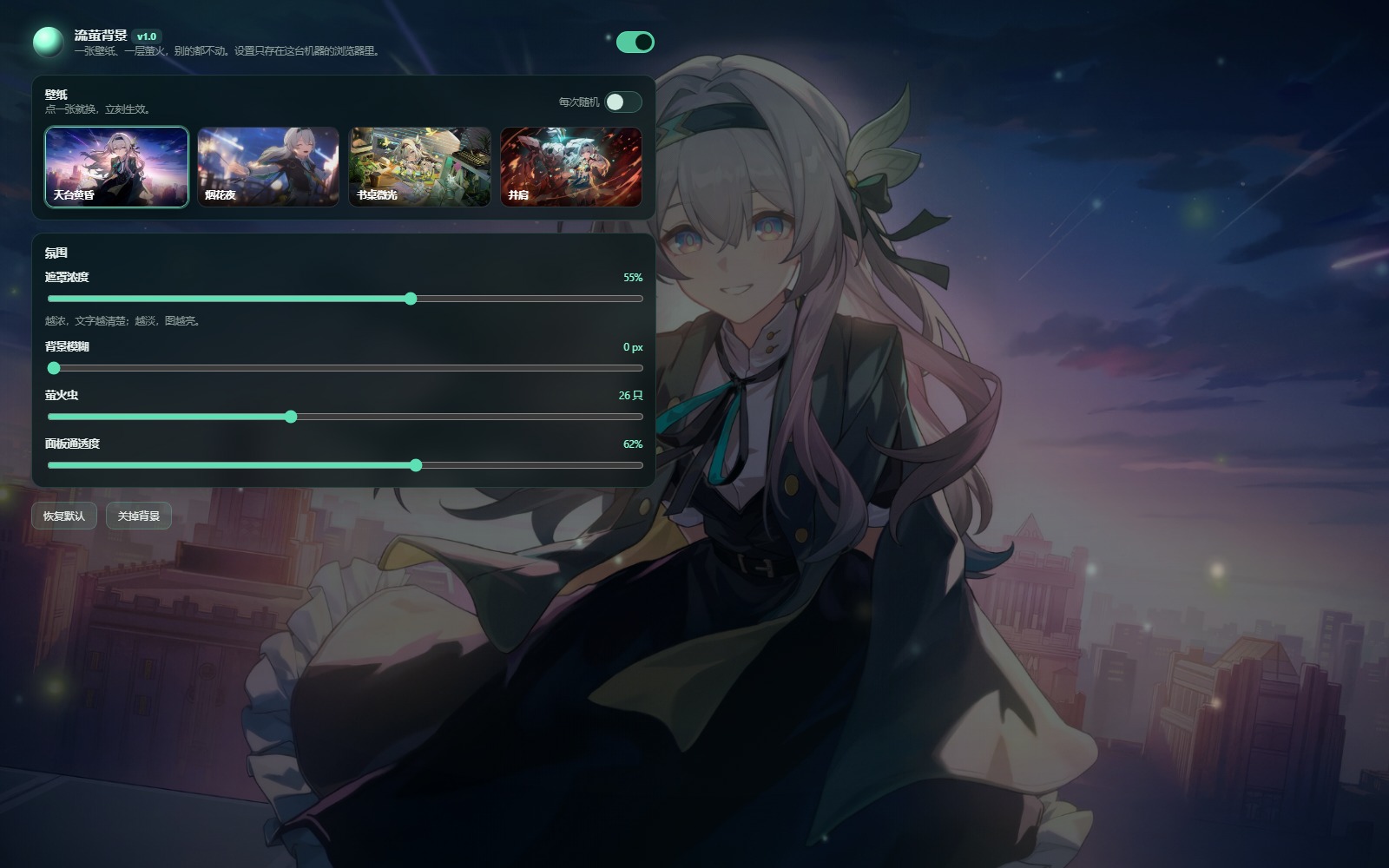 |
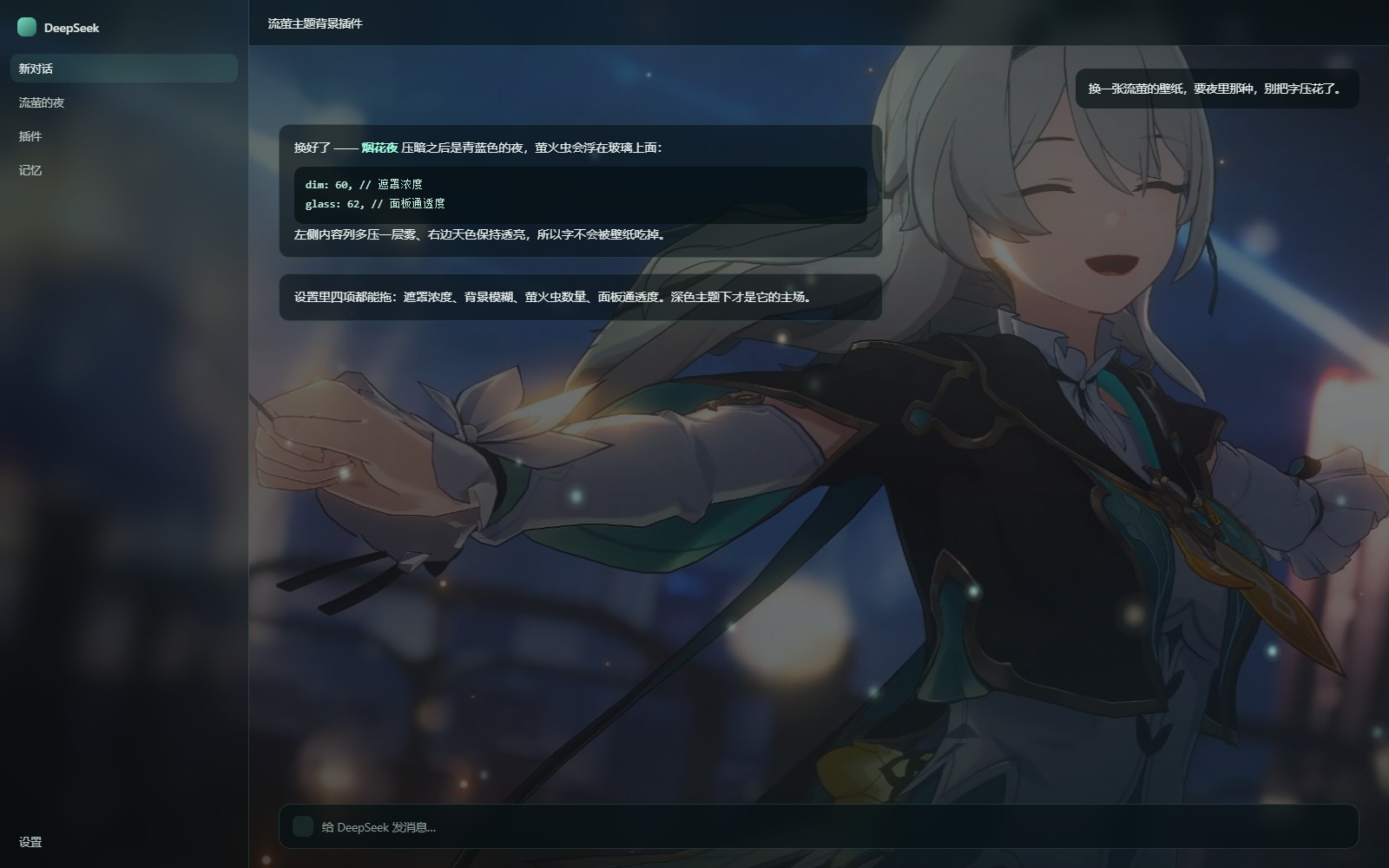 |
| 设置页(深色主题,天台黄昏壁纸) | 聊天页(深色主题,烟花夜壁纸) |
Routes (host half)
GET /api/firefly-bg/list        → { ok, wallpapers:[{ id, name, note, position }] }
GET /api/firefly-bg/img/<id>    → full-size wallpaper (jpeg)
GET /api/firefly-bg/thumb/<id>  → 560px thumbnail for the settings grid
GET /api/firefly-bg/ping?b=<N>  → the browser half reports which build it mounted
GET /api/firefly-bg/health      → liveness + lastPing
/health 里的 lastPing 用来确认「页面到底有没有吃到新代码」:刷新页面后
lastPing.build 应该等于 client.js 里的 BUILD,对不上就是浏览器缓存了旧模块。
Compat
如果同时装了 dsh-plugin-wallpaper-engine 之类也改 --dsw-alias-bg-* 的插件,两边会互相覆盖
(后挂的赢)。要用这个就把那个关掉。
Develop
package.json        # dsh.bundle → cordis.patch.yml, dsh.client → client.js
cordis.patch.yml    # 往 profile 里 insert 一条 bundle
index.js            # 宿主半端:webServer 路由,把 assets/ 里的图发出去
client.js           # 浏览器半端:背景层 + 令牌覆盖 + 打洞 + 设置面板
assets/wallpapers/  # 2560 宽的原图
assets/thumbs/      # 560 宽缩略图
- 只改
client.js:刷新页面就生效(DSH 的客户端插件有 HMR)。 - 改了
index.js(宿主半端):要让 dsh 退出重开,热更新只认安装那一刻的代码。 - 加壁纸:把图放进
assets/wallpapers/<id>.jpg和assets/thumbs/<id>.jpg,再往index.js的WALLPAPERS里加一条(id / name / note / position),重启即可。 client.js顶上的BUILD每改一次 +1,面板右上角显示v1.0 · b<N>—— 看不到新数字就说明 浏览器还在用缓存的旧 bundle,硬刷新(Ctrl+Shift+R)。
Credits & license
- 插件源码:MIT。
assets/wallpapers/、assets/thumbs/下四张壁纸来自 miyoushe(米游社)公开投稿,版权属于 原作者 / miHoYo,仅作个人桌面背景用,MIT 不覆盖这些图片,请勿单独再分发或商用。- 《崩坏:星穹铁道》流萤(Firefly)及角色形象版权归 miHoYo / HoYoverse 所有。本项目为非官方粉丝作品。
No comments yet. Be the first to write one.